
Your campaign report shows qualified visitors reaching your marketing site. On the booking, donation or checkout domain, many appear as referral or direct traffic, start a new session, and convert without a link to the ad that brought them in. Tags fire on both sites. Pageviews look healthy, but attribution does not.
That pattern points to GA4 cross domain tracking not working, but rebuilding the linker is rarely the first fix. The break is usually narrower: a redirect strips a parameter, one hostname is missing from a list, or consent behaves differently on the second domain. Trace the hand-off first. The failing hop is often where attribution goes missing, while some gaps for users who decline consent are expected.
Table of Contents
- Match Your Symptom to the Likely Cause
- How to Debug the Hand-Off in Six Steps
- Linker and GTM Settings to Check First
- Where Redirects and Forms Strip the Identifier
- Separating Consent Gaps From Real Failures
- Confirm the Fix and Decide Who Owns Tracking
Match Your Symptom to the Likely Cause
Your own domain showing up as a referral source is the symptom many teams notice first. It's also the most misread, because several different breaks produce reports that look alike at a glance. Don't start changing settings until you've matched what you're seeing to one specific cause.
Work through the rows below in order. Stop at the first one that matches your reports, run that check, and only move on if it clears.
| Symptom in GA4 | Most likely cause | First check |
|---|---|---|
| Your own domain appears as a referral | Destination hostname missing from the linker domains list, or referral exclusions incomplete | Compare the domains list in GTM with the live hostnames in the journey |
| One visitor shows two sessions across sites | _gl stripped during a redirect or form post | Inspect the final destination URL for _gl |
| Destination shows direct traffic with no source | Linker not running on the originating page | Check the source page for the linker configuration and the outbound link |
| Payment provider appears as a traffic source | Payment domain not in the referral exclusion list | Add the domain to referral exclusions and retest the purchase path |
| Gaps appear only for users who declined consent | Expected consent-driven loss, not a linker fault | Compare journeys split by consent state |
| One user has two client identifiers | Google tag loaded twice on the destination | Count Google tags in preview mode and in the page source |
Read the pattern, not just the row
Self-referrals point at configuration. Either the destination hostname isn't in the linker list, or the referral exclusion list doesn't cover every hostname the visitor touches. A booking engine on its own subdomain is the classic gap here.
Split sessions point at transport. The linker created the parameter, but something between the two sites dropped it. That distinction matters because the fixes live in different places, one in tag settings and one in your redirects, forms or JavaScript.
Direct traffic with no source on the destination is quieter and easier to miss. There's no self-referral to alert you, so it often reads as a reporting quirk. It usually means the linker never ran on the page the visitor left from.
A working linker leaves two pieces of evidence. The destination URL carries _gl, and the session continues across the hop instead of restarting.
Pull the last seven days of acquisition data for your key conversion path now. Match it to one row before you touch anything.
How to Debug the Hand-Off in Six Steps
Pick one journey you can repeat exactly, ideally the one that makes money. Say a visitor lands on your marketing site, clicks through to a separate application domain, submits a form and lands on a confirmation page. Run that single path six ways before you test anything else.
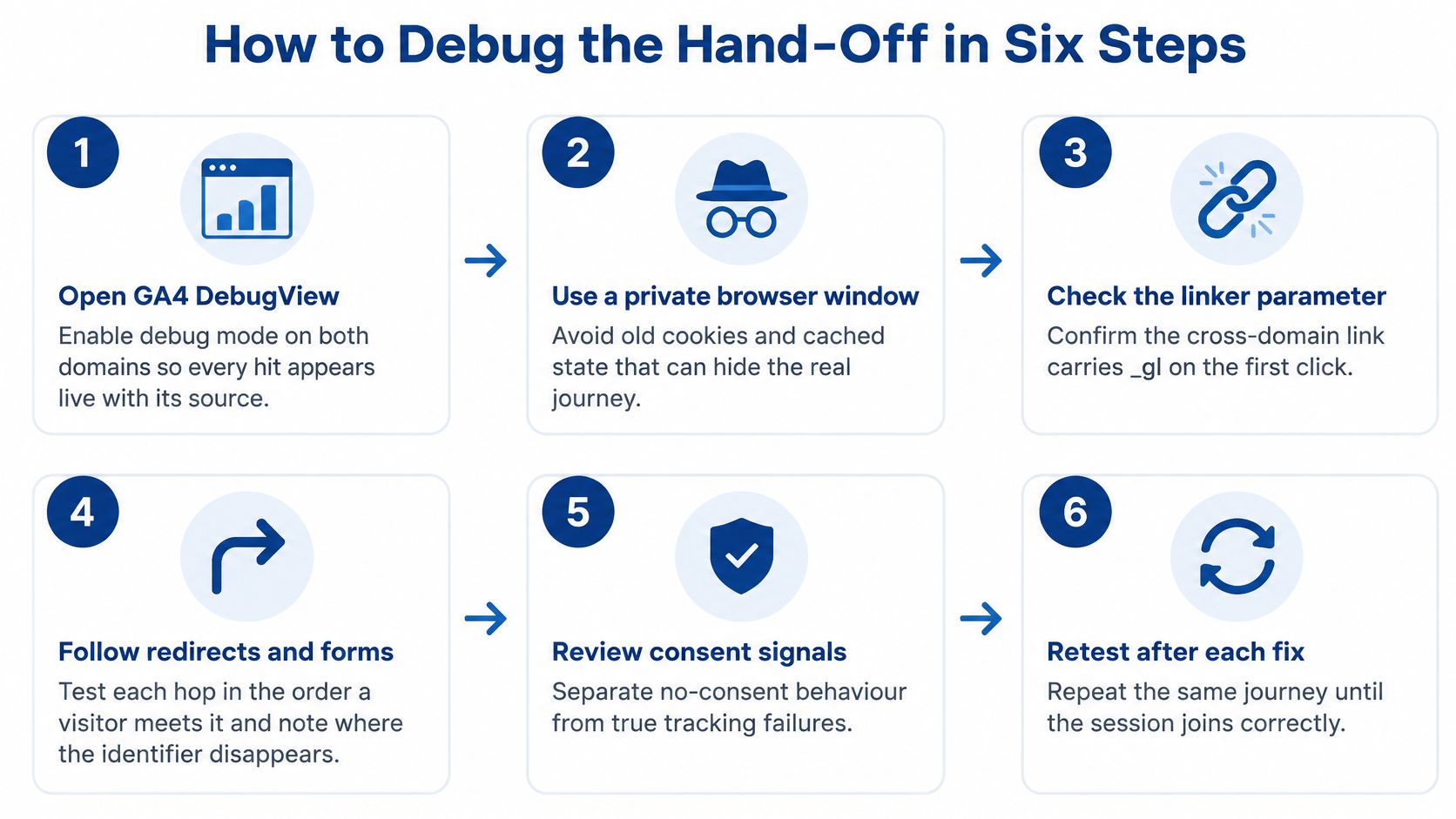
Run the journey and watch what survives
Open GA4 DebugView and enable debug mode on both domains. You need every hit appearing live with its source, because a report checked tomorrow won't tell you which hop broke. If hits from the second domain don't appear at all, you have a tag problem, not a linker problem.
Use a private browser window. Old cookies hide the fault by making a returning visitor look continuous when a new one wouldn't. Click the outbound link or submit the form, and watch the address bar as you go.
Copy the final URL after any redirect and confirm _gl is present. The Google linker documentation describes the manual mechanism as
gtag('set', 'linker', {'domains': [...]}), present on source pages with each destination listed, so qualifying URLs get decorated and the destination tag can store the first-party measurement cookie information. If _gl is missing at the end, the fault sits on the source page or in a hop.Compare the client identifier in the network panel. Filter for requests to the Google measurement endpoint and compare the identifier on the source hit with the one on the destination hit. Matching values mean identity survived even if the URL looked odd.
Check whether the session continued. The destination hit should join the existing session rather than starting a new one. A preserved identifier with a fresh session usually points at referral handling, not decoration.
Repeat through every step in visitor order. Include redirects, forms and the payment page. Test beyond the first click, or you may miss the form post that breaks two steps later.
Where this test misleads people
Testing in a window that already holds cookies is the most common slip, and it produces false passes. Skipping the redirect hop is second, because the initial HTML link can look correct while server routing drops the query string. Reading DebugView while consent is denied is third, since there's no cookie to carry and the journey looks broken for a legitimate reason.
Structured logging helps here. The same discipline behind enterprise application monitoring and debugging applies to measurement, capture the evidence at each hop rather than inferring it later.
A healthy run shows one client identifier, one session and a _gl value on every cross-domain URL. Record the exact step that fails. That step names your fix.
Linker and GTM Settings to Check First
Redirects get blamed for faults that start in tag settings, so verify these before you ask a developer to change routing. Each row names where the setting lives, what it should say and the error that turns up most often.
| Setting | Where it is set | Correct value | Common error |
|---|---|---|---|
| Linker domains | Google tag linker settings in GTM | Every hostname in the journey, including checkout | Root domain listed, subdomain missing |
| Auto link domains | Google tag configuration | Same list as the linker domains | Set on the source tag only |
| Referral exclusion list | GA4 data stream, list unwanted referrals | Payment, booking and third-party checkout domains | Left empty |
| Google tag count | GTM container and site theme | One Google tag per site | Theme and GTM both load the tag |
| Accept incoming linker | Destination Google tag configuration | Enabled on the destination | Disabled or missing on the destination |
| Consent defaults | Consent management platform | Same default and update signals on both domains | Banner configured on one domain only |
The three rows that cause most of the damage
Linker domains decides whether decoration happens at all. The linker only decorates links to hostnames in its list, so a checkout on a separate hostname must be listed explicitly. Don't assume a root domain covers every subdomain in the journey, because a hosted booking or donation hostname is a different entry.
Referral exclusions catch teams out because the setting lives in the GA4 data stream, not in GTM. Someone checks the container, finds nothing wrong, and stops. Meanwhile the payment domain keeps claiming credit for conversions it merely processed.
Google tag count is the quiet one. A common setup has a marketing site on one hostname and checkout on another, with the tag installed by the website theme and again by GTM. Two tags produce two client identifiers for one visitor, and no linker setting will reconcile them.
Change one thing at a time
Check each setting in GTM preview mode and in the GA4 admin before changing anything. Then change a single setting, retest, and note the result. If you fix three things at once you'll know it works now, but you won't know why, and you'll be guessing again at the next break.
Keep the container version and date beside every change. Cross-domain faults usually follow a release, a theme update or a new checkout, and a dated note turns a two day investigation into a ten minute one.
Where the tag is hard-coded in a theme and can't be moved quickly, the manual fallback is gtag('set', 'linker', {'domains': [...]}) on every source page with each destination hostname listed. I'd use it only to confirm the cause. Then bring the tag back under one container, the way you'd consolidate any other custom integration, so the settings stay visible and versioned in GTM.
Where Redirects and Forms Strip the Identifier
When the settings check out and _gl still vanishes, the identifier is being lost in transit. According to Google's cross-domain measurement guidance, cookies are stored separately for each domain so one site can't read another's cookie, which is why GA4 passes the identifier through the _gl URL parameter instead. If redirects, payment providers, link shorteners, consent tools, server-side routing or custom JavaScript remove it, the destination creates a new identifier and reports a referral or second session.
That matters for Australian organisations running separate marketing, application, donation, ecommerce or payment domains, because conversion paths distort even while pageview tags fire correctly.

| Hand-off | Typical symptom | Fix |
|---|---|---|
| Plain link | Linker absent on source page or hostname not listed | Confirm _gl on the final URL and correct the domains list |
| JavaScript navigation | Rebuilt URL drops _gl | Pass the target through the linker helper |
| Form submission | Form action omits _gl | Decorate the form action before the post |
| Redirect or shortener | Redirect discards the query string | Link to the final URL and keep parameters |
| Payment or third-party checkout | Provider does not return _gl | Add the domain to referral exclusions and plan for the break |
Plain links are rarely the problem once the source page carries the linker and the hostname is listed. Verify on the final URL rather than trusting the href in the page source.
JavaScript navigation breaks when code builds a fresh address with window.location. The rebuilt URL never had the parameter, so pass the target through the linker helper and move to the decorated result. Buttons that aren't real anchor tags fail the same way, because there's no link for the linker to decorate.
Form submissions drop the parameter when the action attribute points at the destination without it. Decorate the form action before the post. Application and donation forms are where I'd look first, since they're often built by a different vendor from the marketing site.
Redirects and shorteners discard query strings by default in many configurations. Link straight to the final URL where you can, and confirm any unavoidable redirect preserves parameters. This includes the http to https hop people forget to count.
Payment checkouts are the honest exception. A hosted page, including a typical Stripe integration flow, may return the visitor without _gl, and you can't decorate a page you don't control. Add that domain to referral exclusions and treat the return as a planned break.
List every hop in your journey, mark the one that dropped _gl in your debugging run, and fix that single hop before testing the rest.
Separating Consent Gaps From Real Failures
A visitor accepts analytics storage on the marketing site, then reaches an application domain that asks for consent again. The resulting session gap may reflect that difference in consent, not a broken linker. Check consent behaviour before rebuilding a setup that may already be working.
Privacy compliance depends on clear, consistent choices across domains. The OAIC's privacy policy and guidance can help teams understand the obligations that inform their consent approach.

The split-by-consent test
- Group journeys by consent state. Separate accepted, declined and no response. Check analytics storage and ad storage under Consent Mode.
- Compare session continuity within each group. Use the same conversion path so consent is the main variable.
- Interpret the pattern. If accepted journeys join but declined journeys do not, consent likely explains the gap. If accepted journeys also split, investigate a technical failure.
What to document on each domain
Record whether analytics storage is permitted on each domain, and whether visitors carry the same consent choice across both or are asked again. A banner on the marketing site that is absent from the application domain can produce different measurement outcomes. The privacy policy and consent platform settings should describe the same behaviour.
Governance point: Reducing attribution loss may require clearer consent defaults and consistent consent handling, not more tagging.
Document the expected measurement difference for each consent state alongside the container version notes. This gives the team a reference when reported conversions change, and helps distinguish an expected consent gap from a linker failure.
Confirm the Fix and Decide Who Owns Tracking
A fix you haven't retested is a hypothesis. Run the same six steps on at least three journeys, a direct conversion, a checkout involving a redirect, and a consented visit compared with a declined one. Record the client identifier, session count and final _gl value for each, and file that evidence with the container version notes.
Set an ownership rule that survives releases
Name one person who changes linker settings. Then define the triggers that force a retest, because breakage usually arrives with change rather than during first setup.
- Hostname changes: a new subdomain, booking engine or application portal enters the journey.
- Payment changes: a new provider or hosted checkout replaces the existing one.
- Consent changes: the banner, defaults or consent platform are updated on either domain.
- Platform changes: a redesign, theme update or new GTM container goes live.
I would keep this in-house if your team can run these checks monthly and someone owns the calendar invite. Bring in a specialist when the journey crosses several vendors, or when reports still disagree after a full retest, since that usually means the fault sits in server routing or a vendor's form handling rather than in your container. Our own paid search work includes GTM and GA4 tracking setup and migrations, call tracking and SMS automations, and transparent reporting, with setup and management of Google and Meta ads checked so tracking, attribution and data stay correct, which is the model to copy whoever does the work. That scope sits alongside broader Google and Facebook ads management rather than replacing your analytics ownership.
Write the decision in one line with an owner and a review date. Then pick your revenue-critical journey and run the six steps on it this week.
If your reports still split sessions after a full retest, Continuum Solutions can audit the hand-off across your domains, redirects, payment flow and consent setup, then fix the hop losing the identifier. Visit Continuum Solutions to talk through your GTM and GA4 setup and get a clear, evidence based plan for restoring attribution you can trust.