
AWS EC2 – are you spending too much?
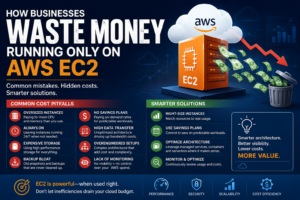
Amazon EC2 is one of the most powerful cloud computing platforms available today.
It provides complete control over infrastructure, extensive flexibility and the ability to run almost any workload at virtually any scale.
However, that flexibility comes with a downside.
Many organisations spend significantly more than necessary because their EC2 environments are poorly optimised.
In our experience, it is not unusual to find businesses wasting 20% to 70% of their monthly AWS spend through overprovisioning, poor architecture decisions and unmanaged infrastructure.
The problem is rarely AWS itself.
The problem is that many organisations migrate to AWS without understanding how cloud economics differ from traditional hosting.
In this article we’ll explore the most common ways businesses waste money running on EC2 and how to avoid them.
Understanding the EC2 Cost Model
Unlike traditional hosting providers that offer fixed monthly plans, EC2 operates on a consumption-based pricing model.
You pay for:
- Compute resources
- Storage
- Data transfer
- Load balancing
- Monitoring
- Backups
- Additional services
This flexibility is one of AWS’s greatest strengths.
It is also one of the primary reasons businesses overspend.
Without active management, costs can grow quickly.
Mistake #1: Choosing Oversized Instances
This is by far the most common issue.
A company launches a small application and selects a large EC2 instance “just to be safe.”
The application may only require:
- 2 vCPUs
- 4GB RAM
but the business deploys:
- 8 vCPUs
- 32GB RAM
because they are worried about performance.
Months later, the application is still barely utilising available resources.
Real-World Example
An internal business application serving 30 employees may be running on a t3.large or t3.xlarge instance despite averaging:
- CPU usage below 10%
- Memory usage below 30%
The organisation is paying for resources that never get used.
How to Fix It
Monitor:
- CPU utilisation
- Memory utilisation
- Network throughput
Then right-size the instance.
AWS Compute Optimizer can help identify opportunities.
Mistake #2: Running Production-Sized Servers in Development
Many organisations duplicate production environments for testing and development.
While understandable, this often results in multiple oversized servers running continuously.
For example:
Production:
- EC2 x 1
Staging:
- EC2 x 1
Testing:
- EC2 x 1
Development:
- EC2 x 1
Suddenly a business is paying for four environments when only one receives significant traffic.
Better Approach
Development environments can often use:
- Smaller instances
- Lightsail
- ECS tasks
- Scheduled shutdowns
This can dramatically reduce monthly costs.
Mistake #3: Leaving Instances Running 24/7
Many workloads do not need continuous operation.
Examples include:
- Development servers
- Training systems
- Demonstration environments
- Internal reporting systems
Yet these servers often run around the clock.
Example
A development environment used only during business hours:
Required:
8 hours/day
Running:
24 hours/day
The business pays for three times the compute resources actually required.
Solution
Automate startup and shutdown schedules using:
- EventBridge
- Lambda
- Systems Manager
This can reduce costs immediately.
Mistake #4: Ignoring Reserved Instances and Savings Plans
Many organisations continue paying on-demand pricing indefinitely.
On-demand pricing provides flexibility but is rarely the most cost-effective option for predictable workloads.
Reserved Capacity Benefits
For workloads expected to run continuously:
- 1 year commitment
- 3 year commitment
can significantly reduce costs.
Savings Plans provide similar benefits while maintaining flexibility.
Common Scenario
An application has operated continuously for two years.
The organisation still pays on-demand rates despite no intention of shutting it down.
This represents one of the easiest cost optimisation opportunities.
Mistake #5: Storing Everything on Expensive SSD Volumes
Many organisations place all storage on premium SSD volumes regardless of workload requirements.
Not all data needs high-performance storage.
Examples include:
- Log archives
- Historical reports
- Old backups
- Rarely accessed files
The Cost Problem
High-performance storage costs more than lower-tier storage options.
When organisations store terabytes of infrequently accessed data on premium storage, costs escalate rapidly.
Better Strategy
Match storage performance to workload requirements.
Not every file requires high IOPS storage.
Mistake #6: Poor Backup Management
Backups are essential.
However, unmanaged backups frequently become a hidden AWS expense.
Common problems include:
- Infinite retention policies
- Duplicate snapshots
- Forgotten backups
- Legacy environments
Over time, storage costs continue accumulating.
Best Practice
Implement:
- Retention policies
- Automated cleanup
- Lifecycle management
This ensures backups remain available without creating unnecessary costs.
Mistake #7: Excessive Data Transfer
Many organisations focus exclusively on server costs while overlooking data transfer charges.
Applications that move large amounts of data may incur significant network costs.
Examples include:
- Media platforms
- Video streaming
- File sharing systems
- API-heavy workloads
Common Architecture Mistake
Serving static assets directly from EC2.
Images, downloads and media files often generate substantial bandwidth usage.
Better Approach
Use:
- CloudFront
- S3
- CDN caching
to reduce bandwidth costs and improve performance.
Mistake #8: Overengineering Infrastructure
Many organisations build enterprise-grade architectures for relatively simple applications.
Examples include:
- Multiple load balancers
- Multi-region deployments
- Excessive redundancy
- Complex networking
despite serving only a few hundred users.
Why It Happens
Businesses often copy architectures from large technology companies.
The result is unnecessary complexity and increased costs.
Reality
Most applications do not need the same infrastructure as Netflix or Amazon.
The simplest architecture that meets requirements is often the most cost-effective.
Mistake #9: Ignoring Containerisation Opportunities
Many businesses continue running multiple applications across separate EC2 instances.
This leads to low resource utilisation.
Example
Four applications:
- EC2 Instance A
- EC2 Instance B
- EC2 Instance C
- EC2 Instance D
Each server averages:
10% CPU utilisation
The organisation is paying for substantial unused capacity.
Alternative
Containerisation using:
- Docker
- ECS
- Fargate
can improve resource efficiency.
Multiple applications can share infrastructure more effectively.
Mistake #10: Lack of Monitoring
You cannot optimise what you cannot measure.
Many organisations deploy infrastructure and never revisit utilisation metrics.
Months or years later:
- Costs increase
- Resources remain oversized
- Inefficiencies accumulate
Monitoring Should Include
- CPU
- Memory
- Storage
- Network traffic
- Application performance
- Cost reporting
Without visibility, optimisation becomes impossible.
Mistake #11: Migrating Without Re-Architecting
Many AWS migrations follow a simple lift-and-shift strategy.
The organisation copies existing infrastructure into EC2.
While this accelerates migration, it often misses cloud optimisation opportunities.
Legacy Example
On-premise architecture:
- Multiple application servers
- Dedicated database servers
- Shared storage systems
Copied directly into AWS.
The business now pays cloud pricing for an architecture designed for physical hardware.
Better Approach
Evaluate whether:
- Managed databases
- Containers
- Serverless services
- Storage optimisation
could reduce costs.
Mistake #12: Using EC2 When Lightsail Would Suffice
Not every workload requires full EC2 flexibility.
Many businesses run:
- WordPress websites
- Small business applications
- Internal systems
on EC2 despite having relatively simple requirements.
Lightsail Benefits
For many SMEs:
- Predictable pricing
- Simpler management
- Lower operational overhead
often provide a better outcome.
Common Scenario
A company pays hundreds of dollars monthly for EC2 infrastructure when a Lightsail deployment could deliver similar performance at a lower cost.
The Hidden Cost of Complexity
One of the biggest expenses is often not AWS itself.
It is operational overhead.
Complex EC2 environments require:
- Administration
- Security management
- Patch management
- Monitoring
- Scaling
- Troubleshooting
These labour costs frequently exceed infrastructure costs.
Businesses should consider total cost of ownership rather than focusing solely on AWS invoices.
When EC2 Is Absolutely the Right Choice
Despite these challenges, EC2 remains an excellent platform.
It is often the right solution for:
- Enterprise systems
- Legacy applications
- High-performance workloads
- Compliance-sensitive environments
- Custom architectures
The goal is not to avoid EC2.
The goal is to use it efficiently.
Final Thoughts
Amazon EC2 provides extraordinary flexibility and scalability, but that flexibility can become expensive when environments are poorly managed.
The most common causes of overspending include oversized instances, unnecessary infrastructure, unmanaged storage, poor monitoring and lift-and-shift migrations that fail to take advantage of cloud-native services.
In many cases, businesses can reduce AWS costs by 20% to 50% simply by reviewing architecture decisions and implementing basic optimisation strategies.
Cloud infrastructure should be regularly reviewed to ensure resources align with actual business requirements.
The most cost-effective AWS environment is not necessarily the smallest or cheapest. It is the environment that delivers the required performance, reliability and scalability while eliminating unnecessary complexity and wasted resources.
For organisations considering an AWS migration or reviewing existing infrastructure, investing time in architecture and cost optimisation often delivers significant long-term savings.