
You’re usually looking at enterprise application development when the business has already hit a limit. Teams are stitching together Excel, a legacy ERP, a CRM that only one department trusts, and a few manual approval steps that exist in someone’s inbox. Reporting is slow, customer data is inconsistent, and every change request feels riskier than it should.
At that point, the question isn’t “should we build an app?” It’s whether the organisation is ready to invest in a system that becomes part of its operating model. That means architecture, cloud platform choice, integration design, release governance, and Australian compliance all need to be decided with commercial discipline early. If those calls are made late, the project gets expensive fast.
Table of Contents
- Beyond the Buzzwords What is Enterprise Application Development?
- Core Architectural Decisions Monolith vs Microservices
- Cloud Platforms and Migration Costing AWS vs Azure in Australia
- Integration Patterns for Core Business Systems
- QA Observability and Release Governance
- Navigating Australian Compliance and Security
- Your Implementation Roadmap A Checklist for Success
Beyond the Buzzwords What is Enterprise Application Development?
A lot of buyers hear “enterprise application” and think of a larger version of a normal app. That misses the point. Enterprise application development is the design and build of software that supports core operations across teams, systems, and approval structures. It’s not just software with more users. It’s software that has to survive real business complexity.

When I see these projects go wrong, the issue usually isn’t code quality first. It’s that the business treated the build as a feature project instead of an operating platform. An internal approvals app becomes a finance workflow engine. A customer portal becomes the front door to billing, support, and identity. A field operations app ends up carrying compliance records and audit history. That’s why a quick prototype often struggles once it meets production reality, which is exactly the problem outlined in why a vibe-coded app isn’t production ready.
What makes an application enterprise grade
An enterprise application needs a few traits from day one:
- Scalability across teams: It has to support more than one business unit and more than one workflow.
- Integration depth: It must connect cleanly with systems like CRM, ERP, identity providers, payment services, and reporting tools.
- Security and governance: Access control, auditability, and release discipline can’t be added as an afterthought.
- Maintainability: Another team should be able to understand, support, and extend it later.
That last point gets ignored. Many systems work in the first year because the original developers remember every shortcut. Problems start when the business grows, requirements change, or the original team moves on.
Practical rule: If the system will hold operational truth, move money, control user access, or replace manual work across departments, treat it like enterprise infrastructure from the start.
Why the investment is usually strategic, not tactical
The strongest reason to build isn’t “we need a custom app”. It’s that off-the-shelf tools no longer fit the way the organisation operates. Sometimes the gap is process complexity. Sometimes it’s reporting, data ownership, or integration. Sometimes licensing and workarounds have become harder to justify than building properly.
In Australia, that decision sits inside a market that is already heavily cloud-oriented. The broader software development market reached USD $3.86 billion in 2025 and is projected to reach USD $17.33 billion by 2034 at a CAGR of 18.14%, with cloud representing 61% of total market activity in 2025, according to Straits Research’s Australia software and enterprise application market analysis. That matters because most new enterprise systems aren’t being designed as isolated on-premise builds. They’re being designed as cloud-native, integration-heavy business systems.
Core Architectural Decisions Monolith vs Microservices
The biggest technical mistake I see in enterprise application development is choosing architecture based on fashion. Many development efforts don’t need microservices on day one. Some absolutely do. The hard part is knowing which problem you’re solving.
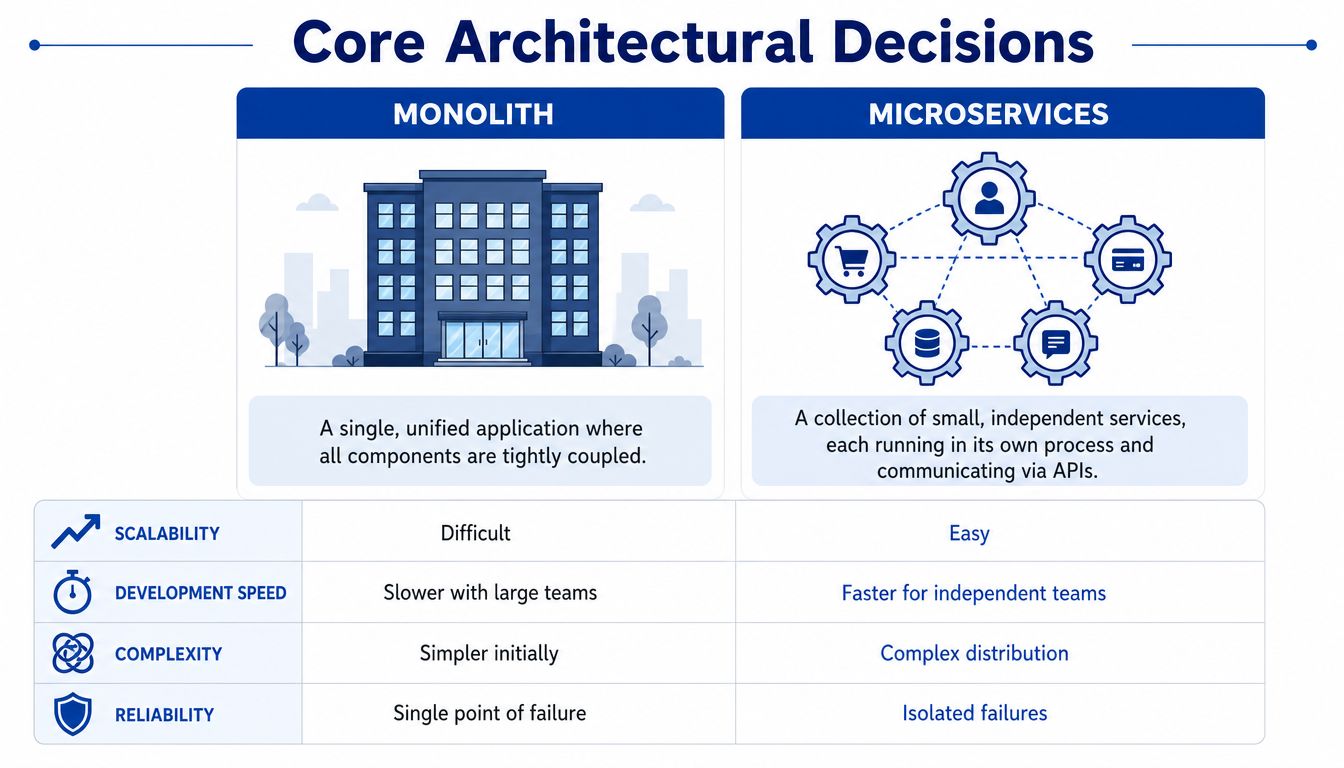
A simple way to explain it is a restaurant kitchen. A monolith is one large kitchen producing every dish. It’s easier to supervise early, and the team can move quickly when the menu is still stable. Microservices are several specialised kitchen stations with their own responsibilities. That gives you more independence and resilience, but it also creates coordination overhead.
Where monoliths still make sense
A well-structured monolith is often the right starting point when:
- Scope is still changing: You don’t yet know the actual domain boundaries.
- The delivery team is small: Coordination costs matter more than theoretical scale.
- You need fast initial cohesion: Shared code, shared deployment, and simpler local development help.
- The business is replacing fragmented manual work: Process clarity is more urgent than distributed architecture.
Monolith doesn’t mean messy. It means one deployable application with disciplined internal modules. If the team enforces boundaries properly, that can carry an organisation a long way.
Where microservices earn their keep
Microservices become valuable when the business has distinct domains that need to evolve at different speeds. Identity, billing, CRM sync, document generation, and workflow orchestration often have different release patterns and different failure profiles. Separating them can reduce blast radius and let teams deploy independently.
According to SPR’s guide to enterprise application development, adoption of microservices architecture correlates with a 30–40% improvement in deployment velocity and system scalability, and Australian enterprises using microservices report average uptime improvements from 97% to 99.5%. Those gains don’t come from the architecture alone. They usually depend on containers, orchestration, infrastructure automation, and mature observability.
| Decision area | Monolith | Microservices |
|---|---|---|
| Initial delivery | Faster when scope is still emerging | Slower to establish properly |
| Operational overhead | Lower early on | Higher from day one |
| Independent scaling | Limited | Strong |
| Failure isolation | Weaker | Better if boundaries are sound |
| Team structure | Suits smaller teams | Suits multiple specialised teams |
If your team can’t run strong CI/CD, service monitoring, and API governance, microservices won’t feel modern. They’ll feel expensive.
The front end choice also changes the backend
Decision-makers often separate app format from architecture, but they influence each other. A PWA suits broad access, quick deployment, and lower device management overhead. Native iOS and Android makes sense when you need deeper device capabilities or a more demanding mobile experience. Flutter and React Native sit in the middle when cross-platform delivery matters but you still want app-store distribution.
The mistake is pairing a lightweight front end decision with a backend that assumes heavy transactional load, or the reverse. If the customer-facing layer is simple but your integration estate is complex, the backend deserves most of the design effort. If mobile UX is the differentiator, the client architecture needs equal attention.
Cloud Platforms and Migration Costing AWS vs Azure in Australia
Cloud platform decisions are rarely won by a feature checklist. In Australia, they’re usually won by fit. Fit with your current stack, fit with your internal team’s skills, fit with your compliance posture, and fit with how much control you want over integration and cost management.
What tends to push buyers toward AWS or Azure
Azure is often the cleaner choice for organisations already deep in Microsoft. If your business runs heavily on Microsoft 365, Entra ID, .NET, Power Platform, or SQL Server, Azure usually reduces friction. Authentication, identity management, and enterprise administration can feel more consistent.
AWS is often preferred when the priority is flexibility, broader third-party integration, or a more cloud-native operating model. Australian businesses that want a wide service catalogue and less dependence on a single vendor stack often lean that way. According to Precision IT’s comparison of Azure and AWS for Australian businesses, AWS holds about 31% global market share, while Azure holds about 25%, and Australian enterprises adopting Azure are typically those with strong Microsoft alignment.
That doesn’t make one better. It means the wrong choice usually shows up later as unnecessary migration work, duplicated identity patterns, or awkward operational handoffs.
What migration usually costs in Australia
Many business cases often become too optimistic. The visible cost is infrastructure setup and application migration. The less visible cost is dependency mapping, test cycles, security uplift, integration refactoring, and cutover planning.
Cloud migration costs for enterprises in Australia range from approximately AUD 70,000 for small-scope engagements to over AUD 700,000 for large programmes, with mid-market businesses typically spending between AUD 200,000 and AUD 350,000, according to this Australian cloud migration cost guide.
Those numbers make sense when you remember what you’re paying for:
- Discovery work: Understanding workloads, dependencies, interfaces, and business criticality.
- Remediation: Updating application components that weren’t designed for cloud operations.
- Governance setup: Access control, logging, backup design, and security baselines.
- Cutover management: Parallel runs, rollback planning, and support coverage.
If you’re assessing a major move, it’s worth reviewing a more detailed cloud migration services approach before settling on scope.
How to de-risk the platform decision
A phased model is usually safer than a wholesale cutover. Start with one bounded workload, establish landing zone standards, confirm operational ownership, then move the systems that benefit most from elasticity or integration. That approach surfaces hidden assumptions before they affect revenue or compliance.
The cheapest migration plan on paper is often the one that ignores testing, support handover, and cloud cost controls. It usually becomes the most expensive plan later.
The other key discipline is avoiding accidental lock-in. Some lock-in is acceptable if it buys speed and stability. The problem is unexamined lock-in. If a design depends heavily on proprietary services, make sure the commercial upside is clear and that the business accepts the exit cost.
Integration Patterns for Core Business Systems
A typical enterprise rollout goes off course when sales, finance, operations, and identity systems all hold slightly different versions of the same customer, order, or approval status. The application itself may be well built. The commercial risk shows up in reconciliation work, delayed reporting, audit exceptions, and staff creating manual workarounds outside the system.
That problem is common in Australian organisations running a mix of ERP, CRM, payroll, industry platforms, and local compliance processes. IBISWorld projects that Australia’s ERP software developers industry is on track to generate substantial revenue in 2026, reflecting continued demand for ERP and integration work, as noted in IBISWorld’s analysis of Australia’s ERP software developers industry. The practical implication is straightforward. Few businesses get to replace every core platform at once, so integration design becomes an investment decision, not just a technical one.
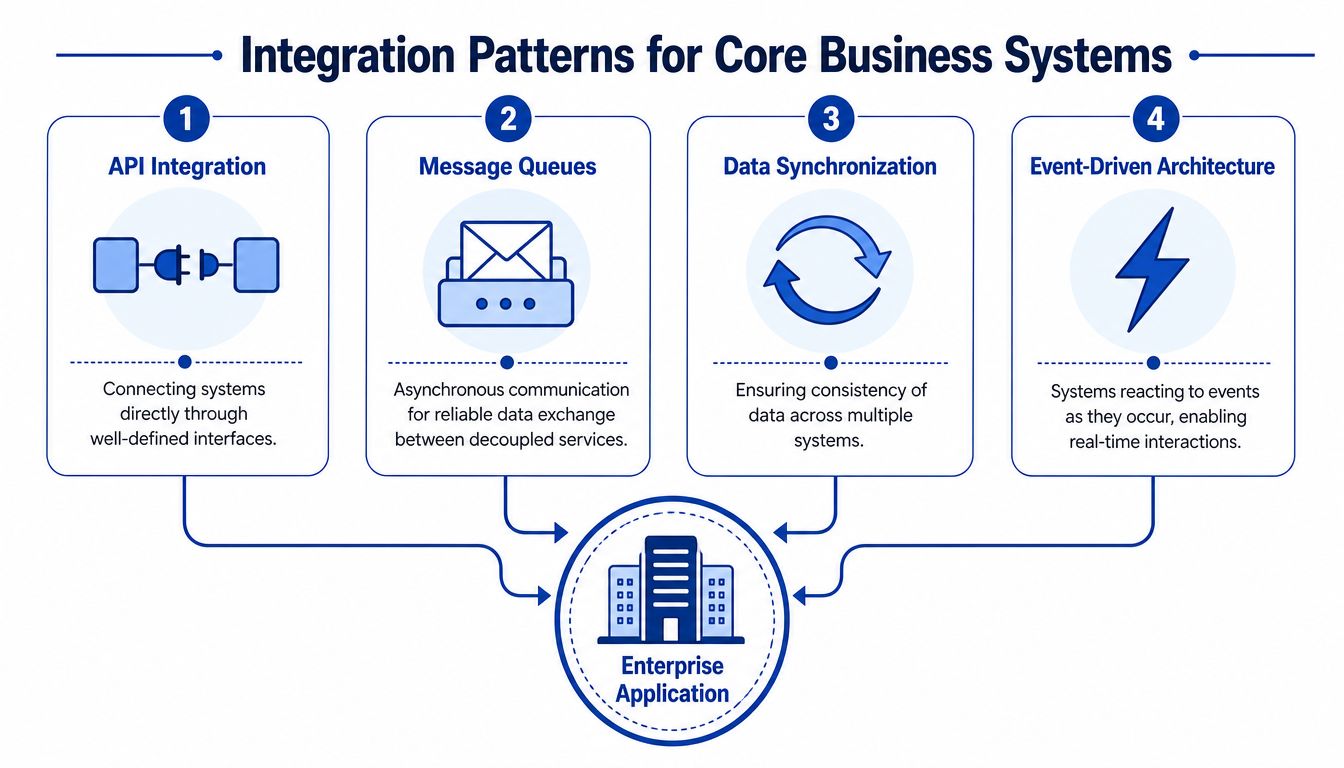
Pattern one using APIs as the contract
If Salesforce, HubSpot, or an ERP platform owns the customer record, define that ownership early and enforce it through APIs. Teams need clear rules on which system creates records, which system updates status fields, and which system publishes changes for downstream consumers.
That discipline reduces more than technical confusion. It limits duplicate data entry, cuts support effort, and gives finance and operations a defensible source of truth when disputes appear later. In regulated environments, that matters because unclear ownership quickly turns into approval gaps and reporting inconsistencies.
A practical custom integrations approach starts with the system of record, then maps each integration to a business event such as customer creation, invoice issue, shipment update, or account suspension.
Pattern two decoupling with queues and events
Synchronous APIs are useful for real-time lookups and transaction validation, but they create operational exposure if every process depends on every other system being available at the same moment. Queues and event-driven patterns reduce that dependency. An order can be accepted now, then passed to finance, inventory, and notifications as separate downstream actions.
This pattern is often the safer commercial choice for high-volume or business-critical workflows. It helps contain outages, handles transaction spikes more predictably, and gives teams better recovery options during cutovers or vendor incidents. The trade-off is added architecture overhead. Message ordering, retry handling, idempotency, and monitoring need to be designed properly or the business trades one failure mode for another.
Use queues and events when:
- A customer transaction must succeed even if a downstream platform is delayed
- Different systems work on different timing cycles, such as finance posting, reporting, or notifications
- Transaction volumes are likely to grow or vary sharply during the year
- You need an audit trail of what was sent, received, retried, or failed
Pattern three identity and access as shared infrastructure
Identity should sit in shared infrastructure, not inside each application. Centralising authentication through providers such as Okta or MiniOrange usually improves access control, onboarding, offboarding, and policy enforcement across the estate.
The governance benefit is often bigger than the user convenience benefit. Central identity makes it easier to prove who approved what, remove access quickly when staff change roles, and apply consistent controls for contractors, partners, and internal users. For Australian businesses handling sensitive employee, financial, or customer data, that directly affects audit effort and security exposure.
Build identity once and integrate it everywhere. Recreating login, roles, and approval permissions inside each application usually creates audit and support problems later.
Pattern four choosing where orchestration belongs
One of the most expensive mistakes I see is burying business process logic inside whichever platform was easiest to customise at the time. That may work for the first release, but it often creates lock-in, raises change costs, and makes future migrations harder than they need to be.
Keep stable system-specific rules close to the system that owns them. Put cross-platform workflow logic in an integration layer or orchestration service when multiple applications need to participate. That separation gives the business more room to replace a CRM, ERP, or customer portal later without rewriting every connected process. It also makes vendor negotiations healthier because the integration model supports an exit path instead of assuming one supplier stays forever.
QA Observability and Release Governance
Teams often treat QA, monitoring, and release controls as cost centres because they don’t create visible features. That’s a dangerous view in enterprise application development. These practices protect revenue, staff productivity, and reputation when the system is under real pressure.
QA is broader than testing a few happy paths
Enterprise QA isn’t just checking whether a button works. It’s validating workflows across devices, browsers, roles, network conditions, and integration states. A customer portal might work perfectly for internal testers and still fail for field staff on older mobile devices, or for finance users trying to approve edge-case transactions.
The commercial issue is simple. Every untested path becomes support load, manual rework, or customer frustration. If the app sits inside operations, defects don’t stay inside engineering. They spill into payroll, customer service, fulfilment, and compliance.
Observability changes how quickly teams recover
Basic uptime monitoring tells you that something is broken. Observability tells you where, why, and for whom. Tools such as Sentry and New Relic help teams trace errors, monitor performance, and connect technical faults to user impact. That’s the difference between “the portal is slow” and “document upload latency increased after the latest release for users on a specific workflow”.
A sound enterprise application monitoring and debugging approach should include application logs, error tracking, infrastructure signals, and alerting tied to business-critical paths.
Release governance reduces avoidable outages
The release process matters as much as the code. Mature teams use staged rollouts, environment promotion controls, rollback plans, and approval gates for risky changes. They also define who can release what, when, and under which support conditions.
Here’s where governance usually pays off:
- Canary releases: A smaller user cohort sees the change first.
- Feature flags: The team can disable a problematic capability without a full rollback.
- Change windows: Operationally sensitive updates happen when support and decision-makers are available.
- Release notes with ownership: Everyone knows what changed and who is accountable.
A production issue is expensive. A production issue with no logs, no rollback path, and no clear owner is much worse.
Navigating Australian Compliance and Security
Many organisations still separate compliance from engineering. Legal reviews the wording. Security reviews the controls. Delivery builds the app. In practice, that split causes rework because Australian compliance obligations affect data models, access patterns, logging, hosting choices, and workflow design.
Why low-code shortcuts can create real risk
Low-code and no-code platforms are attractive because they can reduce delivery time. Sometimes they’re a sensible part of the stack. The problem starts when teams assume faster build speed means enterprise readiness. In Australia, that assumption breaks down quickly around privacy, consent, auditability, and data residency.
According to this analysis of low-code and no-code adoption in Australian enterprise application development, 68% of Australian firms are adopting low-code platforms to cut delivery time, but 52% of IT leaders cite regulatory misalignment as a primary barrier to adoption. That tells you the issue isn’t whether low-code works. It’s whether the platform and workflow design can handle Australian obligations properly.
What security and compliance should change in the design
If the application handles personal, financial, membership, health, or staff data, ask these questions early:
- Where will sensitive data live: Is Australian data residency required by policy, contract, or risk appetite?
- How is consent recorded: Can you prove what the user agreed to and when?
- Who can access what: Are role models mapped to real business responsibilities?
- What happens in a breach scenario: Can you investigate quickly and isolate impact?
The cost discussion matters here too. Hosting choices, cloud architecture, and managed service decisions all affect compliance effort, which is one reason AWS migration cost planning in Australia should be treated as part of governance, not just infrastructure procurement.
Security architecture becomes much easier when it’s built into requirements, not attached after development starts.
Your Implementation Roadmap A Checklist for Success
A typical failure pattern looks like this. The organisation signs off on a promising business case, the build starts quickly, and six months later the hardest issues are still unresolved: integration ownership, cloud spend, approval paths, and who carries operational risk after go-live. A roadmap should prevent that.
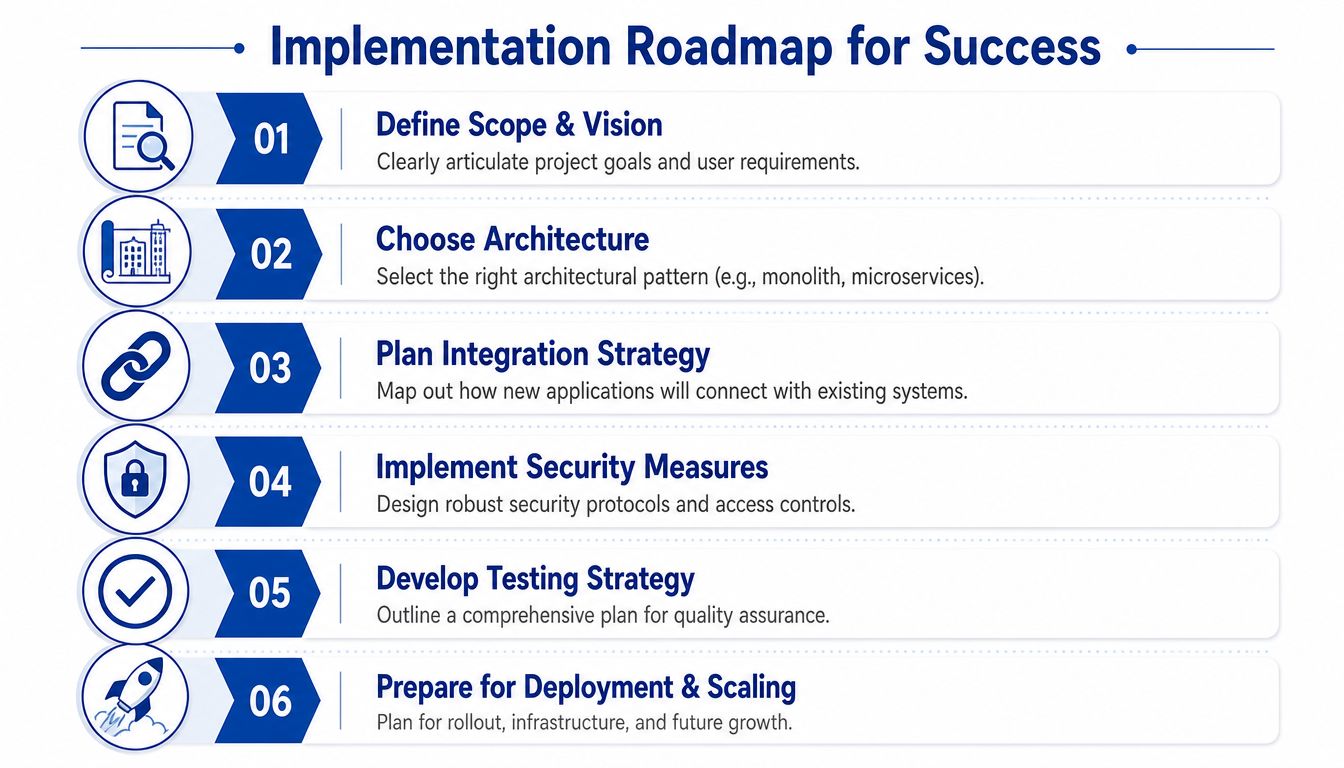
Discovery and commercial framing
Start with the investment logic, not the feature list.
- Define the operational problem: Which workflows are failing today, and what does that cost in delay, rework, missed revenue, or compliance exposure?
- Set decision rights early: Who approves scope, who owns process change, and who breaks ties when business units want different outcomes?
- Name the system of record: For customer, finance, inventory, approvals, and identity, who owns truth?
- Set total cost boundaries: Include build, migration, cloud hosting, support, observability, security controls, licensing, and ongoing change requests.
- Agree success measures: Faster approvals, lower manual handling, better auditability, cleaner reporting, or fewer support tickets. Keep them tied to business outcomes.
For Australian organisations, this stage also shapes risk transfer. A cheaper platform can become the more expensive option once data residency constraints, procurement rules, or specialist support needs are priced in properly.
Architecture and integration planning
Architecture choices should reflect operating model, not engineering fashion.
- Choose an architecture the team can run. Microservices can improve deployment independence, but they also add monitoring, release coordination, and support overhead. For many mid-market firms, a well-structured modular monolith is the lower-risk commercial decision.
- Map integrations before UI detail. The interface will change. Bad assumptions about source systems, event timing, or API limits usually cost more to fix.
- Define identity early. Single sign-on, role models, privileged access, and approval paths should be settled before downstream systems are connected.
- Plan for data migration with business owners involved. Historical data quality, retention requirements, and reconciliation rules often determine the actual timeline.
- Test vendor lock-in before committing. Check export options, proprietary workflow dependencies, and how hard it would be to move the workload later if pricing or policy changes.
I usually advise clients to treat integration design as a governance decision as much as a technical one. If nobody in the business can explain which system owns the process, the project is not ready for build.
Delivery and operational readiness
Go-live should be a controlled commercial event, not a technical milestone.
| Checklist item | What to confirm |
|---|---|
| QA coverage | Critical workflows are tested across supported devices, roles, browsers, and failure scenarios |
| Observability | Errors, performance, integration failures, and business-critical transactions are visible after release |
| Release governance | Rollback paths, change approvals, support ownership, and release windows are defined |
| Security controls | Access, audit logging, backup, incident response, and third-party responsibilities are assigned |
| Cost control | Cloud budgets, licence triggers, support tiers, and post-launch optimisation reviews are agreed |
| Handover quality | Documentation, runbooks, API contracts, operational contacts, and ownership are complete |
The first release does not need to do everything. It needs clear ownership, measured risk, and a cost profile the business can support after the project team steps away.
If you’re planning a significant application, cloud migration, or systems integration project, Continuum Solutions can help you scope the architecture, migration path, and governance model before delivery risk compounds. That’s usually the point where the biggest savings are made.