
The app demo went well. The login worked, the dashboard looked polished, and the core workflow held together in front of the team. That’s usually the moment a founder, operations manager, or CTO starts hearing the same question from the business side: can we launch this?
Often, the honest answer is no. Not because the idea is wrong, and not because the prototype has no value, but because a working prototype and a production application are two different things. One proves that the concept can work. The other has to survive real users, bad inputs, traffic spikes, failed integrations, compliance reviews, staff turnover, and the reputational damage that follows a public failure.
That gap is wider than many development groups anticipate. Only about 5% of AI-built prototypes reach a production-ready state, while 45–62% of AI-generated applications fail to meet critical security, scalability, and error-handling requirements needed for enterprise deployment in Australia, according to this production-readiness analysis. The pattern is familiar. The prototype looks complete on the surface, but the engineering controls underneath it were never built.
If you’ve built quickly and hosted cheaply, this is often the same point where infrastructure decisions start to matter too. A prototype that feels acceptable on basic hosting can become fragile the moment real traffic, API integrations, or authentication flows hit it. That’s one reason many teams eventually revisit the move described in this guide to migrating from shared hosting to AWS.
Table of Contents
- From It Works on My Machine to Real-World Risk
- The Anatomy of a Vibe-Coded Application
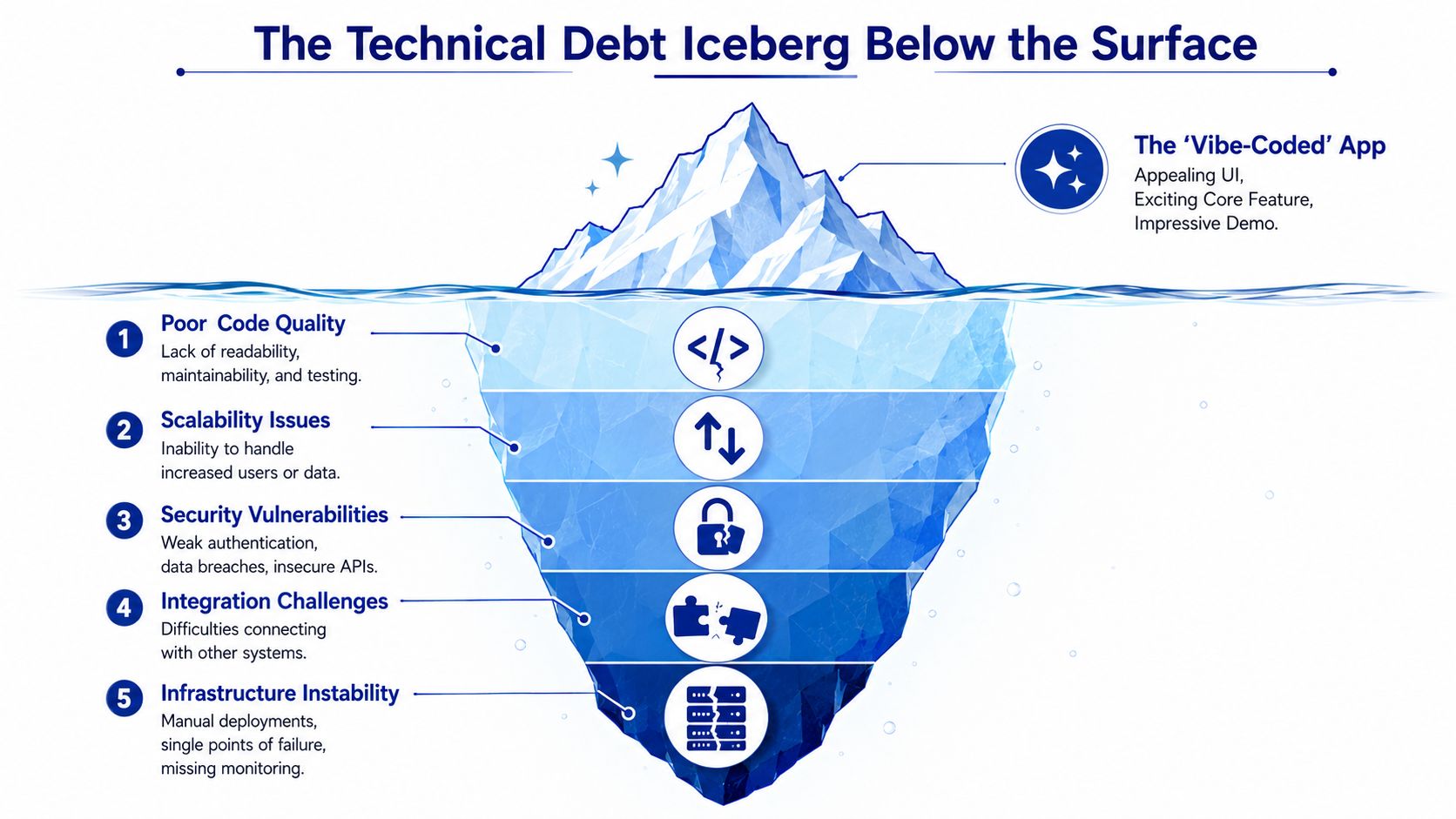
- The Technical Debt Iceberg Below the Surface
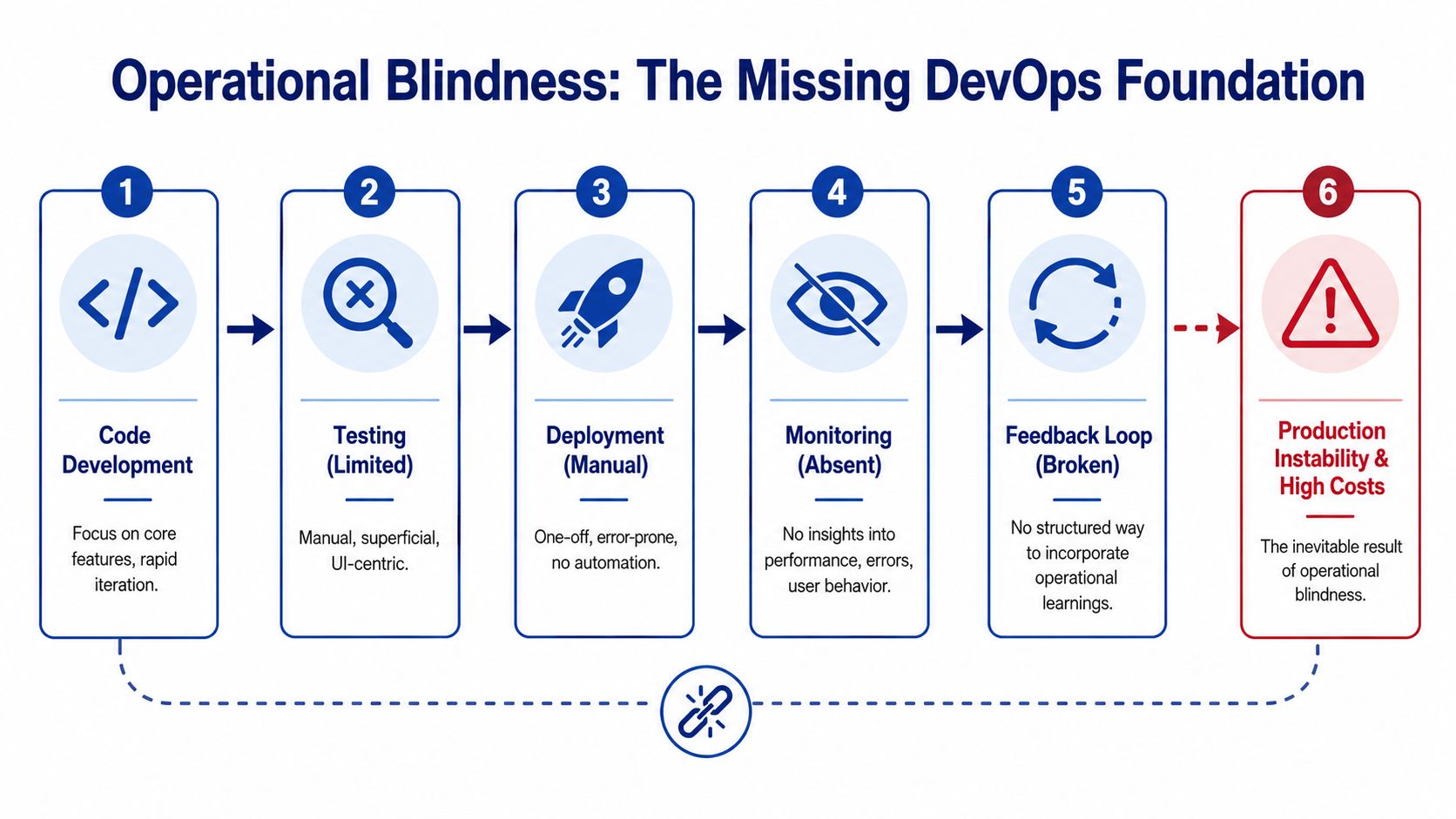
- Operational Blindness The Missing DevOps Foundation
- The Remediation Framework From Prototype to Production
- Building a Business Asset Not Just an App
From It Works on My Machine to Real-World Risk
A demo is not an operating model
A demo answers one narrow question. Can the software perform the happy-path scenario in a controlled setting? Production has to answer harder questions. What happens when a user resets a password twice, uploads malformed data from a mobile device on poor reception, or triggers a third-party API timeout halfway through a transaction?
That’s why the phrase production readiness gap matters. It describes the distance between visible functionality and operational safety. A prototype can have attractive screens, real business logic, and even customer value, while still being unsafe to expose publicly.
Three things usually create that gap:
- Missing engineering review: AI-assisted builds often skip proper peer review before code is merged.
- Missing automated controls: There’s no repeatable pipeline checking linting, security, or build integrity.
- Missing test depth: Unit, integration, end-to-end, and performance tests either don’t exist or only cover the obvious path.
Practical rule: If the app hasn’t been tested for failure, misuse, rollback, and recovery, it isn’t ready for launch.
Why this is a business conversation
Non-technical stakeholders often treat these as developer cleanup tasks. They aren’t. They’re risk controls.
A public launch creates obligations. You’re collecting data, processing transactions, handling identities, and creating customer expectations. If the app leaks data, fails under load, or corrupts records during an integration sync, the issue isn’t just a bug. It becomes a commercial event involving support effort, reputation damage, and delayed revenue.
For a business owner, the practical distinction is simple:
| Prototype question | Production question |
|---|---|
| Does it work in a demo? | Will it keep working under real conditions? |
| Can one developer deploy it? | Can the team release safely and repeatedly? |
| Does the feature exist? | Is the feature secure, observable, and recoverable? |
| Can we show investors? | Can we trust customers on it? |
That’s why “why the app you vibe coded isnt production ready” is the wrong question if you frame it as a coding problem alone. The better question is whether the business is ready to absorb the risk created by launching a system that hasn’t been engineered for the public internet. In most cases, it isn’t.
The Anatomy of a Vibe-Coded Application

What vibe-coded usually means in practice
A vibe-coded app isn’t necessarily built by careless people. More often, it’s built under pressure to validate an idea quickly. The team focuses on the screens, the workflow, and the feeling that the product is real. That bias makes sense early on. It’s how many useful products begin.
The problem is that the codebase often reflects the way it was created. It’s optimised for momentum, not stewardship. A few common signs show up quickly:
- Business logic is tightly coupled to the interface. A web form, mobile screen, and backend action all depend on each other in ways that make small changes risky.
- Configuration is embedded directly in code. Environment values, API endpoints, and credentials are treated as shortcuts instead of managed settings.
- Documentation is missing or thin. The person who prompted the AI understands the intent, but the next engineer only sees generated code with little rationale.
- Testing is superficial. Someone clicked through the main path, but nobody verified edge cases, concurrent users, or integration failures.
This is common in internal tools, early mobile apps, and proof-of-concept SaaS builds. It’s especially common when a founder has generated a credible first version, then asks a team to make it launch-ready after the fact. By then, the visible part feels done, so the remaining work gets underestimated.
A lot of teams only realise the depth of the issue when they try to extend the product, not when they first build it. At that point, custom web development work stops being about adding features and starts being about reshaping the foundation underneath them.
What production engineering adds
Production engineering balances the user-facing product with non-functional requirements. Those requirements don’t impress anyone in a demo, but they decide whether the app survives contact with real operations.
Here’s the practical contrast:
| Vibe-coded priority | Production-grade priority |
|---|---|
| Ship the visible feature | Ship the feature with controls |
| Optimise for speed of creation | Optimise for maintainability and release safety |
| Solve the immediate use case | Design for support, change, and failure |
| Assume the happy path | Plan for bad inputs and broken dependencies |
A polished interface can hide a brittle backend for a surprisingly long time. Customers usually discover the truth before the owner does.
In a proper production workflow, the app isn’t judged only by whether it works. It’s judged by whether another engineer can understand it, whether infrastructure can reproduce it, whether releases are reversible, and whether support staff can diagnose incidents without guessing.
That’s the underlying anatomy of a vibe-coded application. It looks complete because the product layer is visible. The missing layers are architecture, controls, and operations.
The Technical Debt Iceberg Below the Surface
Security and compliance gaps
The fastest way to turn a prototype into a liability is to expose it publicly without hardening the security model. Vibe-coded apps frequently embed hardcoded credentials and omit DevOps controls, with 90% of the essential DevOps layer for product management missing in AI outputs, according to this review of vibe-coded apps in production. In plain terms, the app may function, but the controls around it are absent.
That shows up in familiar ways:
- Secrets stored in source code instead of a managed secret store.
- Weak authentication flows that work in a demo but break under real account lifecycle scenarios.
- Missing API-level authorisation where the UI hides records correctly, but the backend doesn’t enforce the same rule.
- Unstructured error handling that leaks internal details or fails imperceptibly.
For Australian organisations, there’s another problem. A quick prototype rarely captures the auditability and data-handling discipline expected when the app touches personal information, donor records, member data, health-related information, or internal workflows. Research highlighted in this discussion of whether vibe coding is good enough for production apps notes that 78% of Australian startups fail initial compliance audits due to undocumented data flows. That issue matters because AI-generated code rarely documents where data enters, where it’s stored, who can access it, and what third parties receive it.
If your application integrates with CRM systems, identity providers, payment gateways, or marketing tools, undocumented flows become a governance problem quickly.
Scalability limits that appear late
Scalability failures rarely appear in the first week. They appear when the prototype succeeds.
A vibe-coded backend often relies on simplistic database access patterns, synchronous processing for everything, and single-instance assumptions. It may work for early trials, then struggle when users act concurrently, mobile clients reconnect repeatedly, or an import job runs during business hours.
In AWS and Azure projects, this usually means revisiting core architecture decisions. A public-facing app may need queue-based processing, managed databases tuned for the workload, object storage for uploads, autoscaling around the web tier, and better separation between frontend, API, and worker tasks. A mobile app may need a different retry model and more careful token handling than the web version. An integration-heavy system may need idempotency controls so repeated requests don’t duplicate records in Salesforce, HubSpot, Shopify, or an internal ERP.
If growth will break the app, growth is not a success event. It’s an outage scheduled for later.
Reliability failures that damage trust
Reliability is where customers feel technical debt directly. Not in architecture diagrams, but in repeated frustration.
Common failure patterns include:
- Partial transactions where one system updates and another doesn’t.
- Unhandled edge cases such as duplicate submissions, expired sessions, or stale mobile state.
- No graceful degradation when a third-party service is slow or unavailable.
- No useful incident trail for the team trying to diagnose what happened.
When a prototype reaches production without these controls, support staff end up recreating user steps manually, developers read logs that don’t explain enough, and operations teams make risky hotfixes in live environments. None of that is sustainable.
The iceberg metaphor fits because the visible app can look stable while the hidden structure is already compromised. Once the software starts carrying real commercial weight, those hidden weaknesses stop being technical debt in the abstract. They become service risk, legal risk, and cost risk.
Operational Blindness The Missing DevOps Foundation
Manual deployment is not a release process
Many teams assume the problem ends once the app is online. In practice, deployment is where operational risk starts becoming visible.
Production readiness requires rigorous environment separation, but vibe-coded apps often deploy to unstable URLs without CI/CD pipelines. This contributes to why only 25–30% of AI-built apps are fully production ready, as they lack Docker-based reproducible builds and rollback capabilities needed to prevent prolonged incidents and meet enterprise uptime targets, according to this AI app production-readiness checklist.
A manual deployment creates avoidable uncertainty. Nobody can guarantee the same build will behave the same way next time. Dependencies drift. Environment variables differ. A well-meaning hotfix bypasses review because the team needs it live now.
In practical terms, a real release process should answer four questions:
- Can we build the same artifact repeatedly?
- Can we test it before it reaches production?
- Can we promote it through dev, staging, and prod cleanly?
- Can we roll back quickly if the release fails?
When the answer is no, each deployment becomes a gamble rather than a managed change.
No observability means no control
A lot of prototypes are launched with basic server access and maybe a hosting dashboard. That isn’t observability. It’s guesswork with a login.
Once users are live, you need visibility into frontend errors, backend exceptions, performance regressions, queue failures, failed API calls, and unusual activity patterns. Tools such as Sentry and New Relic matter because they shorten the path from customer complaint to technical diagnosis. Without them, teams waste time trying to reproduce issues they should have detected automatically.
For decision makers, the commercial value is straightforward:
| Without observability | With observability |
|---|---|
| Users report issues first | The team sees issues first |
| Slow diagnosis | Faster triage |
| More guesswork in support | More evidence in support |
| Higher incident cost | Better control of downtime and defect impact |
Teams that need this layer often end up formalising it with enterprise application monitoring and debugging as part of the production baseline rather than treating it as an optional add-on.
You can’t manage uptime, customer experience, or incident response if the system doesn’t tell you what it’s doing.
Environment separation and recovery planning
The most dangerous phrase in an early-stage software project is “we’ll just use production for now”.
When development, testing, and live usage happen too close together, avoidable mistakes become public events. An engineer changes configuration in a hurry, test data contaminates live records, or a schema change lands without a safe migration path. This is one reason environment separation matters so much. Dev, staging, and production are not overhead. They are basic damage containment.
Recovery planning is the other half of the equation. Backups need to exist, but they also need to be restorable. Rollback plans need to be documented, not improvised during an incident. If the app depends on file storage, external APIs, and a database, the recovery process has to account for all three, not just the easiest one.
That’s the missing DevOps foundation in many vibe-coded projects. The code may be visible. The operations model is not. Without that model, the business is flying blind.
The Remediation Framework From Prototype to Production
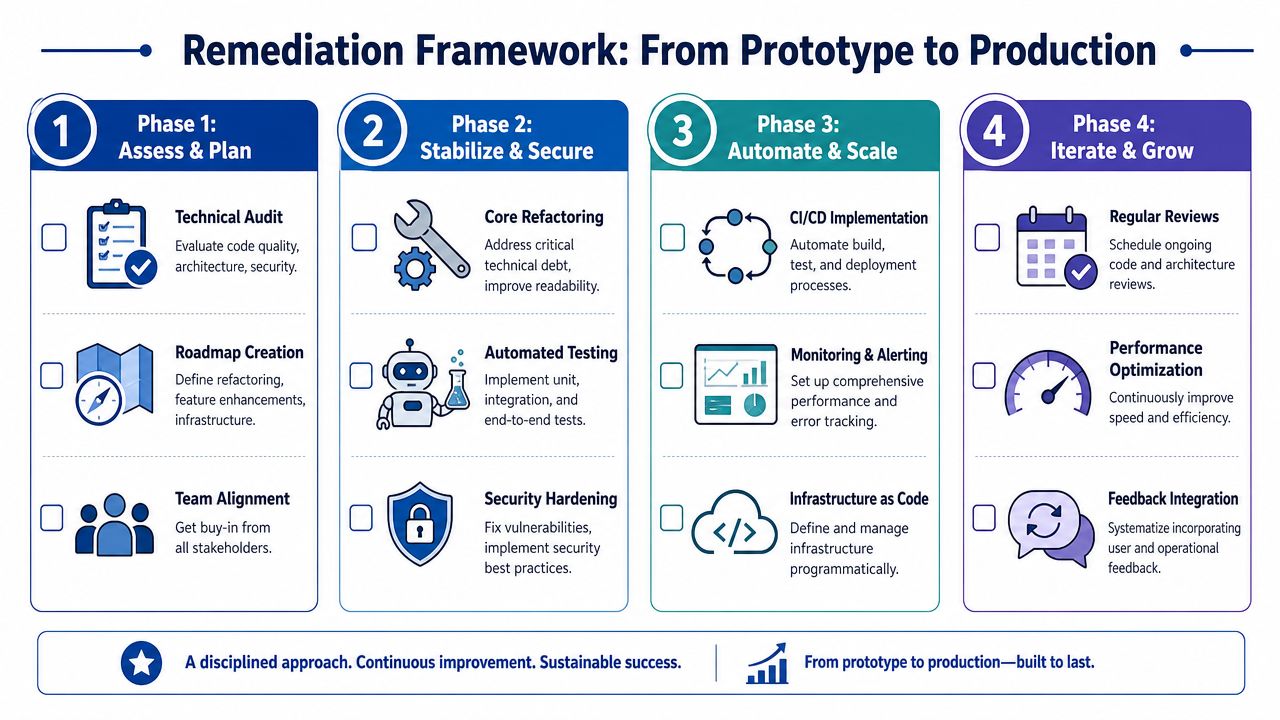
A serious prototype doesn’t need to be thrown away by default. Many can be salvaged. The key is treating the work as remediation and risk reduction, not cosmetic polish.
Moving an AI-generated app to production in Australia typically requires 4 to 12 weeks of structured engineering to remediate security, scalability, and test coverage gaps. 68% of such apps fail readiness assessments due to missing CI/CD pipelines, hardcoded values, and insufficient edge-case handling, according to this analysis of moving AI-generated apps to production. That timeline is useful because it resets expectations. If someone thinks the remaining work is “just a few fixes”, they’re usually underestimating the effort.
Phase 1 assess and plan
Start with an audit, not a promise.
Review the codebase, deployment method, authentication model, integration points, data flows, and infrastructure assumptions. For AWS or Azure, assess whether the current hosting choice matches the application’s behaviour. A prototype might sit on a simple VM today, but a production workload may be better suited to containers, managed services, or a split architecture with separate web, worker, and data layers.
The output from this phase should include:
- Code quality findings covering maintainability, duplication, and areas of unsafe coupling.
- Security findings covering secrets, authorisation, session handling, and external exposure.
- Architecture findings covering scaling limits, failure points, and dependency risk.
- Delivery findings covering release process, environments, and operational gaps.
For teams deciding where the app should run, this is also where platform choice becomes concrete. AWS Lightsail vs EC2 vs ECS is not a theoretical comparison in this context. It affects release discipline, scaling flexibility, recovery options, and support burden.
Phase 2 secure and stabilise
This phase removes the most immediate launch blockers.
Rotate and remove hardcoded secrets. Move credentials into managed configuration. Tighten authentication and authorisation. Add typed error handling so failures are explicit and recoverable. Build database backup routines and confirm restores function correctly. Review API contracts and validate inputs properly.
The test strategy also starts here. Not every line needs a perfect test suite before launch, but the critical paths do. For a SaaS platform, that means onboarding, billing-adjacent workflows, permissions, and data mutations. For a mobile app, it includes session expiry, flaky connectivity, and background retries. For integration work, it includes duplicate requests, delayed responses, and malformed payloads.
Commercial test: If a failed workflow would create manual rework, customer confusion, or compliance exposure, it belongs in the first wave of automated tests.
Phase 3 automate and scale
Once the app is safe enough to continue, remove the operational fragility.
Containerise the application with Docker so builds are repeatable. Set up CI/CD so every change passes through automated checks. Create proper environments for development, staging, and production. Add monitoring, alerting, uptime checks, and log aggregation. Define rollback steps clearly enough that the team can execute them under pressure.
This is also where architecture gets reshaped for actual usage. Some examples:
- AWS web application: Move from a single manually configured server to a container-based deployment with managed database, object storage, and monitored release pipelines.
- Cross-platform mobile app: Separate API concerns from mobile client behaviour, improve token lifecycle handling, and instrument crashes and latency by device and OS.
- Integration project: Add queueing, retries, dead-letter handling, and audit logs so failed syncs don’t become silent data loss.
A production-readiness checklist for decision makers
Before public launch, a business owner or CTO should be able to answer yes to most of the following:
-
Architecture
- Is the hosting model appropriate for expected usage?
- Are there obvious single points of failure?
- Can the system recover from a failed dependency?
-
Security
- Have secrets been audited and relocated?
- Is access control enforced in the backend, not just the UI?
- Are data flows understood and documented?
-
Quality
- Are critical workflows covered by automated tests?
- Have edge cases been reviewed, not just the happy path?
- Can another engineer understand the codebase without guessing?
-
Operations
- Is there CI/CD in place?
- Are dev, staging, and production separated?
- Are logs, metrics, and error tracking available?
-
Recovery
- Are backups configured?
- Have restores been tested?
- Can the team roll back a bad release quickly?
If several answers are no, the app is still in prototype territory, no matter how complete the interface looks.
Building a Business Asset Not Just an App
A prototype proves that the idea has shape. Production engineering proves that the business can depend on it.
That’s the core issue behind why the app you vibe coded isn’t production ready. The missing work isn’t cosmetic. It sits in security controls, architecture decisions, release discipline, monitoring, recovery, and compliance handling. Those are the things that turn software from a demo into an asset the business can rely on.
Business owners usually feel this first as urgency. The team wants to launch because momentum is high. CTOs usually feel it as unease. They can see the hidden liabilities in the codebase and the delivery process. Both instincts are valid. The right move is not to dismiss the prototype, and it’s not to launch it blindly. It’s to assess it objectively and remediate it in the right order.
That’s especially important when the app affects customer data, internal operations, field staff, donors, members, or revenue workflows. In those environments, fragile software doesn’t just break features. It breaks confidence. It creates manual work, confuses reporting, and makes every future change more expensive.
There’s also a strategic upside to doing this well. Once the app has proper architecture, observable behaviour, documented integrations, and a reliable deployment path, it becomes easier to extend. Mobile clients can share cleaner APIs. CRM and ERP integrations become safer. New releases stop feeling like risky events. Teams can build on the system instead of working around it.
When integration complexity is part of the problem, custom integrations often become the dividing line between a brittle application and an operationally useful platform. Clean integrations reduce duplicate data, reduce manual handling, and make governance much easier.
The practical conclusion is simple. Don’t ask whether the prototype works. Ask whether the business can trust it.
If your team has a promising prototype but you’re not confident it can handle a public launch, Continuum Solutions can help assess the production-readiness gap across cloud architecture, DevOps, security, integrations, and application stability. A structured review gives you a clear remediation roadmap, realistic delivery steps, and a safer path from prototype to production.