
Your Shopify orders look right, but HubSpot tells a different story. Returning buyers appear as new contacts, someone's address changes unexpectedly, and the operations team is exporting spreadsheets to work out which records to trust.
A HubSpot Shopify integration can remove that manual reconciliation, but only if you decide who owns the data before switching on the connector. The commercial decision isn't native versus custom. It's whether your customer identities, product attributes and operating rules fit the integration you're buying, and whether your team can recover when a sync fails.
Table of Contents
- Compare the Four Integration Options at a Glance
- How Data Flows Between Shopify and HubSpot
- Common Use Cases for Australian Shopify Merchants
- Limitations That Change the Build Plan
- When a Custom HubSpot Shopify Integration Pays Off
- Setup Decisions and Validation Before Go-Live
Compare the Four Integration Options at a Glance
There are four realistic paths: native Data Sync, a marketplace app, middleware or a custom API integration. The deciding question is straightforward: does your data fit the native model, or must someone reshape it?
I would start with native HubSpot Shopify Data Sync for standard records. It covers contacts, companies where supported, products, orders and carts without maintaining integration code. Custom field mapping requires Data Hub Starter or higher, so include the relevant HubSpot subscription in your evaluation rather than treating installation as the entire cost.
Integration options compared
| Option | Best for | Data covered | Custom field mapping | Build and upkeep effort |
|---|---|---|---|---|
| Native HubSpot Shopify Data Sync | Teams wanting a supported, no-code sync of standard customer and order data | Contacts, companies where supported and products sync both ways; orders and carts move into HubSpot | Requires Data Hub Starter or higher | Low to moderate setup, ongoing admin |
| Marketplace connector app | Stores needing extra data or prebuilt flows quickly | App-supported objects; verify metafield and variant coverage | Limited to fields exposed by the app and its plan | Low to moderate setup, subscription and app upkeep |
| Middleware platform | Teams linking Shopify, HubSpot and other operational tools without writing application code | Objects and events exposed by selected connectors and triggers | Map and transform exposed fields; use API actions for gaps | Moderate setup, ongoing flow monitoring |
| Custom API integration | Businesses with metafields, variants, ERP links or bespoke workflows | Data exposed by the Shopify and HubSpot APIs, within permissions and limits | Full control within API capabilities | High build effort, ongoing maintenance as APIs change |
The business case is substantial: Australia Post's ecommerce report recorded more than AU$69 billion spent online by Australian households in 2024, a 12% year-on-year increase. Reliable customer and order records give operators a usable foundation for assessing repeat purchasing and promotion performance.
Choose for the operating model
A single-store catalogue with standard fields usually belongs on the native shortlist. A multi-channel retailer carrying bespoke product attributes, wholesale accounts and ERP dependencies should assess middleware or custom integration architecture before committing.
For a broader view of how storefront connections fit into an ecommerce operating model, the guide to ecommerce connectivity with Million Dollar Sellers is useful context. Your own field map, however, should decide the purchase.
Buying rule: Don't pay for a custom build to reproduce standard sync. Don't buy a cheap connector that leaves your essential data in spreadsheets.
How Data Flows Between Shopify and HubSpot
A returning customer places another skincare order. Shopify records the purchase; HubSpot can then associate the order with the customer's contact record. The integration moves records between systems, but it does not decide which system owns each field or how your team should interpret a change.
HubSpot's Shopify Data Sync documentation describes the supported object directions: contacts and customers, companies where supported, and products can sync both ways; orders and abandoned-checkout carts sync from Shopify to HubSpot.
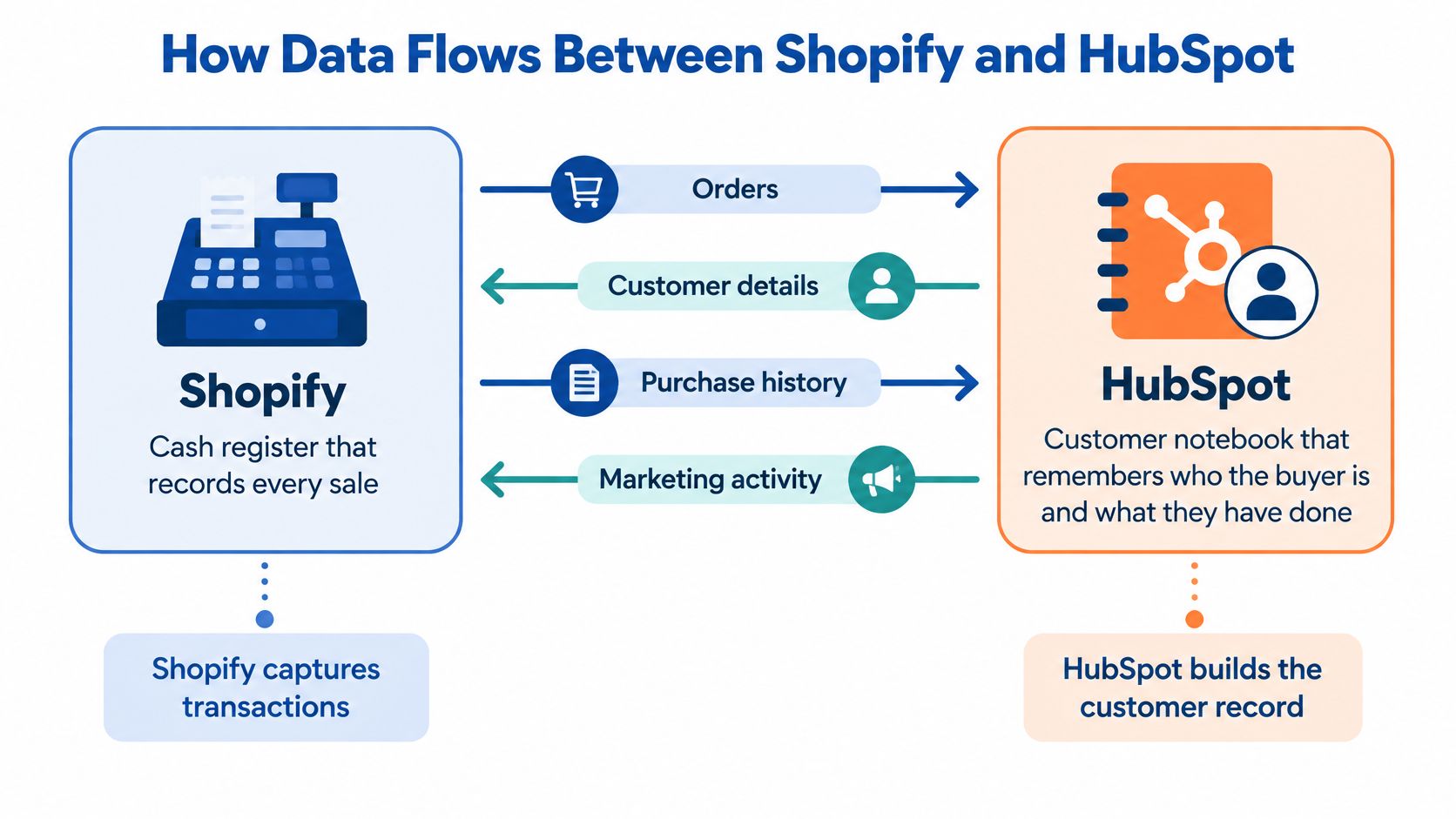
Follow a returning customer
A configured HubSpot automation can update a purchase-status property from first-time to repeat buyer when an order meets your rules. Define how cancelled and refunded orders count before building that workflow. Installing a connector does not set your lifecycle rules, and purchase status should not replace HubSpot's broader lifecycle stages unless that is an intentional CRM decision.
If the customer needs a refund, the operator corrects the transaction in Shopify. HubSpot can hold the related service conversation, but Shopify remains the system for store order corrections.
| Record | Direction | Operational meaning |
|---|---|---|
| Contacts and customers | Both ways | Assign ownership for each mapped contact field |
| Companies | Both ways where supported | Validate how accounts are matched |
| Products | Both ways | Designate which system controls catalogue changes |
| Orders | Shopify to HubSpot | Correct transaction records in Shopify |
| Carts | Shopify to HubSpot | Use checkout activity in configured workflows |
Separate movement from authority
Bidirectional contact sync can overwrite a value if both systems are allowed to update the same field. For example, a sales representative's address edit in HubSpot may flow to the Shopify customer record. A correspondence address is not necessarily the delivery address, so map those fields separately or assign one system authority over each.
For a plain-language explanation of how data sync works, see Yassine Malti's guide. Payment processing has its own responsibilities. If your architecture also includes Stripe payment integration, define which platform records payment status and where staff handle transaction corrections.
Before configuring the sync, draw each object and its direction. Label every mapped field with the system authorised to set its final value, then document what staff should do when a record is missing or incorrect.
Common Use Cases for Australian Shopify Merchants
Consider a hypothetical Melbourne skincare brand running several discount codes while selling one-off bundles and replenishment products. The operations manager can see sales, but can't distinguish promotions that attract repeat customers from promotions that generate isolated discounted purchases.
The useful integration isn't the one that copies the most fields. It's the one that supplies the records needed to answer that question.

Promotion quality and checkout recovery
For the skincare brand, send Shopify customer identifiers, order dates, discount codes and qualifying order status into HubSpot orders and associated contacts. Calculate repeat-buyer status from completed purchases, with an agreed treatment of cancelled and refunded orders. That supports a workflow that separates new purchasers from established customers without confusing discount usage with loyalty.
Checkout recovery needs a different trigger. Australia Post research cited in Shopify's ecommerce conversion guide found that 52% of Australians abandoned carts because checkout was too long or complicated, increasing to 67% among higher spenders.
Use checkout-intent or cart events to populate HubSpot cart records and associate the contact where identification is available. Suppress recovery after purchase, deduplicate repeated events and schedule communication for the buyer's Australian local time. A nightly spreadsheet export can't reliably represent a checkout that has already converted.
Replenishment and wholesale accounts
A food subscription merchant needs product category, purchase date and fulfilment context attached to the relevant order and contact. Its replenishment workflow should reflect expected consumption, not merely elapsed time since checkout. A non-food retailer selling durable products may need accessory compatibility instead.
Wholesale introduces account relationships rather than just purchase timing:
- Shopify inputs: Company identity, buyer details and order associations.
- HubSpot destination: A company record linked to authorised purchasing contacts.
- Operational workflow: Account-owner follow-up, service escalation or an agreed reorder process.
Don't automatically group buyers just because their email domains match. A shared procurement service may purchase for separate legal entities.
Rank use cases by the value of the decision they improve, not by how impressive the automation looks.
Choose the highest-impact case as the first delivery scope. If stakeholders disagree about that priority, a business IT consulting review can frame the decision around operational dependencies, ownership and measurable acceptance criteria.
Limitations That Change the Build Plan
A Shopify order can arrive in HubSpot while a workflow action is still waiting to run. That gap matters when teams rely on CRM activity for customer service, reporting or follow-up. Connector limits affect data ownership and recovery as much as they affect which fields sync.
Workflow webhooks can send POST requests and retrieve responses with GET requests. Execution caps, pauses and request delays can affect when downstream actions run, so treat workflow completion as asynchronous rather than immediate.
Native sync limitations and practical responses
| Limitation | What it breaks | Practical response |
|---|---|---|
| Shopify metafields are not synchronised | Custom product or customer attributes are missing in HubSpot | Map required attributes to HubSpot custom properties through an API service or middleware |
| Shopify variants do not sync through the standard product connection | Size- or colour-level reporting is incomplete | Sync parent products natively and send variant data through a separate custom job |
| Orders cannot be edited in HubSpot and written back to Shopify | CRM-side corrections never reach the store | Keep order edits in Shopify; use HubSpot for notes and follow-up |
| Webhook execution limits in HubSpot workflows | Actions can pause at the cap and delay downstream steps | Set limits deliberately, implement controlled retries and idempotency keys, and monitor workflow logs |
| Contact matching relies mainly on email | Shared addresses can conflate customers; aliases can fragment identities | Define matching and exception rules for households, guest checkouts and wholesale accounts |
| Cart-sync fields removed in April 2025 | Cart token, referring site, shipping cost and buyer marketing acceptance are unavailable | Audit dependent segments and workflows, then replace their inputs or retire them |
Design around failure, not just success
A retry is safe only when repeating a request won't repeat its business effect. Give each event a stable identity and record whether it has already been processed. Otherwise, a timeout can trigger duplicate records or repeat downstream actions.
Long-running work should not hold a workflow open. A service can accept an event, queue it for processing and route failures to an exception queue, where staff can review and resolve them.
Missing data needs an explicit rule. An empty product attribute can block a dependent workflow or send the record for review. A silent default can make an incomplete sync appear healthy while staff act on incorrect information.
Before approving a connector, list the limitations that affect an existing report, service procedure or customer communication. Assign a replacement data source or accepted restriction to each one. If a critical requirement remains unresolved, the implementation isn't ready to purchase.
When a Custom HubSpot Shopify Integration Pays Off
A custom build can make sense when a standard connector cannot represent the way your business handles customers, orders or operational data. For example, a wholesaler may need HubSpot account managers to see subscription eligibility and ERP account status alongside Shopify purchases. Copying ordinary customer fields won't provide that context.

Conditions that justify the investment
A custom integration is worth considering when one or more of these requirements cannot be met reliably with a connector:
- Business-specific attributes: B2B pricing, subscription details or bespoke catalogue attributes need to appear in operational CRM records.
- Shared operational records: An ERP, fulfilment service or support desk needs a consistent customer identity across systems.
- Controlled processing: Your team needs queue management, predictable recovery and visibility beyond standard workflow settings.
- Governance requirements: Consent provenance and audit history need a structure the selected connector cannot provide.
Cost drivers by integration option
| Option | Cost driver | Effort |
|---|---|---|
| Native HubSpot Shopify Data Sync | HubSpot plan tier and any required upgrade for custom mapping | Low to moderate setup, ongoing administration |
| Marketplace connector app | App subscription and plan-specific fees | Low to moderate setup, app upkeep |
| Middleware platform | Platform subscription and usage-based task fees | Moderate setup, ongoing flow monitoring |
| Custom API integration | Discovery, build, staging, handover and maintenance effort | High build effort, maintenance as APIs change |
Custom work needs a defined budget for discovery and mapping, the processing runtime, staging tests, documentation and ongoing support. AWS Lambda with a managed queue can suit event-driven processing; managed middleware may suit a team that wants less infrastructure responsibility. The trade-off is control versus platform overhead: either option still needs maintenance as credentials, permissions and APIs change.
Supportability test: Another developer should be able to deploy, diagnose and replay the integration using its documentation.
Treat the service as a maintained application, with the same expectations you'd apply to custom web development. Commission a short discovery phase before implementation, with field mappings, exception scenarios and acceptance tests as deliverables. A clear specification makes the estimate more useful and reduces dependence on a single developer.
Setup Decisions and Validation Before Go-Live
Start with ownership. A working connection can still create incorrect records if nobody has decided how conflicting edits, shared identities and failed updates should be handled.
HubSpot's Shopify Data Sync documentation confirms that contact matching primarily uses email addresses, custom mappings require Data Hub Starter or higher, and Shopify metafields aren't supported. It also documents the April 2025 cart-field removals, so existing configurations deserve validation rather than automatic reuse.
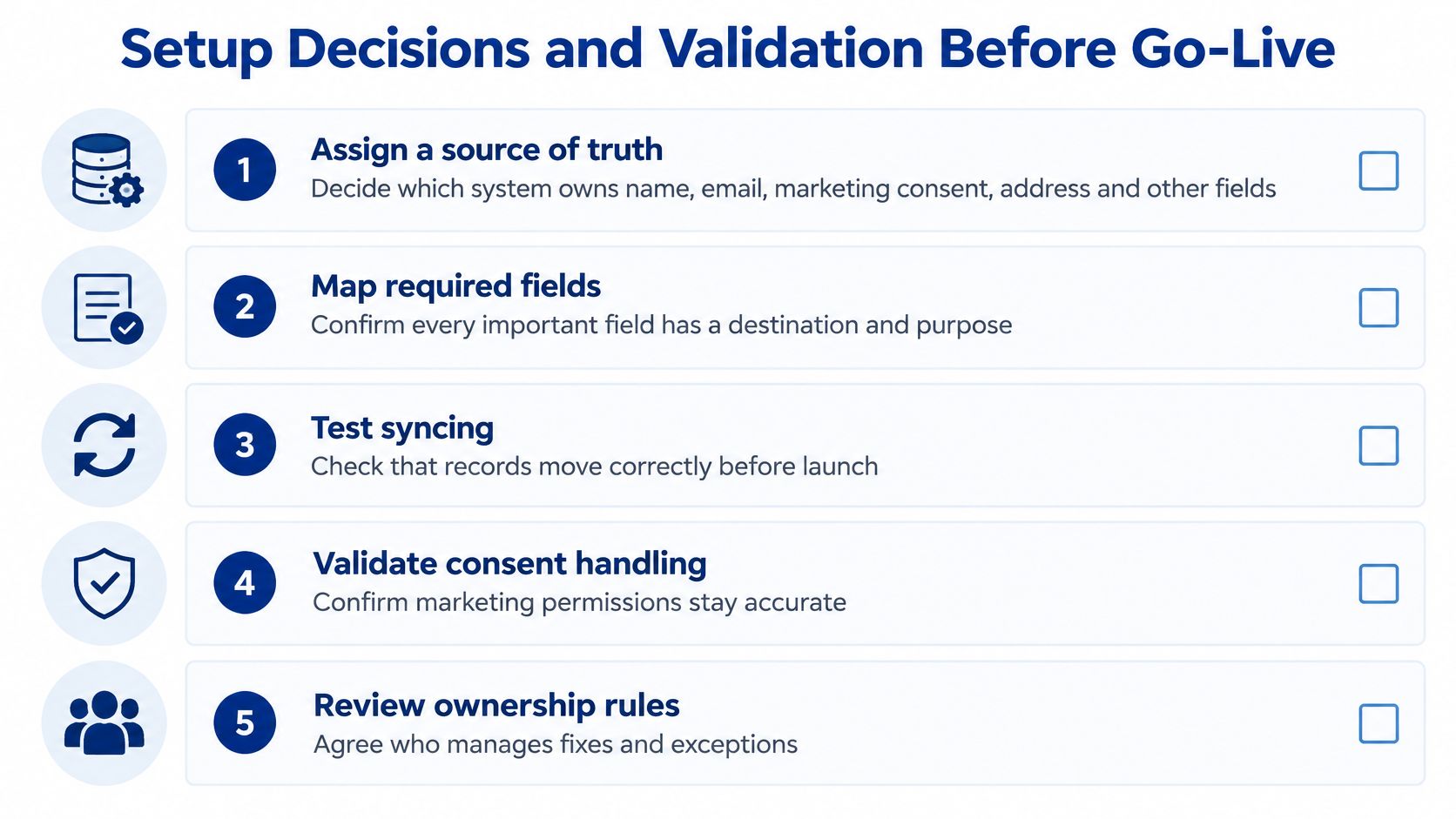
Establish the operating rules
Assign field ownership. Document the authority for name, email, address, marketing consent, order status and lifecycle stage. Record permitted direction and conflict behaviour, including whether an empty value can replace a populated field.
Resolve identity exceptions. Decide how shared household emails, guest checkouts, wholesale aliases and staff test accounts will behave. Don't force separate people into a single customer identity merely because they share an inbox. Where native matching can't represent the distinction, route those cases through controlled matching logic or an exception process.
Map identifiers and use update-or-create logic. Maintain a stable relationship between each Shopify customer ID and its intended HubSpot record. Scope identifiers by store if multiple stores are involved. Before creating a record, look for its existing mapping rather than relying on repeated blind inserts.
Protect consent provenance. Use clearly named properties for permission status, source and capture context. Restrict write ownership so ordinary profile updates can't overwrite them. A copied consent field must support, not replace, the subscription controls and suppression rules used to determine whether communication is permitted.
Prove recovery before release
Separate historical backfill from live events. Pause affected communications and lifecycle automation while loading historical records. Preserve original transaction dates and mark the import context so old purchases don't behave like new customer activity.
Make failures recoverable. Log the affected record ID, operation, error and processing state without exposing unnecessary personal information. Keep failed events available for controlled replay, name an exception owner and agree escalation rules. Include application monitoring and debugging in the operating plan, not as an afterthought.
Validate a restricted test population. Use test orders and selected contacts to check edits, refunds, shared emails, missing attributes and repeated events. Confirm that no unexpected emails or lifecycle changes occur. Correct failed mappings or route them through middleware before widening the sync, then test retry limits and recovery.
Reconcile after release. Compare Shopify and HubSpot order counts weekly using the same date window, status filters and store scope. Sample contact matches and investigate unmatched orders separately. Record discrepancies and their resolution so the team can distinguish expected exclusions from genuine failures.
Our custom integration work includes Salesforce and HubSpot integrations, Mini Orange authentication, custom APIs, and easy data migration with documentation. Continuum Solutions is a Shopify Plus Partner, AWS Partner, Azure Partner and WP Engine Partner.
If your field map exposes gaps, we can review it against native sync, marketplace apps, middleware and custom development, with no obligation to proceed.
Continuum Solutions offers integration design, custom API development and monitoring for Shopify and HubSpot workflows that need more than a standard connector. Visit Continuum Solutions with your field list, current systems and highest-priority workflow to discuss the appropriate integration path and what needs validating before implementation.