
You can feel a lift-and-shift migration is “done” the moment the cutover window closes and the dashboards go green. The servers are now running on AWS, the business is relieved, and the project team starts getting pulled onto the next fire. Then finance notices the bill, ops notices the oversizing, and someone finally asks why the new environment still looks suspiciously like the old one, only more expensive.
That's the problem with AWS Application Migration Services. They're often sold as the fast lane to AWS, but the harder question is what happens after the workload lands. If you don't treat post-cutover economics, observability, and rightsizing as part of the migration, you've only moved the risk, not removed it.
Table of Contents
- The Lift-and-Shift That Looked Finished but Wasn't
- What AWS Application Migration Services Do
- The Four Phases of an Application Migration to AWS
- MGN Compared to Other AWS Migration Approaches
- Cost, Quotas and the Australian Pricing Reality
- Risks, Common Mistakes and When Not to Rehost
- Observability and Post-Cutover Discipline
- A Practical 30-Day Plan Before You Migrate
The Lift-and-Shift That Looked Finished but Wasn't
I've watched teams celebrate a successful cutover while their new EC2 estate kept burning money in the background. The workload was live, replication had stopped, and everyone had moved on, but the migrated servers were still running with the same oversized shape, the same attached storage habits, and the same licensing assumptions they had on-premises.
That gap matters because technical completion is not the same as commercial closure. AWS positions AWS Transform MGN, formerly AWS Application Migration Service, as its dedicated rehosting capability that continuously replicates source servers and orchestrates cutover, with AWS describing it as a way to reduce migration cost and downtime AWS blog on the rebrand and service role. One Australian financial services migration I reviewed moved the servers on schedule, then discovered the steady-state bill was still carrying old database sizing, extra EBS capacity, and idle Windows licensing. The cutover succeeded. The economics did not.
A better way to think about it is this.
Practical rule: the cutover is the start of stabilisation, not the end of the migration.
Australian buyers should treat that as a budget decision, not a technical slogan. AWS says government organisations across Australia and New Zealand use its cloud services for security, compliance, reliability, and cost-effectiveness, which is exactly why large public-sector and enterprise migrations keep using rehosting as a first move rather than a final state AWS blog on government use in AU and NZ. If the landing zone is left unreviewed, the old environment just reappears in AWS pricing. The right next step is a hard post-cutover review of instance sizes, storage, licensing, and what should be modernised instead of carried forward.
What AWS Application Migration Services Do
AWS Application Migration Services is a portfolio term, but AWS Application Migration Service, now called AWS Transform MGN, sits at the centre of it. AWS describes it as a lift-and-shift rehosting layer that continuously replicates source servers, handles physical, virtual, and cloud sources, and turns them into native Amazon EC2 instances. That matters because the service reduces the amount of manual work at cutover and lowers the chance of operator error AWS launch guidance on MGN.
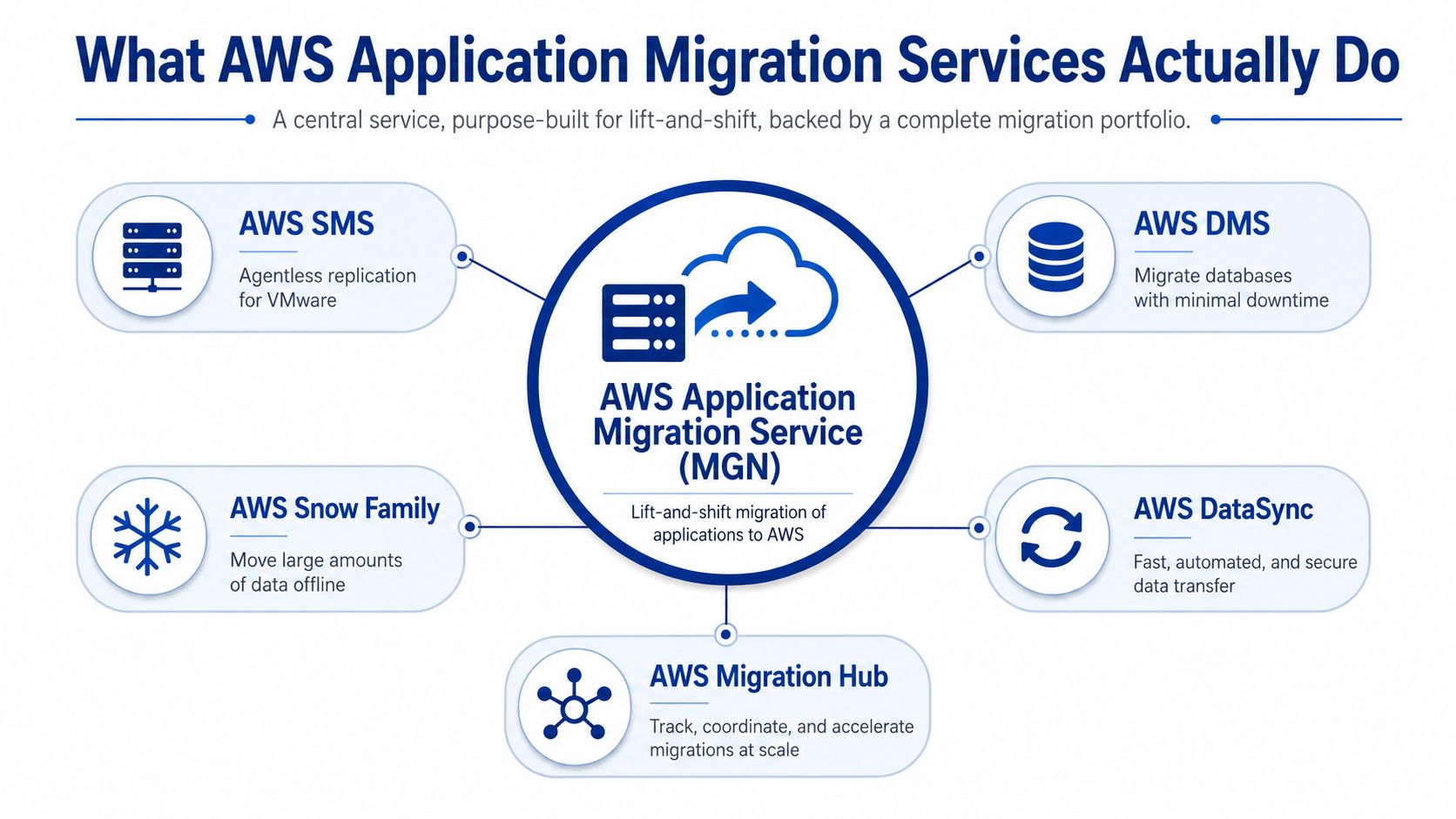
MGN is a replication and cutover engine. It installs an agent on each source server, streams block-level changes into AWS, and keeps the target environment ready until you choose to launch. That means the server can keep running while data changes continue to sync, which is what makes low-disruption rehosting possible.
The practical point is control. You can test the replicated server before production cutover, validate boot behaviour, check application reachability, and then switch over when the business is ready. If a workload depends on local storage patterns, legacy Windows services, or brittle IP assumptions, MGN preserves that shape instead of forcing a redesign mid-project.
A migration partner such as Continuum Solutions cloud migration services should treat that preservation carefully. The job is to move the server cleanly, then decide what stays, what gets resized, and what should be modernised after the cutover.
MGN also draws a clear boundary around responsibility. It moves the server state. It does not repair poor application design, remove application coupling, or rationalise the target operating model for you. Use it when the immediate goal is to rehost an estate with predictable behaviour, then make the post-cutover economics explicit. Otherwise, you just carry the old cost structure into AWS with a new bill.
The Four Phases of an Application Migration to AWS
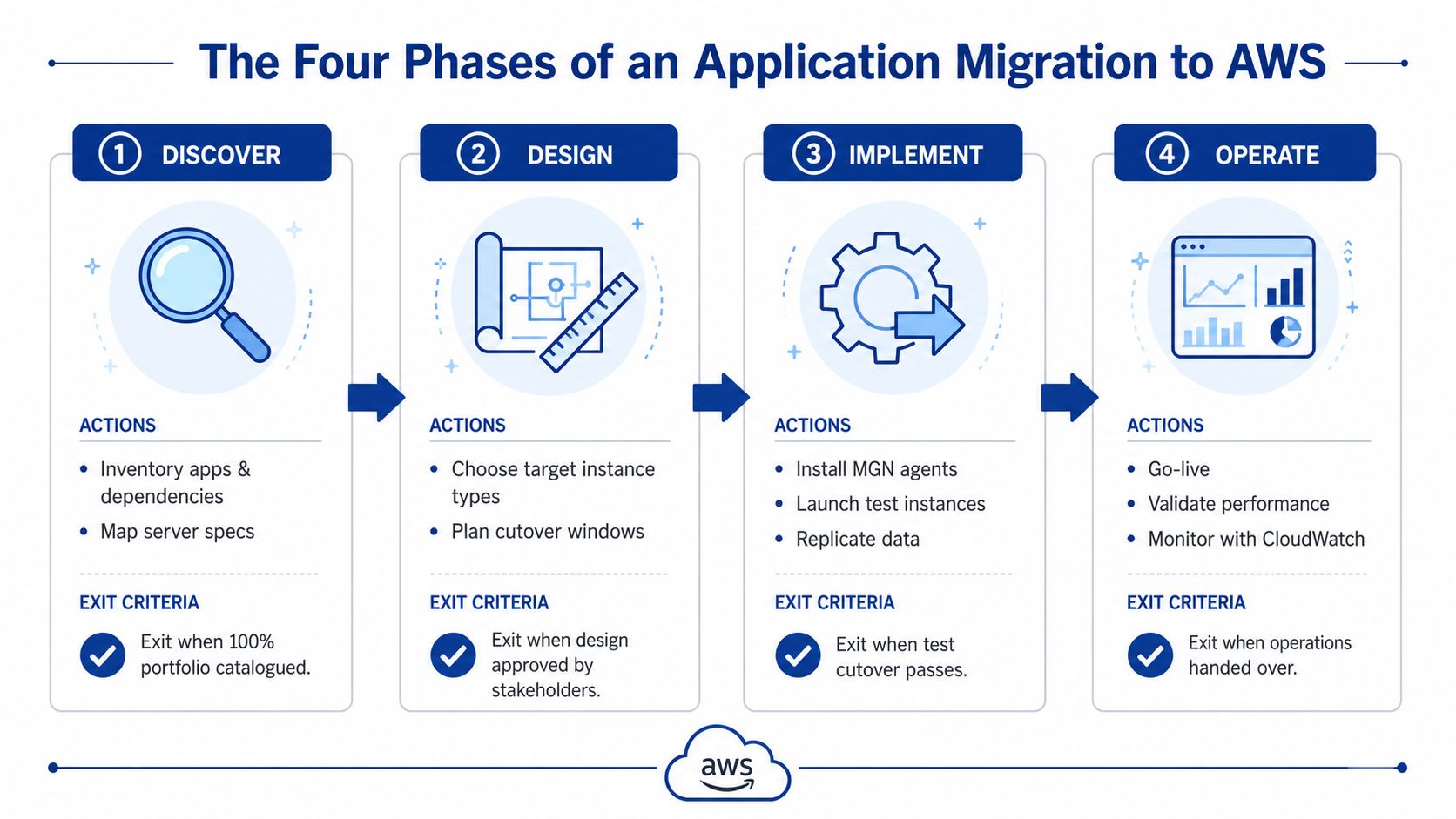
AWS migration work goes wrong when teams treat it like a single event. It isn't. It's a sequence of gates, and each gate needs a concrete exit criterion or you'll drift for months.
Discover and design
Discovery is where you inventory the portfolio, map dependencies, and decide which workloads are worth rehosting. AWS guidance on migration planning puts assessment and mobilise work first, including inventory and dependency understanding before execution begins AWS migration decision guide. If you don't have an agreed dependency map, you don't have a migration plan.
Design is where the target environment is shaped. That includes account topology, network design, the Staging Area Subnet, launch templates, and test criteria for a replicated server to boot and serve traffic properly. The phase only closes when stakeholders sign off on the design, not when someone finishes a diagram.
A migration design that hasn't been tested is a guess with a diagram attached.
Implement and operate
Implementation is the execution phase, where the agent rollout, initial sync, test launches, cutover waves, and decommission triggers all happen. AWS says MGN is now available in all commercial AWS Regions and both GovCloud regions, which matters because the service is designed to sit inside large, multi-region migration programs rather than isolated one-off moves AWS rebrand and availability update.
Operate is the part many teams underfund. Rightsizing, observability, and the modernisation backlog belong here, along with the 90-day MGN clock and a stable cost baseline. I don't close a migration phase until the operating cost is documented and defensible.
The phase checkpoints should be simple:
- Discover: signed dependency map.
- Design: approved target architecture and test plan.
- Implement: documented cutover runbook and green test launch.
- Operate: stable cost baseline and ownership handover.
For teams still running shared-hosting or similarly constrained estates, the same discipline applies, which is why migration planning for moving from shared hosting to AWS should still be treated as a structured programme, not a lift-and-shift shortcut.
MGN Compared to Other AWS Migration Approaches
CTOs don't need more tooling. They need the right tool for each workload. That's where many AWS migration plans become sloppy, because teams default to one approach and force every application through it.
| Approach | Best For | Downtime Window | Modernisation Potential | Typical Use in Australian Estates |
|---|---|---|---|---|
| AWS Transform MGN | Large-scale server rehosting | Low when engineered properly | Low during the move, higher after cutover | Legacy Windows and Linux estates, phased migrations |
| AWS DMS | Database migration and replication | Low for supported patterns | Moderate, especially when replatforming databases | Transactional databases that can move separately |
| VM Import/Export | One-off VM image conversion | Higher because it is more disruptive | Low | Small, isolated workloads or edge cases |
| Partner-led refactoring | Applications that should not survive unchanged | Varies by scope | High | Revenue-critical systems that justify redesign |
The clearest decision criterion is whether the server is the migration unit. If it is, MGN is the default. If the database is the problem, use DMS. If the application already needs redesign, don't hide that behind a rehost.
The portfolio blend that actually works
In practice, the smartest Australian migration programmes mix methods. I'd use MGN for legacy Windows estates that need a controlled move, DMS for databases that should separate from the application lift, and targeted refactoring for the small set of services that matter most commercially. AWS's own migration guidance supports this kind of mixed strategy by recognising rehost, replatform, and rearchitect as distinct options rather than a single pattern AWS migration decision guide.
That's exactly how large programmes get done. The South Australian Department for Infrastructure and Transport cloud programme used AWS migration methods over 24 months, with 16 four-week migration waves to move 125 applications, including 93 replatformed workloads and 32 additional applications Communet case study. That's not a toy migration. That's a phased portfolio move with mixed outcomes by workload.
Cost, Quotas and the Australian Pricing Reality
Finance teams need the cost shape, not the sales pitch. AWS says AWS Transform MGN gives the first 90 days of source server replication free, then charges $0.042 per server per hour after that free period, with the same pricing across supported Regions AWS MGN pricing. That helps during migration planning, but it can also distract teams from the cost that starts after cutover.
What the bill contains
The MGN line item is only part of the picture. The rest is the infrastructure it lands on, the storage it consumes, and the operational mistakes that happen when replication keeps running too long. In Australian projects, costs also climb when staging resources stay alive after cutover, or when the migration plan fails to separate temporary migration spend from steady-state cloud run costs.
AWS also documents service quotas that can stop a wave-based migration if no one checks them early. Those limits include 20 concurrent jobs per supported Region, 150 maximum active source servers per Region, 200 source servers in a single job, 50,000 total source servers per AWS account per Region, and 1 concurrent job per source server AWS MGN service limits. If your wave plan ignores those ceilings, it will stall.
Practical rule: quote migration spend and steady-state spend separately. If you mix them, you will under-forecast both.
The Australian commercial reality
Independent Australian coverage projects public cloud spending to reach A$22.4 billion by 2026, which is why cost control keeps showing up as a board-level concern in migration conversations Australian cloud migration coverage. AWS's own MGN FAQs cover replication mechanics and the free period, but they do not answer the question buyers care about most, which is how to avoid lingering replication, oversized instances, and overprovisioned staging environments after cutover.
If you are building a business case, model the migration as a temporary operating state, then strip that away as soon as the workload is stable. I would rather see a conservative TCO model that gets revised down than a glossy one that blows up in month two. For teams needing the numbers framed for Australia, Continuum Solutions' migration cost guide is a practical starting point for the commercial model.
Risks, Common Mistakes and When Not to Rehost
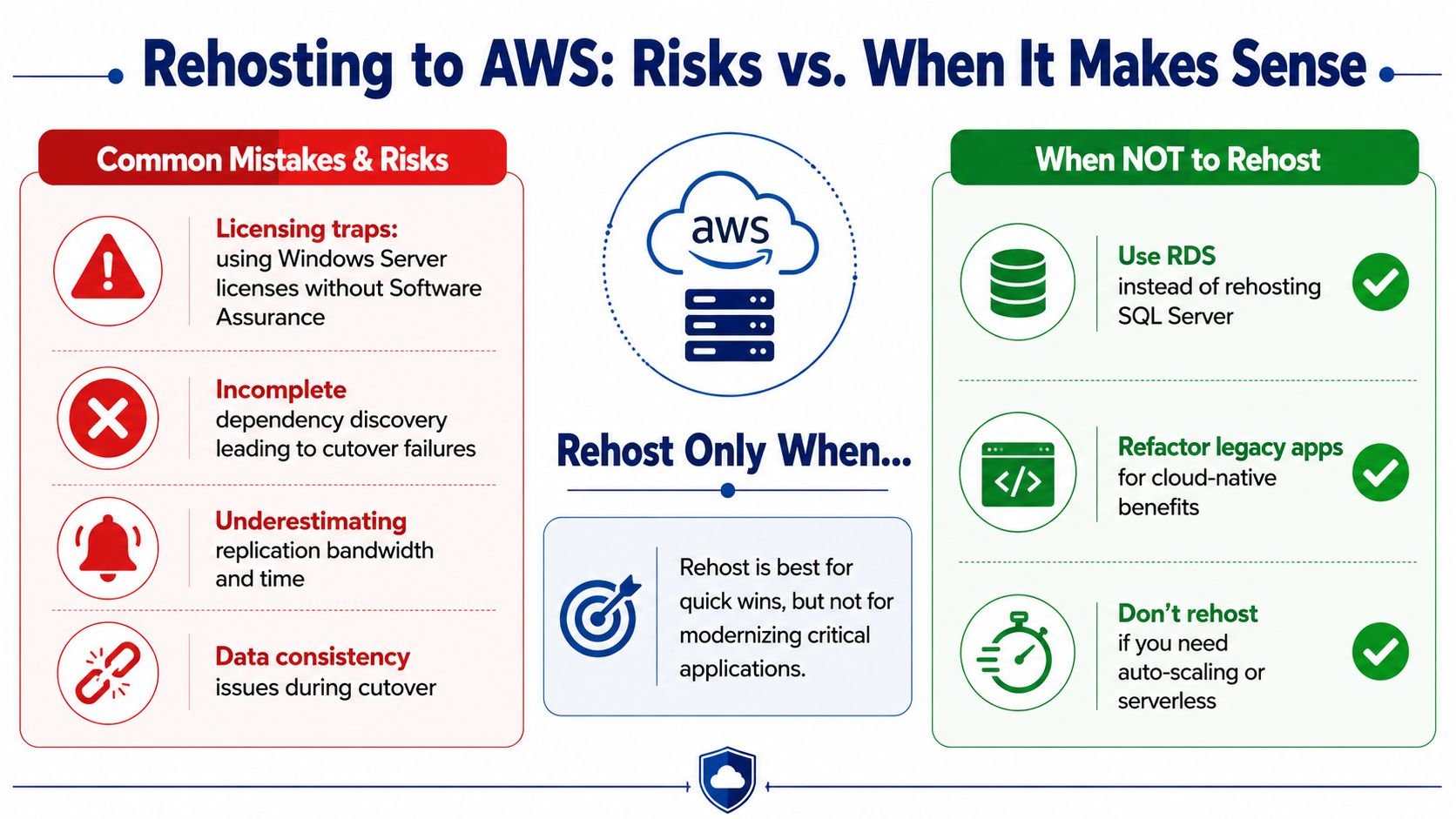
Rehosting fails when people confuse portability with suitability. A server can be lifted into AWS and still be a bad candidate for MGN if the workload is full of hidden dependencies, bad licensing assumptions, or a future state that clearly shouldn't look like the present one.
The mistakes that blow up production
The first trap is licensing. If you bring Windows Server or SQL Server into AWS without checking your licence position, you can end up paying more than you planned. That's not a migration problem, it's a governance problem.
The second trap is application dependency blind spots. Hardcoded IP assumptions, COM+ dependencies, scheduled tasks tied to local time, and domain-joined services can all break cutover even when the replication itself looks healthy. MGN won't save you from bad application design.
The third trap is treating every workload as if it deserves a rehost. It doesn't.
- Retire first if the workload is scheduled for decommissioning.
- Refactor first if it's tied to mainframe integration that shouldn't be dragged into EC2.
- Rewrite first if the economics of rehosting are worse than building a cleaner service.
When not to use MGN
If the workload needs cloud-native scaling, serverless behaviour, or a different operating model, rehosting is the wrong move. The same is true when the application is held together by brittle dependencies that will cost more to preserve than to replace. In those cases, MGN is a bridge, not a destination.
AWS's own migration guidance frames rehost, replatform, and rearchitect as separate choices, which is the right mental model AWS migration decision guide. The decision rule I use is blunt. If the application should look almost the same after landing, use MGN. If it should look meaningfully different, don't hide that requirement behind a rehost.
For teams still making these calls in the Australian SME market, the most common failures are the same ones I see everywhere else, only with less slack in the budget. That's why common AWS mistakes for SMEs is worth reading before a migration wave starts.
Observability and Post-Cutover Discipline
A clean cutover without observability is just a delayed incident. The first thing I put in scope for a migration is not the server move itself, it's the signal chain that tells us whether the move is healthy.
What to wire before cutover
You need four signal groups before the first production switch. Replication lag, instance health, application latency, and cost. AWS guidance on migration and monitoring emphasises visibility and ongoing optimisation after workloads land, and MGN's post-launch actions are part of that operational discipline AWS migration and monitoring guidance.
That means your team should have alarms, log retention, synthetic checks, and named owners ready before the first test launch. If you wait until after cutover to add them, you've already lost the window where the useful evidence exists.
Don't confuse green replication with a healthy application. They're different signals.
The discipline that keeps migrations from drifting
I like a short hypercare window with clear ownership, rollback criteria, and escalation paths. The point isn't to babysit the workload forever. It's to force the team to resolve the quiet failures that only surface after the DNS cutover and the first real user traffic.
Those failures usually come in three forms. Replication stalls stay hidden because nobody watches the right metric. Licence overages appear because the cutover changed the deployment shape but not the cost model. DNS caching produces inconsistent behaviour and people blame the cloud instead of the rollout process.
For teams that need stronger production support after cutover, enterprise application monitoring and debugging should be part of the operating model, not an afterthought. If you're moving critical workloads, put observability in the migration scope from day one and keep it there until the service has settled.
A Practical 30-Day Plan Before You Migrate
If I were advising a CTO this week, I'd use the next 30 days to prove whether MGN is the right fit before anyone signs a migration statement of work. Don't start with procurement. Start with evidence.
Week one and week two
First, inventory the workloads and map dependencies. You need a discovered workload list, not a rough spreadsheet. Identify the apps that are true rehost candidates, the ones that need database separation, and the ones that should probably be retired or rewritten.
Then prepare the AWS account and MGN readiness work. Set up the migration structure, validate permissions, and confirm the landing environment is ready for test launches. If the environment can't support a pilot, it definitely can't support a wave.
Week three and week four
Pick one pilot workload that reflects the estate, not a toy example. Run replication testing, launch test instances, and confirm cutover behaviour against clear success criteria. The deliverable here is a pilot result that either matches the forecast or proves the forecast was wrong.
Then do the commercial due diligence. Confirm the exit from the 90-day free period, review any reserved instance commitments, and define support ownership after cutover. If the contract leaves data egress, IP assignments, or post-cutover support vague, that will become your problem later.
Your readiness pack should contain four things:
- Discovered workload list
- TCO model
- Pilot success criteria
- Exit and rollback runbook
If the pilot results match the forecast within an agreed tolerance, sign the SOW. If they don't, redesign the wave plan before you spend real money. That's how you keep a migration from becoming a long, expensive rehearsal.
If you need help deciding whether AWS Application Migration Services should be used as a rehost path, a bridge to modernisation, or a narrow tool inside a bigger migration programme, Continuum Solutions can assess the current environment, shape the target AWS architecture, and manage the cutover and post-cutover operating model. Visit Continuum Solutions to discuss your migration plan and get a practical view of cost, risk, and implementation before you commit.