
A lot of Melbourne technology teams are sitting in the same meeting right now. The board wants a clearer answer on data residency. Security wants to know whether “hosted in Australia” means Melbourne, Sydney, or something more complicated across backups, logs, and support workflows. Finance wants to know whether moving workloads closer to Victoria users will reduce cost, or move it around.
That's where AWS in Melbourne gets interesting. The launch of the AWS Asia Pacific (Melbourne) Region in 2023 gave Australian organisations a second AWS Region, with three Availability Zones, alongside Australia's existing CloudFront footprint of seven edge locations backed by a Regional Edge Cache in Sydney according to AWS in Australia. For buyers, that changes architecture decisions. It doesn't remove the need for them.
In practice, AWS cloud services Melbourne decisions rarely come down to “should we use AWS?” They usually come down to a tighter set of commercial and operational questions. Which workloads need to sit in Melbourne. Which can remain in Sydney. What governance controls have to change. Which migration approach won't break the business. And which partner can do more than provision accounts and pass through an invoice.
Table of Contents
- Why Melbourne Buyers Are Rethinking AWS Right Now
- The Core AWS Services Melbourne Workloads Actually Run On
- A Phased Migration Approach That Reduces Risk
- Governance, Compliance and Data Residency in Australia
- Typical Architectures and Observability Patterns
- Choosing a Melbourne-Based AWS Partner
- What Real Melbourne AWS Projects Have Taught Us
- Your Next-Step Checklist for AWS in Melbourne
Why Melbourne Buyers Are Rethinking AWS Right Now
A familiar scenario looks like this. A Melbourne-based professional services firm already runs part of its stack in Sydney, still has a few legacy workloads in a colocation environment, and now faces board scrutiny about sovereignty, operational resilience, and vendor concentration. Nobody wants a vanity migration. They want a decision they can defend.
The Melbourne Region matters because it changes the options, not because it makes every prior decision wrong. AWS states the Melbourne Region was launched to bring compute, storage, analytics, security, ML, and AI closer to Australian customers and help with local data residency requirements in Australia, while edge delivery can still lean on CloudFront locations across the country and the Regional Edge Cache in Sydney for lower-latency delivery paths, as noted in AWS's Melbourne launch coverage.
The four questions serious buyers are asking
Most Melbourne briefs I see boil down to four questions:
- Residency boundaries: Which data sets, logs, backups, and admin workflows must remain in-country, and which don't.
- Commercial reality: Will a move to Melbourne improve performance enough to justify migration and operating change.
- Governance impact: What extra controls are needed once a second Australian Region enters the picture.
- Partner capability: Can the delivery team handle landing zones, observability, cutover planning, and cost control, not just infrastructure build.
Practical rule: If your first workshop is about services and not workload classification, you're probably solving the wrong problem.
Not every workload should move to Melbourne. Static sites, batch integrations, or globally distributed applications may get more value from a mixed model than a blanket regional shift. I've seen teams waste months debating a “Melbourne-first” strategy when the issue was weak data classification and poor cost allocation.
That's also why common migration errors keep repeating. Teams skip discovery, copy old network assumptions into new accounts, and forget that local hosting doesn't automatically fix governance gaps. If that sounds familiar, this breakdown of common AWS mistakes SMEs make is worth a read before you approve another cloud proposal.
The Core AWS Services Melbourne Workloads Actually Run On
Melbourne buyers don't purchase a region. They place workload patterns into it. That distinction matters because the right AWS services depend less on product popularity and more on how the application behaves, what data it handles, and what failure mode the business can tolerate.
Customer-facing platforms
The most common pattern is still the public application estate. That means web apps, APIs, customer portals, and mobile back ends deployed on EC2, ECS, or EKS, usually behind Application Load Balancers, fronted by CloudFront, with AWS WAF protecting the edge. Melbourne is attractive here when users and internal teams are concentrated in Victoria, or when contracts push production hosting into an Australian jurisdiction with tighter residency wording.
A lot of teams overcomplicate this pattern. They jump straight to Kubernetes when ECS on Fargate would handle the workload with less operational overhead. Melbourne doesn't change that trade-off. It just changes where you place the compute.
Data and analytics estates
The second pattern is analytics. These stacks usually centre on S3, Glue, Athena, and Redshift. The Melbourne angle is practical. Teams that previously accepted cross-region delay between operational systems and analytics pipelines now have another placement option for data-heavy workloads closer to local business units.
The catch is governance. Data lakes tend to spread fast. If you don't decide upfront which buckets, KMS keys, and lifecycle policies are Melbourne-specific, you'll end up with residency drift hidden inside “temporary” exports and analyst copies.
Enterprise and regulated hybrid workloads
Third comes the enterprise lift-and-modernise layer. That includes SAP on EC2, operational systems managed with AWS Systems Manager, and backup patterns that use Backint for S3 where SAP estates are involved. Then there's the serverless back-office pattern, often built with Lambda, Step Functions, API Gateway, and DynamoDB for onboarding, claims, approvals, and document workflows.
Finally, some regulated environments still land in hybrid designs using Outposts or other tightly controlled connectivity patterns when buyers need local operational control or can't fully separate sensitive components from existing facilities.
| Workload Pattern | Core AWS Services | Why It Fits Melbourne |
|---|---|---|
| Customer-facing web and API estates | EC2, ECS, EKS, ALB, CloudFront, WAF | Good fit where production needs to stay in Australia and user-facing latency matters locally |
| Analytics and reporting platforms | S3, Glue, Athena, Redshift | Useful when local teams want data processing closer to operational systems and governance boundaries |
| SAP and enterprise migrations | EC2, Systems Manager, S3, Backint for S3 | Supports staged modernisation without forcing immediate application redesign |
| Serverless back-office workflows | Lambda, Step Functions, API Gateway, DynamoDB | Strong option for event-driven internal processes with smaller ops overhead |
| Hybrid regulated workloads | Outposts plus standard AWS networking and identity controls | Helps when some systems need tighter locality or controlled dependency on existing environments |
A final warning. Region choice can affect KMS key boundaries, some Control Tower design decisions, and how pricing assumptions are modelled across environments. That's why Melbourne architecture work should start with workload patterns and account structure, not a generic AWS service catalogue.
A Phased Migration Approach That Reduces Risk
Risk doesn't come from migration itself. It comes from teams pretending every application should move in the same way, on the same timeline, under the same success criteria.
The safer model is phased, with decision gates between each step. That keeps the architecture honest and stops a pilot from turning into an uncontrolled platform rewrite.
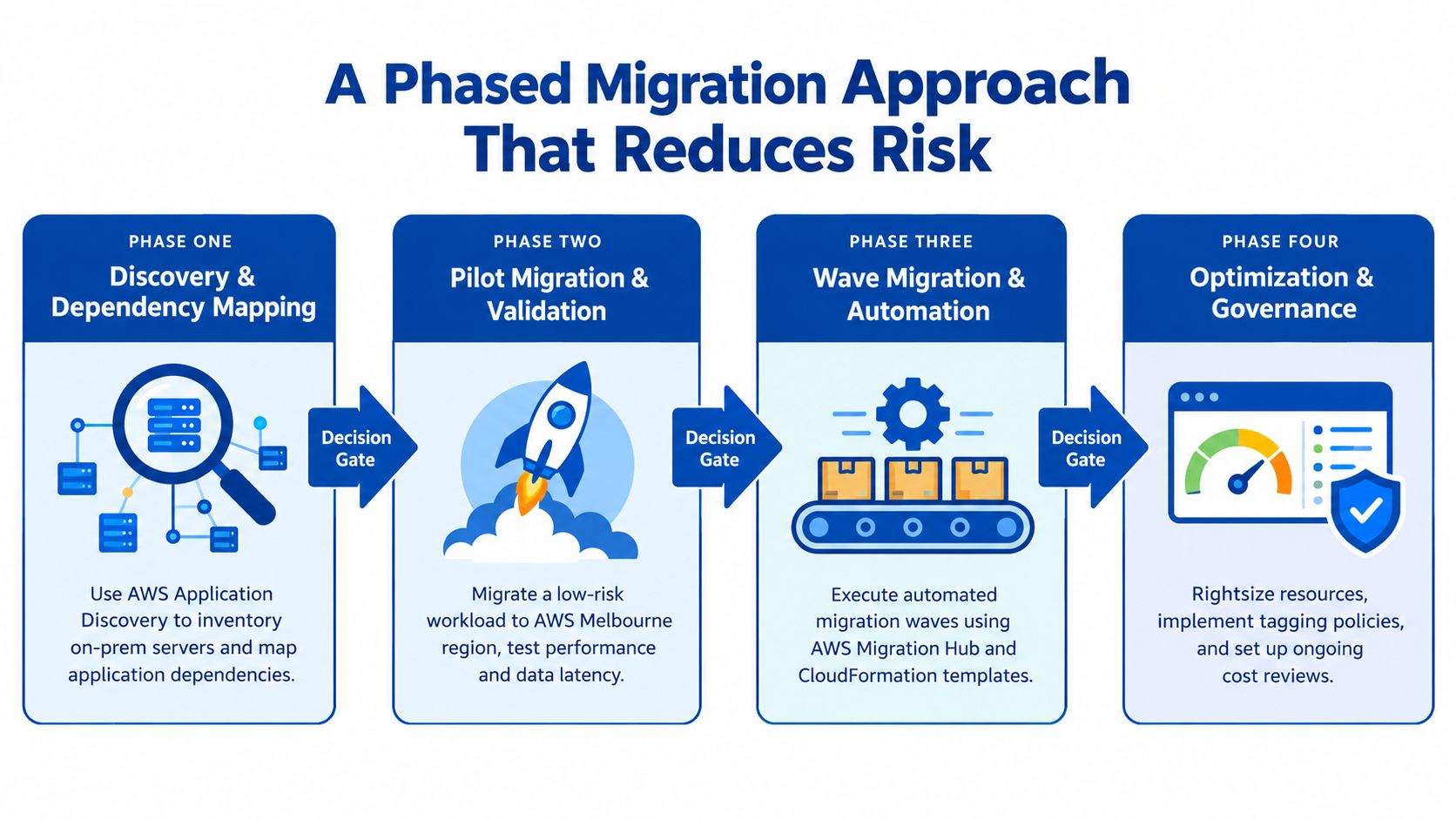
Phase one discovery and dependency mapping
Start with AWS Application Discovery Service where it fits, then add manual validation with business units, application owners, and support staff. Discovery tools help, but they don't understand undocumented batch jobs, spreadsheet-fed integrations, or one person in finance who restarts a service every month because “that's how it works”.
The deliverable at this stage isn't a migration date. It's a wave plan grouped by business criticality, dependency complexity, and data sensitivity.
Good outputs include:
- Application inventory: What exists, who owns it, and what depends on it.
- Residency classification: Which workloads belong in Melbourne, which stay elsewhere, and which need a hybrid pattern.
- Licensing review: Whether Microsoft, Oracle, or VMware positions make rehost, refactor, or replacement the better commercial move.
Phase two landing zone and control model
Before moving a single workload, build the operating model. That usually means a multi-account structure through AWS Control Tower, identity baseline with IAM Identity Center and AWS Organizations, plus network design that accounts for Transit Gateway, VPC endpoints, and shared services.
A lot of migration failures happen here because the landing zone is treated as a template exercise. It isn't. You're deciding how security, finance, operations, and delivery teams will work together for years.
Don't let your first production deployment become the first time anyone tests tagging, logging, account guardrails, or access escalation.
Phase three pilot wave and operational proof
The first workload should be low risk but operationally representative. An internal tool, public microsite, or secondary application usually works well. The point isn't technical bravado. The point is validating runbooks, monitoring, cost tags, backup procedures, and rollback paths before core systems move.
An experienced migration team earns its keep. If a provider can't show a written wave plan, rollback conditions, and post-cutover support model, they're not ready for your important workloads. For organisations needing structured execution help, a specialist provider offering cloud migration services should be able to handle both architecture and operating transition.
Phase four core systems and go or no-go gates
Core databases, customer systems, SAP estates, and analytics platforms come later. Each wave needs explicit go or no-go criteria tied to performance, support readiness, compliance evidence, and cost behaviour.
The biggest mistake here is choosing between rehost and refactor too early. Rehost is often the right first move for stable legacy systems with time pressure. Refactor makes sense when the application already blocks release velocity or operational resilience. If you force every app into modernisation on day one, cost and delivery risk usually spike together.
Governance, Compliance and Data Residency in Australia
Governance decisions in Australia usually get framed as a hosting question. In reality, they're an evidence question. Auditors, risk teams, and boards want proof that controls exist, that data handling is intentional, and that exceptions are tracked.
AWS's Australian compliance position matters here. AWS states that its IRAP assessment covers in-scope services in both the Sydney and Melbourne Regions, and that the 2024 H2 IRAP report added the Melbourne Region plus six additional services, bringing the total number of services assessed at the PROTECTED level to 164, according to the AWS IRAP compliance page. That gives regulated and government-adjacent buyers a stronger basis for Melbourne planning than they had before.
What Melbourne changes and what it doesn't
Melbourne gives organisations another onshore placement option with three Availability Zones, which matters for local resilience design and operational separation inside Australia. It doesn't remove the need to define where logs, backups, support access, and replicated data sit. It also doesn't automatically satisfy every sector-specific requirement.
For many private sector buyers, the practical policy stack still includes the Australian Privacy Principles, the Notifiable Data Breaches scheme, APRA CPS 234 where applicable, and the Essential Eight baseline. The cloud region is just one control decision inside that broader framework.
| Factor | Melbourne (ap-southeast-4) | Sydney (ap-southeast-2) |
|---|---|---|
| Australian region option | Suitable when buyers want an onshore alternative closer to Victoria operations | Established Australian region with long-standing deployment history |
| Availability design | Three Availability Zones in region | Mature Australian deployment option for multi-AZ architectures |
| IRAP position | In-scope services covered under AWS IRAP assessment | In-scope services also covered under AWS IRAP assessment |
| Residency strategy | Strong fit where contract wording or board preference favours Melbourne-hosted workloads | Still a valid choice where systems, teams, or established controls already centre on Sydney |
| Hybrid considerations | Useful as part of an onshore segmentation model | Often retained for existing estates, DR patterns, or established connectivity |
Guardrails and supplementary controls
Base governance usually starts with AWS Organizations, Control Tower, and AWS Config. That gives you account structure, policy guardrails, and configuration evidence. It's necessary, but it's not sufficient.
Most serious environments also need supplementary controls such as:
- IAM Identity Center for controlled workforce access
- Macie for data discovery and sensitive data visibility
- GuardDuty for threat detection
- CloudTrail Lake for retained, queryable audit evidence
AWS's Australia and New Zealand compliance material also points buyers toward a more useful question than “can AWS store my data in Melbourne?” It pushes the operational nuance around which data, logs, and backups must stay in-country, which can cross regions, and how that affects contracts, identity, observability, and incident response, as outlined on the AWS Australia and New Zealand compliance page.
The constraint is often not where production data lives. It's whether your team can prove the full chain of custody for logs, identities, backups, and incidents.
That's the distinction Melbourne buyers need to make early.
Typical Architectures and Observability Patterns
A sensible Melbourne reference architecture is usually boring in the right places. That's a compliment. Mature AWS environments don't win by having the most services. They win by making each component earn its place.
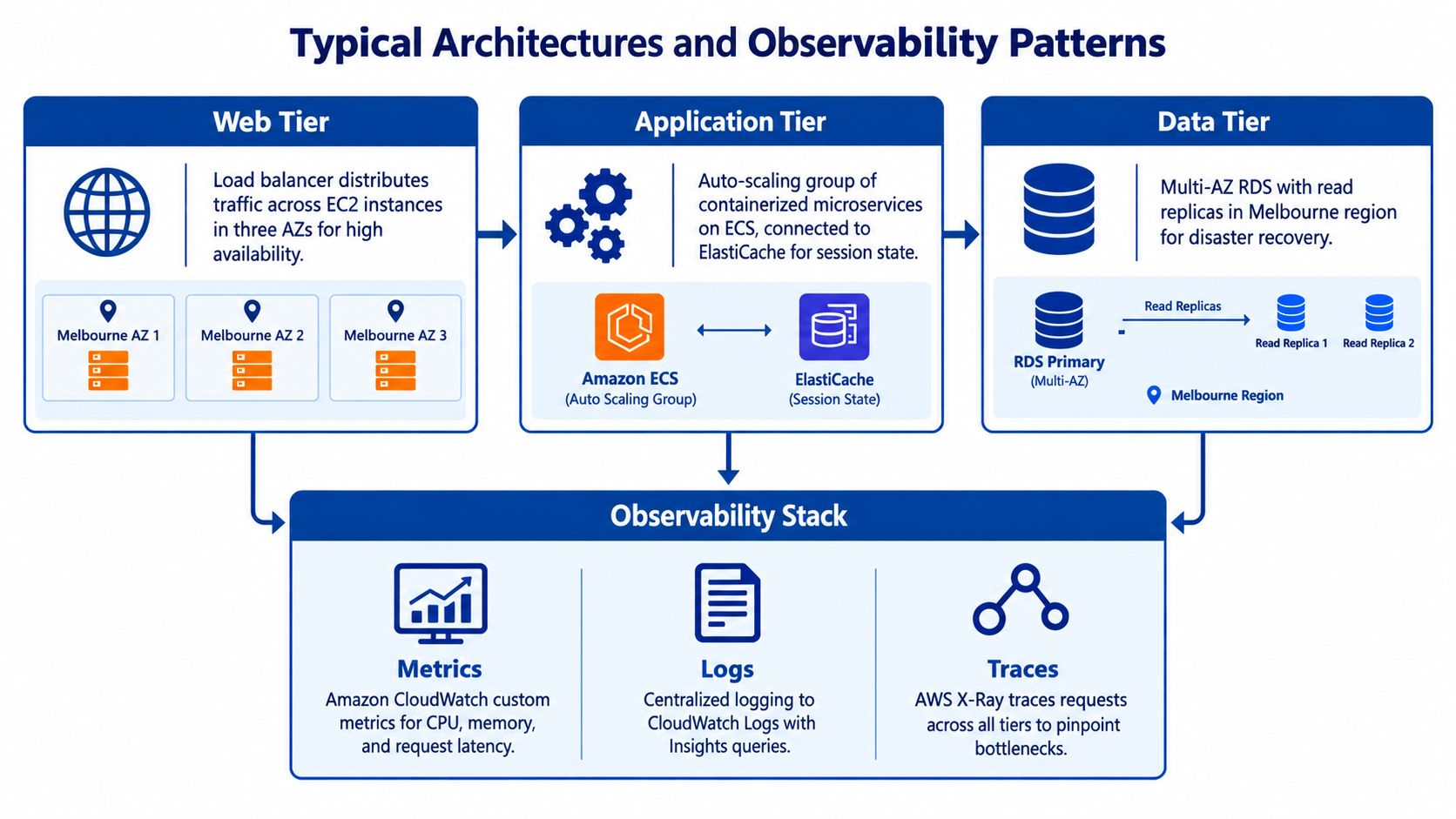
A practical baseline architecture
For a typical customer-facing platform, I'd expect a three-tier setup spread across multiple Melbourne Availability Zones. Application Load Balancer sits at the front, ECS on Fargate or EKS handles application compute, and Aurora PostgreSQL Multi-AZ or another managed relational data layer holds state. S3 supports object storage, often with Intelligent-Tiering when content access patterns vary.
Then add the components that solve specific problems:
- CloudFront for edge delivery and cache efficiency
- ElastiCache for sessions, queues, or hot-read patterns
- Lambda for event-driven tasks, document processing, or background jobs
That stack suits a large share of Melbourne briefs because it balances resilience, managed operations, and room for future change without dragging the team into unnecessary platform complexity.
Observability that won't blow out your bill
The observability stack should be intentional from day one. Baseline coverage usually means CloudWatch metrics, CloudWatch Logs, and CloudWatch Synthetics. For distributed tracing, use AWS X-Ray or OpenTelemetry depending on the estate and tooling standards. Container workloads benefit from Container Insights, while browser-heavy applications often need real user monitoring to see what customers experience.
I've seen plenty of teams budget carefully for compute and then lose control of log costs within weeks. Common causes are noisy debug logging, unlimited retention, and high-cardinality custom metrics nobody uses.
A stronger pattern is:
- Sample traces deliberately: Full tracing everywhere is rarely necessary
- Tier retention: Keep hot operational logs short, archive the rest intentionally
- Control metric labels: Don't create dimensions that explode monitoring cost
- Test failover: Use AWS Fault Injection Service and internal GameDays to validate assumptions before production incidents do it for you
A good dashboard hierarchy matters just as much as tool choice. Start with golden signals such as latency, traffic, errors, and saturation. Then map those to service-level objectives and team ownership. Ad hoc dashboards built during outages don't scale.
For teams that need stronger application-level visibility across cloud and custom platforms, this guide to enterprise application monitoring and debugging is a practical companion to the AWS-native stack.
Choosing a Melbourne-Based AWS Partner
The wrong AWS partner makes Melbourne look harder than it is. The right one shortens decision cycles, identifies design risks early, and stops your internal team from carrying all the translation work between executives, engineers, and compliance stakeholders.
What to check first
Start with capability evidence, not the sales deck. I'd look at four things in order:
- Credentials
- Reference architecture quality
- Commercial model
- Cultural fit
If a buyer starts with cultural fit and leaves credentials for later, they often end up with a partner who's easy to get along with and hard to rely on during cutover.
Useful indicators include AWS Partner tier, relevant AWS Competencies such as migration, SAP, financial services, public sector, or Well-Architected, plus service-specific delivery credentials where they matter. A genuine managed services partner should also be able to explain support coverage, escalation paths, and how they interact with AWS during incidents.
Reseller versus delivery partner
There's a big difference between a firm that resells AWS and a firm that can design, migrate, govern, and support a real operating environment. Resellers often focus on procurement convenience. Delivery partners should be comfortable discussing landing zones, observability standards, IAM boundaries, cutover runbooks, and post-migration cost governance.
Warning signs are usually obvious:
- No discovery phase: They quote before understanding dependencies and compliance constraints
- Thin local references: They can't point to Australian delivery experience that looks like your environment
- Single-solution bias: Every problem gets pushed toward their favourite template or proprietary layer
- Weak support model: Escalation and after-hours response are vague
Credentials open the door. Delivery method tells you what happens after the contract is signed.
For Melbourne organisations comparing options, one practical benchmark is whether the provider can handle cloud architecture, migrations, and operating controls in the same engagement rather than splitting responsibility across multiple subcontractors. That's the sort of capability covered by firms offering cloud computing consulting, including Melbourne-based teams such as Continuum Solutions.
A good partner should also be candid when Melbourne isn't the right default for every workload. If every answer is “move it all”, keep looking.
What Real Melbourne AWS Projects Have Taught Us
The recurring lesson from Melbourne AWS work is that the region decision is rarely the hard part. The hard part is all the architecture and governance discipline buyers hoped they could defer.
Patterns that show up again and again
The first pattern is residency-led design. Teams often choose region placement before they've properly classified data, then discover later that audit logging, third-party integrations, and backup policies don't match the original assumption.
The second is mid-market cost surprise. Not because AWS is unpredictable, but because data transfer, duplicated environments, and weak tagging remain invisible until after cutover. The invoice is just where the architecture mistake shows up.
The third is observability arriving too late. Teams migrate successfully on paper, then realise after launch that they can't answer simple operational questions quickly enough. By then, the fix costs more because the application and support model are already in motion.
| Observed Pattern | What It Signals | Decision to Make |
|---|---|---|
| Region chosen before data classification | Governance is being inferred rather than designed | Finalise workload and data residency rules before architecture sign-off |
| Cost shock after migration | Egress, duplication, or poor tagging was missed in discovery | Demand a clearer cost model with transfer paths and ownership tags |
| Monitoring gaps after cutover | Non-functional requirements were under-scoped | Add observability and support runbooks to the migration scope early |
| Governance improves when partner leads structure | Internal teams need operating guardrails, not just build capacity | Prioritise partners who can implement policy, visibility, and review cycles |
Three questions to ask any shortlisted provider
These three usually expose the difference between a serious delivery team and a generic one:
- How have you modelled cross-region traffic, backups, and shared services in the cost plan?
- Where are the failure modes in this design, and how will you test them before production?
- What evidence will we have for residency, access control, and incident review after cutover?
If the answers are vague, the proposal probably is too.
Your Next-Step Checklist for AWS in Melbourne
If you're evaluating AWS cloud services Melbourne options now, the next two weeks should produce decisions, not just meetings. The point is to leave that period with a shortlist, a migration view, and a governance baseline that internal stakeholders can review.
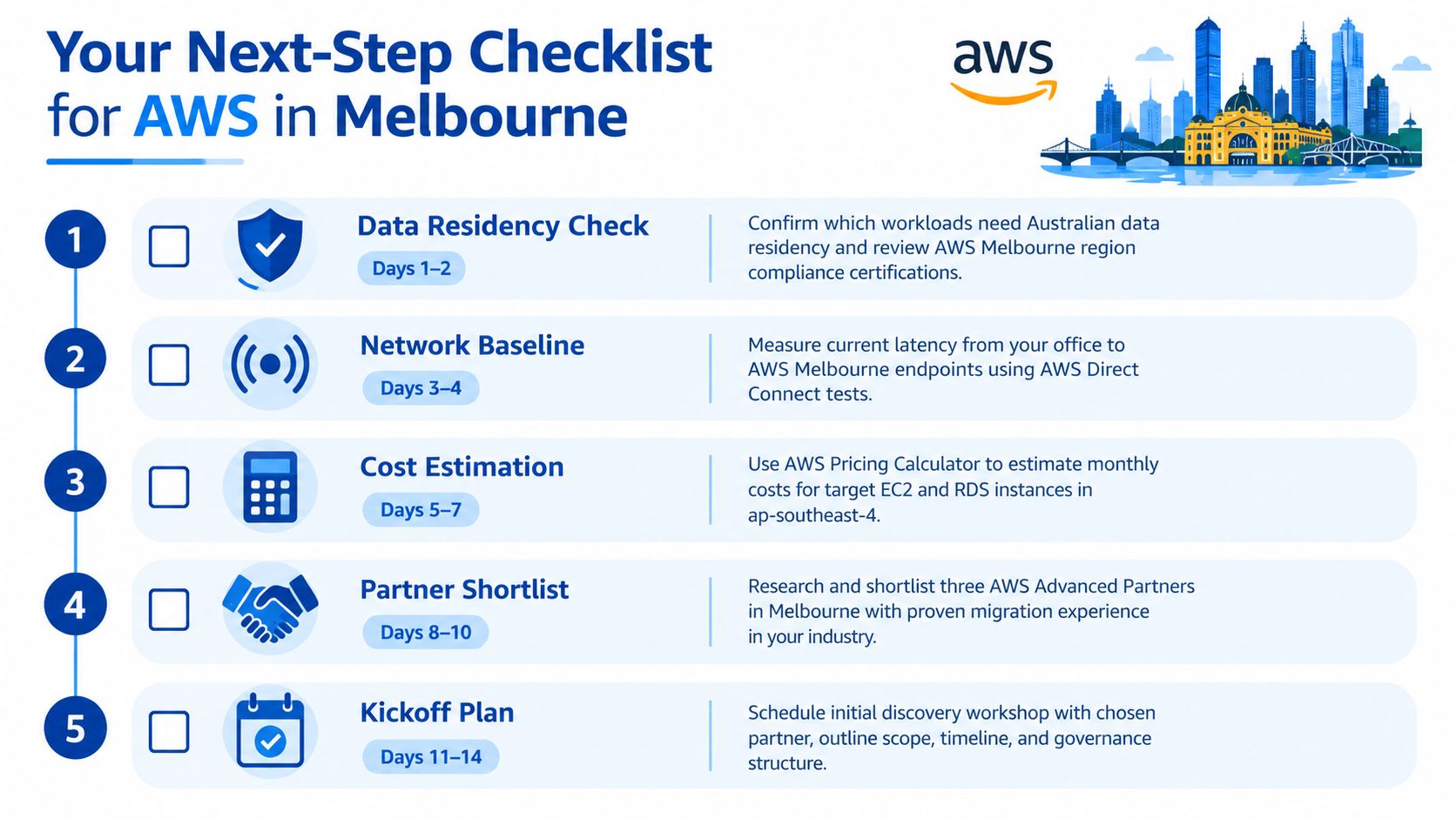
Days one to five
- Confirm residency scope: List which applications, databases, logs, and backups require Australian or Melbourne-based placement. Done means every critical workload has an owner and a residency classification.
- Map current spend and transfer paths: Pull your current cloud, hosting, and network costs into one view. Done means you can identify where data transfer and duplicated environments may distort future AWS cost.
- Define non-functional requirements: Lock in availability expectations, recovery objectives, support windows, and audit evidence requirements before vendor workshops. Done means those requirements are written and approved internally.
Days six to fourteen
- Shortlist delivery partners: Focus on Melbourne presence, relevant AWS credentials, local support model, and migration experience in comparable environments. Done means you have a shortlist with evaluation criteria, not just referrals.
- Request a written migration approach: Ask each provider for phases, decision gates, rollback points, and operating assumptions. Done means you can compare plans side by side, not just compare rates.
- Validate compliance and observability scope: Make sure Privacy Act obligations, Notifiable Data Breaches processes, APRA CPS 234 obligations where relevant, and baseline observability are built into the solution. Done means these controls appear in the proposal, not as “future phase” notes.
A useful commercial step at this point is to pressure-test migration and operating costs before anyone starts building. This guide on how much an AWS migration costs in Australia is a sensible reference for that conversation.
One final strategic point matters here. AWS says its Australia-focused economic assessment expects the Melbourne Region to involve A$6.8 billion of investment from 2022 to 2037, support an annual average of more than 2,500 full-time equivalent jobs at external businesses, and add A$15.9 billion to Australian GDP by 2037, according to AWS's Melbourne economic assessment. That tells you Melbourne is a long-term infrastructure milestone. It doesn't tell you which of your workloads belong there. Your own classification, governance, and cost model still have to do that work.
If you're planning an AWS move in Melbourne, Continuum Solutions can help with the parts that usually cause trouble: workload classification, phased migration planning, landing zone design, observability, and cost control. We work across AWS architecture, application modernisation, and systems integration for Australian teams that need practical delivery rather than a generic cloud pitch. To see how that fits your environment, visit Continuum Solutions.