
You're staring at a database move that can't slip. The application is still live, the business won't tolerate a long outage, and someone in the room has already asked whether AWS Database Migration Service can “just move it”. It can help, but only if you treat it as one piece of a wider migration program, not a magic button.
For Australian teams, the decision isn't whether AWS DMS exists. It's whether you can use it in a way that keeps the source running, limits cutover risk, and doesn't bury you in remediation work after the initial copy is done. AWS said at launch that the service was built so customers could start migrating with the source database remaining operational, and that remains the core value proposition today for systems that can't afford a hard stop AWS Database Migration Service launch announcement.
Table of Contents
- What AWS Database Migration Service Actually Does
- Supported Engines and Migration Patterns
- How DMS Fits Together
- A Practical Migration Checklist
- Common Pitfalls and How to Troubleshoot Them
- DMS Compared to Alternatives
- Cost and Performance Considerations
- When to Engage a Migration Partner
What AWS Database Migration Service Actually Does
Many teams arrive at AWS DMS with the same pressure points. There's a legacy database behind a business-critical workload, a renewal date or hardware refresh is looming, and the target platform has already been chosen or is being designed. DMS is the service that moves data between databases while keeping the source live, so you can stage the cutover instead of gambling on a single overnight outage.
What it does in practice
AWS DMS handles initial load and ongoing change data capture, so it can copy existing data first and then stream ongoing changes until you're ready to switch applications over. That's why it's useful for weekend cutovers, staged migrations, and systems that need the source to stay available while the target is being prepared. AWS also documents that DMS can migrate between relational databases, data warehouses, NoSQL databases, and other data stores, and that it supports both homogeneous and heterogeneous migrations AWS DMS schema conversion update.
Practical rule: Use DMS for data movement, not for solving application design problems. If your application still depends on database-specific code, that work sits outside the migration task itself.
The service is also relevant in Australia because AWS lists DMS in Asia Pacific (Sydney), with the regional endpoint dms.ap-southeast-2.amazonaws.com AWS DMS regional endpoint documentation. That matters when you want to keep replication traffic local and reduce avoidable latency during change capture.
What it doesn't do
DMS won't rewrite your stored procedures, refactor business logic, or tune the target database for you. If you're moving from Oracle to PostgreSQL or SQL Server to PostgreSQL, schema conversion and code remediation sit alongside the migration, not inside it. That's why I push clients to think in terms of a migration programme, not a single tool purchase.
The cleanest way to use AWS DMS is to separate the work into three layers. DMS moves the data. AWS Schema Conversion Tool, or equivalent remediation work, handles structural differences. Your application team handles SQL changes, connection changes, and performance tuning on the target side.
Supported Engines and Migration Patterns
The first mistake teams make is picking a tool before they've defined the migration pattern. If you don't know whether you're doing a homogeneous move, a heterogeneous move, or a cutover that relies on continuous replication, you can't size the work properly. You also can't judge whether AWS DMS is the right fit or whether it will create more rework than it removes.
Homogeneous and heterogeneous moves
AWS DMS is strongest when the source and target engines are closely related. Oracle to Oracle, PostgreSQL to Aurora PostgreSQL, and MySQL to RDS MySQL are the kinds of moves where native data types line up and the service can do the heavy lifting without asking for much manual repair. On the other side, SQL Server to PostgreSQL or Oracle to MySQL are heterogeneous moves, and that's where the schema and code gap becomes the project.
For Australian migration teams, the right question is simple. Can the target accept the source structure with light conversion, or will it need real redesign work before the application behaves properly? If it's the latter, DMS still helps with data movement, but it won't rescue a rushed plan.
| Source | Target | Pattern | Notes |
|---|---|---|---|
| Oracle | Oracle | Homogeneous | Good fit for keeping structure aligned and limiting application changes |
| PostgreSQL | Aurora PostgreSQL | Homogeneous | Strong fit when the target is AWS-managed PostgreSQL-compatible infrastructure |
| MySQL | RDS MySQL | Homogeneous | Works well when the main objective is managed hosting and staged cutover |
| SQL Server | PostgreSQL | Heterogeneous | Needs schema conversion and manual remediation for SQL features that don't translate cleanly |
| Oracle | MySQL | Heterogeneous | Use with caution, because database-specific logic usually needs redesign |
| Sybase | MariaDB | Heterogeneous | Better suited to a structured modernisation programme than a straight lift |
Full load, CDC, or both
A full load only pattern only makes sense when the database is small enough and downtime is acceptable. For production systems, I usually steer clients towards full load plus CDC, because that gives you the initial copy followed by streamed changes right up to cutover. CDC only is useful when data already exists at the target and you're synchronising changes, consolidating systems, or doing a near-zero-downtime switch.
The important part is not the pattern itself, but the operational consequence. Full load plus CDC means you're running two environments in parallel for a period of time, so validation, access control, and rollback planning all need to be designed up front. That's the part teams underestimate when they treat DMS as a simple move operation.
See how we position migration work in broader AWS programmes
How DMS Fits Together
AWS DMS has four moving parts, and if you do not understand them before you create the first task, you will burn time on avoidable errors. The service is built around a replication instance, source and target endpoints, replication tasks, and a replication subnet group. Get those aligned early, and the migration stays controlled instead of turning into a chain of cutover defects.
The replication instance and endpoints
The replication instance does the work. Its size affects throughput and how many tasks you can run in parallel, so size it for the largest table, the change volume, and the concurrency you need, not for average workload. AWS recommends running the source endpoint, target endpoint, and replication instance in the same AWS Region for best performance, and in Australian projects that usually means keeping the flow in Sydney or Melbourne when the architecture allows it AWS DMS service guidance.
The source endpoint and target endpoint are reusable connection definitions. They hold the engine type, server address, credentials, and SSL configuration. Once those are correct, you can reuse them across multiple tasks, which is why I treat endpoint validation as a programme-level activity, not a task-level detail.
Tasks, subnet groups, and data flow
A replication task binds one endpoint pair to one replication instance and defines the migration type, table mappings, transformation rules, and error handling. That means the task is where you decide what gets copied, what gets filtered, and how the service behaves when it hits a problem.
The replication subnet group places the instance into specific subnets. For Australian enterprise work, I want the replication instance close to the endpoints, in the right region, and tested against actual traffic. I do not want a neat architecture diagram that ignores latency or the hidden remediation work that sits outside DMS pricing. That is where Australian migration programs pick up real cost, in validation, schema fixes, access control, and downtime risk. See our AWS migration and architecture notes for the broader programme context.
Same-region placement also makes CDC tuning worth the effort, because the numbers you watch reflect the migration itself rather than avoidable network delay.
The fastest way to make DMS look broken is to spread the pieces too far apart and then guess at the cause.
A Practical Migration Checklist
A good AWS DMS project follows a sequence. Skip the sequence and cutover weekend turns into live troubleshooting, with the business carrying the cost. I'd run the work in six phases and assign one owner to each deliverable before production gets near it.
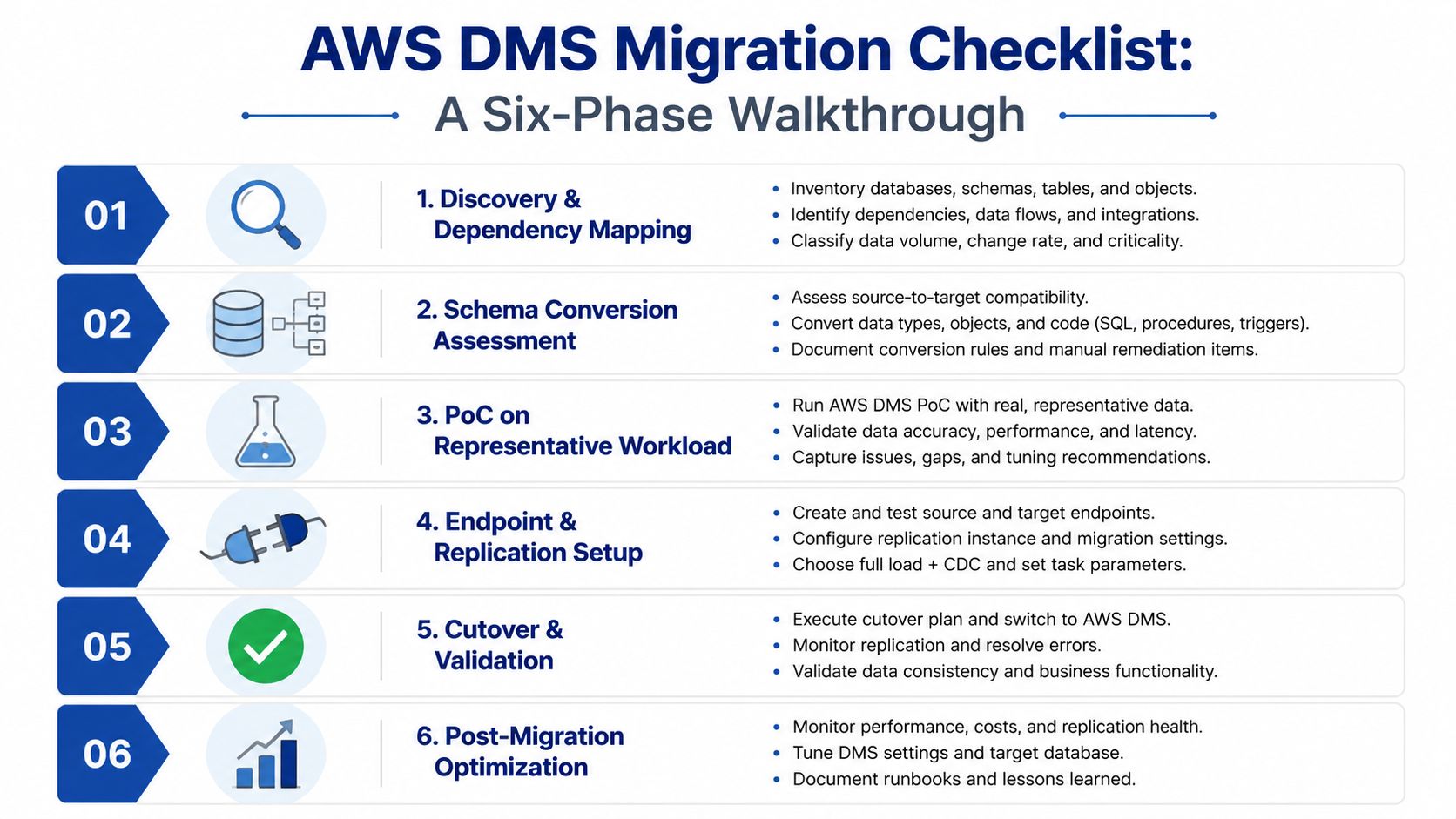
1. Discovery and dependency mapping
Start with a source-of-truth map of tables, LOB columns, sequences, triggers, stored procedures, and application dependencies. The deliverable is a clear record of what DMS will move cleanly and what needs manual handling. If that inventory is incomplete, the migration plan is already weak.
2. Schema conversion assessment
Run schema conversion early and flag every object that needs remediation. For heterogeneous moves, that means finding code that will not translate cleanly, including business logic buried in stored procedures. Leave this until after the data load, and you build delay into the program for no reason.
3. Proof of concept on representative workload
Use a real workload pattern, not synthetic traffic, and measure CDC latency against production-like write volume. AWS DMS documentation recommends proof-of-concept test migrations so you can size the replication instance and identify whether CPU, memory, I/O, or transaction volume is driving lag AWS DMS documentation. That is the point where bad assumptions get exposed cheaply.
4. Endpoint and replication setup
Build the endpoints, place the replication instance in the right region, and decide whether production tasks need Multi-AZ support. Confirm who owns validation queries on both sides. At 2am on cutover weekend, nobody wants a dispute over which report is right.
5. Cutover rehearsal
Treat the first switch as a dress rehearsal. Measure your RPO and RTO, record the actual steps, and capture every manual action. If the rehearsal fails, you have learned something useful before business users are waiting.
6. Post-migration validation
Check row counts, application transactions, and business reports. Do not let the team call it done because “the task completed”. The target has to behave like the source, or the migration is not finished.
Common Pitfalls and How to Troubleshoot Them
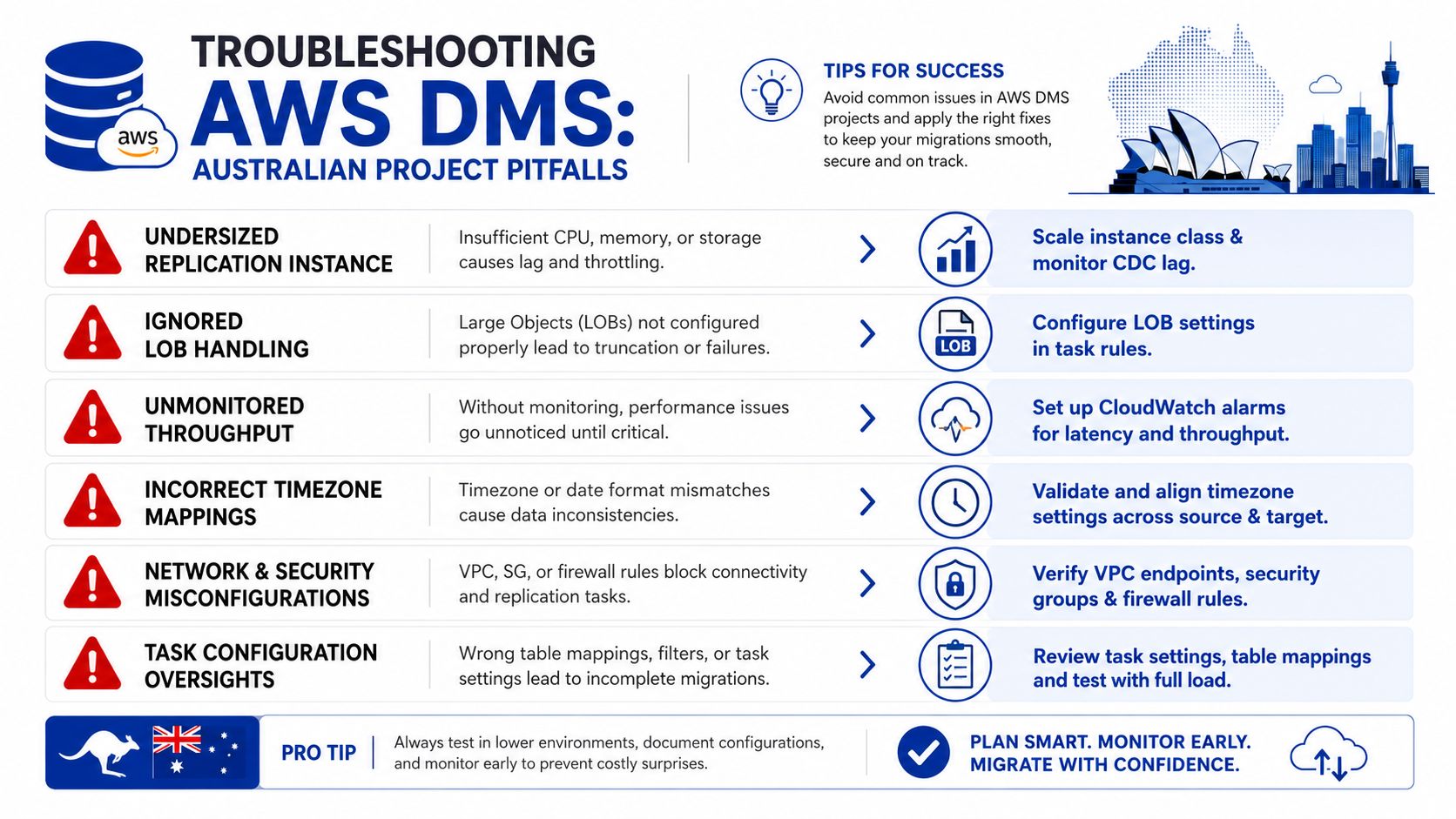
Most DMS failures on Australian projects come from poor sizing, weak validation, and teams expecting the service to cover application and schema problems. If you want a clean cutover, you need to watch the repeat offenders and fix them before they turn into weekend delays and remediation work.
The issues that hurt
Undersized replication instances are a common trap because they look fine in early testing and then stall under sustained CDC load. Size against the actual transaction pattern, not the neatest estimate, and watch CPU, memory, and I/O before production cutover. AWS DMS documentation recommends proof-of-concept test migrations so you can see what is driving latency before you lock in the final task shape.
LOB handling gets missed more often than it should. If the task rules are loose, large columns can be truncated or more LOB data can be moved than the target needs. Set the handling deliberately instead of accepting defaults and hoping they fit.
Missing primary keys can break smooth full-load behaviour or make change application unreliable. That is a source-data problem, not a DMS problem, and it should surface during discovery. Fix the table design issue or isolate the exception before you start the task.
Skipping validation is how schema drift slips into production. I always want a comparison pass after cutover, using AWS SCT or a third-party comparison tool, because row counts alone do not tell you whether the application still behaves properly. For Oracle to PostgreSQL or any other heterogeneous move, the primary remediation cost sits in the work to fix mismatches, not in the DMS runtime. The SME migration mistakes we keep seeing in Australian projects are usually the same ones, poor validation, late remediation, and no clear owner for business sign-off. See common AWS migration mistakes we keep seeing in SME projects
Practical rule: If CDC lag rises while the source stays healthy, look at the replication instance and the target first. If the source log chain is broken or transaction volume is abnormal, escalate to the source database team immediately.
A clean triage path
Start with the replication metrics, then check source transaction behaviour, then inspect target write performance. That order saves time because it separates infrastructure strain from database design issues. If the problem sits in schema conversion, do not spend a day tuning the replication engine to fix something it cannot solve.
DMS Compared to Alternatives
A migration plan that starts and ends with AWS DMS usually misses the key decision. Cutover success depends on the mix of replication method, schema conversion, validation, and how much downtime the business can absorb. In Australian projects, the expensive part is rarely the tool itself. It is the remediation, testing, and weekend support needed to make the cutover hold.
Where DMS fits
AWS DMS makes sense when you want a managed service, broad engine support, and a controlled way to keep the source online during migration. It is a sound choice for homogeneous moves, staged heterogeneous migrations, and teams that do not want to own replication plumbing after go-live. It is a weaker choice when the job needs heavy transformation or when the team already has the skills to run a more specialised replication setup.
What you're really comparing it against
| Tool | Best fit scenario | Key limitation | Typical cost profile |
|---|---|---|---|
| AWS DMS | Managed migration with live source systems and staged cutover | Limited help with complex code transformation | Service cost grows with runtime and migration size |
| Native logical replication | Steady-state replication where the team has deep database skills | Requires strong in-house operational ownership | Lower service overhead, higher skill burden |
| AWS Schema Conversion Tool | Heterogeneous schema assessment and conversion prep | Doesn't move the data by itself | Low direct tool cost, higher remediation effort |
| Dump and restore | Simple homogeneous moves with acceptable downtime | Poor fit for low-downtime cutovers | Lower tooling cost, higher outage risk |
| Third-party replication tools | Complex transformation and specialist enterprise migrations | Licensing and vendor lock-in | Usually higher software cost, sometimes lower manual effort |
Native replication can cost less over time, but only if you have the staff to run it properly. Dump and restore works when the business can live with downtime and the source and target are close enough to keep the process simple. For heterogeneous migration work, AWS SCT plus DMS is usually the practical combination, because one handles conversion assessment and the other handles the data movement.
The hard call is operational, not technical. If the project needs deep transformation logic, or the organisation already runs another replication platform well, DMS should stay in the mix but not lead the design. Otherwise, it usually gives you a cleaner cutover path than scripts, backups, and hope.
Cost and Performance Considerations
The budget mistake I see most often is treating AWS DMS like the whole migration bill. It is only one part of the programme. In Australian projects, the cost sits around it, remediation, validation, cutover support, and the business risk of getting the weekend wrong. AWS prices DMS with on-demand and serverless options, no upfront commitment, and free data transfer into DMS, but the service charge still tracks migration size and runtime rather than business complexity.
What lands in the budget
The direct costs are easy enough to list. You pay for replication instance hours, storage, and any data transfer out. Then comes the work teams usually undercount, source remediation, schema conversion, validation environments, parallel-run overhead, and hypercare after go-live.
That hidden spend is often the primary budget driver in Australia. Small to mid-size migrations commonly start in the low tens of thousands of AUD, while more complex enterprise migrations often land around AUD 300,000 to AUD 600,000+ for delivery alone. For a practical view of how those migration costs break down, see our Australian migration cost guidance. The spread comes from programme complexity, not from the DMS meter.
Performance levers that matter
Start with the replication instance. Size it properly, keep source and target in the same region, and tune task parallelism so the service can keep pace with real write traffic. LOB handling matters too. A poor setting slows the task or drags in more data than the target needs. AWS guidance is clear on the basic pattern, source endpoint, target endpoint, and replication instance should sit in the same region for best performance, and in Australia that usually means staying within Sydney or Melbourne where possible.
| Project Profile | DMS Line Items (AUD) | Remediation & Testing (AUD) | Total Indicative Range |
|---|---|---|---|
| Small homogeneous move | Modest service spend | Validation and cutover support still dominate effort | Low tens of thousands |
| Mid-size staged migration | Moderate service spend | Schema checks, parallel run, and rehearsal add materially | Mid tens of thousands to low hundreds of thousands |
| Complex heterogeneous migration | Service spend is only one part of the bill | Code conversion, remediation, testing, and hypercare drive cost | AUD 300,000 to AUD 600,000+ |
My advice is blunt. Do not price DMS until you have priced the remediation and validation work around it. That is where most programmes blow out.
When to Engage a Migration Partner
Bring in outside help when the migration risk is bigger than your team's spare capacity. That usually means a heterogeneous move to PostgreSQL or Aurora, a regulated workload that needs documented validation, or multiple databases moving in parallel while the internal team is still running day-to-day operations. If the cutover window is tight and downtime has direct revenue impact, a partner pays for itself quickly.
What good looks like
A serious migration partner should show real DMS and SCT delivery experience, not just generic cloud delivery claims. You want Australian-based cutover support, because the people doing the work need to be available when your business is live. You also want capability across both Oracle and Microsoft stacks on one side, and PostgreSQL, MySQL, Aurora, or Redshift on the other.
I'd also insist on a paid proof of concept before commitment. If a partner won't prove the plan on a representative workload, they're selling confidence rather than delivery.
See the migration services we use for staged AWS cutovers
A sensible engagement pattern
The cleanest pattern is discovery sprint, PoC, pilot migration, production waves, and hypercare. That sequence gives you milestones, decision points, and a way to stop if the conversion work is turning into a bigger redesign than expected. It also keeps the commercial model tied to outcomes instead of open-ended consultancy days.
Continuum Solutions handles AWS migration planning, staged validation, and database cutover support for teams that need a practical path through the work. If you're planning an AWS DMS move and want a clear view of remediation, validation, and cutover risk, start a conversation with Continuum Solutions.