
Your membership platform probably didn’t start as a strategic infrastructure project. It started as a practical way to accept registrations, manage renewals, gate content, and keep operations moving. Then growth arrived. More members, more integrations, more support overhead, more payment edge cases, more compliance questions, and more pressure on a stack that was originally “good enough”.
That’s when hosting stops being an IT line item and becomes a business constraint.
For Australian organisations, that decision is even less forgiving. Member data often includes personal details, payment metadata, behavioural events, and support history. NGOs may need stronger governance. Enterprise teams may need auditability, controlled deployments, and integration with CRM and finance systems. Government-adjacent organisations can’t treat region selection as an afterthought. If the platform sits on brittle hosting, every product decision gets slower and every incident becomes more expensive.
The broader market is moving in the same direction. Australia’s Internet Hosting Services industry is projected to reach a $1.5 billion market size in 2026 and grow at a 9.2% CAGR between 2021 and 2026, reflecting rising demand for scalable cloud-hosted platforms across organisations of all sizes, according to IBISWorld’s Australia Internet Hosting Services industry analysis.
AWS is usually the right shortlist candidate when the platform matters commercially, not just technically. It gives you enough flexibility to modernise in stages, enough managed services to avoid running everything yourself, and enough regional capability to make Australian compliance decisions properly. For teams weighing architecture and sovereignty trade-offs locally, a good starting point is this overview of an AWS partner solution architect in Melbourne.
Table of Contents
- Introduction Why Your Platform’s Foundation Matters
- Core Architecture Patterns for Membership Platforms
- Integrating Authentication and Billing Systems
- Building a Scalable Data and CRM Strategy
- Managing Costs and Planning Your Migration
- Operational Excellence and Australian Compliance
Introduction Why Your Platform’s Foundation Matters
A membership platform fails slowly before it fails visibly. Pages get heavier. Admin workflows become fragile. Renewals create support tickets. Reporting depends on spreadsheets because the core system can’t answer basic questions quickly enough. Teams often blame the application, but the underlying hosting and architecture are usually the primary issue.
That’s why AWS hosting for membership platforms should be treated as a board-level technology decision, not a routine infrastructure refresh. The wrong foundation locks you into manual deployments, scaling headaches, duplicated member data, and oversized cloud bills. The right foundation gives product, operations, and finance teams room to move.
What tends to break first
In practice, the first pain points are rarely dramatic outages. They’re recurring operational friction:
- Renewal spikes expose weak capacity planning: Fixed hosting setups cope during normal weeks, then struggle when a campaign or annual renewal cycle compresses demand.
- Integrations become brittle: CRM syncs, payment webhooks, and identity systems start failing in ways that aren’t easy to trace.
- Compliance questions arrive late: Someone asks where member data is stored, how access is logged, or how failover works, and the current stack doesn’t provide a clean answer.
Practical rule: If your platform can’t scale member-facing traffic and back-office processes together, it isn’t actually scaling.
Why the foundation changes the economics
A membership platform isn’t just a website. It’s an operational system that touches billing, support, reporting, access control, and retention. Hosting choices affect developer throughput, incident response, audit readiness, and how much custom integration work you need later.
That’s also why generic “move it to the cloud” advice usually underdelivers. The essential decision is which AWS architecture pattern gives you enough flexibility without creating unnecessary complexity. For some organisations, that means serverless from the start. For others, it means a controlled migration from a monolith into containers or managed components.
Core Architecture Patterns for Membership Platforms
There isn’t one correct AWS pattern for every membership business. The right answer depends on traffic shape, product maturity, internal engineering capability, integration complexity, and how quickly you need to move.
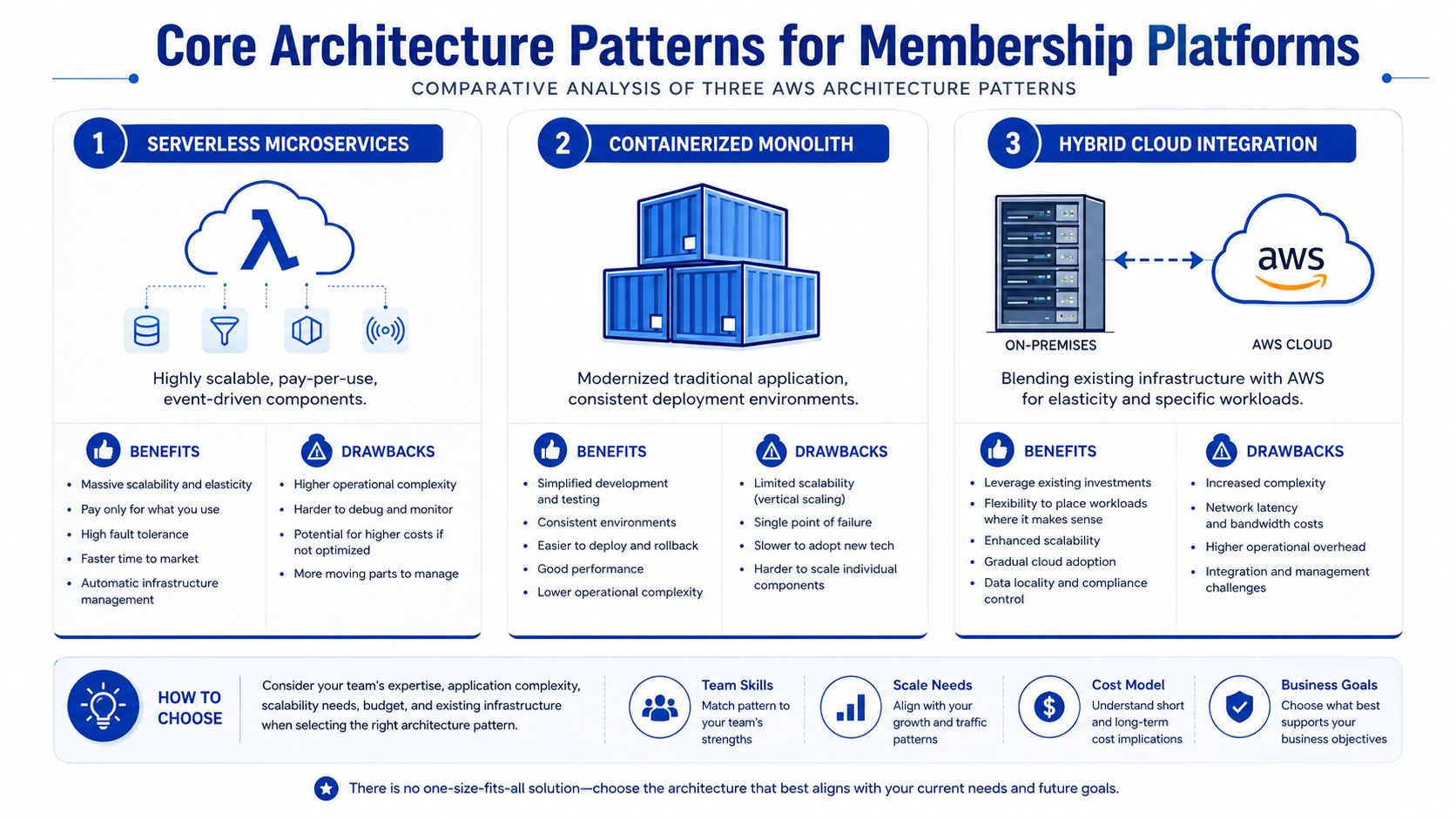
The three patterns that consistently come up are serverless, containerised applications, and managed virtual machines on EC2. All three can work. What matters is choosing the one that fits your operating model.
Serverless when demand is variable
Serverless is often the cleanest option for platforms with fluctuating traffic, event-driven workflows, and a roadmap that prioritises speed of change. A typical stack here is AWS Lambda, Amazon API Gateway, Amazon DynamoDB, Amazon S3, and selected managed services around identity and messaging.
The commercial case is strong when usage is uneven. Serverless architectures on AWS can reduce membership platform hosting costs by 40–60% compared to traditional VM-based setups, based on the case examples discussed in this AWS cloud migration overview for membership platforms.
What works well:
- Member lifecycle events: Registration, renewals, cancellations, entitlement checks, and webhook processing map naturally to event-driven functions.
- Lean operations teams: You avoid patching fleets of servers and can focus more on application behaviour.
- Burst traffic: You don’t need to provision for the quiet weeks just to survive the busy ones.
Where teams get caught out is application shape. Serverless isn’t a shortcut for poor boundaries. If the platform has tightly coupled business logic, long-running jobs, or a legacy codebase built around persistent server state, forcing everything into Lambda can create more problems than it solves.
Containers when the application needs consistency
For established platforms, Amazon ECS with Fargate often gives the best balance between control and operational simplicity. You keep the application packaged in a consistent runtime, but you don’t carry the full burden of managing hosts.
This pattern suits organisations that already have a mature web application, background workers, admin tools, and integration services that need predictable deployment behaviour. It’s also a good fit when development teams want cleaner release processes without rewriting the product into microservices immediately.
A containerised membership platform usually makes sense when:
| Pattern fit | Why it matters |
|---|---|
| Complex business logic | The platform has workflows that are easier to keep inside a cohesive application boundary |
| Steady usage | Traffic is substantial enough that always-on services are acceptable operationally |
| Migration realism | The business needs modern deployment and scaling before it needs deep architectural decomposition |
Containers don’t remove complexity. They relocate it. You still need to define health checks, autoscaling rules, deployment strategy, secrets management, and observability. But compared with a raw EC2 estate, the operational surface is usually cleaner.
A modernised monolith in ECS is often a better commercial decision than an over-engineered microservices rebuild.
For teams evaluating those trade-offs in more detail, this comparison of AWS Lightsail vs EC2 vs ECS for application hosting is useful.
Managed virtual machines when migration speed matters
EC2 still has a place, particularly when the immediate priority is to stabilise a legacy platform or exit unsuitable hosting without changing too much at once. If you’re moving from shared hosting, an ageing VPS, or a heavily customised application server, EC2 can be the lowest-friction path into AWS.
That doesn’t mean it should be the long-term destination.
EC2 is best when you need one or more of these conditions:
- Compatibility first: The application relies on OS-level packages, older frameworks, or deployment assumptions that are difficult to rework quickly.
- Controlled transition: The business needs to reduce migration risk before it tackles modernisation.
- Temporary containment: You’re buying time to separate workloads and plan a cleaner architecture later.
The downside is predictable. VM-heavy platforms tend to accumulate manual maintenance, larger patching overhead, and slower release cycles. Costs also become less forgiving if environments are oversized or left running for convenience.
A practical selection framework looks like this:
- Choose serverless if the platform is event-heavy, growth-oriented, and you want lower idle overhead.
- Choose ECS with Fargate if the application is already substantial and your main problem is reliable deployment plus scalable runtime consistency.
- Choose EC2 if the migration path matters more right now than architectural purity.
Integrating Authentication and Billing Systems
Membership products live or die on two capabilities. People need to get in reliably, and money needs to move without manual repair work. When authentication and billing are bolted directly into a monolith, every policy change becomes risky. Decoupling them on AWS gives you cleaner failure handling and fewer support escalations.
Separate identity from application logic
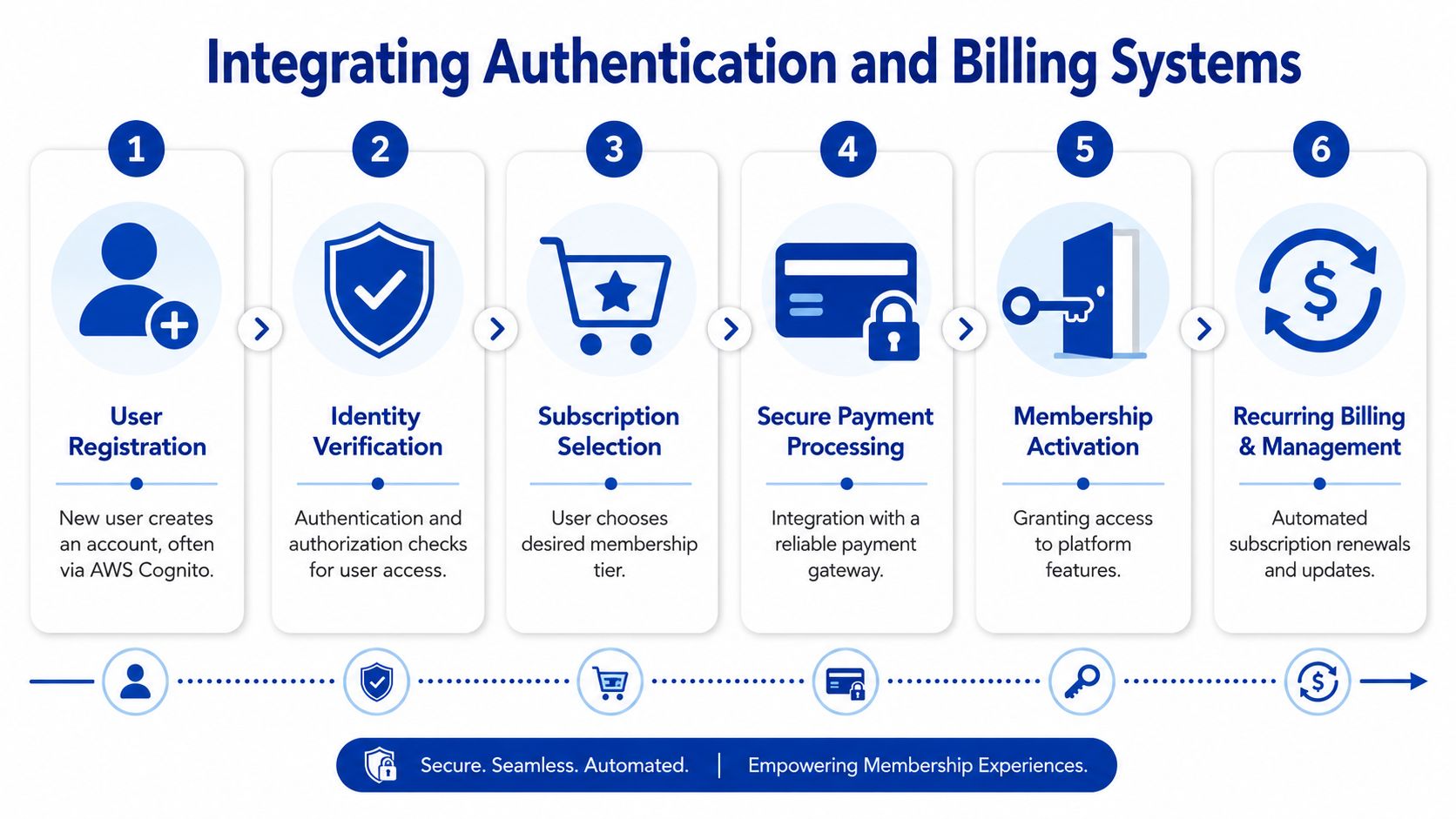
The most reliable pattern is to treat identity as its own service boundary. Amazon Cognito can handle core user pools and authentication flows, while third-party identity providers such as MiniOrange or Okta can sit where SSO, federation, or more specific governance requirements apply.
The mistake is coupling authorisation too tightly to sign-in. A member logging in successfully doesn’t automatically mean they should access premium content, chapter benefits, or partner-only areas. Those entitlement checks should sit in application services, typically exposed via Amazon API Gateway and resolved by backend logic in AWS Lambda or your application runtime.
A sound integration flow usually includes:
- Identity verification: Cognito or a federated provider confirms who the user is.
- Token exchange and session handling: The frontend receives the right claims without embedding business logic in the client.
- Entitlement lookup: The platform checks subscription state, role, grace period, and account standing.
- Feature access: The application returns only what that membership status allows.
This is also the point where custom integrations matter. Many membership platforms need identity, CRM, and billing to stay aligned, especially when an operations team is handling support across multiple systems. That’s where a documented API layer and proper event contracts become more valuable than one more plugin. For integration-heavy environments, this overview of custom integrations for business systems shows the shape of that work.
Use events for renewals and payment failures
Billing should be event-driven, not page-driven. Don’t make subscription state depend on a member revisiting the site at the right time. Gateways such as Stripe send webhook events for payment success, failure, charge disputes, plan changes, and cancellations. AWS gives you a clean way to process those events asynchronously.
A dependable pattern looks like this:
- Webhook entry point: API Gateway receives the event and validates it.
- Processing layer: Lambda functions apply business rules, update membership state, and trigger notifications.
- System updates: CRM, finance tools, or admin dashboards receive downstream updates through queues or integration workers.
When billing logic runs as events rather than inline user actions, support teams spend less time correcting account state manually.
Keep payment status and access status related, but not identical. A failed payment may trigger a grace period. A manual override from support may restore access temporarily. An enterprise account may renew on invoice terms that don’t resemble a card subscription at all. If the model can’t express those states cleanly, billing problems turn into member experience problems.
Building a Scalable Data and CRM Strategy
Most membership platforms don’t break because they lack data. They break because member data ends up in too many places, with no clear source of truth. The website knows one thing, the CRM knows another, support exports a spreadsheet, and finance relies on payment metadata that product teams never see.
The database decision is only part of the problem. The bigger issue is how data moves.

Choose the database around system behaviour
For many membership businesses, Amazon Aurora is the right default when the platform has relational requirements such as plans, invoices, entitlements, event registrations, staff workflows, and reporting joins. If your product team regularly asks questions that combine account, billing, and activity data, relational structure usually makes life easier.
Amazon DynamoDB is stronger when you’re dealing with high-volume event data, simple lookup patterns, or workloads that need very fast horizontal scaling with minimal operational effort. It can work well for profile stores, access tokens, session state, or behavioural events that don’t need heavy relational querying.
A pragmatic split is common:
- Aurora for transactional truth: Membership records, billing state, role assignments, and audit-sensitive entities.
- DynamoDB for high-speed access patterns: Cached entitlements, session-related data, or event-driven service interactions.
- S3 for durable object storage: Exports, documents, media, and archived data exchanges.
This isn’t about choosing the most fashionable database. It’s about reducing future integration friction. A well-structured data layer makes downstream reporting, CRM sync, and support tooling much easier.
Design CRM sync as a product feature
Many organisations still treat CRM integration as middleware plumbing. That’s a mistake. If Salesforce or HubSpot drives renewal outreach, sales handoff, member success, or board reporting, the sync model is part of the platform itself.
The practical questions are operational:
| Decision area | Better approach |
|---|---|
| System of record | Decide whether the platform or CRM owns each field before writing any sync logic |
| Sync timing | Use event-driven updates for critical changes, not overnight batch jobs by default |
| Conflict handling | Define what happens when support staff edit records in one system while automation updates another |
A healthy CRM strategy usually includes member create and update events, idempotent API calls, retry handling, and visible error queues for operations staff. If a sync fails unnoticed, the business doesn’t discover the issue until a campaign misfires or a support interaction goes sideways.
A useful reference point for how integrated membership workflows can support growth and operations is this ClubScout case study.
Good data architecture doesn’t just help engineering. It gives membership, finance, and support teams a version of the member record they can trust.
Managing Costs and Planning Your Migration
AWS bills don’t become reasonable by accident. Membership platforms get expensive when teams migrate old habits into new infrastructure. The usual culprits are oversized always-on services, duplicate environments, unclear ownership, and a migration plan that drags on so long you pay for both stacks at once.
Cost control starts with architecture
AWS’s pay-as-you-go pricing model is valuable because it lets membership platforms scale compute and database resources during peak periods such as renewal campaigns, aligning spend with actual usage rather than fixed reservations. That helps, but only if the architecture is built to take advantage of it.
Cost control works best when you make a few decisions early:
- Use managed services where they remove labour: A slightly higher service line item can still be cheaper than ongoing operational overhead.
- Tag environments and owners properly: Usage-based cost optimisation through dynamic tagging and real-time tag adoption tracking has delivered 25–35% savings for large ANZ-based SaaS providers managing heavy traffic, as shown in this ANZ AWS cost optimisation discussion.
- Turn non-production into a governed asset: Dev and test environments often become permanent cost leaks when nobody owns runtime hours.
The most impactful question isn’t “How do we reduce this month’s bill?” It’s “Which workloads should be always on, and which should scale with actual demand?”
A phased migration is usually the cheapest safe option
The cheapest migration on paper is rarely the cheapest migration in reality. Big-bang moves create rollback risk, freeze product work, and usually force teams to overprovision “just in case”. A phased migration keeps business continuity intact and exposes architectural issues earlier.
A practical migration sequence often looks like this:
- Establish the landing zone: Networking, IAM boundaries, logging, secrets, and baseline monitoring first.
- Move low-risk workloads: Background jobs, file storage, or reporting functions often migrate more safely than the member-facing core.
- Stabilise integrations: Identity, billing, CRM, and notifications need testable contracts before the main cutover.
- Shift member-facing traffic in stages: Start with narrow cohorts, low-risk features, or parallel-read patterns where possible.
- Retire duplicated infrastructure quickly: Running old and new stacks indefinitely destroys the cost case.
The migration plan should follow business dependencies, not just technical neatness.
If you’re budgeting the work properly, include engineering effort, testing, observability, data migration, and post-cutover support. Hosting cost is only one part of the investment. This guide on AWS migration costs in Australia is a practical starting point for that planning.
There’s also a specific NGO angle worth considering. Some Australian nonprofits can pursue the AWS Imagine Grant for ANZ to help fund cloud-related initiatives, but implementation still needs a realistic delivery partner model and a platform plan that fits compliance obligations.
Operational Excellence and Australian Compliance
A membership platform can pass user acceptance testing and still become a board-level problem three months after launch. The pattern is common. Overnight jobs fail unnoticed, support teams discover access issues before monitoring does, and a routine release turns into an after-hours recovery exercise. For Australian organisations, the pressure is greater because operating discipline and compliance decisions are tied together from the start.
Run the platform with deployment discipline
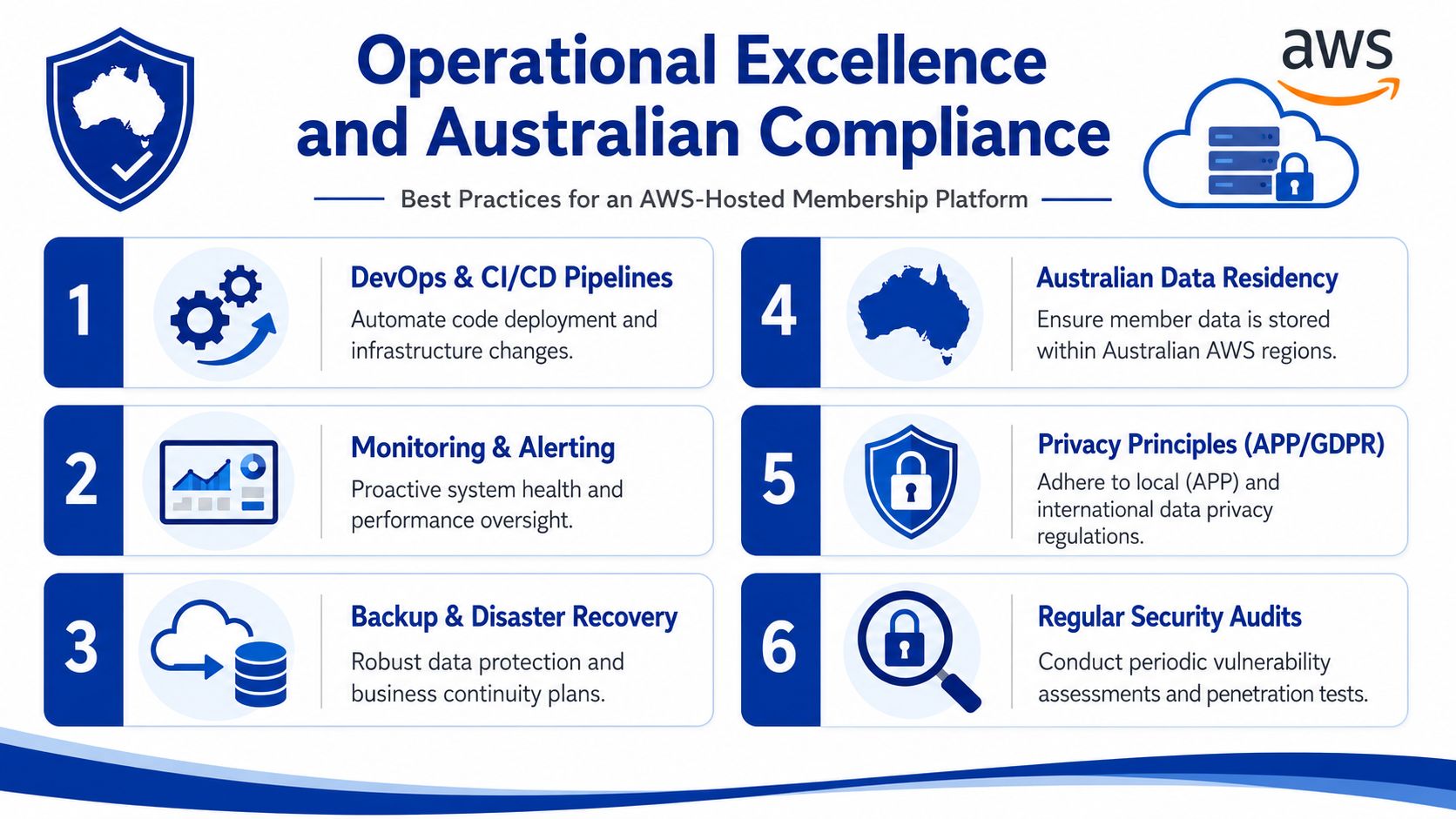
Stable operations start with repeatable delivery. AWS CodePipeline, infrastructure as code, environment approval rules, and automated testing usually reduce more risk than adding another managed service. Membership platforms change often. Pricing rules shift, access entitlements change, event workflows evolve, and billing exceptions appear faster than product teams expect. If releases depend on manual server changes or one senior engineer, the platform will eventually fail at an expensive moment.
A practical operating model usually includes three controls.
- Automated deployments: Build, test, and deploy through a pipeline. Do not patch production by hand.
- Application-level observability: Amazon CloudWatch covers core AWS telemetry, but teams usually need tools such as Sentry or New Relic as well to trace member-facing errors, webhook failures, and slow transactions.
- Runbooks with assigned ownership: Failed direct debit retries, delayed CRM syncs, and account lockout spikes should have documented response steps and a named team responsible for them.
This matters more in Australia than some vendors admit. Local hosting is only part of the operating model. Australian teams often need evidence that systems are controlled, recoverable, and auditable, especially where member data includes payment details, health-related data, union records, or government-adjacent information.
AWS’s long-term position in Australia also matters for procurement and risk committees. Amazon states it plans to invest AU$20 billion in Australia by 2029 to expand, operate, and maintain local data centre infrastructure, according to Amazon’s announcement on AWS data centre investment in Australia. That does not replace sound architecture, but it does support the case for AWS as a long-term hosting option for organisations that need local capacity and continuity.
Design for Australian data residency from day one
Data residency should be a design decision, not a policy note added late in the project. If the platform stores member profiles, donation history, professional credentials, case notes, or support interactions, the architecture should make it clear where that data sits, where backups are stored, who can access it, and what leaves Australia.
AWS provides local region options and documents compliance programs relevant to Australia and New Zealand in its AWS compliance for Australia and New Zealand resources. That helps, but CTOs still need to map those capabilities to their own obligations under the Privacy Act, internal governance requirements, and sector-specific controls. For some organisations, especially those selling to government or operating in regulated environments, Protected-level alignment will also shape network design, access controls, logging, and third-party integration choices.
The Sydney and Melbourne region decision is rarely symmetrical. Sydney generally remains the primary production choice because the service catalogue is broader and architectural compromises are fewer. Melbourne can still play an important role for disaster recovery, selected replicated services, and data sovereignty objectives, but teams need to check service availability before committing to a multi-region pattern. The gaps are real, as outlined in this analysis of AWS development and region design in Australia.
In practice, the pattern I recommend most often is straightforward.
- Run primary production in Sydney: It gives teams access to a wider set of services and fewer workarounds.
- Use Melbourne deliberately: Place replicated data stores, recovery environments, or limited failover components there where the service set supports the design.
- Test recovery under Australian constraints: Confirm backups, security tooling, deployment pipelines, and monitoring all work in the secondary region before calling it a disaster recovery plan.
This is particularly relevant for NGOs and membership bodies with tight budgets. A second region improves resilience, but it also adds cost across networking, storage replication, monitoring, and operational overhead. If the organisation cannot fund regular failover testing and support the extra complexity, a well-designed single-region platform with cross-account isolation, strong backup controls, and defined recovery procedures may be the better commercial decision.
Government-related and sovereign-sensitive projects add another layer. Australian teams still have to do careful design work rather than relying on a simple sovereign hosting label. This discussion of hosting options for Australian sovereign requirements on AWS reflects the practical challenge many delivery teams face.
The commercial point is simple. AWS can support membership platforms well in Australia, but only when operations, data residency, security controls, and recovery design are treated as one investment decision. If those pieces are handled separately, costs rise, audit friction increases, and platform risk stays higher than it should be.
If you’re planning a new membership platform, untangling a legacy stack, or preparing an AWS migration with Australian compliance in mind, Continuum Solutions can help you design the architecture, integrations, and phased delivery plan needed to make the investment commercially sound.