
Your Melbourne IT team has probably already moved some workloads to Microsoft 365 or Azure, but that doesn't mean the organisation has completed an Azure migration. The difficult work starts when legacy applications, identity, integrations, recovery requirements, data residency and monthly cloud consumption all need to operate as one controlled environment.
A server relocation can be technically successful and commercially disappointing. The application may run, yet the business inherits oversized resources, undocumented dependencies, weak rollback procedures and a monthly Azure bill that finance never approved. A sound Azure migration Melbourne programme treats migration as an operating-model change, with measurable baselines, staged cutovers and clear ownership after go-live.
Table of Contents
- The Reality of Azure Migration in Melbourne
- Choosing the Right Migration Strategy for Legacy Workloads
- Building a Phased Runbook and Cutover Timeline
- Managing Migration Costs and Ongoing Cloud Spend
- Navigating Data Residency and Compliance Requirements
- Monitoring, Handover and Next Steps
The Reality of Azure Migration in Melbourne
Azure has moved well beyond its early role as an experimental infrastructure platform in Australia. The Digital Transformation Agency's five-year whole-of-Australian-Government agreement with Microsoft began on 1 July 2026, and Azure, Microsoft 365 and Dynamics were described as standard infrastructure across most Australian government agencies by that point. The agreement creates a 2026 to 2031 planning horizon, which reinforces a shift from isolated lift-and-shift exercises towards governed, enterprise-wide cloud programmes. The Mandarin's reporting on Australia's cloud agreement provides the relevant national context.
Melbourne organisations don't operate in isolation from that environment. Victorian government bodies, healthcare providers, membership organisations and metropolitan enterprises commonly make decisions about identity, landing zones, security controls and data residency in ways that need to coexist with national platform patterns. That doesn't mean every business should copy a Commonwealth architecture. It does mean that a casual “move the servers and tidy it later” approach is increasingly difficult to defend.
Azure Migrate is available in the Australia region, so local teams can use Microsoft's migration tooling for assessment and planning rather than treating Australia as an offshore afterthought. Azure migration consulting should therefore start with an inventory of applications, data, dependencies and operating requirements, not with a preferred virtual-machine size.
The market has outgrown simple relocation
Historical Australian adoption evidence shows the scale of the change. Industry analysis reported cloud-computing spending rising from about AU$4.7 million between 2010 and 2014 to a forecast AU$20.8 billion in 2025, an increase of more than 4,000 times over roughly 15 years. Data centre analysis of Australia's cloud migration helps explain why current programmes focus on phased modernisation, cost governance and resilience rather than on relocating servers unchanged.
That growth creates a practical problem for CTOs. Cloud adoption often happens workload by workload, while governance remains centralised and underdeveloped. Different teams may deploy subscriptions, networks, monitoring and backup policies without a common landing-zone design. The migration programme must correct that fragmentation while keeping production services available.
Architectural rule: Treat Azure as a managed operating model, not as a cheaper data centre. The design must include identity, security, observability, cost ownership and exit planning from the beginning.
Choosing the Right Migration Strategy for Legacy Workloads
The right strategy depends on workload complexity, business criticality and the amount of change the team can absorb. Lift-and-shift preserves the existing application and moves it to Azure with limited modification. It can be appropriate for a stable Windows application with clear dependencies, but it often transfers technical debt and inefficient infrastructure into a new billing model.
Replatforming changes the hosting layer without redesigning the whole application. Examples include moving a database to an Azure managed service, shifting file services to a suitable storage platform or placing an application behind Azure-native monitoring and backup. This can reduce operational overhead, but compatibility, licensing and performance still need validation.
Refactoring changes the application itself. A monolith may be split into services, a batch process may be redesigned around managed data services, or an old integration may be replaced with an API. Refactoring can produce a better long-term platform, but it requires application ownership, testing capacity and a business case that extends beyond the migration date.
Match strategy to evidence
Start by building an application inventory that includes:
- Business owner: Identify who can approve downtime, data changes and acceptance criteria.
- Technical dependency map: Record databases, file shares, identity providers, scheduled jobs, APIs and external integrations.
- Risk classification: Separate workloads by data sensitivity, recovery requirements, operational criticality and technical complexity.
- Modernisation decision: Record whether the workload should be rehosted, replatformed, refactored, retained temporarily or retired.
The Australian Government Architecture notes that legacy services are often the most difficult and expensive workloads to move to cloud. Its guidance also stresses the importance of removing contractual restrictions on data and workload migration while maintaining security and compliance. The Secure Cloud Strategy guidance supports a practical conclusion: complexity drives design effort, cost and duration.
Pilot low-risk workloads first. A development environment, internal application or isolated service can prove the landing zone, identity model, networking, monitoring and deployment process. Keep high-complexity legacy services for a later wave, once those patterns have been tested against real operational conditions. Cloud migration services can support that assessment and sequencing, but the business still needs to own the risk decisions.
The strategy that looks fastest on a slide isn't always fastest in production. Lift-and-shift may reduce initial application change, while replatforming can reduce future administration. Refactoring may offer the strongest long-term result, but it can turn a migration into a product-development programme. The decision should be recorded per workload, with explicit assumptions and a trigger for revisiting the choice after the pilot.
Building a Phased Runbook and Cutover Timeline
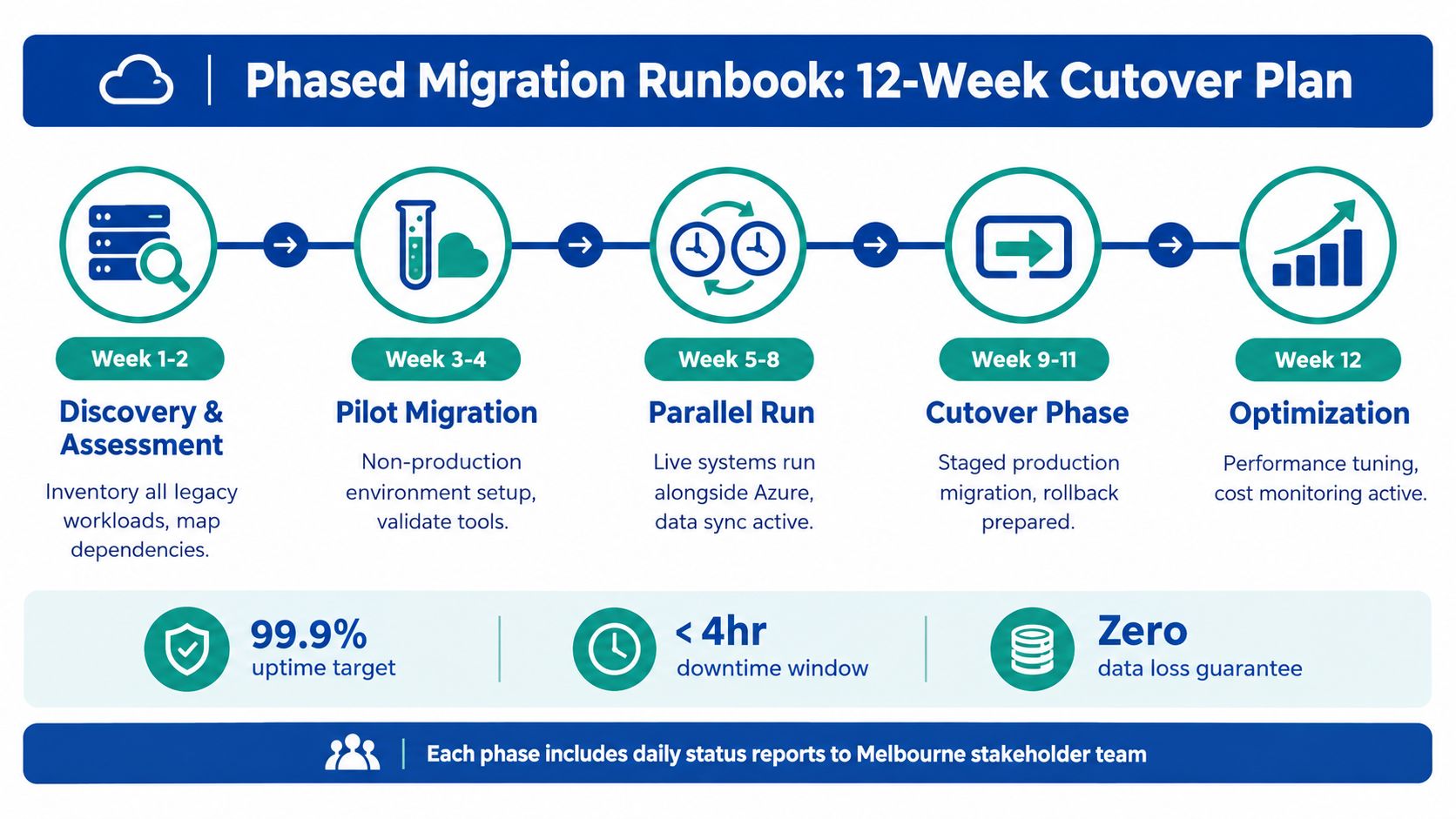
A migration runbook turns an architecture into controlled operational actions. It should tell each person what happens before, during and after a cutover, who approves the next step, which validation evidence is required and when the team must roll back.
An Australian membership organisation provides a useful delivery benchmark. It completed a full Azure migration across five sites in 23 weeks without interrupting member services. The Azure migration case study indicates why staged cutover, parallel runbooks and tightly controlled switchovers matter for services that cannot vanish during a maintenance window.
Build the runbook around waves
A practical runbook usually contains these phases:
- Discovery and dependency validation. Confirm application owners, data flows, authentication, scheduled tasks, integrations and recovery assumptions. Remove undocumented dependencies from the “unknown” category before production planning.
- Foundation deployment. Establish subscriptions, resource groups, network boundaries, identity controls, logging, backup, policy and access procedures. The foundation should be repeatable through infrastructure-as-code where the team has the capability to maintain it.
- Pilot migration. Move a low-risk workload and test deployment, monitoring, backup, restore and incident response. A successful pilot proves more than a successful deployment.
- Parallel operation. Run the existing and Azure environments together where data consistency and business continuity require it. Define which system is authoritative, how synchronisation is checked and when the parallel period ends.
- Controlled production cutover. Freeze changes where necessary, complete final synchronisation, switch traffic or integrations, run smoke tests and keep the rollback path available.
- Stabilisation and acceptance. Compare performance, uptime, recovery and cost against the pre-migration baseline. Don't close the wave until the service owner accepts the result.
Define measurable acceptance criteria
Before migration, record the current service behaviour. Useful measures include uptime, recovery procedure results, transaction processing, batch completion, user access, integration success and infrastructure cost. After cutover, measure the same items using the same definitions. Otherwise, the team can claim success because the application is online while users experience slower workflows or broken downstream processes.
Cutover discipline: Never migrate production and its least-understood legacy dependencies in the same uncontrolled step. Prove the pattern on a lower-risk wave, then expand the scope.
The runbook also needs a named rollback owner. Rollback isn't just restoring a virtual machine. It may involve reversing DNS or routing changes, restoring database authority, replaying transactions, re-enabling integrations and communicating the service state to users. Document the rollback window, decision threshold and evidence required to continue forward.
A Melbourne-based senior architecture team can help coordinate those decisions, but the handover must remain usable by the internal operations team. A partner solution architect in Melbourne should be judged by the quality of the decisions, documentation and operational capability left behind, not by how quickly the first workload is switched.
Managing Migration Costs and Ongoing Cloud Spend
The migration invoice and the Azure bill are different financial commitments. Professional services pay for discovery, architecture, remediation, migration execution, testing and handover. Azure consumption continues after the project, and it can rise when teams leave resources oversized, retain parallel environments or deploy services without ownership and budget controls.
Australian public pricing guidance places professional-services migration projects around AUD 8,000 to AUD 25,000 for environments with 20 to 50 users. A Melbourne-focused estimate puts Azure consumption for a 30 to 100 user environment at about AUD 800 to AUD 4,500 per month, before managed services. Australian Azure migration pricing guidance is useful because it separates project effort from steady-state consumption.
| Environment Size | Migration Project Cost (AUD) | Monthly Azure Consumption (AUD) |
|---|---|---|
| 20 to 50 users | AUD 8,000 to AUD 25,000 | Not specified for this environment |
| 30 to 100 users | Not specified for this environment | About AUD 800 to AUD 4,500 |
These figures are planning benchmarks, not a quote. They don't account for every application dependency, licensing arrangement, data-transfer requirement, compliance control or managed support model. A large legacy application may cost more to assess and remediate than a larger number of simple workloads.
Separate the business case from the run rate
I recommend presenting finance with three distinct views:
- One-off migration spend: Include assessment, design, remediation, testing, cutover and documentation.
- Steady-state consumption: Model compute, storage, databases, networking, backup and monitoring as ongoing operational costs.
- Temporary transition spend: Include parallel environments, duplicated licensing, test resources and any extended support required during stabilisation.
Cost governance needs to be active before go-live. Set resource ownership, budgets, alerts, tagging or equivalent allocation rules, and a review process for unused capacity. Azure Cost Management can support visibility, but it won't decide whether a workload should be resized, retired or redesigned. That decision belongs to the application and finance owners.
A guide to migration cost planning in Australia offers a useful comparison point for separating migration effort from cloud operating cost. The platform choice differs, but the commercial principle is the same: don't approve a migration using only the project invoice.
Navigating Data Residency and Compliance Requirements
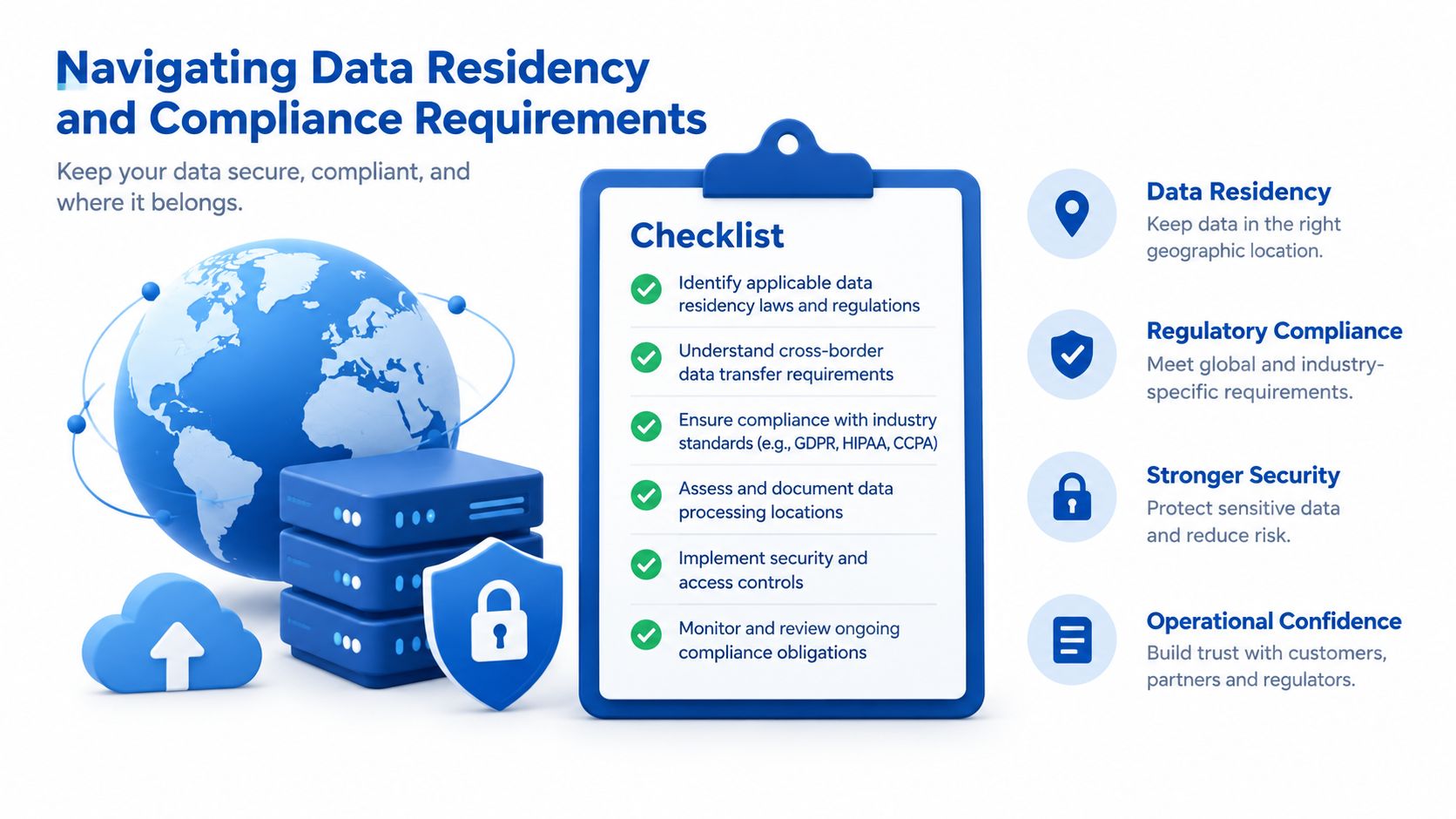
Data residency isn't solved by selecting an Australian Azure region and moving on. The team needs to understand where primary data, replicas, backups, logs, telemetry, support records and integration payloads are stored or processed. A residency chain should show each location and service involved, with an owner responsible for keeping the record current.
The Australian Government cloud policy applies across public, private and hybrid models and covers procurement, transition, data migration, cloud solutions and exit from a cloud product. It requires secure cloud use with attention to data security, privacy, environmental sustainability and compliance with the Protective Security Policy Framework. For a Melbourne organisation, that makes architecture evidence as important as the region selection itself.
Use a workload-by-workload compliance decision
Some workloads may need to remain in Australia East or Australia Southeast because of contractual, privacy, regulatory or customer requirements. Others may be suitable for a broader architecture, subject to the organisation's risk assessment and the service's processing behaviour. Don't apply one residency rule to every workload without checking what the data contains and where each supporting service operates.
The National Archives advises agencies to treat cloud as a priority when rolling out or replacing ICT infrastructure, while conducting risk assessments that cover jurisdictional, governance, privacy, technical and security risks. Its cloud computing and information management guidance is particularly relevant when the workload contains long-term business records.
Keep portability and rollback in the architecture
Australian Government policy requires interoperability and portability to reduce vendor lock-in. It also calls for contract terms that avoid restrictions on migrating government data or workloads, continuous monitoring and logging, and exit strategies with data migration plans. The whole-of-government cloud computing policy requirements provide a strong governance model for any regulated organisation, even where the organisation isn't a government agency.
A practical compliance and rollback checklist should include:
- Residency register: Record the location and processing path for production data, backups, logs and replicas.
- Access review: Map privileged access, identity sources, administrative roles and approval records.
- Security alignment: Map controls to the Essential Eight, Privacy Act expectations and the organisation's own risk framework.
- Retention and records: Identify which information must be preserved, migrated, archived or securely disposed of.
- Portability terms: Confirm that contracts permit data export and workload migration in a usable format.
- Rollback evidence: Test restore procedures and document the conditions that trigger a return to the previous environment.
The Secure Cloud Strategy lists seven principles, including risk-based security decisions, cloud-designed services, public cloud by default, using as much cloud as appropriate, avoiding unnecessary customisation, automation and real-time monitoring. The strategy document supports a balanced position. A compliant Azure migration isn't the one with the most controls on paper. It's the one where the controls are implemented, monitored and tested against the actual workload.
Monitoring, Handover and Next Steps
The cutover isn't the finish line. It only proves that the service can operate in the new environment at a particular moment. The actual outcome depends on whether the internal team can detect a failure, understand its cause, restore service, control spend and make safe changes without relying on the migration team indefinitely.
Australian Government policy calls for continuous monitoring, logging, analysis and reporting so organisations can manage performance and security issues in real time. That expectation should shape the day-two design. Azure Monitor, Log Analytics, Application Insights, Microsoft Defender for Cloud and service-specific diagnostics can form part of the observability stack, but each alert needs an owner and an operational response.
Make handover an acceptance gate
A proper handover includes more than an architecture diagram. It should provide:
- Operational runbooks: Document deployments, backups, restores, incident response and recurring maintenance.
- Dependency records: Keep application, identity, network, data and integration relationships current.
- Access ownership: Record who can approve, deploy, investigate and change production services.
- Cost controls: Transfer budget ownership, resource tagging or allocation rules and review responsibilities.
- Recovery evidence: Store the results of restore and failover tests, including known limitations.
- Team capability: Run practical walkthroughs so internal staff can operate the platform under pressure.
I also recommend a short stabilisation period with daily review of incidents, cost anomalies, performance regressions and user feedback. The team should compare results with the pre-migration baseline, close defects by severity and confirm that monitoring catches the failures it was designed to detect. Enterprise application monitoring and debugging supports this operational focus across application telemetry, error diagnosis and performance investigation.
A migration is complete when the business can operate the platform safely, not when the old server is switched off.
For a Melbourne CTO, the next practical step is a workload assessment that produces an application inventory, dependency map, target-state architecture, migration waves, cost model, compliance register and rollback plan. Those artefacts make trade-offs visible before the organisation commits production services to Azure, and they give finance, security and operations a common basis for approval.
Continuum Solutions provides AWS and Azure architecture, phased migration delivery, cost reviews, application monitoring and structured technical handover for Melbourne organisations moving beyond legacy infrastructure. Visit Continuum Solutions to discuss your workload inventory, Azure target architecture and cutover plan with a senior engineering team.