
If your organisation is planning a move to AWS or Azure, there's a good chance the first version of the plan already looks neat on paper and weak in practice. The servers are listed, the target platform is named, and someone has pencilled in a cutover weekend, but the commercial outcome is still unclear. That's where most cloud migration project plans fall apart, because moving infrastructure is not the same as changing how the business operates.
In Australia, that gap matters more than ever. By 2026, public cloud spending in Australia is projected to reach AUD 22.4 billion, an 83% increase from 2022 according to IDC's Australia and New Zealand market outlook, which shows how cloud has shifted into a mainstream strategic program rather than a side IT task. IDC Australia and New Zealand cloud market outlook
A workable plan starts with business value, then maps the technical work underneath it. If you're comparing approaches, it's worth reading common AWS mistakes SMEs make before you lock in a migration path, because the same planning errors keep showing up across small, mid-market, and enterprise environments.
Table of Contents
- Introduction Why Most Cloud Migration Plans Fail
- The Foundation Discovery and Business Alignment
- Designing Your Cloud Architecture and Phasing Strategy
- Executing the Migration From Pilot to Production Waves
- Ensuring Success Testing Cutover and Rollback Plans
- Life in the Cloud Security Costs and Operations
Introduction Why Most Cloud Migration Plans Fail
Most migration plans fail because they treat cloud as a destination, not a redesign. Teams focus on which servers move first, which provider looks cheaper on paper, and which weekend has the least business activity, then discover after cutover that the operating model has not changed. The environment is newer, but the costs, support load, and delivery friction stay much the same.
A migration can still be technically successful and commercially wrong. If the plan does not link workload moves to application modernisation, process change, and measurable business outcomes, the business ends up relocating its problems. I have seen this happen when an organisation finishes the move, then spends months trying to rebuild the visibility, governance, and performance it should have designed from day one.
Australian businesses cannot afford that kind of drift. Cloud programmes here now carry real commercial and compliance exposure, especially for organisations that must balance data sovereignty, hybrid connectivity, and internal control requirements. If you are comparing approaches, it is worth reading common AWS mistakes SMEs make before you lock in a migration path, because the same planning errors keep showing up across small, mid-market, and enterprise environments.
Practical rule: if the business cannot explain why each workload is moving, the cloud plan is not ready yet.
The plan needs to start with outcomes, then work back to the technical steps. That means discovery, prioritisation, and stakeholder alignment before anyone starts drawing landing zones or choosing migration tools. If that foundation is weak, every later decision costs more to fix, and hybrid cloud becomes a scramble instead of a deliberate design choice.
The Foundation Discovery and Business Alignment
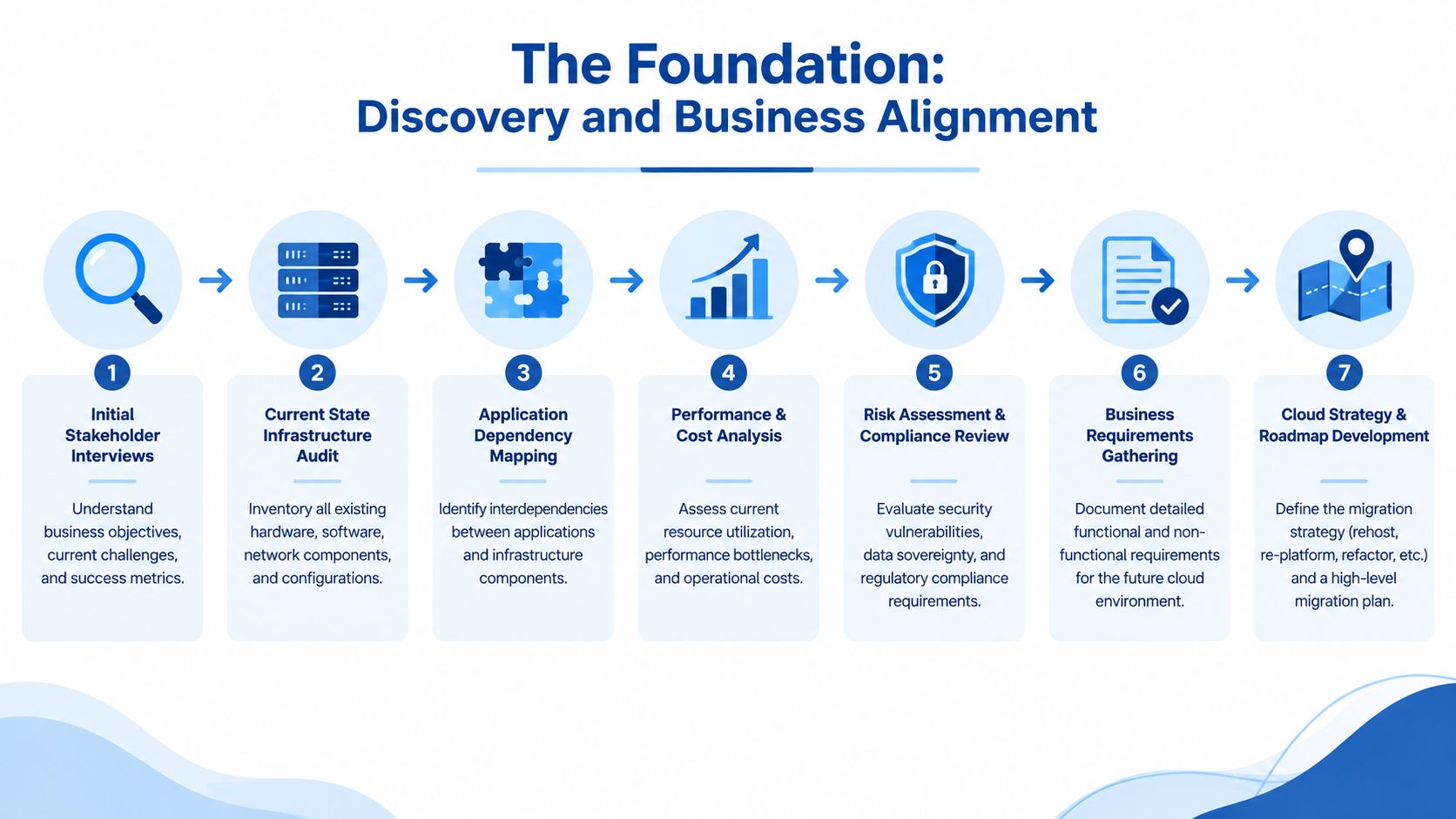
A serious cloud migration project plan starts with a clear picture of what is running, who depends on it, and what the business wants to change. That means more than an asset list. You need dependency mapping, data flow checks, support contract review, and a decision on which systems can move cleanly, which need redesign, and which should stay put.
Start with business outcomes, not the server list
The most useful discovery sessions I've run have had finance, operations, security, and service owners in the same room. Infrastructure choices affect compliance, customer experience, and internal service levels, and a technical team will miss some of that if it works in isolation. In the Unisys Australia cloud migration expectations study, 36% of Australian organisations said they failed to realise notable benefits from cloud computing because the migration plan was not tied to business transformation, and the same study found cloud adoption was already widespread, with 99% of organisations having moved to the cloud in some way and 70% saying cloud had improved organisational effectiveness.
The point is straightforward. Adoption is not the hard part. Value depends on whether the migration is tied to real business change.
A practical discovery checklist should cover:
- Stakeholder objectives, what each team needs from the migration and how success will be judged.
- Application dependency mapping, because missed dependencies are what turn cutovers into incidents.
- Data flow review, including where sensitive data sits and which systems exchange it.
- Risk and compliance review, especially for workloads that touch regulated or personal data.
- Business prioritisation, so low-value systems do not consume the same effort as critical ones.
Make the commercial case with workload choices
Discovery is also where the architecture strategy starts to take shape. A lift-and-shift plan can be fine for a stable legacy system, but it is often the wrong answer for an application that needs performance tuning, security uplift, or lifecycle change. Replatforming usually makes more sense when the business wants cloud benefit without a full rewrite. Refactoring belongs to applications that are strategic enough to justify deeper engineering effort.
The hard reality in Australia is that hybrid is often the right starting point. Many businesses need to keep some workloads close to existing systems, preserve control over sensitive data, and meet internal or regulatory requirements without forcing everything into one destination. If you need help shaping that balance, cloud migration services should begin with discovery and business alignment, not a delivery pitch.
Don't try to make every workload fit the same migration pattern. The right answer for a finance system is often different from the right answer for a public website or an internal workflow tool.
A realistic total cost of ownership model matters. I've seen teams rely on a cloud calculator, then understate integration effort, testing, licences, support, and the time needed to stabilise the new estate. A stronger plan compares the current state against the future state by workload, then checks whether the move creates actual business improvement or just new infrastructure in a different place.
If the business case, dependency map, and risk register are not clear, the migration plan is guessing.
Designing Your Cloud Architecture and Phasing Strategy
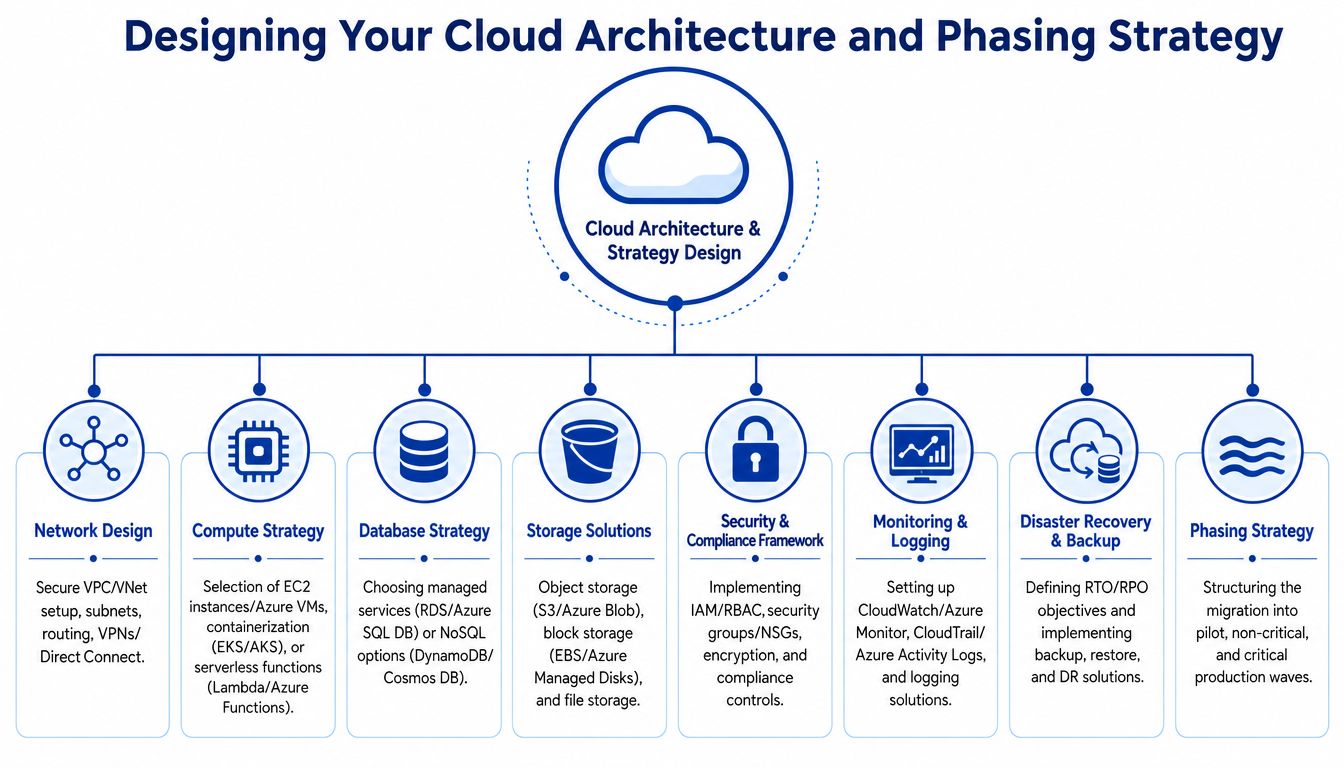
Once discovery is done, the architecture decision becomes commercial as much as technical. The mistake I see most often is treating AWS or Azure as if the platform name decides the design. It doesn't. The design should follow workload criticality, security exposure, integration complexity, and how much change the business can absorb without disrupting operations.
Choose the right path for each application
Migration method should be chosen per workload, not by blanket rule. Rehost works when speed matters and the application is stable. Replatform suits cases where targeted changes can lift the workload, such as moving a database to a managed service or shifting a web app into a container model. Refactor belongs only where the business is willing to fund deeper engineering for long-term flexibility.
Hybrid design is often the practical answer for Australian businesses. I've seen finance teams, health providers, and service companies keep some systems close to existing platforms because of data handling, internal controls, or latency. Recent ANZ research shows 93% of enterprises describe their strategy as hybrid IT Brief ANZ hybrid cloud research. That matches what I see on the ground. Some workloads belong in public cloud. Others should stay tied to private infrastructure, or move only after the dependencies are settled.
Your target architecture should cover the parts the operating team will live with:
- Network design, including segmentation, routing, and private connectivity.
- Compute strategy, whether that means VMs, containers, or serverless for the workload.
- Database strategy, because managed databases reduce overhead only when the data model fits.
- Storage choices, based on access pattern, retention, and recovery needs.
- Security controls, including identity, access, encryption, and audit logging.
- Monitoring and backup, so operations is not starting from zero after go-live.
Phase the move so the business can absorb it
A migration should be a sequence of controlled changes, not a single heroic weekend. Australian government guidance supports this staged approach by recommending plans start with low-complexity, non-sensitive services and use automation for provisioning and configuration Australian Government cloud computing standard. That is sound practice in the private sector too, because it reduces risk while the team learns how the environment behaves.
The sequence should start with a pilot, then move through low-risk systems, then into higher-value production workloads. I usually group applications into waves based on dependencies, business calendars, and support capacity. That keeps the cutover schedule tied to operational reality, not technical convenience.
Practical rule: if a workload has messy dependencies, weak documentation, or unclear ownership, it should not be your first production move.
If you are choosing between AWS services for a specific workload, the architecture decision should include fit, not brand loyalty. A practical comparison such as AWS Lightsail vs EC2 vs ECS can help teams avoid overbuying or underbuilding. The right architecture is the one the business can run, recover, and afford.
Executing the Migration From Pilot to Production Waves
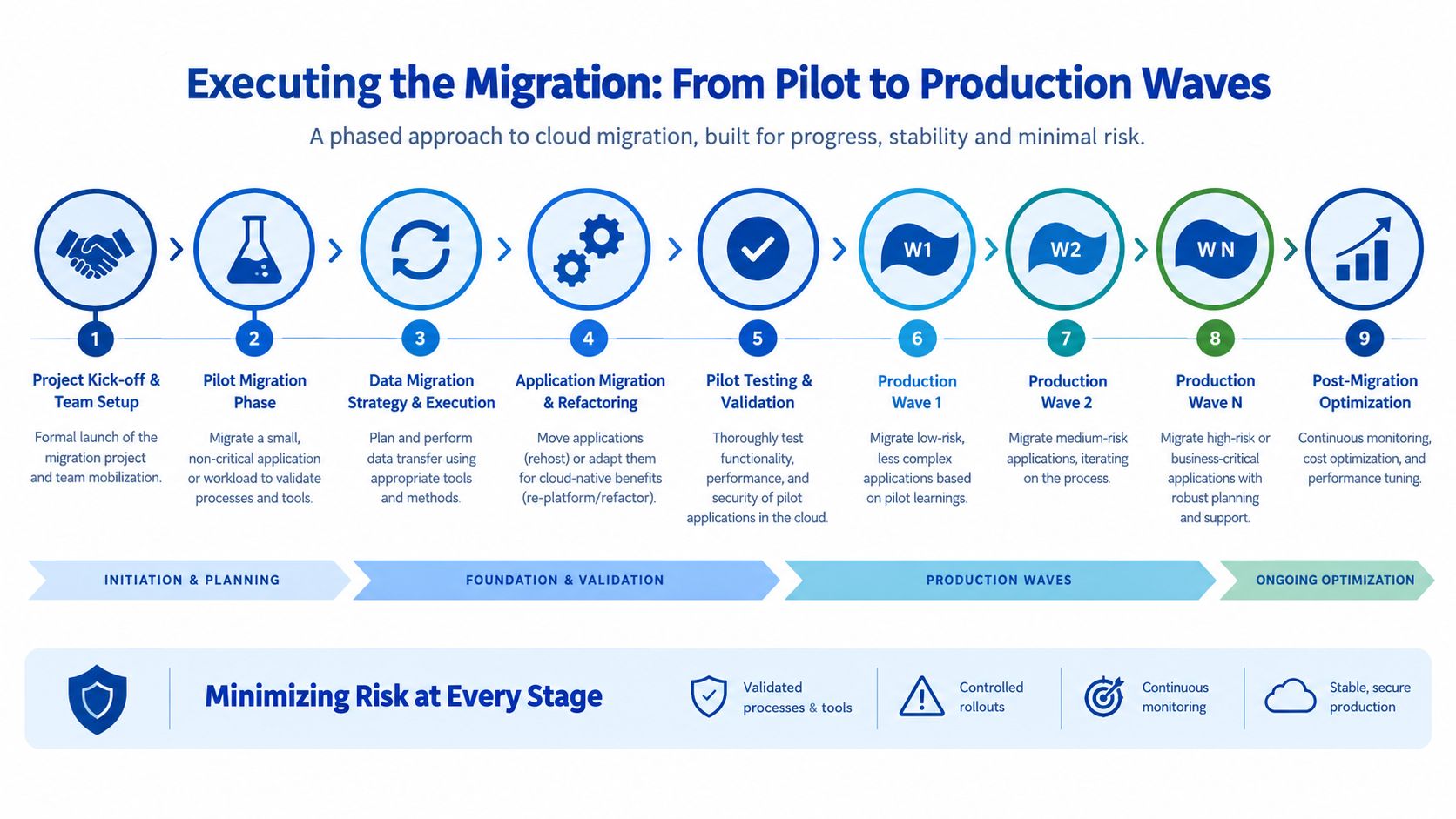
Execution is where a cloud migration plan either becomes disciplined delivery or expensive rework. By this stage, the pilot has shown what the tooling can do. The harder job is keeping each wave tightly owned, visibly scheduled, and aligned to the business's real operating window.
Use a pilot to prove the method
A pilot should be small enough to contain failure and large enough to expose the operational process. Use an application with realistic data movement, live integration points, and support teams who will also carry the production workload. I've seen migrations go wrong when the pilot was treated as a box-ticking exercise, because the first production wave then exposed gaps in handover, timing, and change control that should have been found earlier.
The pilot also tells you whether the migration method suits the environment, not just the lab. If the team is still hand-building steps or improvising configuration, the next wave will be slower and riskier than it needs to be. That is why automation matters, because it keeps provisioning and configuration repeatable while the team is still learning how the platform behaves.
A sensible execution wave usually includes:
- Kick-off and ownership, with business, infrastructure, and support roles named.
- Pilot migration, to validate tooling and process.
- Data transfer, using the right method for the size and shape of the workload.
- Application migration or refactoring, depending on the target design.
- Testing and sign-off, before any broader release.
- Production wave rollout, starting with the least risky systems.
- Monitoring and optimisation, after each wave stabilises.
Treat cutover as a business event
A cutover is not just an IT task. It affects operations, customer trust, and the internal confidence the business has in the programme. I've seen the commercial pain show up twice, first as a spike in support demand during the outage window, then as delayed value because the organisation lost momentum. That is why the run sheet needs minute-by-minute sequencing, named decision makers, and a clear return path if the cutover does not meet the expected thresholds.
The strongest migration teams remove manual drift wherever they can. In practice, that means infrastructure-as-code, repeatable configuration steps, scripted validation, and controlled approvals. It also gives the business better visibility into what is changing and when, which matters just as much as the technical move itself.
If the cutover run sheet cannot be followed by someone who was not in the original planning meetings, it is too fragile.
That same discipline should carry into production support. If your team cannot see failures quickly, trace dependencies, and separate application issues from infrastructure noise, the migration will look successful on paper and painful in practice. Practical monitoring and debugging should already be part of the operating model before the first production wave lands.
Ensuring Success Testing Cutover and Rollback Plans
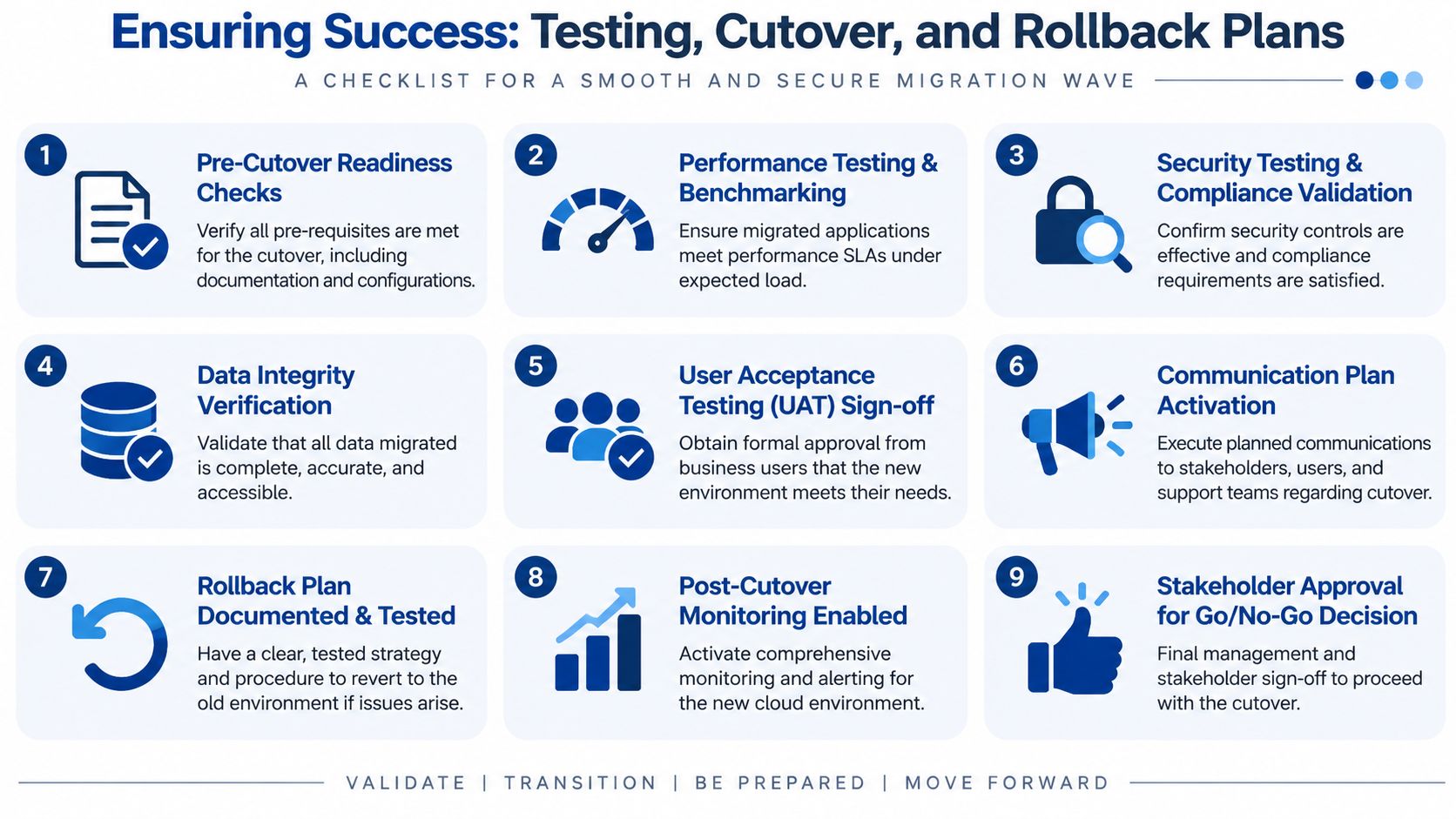
Testing is the part of the migration plan people claim they'll do properly, then compress when the schedule gets tight. That's a mistake. A cloud cutover without full validation is just a controlled way to discover what you missed, and the business usually pays for that discovery in lost time and support noise.
Test more than functionality
Technical teams often stop at “the application loads”, but that isn't enough. The migrated workload should be checked for performance, security controls, data integrity, and user acceptance. If the app works but the response time feels wrong, the permissions don't map cleanly, or the business users can't complete a critical workflow, the migration isn't really done.
Testing should cover:
- Infrastructure validation, to confirm the environment matches the design.
- Performance checks, against expected load and normal operating conditions.
- Security and compliance checks, including access controls and logging.
- Data validation, to confirm records, files, and integrations are intact.
- UAT sign-off, so business owners formally accept the environment.
A practical pattern is to test in the same order the business feels the impact. First, the platform, then the application, then the users. That sequence helps isolate issues faster and prevents teams from blaming the wrong layer.
Build rollback before you need it
Rollback planning is your insurance policy. It should be documented, tested, and understood by the people who'll execute it under pressure. The plan must define the trigger points for reversal, the data handling rules during the failback, and the communication steps that tell stakeholders what's happening without creating confusion.
Overconfidence is a common pitfall for many migration plans. Teams assume they'll only need rollback if the whole platform fails, but in reality the trigger is often partial, an integration stops working, a critical user path breaks, or a compliance control doesn't behave as expected. In those cases, a quick return to the prior state can save the programme from becoming a long outage.
For teams that want a structured way to manage incident response after cutover, monitoring and debugging guidance is most useful when it includes alerting thresholds, ownership, and response steps before go-live. The business shouldn't be discovering how support works during the first outage.
Practical rule: if rollback can't be executed by the operations team under pressure, it isn't a real rollback plan.
A mature plan treats testing, cutover, and rollback as one system. That's how you protect service continuity and keep the migration from becoming a permanent support problem.
Life in the Cloud Security Costs and Operations
Moving into production is not the finish line. It's the moment the organisation starts paying for the operating model it designed, or failed to design, during the project. The cloud estate now needs cost oversight, security governance, and a support rhythm that keeps the environment stable after the migration team has moved on.
Australian policy makes that clear. The government's cloud policy framework says its purpose is to improve governance, cost management, and transparency, while also building capability to manage cloud services effectively Australian Government cloud policy update. That is the right frame for every commercial migration too, because the post-cutover operating model determines whether the investment keeps paying back or starts leaking value.
Design the day two model before go-live
A lot of organisations underweight the operational side because the project is judged on completion, not stability. That leads to confusing ownership, weak monitoring, and cost drift that nobody catches early enough. The smarter approach is to define who watches performance, who reviews spend, who owns access changes, and who signs off on exceptions before the first workload lands.
A solid day two model should include:
- Monitoring and alerting, so the team can see performance and availability issues quickly.
- Cost management, with a baseline and regular review points.
- Security ownership, including access reviews and incident response.
- Handover documentation, so support knows what was built and why.
- Change control, because cloud environments evolve faster than old data centres.
Don't ignore sovereignty and privacy
Australian cloud migration plans often underweight data sovereignty and privacy-law execution, which is where seemingly simple projects can become painful. The verified data notes that Australian guidance and legal commentary emphasise mapping where personal data lives, checking cross-border providers, and tightening vendor contracts before migration, alongside breach response discipline and 72-hour breach notification expectations under the Australian Privacy Principles Australian data sovereignty and privacy commentary. In practice, that means the migration plan needs a data residency view, a vendor review, and a clear response process before sensitive workloads move.
For commercial teams, the mistake is assuming security is finished once identity and encryption are configured. It isn't. The controls need to stay visible in the operating model, because cloud change is continuous and so are the obligations around data handling.
If you're trying to put a realistic budget around the move and the ongoing operating cost, how much an AWS migration costs in Australia is the kind of estimate that should be built from workload scope, risk, and support needs, not from a generic template. The right plan doesn't just get you into the cloud. It tells you how the cloud will be run after the project team has left.
If you're planning an AWS or Azure migration and need a plan that covers discovery, architecture, cutover, and day two operations, Continuum Solutions can help you shape the workload strategy and delivery sequence around your business priorities. We design and deliver cloud migrations with the governance, monitoring, and handover detail that Australian teams need, and we can assess where your plan is currently exposed. Visit Continuum Solutions to start a conversation about your migration.