
A Melbourne SaaS operator called after a Stripe payout stopped matching the entries in Xero. Stripe showed $84,200 in cleared charges, but the Xero clearing account was $612 short. The difference came from a $19 dispute fee, a $48 refund, and three subscriptions billed in USD that converted at different rates.
That gap wasn't a sync bug. It was an integration design problem.
To connect Stripe to Xero properly, you need to decide how charges, refunds, disputes, processing fees, currency conversion and payouts will map to the ledger before anyone clicks an authorisation button. Xero's official Stripe integration is designed to pass transaction data into Xero for reconciliation and reduce manual administration, but the clean result depends on the account structure and transaction rules around it. For Australian operators, the setup also creates a direct relationship with Stripe under the Australian Stripe Connected Account terms, so this is a formal payments workflow, not just a convenience plug-in.
Table of Contents
- When the Stripe to Xero Connection Stops Being Simple
- Three Ways to Connect Stripe to Xero
- Setting Up the Native Xero Stripe Sync
- Mapping Fees, Payouts, and GST in Xero
- Handling Subscriptions, Refunds, and Multi Currency
- Common Pitfalls and How to Verify Your Setup
- When to Move Beyond a Native Connection
When the Stripe to Xero Connection Stops Being Simple
The simple version of Stripe-to-Xero is attractive. A customer pays, Stripe processes the card, Stripe sends a payout, and Xero records the result. That model works while transactions are straightforward and the business operates in one currency with uncomplicated invoices.
It breaks when a payout combines several ledger outcomes. The bank receives a net transfer, but that transfer may represent gross sales, processing fees, refunds, disputes, foreign exchange movement and tax treatment. If the accounting system receives only the net amount, finance loses the detail needed to explain why cash differs from sales.
Practical rule: Treat every Stripe payout as a settlement package, not as a single sale.
The Melbourne SaaS example exposed the problem clearly. The operator initially assumed that the amount arriving in the bank should be posted to revenue. That approach hid the processing costs, treated the refund as an unexplained variance and left the USD subscriptions to create foreign exchange differences during reconciliation. The team was trying to correct a chart-of-accounts design issue with manual matching.
A reliable architecture separates the Stripe balance from the operating bank account. Gross income enters a dedicated revenue account, fees move to a merchant-fee expense account, and the net payout clears through a Stripe clearing account before it reaches the Australian bank feed. Xero's official Australian Stripe integration supports this broader workflow by feeding transactions into Xero for reconciliation and allowing an existing Xero user to create or connect a Stripe account from within Xero.
This matters for more than bookkeeping convenience. Australian businesses may also use Xero's eInvoicing workflow, including ABN-based registration to the Peppol network, so payment acceptance, invoice settlement and auditable transaction flows can sit within a localised finance stack. The right question isn't whether you can connect the apps. It's whether the connection will preserve the financial meaning of each transaction as your operating model becomes more complex. A systems integration review, rather than a rushed connector setup, is often the difference between clean month-end reporting and recurring reconciliation work. Continuum Solutions discusses that broader perspective through its business IT consulting services.
Three Ways to Connect Stripe to Xero
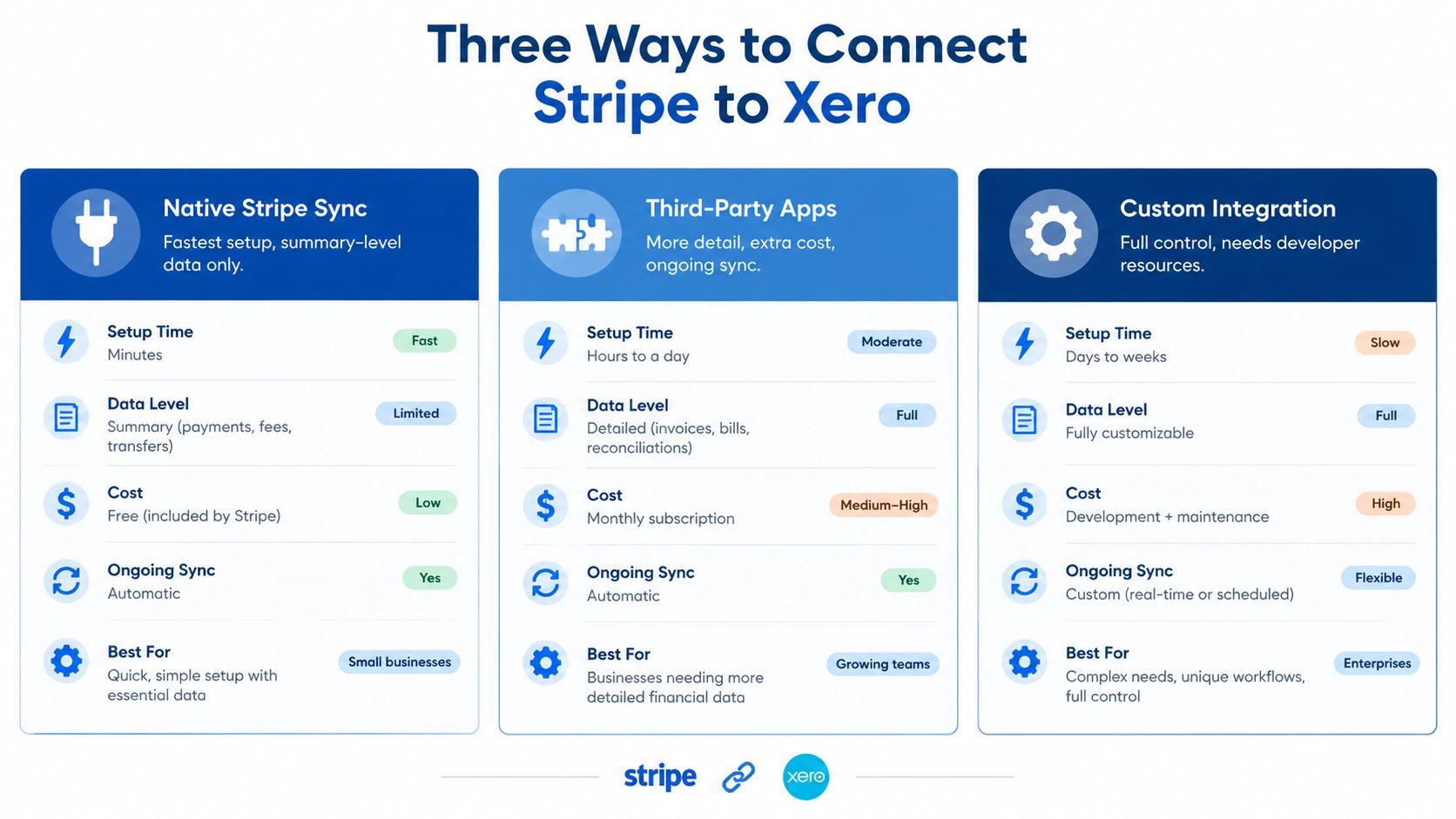
Australian teams generally have three practical connection paths. They differ in control, operational overhead and how much transaction detail reaches Xero.
Native Xero Stripe sync
The native connection is the quickest route for an organisation that wants Stripe payments to reconcile against Xero invoices and bank activity. Xero's Australian bank-feed documentation confirms that a direct Stripe feed can import recent transactions automatically, with transactions flowing from the point the feed is connected. Stripe's support guidance also explains that Xero can create spend-money entries for fees and match payouts later.
The advantage is low implementation effort and one fewer vendor to govern. It suits an ecommerce business with a relatively consistent sales process, one primary Stripe account and a need for payout-level reconciliation rather than a detailed subledger.
The limitation is control. Native sync may not provide the transaction decomposition, invoice-level metadata or exception handling required by a SaaS business with subscription changes, disputes and multiple currencies. It also depends on correct account selection during setup, which Stripe specifically identifies as part of the connection process.
Middleware connectors
Middleware such as OneSaas, Zapier or Make can pass selected Stripe events into Xero. Depending on the design, the workflow may create or update contacts, invoices, payments and adjustment records with more flexible account mapping than the native connection.
That flexibility introduces an extra platform, another authentication layer and potentially a per-record or usage-based cost. Someone must monitor failed runs, duplicate events and changed field mappings. Middleware is useful when the business needs configurable workflows but doesn't want to own a full software integration.
Bespoke webhook integration
A custom build uses Stripe webhooks and the Xero Accounting API to control how charges, refunds, disputes and payouts are represented. It can attach Stripe identifiers, preserve event history, apply customer rules and route different products or currencies to specific accounts.
The trade-off is engineering ownership. The build needs idempotency handling, retry logic, secure credential management, logging and a process for changes to Stripe or Xero APIs. It also needs a clear owner when fee structures, products or tax rules change.
The selection should follow the operating model. A native feed is usually appropriate when payout-level reconciliation is enough. Middleware fits configurable invoice and customer synchronisation. A bespoke integration makes sense when auditability, multi-currency treatment, subscription detail or connected accounts are material requirements. Continuum Solutions outlines this type of work through its custom integrations service.
Setting Up the Native Xero Stripe Sync
A native connection can be sound, but the setup should begin with the ledger rather than the authorisation screen. Create the accounting structure first, then connect Stripe to the account that represents funds held by Stripe.
Create the clearing account
In Xero, go to Accounting > Bank Accounts. Select the Stripe clearing account if it already exists. If it doesn't, create a new bank account coded as a current asset, with a name such as Stripe Clearing.
The clearing account is not your operating bank account and it isn't a merchant-fee expense account. It represents the balance moving through Stripe before payout. That separation makes an unexplained balance visible instead of blending it into ordinary cash activity.
Connect the Stripe feed
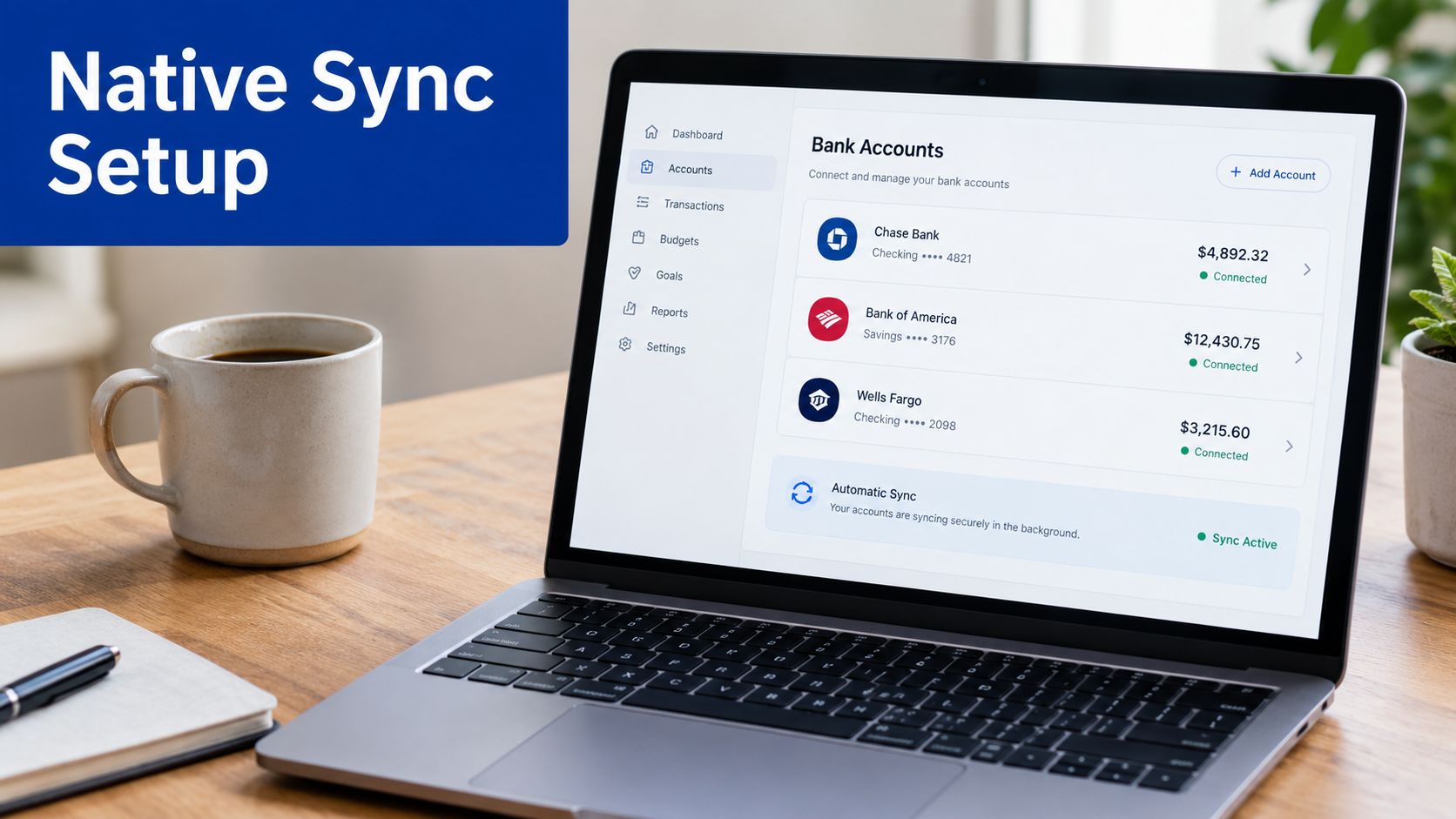
Choose Manage Account > Set up bank feed > Stripe. Authenticate through the Stripe dashboard, grant the required access to charges and payouts, select the correct Stripe account and confirm the connection.
Stripe's Australian setup guidance emphasises selecting the right account. This matters for groups that operate separate entities, brands or currencies. Connecting the wrong account can produce a technically successful authorisation with financially useless data.
Set the account mapping
Use dedicated accounts so the feed remains interpretable:
- Stripe Sales: Route gross payment income to a sales or Stripe-specific revenue account.
- Merchant Fees: Post Stripe processing costs to a separate expense account.
- Stripe Clearing: Hold the Stripe balance and match the payout against the bank deposit.
- Australian bank account: Reconcile the net transfer against the actual deposit.
Xero's direct feed mechanics determine how far the imported data reaches. The Australian documentation says transactions begin flowing once the feed is connected, while Stripe's reconciliation guidance says the direct feed imports from the most recent payout. Don't assume that connecting the feed will reconstruct every historical transaction you need.
Configure invoice payments separately
If customers pay Xero invoices through Stripe, attach the Stripe payment service to the active Xero branding theme. This is a common point of failure. The account can be connected successfully while the Pay Now button remains absent because the service wasn't applied to the invoice theme.
Native sync posts at a summary level in many practical configurations. It can be sufficient for a business that needs reliable payout reconciliation, but it isn't a substitute for invoice-level integration logic where subscription or product detail is required.
Mapping Fees, Payouts, and GST in Xero
A Stripe payout should be decomposed before it reaches the bank reconciliation screen. The accounting model has four important components: gross customer payment, Stripe fee, GST associated with that fee and net transfer to the Australian bank.
Stripe's Australian support page states that GST applies to all Stripe fees for Australia-based account holders at the prevailing standard rate, unless pricing is GST-inclusive. The fee therefore shouldn't be coded as a generic tax-exclusive expense. If the tax treatment is wrong, the BAS position can be distorted.
The ledger logic
The gross charge represents the sale and should map to the relevant income account. The processing fee is an expense. GST on the fee should use the appropriate Australian tax code so any eligible input tax credit is visible in the BAS workflow. The net payout then moves from Stripe Clearing to the connected bank account.
The key mistake is posting the net amount directly to sales. That makes revenue appear lower than the customer amount and removes visibility of the fee and its GST treatment. It also makes the clearing account difficult to explain when refunds or disputes are deducted from a later payout.
| Component | Debit Account | Credit Account | GST Treatment |
|---|---|---|---|
| Gross customer charge | Stripe Clearing | Stripe Sales or relevant income account | Apply the sales tax treatment applicable to the underlying sale |
| Stripe processing fee | Merchant Fees | Stripe Clearing | Code the fee with the correct Australian GST treatment, as Stripe states GST applies to Australian account-holder fees |
| GST on Stripe fee | Relevant BAS and tax reporting treatment | Stripe Clearing or fee transaction, according to the configured Xero tax code | Ensure the input tax credit is captured correctly |
| Net payout | Australian bank account | Stripe Clearing | No new sale should be created at payout stage |
Australian implementation guidance recommends configuring separate accounts for Stripe income, Stripe fees and the Stripe clearing account, then testing live transactions before go-live. The test should confirm that invoice amount, fee deduction and bank reconciliation align. The accounting objective is reconciliation, not a second invoicing engine that creates conflicting sales records.
The Xero App Store listing for Stripe in Australia also shows why fee mapping needs to be deliberate. It lists card-processing pricing of 1.75% plus A$0.30 for domestic cards and 3.5% plus A$0.30 for international cards. These rates should inform cashflow modelling and clearing-account checks, but the actual transaction feed remains the source for each fee posted to the ledger.
Handling Subscriptions, Refunds, and Multi Currency
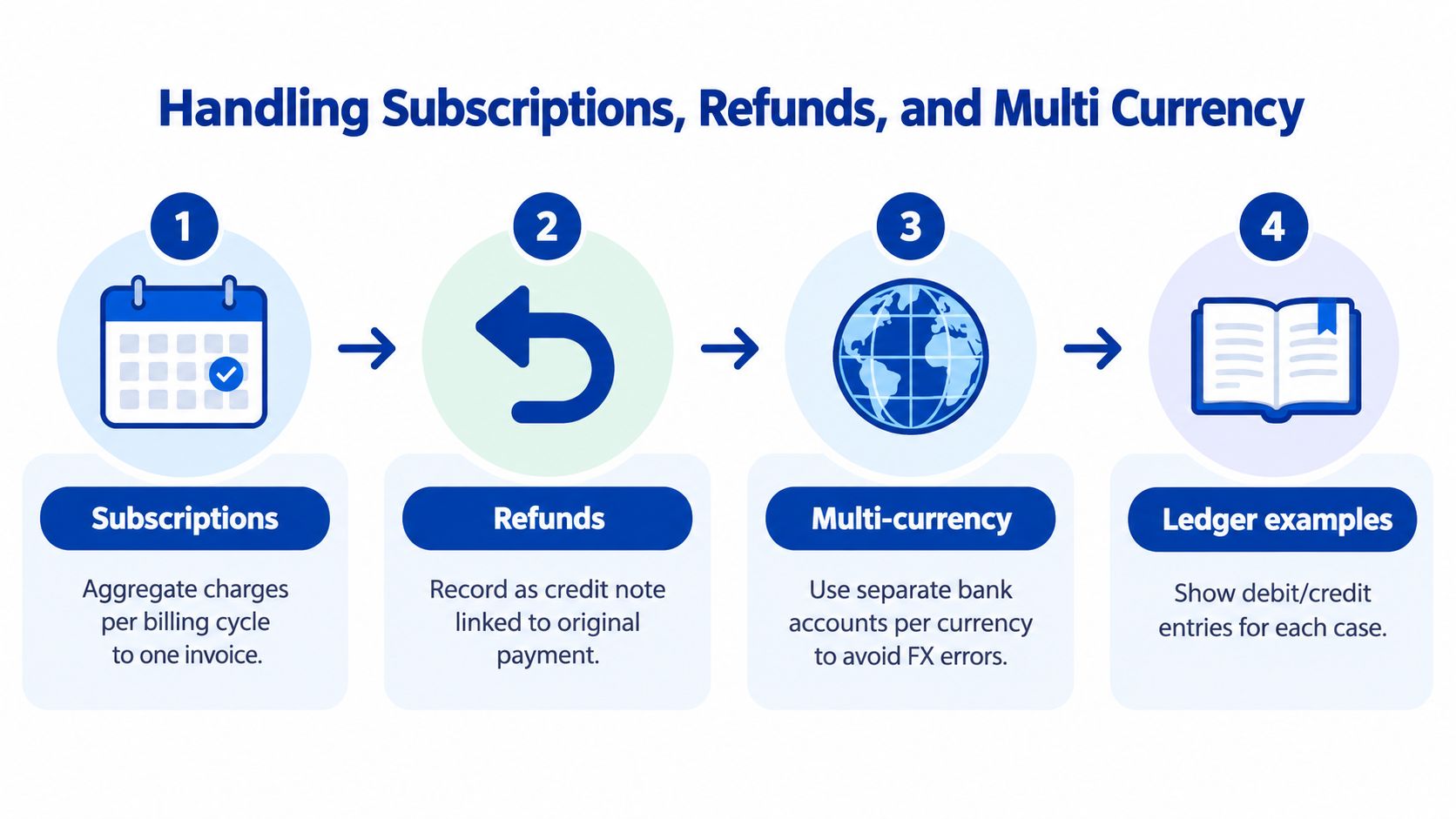
Naive setups usually fail at the boundaries rather than on ordinary card payments. Subscription billing, refunds, disputes and foreign currency receipts each require a rule that tells Xero what the Stripe event means.
Subscriptions
A recurring SaaS charge can be represented as an individual Xero invoice and payment, or grouped into a summary posting for a billing period. Per-invoice sync preserves the customer, invoice and payment trail. Summary posting reduces the number of accounting records and can be cleaner for high-volume, low-value transactions where finance doesn't need each charge in Xero.
Choose based on the control requirement. If the finance team needs to trace revenue to a customer contract or investigate plan changes, retain invoice-level identifiers. If the operational system already holds the billing detail and Xero is primarily used for financial reporting, a controlled summary can be more practical.
Refunds
A full refund should reverse the original income treatment. A partial refund should reduce the original sale by the refunded amount, with the Stripe event linked to the original payment wherever possible.
Don't treat a refund as a fee or a bank adjustment. If the original sale was reported in an earlier BAS period, the accounting team needs a defined process for the period in which the reversal is recognised. The integration should preserve the original payment identifier and refund identifier so someone can investigate the relationship without searching through exports.
Disputes
A dispute has more than one financial outcome. Stripe may hold or remove the disputed charge, and a separate dispute fee may appear. If the business wins, the principal can return. If it loses, the revenue reversal remains, and the fee needs its own expense treatment.
Webhook logic should handle the dispute lifecycle rather than posting every event as a new expense. Idempotency is essential because payment platforms can retry event delivery. A repeated event must update or safely ignore an existing record, not create a duplicate chargeback.
Multi-currency receipts
Decide whether Stripe will settle foreign currency balances into an Australian dollar account or maintain separate currency balances. The choice affects the account structure, payout matching and foreign exchange treatment in Xero.
When the transaction rate differs from the payout-day rate, Xero may need a foreign exchange gain or loss entry. The clearing account should retain the original currency and Stripe payout reference where possible. Otherwise, the finance team sees a small variance with no clear explanation.
For an Australian operation selling globally, Stripe's Xero setup guidance is a useful starting point for account selection and payout matching, but it doesn't remove the need to design rules for partial payments, disputes, subscriptions or multi-currency receipts. Those cases should be tested in the actual account structure, not assumed from a successful connection screen. If the application also controls billing, customer status or entitlements, a custom web development capability may be required to keep Stripe events, Xero records and the SaaS platform aligned.
Common Pitfalls and How to Verify Your Setup
A connection can look healthy while the ledger is already drifting. The most reliable verification process follows one complete transaction through Stripe, Xero and the bank rather than relying on a green integration status.
Check the invoice and payment presentation
If Stripe is enabled as a Xero payment service but isn't attached to the active branding theme, the Pay Now button may not appear. Check an approved invoice as a customer would see it, then confirm that the resulting payment marks the correct Xero invoice as paid.
Also inspect contact matching. Stripe-created customers and Xero contacts can produce duplicate or orphaned records when email, legal name or entity rules differ. Decide which system owns customer creation before enabling automatic record creation.
Test currency and tax treatment
An AUD Xero bank feed cannot be treated as though it were a USD settlement account. Confirm the Stripe account, Xero organisation, bank account and reporting currency settings align with the Australian operating model. Review the foreign exchange account used for residual differences.
Stripe states that GST applies to fees for Australia-based account holders. Verify that the fee line uses the intended GST treatment, rather than a tax-exclusive generic expense code. This check should be performed against the Stripe fee documentation and the Xero tax report before the first BAS affected by the connection.
Run a live transaction
Test mode can confirm authentication, but it won't prove that a real payout, fee and bank deposit reconcile under production conditions. Run a $1 live test charge, then inspect the resulting invoice, revenue line, fee line, GST treatment, Stripe clearing movement and bank deposit. The amount is deliberately small, but the test must follow the full production path.
Verification rule: Don't declare the integration ready until one complete week of activity reconciles cleanly.
Pre-go-live checklist
- Account selection: Confirm the correct Stripe account is connected.
- Chart of accounts: Verify separate mappings for income, fees and Stripe Clearing.
- Invoice theme: Confirm the Stripe payment service is attached to the active branding theme.
- Tax coding: Check GST treatment on Stripe fees and the expected BAS treatment.
- Currency rules: Test each settlement currency and foreign exchange account.
- Event handling: Confirm refunds, disputes and subscription changes have defined outcomes.
- Payout matching: Reconcile the test payout to the actual bank deposit.
- Balance control: Confirm the clearing account zeroes against the Stripe payout report, apart from funds Stripe is still holding.
For ongoing operations, an application monitoring approach helps detect broken feeds, failed webhook delivery and reconciliation exceptions before month-end. Continuum Solutions describes this type of enterprise application monitoring and debugging for systems that need observable, supportable integrations.
When to Move Beyond a Native Connection
A native connection is enough when the business has straightforward invoices, one principal Stripe account, limited currency complexity and a finance team that only needs payout-level reconciliation. It starts to strain when the operating model requires line-level revenue recognition, connected accounts, detailed audit history or reliable handling of several event types.
Use these decision signals:
- Transaction volume: If Stripe activity approaches roughly 500 transactions per month, review whether summary postings still provide sufficient control.
- Currency spread: Multiple currencies landing in more than two currencies increase the need for explicit settlement and foreign exchange rules.
- Subscription reporting: Line-level recognition, annual plans and deferred revenue usually require more than a basic payout feed.
- Marketplace structure: Connected accounts create ownership and settlement questions that a simple merchant connection may not answer.
- Audit requirements: Finance may need immutable event IDs, retry history, mapping versions and a record of who changed a transaction.
A scalable design may use middleware such as OneSaas, or a webhook service that posts to the Xero Accounting API. The important questions concern architecture, not brand preference. Ask how the integration prevents duplicate events, retries failed requests, handles changed Stripe fee structures, preserves Payout IDs and assigns responsibility for mapping changes.
Review the last 90 days of Stripe payouts, list every reconciliation exception and classify each one as a mapping issue, timing issue, currency issue, refund, dispute or data-quality problem. Then compare the cost of resolving that drift manually with the cost of a controlled integration build. Continuum Solutions' Stripe integration service is relevant when the connection needs custom mapping, API logic, monitoring or a documented handover rather than another untested connector.
Continuum Solutions designs and maintains Stripe-to-Xero integrations for Australian SaaS, ecommerce and operational platforms, including account mapping, webhook handling, reconciliation controls and monitoring. Review your recent payout exceptions, then visit Continuum Solutions to discuss an integration architecture that keeps payments, fees, GST and bank reconciliation aligned.