
Your sales lead closes a deal in HubSpot, finance raises the invoice in Xero, and someone rekeys the company name, address and line items in between. A week later the client pays, but the CRM still shows the invoice as open, so the account manager sends a chasing email finance has to apologise for. The cost isn't just double entry. It's a pipeline nobody can tie to cash, and a GST treatment nobody can prove at month end.
That's the problem a HubSpot Xero integration has to solve for Australian teams. The connection itself takes minutes. Deciding which system owns tax, how contacts match, who clears exceptions, and how a government e-invoice travels takes longer, and it's where most setups fail.
Table of Contents
- Which HubSpot Xero Integration Path Fits
- Field Mapping and the System of Record
- Configure Sync and Pass the Ten-Record Pilot
- Australian GST and BAS Controls
- Sync Failures and How to Fix Them
- When to Brief an Integration Partner
Which HubSpot Xero Integration Path Fits
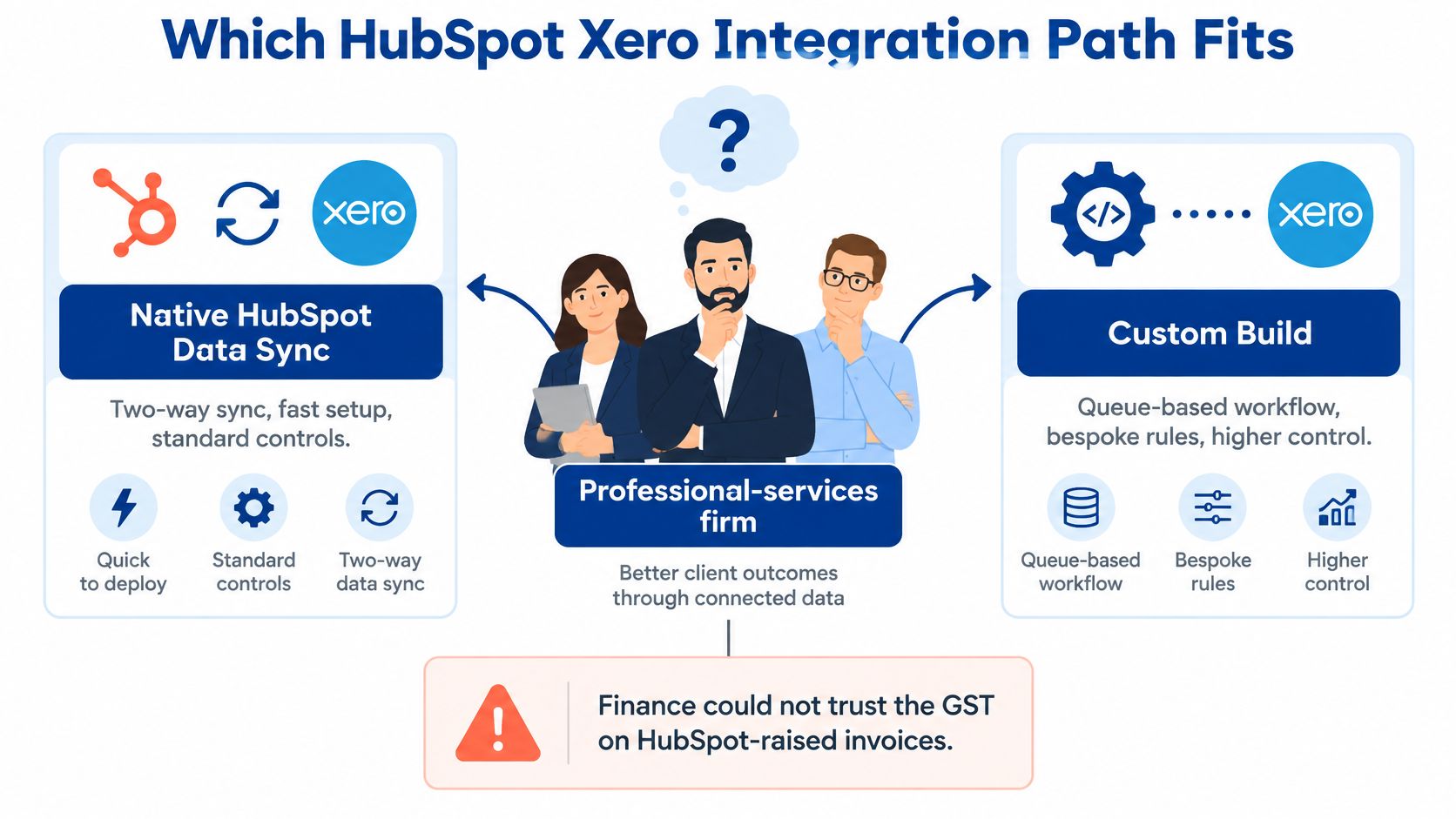
Say a professional services firm turns on two-way sync on a Friday. By Tuesday, sales has raised invoices from deals, finance is trying to reconcile them, and the GST on several HubSpot invoices doesn't match what Xero would have applied. Nobody did anything reckless. They just picked the path before they'd agreed who owns the tax rate.
Choose the path first, then map fields. The table below is the decision.
| Path | Records | Direction | Best when | Main constraint |
|---|---|---|---|---|
| Native HubSpot Data Sync | Contacts, products, invoices, payments | Bi-directional, near real time, plus historical sync | One Xero organisation and a standard deal to invoice handoff | No BAS, STP or super lodgement, card fees excluded, tax rates don't write back from HubSpot |
| iPaaS workflow | Only the objects you map | Usually one-way or scheduled | A single trigger, such as a Closed Won deal creating a draft invoice | Duplicates, thin audit trail, breaks when fields change |
| Custom API integration | Modelled objects, including ABN and custom fields | Controlled, usually event-driven with a queue | Multiple entities, shared inboxes, or a finance exception queue | Build and maintenance cost, needs a named system of record |
What the native path actually covers
The Xero App Store Australian listing for HubSpot Data Sync specifies four supported record types, contacts, products, invoices and payments, that can synchronise bi-directionally in real time, with historical synchronisation when the connection is established. The sequence is prescribed, contacts first, then products from Xero into HubSpot, then invoices, and payment sync switches on automatically with invoice sync. A HubSpot Super Admin, or a user with App Marketplace permissions, has to configure it.
Those limits matter in the same breath. The native link doesn't lodge BAS, STP or superannuation. Credit card fees don't land in Xero. A tax rate created or changed in HubSpot doesn't write back to Xero, and HubSpot's automated sales tax feature is incompatible with invoices synced to Xero. If your finance team expects the CRM to handle any of that, the native path will disappoint you on day one.
When the other two paths make sense
A tool like Zapier, Make or Workato suits one narrow trigger, for example a Closed Won deal creating a draft invoice for finance to approve. Expect connector fees in the low hundreds of dollars a month plus a few days of mapping, and accept a weak audit history in return. It's cheap because it does less.
A custom API build earns its cost when you've got more than one Xero organisation, HubSpot custom objects, shared finance inboxes, or an exception queue finance will work through. I'd budget days for a clean native setup, and several weeks of senior integration time plus ongoing maintenance for a governed custom build. Our own custom integrations work follows that second model, with documentation and handover built in.
Decision rule: If you can't name which row you're in, you're not ready to map a single field.
One more consideration before you choose. If you're also weighing how Xero connects to the rest of your finance stack, it's worth reviewing how you'd connect Xero with AI2Fin so the CRM decision doesn't box in your reporting later. Pick one row, write it down, then move on.
Field Mapping and the System of Record
Don't enable two-way sync until ownership is written down. Two systems writing to the same field is how a correct billing address gets overwritten by a marketing import. The ownership table comes first, the toggles come after.
| Object | System of record | Match key | Allowed direction | Australian note |
|---|---|---|---|---|
| Contact | Xero for accounting identity, HubSpot for lifecycle and consent | Xero contact ID, with email only as a first match | Xero creates or updates the HubSpot contact | Normalise email, phone and ABN, don't key only on a shared inbox |
| Company and ABN | Xero | Xero contact ID | Xero to HubSpot | ABN stays an accounting identifier, not a marketing field |
| Product and account code | Xero | Xero item code | Xero to HubSpot | Don't let sales rename items that post to the chart of accounts |
| Deal and lifecycle | HubSpot | HubSpot deal ID | Stays in HubSpot | A Closed Won deal may trigger an invoice, it doesn't overwrite Xero |
| Invoice and tax | Xero | Xero invoice ID | Invoice created from an approved HubSpot action, then Xero owns it | Tax rates import from Xero and don't write back |
| Payment status | Xero | Xero payment and invoice IDs | Xero to HubSpot for sent, paid and overdue | Don't mark an invoice paid in the CRM first |
Why email matching breaks
The Xero App Store documentation for HubSpot states that contact matching uses the Xero contact email address as an identifier, can create or update the corresponding HubSpot contact, and can return invoice states such as sent, paid or overdue to HubSpot. That works until it meets a shared accounts@ inbox covering six different customers, a contact who changed address, or two household contacts on one email. Then the match either merges strangers or creates duplicates.
So treat email as a first pass only. Store the immutable Xero contact ID and HubSpot record ID on both sides, and write a collision rule before the first sync, something like, two records sharing an email but with different ABNs go to manual review, never auto-merge. Normalise Australian email, phone, company name and ABN formats during cleanup, and decide whether the ABN lives only in Xero, which I'd recommend.
Mapping the fields finance cares about
Map the mandatory Xero invoice fields explicitly, contact, line item, account code, tax rate and currency. Feed HubSpot products from Xero items rather than letting both sides edit names and codes, because a renamed item can post to the wrong account. If payments also run through a gateway, the same ownership discipline applies, which is why we treat Stripe integration and CRM sync as one data design, not two projects.
Document the flow and run a privacy impact assessment, because the Privacy Act and the Australian Privacy Principles govern the personal information crossing the link. That's not a formality for NGOs and membership bodies holding member data. If your processes currently live in one person's head, a practical guide for owner-dependent firms is a useful starting point for getting them written down before the integration depends on them.
If finance and sales disagree about a record, the ownership table wins. That rule is what the pilot tests.
Configure Sync and Pass the Ten-Record Pilot
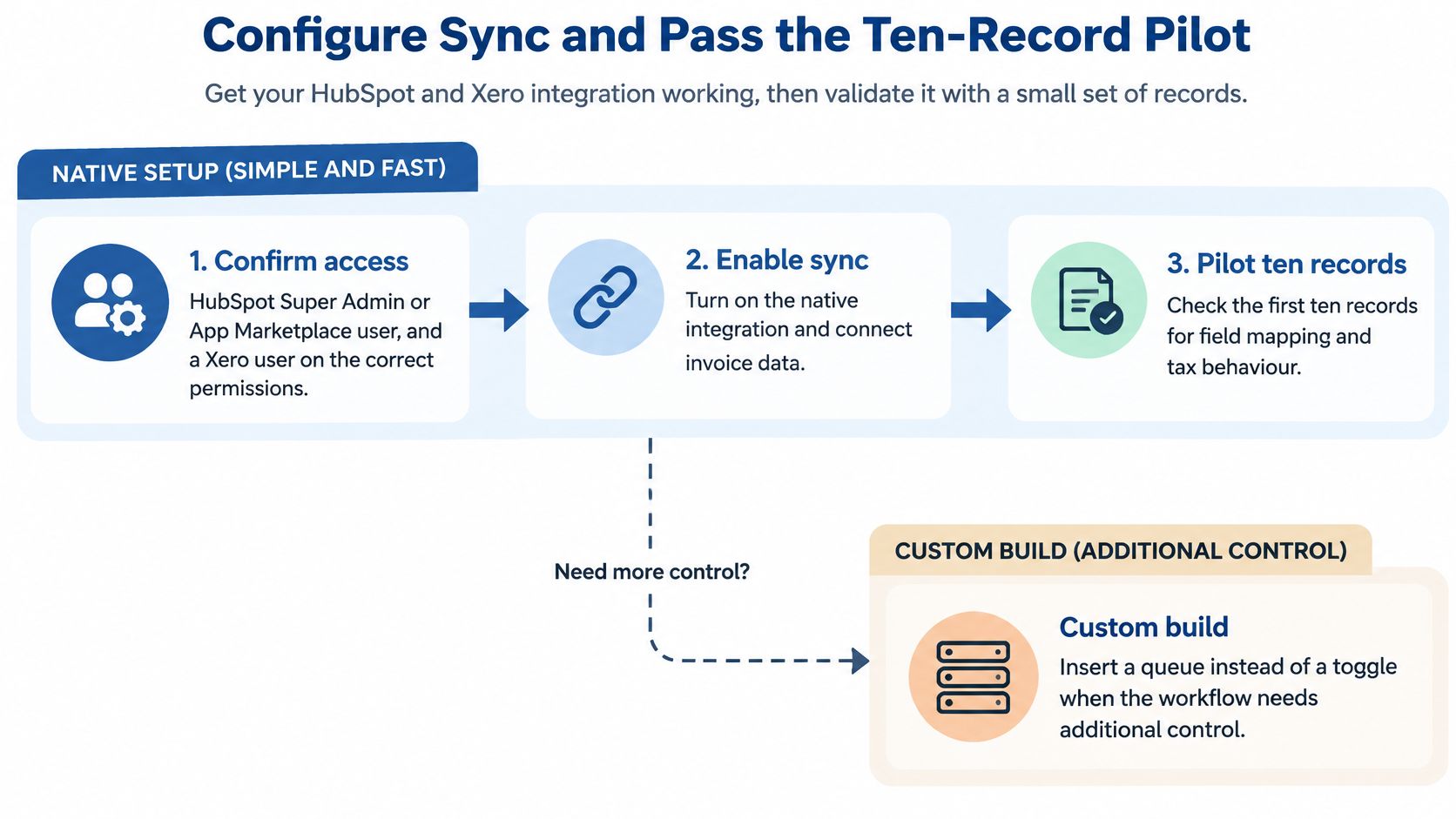
This procedure follows the native path. A custom build runs the same order, it just inserts a queue and an approval step where the native path has a toggle. Contacts and products must exist before an invoice will post, so the sequence can't be reordered.
Steps 1 to 4, access, cleanup and contacts
- Confirm access before you touch production. You need a HubSpot Super Admin or App Marketplace user, and a Xero user on the correct organisation. Skipping this check is how a test connection ends up pointed at the live ledger, or worse, at the wrong entity in a group.
- Export from both systems and deduplicate. Match on name, email and ABN. Merging duplicates after sync means unpicking invoices attached to the wrong contact, which is slow and sometimes impossible to do cleanly.
- Normalise the Australian fields. Standardise email case, phone format, company naming and ABN formatting. Park every shared inbox record in a manual review list, because those are the records that will collide.
- Connect HubSpot Data Sync and enable contact sync only. Let it settle, check a sample, and confirm the created versus updated counts look sane before anything financial moves.
Steps 5 to 7, products, invoices and history
- Turn on product sync from Xero to HubSpot. Check item codes against the chart of accounts. If a product in HubSpot doesn't carry the Xero item code, the invoice line has nowhere correct to post.
- Enable invoice sync and confirm payment sync came with it. Then check that HubSpot's automated sales tax is off. Leaving it on doesn't produce a warning you'll notice, it produces invoices that fail or carry tax Xero never agreed to.
- Limit historical sync to a short date window. Extensive invoice histories are often unnecessary in the CRM. A wide window floods deal records with history nobody will read and makes the pilot results impossible to audit.
There's a commercial reason to get this right rather than fast. Xero's Australian small business research found that for the March quarter of 2024, Australian small business sales grew by an average of 3.5% year over year, coming off a weak end to 2023. When growth moves around like that, a forecast sitting in the CRM tells you little on its own. You need to see which deals became invoices and which invoices became payments, and that's exactly what a clean sync gives you.
The scale argument points the same way. According to Australian Bureau of Statistics business counts summarised by Xero, the number of Australian businesses increased by 2.5% during 2024-25, representing a net increase of 66,650 businesses, and 91.5% of businesses reported annual turnover below AUD 2 million. Most organisations connecting these tools are lean. They can't absorb a month of manual reconciliation because someone skipped the pilot.
Steps 8 to 10, the pilot records and the gate
- Run ten representative records. Include a new contact, an existing contact, a changed email, a shared inbox, a standard 10 per cent GST line, a GST-free line, a part payment, an overdue invoice and a credit note. Add one ordinary clean invoice as your control. If your business has a trickier case, a multi-entity client, a progress payment, or an invoice you deliver through Peppol, swap it in. Write down the expected result for each record before you run it, so the check is against a prediction rather than a shrug.
- Have sales and finance check independently. Finance verifies invoice totals with and without GST, tax codes, account codes and status moves from sent to paid or overdue. Those tax code checks matter later, because the synced invoices are the evidence behind the BAS figures. Sales verifies contact counts created versus updated, and that platform IDs landed on the right records. Two separate checks catch the errors one team can't see.
- Widen the window only after counts match. Assign a named owner for the sync, and agree the rollback in advance, disconnect invoice sync and let Xero stay the ledger while you fix the cause. A rollback you have to invent under pressure isn't a rollback.
The gate: The ten-record pass is the go or no-go decision. Go-live is just the paperwork after it.
For a custom build, insert the queue between steps 6 and 8, so an invoice request waits for finance approval instead of posting directly. The pilot records stay identical. If the queue can't handle the shared inbox case or the GST-free line, you've learned that on ten records, not on a quarter of billing.
Australian GST and BAS Controls
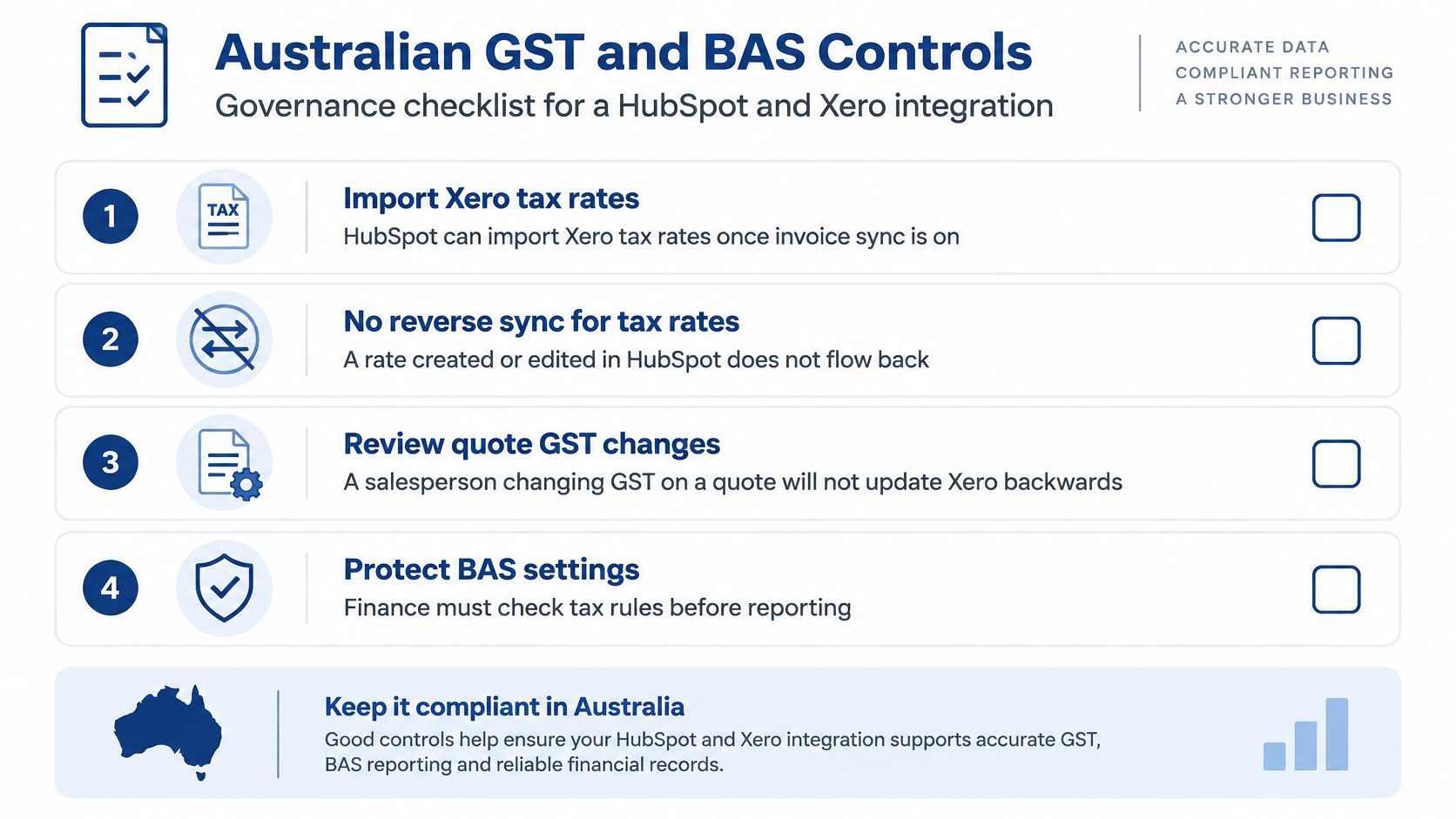
The single rule that causes the most damage is this one. Per HubSpot's Xero data sync documentation, HubSpot imports Xero tax rates when invoice synchronisation is configured, but tax rates created or changed in HubSpot do not flow back to Xero, and HubSpot's automated sales tax feature is incompatible with invoices being synced to Xero. So a salesperson who edits GST on a quote hasn't changed the tax treatment. They've created a CRM total that disagrees with the ledger.
Credit card fees don't synchronise to Xero either. The gateway payout will be short against the invoice until finance posts the fee, and if nobody tells the accounts person that, they'll spend an afternoon hunting for a missing payment. And HubSpot doesn't lodge BAS, STP or superannuation. Xero and your tax agent still do. If your team needs a refresher on what lodgement involves, Everglow Prosperity's BAS lodgement guide is a clear reference to keep beside the month-end checklist.
| Control | Authoritative system | What the sync does | Check before close |
|---|---|---|---|
| GST tax code on a line | Xero | Imports Xero tax rates, HubSpot edits don't write back | Match code and GST amount on the pilot invoices |
| HubSpot automated sales tax | Do not use | Incompatible with invoices synced to Xero | Confirm the feature is off |
| Credit card surcharge | Xero manual entry or journal | Fees do not synchronise | Reconcile the gateway payout to the invoice |
| Payment status | Xero | Can return sent, paid or overdue to HubSpot | Record the payment in Xero, not the CRM |
| BAS, STP and super | Xero and the tax agent | Not lodged by the integration | Clear exceptions before lodgement |
| Peppol e-invoice | Xero e-invoicing | CRM sync is not Peppol delivery | Confirm PINT A-NZ sending in Xero for government buyers |
A month-end sequence finance can run
- Freeze tax code changes. Nobody edits or adds a GST rate during close, in either system, without finance approval.
- Clear the exception queue. Every failed invoice, unmatched contact and missing payment gets an owner and a resolution, or a documented reason it carries forward.
- Tie the counts together. HubSpot invoice count against Xero invoice count and totals for the period. Investigate gaps, don't round them away.
- Explain every card fee variance. Payout, fee and invoice should reconcile to the cent.
- Prepare the BAS last. Only once the four checks above are clean.
Name who may approve a tax code change, and make it finance, not sales. Remove tax editing rights from CRM roles that don't need them. It's a permissions change that prevents a class of error entirely, which is always cheaper than detecting it.
Peppol is a separate question
A CRM invoice sync is not an e-invoice. If you supply government buyers, confirm their Peppol capability and your sending setup inside Xero, where the formatting happens. Don't let a paid status in HubSpot stand as evidence that a compliant e-invoice was delivered.
Sync Failures and How to Fix Them
Most failures in the first month are mapping and ownership problems wearing a sync error's clothes. Finance usually notices duplicates and GST mismatches first, because those two stop the close. Work the table in that order.
| Symptom | Likely cause | Fix |
|---|---|---|
| Duplicate contacts | Email used as the only key, or a shared inbox | Merge both sides and keep Xero and HubSpot IDs |
| Invoice missing in HubSpot | Contact or product sync not completed first | Finish contacts, then products, then retry the invoice |
| GST amount differs | Tax rate edited in HubSpot | Correct the rate in Xero, re-sync, and lock tax edits |
| Paid in HubSpot, open in Xero | Payment recorded only in the CRM | Enter the payment in Xero so status returns |
| Payout doesn't match invoices | Card fees are excluded from sync | Reconcile the fee in Xero against the gateway payout |
| Overdue status blank | Invoice sync or history not enabled | Enable invoice sync and confirm the returned state |
| Old invoices flood the CRM | Historical sync set too wide | Restrict the date range and archive the extras |
| Billing address overwritten | Two-way contact edits | Limit direction and restore the Xero address |
The fixes that aren't a resync
When duplicates appear, stop the sync for that record, merge in both systems, and store the platform IDs. A full resync just recreates them. When an invoice is missing, rerun contacts and products in order rather than forcing the invoice through. An invoice pointing at a contact Xero doesn't recognise won't post no matter how many times you retry it.
The silent one is the overwritten billing address. Two-way contact edits let a marketing update replace an address accounts had corrected, and nobody notices until invoices go to the wrong place. The fix is field-level direction on the contact, not another sync. If failures keep recurring, treat the integration like any production system and put proper enterprise application monitoring and debugging around it, with alerts on the exception queue rather than a monthly surprise.
One failure mode sits outside the sync entirely. Xero's Australian e-invoicing guidance states that non-corporate Commonwealth entities have been required to receive Peppol e-invoices since 1 July 2022, while the Australian Government has a target for 30% of supplier invoices to Commonwealth agencies to use the Peppol network by July 2026, and business-to-business e-invoicing remains voluntary. Australia uses the Peppol network with the PINT A-NZ specification, the ATO acts as the Australian Peppol Authority, and Xero's Australian e-invoicing feature handles that formatting automatically. If a government buyer rejects your invoice, check the Peppol path in Xero, not the HubSpot status.
Keep an exception queue with an owner, an age and a dollar impact on every item. Anything touching tax is a finance ticket, not a CRM admin tweak.
When to Brief an Integration Partner
Stay on the native path when all of these hold, one Xero organisation, unique contact emails, finance accepts Xero as the tax authority, and an internal admin can run the ten-record pilot and the month-end checklist. In that situation a partner adds cost without adding control, and I'd tell you to keep the budget.
Brief a partner when any one of these is true, more than one Xero organisation, ABN or shared inbox collisions, custom objects, an exception queue carrying real dollar impact, or invoices to Commonwealth entities that must travel on Peppol. Forcing the native toggle in those cases doesn't risk a slower sales screen. It risks a ledger finance won't sign at year end.
A short discovery should produce scope before build work starts, covering data cleanup volumes, system of record rules, the pilot plan and a written handover. When organisations come to us this way, our business IT consulting services start with a short call after an enquiry to dig deeper if it's a good fit, and we then give a clear proposal with scope, timeline and cost after that process. For NGOs, professional services firms and growing teams, the documented handover matters as much as the sync itself.
Your next step costs nothing. Export a contact sample from both systems, mark the collisions, the shared inboxes and the changed emails, and bring that sample to the scoping call. Then the proposal prices your real cleanup, not an ideal dataset that doesn't exist.
If your HubSpot Xero integration involves multiple entities, messy contact data, or GST controls finance needs to trust at BAS time, we can scope it properly before anyone builds. Continuum Solutions designs and maintains custom integrations for Australian NGOs, enterprises and growing teams, with documented handover as standard. Start with a short scoping conversation at Continuum Solutions and bring your contact sample with you.