
S3 Standard in the Sydney Region costs approximately US$0.025 per GB-month, or around A$37 per TB-month for storage. A full 1 TB restore from Sydney can add roughly A$140 in outbound transfer, before request and retrieval charges.
That distinction matters when I review an Australian AWS bill. A backup bucket can look inexpensive in Cost Explorer until someone needs to recover it, move it to another Region, or restore it to an office or secondary provider. The monthly storage line is only one part of the S3 backup cost.
A sensible design balances four things: storage price, recovery speed, security isolation and the cost of moving data. If you optimise only for dollars per gigabyte, you can build a backup platform that is cheap to retain and expensive to use when the business is already under pressure.
Table of Contents
- Why Your S3 Backup Cost Is Harder to Read Than It Should Be
- Choosing the Right S3 Storage Class for Australian Backups
- Designing Lifecycle Policies That Move Data on Schedule
- Hidden Charges That Blow Up Your Monthly Backup Bill
- Modelling a Real 10 TB Ransomware Recovery From Sydney
- Comparing Australian Backup Architectures for Real Resilience
- Your S3 Backup Cost Optimisation Checklist and Next Step
Why Your S3 Backup Cost Is Harder to Read Than It Should Be
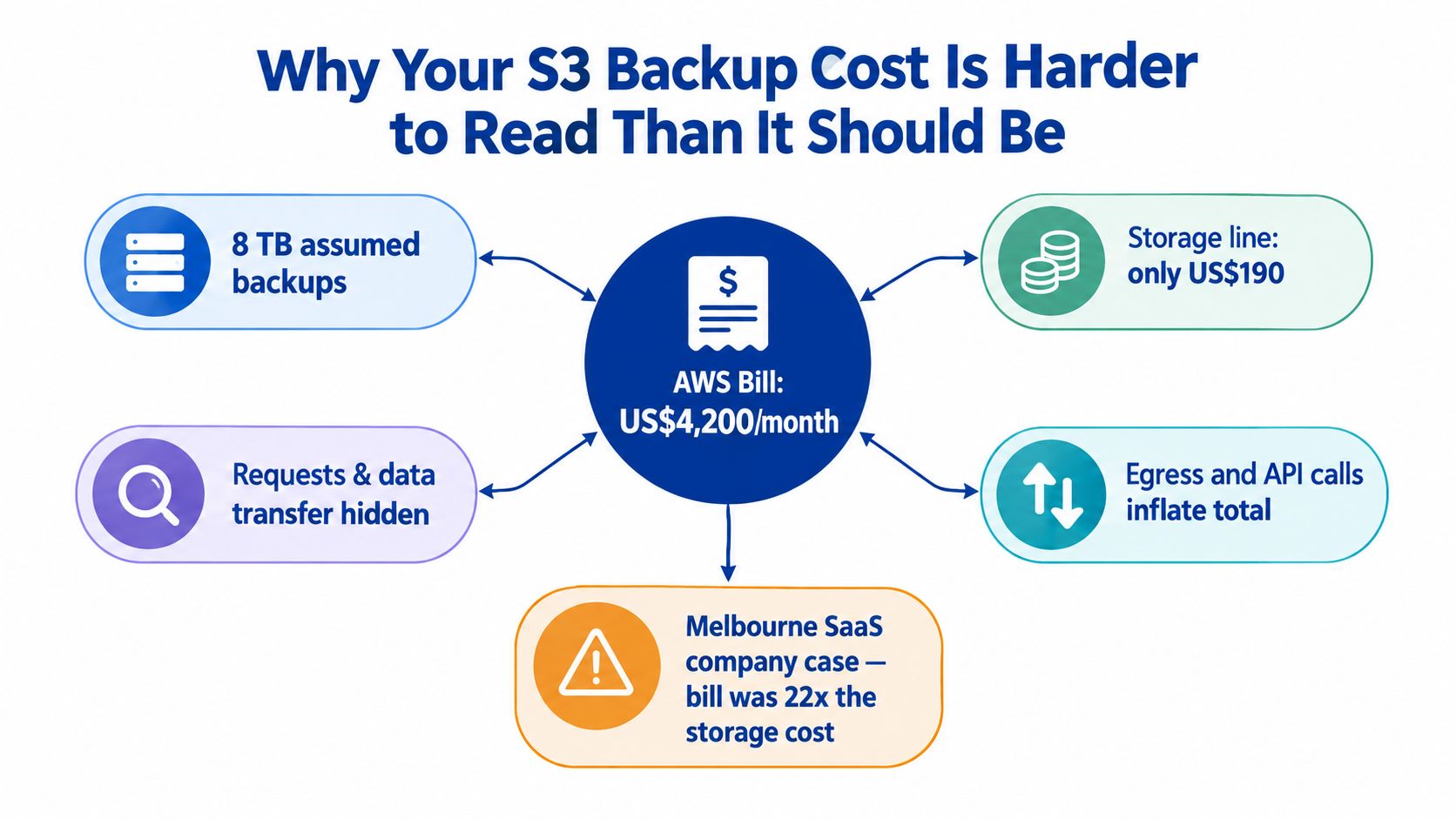
A Melbourne software company asked me to review an AWS backup bill that appeared out of control. Finance could see the storage charge, while engineering could not explain the rising total. The problem was the bill structure. Backup data, application data, replicas and old object versions were spread across several buckets and accounts.
A Sydney-region review should separate four cost dimensions:
- Storage: The recurring charge for bytes held in S3. S3 Standard is approximately US$0.025 per GB-month, or about A$37 per TB-month.
- Requests and retrieval: API calls, archive retrieval and operations created by backup software, inventory jobs and restore workflows.
- Data transfer: Internet egress, cross-Region movement and transfers to another provider or an on-premises environment. A 1 TB restore from Sydney can add roughly A$140 in outbound transfer, before request and retrieval charges.
- Management overhead: Replication, monitoring, inventory, restore testing and the operational work needed to keep policies accurate.
AWS describes S3 pricing as a combination of storage, requests, retrieval, data transfer, replication and management features in its S3 pricing documentation. These charges can appear under different services, accounts or cost allocation tags, so a single bucket view rarely explains the complete S3 backup cost.
Why Cost Explorer often gives an incomplete answer
Cost Explorer can show correct charges without showing how they relate. Replication may sit separately from the source bucket. A restore may appear as data transfer. Noncurrent object versions can continue generating storage charges even when the current bucket view looks tidy.
Use Cost and Usage Reports, S3 Storage Lens and inventory reports only after assigning consistent owners, environments and cost centres to buckets. Reserved Capacity will not explain a Sydney restore bill of roughly A$140 per 1 TB or remove unpredictable transfer charges.
Check whether the policy separates production data from temporary exports, expires noncurrent versions and identifies the restore destination. Restoring inside AWS, sending data across Regions or returning it to an office produces different charges. A policy that saves roughly A$37 per TB-month in storage can still create a much larger recovery bill.
Practical rule: Price the full Sydney recovery path before approving retention. Include storage, requests, retrieval, replication, egress and restore time.
That review also belongs in wider platform planning. Teams assessing a move between environments should include retention, replication and recovery assumptions in an AWS migration cost review, rather than treating backup as a separate line item.
Choosing the Right S3 Storage Class for Australian Backups
I don't choose a storage class from the lowest advertised rate. I choose it from the probability, urgency and destination of a restore.
For Sydney, published comparisons put S3 Standard at approximately US$0.025 per GB-month, or about US$25 per TB-month. That is roughly US$300 per TB-year, before requests, retrieval and transfer. The same comparison lists approximately US$0.0152 per GB-month for S3 Infrequent Access and US$0.005 per GB-month for Glacier storage. Those figures convert to approximately US$15.20 and US$5 per TB-month respectively, or about US$182 and US$60 per TB-year, before other charges. See the Australian Sydney-region pricing comparison.
| Storage Class | Storage US$/GB-month | Storage A$/TB-month | Retrieval Fee | Minimum Storage Duration | Best Fit |
|---|---|---|---|---|---|
| S3 Standard | Approximately US$0.025 | Approximately A$37 in current Australian analysis | No separate retrieval fee stated here | Validate current AWS terms | Frequently restored backup data |
| S3 Standard-IA | Approximately US$0.0152 in Sydney comparison | Convert using current exchange rate | Retrieval and transfer charges apply | Validate current AWS terms | Infrequently accessed recovery copies |
| S3 Intelligent-Tiering | Varies by access tier | Validate live Sydney pricing | AWS states no retrieval fees | No minimum stated in the cited FAQ | Unpredictable access |
| S3 Glacier Flexible Retrieval | Approximately US$0.005 in the Sydney comparison | Approximately US$5 equivalent before currency conversion | Retrieval and request charges vary by option | Validate current AWS terms | Planned archive recovery |
| S3 Glacier Deep Archive | AWS says it can be up to 75% less expensive than Glacier Flexible Retrieval | Validate live Sydney pricing | Retrieval charges apply | Validate current AWS terms | Long-term retention with slow recovery |
My recommendation by access pattern
Use S3 Standard for nightly backups that the business may need to restore quickly or repeatedly. The higher storage rate is defensible when recovery is operational rather than exceptional.
Use Standard-IA when restore activity is rare and the team can accept retrieval and transfer charges. AWS's FAQ gives an example where retrieving 300 GB from Standard-IA at US$0.01 per GB creates a US$3 retrieval charge, with internet transfer potentially added separately. That example is documented in the S3 FAQ on retrieval pricing.
Use Intelligent-Tiering when access is difficult to predict. AWS states that it has no retrieval fees, but monitoring and automation charges apply per object. That makes it more attractive for uncertain access patterns than a manually guessed archive schedule, particularly where a wrong archive decision would delay recovery.
Use Glacier Flexible Retrieval for backups that can wait. AWS lists Expedited, Standard and Bulk retrieval options. Bulk retrievals are free under the cited storage-class guidance and generally complete in 5 to 12 hours, which is reasonable for scheduled recovery but not for a customer-facing outage.
Use Deep Archive only when the recovery-time objective supports it. AWS says Deep Archive can be up to 75% less expensive than Glacier Flexible Retrieval, while its Standard retrieval can take up to 12 hours. The saving is real, but it belongs to compliance and long-retention data, not the only copy of a system that must be operational immediately. Current AWS rates should be checked in the AWS architecture and cloud services guidance from Continuum before committing.
Designing Lifecycle Policies That Move Data on Schedule
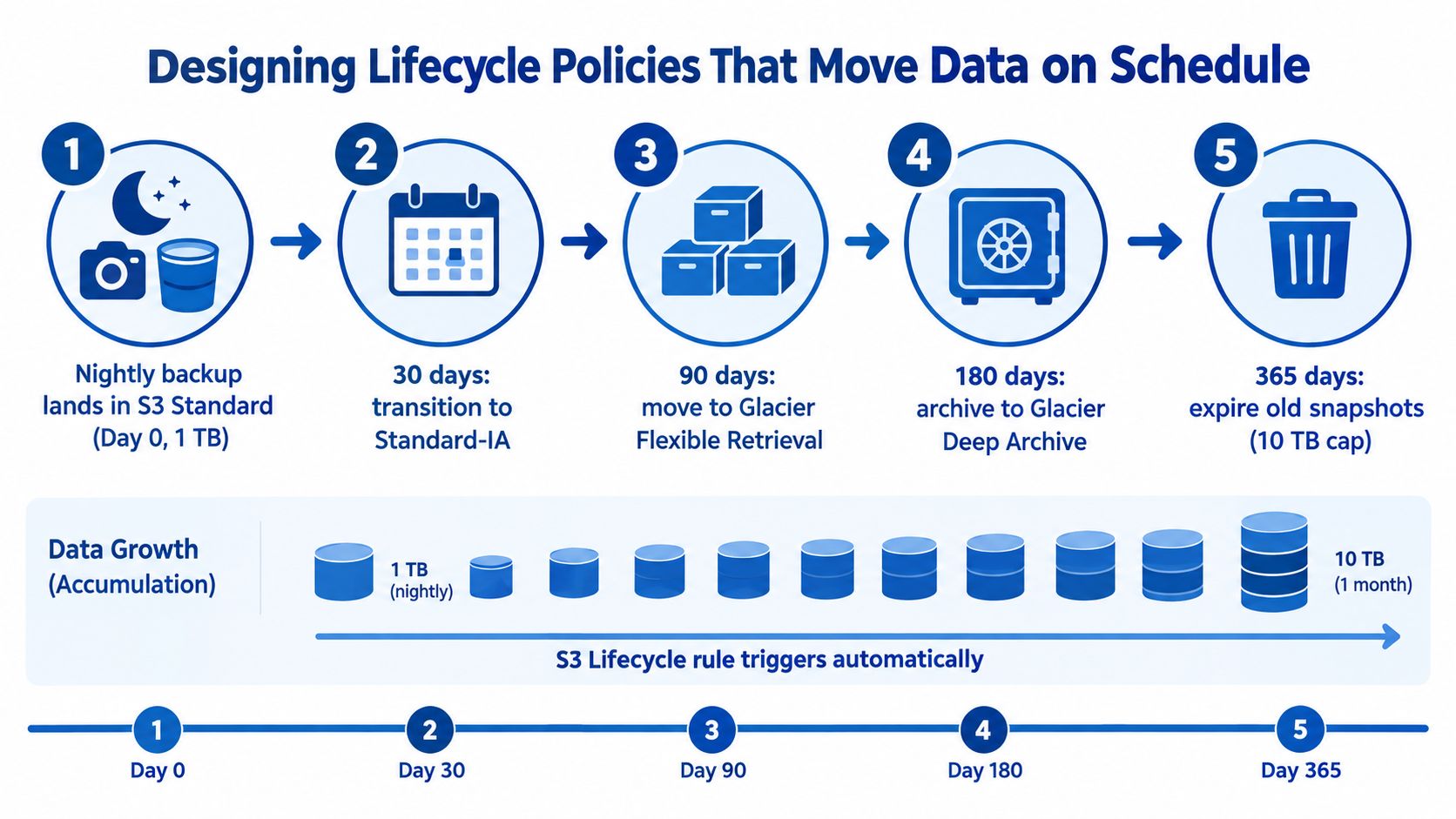
A lifecycle rule should reflect the backup's expected life, not merely the date someone created the bucket. I usually separate recent recovery points from older retention copies, then attach different transition and expiration behaviour to each prefix or tag.
A practical pattern is:
- New backup objects land in S3 Standard.
- Older objects move to Standard-IA when access becomes less likely.
- Long-retention objects move to Glacier Flexible Retrieval when a slower restore is acceptable.
- Compliance records move to a deeper archive only after the recovery requirement has been documented.
- Noncurrent versions expire under a separate rule.
A bucket that accumulates nightly backups can grow from 1 TB to 10 TB over a month, depending on how each backup is stored and retained. That is why I model the retained footprint, not just the size of the source system. At 10 TB, Sydney storage at the Australian analysis rate of approximately A$37 per TB-month would be about A$370 per month in Standard storage, before other charges. The same source places S3 Standard at approximately A$444 per TB-year, so the annual figure is about A$4,440 for 10 TB of storage alone. See the Australian cloud backup cost analysis.
The policy details that matter
A lifecycle configuration uses transition actions and day-based rules. In plain terms, it tells S3 to move an object after a defined age and eventually expire it. Selective filters matter because a rule attached to a bucket can otherwise apply to every object under that scope.
I don't apply a destructive expiration rule to a whole bucket first. I test the filter against a controlled prefix, inspect object age and noncurrent versions, then expand the rule after the retention owner signs off.
A lifecycle delete is not a recovery strategy. It is a permanent instruction that must be tested like application code.
Transitions also need careful planning. A lifecycle policy won't turn an archive into a warm copy just because an incident has started, and moving data down a tier can introduce retrieval charges or minimum-duration consequences. Noncurrent versions need their own transition and expiration actions. If they aren't included, the current-object policy can look correct while old versions keep consuming storage.
The cost swing is substantial when a policy works, but the lower rate isn't guaranteed until the rule is attached, scoped correctly and observed in billing. I check S3 Storage Lens, inventory and the Cost and Usage Report after deployment rather than assuming that a saved policy has already changed the bill.
Hidden Charges That Blow Up Your Monthly Backup Bill
The line item I challenge most often is not storage. It is the assumption that a backup job has one price.
Backup software generates requests. A restore generates requests, retrieval charges and potentially transfer charges. Replication creates a second storage footprint and moves data between Regions. Versioning preserves older object states, which is useful for rollback but expensive when nobody expires them.
AWS separates these charges in its S3 pricing model. The exact request price depends on the operation and Region, so I won't put unsupported Sydney unit rates into a forecast. The correct approach is to extract the organisation's actual PUT, COPY, LIST and GET activity from the Cost and Usage Report and model it against the actual object count.
| Cost Component | Sydney Unit Price | Typical Monthly Impact for 5 TB |
|---|---|---|
| Storage | Approximately A$37 per TB-month for S3 Standard in the cited Australian analysis | Approximately A$185 for storage only |
| Internet egress | Approximately A$140 per TB in the cited Australian recovery analysis | Depends on restore volume |
| Archive retrieval | Depends on class and retrieval option | Depends on restored volume |
| Requests | Operation and Region dependent | Depends on object count and job design |
| Cross-Region replication | Transfer, destination storage and related features | Depends on replicated volume and destination |
Versioning and replication need separate budgets
Versioning is valuable for accidental deletion and overwrite recovery, but old versions don't vanish just because users can't see them in the normal object view. I add explicit noncurrent-version retention and check delete markers. A backup bucket without that control has an open-ended storage policy.
Cross-Region replication improves resilience, but it isn't free resilience. AWS states that cross-Region transfer is billed when data leaves a Region, and the receiving account is charged for backup storage under AWS Backup's pricing model. Replication also creates another copy to retain, secure, monitor and test.
A second Sydney bucket may support Australian residency, but it doesn't automatically provide isolation. If the same compromised production identity can delete both copies, the design has duplicated data without meaningfully changing the threat model.
For an actual bill review, I group costs by bucket, account, backup policy, environment and owner. That turns a vague “S3 is expensive” complaint into a decision such as removing unnecessary replication, shortening noncurrent retention, or moving cold recovery points to archive. The common AWS mistakes review is useful context for teams finding the same control gaps across several services.
Modelling a Real 10 TB Ransomware Recovery From Sydney
A ransomware recovery starts with a business decision, not a storage-class decision. The team must identify a clean recovery point, authorise the restore, obtain the data, validate it and deliver it to the workload that needs it.
For a 10 TB recovery from Sydney, the Australian comparison provides a useful baseline. A full 1 TB retrieval may add approximately A$140 in outbound transfer, so 10 TB could imply roughly A$1,400 in egress if the same rate applied across the transfer. That is a planning estimate, not a quote, and it excludes request, retrieval and operational costs. The same analysis places 10 TB of Standard storage at approximately A$370 per month, or about A$4,440 per year, before transfer and API charges.
| Restore Scenario | Retrieval Cost | Egress Cost | Downtime | Total Cost |
|---|---|---|---|---|
| Partial restore from Standard | No separate retrieval charge stated here | Based on the amount delivered | Depends on validation and application recovery | Must be calculated from the incident scope |
| Full restore from Sydney Standard | No separate retrieval charge stated here | Approximately A$1,400 for 10 TB at the cited 1 TB rate | Depends on restore throughput and application work | Egress plus requests and operations |
| Glacier Flexible Retrieval using Bulk | Bulk retrieval is free under AWS guidance | Transfer still applies where data leaves S3 | Generally 5 to 12 hours for bulk retrieval | Transfer plus operations |
| Glacier Flexible Retrieval using Standard or Expedited | Per-GB and per-request fees apply | Transfer still applies where data leaves S3 | Faster option availability and timing must be validated | Retrieval, transfer and operations |
| Deep Archive recovery | Retrieval charges apply | Transfer still applies where data leaves S3 | Standard retrieval can take up to 12 hours | Retrieval, transfer and operations |
AWS explains the retrieval options for S3 storage classes. Bulk retrieval is attractive when the incident can tolerate waiting, while Standard or Expedited retrieval may be justified when every hour of recovery matters.
The mistake I see is comparing a monthly archive saving with a recovery bill that includes only storage. The finance model needs at least three cases: routine retention, a partial restore and a full emergency restore. It should also show whether the destination is another AWS workload in the same Region, a different Region, an office, or another cloud provider.
If the organisation cannot fund the full restore path, it hasn't finished choosing its backup architecture.
Don't invent labour costs to make the model look precise. Use your own payroll or contracted day rates, then add application validation, incident response, communications and the cost of delayed operations. Budget for the worst credible restore, not the average month.
Comparing Australian Backup Architectures for Real Resilience
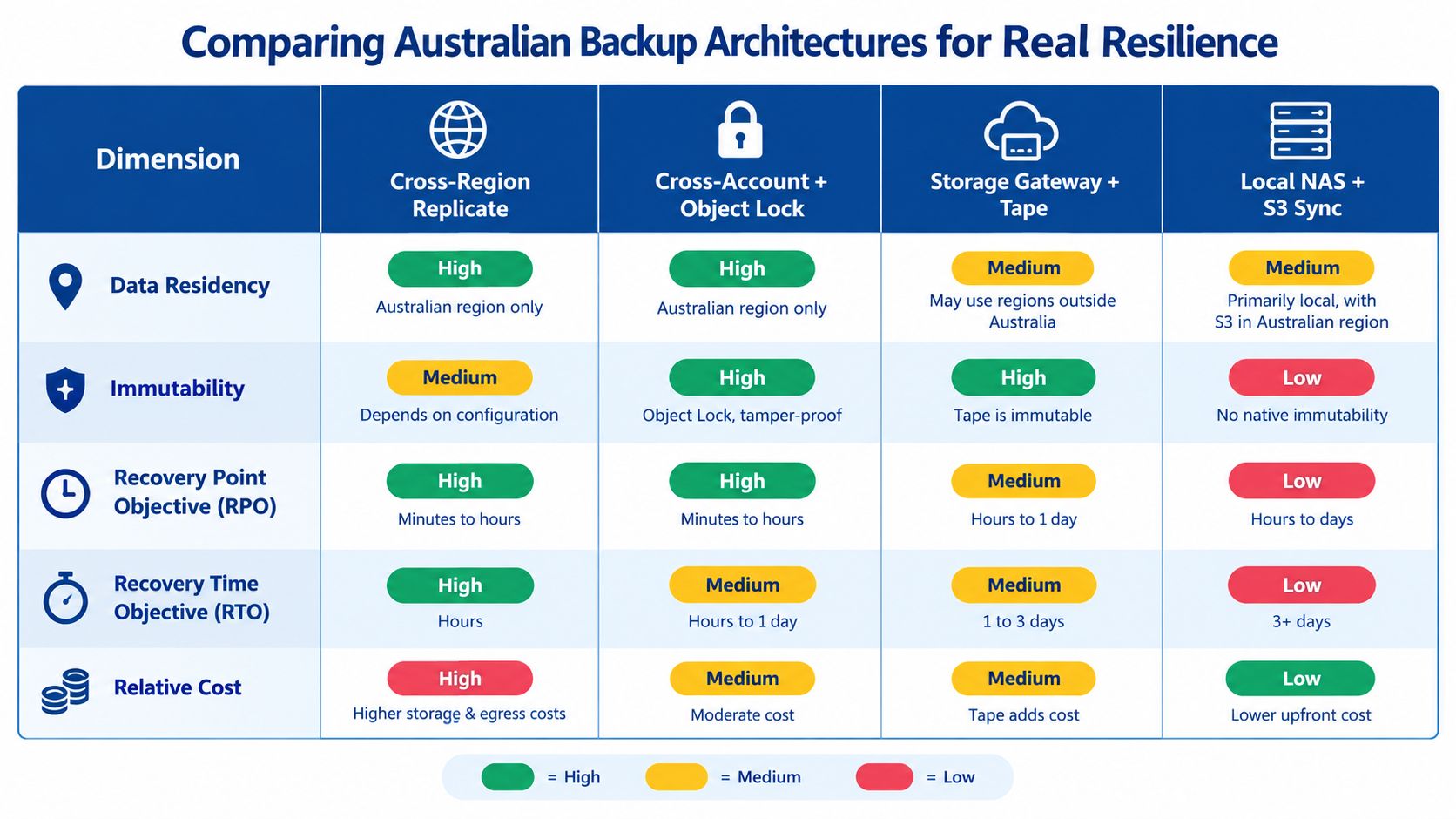
Australian data residency and backup security solve different problems. Sydney storage can help meet a location requirement and reduce latency for Australian workloads, but it doesn't guarantee immutability, account isolation or recoverability.
The four designs below are the ones I normally compare with a client:
| Architecture | Residency | Immutability | RPO | RTO | Cost Position |
|---|---|---|---|---|---|
| Same-Region versioned bucket with Object Lock | Strong for Australian-only storage | Strong if configured and governed correctly | Depends on backup schedule | Fastest when the workload is also in Sydney | Lowest additional architecture cost |
| Cross-Region replication | Depends on the selected destination | Replication alone doesn't guarantee immutability | Potentially stronger than one copy | Better if the primary Region is unavailable | Adds transfer and replica storage |
| Isolated backup account with restrictive controls | Can remain Australian | Stronger blast-radius separation with Object Lock and account controls | Depends on schedule and copy method | Requires tested access and restore procedures | Adds governance and operational work |
| Offline or second-provider copy | Depends on the physical or provider location | Strongest isolation when genuinely offline | Depends on copy schedule | Usually slower and more operationally involved | Highest operational complexity |
What I recommend
For a small organisation with one Region and a manageable threat model, I start with versioning, Object Lock, a separate backup account and tested restores. That provides a practical foundation without immediately paying for every resilience feature.
For a regulated organisation or an NGO handling sensitive records, I usually add cross-Region or cross-provider protection only after confirming residency and governance requirements. AWS notes that cross-Region transfer can incur charges, so the resilience decision must include both the transfer budget and the compliance position.
An offline copy can reduce exposure to compromised cloud credentials, but it introduces physical handling, update frequency and restore logistics. It isn't a free upgrade.
Continuum Solutions is one option for AWS cloud architecture support in Melbourne, including a review of backup controls against cost, residency and recovery requirements. The decision rule is straightforward: match the architecture to the threat model, not to the cheapest storage quote.
Your S3 Backup Cost Optimisation Checklist and Next Step
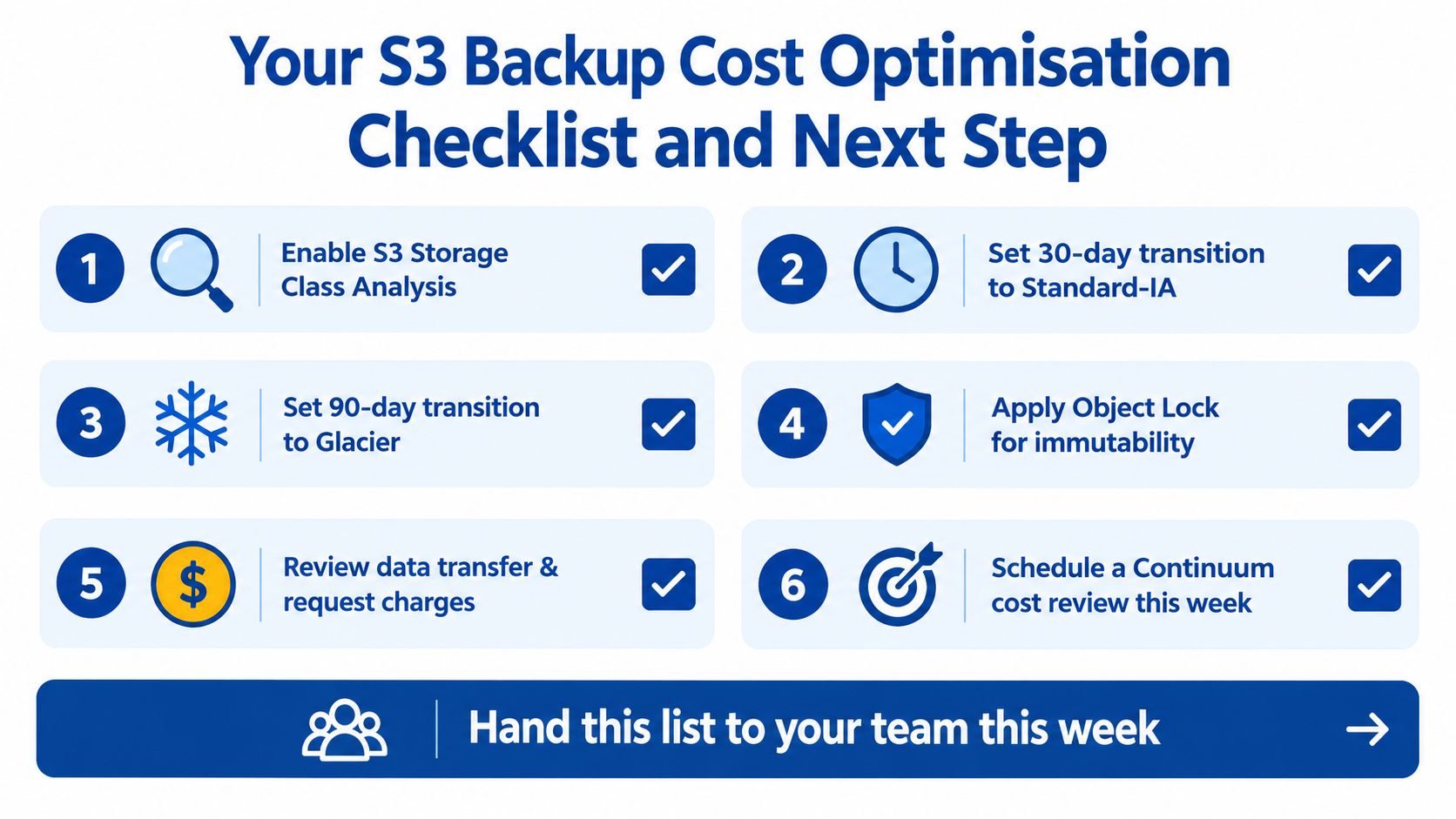
Give your engineering lead this checklist and ask for evidence against every item:
- Measure object age: Enable S3 Storage Class Analysis and inspect which backup objects are cold before changing tiers.
- Transition predictable cold data: Use a 30-day transition to Standard-IA only where the access pattern and minimum-duration terms support it.
- Archive deliberate retention: Use Glacier Flexible Retrieval for recovery points that can tolerate scheduled restoration, and model the transfer bill before moving data.
- Protect against deletion: Apply Object Lock where immutability is required, then confirm that the backup identity cannot alter retention.
- Control version growth: Expire noncurrent versions and delete markers according to an approved retention policy.
- Separate critical copies: Replicate only the buckets that need additional blast-radius protection, and tag every bucket with a cost-centre owner.
For a 10 TB Standard footprint, the Australian storage baseline is approximately A$370 per month, while a full 10 TB transfer at the cited recovery rate could be approximately A$1,400. Those figures make the priority clear: reduce unnecessary warm storage, but don't weaken the restore path to save a line item. The underlying rates and exchange conversion should be checked against the live AWS bill before implementation.
A proper review maps each bucket to its storage class, lifecycle rules, version history, replication path, restore destination and owner. It also runs a restore test, because a policy that has never produced a usable recovery is only an assumption. For organisations planning broader infrastructure work, cloud computing consulting can include that cost and resilience assessment.
Continuum Solutions designs and reviews AWS backup architectures, lifecycle policies, account isolation and restore testing for Australian organisations. Visit Continuum Solutions to arrange a paid S3 cost review that maps your Sydney-region bill to the recovery scenarios your business needs.