
A job is marked complete from the cab of a service van. The technician has finished the work, the customer expects an invoice, and the office team still has to retype the client details, line items, GST and payment terms into another system. By the end of the day, the business has completed the job, but its data is still catching up.
That gap is where a ServiceM8 integration either earns its keep or creates a new class of operational problems. The right design can move job, customer, invoice and payment information between systems without repeated data entry. The wrong design can create duplicate invoices, stale records and reconciliation work that costs more to fix than the original manual process. Australian trade businesses need to assess the workflow, architecture and failure handling together, not choose a connector based on a feature list.
Table of Contents
- Why ServiceM8 Integration Matters for Australian Trade Businesses
- Understanding ServiceM8 Integration Architecture
- Comparing ServiceM8 Integration Approaches
- Real-World ServiceM8 Integration Patterns
- Integration Risks and Failure Modes
- Planning Your ServiceM8 Integration Implementation
Why ServiceM8 Integration Matters for Australian Trade Businesses
A completed service call can still leave an Australian trade business exposed. The technician closes the job in ServiceM8, but the office later discovers that the customer record does not match the accounting system, a line item is missing, or the invoice has not been issued. The field team sees finished work. Finance sees incomplete information. That gap creates rework at the point where accuracy affects cash flow and customer experience.
A published Australian plumbing case study shows what a connected workflow can achieve. After a job was marked complete in ServiceM8, the integration created a Xero invoice with client details, line items, GST and payment terms, then updated customer and payment information in the connected systems. The workflow processed 52 jobs in its first week with zero manual data entry and saved 8 hours each week, according to the published Australian ServiceM8 and Xero case study.

The cost of disconnected records
The obvious cost is administration time. The harder costs to spot are billing delays, duplicated customer records, inconsistent payment status and weak operational reporting. A dispatcher can treat a job as complete while no invoice exists in the accounting platform. A customer service employee can correct a phone number in one system while the other continues using the old number. These errors often appear during month-end checks, customer disputes or overdue-payment follow-up.
For Australian operators, the accounting connection also has local implications. ServiceM8 lists integrations with Xero, MYOB Business and QuickBooks Online, including synchronisation for clients, items, invoices and payments on its Australian integrations page. MYOB Business is positioned there for Australia and New Zealand, so the choice reflects local accounting workflows rather than a generic list of global software connections.
Integration value depends on clear ownership. ServiceM8 can control job status and field activity, while the accounting platform controls invoices and payment records. A CRM may own sales-stage information and marketing consent. Define those boundaries before automation is configured. Otherwise, a correction in one system can overwrite a valid update in another, or the same customer can be created twice.
For businesses assessing the work, business IT consulting services should begin with process mapping. Record the handoffs from booking through completion, invoicing, payment and follow-up, including who checks failures. The integration should remove specific manual tasks and preserve an audit trail, not merely add another connection that the office must monitor.
Understanding ServiceM8 Integration Architecture
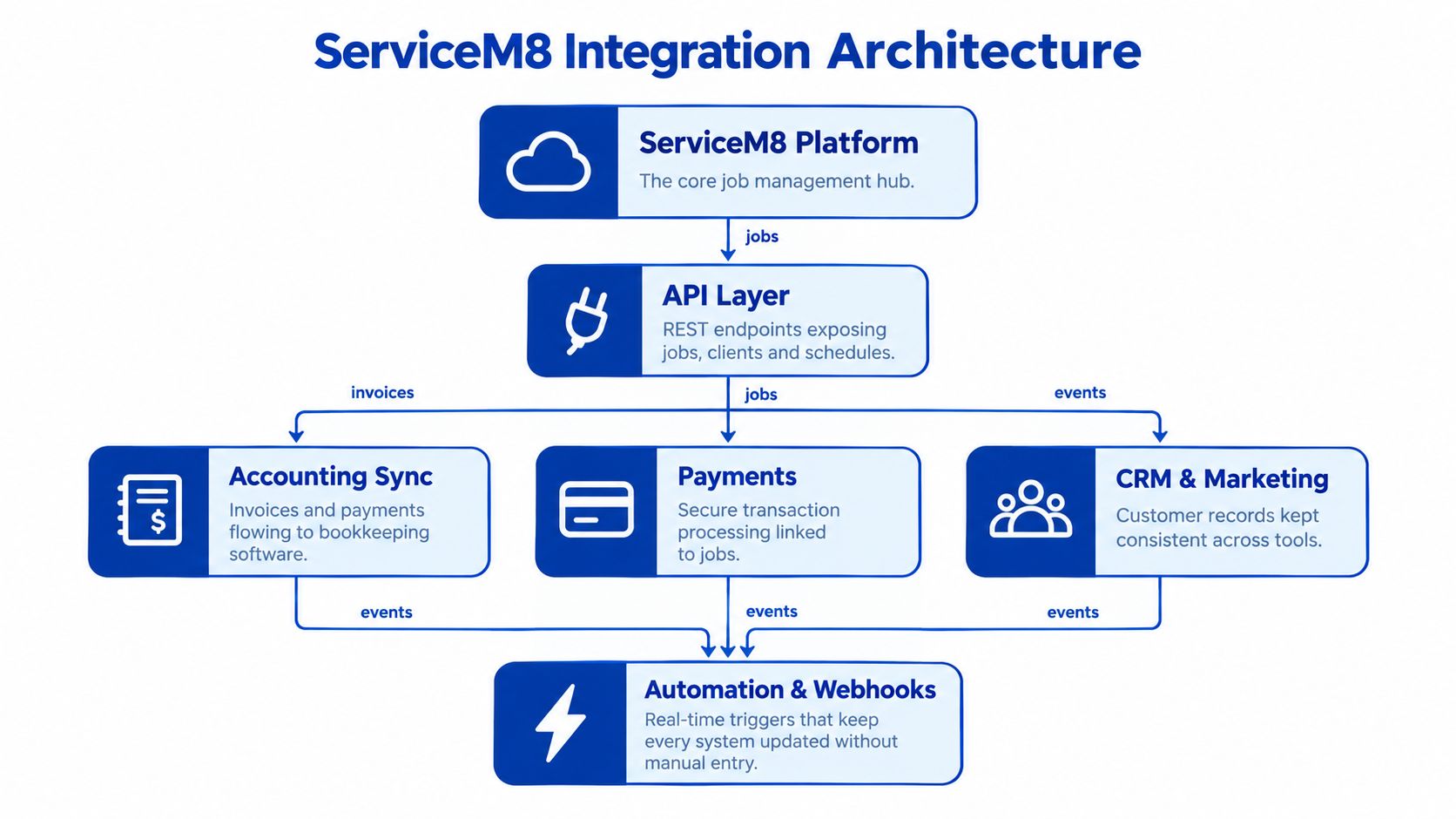
ServiceM8 has three practical integration layers. The first is the native connector layer for accounting and established workflow tools. The second is the application programming interface, or API, for custom data flows. The third is broader automation tooling that can connect ServiceM8 to systems outside its native ecosystem.
The native path is appropriate when the workflow is conventional. A trade business may need clients, items, invoices and payments synchronised with Xero, MYOB Business or QuickBooks Online. That approach usually reduces development effort, but it also means accepting the connector's field mappings, timing and error-handling behaviour.
The API surface
The documented ServiceM8 REST API uses JSON over HTTP with GET, POST and DELETE methods. It exposes operational objects including Jobs, Companies, JobActivity, Staff, Materials, Attachments, Queues and Vendors, as described in the ServiceM8 developer getting started documentation.
That object model supports more than invoice synchronisation. A custom integration can use job activity to send operational events to another platform, map materials to an inventory process, or pass staff and queue information into a dispatch or reporting service. The important architectural choice is to treat ServiceM8 as an operational system of record for the data it owns, rather than copying every field into every connected application.
Private internal applications can authenticate with an API key sent in the X-API-Key header. Public add-ons use OAuth 2.0, which is more suitable when different ServiceM8 customers need to authorise access to the same application. These are different security models, so a team shouldn't design an internal automation as though it were a marketplace product.
Data ownership and event flow
A reliable design defines the direction of every important field. For example, ServiceM8 can own job status, job activity and materials, while Xero owns invoice state and payment reconciliation. The integration then sends only the changes that the receiving system should trust.
custom integrations become useful in this situation. They allow the team to introduce validation, matching rules, retry handling and audit records instead of relying on a sequence of loosely connected actions. The extra control isn't automatically necessary, but it becomes valuable when a business has several systems, unusual billing rules or a CRM that must remain consistent with field operations.
Comparing ServiceM8 Integration Approaches
A Sydney electrical contractor with standard invoicing may only need a native accounting connector. A multi-branch maintenance business that links ServiceM8 with a CRM, dispatch system, payments and stock control will usually need more control. The right approach depends on how many systems share job data, which platform owns each field, and what must happen when a connection fails.
| Approach | Setup Time | Customization | Maintenance | Best For |
|---|---|---|---|---|
| Native accounting connector | Short | Limited to supported mappings and workflow options | Usually lower, but dependent on the connector | Standard Xero, MYOB Business or QuickBooks Online synchronisation |
| Zapier-style automation | Short to moderate | Moderate for simple triggers and actions | Ongoing subscription and workflow maintenance | Lightweight notifications, one-way updates and straightforward app connections |
| Custom API integration | Moderate to extended | High, including validation and business rules | Ongoing code, monitoring and security ownership | Bi-directional workflows, complex CRM links, dispatch, payments and controlled billing |
| Hybrid architecture | Moderate | High where custom logic is needed | Split between connector and custom service | Native accounting plus targeted operational automation |
ServiceM8 supports connections with a wide range of applications, and automation platforms can extend that reach further. App coverage does not prove that a connection is suitable for an Australian field-service workflow. Every additional platform introduces another dependency, authentication arrangement, rate limit and point where processing can stop. Check whether the integration supports the records, events and error handling the business needs.
Where native connectors work
Native accounting connections suit a standard flow from client and job data to invoice and payment synchronisation. They reduce custom code and give finance staff a familiar reconciliation process. They are a poor fit when invoice creation requires approval, a CRM needs complex two-way updates, or dispatch data must be transformed before it reaches another application.
The main trade-off is control. A connector may map ordinary customer, invoice and payment fields correctly while offering no practical way to hold an unusual job for review. Confirm how it handles cancelled jobs, amended line items and incomplete customer details before relying on it for billing.
Where automation platforms fall short
A Zapier-style workflow is appealing because an operations manager can understand its trigger and action visually. Problems appear when the workflow must update an existing ServiceM8 job, distinguish a changed record from a new record, or retry safely without creating a duplicate.
Production workflows need an idempotency key, usually based on the ServiceM8 job or event identifier, plus a record of successful processing. Without those controls, a temporary timeout can produce duplicate notifications, invoices or CRM records.
Payment workflows often need more control than a simple connector provides. A focused Stripe integration can map payment intent, confirmation, refund and reconciliation states, but those states still need careful mapping back to the ServiceM8 job and accounting ledger.
Decision rule: Choose the least complex approach that meets the required reliability, audit and data-ownership rules. A low-code workflow is unsuitable for a process that needs database-level control.
Real-World ServiceM8 Integration Patterns
A technician marks a job complete from the driveway, often with limited connectivity and little time to check what happens next. That single update may trigger invoicing, payment matching, customer notifications and CRM changes. A reliable ServiceM8 integration treats completion as the start of a controlled process, not as permission to create an invoice immediately.
A practical pattern for Australian trade businesses is a controlled job-completion workflow. The field team completes the work in ServiceM8, and an integration service validates the event, retrieves the final job details, prepares invoice data and sends it to the accounting platform.
An Australian plumbing workflow demonstrates the pattern. Completing a ServiceM8 job created a Xero invoice containing the customer, line items, GST and payment terms. The process also synchronised customer records and payment status across the connected systems. As noted earlier, the workflow reduced manual handling and gave the business a measurable operational improvement.

A production-safe completion flow
The business rule should account for duplicate events, incomplete records and jobs that require review. A safer sequence is:
- Receive the completion event. Capture the ServiceM8 job identifier, event type and event timestamp in an integration service.
- Check the processing record. If the same job event has already been handled, stop without creating another invoice.
- Read authoritative job data. Retrieve the customer, site, materials, labour, tax treatment and payment terms from the relevant ServiceM8 records.
- Validate before posting. Queue the job for review when required fields are missing, the customer cannot be matched or the financial state does not permit invoicing.
- Create or locate the accounting invoice. Use a stable external reference so a retry can find an existing invoice instead of creating a second one.
- Write back the result. Store the accounting identifier and payment state in the integration record, then update the CRM or customer record where the workflow requires it.
Idempotency matters because webhooks can arrive more than once, and a timeout can occur after the receiving system accepts a request. The integration needs a durable processing record and a repeatable lookup method. Otherwise, a technician's single completion can produce duplicate invoices, notifications or accounting entries.
Other useful patterns
A scheduling connection with Deputy can pass timesheets and job activity to payroll or cost reporting. Payment workflows can associate contactless transactions with the relevant job. CRM workflows can expose customer history and service outcomes to sales or account teams. ServiceM8's add-on ecosystem covers accounting, payment, scheduling and other operational connections in its add-ons directory.
Each integration should have one defined purpose and one system of record. ServiceM8 should normally remain the owner of job status, while the accounting platform owns invoices and the payment provider owns transaction events. Define the trigger, data owner, acknowledgement and failure route before building the connection.
A documented case study portfolio helps decision-makers assess whether a delivery partner has handled comparable data and operational constraints. The practical test is not whether two APIs can exchange records. It is whether the workflow remains correct when staff amend jobs, customers change details, connectivity drops or a transaction fails halfway through.
Integration Risks and Failure Modes
A connector can be active and still deliver a poor operational outcome. The meaningful test is whether the team spends less time correcting records, whether finance can reconcile payments confidently and whether someone notices when a workflow stops.
The most common failure is duplicate financial activity. A completion event is retried after a timeout, and the integration creates a second invoice because it has no durable record linking the ServiceM8 job to the accounting invoice. The same issue can occur when a staff member changes a job back and forth between statuses and the automation treats every transition as a new billing instruction.
What fails in the field
Reconciliation mismatches occur when ServiceM8 shows a payment received but the accounting system has a different amount, reference or status. This is particularly difficult when a payment gateway, ServiceM8 and the accounting platform all send events independently.
Stale customer records appear when updates travel in only one direction. A changed email address or billing contact may exist in ServiceM8 but not in the CRM, or in the CRM but not in the accounting platform. Matching on name and address alone makes the problem worse because similar customer records can be merged incorrectly.
Staff availability conflicts occur when scheduling information moves between ServiceM8 and a rostering system without a clear owner. A technician can appear available in one application while already allocated in another.
Incomplete field mappings create silent quality problems. A workflow may technically succeed while dropping site notes, material codes, tax details or customer consent fields that the next team needs.
Operational test: Measure successful reconciliation, rejected records, manual corrections and time to detect a failed workflow. Connector count isn't a reliability metric.
Monitoring and human control
A production integration needs structured logs containing the source record, destination record, event type, result and retry count. It should alert the operations team when an invoice is rejected, when a queue grows unexpectedly or when events stop arriving. Tools such as Sentry and New Relic can support error tracking and application monitoring, but the alert needs an owner and a documented response.
Don't automate every financial decision. Keep a review point for unusual GST treatment, high-value invoices, missing purchase-order information or an unmatched customer. A human review queue is safer than forcing incomplete data through a workflow that reports success.
Application monitoring and debugging should cover the integration service as well as the main customer-facing application. The enterprise application monitoring and debugging service is relevant when the business needs traceable failures, release visibility and a support process that extends beyond checking whether a connector is switched on.
Planning Your ServiceM8 Integration Implementation
A practical implementation starts with the business process, not the API documentation. Draw the current path from booking to completed job, invoice, payment and customer follow-up. Mark every point where a person copies data, makes a judgement or checks another system.
Then define the target state in writing. For each record, specify the source of truth, the trigger, the fields that move, the validation rule, the destination response and the person who handles an exception.
An implementation checklist
- Map the records: Identify how ServiceM8 Jobs, Companies, JobActivity, Staff, Materials and Attachments correspond to records in Xero, MYOB Business, QuickBooks Online, Deputy or a CRM.
- Choose the first workflow: Start with one high-value process, such as completed jobs to invoice creation, rather than connecting every application at once.
- Set field ownership: Decide which system controls customer details, job status, invoice state, payment status and scheduling information.
- Design for retries: Store external identifiers, use idempotency checks and separate transient failures from data-quality failures.
- Protect credentials: Store private API keys securely, restrict access and use OAuth 2.0 when building a public add-on. The ServiceM8 authentication documentation describes the separate private and public authentication patterns.
- Test realistic exceptions: Include duplicate events, missing tax details, changed customer records, cancelled jobs, partial payments and API timeouts.
- Release in phases: Run the new workflow alongside the manual process for a controlled period, compare outputs and cut over only after finance and operations approve the results.
- Document ownership: Record who supports the integration, where logs are stored, how failures are retried and what happens when a connected platform changes its API.
Cost and delivery choices
The direct cost includes development or configuration effort, automation subscriptions, monitoring and support. The longer-term cost includes changes to accounting rules, new CRM fields, staff onboarding and maintenance when a connected platform changes its authentication or data model.
A native connector usually has the lowest initial delivery effort but may require manual work around its boundaries. A custom integration costs more to design and test, yet it can reduce recurring corrections and support the exact workflow the business depends on. A hybrid approach often makes sense for Australian trade operators: retain the native accounting synchronisation, then add custom API logic for dispatch, CRM, payment or exception handling.
The build-versus-partner decision depends on internal capability. An in-house team may be suitable when it can own API security, testing, monitoring, support and future changes. A systems integrator is more practical when the business needs architecture, application development, cloud hosting and a documented handover rather than a one-off automation.

Start by selecting one workflow and measuring its current manual touchpoints. Document the fields and failure cases, confirm which system owns each record, then run a small controlled implementation with monitoring enabled from the first release. That sequence gives the business evidence about reliability and ownership before it commits to a wider ServiceM8 integration programme.
Continuum Solutions designs and maintains custom API integrations, cloud-hosted workflow services and monitoring for businesses that need ServiceM8 to work reliably with accounting, CRM, payment and operational systems. Visit Continuum Solutions to discuss your current process, integration risks and a practical implementation path.