
A Stripe payout lands in the operating account, but the amount doesn't match the invoices marked as paid in Xero. The bookkeeper opens a CSV export, searches for refunds, checks the Stripe fee report, and tries to explain why the bank deposit is a lump sum rather than a customer payment. By the time the finance lead reviews the file, the reconciliation has become a month-end investigation instead of a routine control.
That outcome isn't caused by Stripe or Xero alone. It comes from an integration model that treats payment collection, fees, refunds, disputes, GST, and payouts as separate problems. For Australian teams, the workable design is more specific: use Stripe as a clearing layer, map fees deliberately, match batched payouts to the bank feed, and test the workflow with live transactions before relying on it during BAS preparation.
Table of Contents
- Why Finance Teams Wire Stripe Into Xero in the First Place
- Choosing Your Integration Path
- Configuring the Native Stripe Xero Connection
- Designing the Reconciliation and GST Model
- Building a Custom API Integration With Webhooks
- Common Mistakes That Break Monthly Close
- Migration Checklist and Next Steps for Australian Teams
Why Finance Teams Wire Stripe Into Xero in the First Place
A typical failure starts with a finance team that has outgrown manual exports. A bookkeeper opens Xero on Monday morning and sees 14 Stripe payouts totalling A$87,400, a Stripe fee invoice for A$1,612, six refunds, and an open dispute. None of those items is matched cleanly against the invoices that customers paid.
The team can import a CSV, but that only moves the data. It doesn't decide whether the gross payment belongs against an invoice, whether the fee needs its own GST code, or whether a refund relates to a payout that has already cleared. Coding the bank deposit as a single income line hides the fee and makes revenue reporting unreliable. The risk becomes more serious when the BAS period closes before the finance team has separated gross sales, fees, refunds, and deposits.
A native Stripe connection changes the transaction flow. Xero's Australian product documentation says users can connect or create a Stripe account from within Xero, add Stripe as a payment service on invoices, and have Xero create a spend-money transaction for the Stripe fee while marking the invoice as paid. Stripe's Australian Xero integration guidance also records that businesses in Australia had processed more than A$200 billion on Stripe by August 2024, while the number of Australian businesses using a platform on Stripe grew by nearly 20% in 2023. That scale makes the integration a mainstream receivables and reconciliation pattern, not an experimental add-on.
Practical rule: Never treat the net bank deposit as sales. Record the customer payment, the Stripe fee, and the payout movement separately.
The design work sits at the boundary between accounting and systems integration. I approach it as a business process rather than a button-click exercise, because the right account structure determines whether month-end close is controlled or improvised. Teams assessing that wider systems problem can also review Continuum Solutions' business IT consulting services before choosing an implementation path.
Choosing Your Integration Path
There are three sensible routes. The native connection is appropriate when the workflow is straightforward and the finance team can accept Xero's transaction model. A connector makes sense when refunds, disputes, multi-currency settlements, or several sales channels require more mapping. A custom API integration is justified when Stripe is part of a larger billing platform or when the business needs accounting behaviour that the packaged options can't provide.
The important decision isn't monthly payment volume. Ask whether Stripe is the only payment channel, whether invoices originate in Xero or another application, how often partial refunds occur, and whether finance needs transaction-level detail or payout-level journals. I make the decision against the month-end exceptions, not the happy-path payment.
A direct comparison
| Dimension | Native, Stripe App | Third-party Connector | Custom API + Webhooks |
|---|---|---|---|
| Control | Standard Xero and Stripe workflow | Configurable mappings within the connector | Full control over journals, fees, refunds, and GST logic |
| Cost model | Usually the lowest implementation cost | Subscription and connector usage charges | Engineering build plus ongoing support |
| Multi-currency handling | Suitable only where the native workflow fits | Better support for currency and exception rules | Designed around the organisation's settlement model |
| Refunds and disputes | Basic operational handling | More explicit workflows | Fully programmable event handling |
| Maintenance | Vendor-managed connection | Re-authentication and connector monitoring | Internal ownership of code, security, and API changes |
| Best fit | Standard invoice payments and simple payouts | Growing finance teams with recurring exceptions | Complex billing, multiple systems, or strict control requirements |
Native is my default starting point, but I won't force it onto a business that needs payout-level aggregation, custom tax logic, or a durable event history. A third-party connector can reduce development effort, although it adds another vendor, another authentication boundary, and another failure point. Custom work gives the most control, but the business must fund testing, monitoring, support, and change management.
The custom integrations service from Continuum Solutions is relevant when Stripe and Xero need to exchange data with a CRM, subscription platform, internal application, or data warehouse rather than operating as an isolated pair.
Configuring the Native Stripe Xero Connection
Start in the Xero App Store, not in Stripe's Connected Accounts area. Install the official Stripe application, authorise it with a Xero user who has the required adviser or standard permissions, and then configure Stripe as a payment service on the invoices that customers will pay online. Xero's Australian documentation confirms that the connection can mark invoices as paid and record the related Stripe fee.
The account mapping matters more than the authorisation screen. I create a dedicated Stripe Clearing account in Xero and point the payment service to the bank account attached to Stripe, as described in Stripe's payout and reconciliation guidance. I don't point the integration directly at the operating bank feed, because that collapses the payment event and the payout into one accounting step.
The setup sequence I use
Create the accounts first. Add a Stripe clearing account, a Stripe fees expense account, and any separate refund, dispute, or foreign exchange accounts required by the chart of accounts.
Connect from Xero. Add Stripe under payment services, authorise the connection, and select the invoice branding theme that should display the online payment option.
Set the payout destination correctly. The payment service settings must refer to the bank account connected to Stripe. Xero can then match the bank payout against the payments and fees recorded through the integration.
Confirm tax treatment. Stripe's Australian support material states that Xero can automatically create a spend-money transaction for the Stripe fee. Review the tax code before enabling automation, because the fee line must carry the correct GST treatment for the organisation's records.
Reconcile before automating. Use a live payout, inspect the source transactions, and confirm that the clearing account, invoice payment, fee, and bank deposit behave as expected.

Don't rely on a historical backfill as proof that the model works. Australian implementation guidance recommends auditing the chart of accounts, mapping revenue, fees, refunds, and GST, configuring payout bank rules, running live transactions, and monitoring the first two weeks closely. I also recommend confirming the Australian legal scope in Xero's payments terms before inviting additional users into the connected organisation.
For organisations that need help connecting Stripe with a wider application estate, the Stripe integration service from Continuum Solutions is one implementation option.
Designing the Reconciliation and GST Model
The clearing account is the control that prevents double-counting. Stripe receives the customer payment, deducts its fee, and later transfers a payout to the bank. Xero should represent those movements separately, with the clearing account acting as the temporary home for the payment activity before the payout reaches the bank feed.
The account structure I recommend is deliberately boring. Boring accounting structures are easier to reconcile, explain to auditors, and hand over when the original implementation team has moved on.
Recommended Xero structure
| Xero Account | Debit or Credit at Payout | GST Treatment | BAS Label |
|---|---|---|---|
| Stripe Clearing | Credit for the payout movement | No separate GST on the transfer | Balance-sheet clearing movement |
| Stripe Fees | Debit for processing fees | Apply the correct GST code to the fee invoice or transaction | Business expense and eligible input credit where supported |
| Stripe Refunds | Debit when customer funds are returned | Reverse the relevant sales treatment according to the underlying transaction | Sales adjustment |
| Stripe Disputes Reserve | Debit or balance held for disputed amounts | Review the dispute and any separate fee independently | Balance-sheet or expense treatment as applicable |
| Foreign Exchange Gain or Loss | Debit or credit for settlement differences | Review the currency treatment separately | Gain or expense classification |
The exact account codes depend on the organisation's existing chart. I don't copy a generic code into every Xero file. I map the accounts to the client's revenue structure, tracking categories, tax settings, and reporting requirements.
Australian guidance consistently recommends reconciling payout deposits, not individual card charges, because Stripe generally batches transactions before transferring funds to the bank. The bank rule should identify the payout reference or payout ID, not the customer's name. Customer names can be truncated or altered by the payment flow, while the payout identifier gives the finance team a stable reconciliation key.
The monthly close sequence
First, import or retrieve the Stripe payout report for the close period. Next, post the clearing movement, including the gross payment activity, fees, refunds, disputes, and any currency adjustment. Finally, use the bank feed to match the net payout against the clearing account entry.
GST deserves a specific review. Australian implementation guidance identifies GST on Stripe fees as a recurring source of error and states that the fee line needs the correct tax code to preserve input-credit claims and avoid BAS errors. If the clearing model hides the fee inside a net deposit, the finance team can't reliably distinguish the processing cost from the cash received. Stripe's Xero account setup support is useful for the connection mechanics, but the final GST treatment should be confirmed against the organisation's tax advice and Stripe's tax invoice.
Control that matters: Reconcile the payout reference to the bank line, then reconcile the underlying charges and fees inside Stripe. Don't use a customer name as the primary key.
The model also needs an exception path. Partial refunds, chargebacks, multi-currency payouts, and refunds issued after the original payout can leave a temporary balance in the clearing account. That balance isn't automatically an error, but it must have an identified cause and an owner before close is signed off.
Building a Custom API Integration With Webhooks
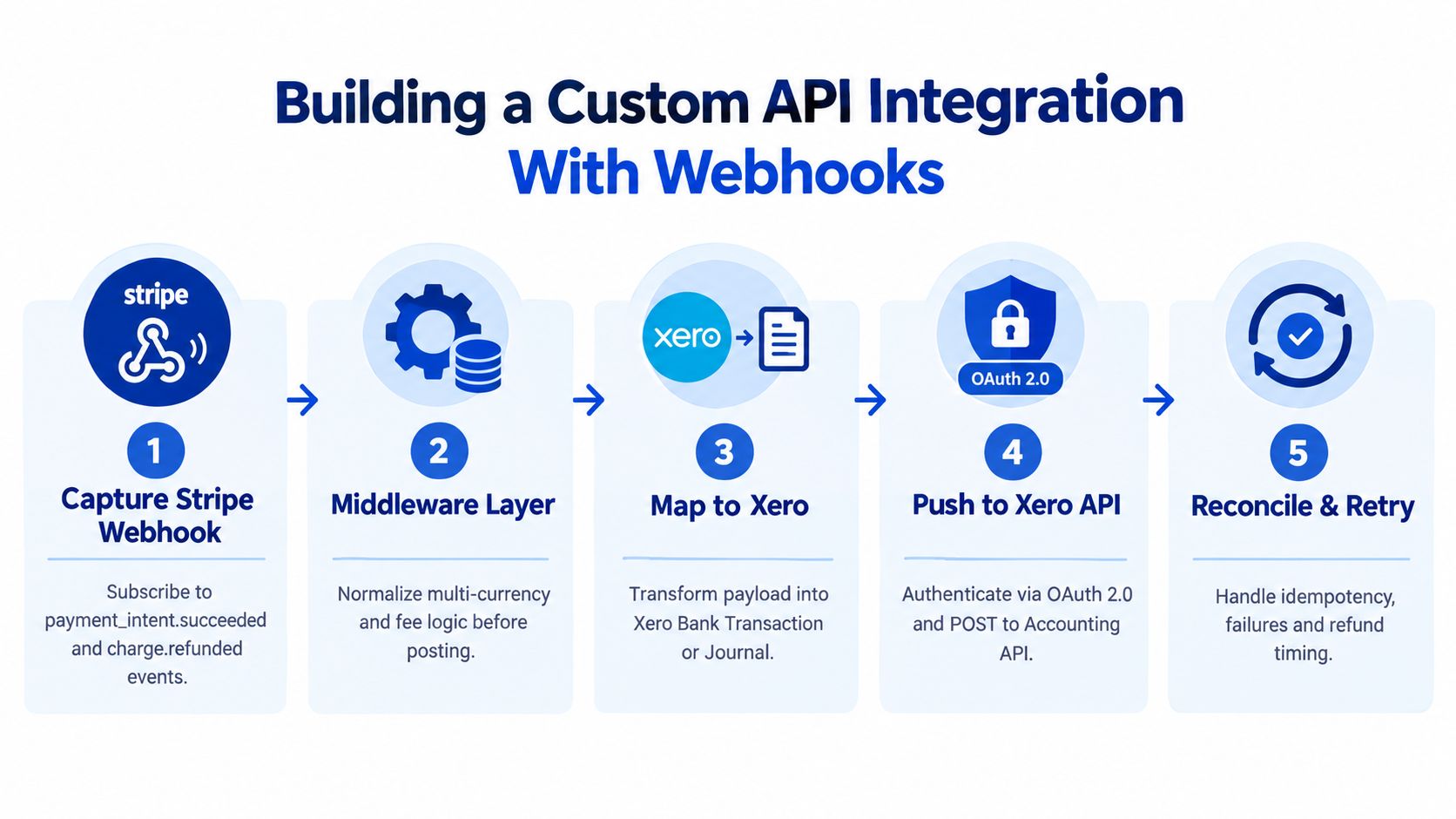
The native connection stops being sufficient when Stripe's event timing doesn't match the accounting workflow. A subscription platform might create an invoice in one system, collect payment in Stripe, issue a partial refund later, and receive a payout that combines several currencies or settlement windows. In that environment, pushing every card charge into Xero creates noise. I aggregate the accounting result around the payout and preserve the transaction detail in middleware.
The middleware subscribes to relevant Stripe events, including:
- Payment events:
charge.succeededandinvoice.payment_failed - Refund events:
charge.refunded - Payout events:
payout.paidandpayout.failed - Dispute events:
dispute.createdanddispute.closed
The service validates each webhook, stores the Stripe event ID, and refuses to process the same event twice. That idempotency record is essential. Stripe can retry delivery, and a duplicate webhook must not create a second Xero journal.
A reliable event pipeline
The transformation layer normalises currency, fee, refund, and dispute data before it calls Xero. It then aggregates charges for the payout window and posts one clearing-account journal for the payout, with fee and foreign exchange lines split out. That gives finance a clean bank reconciliation without discarding the underlying Stripe event history.
The Xero connection should use OAuth 2.0 for a connected application with the minimum accounting scopes required, including access to accounting transactions and contacts where those records are part of the design. API calls need retry handling with exponential backoff for transient failures and rate-limit responses. A failed Xero request must remain visible in an operations queue, not disappear into a log file that nobody reviews.
I archive the original webhook payloads before transformation. For an Australian implementation, storing those records in an AWS Sydney region can support a data-residency requirement, but the organisation still needs a documented retention, access, encryption, and breach-response policy. API keys belong in a managed secret store, not in source code or a shared spreadsheet.
This is application integration work, not a spreadsheet exercise. A team considering custom web development from Continuum Solutions should define the accounting contract first, then build the event pipeline around the reconciliation outcomes finance needs.
Common Mistakes That Break Monthly Close
Most failed implementations don't fail because the payment button is broken. They fail because the team never tests the awkward transactions that expose the accounting model.
The five controls I put in place
Skipping the live-test week. A sandbox can prove that authentication works. It can't prove that a real payout, small refund, partial payment, or dispute lands in the intended Xero accounts. Run live transactions and compare them with the existing manual records before go-live. Australian guidance specifically recommends a real transaction test period and close monitoring during the first two weeks.
Treating the payout as revenue. A bank deposit is the result of several earlier events. Coding it directly to income hides the gross sale and the Stripe fee. The control is simple: require the bank rule to match the payout to the clearing account, never to the revenue account.
Ignoring fee GST. Australian guidance identifies the GST treatment of Stripe fees as a recurring gap. If the fee is coded as GST-free without checking the relevant tax invoice and treatment, the BAS may omit an available input credit or apply the wrong tax classification. Make the fee tax code part of the implementation sign-off.
Ignoring multi-currency settlement. A foreign-currency charge can settle through a different currency balance or arrive after conversion. The clearing journal needs an explicit foreign exchange gain or loss line where the accounting result differs from the source transaction.
Running duplicate feeds. A native sync and a third-party connector can both post the same payment. Disconnect the old feed before activating the replacement, then inspect the first payout for duplicate journals.
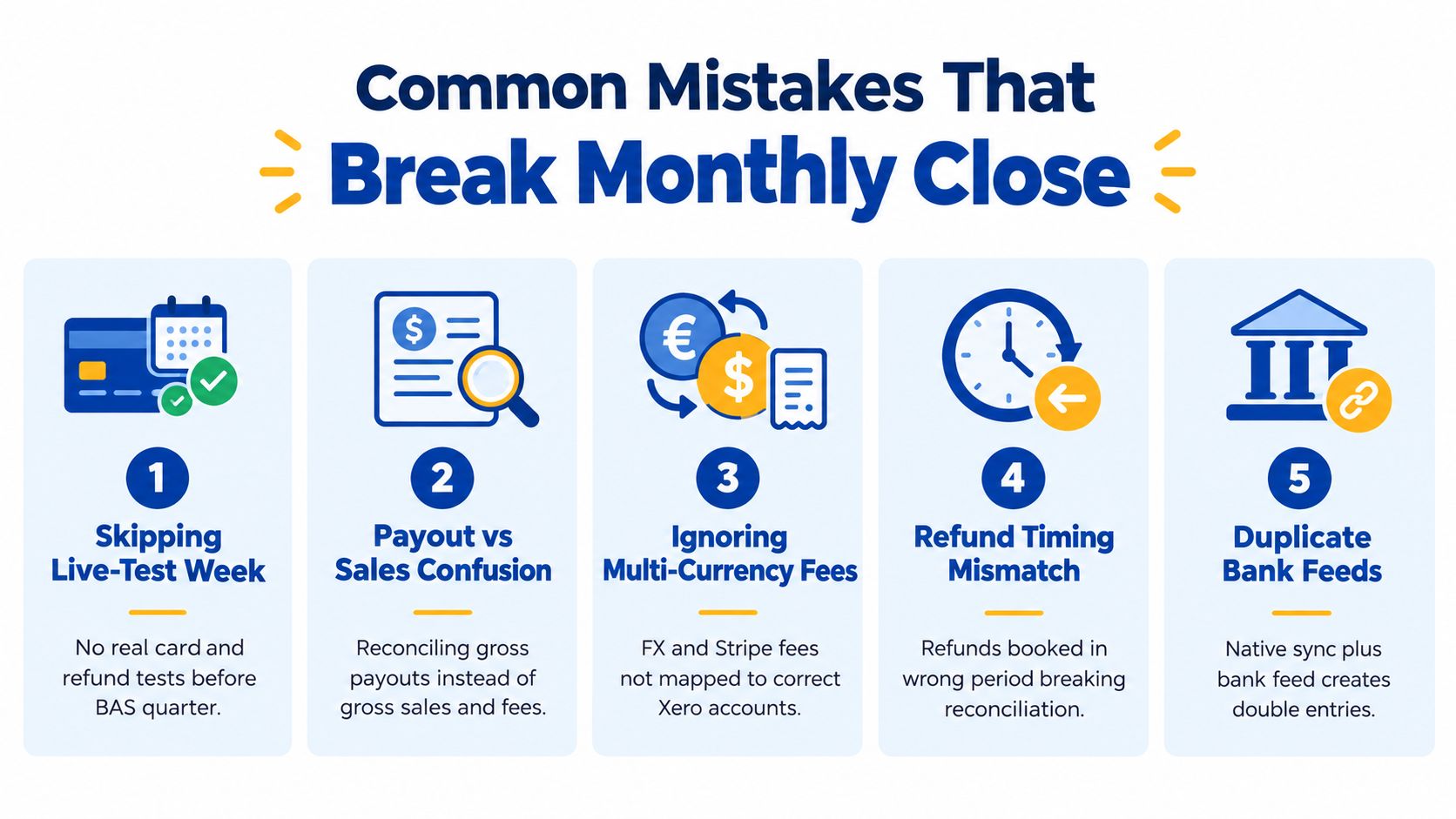
Refund timing causes a separate problem. If Stripe refunds a charge after the originating payout has reached the bank, the clearing account can show a negative balance until the next payout absorbs the refund. That balance needs a documented adjustment or matching rule, not an unexplained write-off.
The same principle applies to disputes. Keep the disputed principal separate from any dispute-related fee, and preserve the Stripe reference so the finance team can trace the Xero entry back to the original event. The control is an exception report that lists open refunds, disputes, failed payouts, and clearing balances before close.
Migration Checklist and Next Steps for Australian Teams
A controlled migration doesn't require a large programme, but it does require a fixed sequence. I use a staged plan that lets finance validate the accounting model before engineering removes the old manual process.
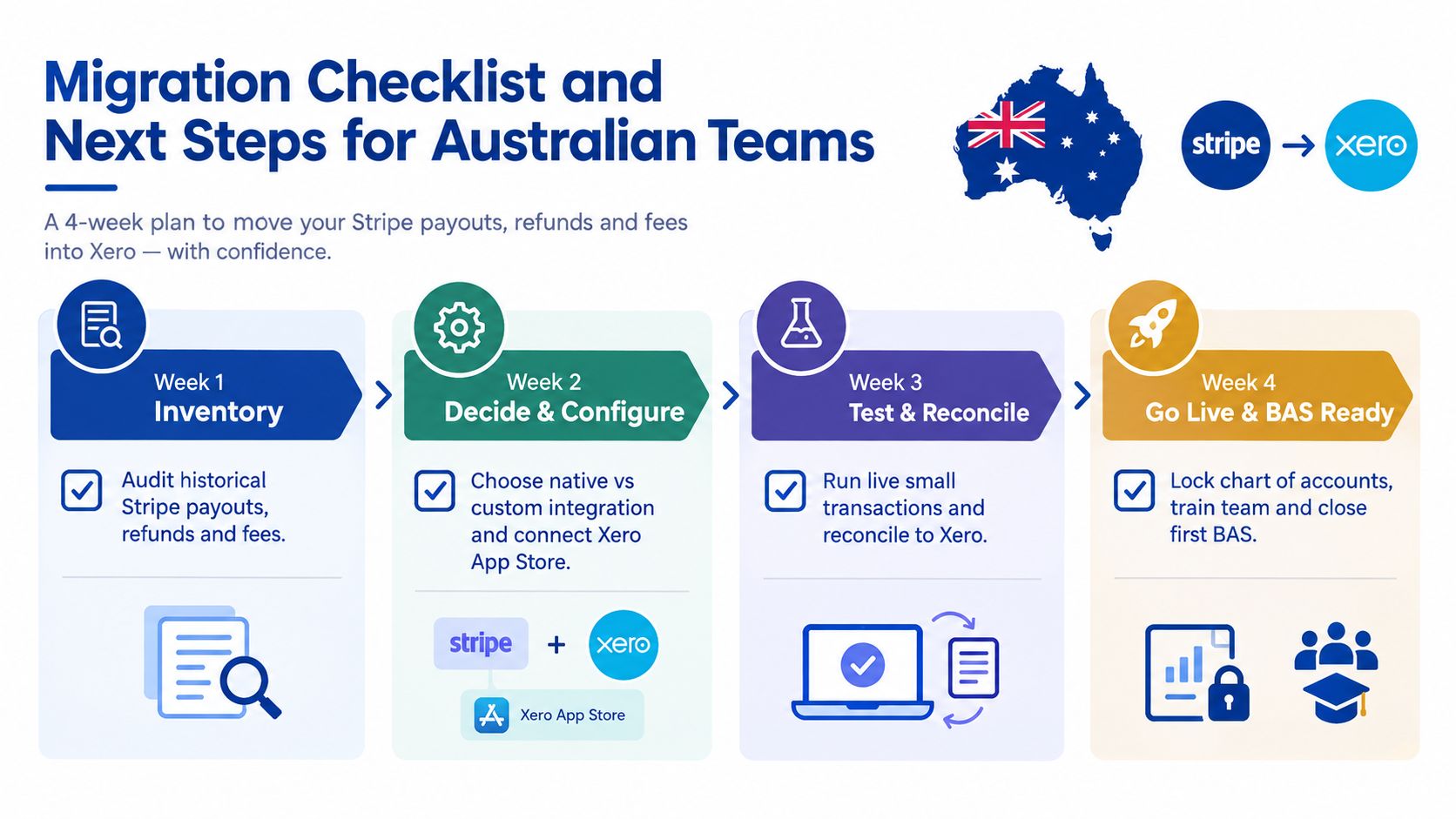
A four-week implementation plan
Week 1, inventory: List historical Stripe payouts, refunds, disputes, fees, currencies, and the Xero invoices they should relate to. Identify gaps in the existing chart of accounts.
Week 2, decide and configure: Choose native, connector, or custom API integration. Create the clearing and fee accounts, confirm tax codes, connect the Xero App Store application where appropriate, and document permissions.
Week 3, test and reconcile: Run live transactions, including a refund, and compare the output against the current manual record. Assign one owner to investigate every unmatched payout.
Week 4, go live and prepare for BAS: Cut over at a period boundary, lock the account mappings, review the first close, and retain the reconciliation evidence.
Store Stripe credentials in a managed password vault or AWS Secrets Manager, restrict Xero permissions to the records the integration needs, and document what customer data passes through middleware. If the integration handles personal information, assess its exposure under Australia's Notifiable Data Breaches scheme. Where data residency matters, design middleware storage and logs around an AWS Sydney deployment and document the exception process.
This is the same discipline I apply to broader cloud migration services from Continuum Solutions, inventory first, configure deliberately, test with real workflows, and cut over with an evidence trail.
Start this week by booking a Stripe test account, creating the Xero clearing and fee accounts, assigning a reconciliation owner, and scheduling the live-test period before the first BAS quarter using the new model. If your payment workflow also depends on a subscription platform, CRM, or internal application, document those interfaces before selecting the connector.
Continuum Solutions designs and supports Stripe and Xero integrations, including clearing-account workflows, API connections, webhook processing, and cloud-hosted middleware for Australian teams. Visit Continuum Solutions to discuss the reconciliation model, security controls, and implementation path that fit your finance and engineering environment.