The contract was extended in Syrinx on Saturday. The off-hire never reached the accounts file. On Monday the depot supervisor is matching deposits in a spreadsheet while the counter queue builds. That is the usual trigger for a Syrinx 365 integration: hire contracts, availability and invoicing live in the rental system, while finance, the web store or GPS data live somewhere else, and staff type the same job twice.
Table of Contents
- What Syrinx 365 Integration Actually Involves
- Choosing the Right Integration Pattern
- Setting Up Authentication and Access
- Mapping Data and Building the Synchronisation
- Testing and Running a Parallel Go-Live
- Monitoring and Common Mistakes to Avoid
- Getting Your Syrinx 365 Integration Delivered
What Syrinx 365 Integration Actually Involves
Syrinx 365 is Point of Rental’s hire management platform. On 14 November 2024, Point of Rental announced that Syrinx 365 Cloud was available, listing an Australian contact in Collingwood, Victoria. The cloud edition is used through an internet connection and exposes a public API plus API connections to accounting software and ecommerce systems, and an on-premises option remains available, as set out in the Syrinx 365 cloud announcement.

That announcement is the commercial starting point for Australian hire businesses. It does not, by itself, join a contract line to a tax invoice.
Cloud or the server you still own
The deployment choice decides who carries authentication, networking and later testing.
Cloud-hosted means staff reach Syrinx over the internet and the vendor keeps the platform current. On-premises means your IT team still owns the server, the firewall path and the backup. A connector that works on a hosted tenant can fail on a site where the API is only reachable from the office network.
Treat the integration as a governed data flow, not a file drop. Customers, equipment, contracts, availability and invoices need a home in finance, online sales or telematics. Teams already running Microsoft business applications can study how Dynamics 365 tools for connected teams handle shared records and access before they copy that pattern onto rental data. If the storefront has to show live availability rather than a static catalogue, that work belongs with custom web development, not a settings screen.
Scope the project as architecture, access, mapping, a parallel billing cycle and monitoring after go-live. Operations managers and IT leads need those decisions on paper before anyone writes a sync job.
Choosing the Right Integration Pattern
Three patterns cover almost every Syrinx 365 integration I have seen succeed or stall: direct API calls, a scheduled batch, and queue-led middleware. Pick on volume, how long a record can be late, how many systems sit downstream, and whether anyone on staff will still be maintaining this in a year.
| Pattern | How It Works | Best For | Watch Outs |
|---|---|---|---|
| Direct API | Each hire event calls the other system immediately | One depot, one ledger, low volume | A downstream outage blocks the counter |
| Scheduled ETL | A job reads changes and posts them on a timer | Overnight invoices, a single Xero file | State changes inside the window are invisible until the next run |
| Queue-led middleware | Events land on a queue, workers retry with back-off | Several branches, ecommerce, GPS and a CRM | You now own a service, not a script |
When a nightly batch is enough
A single depot posting invoices to one ledger can live on a scheduled job. Contracts close through the day, the batch runs after close, and finance reviews exceptions in the morning. Latency of a few hours is acceptable because nobody is promising a customer an instant tax invoice from the website.
That design fails as soon as a second system must stay current. An ecommerce order, a GPS ping and a CRM note do not wait for 2am, and a failed batch leaves the whole day unposted.
When the queue earns its cost
Multi-branch hire, with web orders, telematics and a CRM, needs a queue. Bursts at Monday open should stack, not hammer the far end. If Xero or the CRM is down, the worker retries later and the watermark does not move past a failed record.
Receiving systems enforce their own ceilings. Dynamics 365 Finance and Operations applies a service-protection limit of 6,000 requests within a five-minute sliding window per user, which is why high-volume synchronisation should use batching, queuing and retries with back-off rather than uncontrolled bursts, per Microsoft’s service-protection API limits. Recurring integrations can sit outside that particular cap, while calls that travel through Dataverse can still hit a different limit. Capacity tests have to name which endpoint they hit.
Practical rule: If you cannot name the watermark and the retry, you do not have an integration. You have a script that worked once.
The same watermark habit shows up in CDC and API-led SAP integration, where change capture replaces full extracts. On the rental side, an integration partner such as Continuum Solutions is useful when the middleware, the retry policy and the runbook need to outlast the person who built them. Teams that want that layer designed rather than improvised usually start from custom integrations instead of another spreadsheet macro.
Cost follows the pattern. A nightly accounting batch is mostly mapping and a scheduler. Queue-led sync adds hosting, alerting and someone on call when a poison message stops the workers. Pay for the queue when an outage at one downstream system must not stop hiring.
Setting Up Authentication and Access
No record should move until you know which tenant you are calling and which identity is allowed to call it.
Confirm the tenant, then cut the key down
- Confirm whether this Syrinx tenant is cloud-hosted or on-premises. The credential store, the network path and the person who rotates secrets are different in each case.
- Issue API credentials for the integration alone. A shared office login hides who changed a contract and breaks the day that person leaves.
- Scope the key to the objects the job touches: customers, assets, contracts, invoices, payments. Read-only first. Add writes only for the fields the target system is allowed to own.
Least privilege is boring until a bad payload overwrites asset status across every depot. A narrow key limits the blast.
Documents are an identity problem
Syrinx 365 material documents email configuration, SMTP, application passwords and emailed contract links. It does not answer whether Microsoft Entra ID single sign-on, conditional access or SharePoint-based document governance can sit beside it, so identity and records need a deliberate decision rather than an assumption. That gap is visible in the Syrinx 365 Cloud quick guide.
The question that matters for an Australian hire company is simple. How do staff and customers open contracts and safety documents without a link that anyone can forward, and without a second copy of the file in someone’s inbox?
Under the Privacy Act, you need a named owner for breach response, a rule for subcontractor access, and a leaver process that kills access the day employment ends. Microsoft 365, if you use it, should be judged as records management: retention, least-privilege roles, and whether a closed contract still has a live link. SMTP setup does not answer any of that.
Before go-live, run four checks on a real contract:
- Expiry: Does the customer link die after the agreed window, or does it live forever?
- Closure: When the contract is off-hired, is access revoked in the same step?
- Versions: Can you show which safety sheet the customer received?
- Failures: If the mail server rejects the message, does someone see it, or does it vanish?
If a link cannot be revoked, it is not a document workflow. It is a public file with extra steps.
Mapping Data and Building the Synchronisation
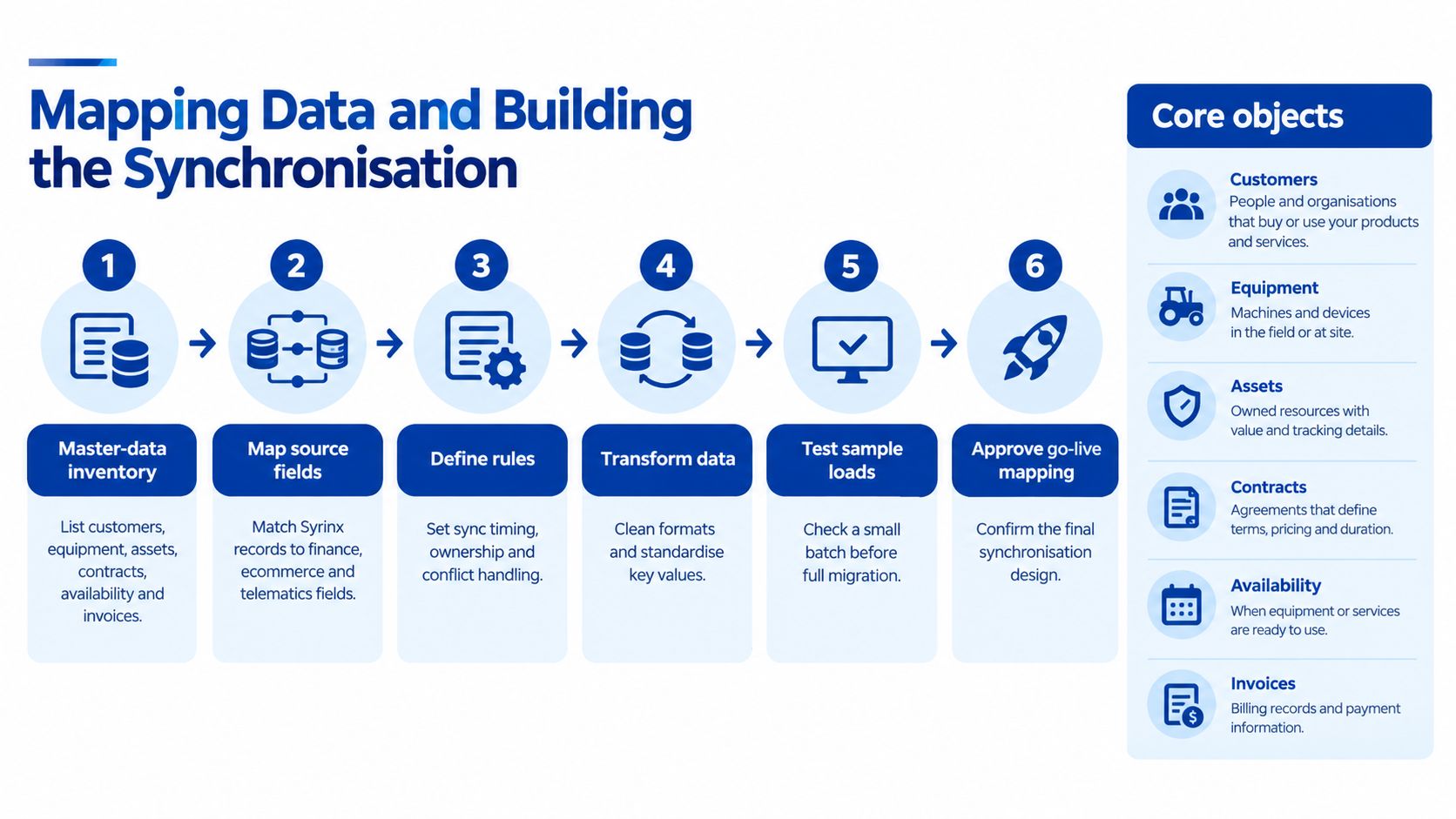
A hire can be closed in Syrinx while its invoice is still awaiting export. If the integration treats both records as simple rows, it can post the wrong status or duplicate a charge. Map the lifecycle and reconciliation rules before writing data.
Inventory, then a single external key
List the records in scope: customers, equipment, assets, contracts, availability, invoices, payments and servicing. Syrinx 365 supports integrations with accounting systems such as Xero, Sage and QuickBooks, as well as GPS and telematics connections. Its product information for Syrinx 365 also describes a public API for accounting and ecommerce integrations.
Assign each record a stable external identifier and use it for idempotent upserts. A customer name is not a key: differences in trading names, punctuation or company suffixes can create duplicate contacts. Store the Syrinx ID alongside the target system’s ID, and define which system owns each field when both can edit it.
Rental records carry state as well as values. A deposit, extension, off-hire, damage charge and batch invoice each needs a document status and tax treatment. Include line-level GST codes and lifecycle status in the mapping. For Australian finance teams, confirm how deposits held, taxable hire charges and damage recoveries are represented in the ledger before the first write.
Document integrations provide a useful comparison. Teams can streamline Dynamics 365 data exchange by defining document types, identifiers and acknowledgements. Apply the same discipline to hire invoices: retain the source key, record the export status, and make failed acknowledgements visible for repair rather than retrying them automatically.
History first, then the trickle
Load the agreed history and reconcile it before enabling incremental updates. Set project-specific acceptance thresholds with finance and operations. For example, require opening balances and active contracts to reconcile fully, track incremental success over a defined pilot, and resolve duplicate customer or asset identifiers before production. These are project controls, not vendor performance claims.
Use timestamps or event markers for incremental sync only after the opening load is clean. Otherwise, smaller batches will keep reproducing the same discrepancies. Build retry handling around idempotent keys, and respect API throttling with queued writes and backoff rather than repeated rapid requests.
Payment data needs its own identifiers. Keep card charges, surcharges, refunds and payouts distinct so a Stripe payout is not mistaken for a cash deposit. Where card payments sit beside the hire ledger, a Stripe integration for payment reconciliation can help preserve the relationship between each charge, refund and payout.
What finance must sign before production
Get written agreement from the finance owner on these decisions:
- GST: Which lines are taxable, which are deposits held, and how damage recoveries are coded.
- Invoice numbers: Whether Syrinx or the ledger allocates numbers, so the two systems cannot issue competing sequences.
- Timezone and dates: Which depot timezone applies, how UTC timestamps are converted, and which date formats the ledger accepts.
- Authority: Which system wins when both sides change the same customer or contract.
- Privacy mapping: Which personal fields move between systems, who can access them, and how long they are retained under the organisation’s Privacy Act obligations.
A full reload after go-live costs more than resolving ownership, tax and identifier rules before the first production write. Decide those rules once, then enforce them in the mapping.
Testing and Running a Parallel Go-Live
Cutover fails when nobody captured a baseline, so every mismatch becomes an argument.
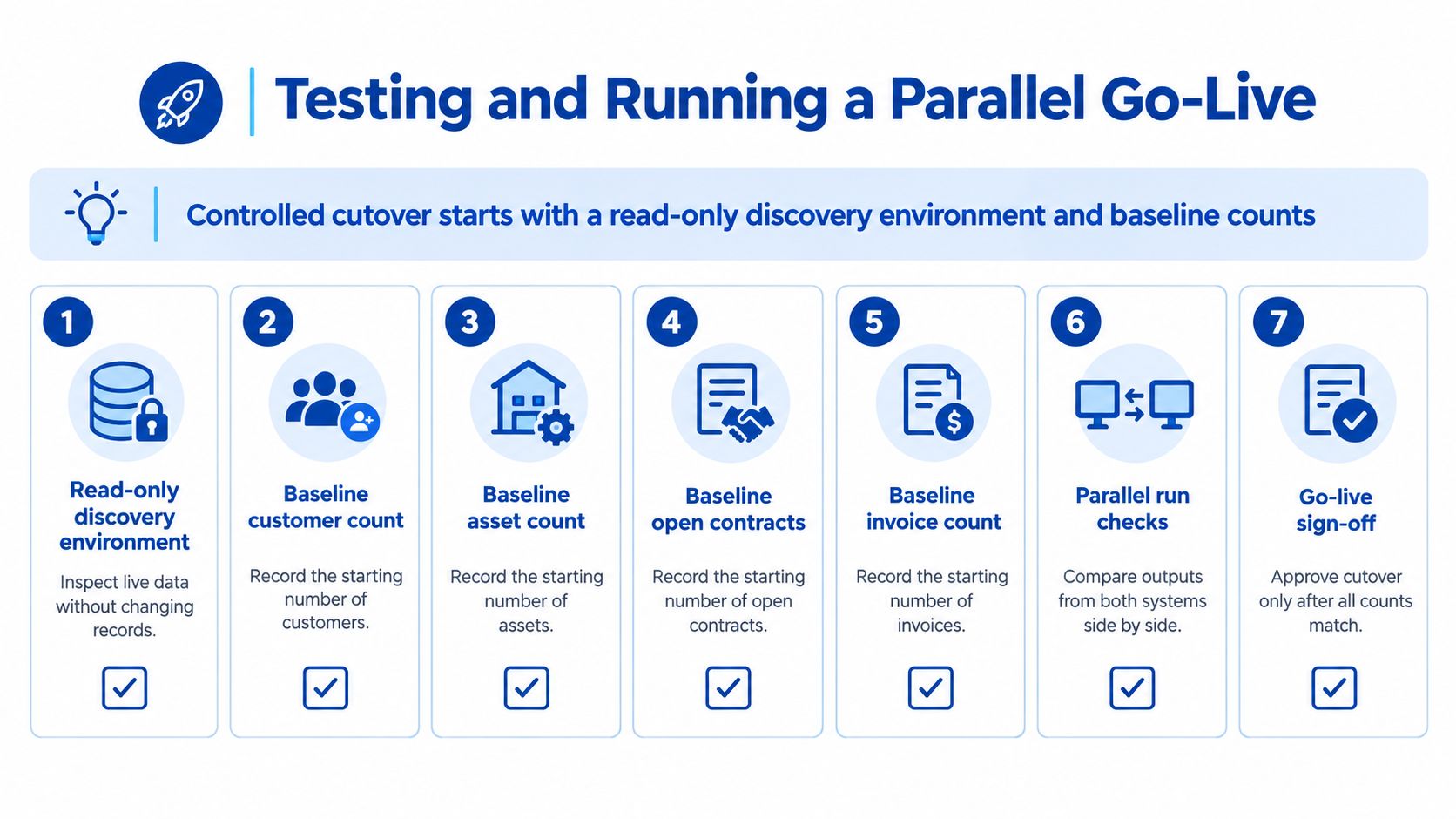
Start in a read-only discovery environment. Record baseline counts for customers, assets, open contracts, invoices, payments and scheduled movements. Those counts are the reference for every later argument about “missing” rows.
Workflows that break first
Exercise these in both systems, against expected totals, not against a screenshot:
- New hire and extension, because availability and the invoice period both move.
- Off-hire, because a late return changes the charge and the asset status together.
- Damage or servicing, because a workshop note must not reopen a closed hire by accident.
- Deposit, refund and batch invoice, because money and document status travel as a pair.
- Accounting export, because this is the point where a stateful contract gets flattened and GST lines disappear.
A parallel run should cover at least one complete billing cycle. Each day, compare record counts, monetary totals, tax totals and status transitions. Do not sign off on a day when the counts match and the dollars do not.
Rollback is specific. Disable outbound writes and keep the last successful sync watermark. Re-enabling from an earlier watermark replays work you already posted. Re-enabling with no watermark skips the gap.
Parallel running is not double entry for its own sake. It is the only week in which both systems can still be believed.
Who owns the next release
Syrinx 365 Cloud is kept on the newest version automatically, while the on-premises option leaves server and IT operations with the customer. Cloud integrations therefore need regression tests against vendor updates you do not schedule. On-premises integrations need patch, backup, firewall, certificate and disaster-recovery ownership. Hire and Rental News reported that cloud launch in those terms. The same sources confirm API capability and both deployment models, and they do not publish audited Australian uptime or success rates. Measure those in the pilot.
Set alerts before the parallel week ends: more than 0.5% rejected records in a run, any monetary mismatch, or sync lag past the operating window you agreed. Those are control limits for your pilot, not vendor benchmarks.
Budget the parallel cycle as real labour. Supervisors still run the counter while they check totals. If you cannot staff that week, you are not ready to cut over.
Monitoring and Common Mistakes to Avoid
Go-live is the start of drift, not the end of the project. An operations manager needs a board that shows rejected records, authentication failures, duplicate keys, monetary mismatches and how far the watermark lags the counter. A green “last run succeeded” lamp hides a run that posted 400 invoices and dropped 12.
Review failures on a set day each week. If nobody owns that review, Syrinx and the ledger diverge until year-end audit, when the gap is expensive to explain.
Four failures that corrupt hire data quietly
Accounting export treated as a file drop. Symptom: the ledger total matches and individual GST lines do not. Cause: a flat export discarded document status and line tax. Fix: send line-level tax and status, and reject the file when a required status is blank.
History skipped. Symptom: a customer disputes a balance from a contract that closed before go-live. Cause: incremental sync started on a partial opening position. Fix: do not enable increments until opening balances and active contracts reconcile.
Names used as keys. Symptom: two contacts for one hirer, deposits split across both. Cause: matching on display name. Fix: upsert only on the external identifier, and quarantine rows that arrive without one.
Cloud updates ignored. Symptom: a mapping that worked in March fails after a platform upgrade, with no change on your side. Cause: nobody re-ran the high-risk workflows after the vendor release. Fix: keep a short regression pack, the same workflows you tested at cutover, and run it when the cloud edition moves.
Hard-coded credentials and silent retries belong on that list too. A job that swallows errors will post nothing for a fortnight and still look idle rather than failed.
The practical home for this board is the same discipline you would use for application monitoring and debugging: named thresholds, a human owner, and a log you can hand to finance without a developer in the room.
Getting Your Syrinx 365 Integration Delivered
You can decide this week whether the project is real.
- Deployment: Cloud or on-premises, and who rotates credentials.
- Scope: The systems that must connect. A wish list of every possible feed is not a scope.
- Finance owner: One person who signs reconciliation, GST and invoice numbering.
- Capacity: Whether your team can build the middleware and still watch it after the consultant leaves.
A single accounting export, on a schedule, with a stable key and a weekly exception list, is often an internal job. Multi-system, queue-led sync, with throttling, a parallel billing cycle and regression after vendor updates, is where in-house builds stall. The stall is usually ownership, not syntax. Nobody is left to read the dead-letter queue.
Continuum Solutions, based in Melbourne, designs and maintains this kind of API-led integration and hands over the runbook with the code. The honest commercial step is a short discovery that produces a data map, a pattern recommendation and a fixed estimate, so the build starts from counts you have seen rather than from a demo. Teams comparing that path with doing it alone can review business IT consulting and judge the split of work before they commit.
I would rather be told the full scope now, including the billing cycle you cannot staff, than be asked to rescue a sync that has been posting duplicates since cutover. If the finance owner will not sign the opening balances, do not start the build.
Continuum Solutions designs, builds and maintains cloud integrations for Australian hire and operations teams, including API-led connections between rental platforms, finance and customer systems. If you are scoping a Syrinx 365 integration and want a data map, a pattern choice and a fixed estimate before anyone writes a sync job, visit Continuum Solutions and book a discovery conversation.