
What should an AWS migration cost an Australian business once you include local engineering rates, compliance work, and the period of running two environments at once?
There is no single price card for that. A small, low-complexity migration can be manageable. A regulated or integration-heavy programme can become a seven-figure investment once discovery, redesign, testing, security controls, cutover planning, and post-migration optimisation are included. The gap between those outcomes usually has less to do with the number of servers and more to do with business constraints.
Australian CTOs often get caught by the same budgeting mistake. They model the future AWS bill, then underestimate the project needed to get there. The total cost usually includes architecture and landing zone design, migration tooling, application remediation, security uplift, internal staff time, vendor coordination, and a double-run period where on-premises or colocation costs continue while AWS is already live.
Compliance changes the number quickly. If the environment supports APRA-regulated workloads, government contracts, or PSPF-aligned controls, the migration needs more design, evidence, testing, and governance. Data residency decisions also matter. Keeping workloads in AWS Sydney can support sovereignty requirements and reduce latency for Australian users, but it can also shape architecture choices, resilience patterns, and spend.
I have seen two organisations with similar infrastructure end up with very different budgets because one could rehost with limited change, while the other had legacy Windows dependencies, brittle integrations, strict security requirements, and no tolerance for cutover failure. Those factors drive labour effort, and labour is often the largest line item in an Australian migration.
That is why the commercial question is broader than monthly AWS consumption. It is whether the migration reduces total cost of ownership, how long the double-run lasts, what compliance obligations apply, and whether the delivery partner has handled these constraints before. Working with an AWS migration partner in Melbourne can help scope those trade-offs early, before the programme is priced on assumptions that will not survive discovery.
Table of Contents
- The Four Core Components of AWS Migration Costs
- Deconstructing Professional Services Pricing
- Estimating Your Ongoing AWS Infrastructure Bill
- Hidden Costs and Australian-Specific Considerations
- Typical AWS Migration Cost Ranges in Australia
- Using a Phased Migration to Manage Cost and Risk
- Your Next Steps to a Cost-Effective Migration
The Four Core Components of AWS Migration Costs
The first mistake in AWS budgeting is treating the migration as a single number. In practice, the cost sits across four pillars: professional services, cloud infrastructure spend, tooling and licensing, and internal team cost.
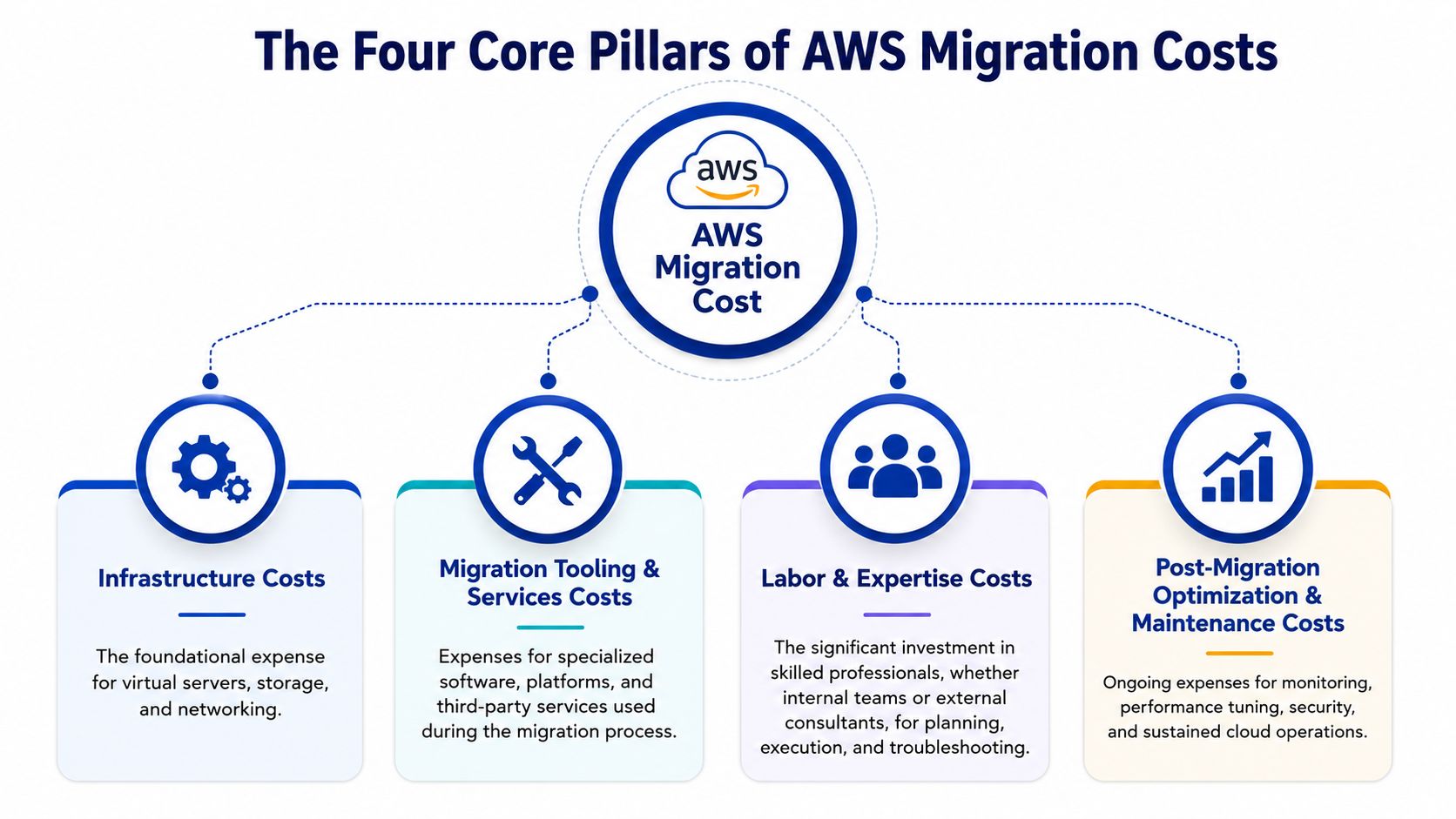
If a proposal only discusses the future AWS bill, it’s incomplete. Decision-makers need to model total project cost, not just post-cutover consumption. That’s especially true in Australia, where labour, compliance uplift, and dual-running periods can materially change the commercial outcome.
For teams comparing options across AWS architecture and migration articles, this four-part lens is the easiest way to avoid under-budgeting.
Why the AWS bill is only one part of the number
Professional services usually carry the most uncertainty early on. This is the architecture, discovery, dependency mapping, migration execution, testing, and cutover management required to move without breaking production.
Cloud infrastructure spend is the recurring AWS cost after workloads land. That includes compute, storage, databases, networking, backup, logging, and security services. It’s visible, but it’s not the whole story.
Tooling and licensing is where many estimates stay too optimistic. Native AWS services can reduce spend in some areas, but existing Microsoft licensing, third-party security products, database licensing, and specialist migration software can still sit in the budget.
How these four pillars affect total cost
Internal team cost is usually ignored because it doesn’t show up on a vendor quote. But your infrastructure lead, application owner, security team, service desk, and project sponsor all spend time on the migration. That time has an opportunity cost, and it’s real.
A practical budgeting model looks like this:
| Cost pillar | What it covers | Why it matters |
|---|---|---|
| Professional services | Assessment, architecture, migration, testing | Drives delivery speed and risk |
| AWS infrastructure | Compute, storage, networking, managed services | Becomes ongoing OpEx |
| Tooling and licensing | Migration tools, software licences, security products | Often omitted in early estimates |
| Internal team cost | Staff time, governance, training, business coordination | Affects true project cost |
Practical rule: If your business case only compares on-prem hardware costs to the projected AWS monthly bill, you’re not estimating the migration. You’re only estimating one quarter of it.
These pillars also interact. A deeper refactor raises project cost upfront but can reduce long-term infrastructure and licensing spend. A fast lift-and-shift lowers initial engineering effort, but it can leave expensive design decisions in place and push optimisation work into later quarters.
Deconstructing Professional Services Pricing
Professional services are where migration budgets are won or lost. Not because consultants are expensive in themselves, but because this is the work that prevents rework, outages, security gaps, and ugly cutovers.
The strongest engagements usually move through four disciplines: discovery, architecture, execution, and validation. Buyers who understand these phases ask better questions and get cleaner proposals.
For organisations assessing delivery options, an AWS partner in Melbourne should be able to explain each phase in plain commercial terms, not hide behind generic “migration factory” language.
Discovery and assessment
Discovery is where the real migration starts. The team audits current infrastructure, reviews applications, identifies dependencies, checks identity and network design, and works out what can be rehosted, what needs replatforming, and what should be retired.
This phase matters because a poor inventory creates false confidence. If nobody maps application dependencies properly, the cutover plan is fiction. The budget then expands mid-project because hidden systems and unsupported integrations appear late.
A proper assessment usually tests questions like:
- What’s business-critical: Which workloads need the most careful sequencing because downtime affects customers, staff, or revenue.
- What’s tightly coupled: Legacy applications often depend on file shares, hard-coded IP assumptions, domain services, or old databases.
- What’s not worth migrating: Some systems should be replaced, consolidated, or decommissioned rather than moved as-is.
Planning and architecture design
Planning converts that inventory into an AWS landing zone, network design, security model, backup approach, monitoring baseline, and migration wave plan.
This is also where Australian compliance requirements start adding cost. If the organisation operates in a regulated environment, the architecture work needs to account for control mapping, audit evidence, data residency expectations, and stronger security hardening.
Good architecture work is cheaper than emergency remediation. Teams only discover that after the first rushed cutover goes badly.
Execution cutover and optimisation
Execution is the most visible phase, but it shouldn’t be the first serious piece of engineering. During execution, teams replicate servers, move data, test workloads, run cutover rehearsals, and switch production traffic.
AWS’s native Migration Gateway (MGN) can reduce migration tooling cost for server replication because it provides 90 days (2,160 hours) of free server replication, after which pricing is AUD $0.064 per hour per server, or roughly AUD $45 per server per month (AWS MGN pricing discussion). That can be useful in a rehost-heavy programme, but it doesn’t remove the need for engineering judgement around sequencing, rollback, and application validation.
The final phase is validation and optimisation. That includes performance testing, backup checks, failover review, monitoring, security verification, and cost tuning. Skipping it is one of the fastest ways to end up with a cloud estate that technically works but is operationally fragile.
Estimating Your Ongoing AWS Infrastructure Bill
Once the migration lands, the financial model changes. On-prem environments usually hide inefficiency inside fixed assets and sunk costs. AWS exposes it every month.
That transparency is useful, but only if the architecture is sound. A badly designed AWS environment can be expensive in a very visible way. A well-designed one gives the CTO more control over performance, resilience, and cost.
Independent IDC research commissioned by AWS found that organisations migrating to AWS achieved up to 31% lower infrastructure costs and a 94% reduction in unplanned downtime compared to on-premises environments, driven by automated multi-AZ availability and automated scaling (IDC findings summarised here).
The services that usually drive the bill
Most monthly AWS bills are shaped by a handful of categories:
- Compute: EC2, containers, and serverless workloads. This is often the largest line item for application hosting.
- Storage: S3, EBS, snapshots, backup retention, and archive tiers.
- Databases: RDS, Aurora, DynamoDB, Redis-compatible services, and related storage and IO.
- Networking: Data transfer, load balancers, NAT, private connectivity, and cross-environment traffic.
- Observability and security: CloudWatch, logging pipelines, threat detection, key management, and backup tooling.
What matters is less the service names and more the consumption pattern. Compute-heavy systems behave differently from data-heavy systems. Bursty workloads often suit serverless or autoscaling better than static instance fleets. Legacy estates lifted without redesign often carry waste forward.
Architecture choices matter more than list pricing
The same application can cost very different amounts to operate depending on design choices made during migration. A lift-and-shift of oversized virtual machines keeps migration effort down, but it often preserves overprovisioning. Refactoring toward managed services can reduce admin load and remove some infrastructure overhead, though it raises project effort.
A useful way to think about the AWS bill is by decision layers:
| Decision area | Lower upfront effort | Lower long-term spend |
|---|---|---|
| Compute model | Rehost VMs | Containers or serverless where suitable |
| Database | Keep existing engine | Move to managed or open alternatives where justified |
| Storage | General-purpose defaults | Lifecycle policies and right storage classes |
| Procurement | On-demand only | Reserved capacity and savings plans after usage stabilises |
For teams comparing hosting models at the workload level, this breakdown is similar to the trade-offs in AWS Lightsail vs EC2 vs ECS.
The monthly bill also won’t settle immediately. In most environments, there’s a period of tuning after migration as usage patterns become clear, non-production sprawl is cleaned up, and procurement settings are adjusted. That’s normal. The mistake is assuming day-one cloud consumption equals steady-state cost.
Hidden Costs and Australian-Specific Considerations
Why do so many Australian AWS migrations come in over the first budget estimate? The short answer is that cloud calculators price infrastructure, while real migration programmes also have to fund duplicated operations, local delivery rates, control uplift, and internal effort that never appears on an AWS quote.
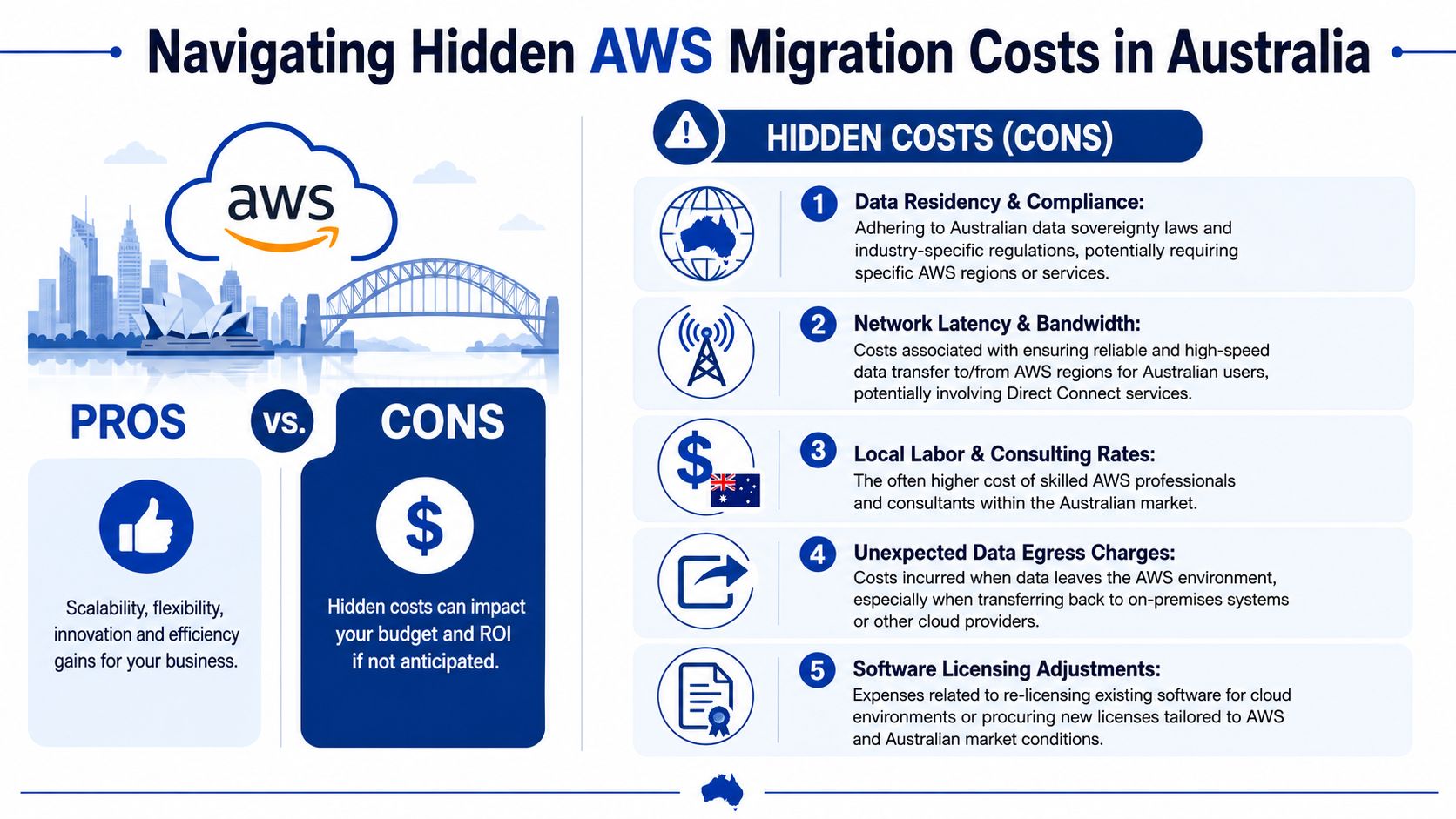
For Australian organisations, the premium usually comes from operating context rather than raw AWS pricing. A mid-market business can absorb some compromise on documentation or control maturity. An APRA-regulated firm, a government supplier, or a business working under PSPF-aligned expectations usually cannot. Those projects need more design review, more evidence, more stakeholder sign-off, and more time with security, risk, and audit teams.
The biggest omission in early business cases is the double-run period. Production stays on-prem while AWS is built, tested, hardened, and approved. That means duplicate hosting, duplicate backups, duplicate monitoring, and often duplicate vendor support for weeks or months. If the migration touches revenue systems, boards and risk committees will usually prefer a longer overlap rather than a faster cutover with less evidence.
The same pattern shows up in software licensing. Windows Server, SQL Server, security tools, backup products, and application licences often continue during transition. Some can be optimised later. Few disappear on day one.
Internal labour is another cost bucket that gets underestimated. User acceptance testing, integration validation, data reconciliation, rollback planning, change management, and service desk readiness all pull senior people out of BAU. Finance may not see a supplier invoice for that work, but the business still pays for it through delayed projects and diverted technical capacity.
Australian compliance settings add a second layer of cost. APRA CPS 234 and PSPF-aligned environments generally require tighter identity controls, stronger logging and retention, clearer key-management decisions, network segmentation, privileged access controls, and evidence that those controls are operating as designed. The cloud build itself is only part of the spend. The surrounding artefacts matter too: control mappings, runbooks, incident procedures, risk assessments, and audit-ready documentation.
Local labour rates make those requirements expensive to deliver. In the Australian market, senior cloud architects, DevOps engineers, and cloud security specialists commonly bill at materially higher rates than generic offshore estimates suggest, especially for regulated workloads or short-notice projects. That difference is one reason imported migration benchmarks often look cheaper than what Australian CTOs approve.
Operational visibility also needs to be funded from the start. Once workloads move, performance issues, cost anomalies, and failed integrations surface quickly if telemetry is weak. Teams that include enterprise application monitoring and debugging in the migration scope usually detect those issues earlier, when fixes are still cheap. Teams that defer observability often end up paying for longer triage, unstable handovers, and avoidable rework.
The hidden cost is usually not a surprise AWS line item. It is the extra effort required to make the new environment secure, supportable, auditable, and safe to run in an Australian operating context.
Typical AWS Migration Cost Ranges in Australia
What should an Australian CTO budget for an AWS migration once local labour, compliance work, and a period of running both environments are included?
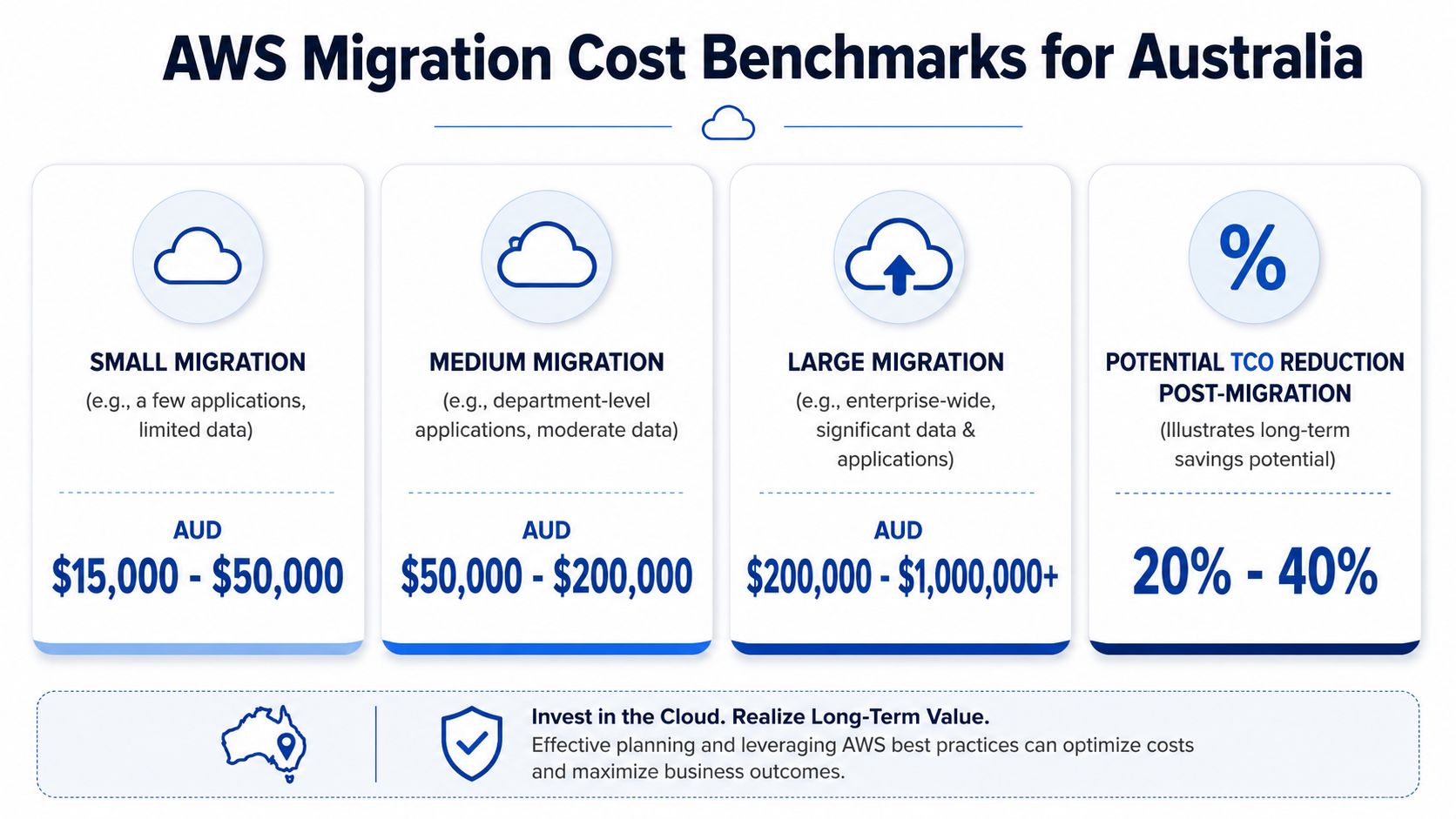
For a straightforward rehost by a small or mid-market business, the one-off project budget often starts around the lower tens of thousands and can move into the low hundreds, depending on application count, data volumes, and how much remediation is needed before cutover. Once the scope includes legacy platforms, regulated data, redesign of identity and networking, or formal testing and sign-off, the budget rises quickly.
A useful external benchmark places smaller lift-and-shift migrations in the AUD $60,000 to AUD $300,000 range, with more complex enterprise migrations often landing at AUD $300,000 to AUD $600,000+ for project delivery alone (cloud migration cost ranges).
In Australia, I would treat those figures as a starting point, not a full business case. They often exclude the costs that matter in board approval: internal staff time, security and compliance artefacts, licence overlap, and the temporary period where on-premises or hosted infrastructure still runs while AWS is being proven in production.
Small business and mid-market ranges
A practical way to read migration budgets is by complexity, not just company size.
| Business profile | Typical pattern | Likely cost position |
|---|---|---|
| Small business | Rehost, few integrations, limited compliance | Lower end of the range |
| Mid-market | Mixed workloads, some refactoring, moderate governance | Middle of the range |
| Enterprise | Legacy apps, data sensitivity, many dependencies | Upper range or beyond |
Costs stay contained when the migration is mostly a rehost of well-understood systems with limited dependency mapping and a short cutover window. They increase when teams decide to clean up technical debt at the same time, which is often the right decision commercially, but it changes the budget from server relocation to platform transformation.
That trade-off matters. A cheaper migration that preserves brittle architecture can leave the business with high AWS run costs and another remediation programme six months later.
Enterprise and regulated programme ranges
Large Australian programmes usually sit well above generic online estimates. The reason is simple. The project is paying for architecture decisions, testing, rollback planning, stakeholder coordination, and risk reduction, not just machine moves.
One published example estimates about AUD $150,000 to migrate a workload including 30 virtual machines, a Kubernetes cluster, 20 virtual desktops, 3 MySQL clusters, 3 Redis clusters, and 10TB of data storage (detailed migration example). That is a useful reference point because it reflects a real multi-component environment rather than a trivial website move.
For Australian organisations in regulated sectors, that figure can still understate the total project cost. APRA-regulated entities, government suppliers working to PSPF expectations, and businesses handling sensitive customer or health data usually need extra design assurance, evidence collection, change control, and security validation before production approval is granted. They also commonly carry double-run costs for longer, because old and new environments must operate in parallel until performance, controls, backup, and recovery are proven.
The budget question is not only “what does it cost to migrate?” It is “what does it cost to migrate safely, satisfy governance, and avoid paying twice for a rushed fix later?” For many Australian businesses, that is the number that decides whether the migration creates value or just shifts spend from one platform to another.
Using a Phased Migration to Manage Cost and Risk
The highest-risk migrations usually have one thing in common. They try to do too much at once.
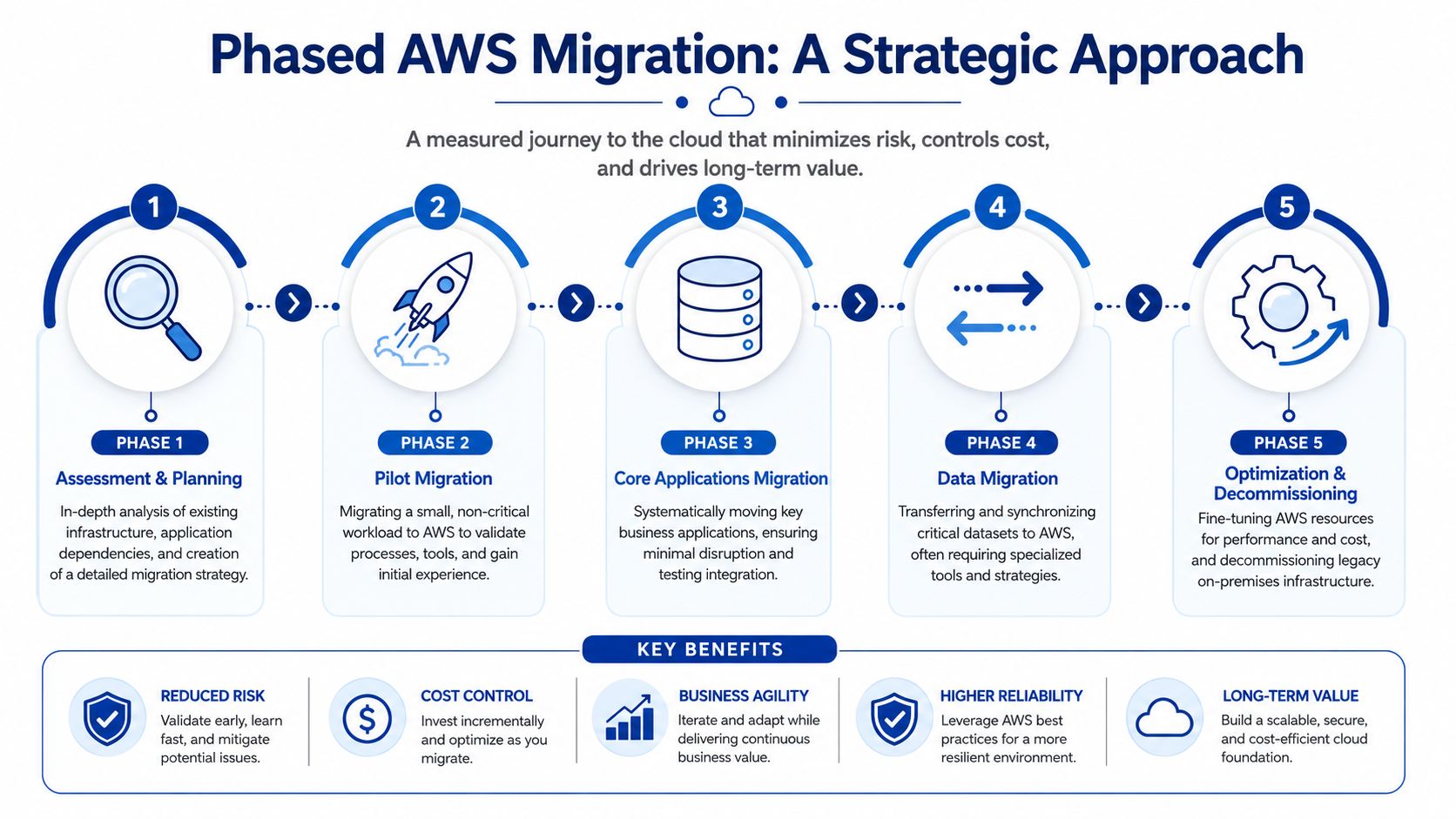
A phased programme is commercially smarter because it spreads spend, lowers the blast radius of mistakes, and lets the team improve the landing zone after each wave. It also gives finance a cleaner investment profile than a single large cutover event.
For organisations moving from less resilient hosting setups, the logic is similar to the staged approach used when migrating from shared hosting to AWS. You start by reducing obvious risk, then improve architecture in controlled steps.
Why phased beats big bang
A phased model works because it separates technical ambition from operational recklessness.
- Cash flow stays manageable: The business can approve migration waves in sequence instead of funding every workload at once.
- Lessons compound: Early waves expose issues in IAM, networking, observability, and deployment methods before critical systems move.
- Rollback is simpler: If a pilot workload hits a problem, the business impact is contained.
Move the easiest useful workloads first. Not the easiest workloads overall, and not the hardest ones to “get them out of the way”.
What a sensible phased roadmap looks like
A practical roadmap often follows this pattern:
- Assess and design the landing zone
- Migrate a low-risk pilot
- Move production workloads in priority waves
- Tune cost, security, and operations
- Decommission legacy infrastructure only when support teams are ready
The sequencing matters. Decommissioning too early creates support risk. Waiting too long creates unnecessary double-run cost. A disciplined phased programme keeps both under control.
Your Next Steps to a Cost-Effective Migration
The best way to control AWS migration cost is to do the hard thinking before execution starts. That means defining why you’re moving, what success looks like, and which workloads deserve modernisation versus simple relocation.
Organisations migrating to AWS in Australia can achieve up to 66% reduction in compute, storage, and networking costs compared to on-premises infrastructure, and most see bills stabilise 6 to 12 months post-migration. An annual optimisation budget of 15% to 20% of the initial migration spend is also recommended to maintain efficiency over time (AWS cost savings report).
What to prepare internally before engaging a partner
- Define the business driver: Cost reduction, resilience, compliance uplift, platform scalability, or application modernisation.
- Build an initial workload inventory: Applications, servers, databases, integrations, environments, and known dependencies.
- Nominate decision-makers: Infrastructure, security, app owners, finance, and executive sponsorship need to be identified early.
- Decide your migration posture: Rehost, selective refactor, platform replacement, or a mixed model.
What to ask a migration partner
Ask direct commercial questions, not just technical ones.
- How do you handle discovery: If the answer is vague, expect scope creep later.
- What assumptions sit behind the estimate: Hidden assumptions are where budgets break.
- How do you manage cutover risk and rollback: A migration plan without rollback discipline isn’t mature.
- What does post-migration optimisation look like: Cloud cost control starts after go-live, not before it.
The right migration plan won’t promise the lowest upfront figure. It will give you the clearest path to a supportable, secure, and economically sensible AWS environment.
If you’re planning an AWS migration and want a commercially grounded view of scope, architecture, and likely cost, Continuum Solutions can help you assess the estate, sequence the work, and avoid the budget traps that generic cloud pricing guides miss.