
Your team knows the pattern. A core application slows down at the worst time. Reporting depends on brittle exports. A server upgrade turns into a capital request nobody wants to approve. Security reviews get harder because nobody is fully confident about what talks to what, where data sits, or how quickly a failed component can be restored.
That’s usually the point where cloud migration stops being an infrastructure conversation and becomes a board-level one.
For Australian organisations, this isn’t early adoption anymore. Approximately 67% of Australian businesses have already adopted public cloud services, with a median post-migration cost reduction of 53% for infrastructure, and over 80% have either migrated or are planning to according to the VITG cloud migration strategy handbook. The practical implication is simple. If your operating model still depends on ageing infrastructure, manual recovery steps, or fragmented environments, your competitors are probably moving faster than you are.
Cloud migration services matter most when the goal is bigger than “move servers somewhere else”. The actual work is reducing risk, improving delivery speed, tightening security, and making sure the new platform is observable from day one. That’s why teams often pair migration planning with enterprise application monitoring and debugging rather than treating stability as an afterthought.
Table of Contents
- Is Your Infrastructure Holding Your Business Back
- The True Value of Cloud Migration Services
- The Phased Migration Process Demystified
- Choosing Your Migration Strategy and Platform
- Budgeting Realistically for Migration Costs and Risks
- How to Select the Right Cloud Migration Partner
- Your Next Steps Towards a Successful Migration
Is Your Infrastructure Holding Your Business Back
Monday starts with a small outage. By Wednesday, the team has delayed a release because nobody wants to touch a fragile integration. By Friday, finance is asking why infrastructure spend keeps rising when delivery is still slow. That pattern is usually the first sign that the platform is no longer supporting the business.
In established Australian organisations, the problem is rarely one broken server or one ageing application. It is accumulated operational debt. Core systems depend on manual workarounds, backup jobs no one has tested properly, and a handful of long-serving staff who carry too much undocumented knowledge. The business keeps running, but every change takes longer, costs more, and carries more risk than it should.
The warning signs are usually easy to spot once you assess them commercially.
Hosting and support contracts roll over because there is no clean inventory of what can be retired. Audit requests trigger a scramble across spreadsheets, tickets, and inboxes. Development teams wait for environment changes instead of shipping work. Performance issues are argued about rather than measured, which is why proper enterprise application monitoring and debugging practices often become important before a migration even starts.
I also look closely at resilience. Many businesses believe they have disaster recovery because there is a document, a secondary site, or a backup appliance. In practice, recovery targets have not been tested against real business expectations, and leadership has not realistically priced the cost of downtime. That gap matters more in regulated sectors, where service interruptions, data handling failures, and weak access controls can quickly become board-level issues.
This is why cloud migration services should be treated as a business change program with technical delivery attached. The goal is to reduce operational drag, improve control, and put the organisation on a platform that can support growth without constant exception handling.
Legacy infrastructure usually costs the business twice. First in direct maintenance, then again in slower delivery.
When I assess a migration, I start with a simple question. Is the current environment helping the business change at the speed it needs, while meeting compliance, cost, and resilience requirements? If the answer is no, staying put is usually the higher-risk decision.
The True Value of Cloud Migration Services

Why the business case is usually larger than hosting
Many buyers start with a cost question. That’s sensible, but it’s rarely the full business case. The value of cloud migration services is that they turn infrastructure into an operating capability rather than a constraint.
A well-run migration creates room for faster delivery. Environments can be provisioned consistently. Teams can separate production, staging, and development more cleanly. Releases become easier to test and easier to roll back. That matters just as much to an operations manager or CTO as the hosting line item on a monthly bill.
Security and governance also improve when the target environment is designed properly. Instead of relying on inherited server configurations and undocumented exceptions, the business can standardise identity, logging, encryption, backup policies, and access control across workloads. That’s a very different position during an audit or incident review.
What changes after the move
The strongest migrations usually deliver three outcomes.
- Scalability without guesswork. Demand spikes stop forcing rushed hardware decisions. Capacity planning becomes more flexible, especially for web applications, APIs, batch jobs, and customer portals.
- Cleaner operating discipline. Teams gain a clearer separation between infrastructure, application deployment, and security control. That reduces the number of risky manual changes in production.
- A platform for modernisation. Once workloads are stable in cloud, you can decide what should be optimised, containerised, rebuilt, or integrated with newer services.
That last point is where a lot of value sits. A migration creates the base layer for better DevOps practices, stronger observability, and more reliable integrations between business systems.
Practical rule: If your migration plan ends at “go live”, you’re paying for relocation, not improvement.
Cloud migration services also add commercial discipline. A strong migration partner should challenge poor workload placement, over-sized environments, and unnecessary complexity before those decisions become long-term cloud spend. The best projects balance speed with future operability. They don’t just move technical debt into someone else’s data centre.
The Phased Migration Process Demystified
A rushed migration usually looks efficient in a slide deck and messy in production. The safer model is phased. That’s not caution for its own sake. It’s how you keep the business running while reducing unknowns.
Phase 1 and 2 discovery then design
The first phase is discovery and assessment. This phase determines whether the project succeeds or gets expensive later. Every application, dependency, data flow, access pattern, and operational requirement needs to be documented clearly enough to support design decisions.
Typical outputs include:
- Application inventory. Which systems are in scope, who owns them, and how critical they are.
- Dependency mapping. Database links, file shares, external APIs, scheduled jobs, authentication paths, and monitoring requirements.
- Risk register. Known failure points, unsupported software, legacy integrations, and compliance constraints.
The second phase is planning and design. During this phase, teams choose the target architecture, migration waves, rollback approach, security controls, and cutover method. When AWS is the target, decisions for landing zones, IAM design, network segmentation, CloudWatch, AWS Backup, and infrastructure-as-code are often locked in. If Azure is the target, the same principle applies with Azure-native equivalents.
A lot of businesses that start on low-cost hosting or unmanaged infrastructure haven’t yet formalised this kind of environment design. That’s one reason migrations from simpler platforms need proper architecture upfront, especially when migrating from shared hosting to AWS.
Phase 3 pilot migration
The pilot is where theory meets production behaviour. You choose a low-risk workload that still reveals the actual operating conditions of the target environment. It should be important enough to test the model properly, but not so critical that any issue becomes a business crisis.
A survey of Australian CIOs revealed that 90% have experienced failed migration projects, underscoring the case for a phased strategy beginning with low-risk workloads, according to Kinetic IT’s guidance on cloud migration success.
A useful pilot should validate:
| Focus area | What you’re proving |
|---|---|
| Performance | The application behaves acceptably in the new environment |
| Security | Access control, logging, and encryption work as intended |
| Operations | Support teams can deploy, monitor, alert, and recover |
| Cost | The workload is sized sensibly and doesn’t carry obvious waste |
A pilot is not a token exercise. It’s where you find the documentation gaps and hidden dependencies before the business feels them.
Phase 4 and 5 cutover then optimisation
After the pilot, the project moves into phased cutover. Workloads are grouped into waves based on risk, dependency, and business impact. Critical systems rarely go first. Teams that ignore this usually underestimate how many integrations sit outside the application itself, such as identity providers, finance exports, partner APIs, scheduled reports, and operational runbooks.
The final phase is post-migration optimisation, a stage where cloud migration services deliver more than relocation. Rightsizing, reserved capacity decisions, alert tuning, backup validation, patching models, and security hardening happen here. Teams also use this stage to decide which applications should stay as-is for now and which ones deserve deeper modernisation.
A good migration plan makes the work feel controlled. Not because nothing can go wrong, but because the project is structured to surface issues early, isolate risk, and keep decisions commercial.
Choosing Your Migration Strategy and Platform
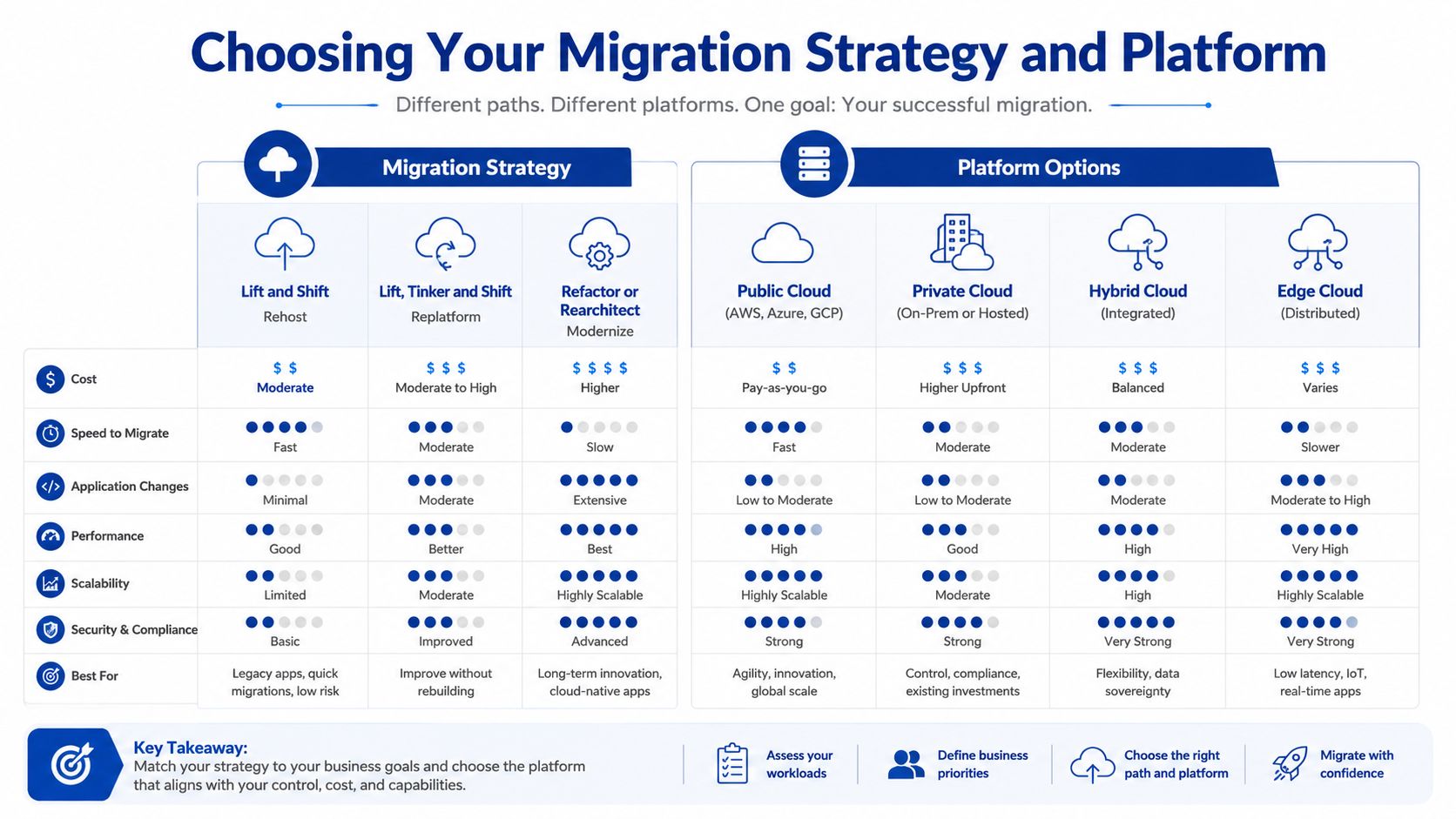
The two biggest decisions are how you’ll migrate and where you’ll land. They’re related, but they’re not the same decision. I’ve seen businesses choose a platform first, then discover the migration method they assumed would be cheap or fast creates long-term operating problems.
How to choose the right migration path
The common migration patterns are useful, but only if you tie them to business intent.
- Rehost. Move the workload with minimal change. This suits teams that need speed, need to exit ageing infrastructure quickly, or want to defer deeper application work until after the move.
- Replatform. Keep the application largely intact, but improve parts of the stack. Common examples include moving to managed databases, modernising deployment pipelines, or changing how storage and backups work.
- Refactor. Redesign the application to use cloud-native patterns. This can make sense for software that directly affects customer experience or where release speed is a competitive issue.
- Retire or replace. Some systems shouldn’t be migrated at all. If an application is duplicated, obsolete, or clearly better served by SaaS, moving it as-is only preserves unnecessary cost.
Here’s a practical way to frame it:
| Strategy | Best fit | Trade-off |
|---|---|---|
| Rehost | Tight timelines, lower immediate change | Keeps more technical debt |
| Replatform | Balanced improvement without full rebuild | Needs stronger design upfront |
| Refactor | Strategic systems that need agility | More investment and coordination |
| Retire or replace | Low-value legacy tools | Requires business change management |
AWS and Azure in an Australian context
For many Australian organisations, the platform decision often comes down to AWS or Azure. The right choice depends less on brand preference and more on operating model.
AWS is often a strong fit for digital products, high-scale web platforms, event-driven architectures, API-heavy systems, and teams that want a broad set of infrastructure options. Azure is often attractive for organisations that are already deep in Microsoft 365, Entra ID, Windows Server, SQL Server, and broader Microsoft commercial agreements.
The decision gets more serious when compliance enters the room. Australian cloud compliance mandates require alignment with OAIC, CDR, or IRAP regulations. This includes technical controls such as encryption via AWS KMS and secure landing zones built with AWS Control Tower to meet APRA CPS 234 security standards, as outlined in this AWS cloud migration guide for Australian businesses. In practice, that means platform choice is partly a governance decision, not just a technical one.
If your workload mix ranges from simple virtual machines to containerised applications and managed services, it helps to compare hosting models rather than cloud brands alone. A practical example is this breakdown of AWS Lightsail vs EC2 vs ECS for application hosting. Those distinctions shape cost control, operability, and how much engineering overhead your team will carry after go-live.
Budgeting Realistically for Migration Costs and Risks
The budget conversation gets easier when leaders accept one point early. Migration cost isn’t driven only by the amount of data or the number of servers. It’s driven by complexity, compliance, testing depth, application interdependence, and how much change the business wants to bundle into the project.
What drives the budget
In Australia, cloud migration costs can range from AUD $70,000 for simple projects to over AUD $700,000 for large enterprise migrations, with compliance obligations playing a major role, according to this Australian cloud migration cost guide. That range is broad because two projects with similar infrastructure footprints can have very different governance burdens.
A small migration might involve a handful of systems, straightforward hosting, limited integration complexity, and low regulatory exposure. A more expensive engagement usually includes controlled cutovers, formal testing cycles, stronger security architecture, audit artefacts, identity redesign, data residency review, and significant coordination across internal stakeholders.
A buyer should expect the statement of work to spell out where effort sits. If a proposal feels cheap because it says “migration” without saying who handles architecture, rollback, security control validation, hypercare, and post-go-live optimisation, it’s probably under-scoped.
The costs that surprise most teams
The headline project fee is only part of the picture. The hidden costs are usually operational.
- Internal time. Your best people will be pulled into workshops, reviews, testing, and sign-offs. That has a real cost, even if it doesn’t appear on the supplier invoice.
- Licensing changes. Some software becomes cheaper in cloud. Some becomes more complicated, especially when third-party vendors change support or licensing terms.
- Training and support uplift. Operations teams need new runbooks, new alerting workflows, and new access procedures.
- Temporary duplication. During transition, you may pay for both old and new environments while proving stability and managing rollback options.
For organisations pricing up AWS specifically, this overview of how much an AWS migration costs in Australia is useful because it frames the commercial side, not just the technical one.
How to contain failure risk
Plenty of migrations fail because leaders treat them as a one-off technical event. That usually leads to compressed discovery, vague testing ownership, weak rollback planning, and unrealistic cutover windows.
A stronger approach looks like this:
- Tie the project to business outcomes. Define what success means in operational terms. Faster deployment, cleaner security evidence, lower outage risk, simpler support, or better integration performance.
- Invest in pre-migration testing. Don’t assume application behaviour will be identical just because the code hasn’t changed.
- Build rollback into the plan. A cutover without a tested fallback path is wishful thinking.
- Protect the hypercare period. The first weeks after go-live need clear ownership, rapid response pathways, and active monitoring.
If the budget has no room for testing and hypercare, the project team is budgeting for luck.
Risk management is what turns cloud migration services from a procurement item into an executive decision with a controlled downside.
How to Select the Right Cloud Migration Partner
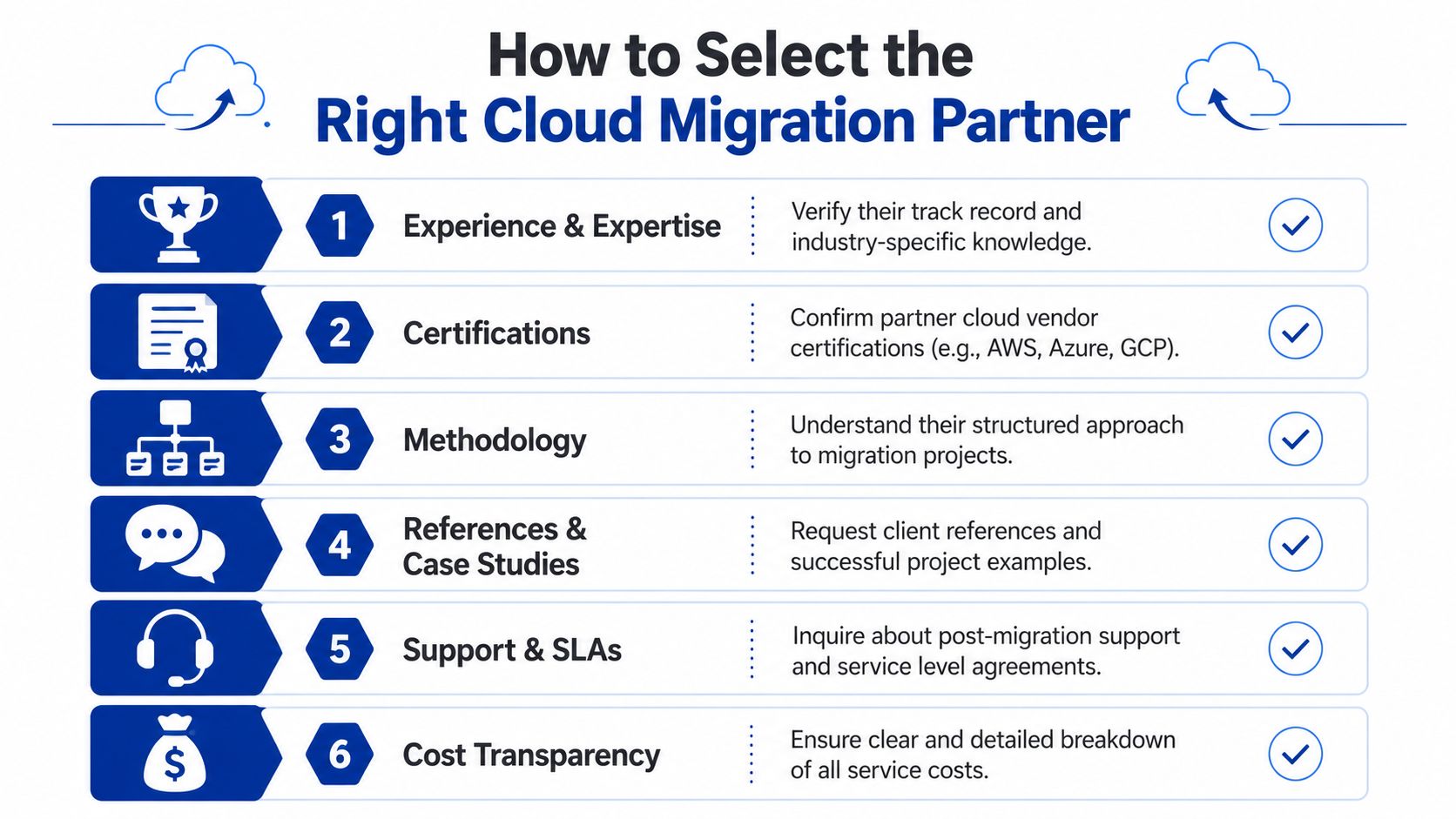
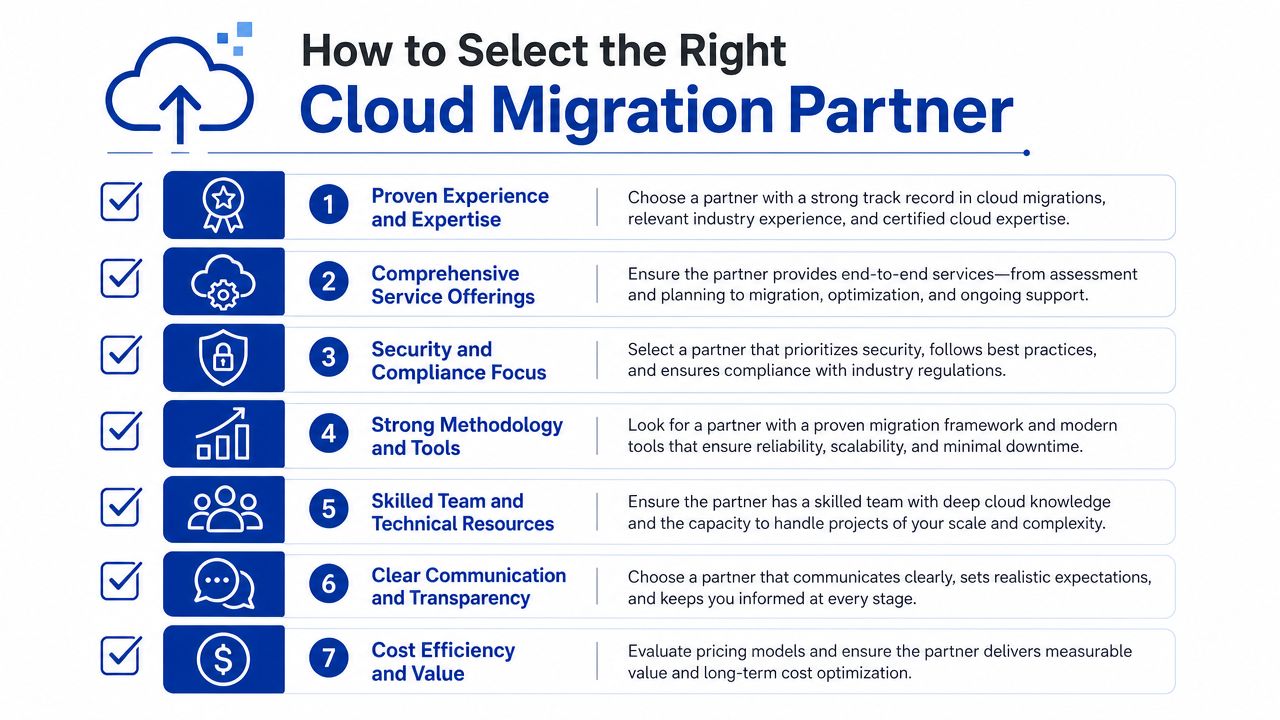
The partner you choose will shape architecture quality, risk posture, project speed, and whether the business gains anything beyond a change of hosting venue. Technical skill matters, but it isn’t enough on its own.
What a strong partner should prove early
Start with evidence, not promises. A capable migration partner should be able to explain how they assess current environments, how they sequence migration waves, how they handle rollback, and how they support the business after cutover.
Look for these signs:
- Local compliance fluency. They should be comfortable discussing Australian regulatory constraints, data sovereignty, encryption requirements, identity architecture, and security logging in practical terms.
- Architecture depth. Certifications matter, but what matters more is whether they can justify design choices under commercial pressure.
- Operational ownership. A migration doesn’t end at deployment. Ask how they handle monitoring, incident response, documentation, and handover.
- Cost visibility. They should distinguish between one-off migration effort and ongoing run costs.
One commonly overlooked area is provider funding. Engaging a cloud migration partner is invaluable for accessing obscure provider funding programs, and mainstream advice often misses how these incentives can reduce migration costs for Australian organisations, according to Kinetic IT’s discussion of common cloud migration challenges. That’s one reason partner relationships matter commercially, not just technically.
If AWS is in scope, it’s worth reviewing whether the firm has direct platform alignment and solution design capability, such as an AWS partner solution architect in Melbourne.
Questions worth asking before you sign
Ask direct questions. The right partner won’t mind.
What workloads would you move first, and why?
How do you document dependencies and validate rollback before a production cutover?
Which parts of the target architecture are opinionated standard patterns, and which are custom to our environment?
How do you help clients identify cloud credits, partner funding, or commercial incentives during migration planning?
The best partner acts like an advisor with delivery accountability. They should challenge poor assumptions, flag underfunded workstreams, and resist migration choices that create expensive operational problems later.
Your Next Steps Towards a Successful Migration
A typical migration stalls before the first cutover because the business has not agreed on three things: what outcome matters most, which risks are acceptable, and who will own the environment after go-live. Start with a readiness review that answers those points in writing. Inventory the applications that drive revenue or operations, note the dependencies that could break a migration wave, confirm Australian compliance and data handling constraints, and separate workloads that can move quickly from those that need redesign or retirement.
The most effective first step is often a focused architecture workshop with your CFO, technology lead, security owner, and the people who run the affected systems day to day. In that session, I would expect to test the target state, challenge cost assumptions, identify where cloud credits or partner funding may apply, and expose decisions that should not be left until after platform selection. That work saves money because it prevents the common pattern of approving a migration on optimistic run-cost assumptions, then discovering support, licensing, networking, or remediation costs too late.
Keep the brief commercial. Define what success looks like in 12 months, not just on migration weekend.
If you need an external facilitator to run that workshop, pressure-test the plan, and turn it into a realistic migration roadmap, Continuum Solutions can help. A short strategy session is usually enough to decide whether to rehost, replatform, or modernise selected workloads, what that means for budget and timing, and whether the business case still holds once compliance, operating model, and delivery risk are priced in.