
Australian teams usually start looking at PWA development services when the current mobile experience has become a bottleneck. The pattern is familiar, a site that looks fine on desktop, but feels slow, fragmented, or awkward on a phone, and a separate native app that's too expensive to keep aligned with the web stack. In Australia, that pressure is sharper because mobile behaviour dominates discovery and conversion, so the question isn't whether the interface feels modern, it's whether the delivery model holds up under real operational load.
For IT managers, the core issue is architectural. A PWA is only useful when it reduces friction, improves repeat visits, and fits cleanly into cloud delivery, monitoring, and integration workflows. If it can't do that, it's just another front-end project with a new label.
Table of Contents
- The Business Case for Progressive Web Apps in Australia
- Core Technical Deliverables and Architecture
- Evaluating PWAs Against Native and Responsive Alternatives
- Project Phases and Cloud Delivery Workflows
- Cost Drivers and Infrastructure Considerations
- Measuring Success Across Enterprise and NGO Use Cases
- Vendor Selection and Implementation Checklist
The Business Case for Progressive Web Apps in Australia
Australian mobile behaviour makes this a delivery decision, not a design preference. One AU-focused industry source says mobile devices account for over 65% of Australian web traffic, and another says over 60% of Australian web traffic now originates from mobile devices, with Google's mobile-first indexing making mobile performance central to visibility and conversion in 2025-2026 (Australian mobile-first website design analysis). For organisations that depend on repeat visits, service access, or low-friction transactions, that shifts the business case away from cosmetic responsiveness and towards reliable mobile delivery.
Practical rule: if most of your users reach you on phones, the platform has to behave like a mobile system first, not a desktop site squeezed into a smaller screen.
The commercial logic is straightforward. The same Australian source ties mobile optimisation to measurable outcomes, including 67% higher conversion rates for mobile-optimised websites versus poorly optimised competitors, and notes that 53% of users abandon sites that take longer than 3 seconds to load (same Australian mobile-first analysis). Those are not PWA-specific numbers, but they explain why teams keep revisiting the same problem, speed and friction on mobile have a direct effect on revenue and support demand.
A PWA makes sense when you need browser reach with app-like behaviour, especially for service portals, content-led commerce, and authenticated workflows where users don't want another download step. It's also a sensible middle path when a separate native program would create duplicated maintenance, uneven feature parity, and release overhead across platforms. For teams considering the option, a good starting point is the practical delivery overview on Continuum Solutions' progressive web apps page, then mapping that against your own channel mix and support model.
Core Technical Deliverables and Architecture
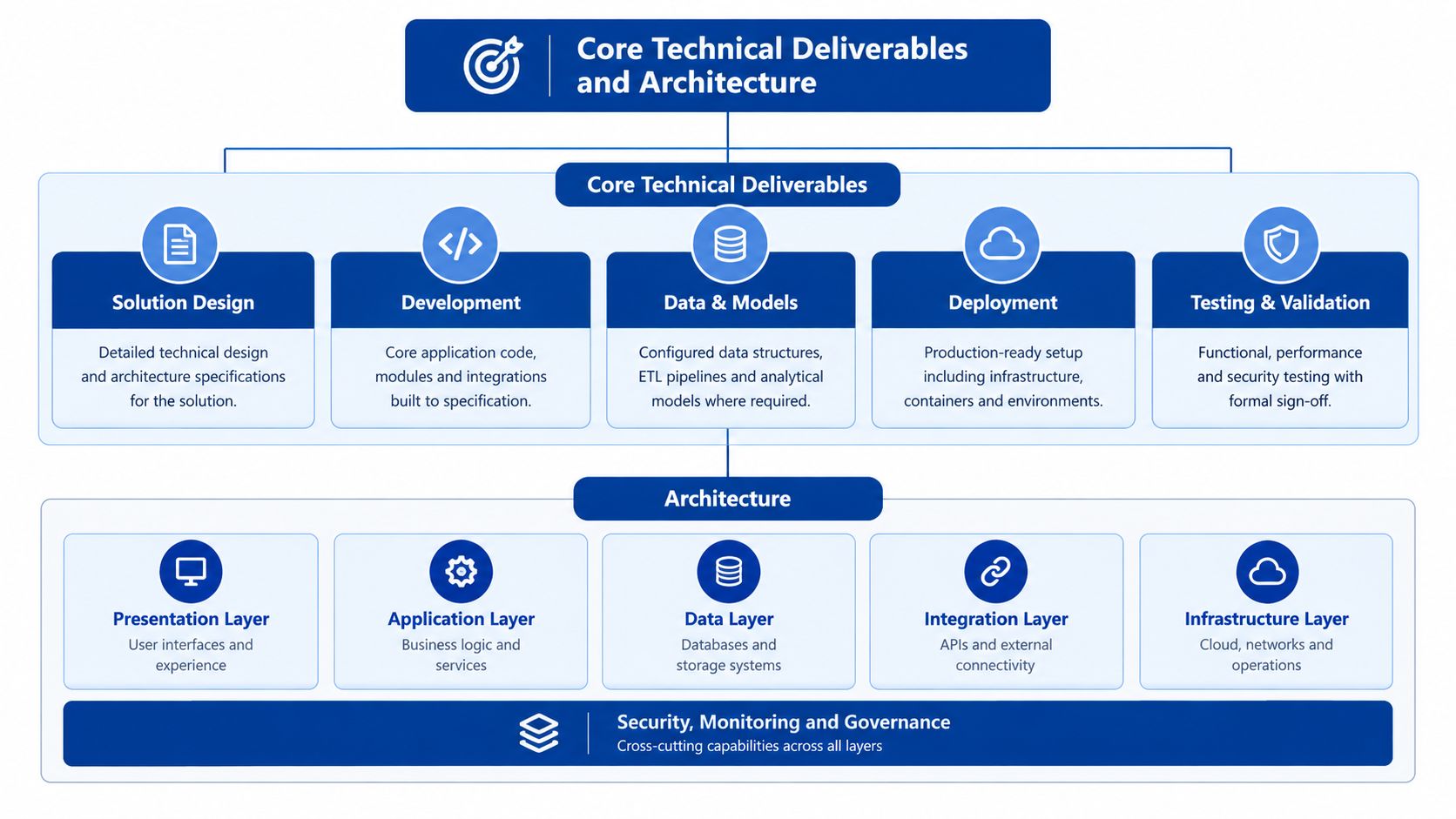
A serious PWA engagement should produce more than a manifest file and a service worker. The outputs that matter are the ones that make the application stable in production, easy to deploy repeatedly, and visible to operations teams when something degrades. That usually means server-side rendering, offline-capable caching, containerised deployment, and monitoring wired in from the start.
What the architecture has to cover
Server-side rendering, or SSR, matters when the first response has to carry real content quickly and consistently. In a mobile-heavy market like Australia, that helps with initial load and makes the application easier to crawl and render predictably, especially when the front end is pulling data from multiple services. A professional build should also include service workers that handle caching strategies deliberately, not as an afterthought, so repeat visits work even when the network is patchy.
Docker-based delivery is the other essential requirement. It gives you a reproducible runtime across development, staging, and production, which is what stops “works on my machine” becoming a release problem. If the PWA is part of a broader platform, the containers should be designed to integrate cleanly with AWS Lambda, ECS, or similar hosting patterns, depending on latency, scaling, and operational preference.
If the proposal doesn't say how it will be observed in production, it's incomplete.
A proper scope should also mention logs, metrics, and error tracking, not just UI components. That means defining where request traces go, how frontend exceptions are captured, and how release health is measured after deployment. If you're comparing suppliers, the architecture discussion should be as specific as the hosting and should align with the kind of deployment detail covered in Continuum Solutions' AWS hosting guidance for membership platforms.
Evaluating PWAs Against Native and Responsive Alternatives
The wrong comparison is “PWA versus app.” The useful comparison is how each option behaves under real constraints, maintenance load, and user expectations. For many Australian organisations, a PWA is the middle path, but only if the product doesn't need deep hardware access or platform-specific behaviours.
The simplest way to judge the options is by operational fit. Responsive web is the cheapest to maintain, but it stops short of installability and offline resilience. Native apps give you the broadest device integration, but they bring app-store dependency, duplicate codebases, and higher lifecycle overhead. A PWA sits between those positions, and that middle ground is why it works well for portals, customer self-service, and lighter transactional journeys.
| Criteria | Responsive Web | Progressive Web App | Native App |
|---|---|---|---|
| Development effort | Lowest | Moderate | Highest |
| Maintenance overhead | Low | Moderate | High |
| App store friction | None | None | Present |
| Offline capability | Limited | Built in | Strong |
| Device feature access | Basic | Moderate | Broad |
| Best fit | Public content and simple journeys | Installable, browser-based workflows | Deep hardware integration |
A useful test is to ask what failure looks like. If the biggest risk is slow mobile access, a PWA can help. If the biggest risk is needing camera, background processing, Bluetooth, or heavy device interaction, native still wins. If the biggest issue is just layout, not capability, responsive web may be enough.
Decision rule: don't force a PWA into a use case that really needs native hardware access. That's how teams create expensive compromises.
Australian teams often get trapped by the false idea that “more app-like” is always better. It isn't. The better question is whether the delivery model reduces maintenance burden while keeping the service easy to find, easy to open, and easy to return to. For more detail on mobile delivery trade-offs, the comparison point on mobile app development in Melbourne is a useful reference.
Project Phases and Cloud Delivery Workflows
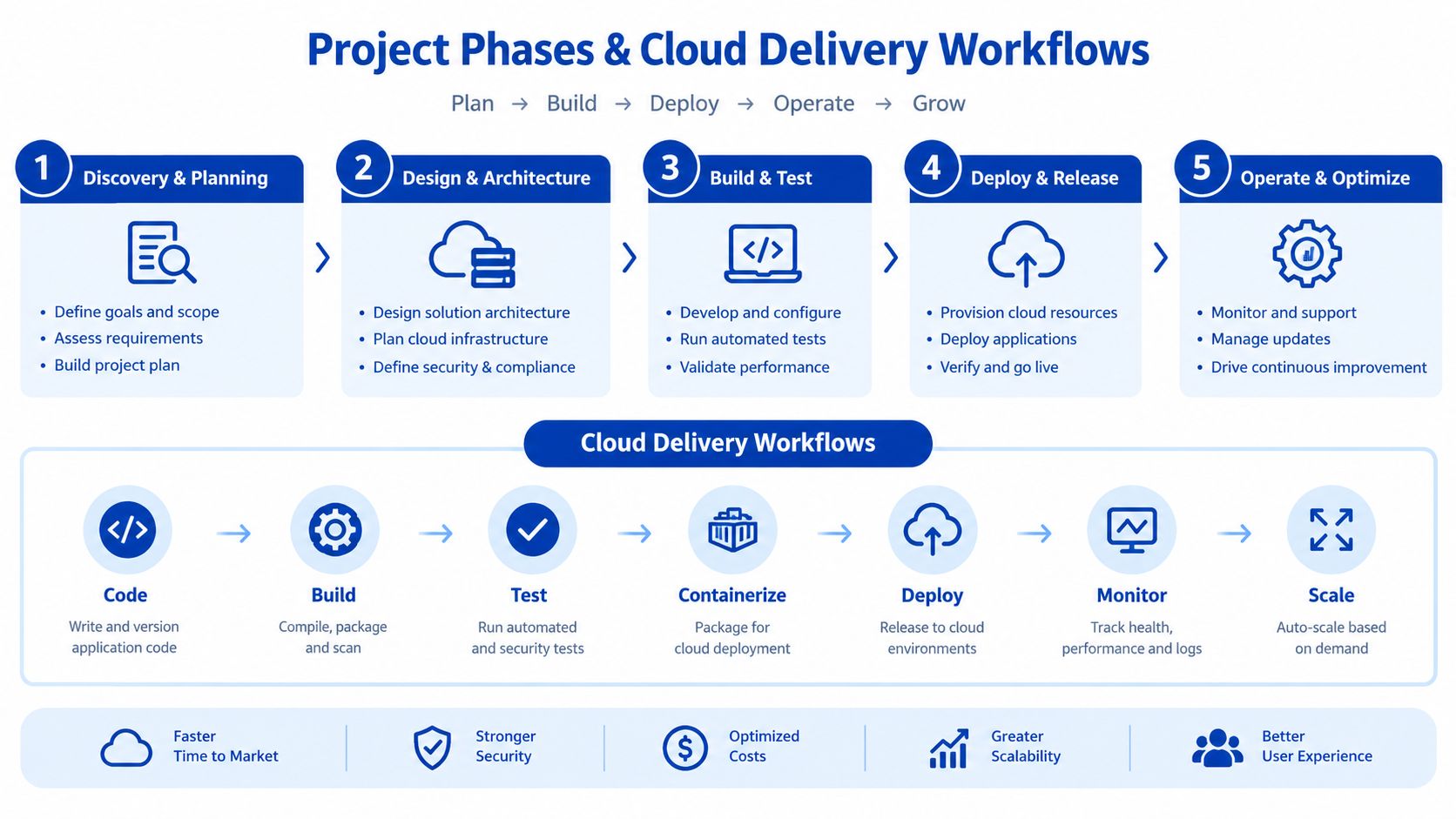
The strongest PWA projects don't begin with design mock-ups. They start with discovery around users, integrations, hosting boundaries, and release risk. In practice, that means a consultant or delivery team first maps the current stack, then decides what should be rendered server-side, what can be cached, and what needs to stay behind authenticated APIs.
How the delivery flow usually works
A sensible first phase is architecture and scope. That's where the team defines the deployment model, chooses the frontend framework, identifies integrations, and decides how release environments will mirror production. After that comes build work in small increments, with QA on real devices rather than assuming browser emulation will catch every issue.
The strongest teams wire in observability early. Sentry or New Relic, or both, should be connected before launch so frontend errors and performance regressions show up during staging and then in production. A phased release is safer than a hard cutover, especially when the PWA touches authenticated workflows or member data.
A typical handover should include Docker images, deployment scripts, monitoring access, and technical documentation that explains how caching, routing, and rollback work. If the supplier can't explain how a release is reversed under pressure, the handover isn't complete. For organisations replacing older platforms, a migration-oriented delivery model similar to Continuum Solutions' cloud migration services tends to fit better than a pure design-led build.
Cost Drivers and Infrastructure Considerations
The biggest cost mistake with PWAs is treating the front end as the whole project. In reality, the budget is shaped by integration depth, hosting model, testing scope, and how much of the existing platform needs to be replaced or stabilised. A simple shell wrapped around a static site is very different from a PWA that sits on top of authenticated workflows, content APIs, payment flows, or legacy systems.
What pushes spend up
The most common cost drivers are SSR setup, integration work, device QA, and the time needed to tune performance under real load. If the PWA has to talk to multiple systems, the backend effort usually matters more than the visible interface. That's why serverless patterns and containerised platforms can lead to very different operating costs, depending on traffic shape and release frequency.
AWS Lambda can be a strong fit when request patterns are bursty and the service is broken into small functions. ECS usually makes more sense when the application needs steadier runtime control, more predictable containers, or closer alignment with a broader service platform. Azure can fit the same kind of decision-making, but the key point is choosing a hosting model that doesn't force your operations team into avoidable complexity.
There's also a hidden cost to poor performance tuning. If the team doesn't minimise request waterfalls, cache wisely, and watch regressions, the business pays for it later in support load and lower conversion efficiency. A single codebase can reduce maintenance burden, but only if the architecture is disciplined enough to keep releases stable and observable.
If the quote is cheap but excludes QA on real devices, monitoring setup, and post-launch support, the project isn't actually cheap.
For Australian buyers, that means asking for the full delivery cost, not just build cost. Hosting, observability, release management, and integration maintenance all belong in the forecast. When a vendor is vague on those items, the budget usually expands after the contract is signed.
Measuring Success Across Enterprise and NGO Use Cases
Success needs to be measurable in operational terms, not just in how polished the interface looks. For enterprise and NGO deployments, the important indicators are installation behaviour, offline usage, support deflection, and whether the system stays reliable as more users rely on it. That's especially true when the PWA serves mixed audiences, such as staff, contractors, members, or citizens.
Australian government delivery already shows that large-scale web and mobile channels can support serious service workloads, with myGov described as the largest citizen-facing digital government platform in Australia and reporting over 20 million active and linked accounts (Australian Government Architecture Platform myGov). That doesn't make every PWA a government-scale build, but it does show that browser-based service delivery is normal for high-volume public systems when the access model is designed properly.
The permissions model matters just as much as the interface. An Australian ecological monitoring PWA used in field operations distinguishes between project officers with full read/write access and contractors who only access the required modules and submit collected data without broader system access (TERN Monitor access model). That's a useful reminder that a PWA is often an operational system, not a marketing layer.
What to measure
- Installation behaviour: track whether users add the app to their device and return through that path.
- Offline usage: check whether service workers are helping real users complete tasks when connectivity drops.
- Error rates: monitor frontend exceptions and API failures separately so teams know where the fault sits.
- Performance baselines: use Core Web Vitals and repeat-visit timings as a release gate.
- Access patterns: confirm whether role-based users are getting the right experience, not just the right screens.
The practical point is simple, if performance work doesn't change behaviour or reduce friction, it's not done yet. For teams that need structured monitoring and debugging across application layers, Continuum Solutions' enterprise application monitoring and debugging capability is the kind of support model that belongs in the conversation early, not after incidents start.
Vendor Selection and Implementation Checklist
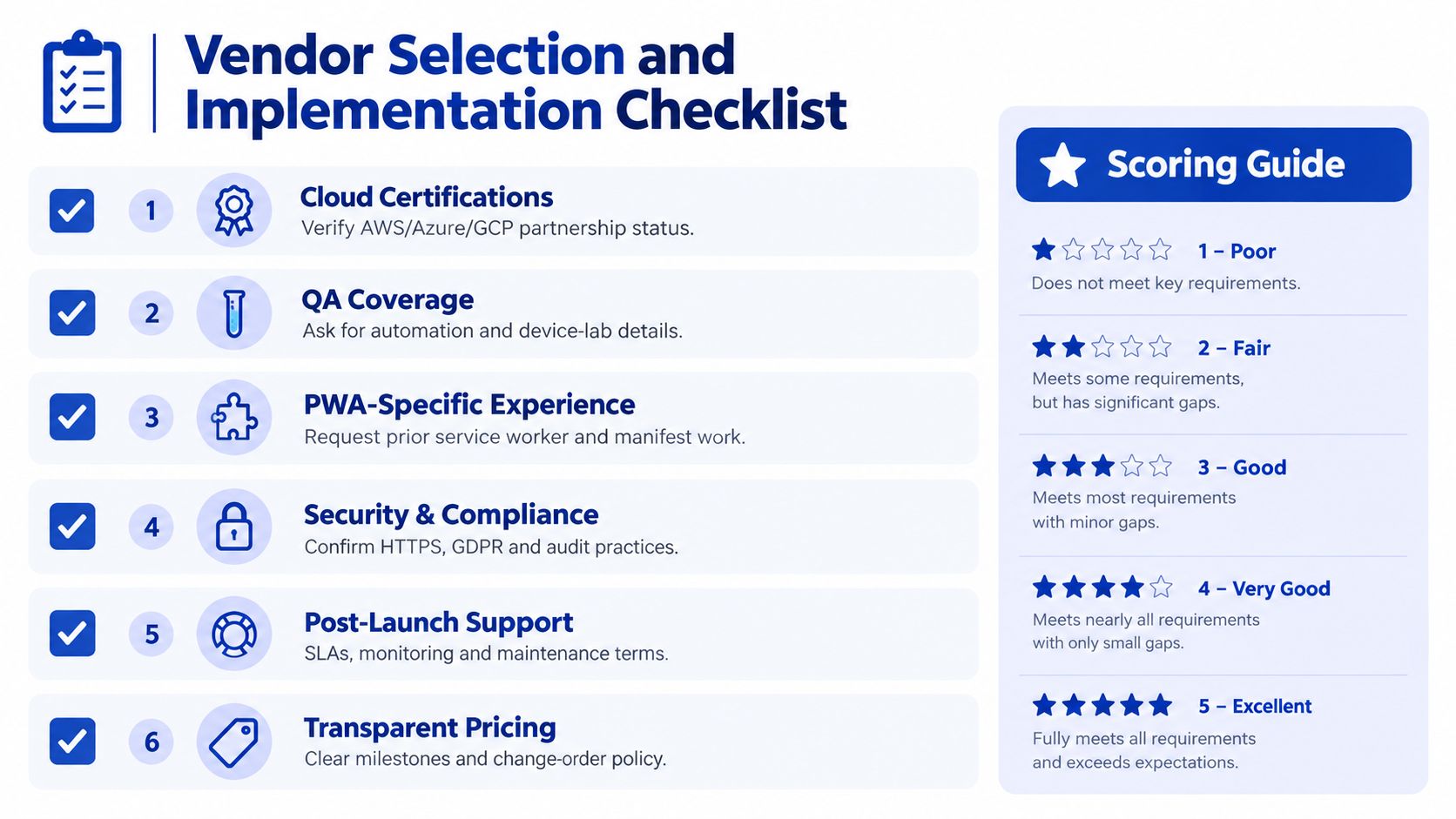
A good vendor should be able to discuss architecture, hosting, testing, and integration without drifting into vague design language. If they only talk about UI and ignore SSR, observability, or deployment workflow, you're not buying a platform team, you're buying a skin over an unfinished stack.
The questions that matter
- Cloud capability: ask which cloud platforms they support, how they handle deployment, and who owns the infrastructure after go-live.
- QA coverage: confirm they test on real devices, not just emulators, and ask how they handle browser and OS variations.
- PWA experience: request examples of service worker design, manifest work, caching strategies, and offline-first behaviours.
- Integration depth: ask how they connect the PWA to CRMs, authentication, APIs, and legacy systems without creating brittle coupling.
- Support model: verify what happens after launch, who monitors the system, and how incidents are triaged.
- Pricing clarity: insist on milestones, acceptance criteria, and change control so the budget doesn't drift.
A strong partner should also be able to explain what they won't do. That matters because some use cases don't suit a PWA, and a credible team will say so. You want a delivery partner who can recommend responsive web, native, or a phased PWA depending on the operating model, not one who forces the same answer every time.
Continuum Solutions is one option in this space because it combines cloud architecture, PWA delivery, API integration, and ongoing monitoring across a single delivery model. If you're planning a modernisation project and need a practical assessment of whether a PWA fits your stack, visit Continuum Solutions and start the conversation with your requirements, not a wishlist.