Your website is still taking payments, but the developer who built it is hard to reach. WordPress shows pending updates, the hosting renewal has arrived, and nobody can say when a backup was last restored successfully.
That's when choosing a WordPress support company becomes an operational decision, not a website purchase. You're paying someone to protect business continuity, maintain connected systems and respond when something breaks. The useful comparison is what they'll own, what they'll test and what remains your responsibility.
Table of Contents
- What a WordPress Support Company Covers
- What WordPress Support Costs in Australia
- Support Models Compared Before You Buy
- The Maintenance Routine That Keeps a Site Safe
- Monitoring, Performance and Accessibility Checks
- Handling a Breach and Your Privacy Duties
- How to Choose a WordPress Support Partner
- Confirm the Scope Before You Sign
What a WordPress Support Company Covers
WordPress reached 43.7% of websites in 2024, according to Red Search Australia. For a business running it, the practical implication is straightforward: the website is a live application, not a finished asset that can be left untouched.
WordPress support services and what each one covers
| Service | What It Covers | Typical Frequency | Best Suited To |
|---|---|---|---|
| Routine maintenance | Core, theme and plugin updates, staging tests, backups | Monthly or fortnightly, with urgent security exceptions | Brochure and small business sites |
| Security monitoring | Malware scanning, admin access reviews, vulnerability scans, MFA checks | Continuous alerts with monthly review | Membership, ecommerce and form-heavy sites |
| Performance work | Caching, image and database clean-up, page speed checks | Quarterly, plus after major changes | Sites with slow load times or traffic spikes |
| Uptime and error monitoring | Availability checks, PHP error logs, failed form and payment alerts | Continuous | Revenue-critical or lead-generating sites |
| Hosting coordination | Server configuration, PHP versions, SSL renewal, DNS changes | Monthly | Sites moved between hosts or to AWS |
| Integration support | CRM, payment, email and form connections, API credentials | Per change | Sites connected to Stripe, HubSpot, Salesforce or Xero |
| Incident response | Containment, restoration, evidence retention, post-incident review | Within agreed response times | Any site that holds personal information |
These are recommended procurement cadences, not a universal package. Businesses generally buy maintenance only, managed care with monitoring and reporting, or managed care plus development hours.
Define the operating boundary
A freelancer on call supplies labour when available. A hosting provider manages infrastructure within its contract. Neither arrangement automatically includes reviewing plugin behaviour, administrator permissions or form configuration.
DesignStack's guide to expert support for your WordPress site provides a useful service-scope comparison. For platforms with authenticated users, our guidance on AWS hosting for membership platforms addresses the infrastructure decisions underneath the CMS.
At Continuum Solutions, our services span website design, AWS consulting and managed services, technical support and maintenance, technology consulting, SEO and digital marketing. For support procurement, keep the operational scope separate from optional promotional work.
Before discussions, gather your plugin and theme inventory, integrations, hosting details, administrator list and last restore-test date. A contact form creates a different exposure from a static page; donations, bookings and CRM connections add further responsibilities.
What WordPress Support Costs in Australia
Australian website maintenance retainers ranged from AUD 90 to more than AUD 980 per month in 2026, based on published pricing from 10 Australian agencies, according to Studio Slate. That's a market reference, not a quote for supporting your particular application.
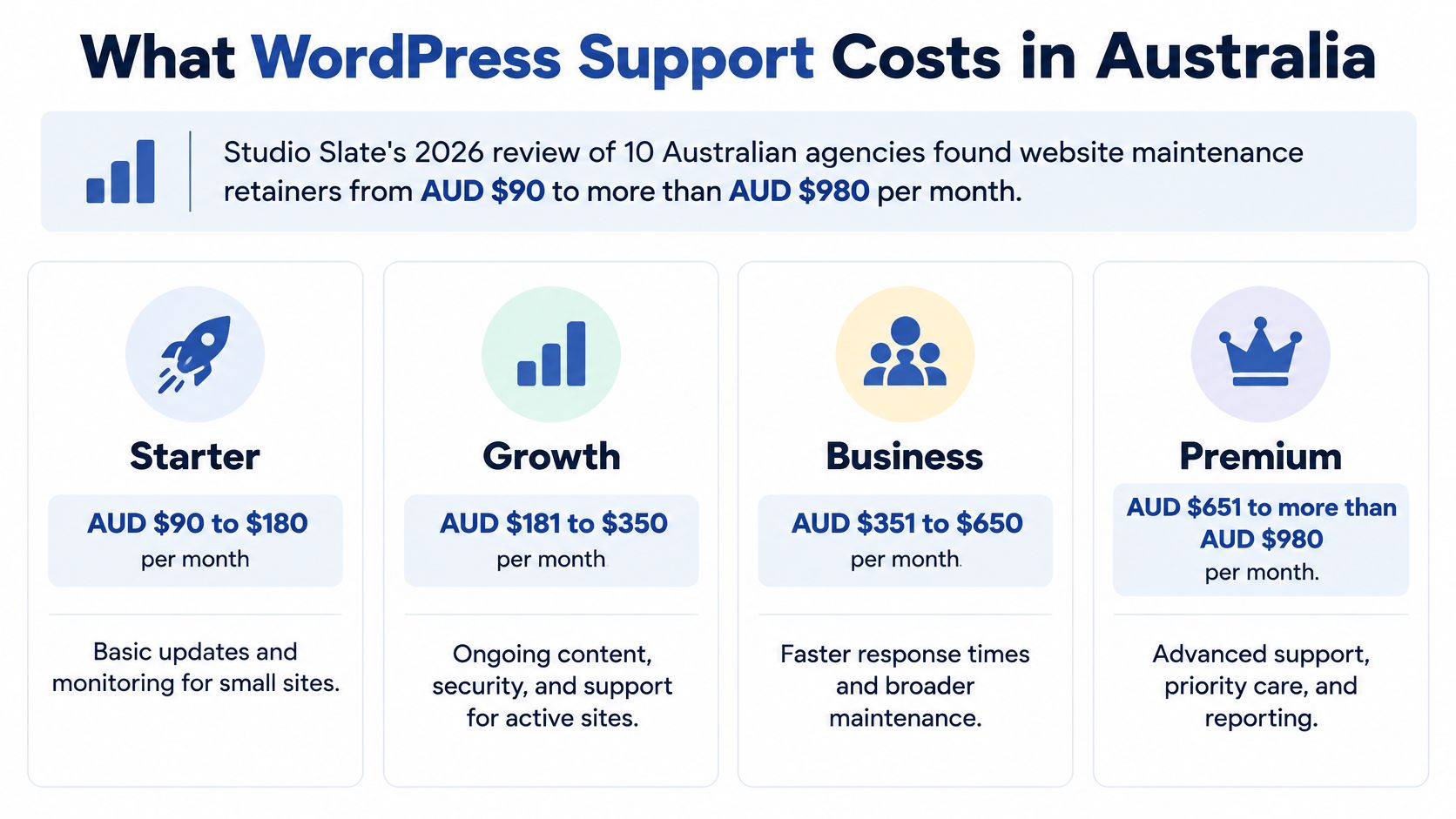
Treat the graphic's intermediate bands as budgeting categories, not guaranteed service entitlements. The contract determines whether incident investigation or an integration failure is covered.
Monthly WordPress support tiers in Australia
| Support Tier | Typical Monthly Range (AUD) | What It Usually Includes | Watch For |
|---|---|---|---|
| Entry maintenance | From AUD 90 within the published market range | Core, theme and plugin updates, backups, basic uptime checks | Restore tests and security review are often excluded |
| Business care | Provider quote based on monitoring and response scope | Adds monitoring, performance checks and monthly reporting | Confirm stated response times |
| Managed security and integrations | Provider quote based on connected systems and incident cover | Adds access reviews, integration support and incident response | Check notification processes and evidence ownership |
| Premium or ecommerce | AUD 980 or more at the upper end of the published range | Dedicated hours, on-call cover, performance and compliance work | Confirm on-call hours and out-of-hours rates |
The table uses the published range as its price reference, not evidence that every agency bundles services identically.
What moves the quote
Plugin and integration complexity, transaction volume and the frequency of content or layout changes drive effort. A stable brochure site doesn't require the same testing as a platform that synchronises subscriptions and customer records.
Say you operate a six-page consultancy website with a contact form. Entry maintenance may be appropriate if updates, backups and basic availability checks meet your operational needs.
Now consider a membership organisation using Stripe, HubSpot and donor records. Its support scope needs payment-event checks, access reviews, integration troubleshooting and incident readiness. Buying the brochure-site package would leave important work unassigned.
Budgeting rule: Compare response commitments, restoration evidence and notification support before comparing the monthly fee.
Keep migrations, redesigns, theme rebuilds and compromise clean-up explicit. Providers may quote these as separate projects or additional hours; don't assume unused maintenance time will fund them.
Support Models Compared Before You Buy
Support models compared
| Model | Best Suited To | Advantages | Disadvantages |
|---|---|---|---|
| Freelancer on call | Brochure sites with a stable scope | Lower fixed cost and flexible hours | Cover can lapse during leave; monitoring may not be included |
| Hosting provider | Server-level tasks such as PHP and SSL | Server patching and infrastructure uptime | Application reviews, admin access and forms may sit outside scope |
| WordPress support company | Membership, donation, ecommerce and form-heavy sites | Recurring operations, monitoring, reporting and incident response | Retainer cost and reliance on a contracted team |
| In-house developer | Organisations with frequent change and internal knowledge | Direct control and fast changes | Key-person risk and cover needed for leave and turnover |
A freelancer can be commercially sensible when interruptions are tolerable and changes are infrequent. The disadvantage isn't individual capability. It's whether someone else can act when that person is unavailable.
Hosting support answers a different question: is the environment running? A healthy server can still serve a broken donation form or an incorrectly exposed document.
Match the model to operational ownership
A dedicated support company suits applications where someone must continuously own releases, alerts and recovery. An in-house developer offers closer business context, but the organisation still needs operational cover, documentation and infrastructure expertise.
For a site outgrowing shared hosting, I'd evaluate the workload before recommending AWS. A managed cloud design can separate the web application, database and backups, giving clearer recovery boundaries. It also adds configuration, monitoring and cost-management responsibilities.
AWS Lightsail can suit a straightforward deployment. EC2 provides more infrastructure control, while container-based delivery may suit an established engineering team. Moving to the most configurable option isn't automatically an improvement.
Use these questions to establish the ownership model:
- Connected systems: Who diagnoses a failure spanning WordPress, Stripe and the CRM?
- Business exposure: Can operations continue if payments or member access stop?
- Long-term control: Who retains the credentials and deployment knowledge after the first year?
Choose the model before shortlisting providers. Otherwise, you'll compare prices for different responsibilities.
The Maintenance Routine That Keeps a Site Safe
A WordPress site can show “updates complete” and still be difficult to recover after a failed deployment or account compromise. Safe maintenance needs clear patching responsibilities, controlled access and backups that have been restored successfully.
The Australian Cyber Security Centre's Essential Eight framework.pdf) includes application and operating-system patching, multifactor authentication, restricted administrative privileges and regular backups. These controls give maintenance a firmer foundation than an update-completed email.
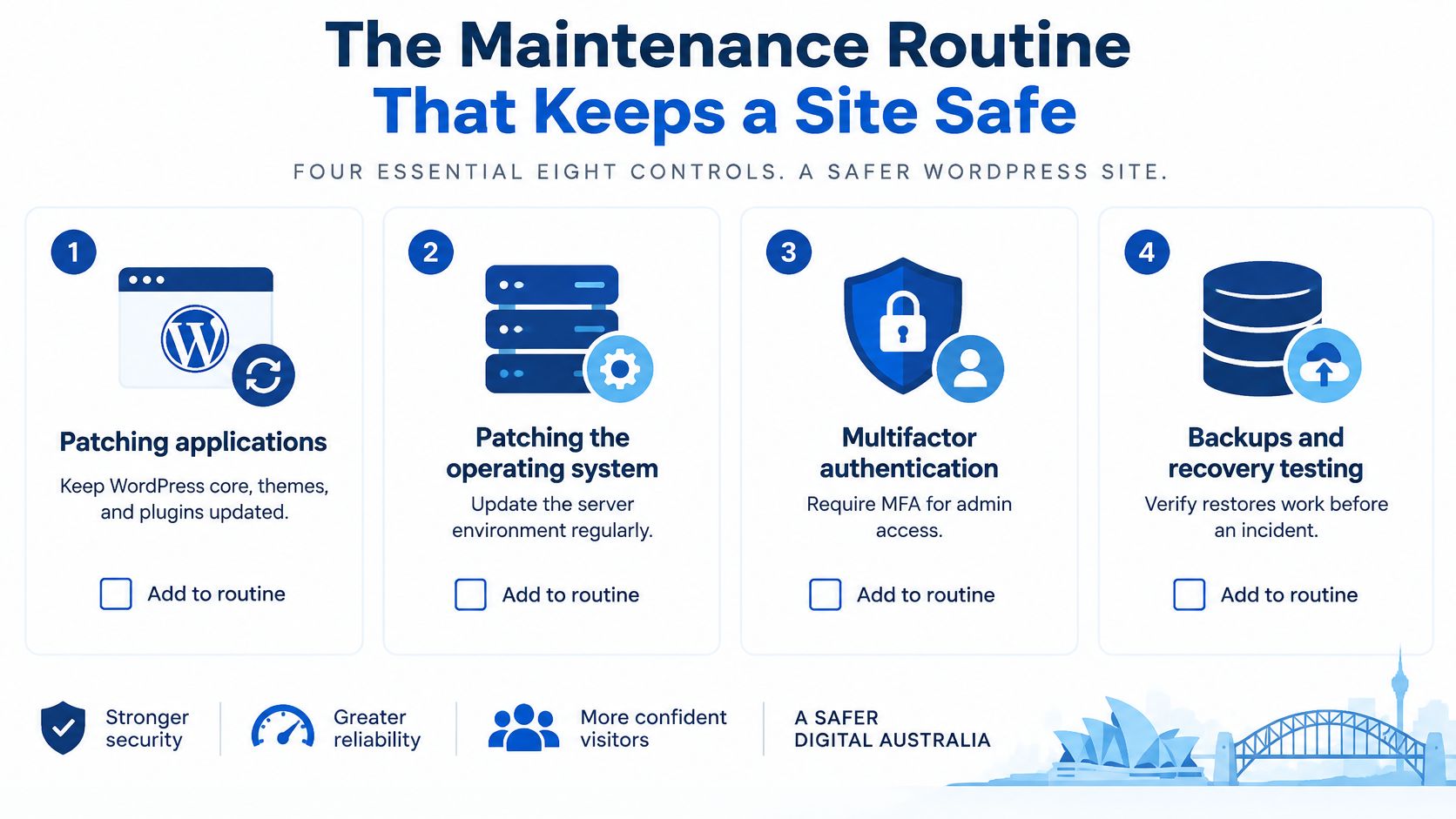
Application patching covers WordPress core, themes and plugins. Environment maintenance covers PHP and the underlying server. Agree with the host and support provider who handles each layer, so a vulnerable component cannot fall between responsibilities.
Require MFA for administrators and editors. Remove unused accounts and limit who can install software. Keep off-site backups with a documented retention period, then test restoration in an isolated environment. A backup log shows that a process ran; a restore test shows whether the files and database can bring the site back.
A practical operating cadence
Use this schedule as a starting point, then adjust it to the site's risk and release activity:
- Weekly security review: Check vendor security notices and plugin changelogs against the site's component inventory.
- Fortnightly routine releases: Apply non-critical updates in staging, test layouts and forms, then deploy with a rollback available.
- Monthly access review: Remove departed users, check administrator permissions and flag abandoned plugins for replacement.
- Monthly recovery exercise: Review backup logs, restore the files and database together, and confirm the application works.
- Quarterly environment review: Check supported hosting versions, database health and integration compatibility before an upgrade becomes urgent.
A staging copy should resemble production without sending customer emails or charging live payment methods. Mask personal information and disable production webhooks where appropriate. Keep test data limited to what the work requires.
Emergency changes need a separate path
Critical vulnerabilities under active exploitation need mitigation much faster than routine updates. Do not let the maintenance calendar delay an emergency response.
If a patch is unavailable, disable the affected feature, restrict access or apply a supported mitigation. Record the change, the reason for it and what remains unresolved. Once a patch is available, test and apply it through the appropriate release process.
The provider should carry out updates, tests and release records. The business should approve functional changes and retain final authority over administrator access.
Monitoring, Performance and Accessibility Checks
A WordPress site can appear online while its checkout is failing or its members cannot sign in. Monitor service availability alongside the user journeys that support revenue and operations.
A useful uptime check runs at least every minute from multiple locations, with alerts sent to a named responder and a backup contact. This is a recommended setup, not a guarantee that every outage will be detected immediately. Track PHP errors, failed form submissions, checkout steps and payment webhook failures as separate application signals.
Follow the transaction, not just the homepage
Monitoring tools such as Sentry and New Relic can capture stack traces and application context, helping teams investigate failures. Configure them to avoid collecting passwords, payment details or unnecessary personal information.
Continuum Solutions provides enterprise application monitoring and debugging alongside custom development, progressive web apps, API integrations and Stripe integration. Its app development services include application monitoring, uptime monitoring and debugging.
Track Core Web Vitals on key templates, including landing pages, account screens and checkout. Review caching behaviour, image compression, database revisions, expired transients and third-party scripts. Keep personalised membership pages out of public-page caches, then retest after plugin or page-builder changes under consistent conditions.
Test usability beyond a scanner
Use WCAG 2.2 Level AA as the accessibility acceptance benchmark for the site. Check each critical journey against it, rather than relying on an undefined claim that a theme is accessible.
- Structure and navigation: Check semantic headings, landmarks, keyboard operation and visible focus.
- Forms and content: Test labels, colour contrast, alternative text and clear error messages.
- Regression testing: Repeat manual keyboard and screen-reader checks after template, form or checkout changes.
Automated scans can catch some defects, but they cannot confirm that someone can complete a donation or understand how to correct a form error. Test mobile layouts and constrained connections as well.
A monthly report should show uptime, incidents and root causes, performance trends, and accessibility defects with severity, an owner and a target fix date.
Handling a Breach and Your Privacy Duties
A compromised WordPress installation, a compromised hosting account and a personal-information breach aren't interchangeable. Malware requires application investigation; hosting-account compromise may expose infrastructure controls; unauthorised access to donor or customer records requires a privacy assessment.
The OAIC recorded 532 breach notifications during January–June 2025, with 59% attributed to malicious or criminal attacks and 37% to human error, up from 29% in the previous reporting period, according to its data-breach dashboard announcement. Maintenance therefore needs to address configuration and human access, not just malicious code.
Contain without destroying evidence
Misconfigured forms, shared logins, exported spreadsheets and publicly accessible backups can expose information even when WordPress is current.
- Contain the affected component: Isolate the site or disable the vulnerable plugin without unnecessarily erasing evidence.
- Preserve the record: Retain logs, relevant backups and a forensic copy before clean-up.
- Revoke compromised access: Rotate administrator credentials, hosting access, API keys and affected Stripe or CRM tokens.
- Recover and verify: Restore a clean version, remove the entry point and confirm that connected systems behave correctly.
A live commerce database needs particular care. Restoring an old backup without reconciling subsequent orders can create another operational incident.
Our cloud services include on-call support. For procurement, define whether that covers initial containment, investigation, recovery or specialist escalation.
Know who makes the notification decision
For organisations covered by the Privacy Act 1988, the OAIC's Notifiable Data Breaches guidance requires prompt notification to affected individuals and the OAIC where personal information is accessed or disclosed without authorisation, or lost, serious harm is likely, and remedial action hasn't prevented that risk. Notifications must describe the breach, information involved, organisational contact details and recommended protective steps.
The provider investigates and documents technical facts. The business remains responsible for assessing notification obligations, supported by legal advice.
Our privacy policy is part of supplier due diligence, not a substitute for your incident-response agreement. Specify evidence ownership, escalation contacts and who authorises communications before an incident occurs.
How to Choose a WordPress Support Partner
Selection criteria for a WordPress support company
| Criterion | What Good Looks Like | Red Flag |
|---|---|---|
| Patch and release process | Staging tests, change log, documented rollback | Updates applied directly to the live site |
| Access control | Named admins, MFA, least-privilege roles, offboarding steps | One shared admin login for the whole team |
| Backups | Off-site daily backups and a monthly restore test with a written report | Backups claimed but never restored |
| Monitoring and response | Uptime and error alerts, response times by severity, on-call cover | Response described only as as soon as possible |
| Privacy and incident process | Written containment steps, evidence retention, notification support | No incident plan or consideration of Privacy Act coverage |
| Integration and documentation | Written handover, component inventory, business-held credentials | Credentials held only by the provider |
| Local accountability | Named account lead, monthly reporting, Australian-based team | Pooled offshore support with rotating staff and no accountable lead |
Use these as acceptance criteria, not assumptions about every provider's service. Offshore delivery isn't necessarily unsuitable; unclear ownership and inconsistent access practices are the concern.

Test promises against evidence
Request a sample change log, administrator list with MFA status, recent restore report, severity-based response commitments and incident procedure. A polished dashboard doesn't replace those artefacts.
Consider these hypothetical procurement failures:
- Nonprofit donations: A charity buys updates only. A theme conflict breaks its donation plugin over a weekend, but nobody is responsible for monitoring payment callbacks.
- Ecommerce access: A retailer leaves sole administrator access with its original developer. When that relationship ends, staff can't rotate credentials or identify live integrations.
- Membership accessibility: An organisation commissions an audit but no regression testing. A later theme change makes the sign-up form unusable by keyboard.
Each failure starts with an ownership gap, not necessarily a lack of technical talent.
Choose for the workload
A brochure site without payments may suit entry maintenance with demonstrable recovery. A donation or membership platform needs managed security and incident readiness; an ecommerce operation needs appropriate transaction monitoring and on-call cover. An in-house team needs documented handover and operational backup.
Continuum Solutions is a Shopify Plus Partner, AWS Partner, Azure Partner and WP Engine Partner, with Australian staff. Our ClubScout work included documentation and knowledge transfer to support long-term platform ownership.
Our business IT consulting services can help frame the broader ownership decision when WordPress depends on cloud infrastructure and connected applications.
Commercial judgement: A fully patched application can still fail through weak access controls or unmanaged payment tokens. The support fee isn't the full cost of that exposure.
Confirm the Scope Before You Sign
Turn the proposal into an operating agreement this week. Assign a business owner to complete this checklist with the shortlisted support teams.
- Inventory the platform. List every plugin, theme, integration, hosting account and administrator, including the owner of each.
- Verify access. Confirm MFA status, remove unnecessary accounts and identify who can grant privileged access.
- Prove recovery. Obtain the latest restore-test report and backup retention policy, including exclusions.
- Agree response commitments. Define severity, acknowledgement times, escalation and out-of-hours coverage.
- Allocate change authority. Record who approves features, holds credentials and removes access when someone leaves.
- Document incident ownership. Name the investigator, evidence custodian and business decision-maker for potential notifications.
- Specify reporting. Require availability, incidents, performance trends and accessibility defects in a consistent format.
Compare the same scope
Run shortlisted providers through the same checklist and compare exclusions line by line. Separate acknowledgement from active investigation, and investigation from resolution; a quick reply doesn't mean someone has started fixing the fault.
Where remediation requires custom web development, separate that project from the recurring support agreement. Replacing an unsupported plugin or rebuilding a fragile integration needs acceptance criteria, not an open-ended maintenance allowance.
The cheapest plan is appropriate only when its recovery, access and response arrangements match the business's exposure. Payment processing and donor records deserve more scrutiny than a headline fee.
Before signing, confirm that credentials, documentation and reports can transfer to another team without rebuilding the site. An orderly exit is part of a workable support arrangement, even when you intend to stay.
Continuum Solutions offers AWS consulting, managed cloud services, WordPress technical support and custom integrations to help businesses operate connected platforms reliably. Visit Continuum Solutions and send your hosting details, integration list and current support concerns through the contact form. We respond within one business day with an honest assessment of whether and how we can help.