
An Australian organisation can complete an AWS server migration and still miss the point. The applications run, the cutover is signed off, and the old servers are switched off, but users see no improvement, support teams now manage a more complicated environment, and the monthly bill is harder to explain. That’s not a successful transformation. It’s an infrastructure move without a clear business result.
I advise CTOs to treat migration as a program with measurable outcomes, assigned owners and an operating plan that continues after cutover. Choose the target architecture only after you know what the organisation needs to improve, what must remain under Australian control, and how you’ll prove the change was worthwhile.
Table of Contents
- Why Most AWS Server Migrations Underperform After Cutover
- Discovery, Assessment and the Pre-Migration Baseline
- Choosing Between Rehost, Replatform and Refactor
- Tooling, Data Transfer and the AWS Migration Stack
- Security, Compliance and Australian Data Sovereignty
- Testing, Cutover, Rollback and the Wave Plan
- Cost Control and the Post-Migration Scorecard
Why Most AWS Server Migrations Underperform After Cutover
Consider a common Australian cutover scenario. A nonprofit moves its public website and member database to Amazon EC2. The service stays online, and the old hosting contract ends. But the team hasn’t tested whether authentication still works with its CRM, whether staff can restore records, or whether the new environment is cheaper to operate. The server move is technically complete. The service hasn’t become easier to run.
That gap is visible in Australian cloud reporting. Datacom’s 2025 survey of 504 Australian organisations found that 49% believed their cloud strategy had met expectations, down from roughly two-thirds in 2020, with lift-and-shift identified as a key reason cloud investments underdeliver (Datacom’s Australian cloud and infrastructure findings). Moving an unchanged workload can preserve inefficient architecture, duplicate monitoring and support effort, or carry licensing and integration problems into a new environment.

Define success before choosing the migration method
A server migration needs a business case that survives contact with operations. Agree on the outcomes first: availability, recovery time, response time for Australian users, cost per transaction, deployment frequency, or reduced support effort. Each target needs an owner, a pre-migration baseline and a way to measure it after launch.
Then agree on what the migration is allowed to change. A regulated organisation might prioritise controlled access, documented recovery and evidence for audits. An NGO might need to stabilise a donation platform without disrupting its CRM or payment integrations. The right measure depends on the service, not on how many servers have moved.
Practical rule: If the project can only report servers migrated and infrastructure retired, it isn’t measuring business success.
Australian organisations can also use common AWS migration mistakes SMEs make as a prompt for risk discussions, but the migration’s own success criteria should come from its users, service owners and finance team. Keep those measures in view from discovery through the post-cutover review.
Discovery, Assessment and the Pre-Migration Baseline
Start with outcomes, not a server export. Ask the service owner what must improve and how they’ll recognise that improvement. For a customer-facing application, that may mean availability and latency for Australian users. For an internal platform, it may mean dependable recovery and fewer manual deployment steps. Finance needs a cost baseline that includes infrastructure and the people required to operate it.
Build a baseline the team can defend
Capture current performance and operating effort before proposing a target design. Record utilisation, storage growth, service dependencies, database behaviour, backup arrangements, recovery procedures and recurring infrastructure costs. Include the workarounds that don’t show up in monitoring, such as staff exporting data manually or restarting a service after a known fault.
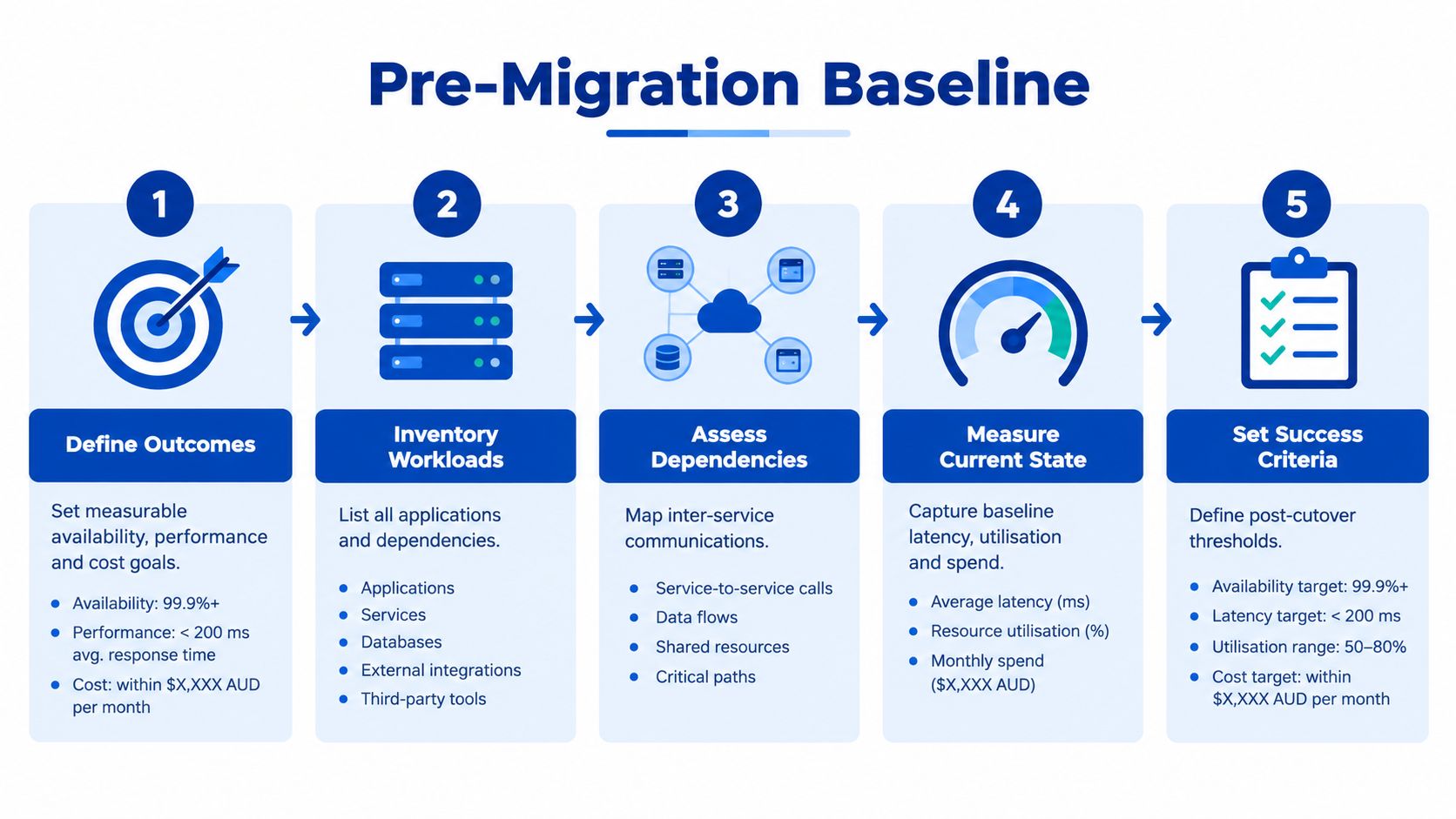
Use AWS Application Discovery Service or existing monitoring and asset records as starting points. Automated collection can help identify server configurations and observed connections, but it won’t tell you whether an undocumented integration is business-critical. Interview application owners, operations staff and suppliers, then assign an accountable owner to each dependency.
Australian and New Zealand cloud leaders identified skills shortages as a concern for 84% of respondents. Australian migration reporting also identified integration challenges for 38%, security concerns for 30% and IT skills gaps for 25% of organisations (Australian migration and cloud strategy findings). Those risks call for named owners, not just another discovery tool.
Classify data and map the connections
For each workload, document its data classification, identity provider, databases, interfaces, scheduled jobs, network dependencies, backup destinations and users. Mark connections that cross systems or suppliers, especially links to CRM, finance, payment, identity and analytics services. A server can pass a boot test and still fail its real job if one of those connections is missing.
Use that inventory to group workloads into migration waves. Start with a service that can validate the landing zone and operating process without putting a critical service at risk. Before the first production move, confirm that the target account structure, network, access controls, logging, backups and region choices match the organisation’s requirements. Teams planning this work can review Continuum Solutions’ cloud migration services as one option for migration planning, wave design and controlled cutovers.
Choosing Between Rehost, Replatform and Refactor
Don’t make “rehost everything first” the default. It can shorten the initial move, but it also carries the original design and operating problems into AWS. Choose a path per workload, based on the business reason to move and the cost and risk of changing it.
| Trigger | Rehost | Replatform | Refactor |
|---|---|---|---|
| Data-centre exit or urgent infrastructure deadline | A sensible short-term move if the application can run safely on EC2 and the target is ready. | Use when a managed service or small platform change reduces operational burden without a major redesign. | Avoid making a deadline-critical move depend on a broad rewrite unless the current design creates an unacceptable risk. |
| End-of-life operating system or database | Usually carries the underlying support issue forward. | Consider an AWS-supported platform change if the application can tolerate it. | Justified when the obsolete design prevents security, support or business requirements from being met. |
| High operating cost or poor performance | Helps only when the target configuration and licensing improve the cost profile. | Often a practical route to managed database or platform services, subject to workload testing. | Consider when architectural inefficiency is a material cause and the expected benefit supports the investment. |
| Complex integrations or regulated data | Can limit application change during relocation, but preserves dependencies that still need validation. | Useful when boundaries and interfaces can be improved without replacing the whole application. | Appropriate when a redesign is necessary to meet control, resilience or integration goals. |
Match the change to the payoff
Rehost when the priority is relocation and the existing workload is supportable, understood and adequately tested. It can be a pragmatic first move for a tightly coupled application, but only if the business case includes the cost of ongoing maintenance and a decision about what happens next.
Replatform when a contained change can simplify operations. A database move to a managed service, for example, may reduce routine administration, but the team still needs to validate compatibility, performance and recovery. Don’t assume a managed service is automatically cheaper; compare its measured operating cost and support needs with the current baseline.
Refactor when the current architecture blocks an important outcome, such as reliable integration or a required security control. It offers more room to improve the service, but carries greater delivery and testing risk. Keep the work bounded, and don’t disguise a product rewrite as a server migration.
Rehost for a clear relocation need, replatform for a defined operational gain, and refactor only when the business benefit justifies the change.
For workloads where the hosting model itself needs review, compare AWS Lightsail, EC2 and ECS against operational requirements, integration needs and the team’s capability to run the result.
Tooling, Data Transfer and the AWS Migration Stack
Pick tools to perform specific jobs. A migration platform can automate repetitive work, but it can’t make an undocumented dependency safe or replace a cutover decision.
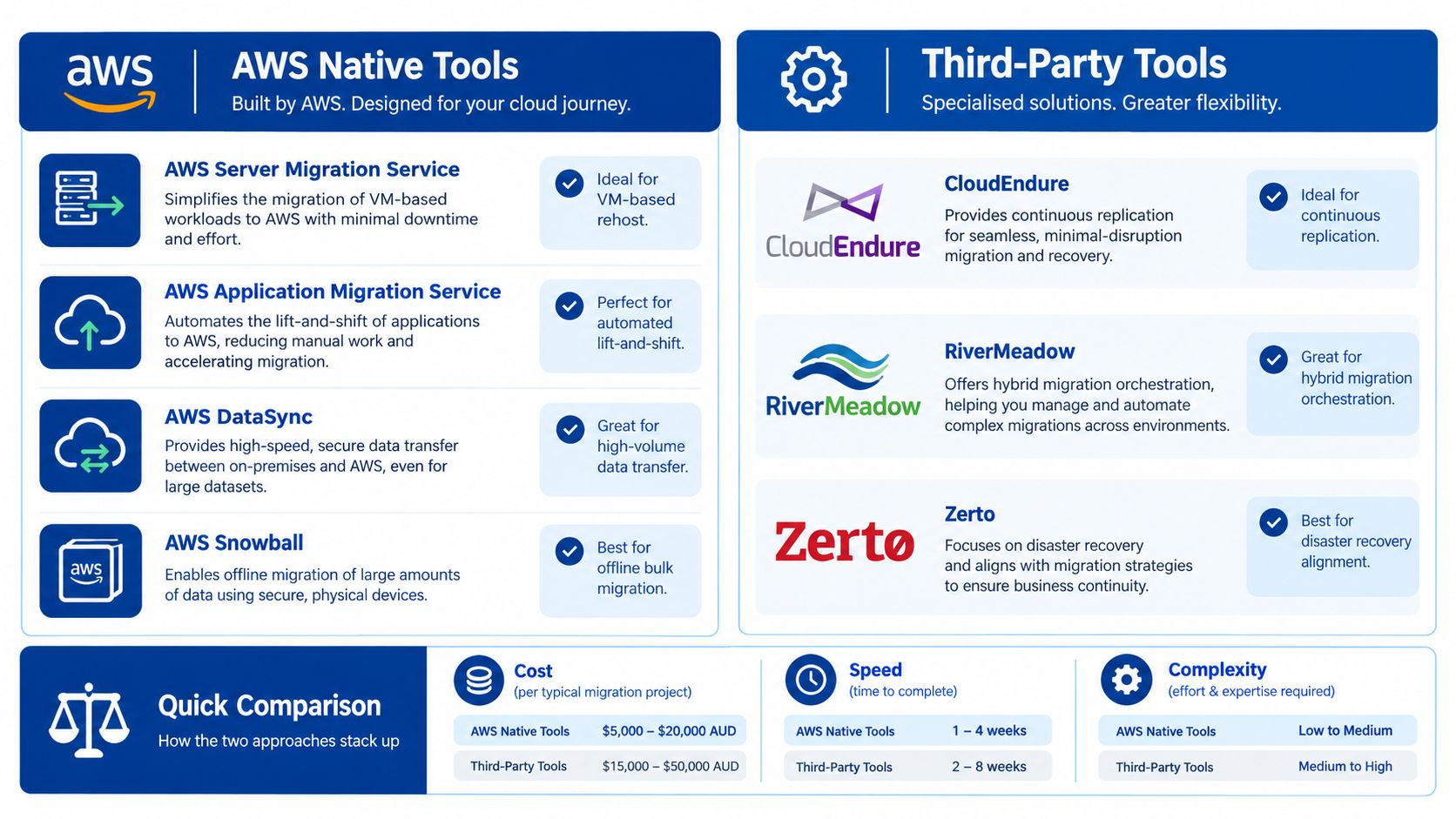
Assign each tool a job
For server relocation, assess AWS Application Migration Service (MGN) for continuous replication and test launches before cutover. AWS Transform can support discovery and migration planning, including wave development. AWS DataSync suits managed file transfers where source and destination support the required pattern; AWS Snowball can be considered where network transfer is impractical and offline transfer is suitable.
AWS Database Migration Service (DMS) serves a different purpose: database migration and replication. AWS Application Discovery Service can help collect server and dependency information. Third-party orchestration products may be useful when they address a specific gap in workflow, source-platform support or governance, but don’t add them just to enlarge the toolset. Confirm product availability and suitability for your environment before building the plan around a named service.
Put transfer costs into the design
AWS states that DMS doesn’t charge for data transferred into the DMS service, and transfers between a DMS node and Amazon RDS or Amazon EC2 in the same Availability Zone are free. Standard AWS data-transfer charges apply across Availability Zones, Regions or outside AWS (AWS DMS pricing details). Record the source and target locations in the estimate before approving the design. A database move across locations can have a different transfer cost from a same-AZ design.
Include testing and cleanup in the work plan. Test instances, replication jobs, storage and migration support infrastructure can continue to incur charges if nobody removes them when they’re no longer needed. Keep the business case tied to measured consumption rather than an assumed saving.
For a smaller website or hosting change, migrating from shared hosting to AWS still requires the same discipline around dependencies, backups, validation and cost ownership.
Security, Compliance and Australian Data Sovereignty
An AWS Australian Region can support residency requirements, but region selection alone doesn’t prove that a workload meets an organisation’s obligations. Data residency concerns where data is stored or processed. Sovereignty also raises questions about who can access it, which legal and operational controls apply, and who governs the supporting services.
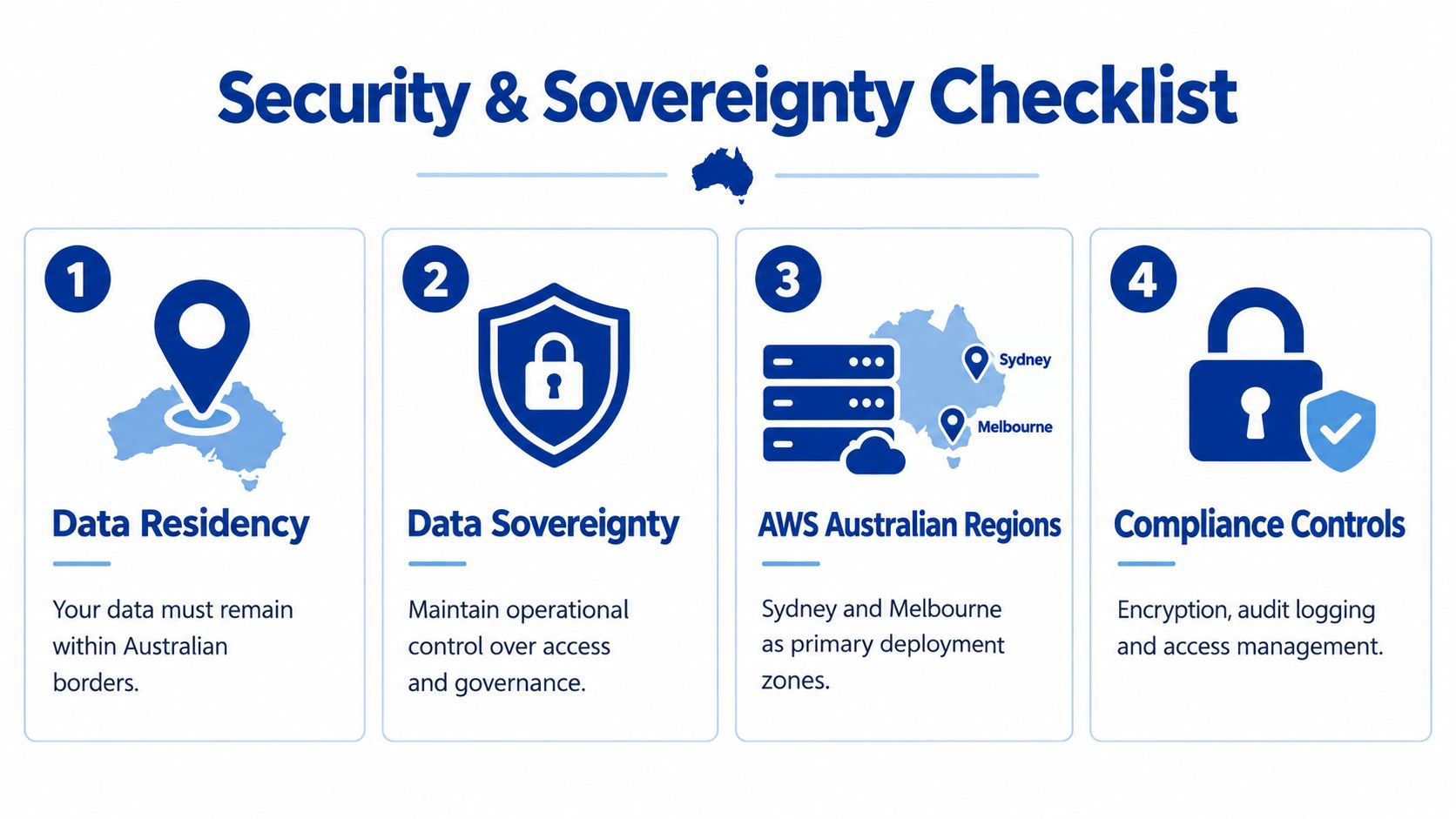
Australian guidance considers data classification, system access, encryption-key control and processing location. Highly classified information may require secure on-premises facilities rather than public cloud. The Australian Government’s 2025 AI plan identifies onshore capability as central to sovereignty and legacy migration (Australian guidance on data sovereignty and onshore capability).
Assess the whole operating path
For each workload, document:
- Classification and location: Which data must remain in Australia, including backups, logs and replicated copies?
- Access and identity: Who can administer systems, from where, and through which identity services?
- Keys and processing: Who controls encryption keys, and where do the application and its supporting services process data?
- Operations and suppliers: Where are incident responders located, which vendors can access the service, and what do contracts say about access and handling?
Also review telemetry, observability platforms, managed SaaS dependencies and support arrangements. A primary database in an Australian Region doesn’t settle the question if logs, backups or operational access follow a different path.
Stricter locality controls can narrow service choices and add cost. Don’t pretend otherwise. Document the control requirement, the architecture decision, its cost and any accepted residual risk. For a regulated organisation or NGO handling sensitive information, that record is part of the migration deliverable, not an afterthought.
Testing, Cutover, Rollback and the Wave Plan
Treat cutover as a rehearsed operational change, not a calendar event. Sequence waves using the dependency map, then test a representative workload before moving services that support critical public or internal operations. A lower-risk pilot helps validate the landing zone, runbooks, access controls and support handover.
Make go or no-go measurable
Before production traffic moves, complete application acceptance testing, reconcile replicated data, verify security controls and confirm monitoring and backups. The service owner should test real business transactions, including integrations and user access, not just whether a server responds. Agree in advance on the conditions that stop the change.
Rehearse the rollback path with the people who’ll execute it. Define who can authorise a reversal, what state must be preserved, and how the service returns to its prior operating mode. For a DNS or traffic-manager cutover, document the action and the checks that follow it. Keep the source system recoverable until the new service has passed its agreed validation.
NSW Health offers a concrete example of phased migration in a regulated environment. By 2022, 30% of eHealth workloads had been migrated, with A$25 million in benefits from avoided capital expenditure and productivity improvements, an average tenfold increase in deployment speed, an estimated 116,000–144,000 hours of productivity saved for frontline clinicians, and a 70% reduction in unplanned outages (NSW Health migration outcomes). The point isn’t to copy those targets. It’s to measure operational outcomes alongside migration progress.
A cutover runbook should assign a decision-maker, technical leads, service owners and communications responsibilities. Confirm that monitoring is ready to detect failures that matter to users, and that escalation reaches someone authorised to act. Where application monitoring needs strengthening, application monitoring and debugging services can be considered as part of the operational handover.
Cost Control and the Post-Migration Scorecard
The migration isn’t finished when traffic moves. Compare actual compute, storage, transfer, backup and managed-service charges with the pre-migration baseline after each wave. For public websites and APIs, AWS provides Australia and New Zealand with a first 1 TB per month of data transferred out from CloudFront edge locations free; charges apply beyond that allowance, and request charges also need to be modelled (AWS CloudFront pricing). AWS also charges for data transferred between Regions for backup replication, while transfers within the same Region don’t incur those data-transfer charges; destination backup storage is billed separately (AWS Backup pricing).
At the six- and twelve-month reviews, assess availability, recovery performance, user experience, spend variance and delivery velocity against the baseline. A survey of 80 Australian IT and business leaders found that 36% reported their organisations had failed to realise notable cloud benefits, primarily because migration plans weren’t integrated with broader business strategy (Unisys findings on Australian cloud migration expectations). If a workload misses its targets, decide whether to replatform, modernise, keep it hybrid or retire it. Don’t keep paying for an architecture just because the migration has been marked complete.
Continuum Solutions plans and delivers phased AWS migrations, including target architecture, migration waves, security controls and cutover approaches. If you’re preparing a server migration or need an independent review of its costs, dependencies and success measures, visit Continuum Solutions.