
Simple lift-and-shift migrations to AWS often take around 1 to 3 months, while more complex application modernisation projects commonly run for 6 to 12 months or more. The right answer depends on a structured assessment of your applications, data, integrations, risk tolerance, and what “finished” means for the business.
That’s usually the point where a CTO or IT manager gets stuck. The board wants a date. Finance wants a budget. Operations wants to know when disruption will happen. The technical team knows the honest answer isn’t a single number pulled from the air.
The problem with most advice on how long an AWS migration takes is that it stays at “it depends” and leaves it there. That’s accurate, but it’s not useful. A migration timeline becomes predictable only when you break it down by migration strategy, scope, project phases, and business constraints.
If you’re planning a move from shared hosting, ageing on-prem infrastructure, or a legacy application stack, the timeline isn’t just a technical question. It’s a commercial decision about how much risk you’ll accept, how much change the business can absorb, and whether you’re moving infrastructure or improving the platform while you’re at it.
Table of Contents
- Estimating Your AWS Migration Timeline
- Typical Timelines by Migration Scope
- The Six Phases of an AWS Migration Project
- Key Factors That Influence Your Migration Timeline
- Sample Timelines in Real-World Scenarios
- A Risk Mitigation Checklist for a Timely Migration
- Planning Your Next Steps with Continuum Solutions
Estimating Your AWS Migration Timeline
When someone asks, how long does an AWS migration take, the useful answer starts with a different question. What exactly are you migrating, and what counts as done?
For one organisation, “done” means moving a handful of virtual machines from a co-location environment into Amazon EC2 with minimal code changes. For another, it means replacing brittle infrastructure, redesigning deployment pipelines, moving a database into Amazon RDS, introducing containers on Amazon ECS, tightening identity controls, and retiring technical debt that has built up over years.
Those are not the same project, even if both are described internally as “an AWS migration”.
What usually makes estimates go wrong
The biggest reason timelines blow out is that teams estimate the move, but forget the surrounding work. They account for copying workloads into AWS, but not for application discovery, dependency mapping, user acceptance testing, rollback planning, security review, change management, and post-cutover optimisation.
A more realistic estimate usually considers four layers:
- Infrastructure move: Servers, storage, networking, DNS, backups, and access controls.
- Application change: Whether the software can move as-is or needs code, config, or runtime changes.
- Data movement: Database migration, file transfer, validation, sync, and cutover planning.
- Operational readiness: Monitoring, alerting, support model, documentation, and team handover.
Practical rule: If the estimate only covers the weekend cutover, it isn’t a migration plan. It’s a go-live event with the hard work hidden off the page.
A practical way to frame the timeline
A workable estimate starts broad, then narrows. Use the initial benchmark of 1 to 3 months for a straightforward rehost and 6 to 12 months or more for a modernisation-led programme. Then pressure-test that estimate against application dependencies, business blackout periods, internal capability, and compliance requirements.
That gives stakeholders something far better than “it depends”. It gives them a timeline with reasoning behind it.
Typical Timelines by Migration Scope
Most AWS migrations fall into recognisable patterns. You can usually classify them as small, medium, or large, not as an academic exercise, but because each scope level tends to bring a different approval process, testing burden, and operational impact.
A small migration is often infrastructure-led. A medium migration usually includes a business-critical application and a meaningful data component. A large migration becomes a programme rather than a project, with multiple workstreams moving in parallel.
AWS Migration Timeline Estimates by Scope
| Migration Scope | Example Scenario | Estimated Timeline |
|---|---|---|
| Small | A marketing website, brochureware application, or a few low-complexity servers moved to Amazon EC2 with limited code changes | Around 1 to 3 months |
| Medium | A line-of-business application with database migration, integration touchpoints, security review, and staged testing | Around 3 to 6 months |
| Large | Multiple applications, shared services, complex integrations, legacy dependencies, or an on-prem estate being migrated in waves | Around 6 to 12 months or more |
The table is useful as a starting benchmark, not a commitment. A “small” migration can still drag if the application owner can’t define dependencies or if the business only allows narrow change windows. A “medium” migration can move quickly if the workload is well understood and the target AWS architecture is standardised.
Scope is more than server count
Teams often try to estimate by counting servers. That’s not enough. One simple web stack on two servers can be easier to move than one old application running on a single server with undocumented cron jobs, file shares, outbound integrations, and a database nobody wants to touch.
A better early filter is to ask:
- How coupled is the application? Tight coupling to old infrastructure slows everything.
- How much data needs validation? Data integrity work extends timelines more than initially estimated.
- How much business coordination is needed? Legal, finance, operations, and customer service can all affect scheduling.
- How much redesign is planned? Rehosting is faster than replatforming or refactoring.
If you’re still running a website or application on older hosting and trying to gauge the jump in complexity, this guide on migrating from shared hosting to AWS is a useful comparison point.
A migration that looks small on an infrastructure diagram can still be large from an operational standpoint.
The Six Phases of an AWS Migration Project
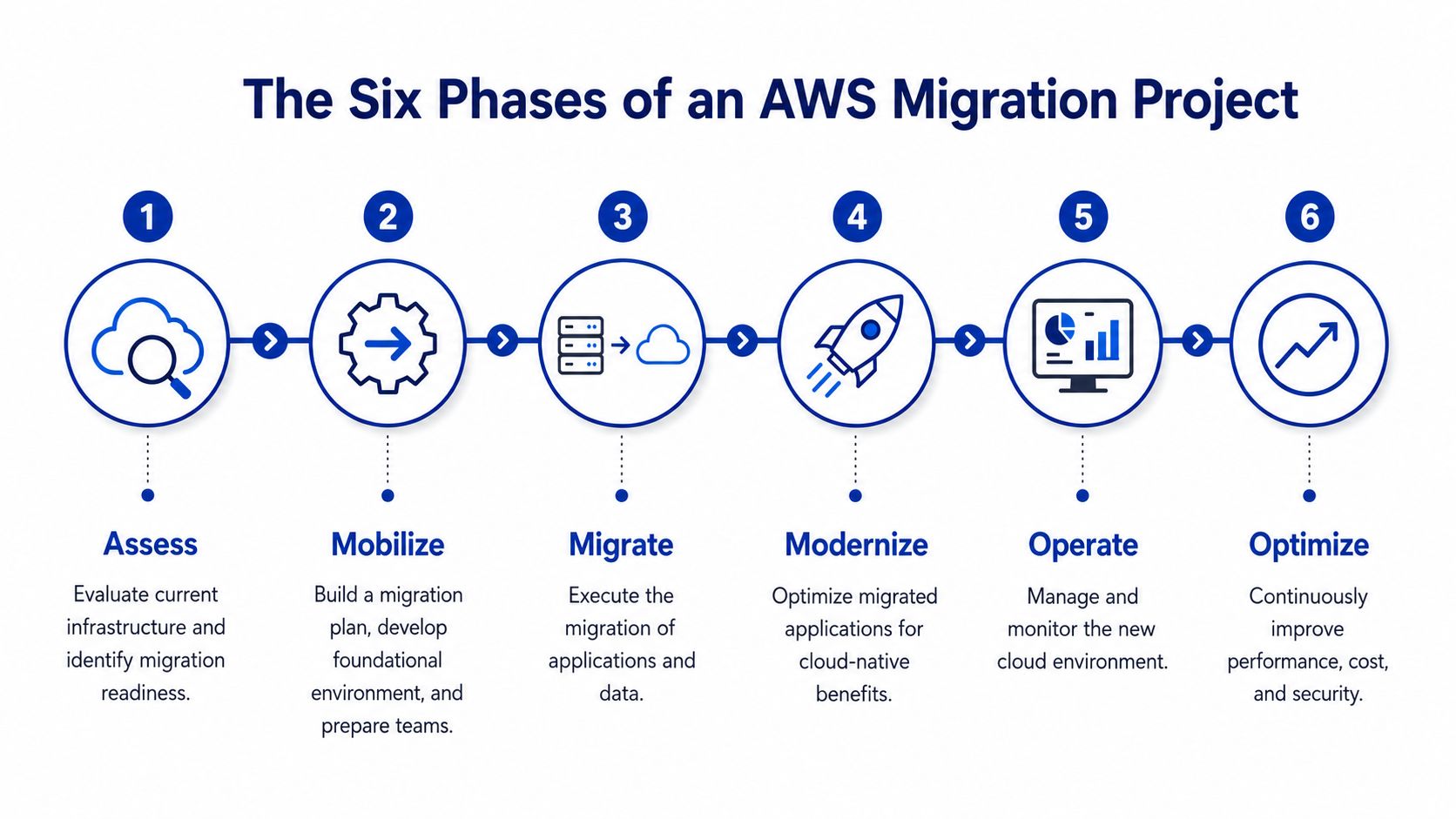
Migration projects stay on schedule when they’re treated as a sequence of deliberate phases, not a single technical event. The mistake I see most often is compressing the first part of the project to “save time”, then paying for that shortcut during testing and cutover.
Assessment defines the real timeline
Assess comes first. During this stage, the team inventories applications, maps dependencies, reviews hosting costs, identifies business constraints, and decides which workloads are suitable for which migration path. In timeline terms, this phase often consumes a meaningful share of the total project because it determines whether the schedule is realistic or fantasy.
Mobilise follows. That includes building the AWS landing zone, setting up identity and access patterns, establishing networking, logging, backup strategy, tagging, monitoring, and creating the delivery plan. Teams also confirm tooling, environments, and responsibilities here.
Together, these early phases usually account for a substantial portion of the total migration timeline. That’s why rushed discovery is expensive. A fast start often creates a slow middle.
If you’re still deciding between compute models before planning the target state, this comparison of AWS Lightsail vs EC2 vs ECS helps clarify what belongs where.
Execution is only one part of the schedule
Migrate is the phase most executives imagine when they hear the word migration. This is the movement of servers, databases, files, and workloads into AWS. It may happen in waves, by environment, by application, or by business priority.
Modernise may happen during or after migration, depending on the strategy. That can include moving databases into Amazon RDS, introducing containers with Amazon ECS, replacing manual deployments with CI/CD, or reworking storage patterns around Amazon S3. This phase stretches the timeline because it introduces change beyond infrastructure relocation.
Operate starts as soon as workloads are live in AWS. Teams monitor application behaviour, support users, tune alerts, fix unexpected edge cases, and stabilise the environment under real usage. Many timelines underestimate this period because they treat go-live as the finish line.
Optimise is where cloud value is either realised or missed. This includes right-sizing, cost review, performance tuning, backup refinement, reserved capacity planning, security hardening, and operational clean-up. It’s still part of the migration outcome because a workload that merely runs in AWS isn’t necessarily well-run in AWS.
A practical way to think about phase weighting is this:
- Assess and Mobilise: Often a large chunk of the schedule because they reduce downstream surprises
- Migrate: Usually the most visible phase, but not always the longest
- Modernise and Operate: Frequently where timelines expand if the application needs more change than expected
- Optimise: Commonly overlaps with business-as-usual operations after cutover
Teams that skip phase discipline don’t get a shorter migration. They get a messier one.
Key Factors That Influence Your Migration Timeline
The difference between a quick AWS migration and a slow one usually comes down to a small set of variables. The most important is the migration strategy itself. After that, architecture, data, people, and governance start interacting in ways that either keep momentum or stall it.
The migration strategy drives the calendar
The 6 Rs framework is still one of the most practical ways to think about duration and trade-offs.
- Rehost: Move the workload with minimal change. This is the classic lift-and-shift and usually the fastest route to AWS.
- Replatform: Make limited platform improvements without rewriting the whole application. Common examples include moving a database to Amazon RDS or shifting a web tier into containers.
- Repurchase: Replace the application with a SaaS product. This can shorten infrastructure work but expand business process, integration, and change management work.
- Refactor: Redesign the application for cloud-native patterns. This offers the most long-term upside and usually the longest timeline.
- Retire: Decommission workloads that no longer justify migration effort.
- Retain: Leave some systems where they are because the timing or business case doesn’t support movement yet.
The trap is choosing a strategy that sounds efficient but doesn’t match the application reality. Teams sometimes label a migration “rehost” to secure approval quickly, then discover partway through that the app can’t run cleanly without database changes, authentication changes, or integration rework. The project then turns into a replatform without the plan or budget to support it.
Complexity compounds across teams
Application architecture matters because technical debt creates scheduling debt. A monolithic application with manual deployments, hidden dependencies, and local file storage typically takes longer than a stateless application with documented integrations and clear environment boundaries.
Data creates another bottleneck. Large databases, file repositories, and systems with strict integrity requirements don’t just need transport. They need reconciliation, validation, rollback options, and often a cutover plan that keeps business disruption low. That work is rarely visible in an early estimate, but it drives the calendar.
People and governance matter just as much:
- Internal capability: If your team knows AWS, Terraform, containerisation, and release management, decisions happen faster.
- Security review: Identity design, secrets handling, logging, encryption, and network segmentation often add approval steps.
- Compliance constraints: Regulated environments need more documentation, validation, and sign-off.
- Vendor coordination: Third-party systems, managed software vendors, and support providers can delay dependencies you don’t control.
For budgeting and timeline trade-offs, the relationship between pace and project design is easier to understand when viewed alongside this guide to how much an AWS migration costs in Australia.
The fastest migration path isn’t always the cheapest long-term option. The slowest path isn’t always over-engineering either. The right choice depends on how much future rework you’re willing to accept.
Sample Timelines in Real-World Scenarios
The easiest way to make migration timelines concrete is to look at common project shapes. Not every organisation matches these exactly, but the patterns are familiar enough to help with planning.
Scenario one rehosting a business website
A B2B company runs its marketing site and blog on a dedicated server. The stack is conventional. Web server, application layer, database, SSL, scheduled jobs, and some integrations with a CRM and email platform. The business doesn’t want major application changes. It wants better reliability, cleaner backups, and more control over hosting.
This is a classic rehost candidate and often lands in the 2 to 3 month range.
A realistic shape looks like this:
- Assess: Inventory the application, integrations, DNS, certificates, and backup requirements.
- Mobilise: Build the AWS environment, access model, logging, security groups, monitoring, and backup policies.
- Migrate: Replicate the server pattern onto Amazon EC2, move data, and prepare the target environment.
- Operate and optimise: Cut over during a low-risk window, monitor behaviour closely, then tune instance sizing and backup routines once live.
The time is usually spent on validation rather than engineering novelty. These projects go well when the source environment is understood and the application behaves predictably under test.
Scenario two replatforming a legacy membership system
An NGO runs an older on-prem membership database tied to a front-end application that has grown over time. The database is outdated. Reporting is clumsy. The organisation wants to move the data tier into Amazon RDS and shift the application into containers on Amazon ECS, with some cleanup to configuration, deployment, and environment consistency.
That’s a replatform project, not a rehost. It commonly sits in the 6 to 8 month range because more parts of the system are changing at once.
The extra time usually appears in places executives underestimate:
- Dependency mapping: Membership platforms often connect to payment tools, email systems, reporting extracts, and authentication services.
- Data preparation: Legacy schema quirks and data quality issues need attention before migration.
- Application remediation: Even small code updates can ripple through an old system.
- Testing: Functional, integration, performance, and user acceptance testing all become more important.
- Stabilisation: Support teams need time after cutover to handle edge cases and operational tuning.
The important lesson isn’t just that the second project takes longer. It’s why. The timeline grows because the business is changing the platform while moving it, which is often the right decision, but it needs to be planned realistically.
A Risk Mitigation Checklist for a Timely Migration
Teams sometimes skip risk controls because they’re under pressure to move faster. That usually backfires. A migration without clear decision gates doesn’t become leaner. It becomes unpredictable.
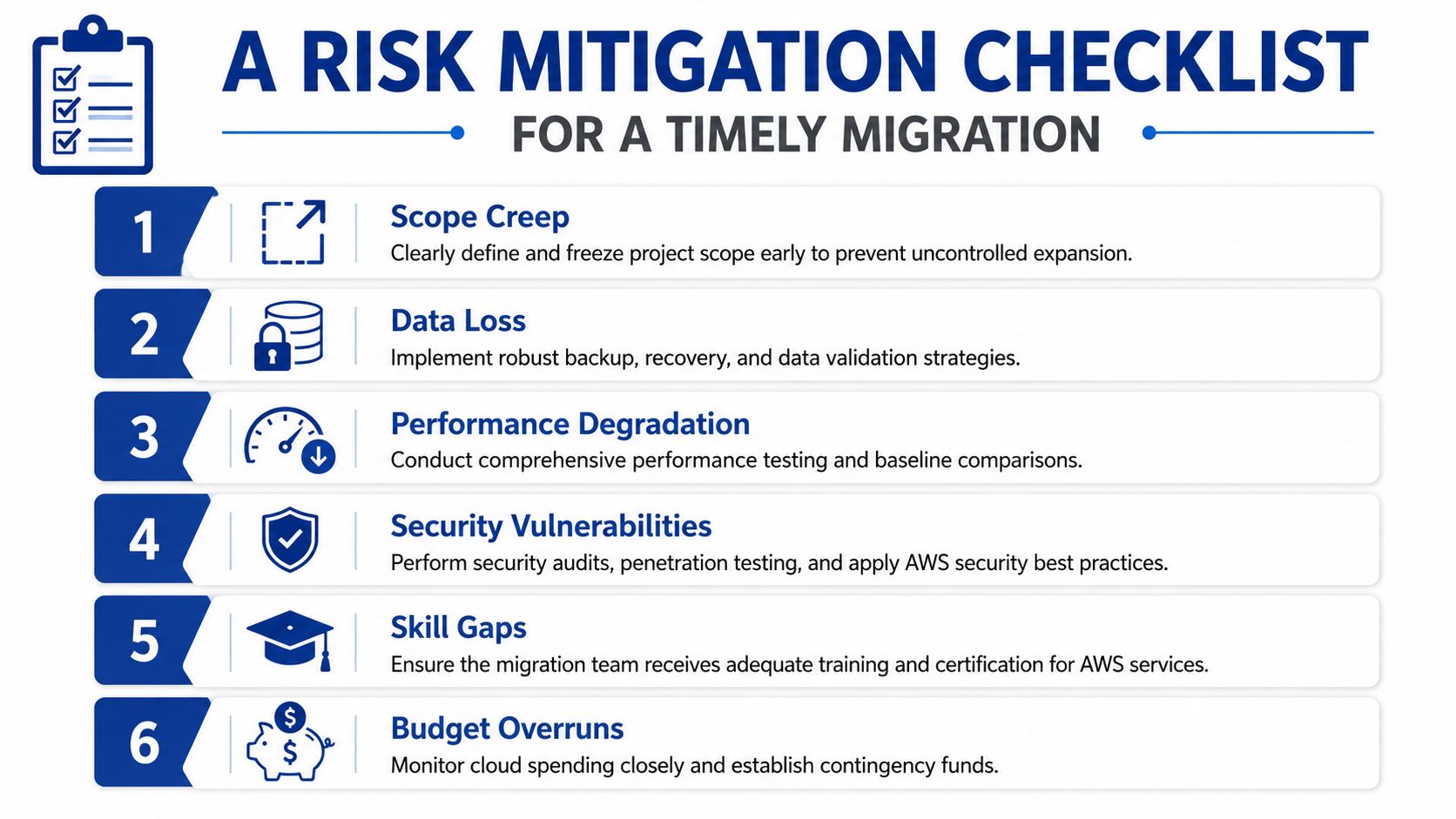
The safest way to protect the timeline is to treat a handful of checks as mandatory before cutover planning begins.
Non-negotiable checks before cutover
- Lock scope early: Define what is in and out of the migration. If teams keep adding “while we’re at it” improvements, the schedule will drift.
- Map dependencies properly: Confirm upstream and downstream systems, scheduled processes, authentication flows, and reporting outputs.
- Agree success criteria: Set operational, technical, and business acceptance criteria before the move, not after.
- Validate data strategy: Decide how data will be migrated, checked, reconciled, and rolled back if needed.
- Build a rollback plan: If the cutover fails, the team needs a clear path back, with roles and triggers already agreed.
- Prepare support coverage: Make sure application owners, infrastructure staff, and business stakeholders are available during migration windows and stabilisation.
A few more checks matter just as much in practice:
Warning sign: If nobody can explain who signs off on production cutover, the project isn’t ready for production cutover.
- Security review completed: IAM, secrets, network controls, logging, and backup design need approval before migration weekend.
- Performance baseline captured: Without a baseline, teams can’t tell whether the AWS environment is performing acceptably.
- Runbooks documented: The new environment should be operable by more than the person who built it.
Many avoidable delays start with mistakes that look minor at the time. This roundup of common AWS mistakes SMEs make is worth reviewing before final planning.
Planning Your Next Steps with Continuum Solutions
If you’re asking how long an AWS migration takes, you’re usually not looking for a theoretical answer. You’re trying to set expectations internally, decide whether the project is worth doing now, and avoid committing the business to an unrealistic delivery date.
The practical answer is that timeline certainty comes from assessment quality. A migration plan becomes credible when it accounts for application dependencies, data movement, operating model changes, security controls, testing effort, and the migration strategy itself. Without that, any promised timeline is just a guess with nicer formatting.
A sensible next step is to produce a migration roadmap before locking in delivery dates. That means identifying which workloads should be rehosted, which should be replatformed, which should be retained for now, and what sequence reduces business risk while keeping commercial momentum.
If you need that level of planning, a structured review of your current environment and target state is the right place to start. You can explore cloud migration services to map out the work in phases, align the timeline with your business constraints, and avoid turning a migration into a long-running remediation exercise.
If you’re planning an AWS migration and want a realistic roadmap rather than a vague range, talk to Continuum Solutions. Their team can help assess your current environment, define the right migration strategy, and build a phased plan that fits your operational and commercial priorities.