
You’re probably asking this because someone in the business has said, “We need an app”, and the next question landed on your desk. What will it cost, how long will it take, and how do we avoid funding a technical liability that looks cheap at the start and expensive a year later?
That’s where the usual answer becomes frustrating. “It depends” sounds evasive when you’re trying to build a budget, compare vendors, or decide whether the project belongs in this financial year. But it’s still the only honest answer, because custom app cost isn’t a fixed market price. It’s the output of decisions about scope, architecture, integrations, compliance, release strategy, and operational ownership.
A custom app with a simple login, basic content and one lightweight API behaves very differently from a field operations app syncing offline data, authenticating staff through SSO, and pushing records into Salesforce, Xero, and an internal ERP. Both are “apps”. They don’t belong in the same budget category.
The useful question isn’t just how much does it cost to build a custom app. It’s what choices are driving that cost, which costs are justified, and which ones are avoidable. That’s the difference between a sensible investment and a quote that looks tidy but hides serious downstream rework.
Table of Contents
- Introduction Why ‘It Depends’ Is the Only Honest Answer
- The Anatomy of App Cost Ballpark Figures for 2026
- Deconstructing the Price Core Cost Drivers Explained
- Platform Choices and Their Financial Impact
- Real-World Scenarios Three Worked Cost Examples
- Beyond the Build Planning for Maintenance and Infrastructure Costs
- How to Get an Accurate Quote and Optimise Your Budget
Introduction Why ‘It Depends’ Is the Only Honest Answer
Most executives don’t need another vague article about app pricing. They need enough clarity to decide whether they’re budgeting for an MVP, a serious customer product, or a platform that will sit inside core operations for years.
That’s why “it depends” matters. Not because the answer is unknowable, but because the wrong framing produces bad decisions. If you treat app cost as a single number, you’ll under-budget for integration, security, testing, support, and cloud operations. If you treat it as a strategic decision, the pricing starts to make sense.
Three variables usually determine where your project lands. First, what the app has to do for the business. Second, what it has to connect to. Third, how reliable, secure, and scalable it needs to be from day one.
Practical rule: If the app touches revenue, regulated data, staff workflows, or multiple business systems, it should be scoped as a platform decision, not a design project.
A founder validating an idea can accept narrower scope and controlled risk. A CTO replacing manual workflows can’t. The same goes for an organisation launching a member portal, donor app, or internal field service tool. The build approach, AWS footprint, release plan, and support model all shift with the business objective.
The essential job is to translate those decisions into cost bands you can use. That’s where ballpark figures help, provided they’re treated as directional, not contractual.
The Anatomy of App Cost Ballpark Figures for 2026
Australian pricing varies widely because app complexity varies widely. A basic app with a standard interface and minimal backend doesn’t cost anything like a multi-platform product with custom workflows, security controls, and several external integrations.
A practical cost table
The clearest published complexity bands in the Australian market come from Dev Story’s breakdown of app development costs in Australia, which places basic apps at AUD 15,000 to 30,000, mid-range apps at AUD 30,000 to 80,000, and complex enterprise apps at AUD 80,000 to 250,000+. The same source notes that annual maintenance commonly sits at 10% to 20% of the initial build cost.
| App tier | Typical characteristics | Ballpark build cost |
|---|---|---|
| Basic | Minimal backend, standard UI, limited workflows | AUD 15,000 to 30,000 |
| Mid-range | Custom UI, APIs, user accounts, more defined business logic | AUD 30,000 to 80,000 |
| Complex enterprise | High security, scalability, multi-platform delivery, compliance-aligned scope | AUD 80,000 to 250,000+ |
These bands are useful because they reflect technical complexity, not just screen count. That’s a better way to estimate than counting pages in Figma and pretending they tell you what the backend will cost.
Why these ranges move
Two apps can look similar in the App Store and sit in very different budget brackets. One may use a straightforward REST API and a standard authentication flow. The other may require role-based access, audit trails, payment logic, CRM sync, and staged deployment pipelines.
That’s also why many serious business builds start above “cheap app” territory. Once the project includes production-grade API work, device testing, deployment automation, and documented handover, you’re no longer buying just coding time. You’re buying delivery discipline.
For organisations comparing options, it helps to review custom app development services in Melbourne through the lens of business fit rather than headline price alone. A lower quote often excludes the exact work that makes the app maintainable after launch.
The cheapest estimate usually assumes the fewest responsibilities. That’s fine for a throwaway prototype. It’s expensive for a business system.
Deconstructing the Price Core Cost Drivers Explained
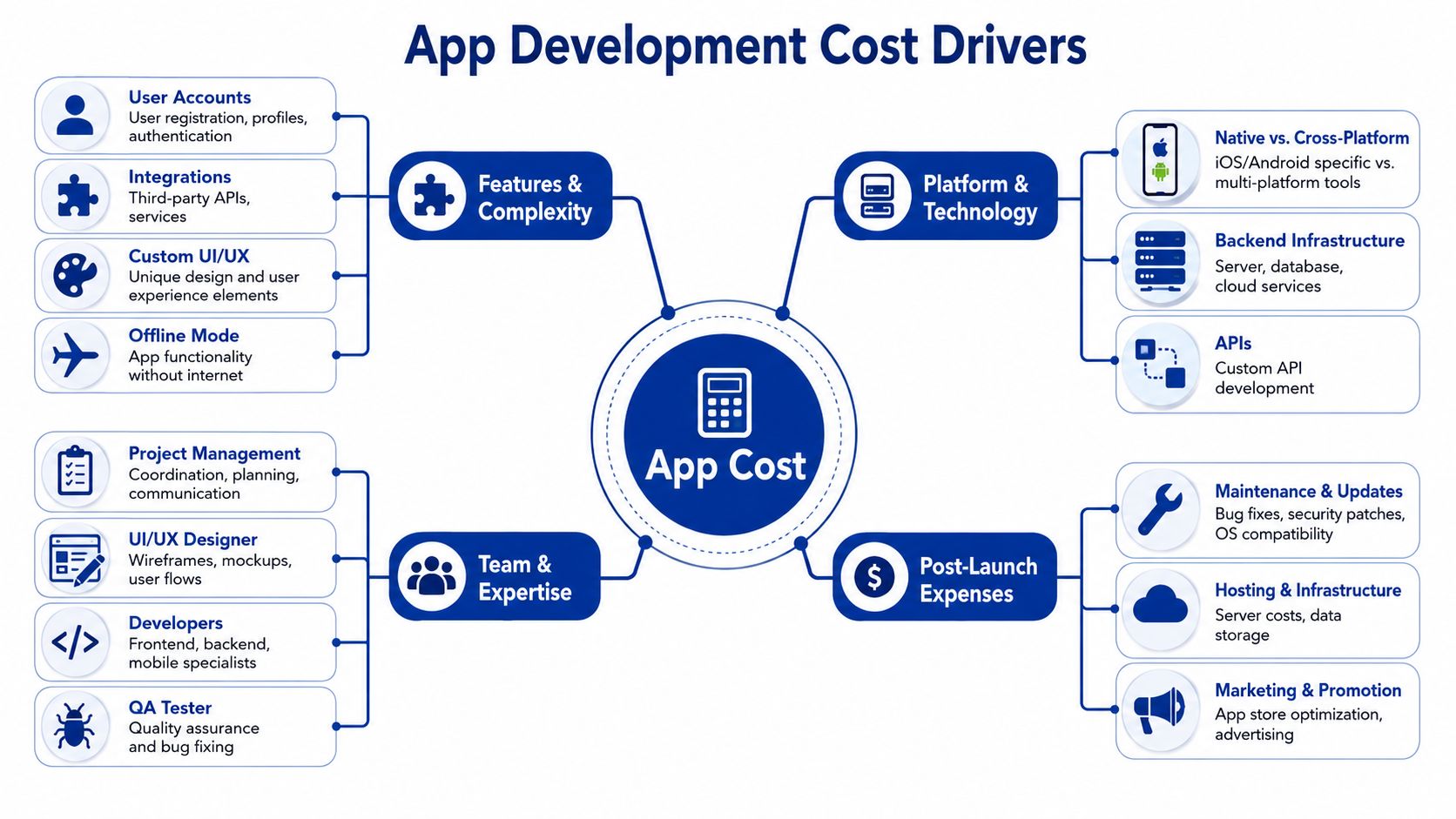
The quickest way to misunderstand a quote is to focus on the feature list and ignore the technical obligations underneath it. “Login”, “dashboard”, and “notifications” sound simple until someone defines security rules, data ownership, approval flows, and edge cases.
Feature scope is rarely the real issue
A basic customer app might only need registration, a profile, content display, and a few transactional actions. That’s manageable. Cost rises when those same features gain business rules.
Examples:
- Authentication with governance: Email login is one thing. SSO through Microsoft, Google, or MiniOrange, combined with role separation and approval states, is another.
- Data-heavy workflows: A simple form is cheap. A multi-step workflow with validation, attachments, offline sync, and retries is not.
- Custom UI behaviour: Standard components are efficient. Highly branded interactions, dynamic dashboards, animations, and bespoke navigation patterns add design and front-end effort.
A lot of overspend happens because teams approve “just one more feature” without recognising that some features multiply complexity rather than add to it.
Architecture and integrations change the economics
Architecture choices often have a larger cost impact than visual design. A lightweight backend on AWS Lambda and Amplify can be efficient for event-driven workflows, bursty traffic, and phased release models. Container-based deployment on ECS or similar patterns may make more sense when workloads are persistent, integration-heavy, or operationally complex.
Neither is automatically cheaper. The right choice depends on usage profile, scaling expectations, and the type of backend work involved.
A few common drivers push costs up fast:
- Integration depth: Connecting to a clean REST API is one level of effort. Integrating with Salesforce, HubSpot, Shopify Plus, or a legacy line-of-business platform is another. Field mapping, retries, auth handling, rate limits, and error recovery all need engineering time.
- Security posture: Apps handling customer data, staff access, payments, or regulated workflows need stronger controls, better logging, and more testing.
- QA coverage: Real-device testing across iOS and Android versions takes time, but skipping it pushes instability into production.
- Operational readiness: Monitoring through Sentry or New Relic, deployment pipelines, rollback procedures, and technical documentation are part of the build if the app needs to survive beyond launch.
Where clients often get into trouble is assuming integrations are plug-and-play. They aren’t. Even a well-documented API can become expensive once you factor in authentication expiry, partial failures, data mismatch, and business rules living outside the app.
For businesses with several systems already in place, custom integration work often determines whether the app becomes a useful operational layer or just another disconnected interface.
A custom app usually fails commercially for one of two reasons. It’s overbuilt for a weak use case, or it’s under-architected for a real one.
Platform Choices and Their Financial Impact
Platform choice is where many budgets go off course early. Teams often start with “we need iPhone and Android apps”, even when the use case doesn’t justify native builds for both platforms.
Native versus cross-platform versus PWA
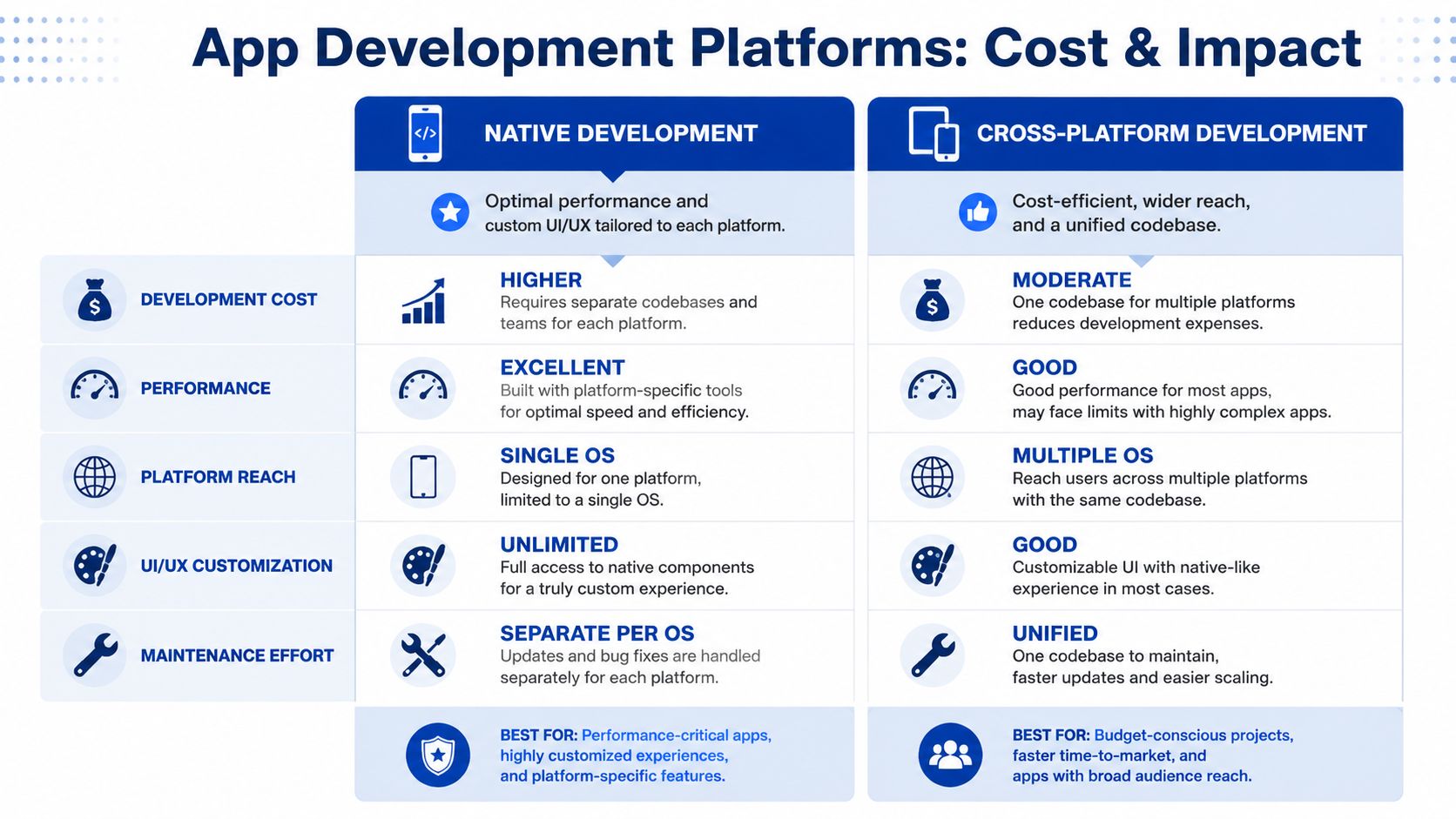
The most important published Australian cost signal here is direct. This Australian app costing analysis notes that building for both iOS and Android adds 40% to 60% more to total cost compared with a single-platform MVP, and that this platform choice is the single biggest price driver.
That matters because each path solves a different business problem.
| Option | Best fit | Commercial upside | Trade-off |
|---|---|---|---|
| Native | High-performance apps, device-specific functionality, premium UX expectations | Strong control over platform behaviour | Separate codebases and higher maintenance burden |
| Cross-platform | Most business apps, shared product logic, faster market entry | Broader reach with one primary codebase | Some edge cases can be harder for very specialised features |
| PWA | Content-led products, lightweight transactions, internal tools with browser access | Lower app-store dependency, fast iteration | More limited device-level capability in some cases |
For many organisations, Flutter or React Native is the practical middle ground. You can keep a shared codebase, ship to both major mobile platforms, and avoid duplicating large portions of front-end work. For the right problem, that’s commercially sensible.
A PWA can be even more efficient if app-store distribution isn’t essential and the workflow suits browser-based delivery. Internal portals, booking flows, member dashboards, and lightweight self-service tools often fit this pattern well.
How to choose without overspending
Use business constraints, not assumptions.
If your app needs deep hardware access, advanced device interactions, or a very polished platform-specific experience, native can be justified. If your goal is broad reach, faster release cycles, and maintainable shared logic, cross-platform usually deserves first consideration. If the “app” is mostly authenticated web functionality, a PWA may be the more disciplined choice.
Questions worth asking before locking the platform:
- Where will users discover it? App stores, direct link, staff portal, or customer login.
- What hardware is required? Camera, Bluetooth, location, offline storage, biometric auth.
- How often will it change? Frequent updates favour simpler deployment paths.
- What internal capability exists? Ongoing support matters as much as first release.
For teams weighing frameworks, a practical Flutter versus React Native comparison helps narrow the decision based on maintainability, integration patterns, and delivery goals rather than framework popularity.
Choose the smallest platform footprint that still meets the real user need. Expanding later is usually cheaper than supporting unnecessary complexity from day one.
Real-World Scenarios Three Worked Cost Examples
Abstract pricing isn’t enough for budgeting. It helps to see how scope decisions stack up in realistic business scenarios.

Published Australian guidance places the broader market range for custom mobile apps at AUD 70,000 to AUD 700,000+, with enterprise-grade and regulated applications sitting toward the higher end, according to Appinventiv’s Australia-focused cost guide. That wide spread makes more sense once you look at representative project shapes.
Scenario one a lean validation MVP
A startup wants to test demand for a niche booking concept. The product only needs customer sign-up, profile creation, service listings, booking requests, basic admin review, and push notifications. No heavy reporting. No complex CRM sync. One mobile platform first.
This is the kind of project where scope discipline matters more than technical ambition. A shared backend, standard design components, and a controlled feature set keep the build focused.
A realistic outcome sits near the lower end of serious custom build budgets. The project is still custom software, but not yet a large systems exercise.
Scenario two a membership platform with integrations
An established organisation needs a customer-facing app for members. Users need secure sign-in, content access, event registration, account management, payments, push notifications, and synchronisation with a CRM. Staff also need confidence that member records, entitlements, and transactions remain consistent across systems.
Many “mid-range” quotes often prove insufficient. Payments are not just a button. CRM sync is not just an API call. Membership rules, entitlement logic, failed transaction handling, and support workflows all need careful implementation.
In practice, this type of project often lands in the middle to upper part of the Australian custom app market because the app is only one layer. The surrounding system behaviour drives cost.
Scenario three an internal operations app
A business wants to replace spreadsheet-driven field workflows with a secure internal app. Staff need role-based access, form capture, attachments, status updates, offline capability, and synchronisation back to internal systems. Management needs auditability and reliability. The solution also needs a proper backend, observability, and maintainable deployment.
This is no longer “just an app”. It’s a workflow platform with mobile delivery. Costs rise because failure has operational consequences. If sync breaks, staff lose time. If permissions break, governance issues appear. If the app isn’t monitored, defects sit unnoticed in production.
That’s why internal enterprise tools often justify stronger engineering discipline than public MVPs.
A good way to sanity-check this kind of planning is to review project case studies that show how architecture, integrations, and release strategy affect delivery outcomes in practice.
Beyond the Build Planning for Maintenance and Infrastructure Costs
The initial build is only part of the investment. If your budget stops at launch, you haven’t funded the app. You’ve funded the first version of the app.
Maintenance is part of the product
Australian guidance is consistent on this point. Itomic’s cost guide states that ongoing maintenance accounts for approximately 10% to 20% of the original development budget annually, and gives a concrete example: an app built for AUD 100,000 typically requires AUD 10,000 to AUD 20,000 per year for updates, bug fixes, security patches, and server upkeep.
That spend isn’t optional padding. It covers work such as:
- OS compatibility updates: Apple and Google change platform requirements. Apps need updates to remain stable and compliant.
- Dependency management: Libraries age, vulnerabilities appear, and old packages create risk.
- Bug resolution: Real users always expose edge cases no test plan catches completely.
- Security hygiene: Patch cycles, access reviews, and environment hardening need ongoing attention.
If the app matters to the business, maintenance belongs in the operating model, not the exception budget.
Cloud costs depend on architectural discipline
Infrastructure costs don’t come from “being on AWS” or “being on Azure”. They come from the way the app is built and run. Serverless patterns can reduce waste for event-driven or variable-load applications. Containerised services can be the better choice when workloads need tighter control or sustained processing. Either can become expensive if environments are oversized, logs are unmanaged, or integrations retry badly.
The same applies to observability and support tooling. Sentry, New Relic, uptime monitoring, backups, CI/CD, and staging environments all add cost, but they also reduce downtime and shorten diagnosis when something breaks.
For businesses planning hosting architecture, it’s worth understanding the trade-offs between AWS Lightsail, EC2, and ECS for application hosting. The wrong hosting model won’t just affect infrastructure spend. It can also distort maintenance overhead, release confidence, and incident response.
How to Get an Accurate Quote and Optimise Your Budget
If you want a quote that’s useful, do some work before asking for one. The quality of the estimate depends heavily on the quality of the inputs.
What to prepare before speaking to a development partner
Provide a brief that answers business questions, not just feature wishes.
- Define the commercial goal: Is this for market validation, customer retention, staff productivity, or legacy replacement?
- State the primary users: Customers, members, field staff, franchisees, internal operations, or partners.
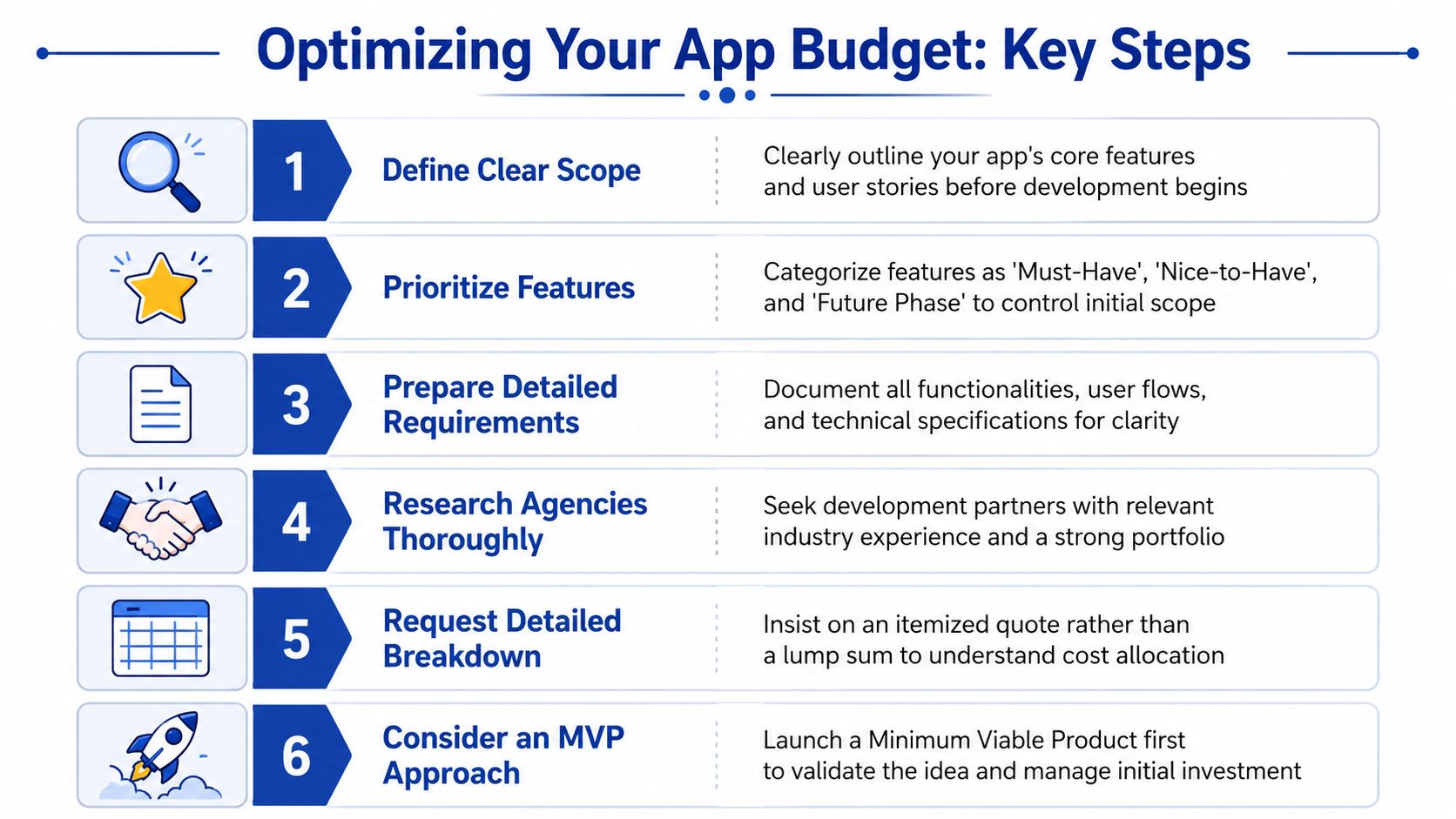
- Separate must-haves from later phases: This is the fastest way to avoid accidental enterprise scope in an MVP.
- List every system involved: Salesforce, HubSpot, Shopify, Xero, internal APIs, SSO providers, data warehouses, or spreadsheets that currently act like databases.
- Identify constraints early: Security expectations, compliance obligations, timeline pressure, or internal approval processes.
Budget optimisation that actually works
Most budget optimisation advice is too generic. The practical version is simpler.
First, phase the release. Don’t build every role, dashboard, workflow, and report into version one.
Second, choose architecture based on the actual workload. A lean AWS serverless design can be a sensible fit for variable usage, API-first backends, and staged rollout plans. A heavier hosting model should be justified, not assumed.
Third, insist on a real discovery phase. That’s where user flows, data movement, integrations, and edge cases are defined before engineering begins. It costs money, but it usually protects much larger amounts from rework later.
A good quote should show how the budget is being consumed. If it doesn’t explain where complexity sits, it won’t help you govern the project.
If you’re budgeting a mobile product, internal platform, or integration-heavy app and want a commercially grounded estimate, Continuum Solutions can help you scope the architecture, clarify the trade-offs, and turn a broad idea into a practical delivery plan.