
A Melbourne NGO discovers that restoring its archive costs more than keeping it in Standard-IA for a year because it chose Glacier Deep Archive without modelling retrieval fees and the 180-day minimum storage duration. The lowest S3 storage rate can produce the highest total bill when the organisation needs data urgently.
That situation is common in Australian AWS environments. A team sees a low archive price, moves compliance records or donor data into a Glacier class, then discovers that recovery involves retrieval volume, restore requests, lifecycle transitions and potentially data transfer charges. The monthly storage line looked efficient, but the architecture wasn't.
Sydney pricing adds another layer. AWS prices S3 according to the bucket's region, and Sydney uses Asia Pacific (Sydney), ap-southeast-2, so a US-region estimate shouldn't be copied into an Australian business case. The AWS S3 pricing documentation also separates storage classes and usage dimensions, including storage duration, requests, retrieval and transfer.
Table of Contents
- Why S3 Bills Surprise Australian Teams
- How S3 Pricing Actually Works Beyond Per-GB Rates
- Comparing S3 Storage Classes and Their Trade-offs
- Concrete Cost Examples for Australian Workloads
- How to Choose the Right Storage Class for Your Data
- Lifecycle Policies and Intelligent-Tiering Strategies
- Data Residency, Egress Costs and Cross-Region Trade-offs
- Practical Next Steps for Reducing S3 Spend
Why S3 Bills Surprise Australian Teams
A mid-market enterprise often starts with a simple question: how many gigabytes will we store? That figure is useful, but it doesn't explain the invoice. The true cost depends on what the application does with those objects after they're uploaded.
Consider a Melbourne NGO retaining program records and media assets. Its technology team chooses Deep Archive because the data is rarely opened. Months later, an audit requires a large restore. The team pays for retrieval and restore activity, waits for the archive workflow, and may also pay to move the recovered data out to the consuming system. The original choice was inexpensive only under the assumption that the data would remain untouched.
The assumptions that fail
The most common mistake isn't choosing a particular class. It's treating every object as if it has the same business value and access pattern.
- Active application data may be read frequently by APIs, staff portals or mobile applications.
- Operational backups may be restored occasionally, but the recovery-time requirement can still be tight.
- Compliance archives may be retained for a long period and almost never accessed.
- Temporary exports may disappear quickly, making minimum-duration charges relevant.
- Media and analytics datasets can shift from cold to active when a campaign, investigation or reporting project begins.
A storage class that works for one group can be financially wrong for another. Standard-IA can suit long-lived data that needs rapid access, while Deep Archive is appropriate only when the organisation accepts slower restoration and the retention period supports its minimum-duration rules.
Practical rule: Never approve an S3 class from the storage rate alone. Approve it from a workload model that includes access, recovery and retention.
For migration teams, the storage decision should sit inside the broader AWS migration cost model for Australia. That model should distinguish storage from requests, retrieval, lifecycle transitions and transfer. Once those dimensions are visible, the apparent cost shock usually becomes a design problem that can be corrected before production.
How S3 Pricing Actually Works Beyond Per-GB Rates
S3 pricing has several moving parts, and they interact. Storage capacity is the most visible dimension, but it isn't the complete monthly charge.
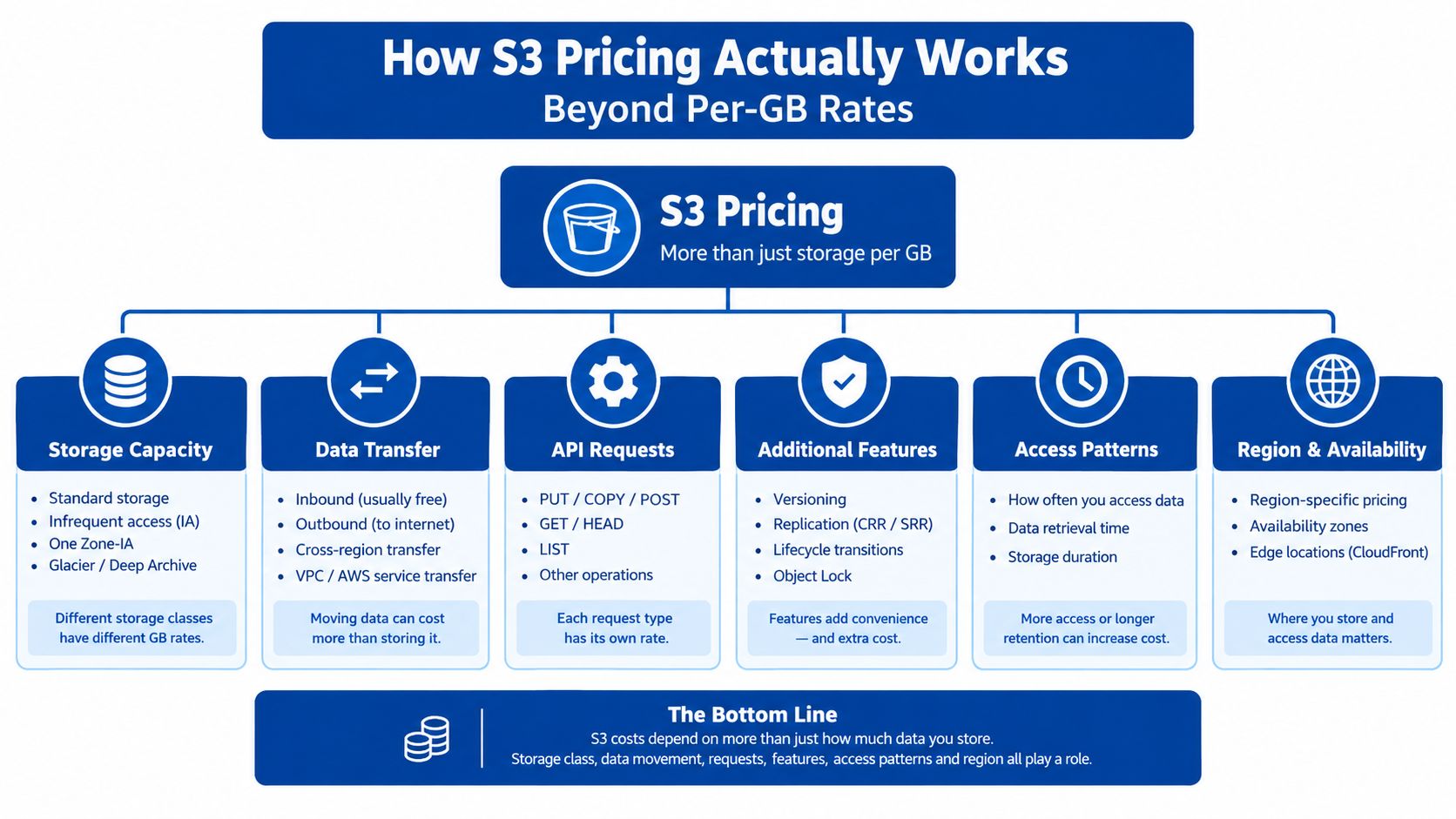
The six dimensions in a real cost model
Storage volume is the amount of data held in the selected class, measured across the billing period. AWS says the calculation depends on object size, storage duration during the month and the selected class, including Standard, Intelligent-Tiering, Standard-IA, One Zone-IA and the Glacier classes. Sydney rates must be taken from the regional pricing table, not from a US calculator.
Requests include API activity such as GET, PUT and LIST operations. AWS states that request pricing applies based on the number and type of requests, regardless of object size and regardless of whether calls come from the console, command line or SDK. A bucket containing many small objects can therefore create a different request profile from a bucket containing fewer large objects, even where stored capacity is similar. The AWS S3 FAQ explains why request frequency belongs in a migration or modernisation estimate.
Retrieval and restore charges apply when data is accessed from classes that price retrieval separately. Standard-IA has a per-gigabyte retrieval charge, while Glacier classes can add retrieval volume and restore request costs. A recovery test should model the amount restored, not just whether a restore might happen.
Lifecycle transitions can create request charges as objects move between classes. A rule applied across a large object population may create considerable transition activity, particularly when policies are broad or move data through several classes.
Minimum storage duration is a contractual pricing floor. Standard-IA and One Zone-IA use a 30-day minimum. Glacier Instant Retrieval and Glacier Flexible Retrieval use 90 days, while Deep Archive uses 180 days. Early deletion, overwrite, expiry or transition can trigger a prorated charge for the remaining period, as described in AWS's S3 pricing details on minimum storage duration.
Data transfer matters when recovered or stored data leaves AWS, including delivery to an external application or internet user. A Sydney bucket doesn't make egress free. Keep storage, retrieval and transfer as separate lines in the estimate so a recovery event can be priced.
Comparing S3 Storage Classes and Their Trade-offs
The right class depends on how data behaves, not on which row has the smallest storage figure. AWS currently presents seven relevant S3 storage classes for this decision, each trading storage cost against availability, access constraints, resilience or recovery behaviour.
S3 Standard is the sensible starting point for hot application assets, active datasets, frequently used reports and API-backed content. It avoids the retrieval model attached to IA and Glacier classes, but its storage rate can be inefficient for data that remains untouched for long periods.
S3 Intelligent-Tiering suits unknown or changing access patterns. AWS describes a per-object monitoring and automation charge, but also states that the class has no retrieval charges and no additional tiering charges when objects move between its access tiers. That makes it useful for analytics, shared datasets and content that can suddenly become important.
S3 Standard-IA offers lower storage pricing for long-lived, infrequently accessed data that still needs rapid access. The trade-off is a retrieval charge and a 30-day minimum. It works well when access is occasional and the organisation can tolerate the cost of retrieving a known volume.
S3 One Zone-IA stores data in one Availability Zone, reducing redundancy as well as storage cost. It can suit reproducible secondary copies, processed datasets and backups whose primary source can be recreated. It isn't a good default for the only copy of irreplaceable records.
S3 Glacier Instant Retrieval targets archive data that needs millisecond access. It carries a 90-day minimum and retrieval charges, so it belongs to records that are cold but still expected to be available quickly.
S3 Glacier Flexible Retrieval supports archive workloads where restoration can take longer. Its lower storage rate is useful for backups and long-retention material, but retrieval volume, restore requests and the 90-day minimum must be included.
S3 Glacier Deep Archive is for the longest retention periods and the least frequent access. Its 180-day minimum and recovery constraints make it unsuitable for data that an operational team might need immediately.
| Storage Class | Best For | Min Duration | Retrieval Fee | Availability |
|---|---|---|---|---|
| S3 Standard | Frequently accessed applications and datasets | None stated here | No separate retrieval charge described | Multi-Availability Zone design |
| S3 Intelligent-Tiering | Unknown or changing access patterns | No minimum stated here | No retrieval charge | Automatic access tiers |
| S3 Standard-IA | Long-lived, infrequently accessed data needing rapid access | 30 days | Yes | Multi-Availability Zone |
| S3 One Zone-IA | Reproducible secondary copies and non-critical datasets | 30 days | Yes | Single Availability Zone |
| S3 Glacier Instant Retrieval | Cold archives needing rapid access | 90 days | Yes | Archive durability with instant access |
| S3 Glacier Flexible Retrieval | Backups and archives with slower recovery needs | 90 days | Yes | Archive storage with restore workflow |
| S3 Glacier Deep Archive | Long-term, rarely accessed retention | 180 days | Yes | Longest-retention archive model |
The AWS explanation of S3 storage-class price reductions illustrates the Sydney trade-off. In the cited change, Standard-IA and One Zone-IA prices in Sydney fell by up to 27%, with a published example of USD 0.0138 per GB-month for the affected class. That reduction matters only when the workload matches the class's resilience and retrieval model.
Concrete Cost Examples for Australian Workloads
A Melbourne startup can lose money by choosing an archive class for an active application. User requests and API reads are unpredictable, so Standard or Intelligent-Tiering usually fits better. The lower storage rate of an archive class may be outweighed by retrieval charges, restore delays and the operational work required when content becomes active.
For a mid-market enterprise retaining compliance records, the cost model changes. Records kept for long periods, retrieved rarely and restored through an asynchronous process may suit Glacier Flexible Retrieval or Deep Archive. Finance should model lifecycle transition requests, expected retrieval volume, restore requests and minimum-duration charges before approving the design. A low monthly storage figure is only one part of the bill.
An NGO should split authoritative records from reproducible exports and inactive media. The authoritative copy may justify multi-Availability Zone storage with rapid access. A processing output that can be regenerated may fit One Zone-IA. A genuine long-term archive may fit Deep Archive if the recovery plan accepts its restore constraints.
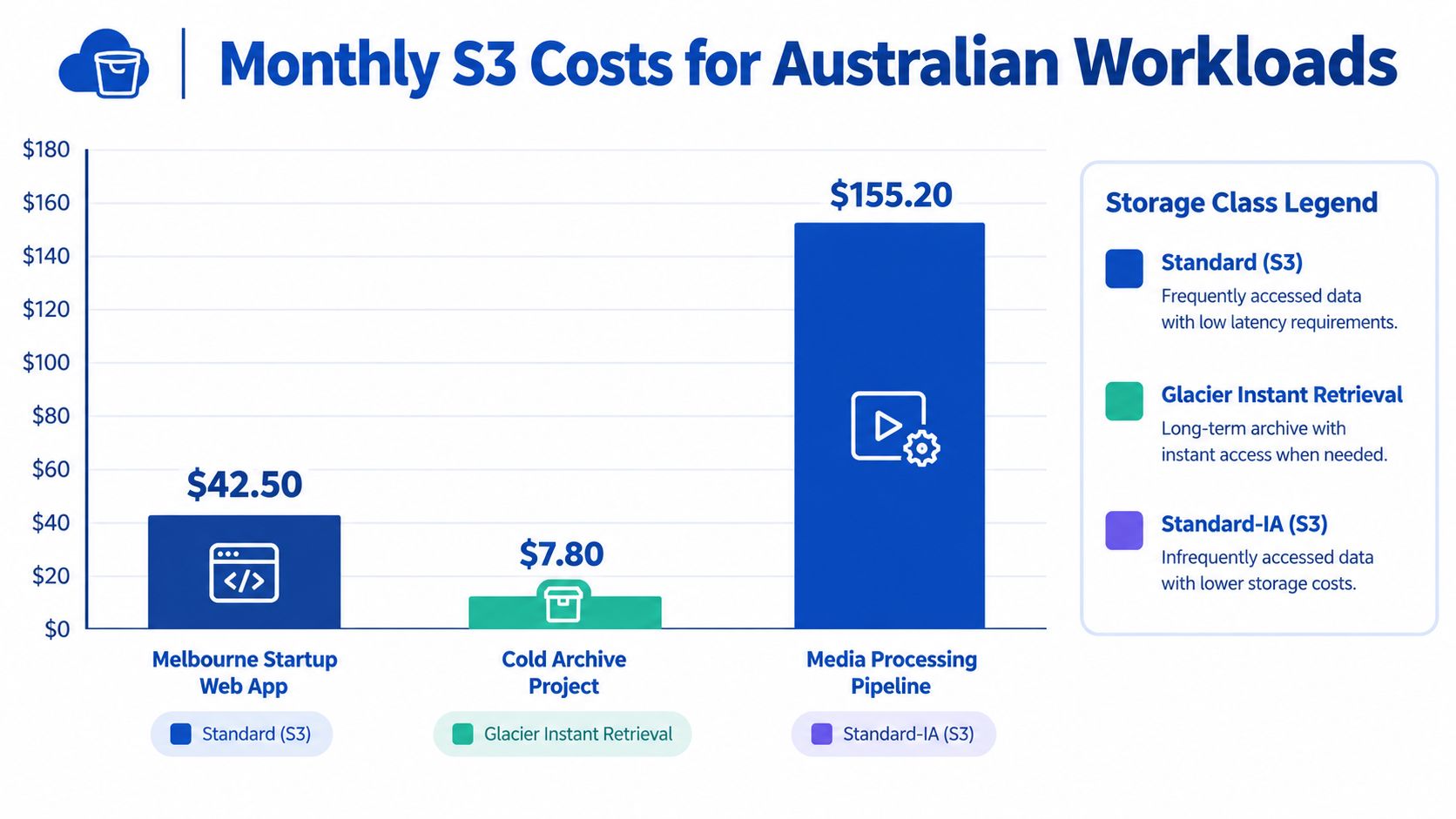
The historical Sydney comparison reinforces the need for region-specific modelling. In 2012, S3 Standard storage in Sydney was listed at US$0.140 per GB-month, compared with US$0.125 per GB-month in the US Standard and Ireland regions. The difference was 12% relative to US$0.125, or approximately US$15 per month for a 1 TB-month workload, before requests, retrieval and transfer. This is not a current quote, but it demonstrates why Australian estimates should use a Sydney-specific rate rather than a generic regional assumption.
The practical outcomes differ by workload:
- The active startup pays for availability and frequent access. Standard can cost less overall than an archive class once retrieval and operational delay are included.
- The compliance archive can lower recurring storage costs with a Glacier class, but an emergency restore adds retrieval and restore charges.
- The mixed NGO dataset can reduce waste by assigning classes to objects according to criticality instead of applying one class to the entire bucket.
Intelligent-Tiering can suit unpredictable access because AWS states that it avoids retrieval charges and additional tiering charges between access tiers. Include its per-object monitoring charge in the estimate, especially when the bucket contains a very large object count.
For an application or AWS hosting for a membership platform, budget for stored gigabytes, GET and PUT requests, expected retrieval gigabytes, lifecycle transitions, retention duration and the Sydney-region rate. Use the chart to compare scenarios, then validate the design against the workload's Cost and Usage Report.
How to Choose the Right Storage Class for Your Data
I use three questions before selecting a class. They force the discussion away from storage capacity and towards the business consequence of access.
Start with access and recovery
How often will the data be accessed? Daily or unpredictable access usually points to Standard or Intelligent-Tiering. Occasional access can support Standard-IA. Rare access supports a Glacier option only when the team understands retrieval behaviour.
How quickly must the data return? A regulatory reporting table needed during a live operational process isn't the same as a historical archive. Millisecond access may justify Standard-IA or Glacier Instant Retrieval. A long-running restore process may be acceptable for Deep Archive, but only if the business process is designed around it.
What happens if one Availability Zone fails? A reproducible backup or processed dataset can tolerate a different resilience choice from the sole copy of an irreplaceable record. One Zone-IA is a deliberate trade-off, not merely a cheaper version of Standard-IA.
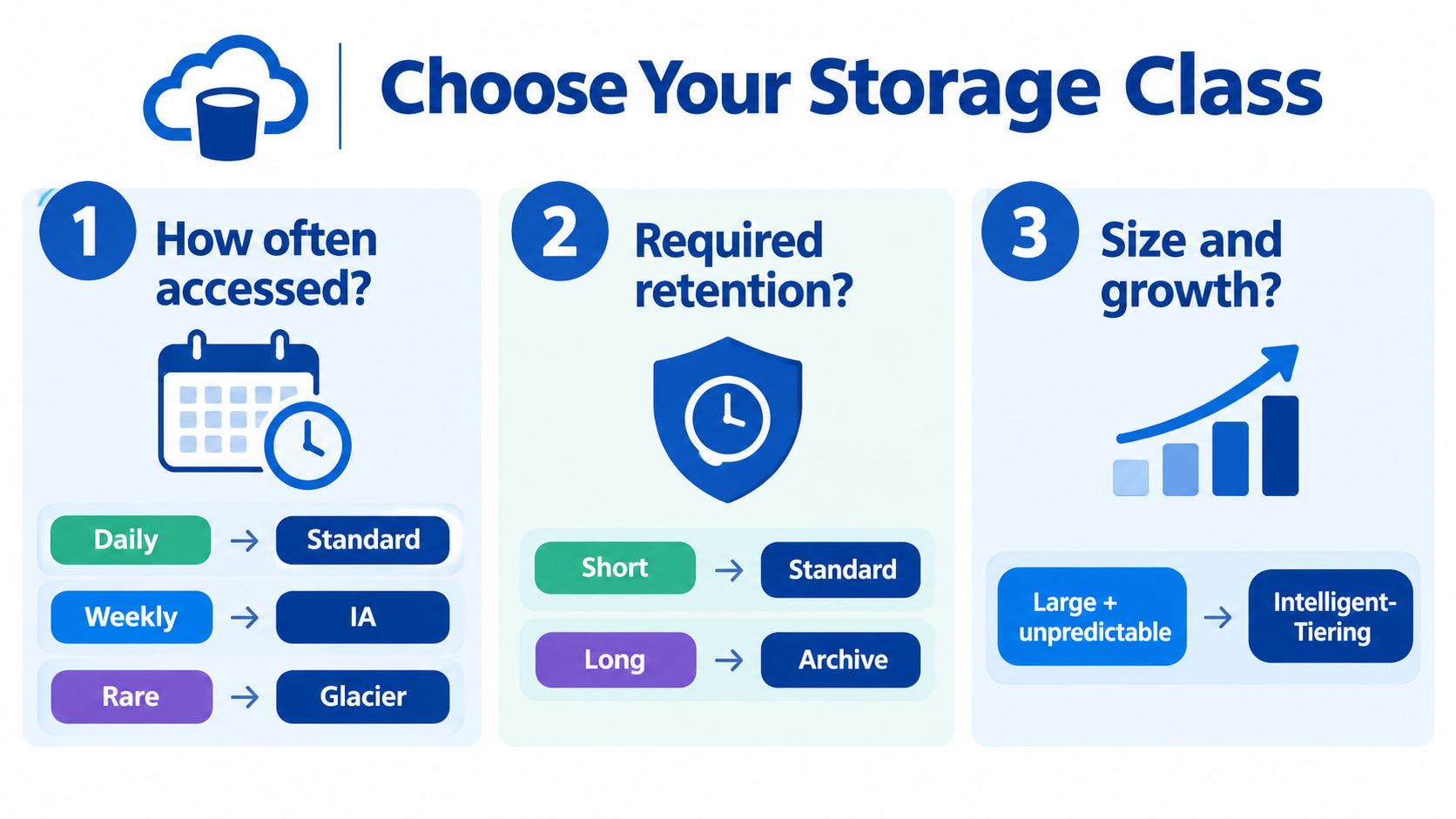
Make the decision repeatable
Tag objects by business criticality, expected access frequency and retention period. Add an owner or data domain where several teams share a bucket. These tags let lifecycle policies target compliance records differently from temporary exports, instead of relying on broad prefixes that drift as the application changes.
A practical mapping looks like this:
- Active assets: S3 Standard for predictable high access, or Intelligent-Tiering where usage changes.
- Warm operational data: Standard-IA when rapid access remains important and retrieval volume is limited.
- Reproducible copies: One Zone-IA when the source can be recreated after a Zone failure.
- Cold retention: Glacier classes when retention is long and restoration is infrequent.
- Uncertain datasets: Intelligent-Tiering while access logs establish the pattern.
The final selection should be recorded with the expected retrieval event, retention rule and failure scenario. That decision record prevents a future migration from treating a temporary staging object and a legally retained record as equivalent.
Lifecycle Policies and Intelligent-Tiering Strategies
A lifecycle policy saves money only when its timing matches the workload. It can transition objects after a defined age, expire them when approved retention ends, and apply different treatment to current data and records. The rule must reflect access frequency, retention requirements and likely retrieval events, because a cheaper destination can cost more if objects move too soon or return frequently.
Intelligent-Tiering handles uncertainty differently. AWS says it automatically optimises storage costs for unknown or changing access patterns. It charges for per-object monitoring, while objects moving between access tiers incur no retrieval or additional tiering fees. That combination suits data lakes, shared project files, user-generated content and mixed-use datasets where a calendar-based transition would rely on guesswork.
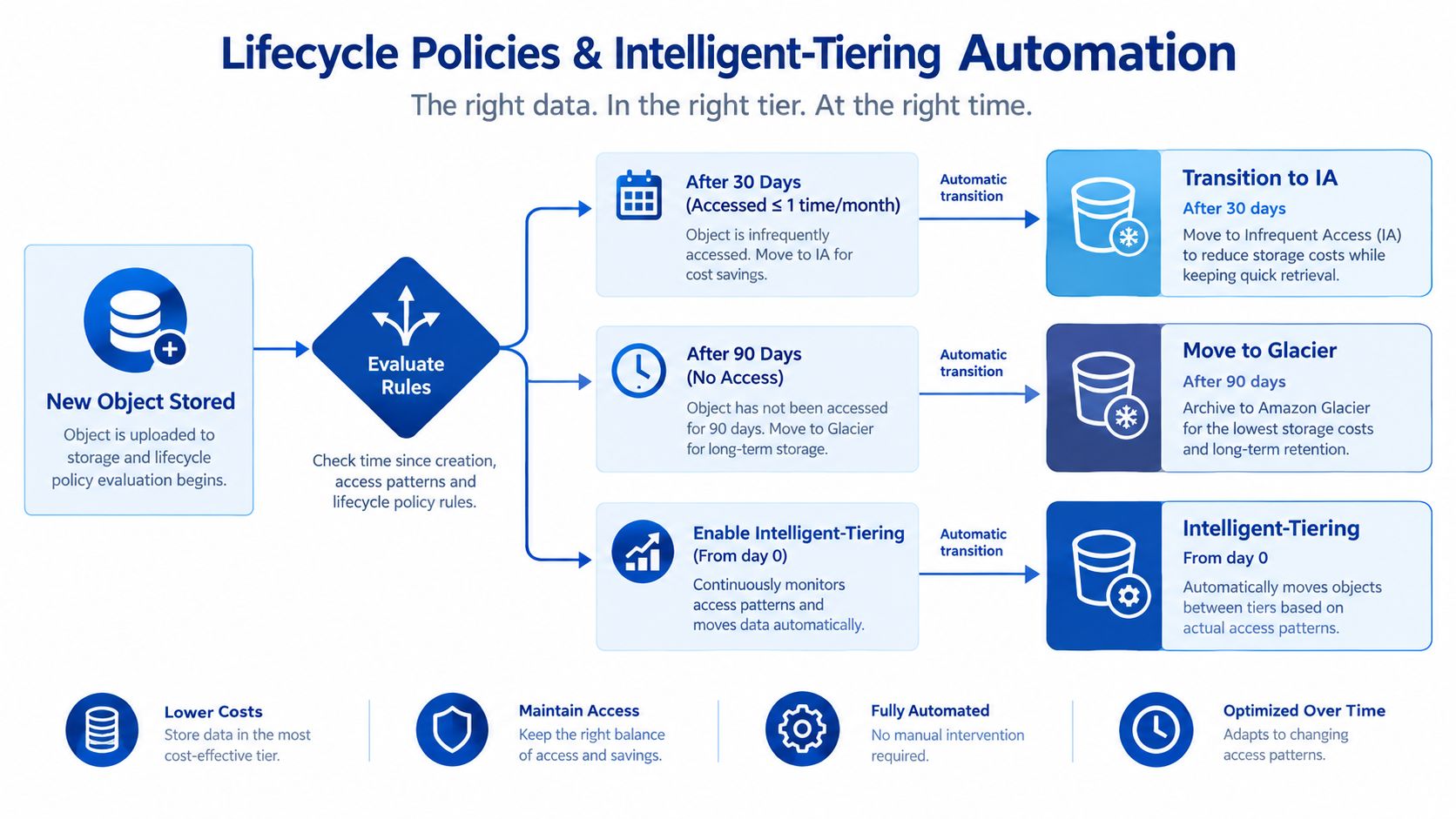
Where implementations go wrong
Sending every object to Deep Archive can create a recovery problem. If data is deleted, overwritten or transitioned again before 180 days, the minimum-duration charge can reduce or erase the expected saving. The same calculation applies when short-lived staging data enters an IA class with a 30-day minimum. Model the full object lifecycle, not just the lower storage rate.
Tagging failures create another cost and governance risk. A new prefix can bypass a rule, while an overly broad rule can capture records with different retention obligations. Versioned buckets require explicit handling of noncurrent versions, or older data may remain stored after the current object changes.
Roll out changes in controlled stages:
- Audit access patterns using AWS billing data, application logs and recovery records.
- Define tags for criticality, access frequency, retention and ownership.
- Pilot the rule on a non-critical prefix or bucket.
- Measure transition and retrieval activity after deployment.
- Expand gradually and review exceptions with application owners.
Include lifecycle design in a cloud migration services assessment. Deploy rules through infrastructure as code where practical, then review them when the application, retention policy or recovery objective changes.
Intelligent-Tiering is not automatically the lowest-cost option. Predictable archive data may suit a precise lifecycle policy, while changing access patterns can justify monitoring fees. Choose the approach that minimises total storage, transition, retrieval and operational costs.
Data Residency, Egress Costs and Cross-Region Trade-offs
A Sydney bucket may satisfy residency requirements while still producing an expensive recovery or delivery bill. Location supports latency, contractual obligations and internal policy, but it does not remove retrieval, replication or egress charges. AWS, Azure and Google Cloud can all charge for data leaving their Australian regions, so confirm current provider pricing tables before approving a business case.
Model the complete path, not just the bucket location. Start by deciding whether the data type requires Australian residency. Personal, financial, health and contract-bound records may have different obligations from reproducible build outputs. Then test the recovery-time objective. A local Sydney copy may provide convenient access, while a replica in another region can offer a different disaster-recovery option.
Cross-border movement also needs an owner. Replication, backups, restores and analytics exports may each create a separate governance and cost concern. An architecture that depends on transferring large volumes during a provider change or application migration also carries exit risk, with operational friction arriving alongside the transfer bill.
Cross-region replication adds a second copy to store, classify, protect, monitor and eventually delete. That cost can be justified for irreplaceable data with a demanding recovery objective. It may be unnecessary for a reproducible secondary dataset that can be generated again. The right choice depends on the consequence of losing the primary copy, not on the lower price of one storage class.
Run a recovery exercise against both locations. Price a restore from Sydney, a restore from the secondary region, the volume delivered to the application and any internet delivery required afterwards. Include retrieval charges where the retained data sits in an infrequent-access or archive class. This exposes the total cost that a per-gigabyte storage comparison misses.
A review of common AWS mistakes for SMEs should examine this recovery scenario rather than judging residency from the bucket region alone. Keep the design aligned with retention obligations, recovery needs and the data that users or systems need to move.
Practical Next Steps for Reducing S3 Spend
Start with an inventory, not a storage-class change. List buckets, owners, regions, storage classes, versioning status, lifecycle coverage, access patterns and the business retention requirement. Separate active application data, backups, temporary exports, media, analytics outputs and regulated records.
Then build a Sydney-specific model with six lines:
- Storage: Calculate the volume in each proposed class.
- Requests: Estimate GET, PUT, LIST and other API activity.
- Retrieval: Model the expected gigabytes restored from IA or Glacier.
- Transitions: Include lifecycle movement between classes.
- Minimum duration: Check 30-day, 90-day and 180-day rules against retention.
- Transfer: Price recovery, replication and delivery outside the region.
Choose classes by access and consequence. Use Standard for hot data, Intelligent-Tiering for uncertain patterns, Standard-IA for infrequent rapid access, One Zone-IA for reproducible secondary copies and Glacier classes for cold retention. Tag objects before writing lifecycle rules, then test a narrow scope before applying expiration or archive transitions broadly.
Review the result after real access data becomes available. A policy that matched a migration workload may become wrong when the application adds a reporting feature, users upload more media or compliance retention changes. For organisations that need structured support, cloud computing consulting from Continuum Solutions can include an AWS architecture review, storage-cost model, migration recommendations and implementation planning.
Decision checkpoint: If your team can't describe the expected restore event, retention period and failure consequence for a dataset, it isn't ready for an archive class.
A practical next move is to select one high-cost bucket, export its usage and billing data, classify its objects, and compare Standard, Standard-IA, Intelligent-Tiering and the relevant Glacier option using the same recovery scenario. That exercise usually reveals whether the problem is the storage class, lifecycle coverage, object access pattern or transfer design.
Continuum Solutions can review your Sydney-region S3 architecture, model storage and recovery costs, and implement lifecycle or Intelligent-Tiering controls around your application and compliance requirements. Visit Continuum Solutions to discuss a practical AWS cost review or migration plan for your enterprise, NGO or startup.