
You can usually spot the problem before anyone calls it a problem. Jobs are being managed in Simpro, invoices are issued from Xero or MYOB, customer records live in a CRM, and one person keeps stitching the whole thing together by re-keying the same data into three systems every week. That's not an integration strategy, it's a fragile workaround that gets more expensive every time the business adds another job type, another branch, or another approval step.
Simpro matters here because it's already the operational system of record for a lot of trade businesses. Simpro is an Australian-born field service management platform supporting more than 8,500 service, project and maintenance businesses, with around 150,000 users across Australia, New Zealand, the United States and the United Kingdom (Simpro marketplace overview). When a platform sits that far into the field workflow, integration stops being a nice-to-have and becomes a design decision about who owns what data, where the truth lives, and how much manual reconciliation the business is willing to tolerate.
This guide is a practical playbook, not a compatibility checklist. The key questions are which system should own each record, whether data should move one way or both ways, how tax and payment reconciliation should work, and when a packaged connector is enough versus when a custom build is the safer long-term option. If you're trying to reduce double entry without creating a new mess in finance or operations, start with the architecture, not the logo on the connector.
Table of Contents
- Why Simpro Integration Matters for Trade Businesses
- What Simpro Integration Actually Means
- Choosing Between Connectors and Custom Integration
- Common Integration Use Cases and Example Flows
- Technical Requirements for a Reliable Simpro Integration
- Implementation Checklist and Realistic Timelines
- Costs Risks and When to Engage a Specialist
Why Simpro Integration Matters for Trade Businesses
A service manager closes a job in Simpro, the office copies the invoice into Xero or MYOB, and the salesperson updates the CRM with the same customer and site details. By Friday, three systems contain slightly different versions of the same work. A missing purchase order, changed contact name, or duplicated invoice can then delay payment and create another manual check.
That is why simpro integration deserves more than a compatibility checklist. Simpro often sits close to the operational workflow, while accounting controls tax treatment, payments, and financial reporting. The integration design must decide which system owns each record, which fields may be edited elsewhere, and whether updates travel one way or in both directions. Those choices matter more than the connector's logo.
Simpro supports accounting packages used by trade businesses in Australia and New Zealand, including Xero, MYOB AccountRight Plus, MYOB AccountRight Premier, MYOB Business Pro, MYOB Business Lite, Reckon Accounts Premier and Enterprise, and Intuit QuickBooks Desktop Premier and Enterprise in Australia (Simpro supported accounting software). Compatibility establishes that a connection is possible. It does not decide how tax codes map, how failed records are retried, or which system wins when two users change the same customer.
The operational problem behind the integration request
The visible request is usually “stop entering the invoice twice.” The harder problem is ownership. If Simpro, the accounting platform, and a CRM can all create or edit customers, invoices, or payments, conflicting updates become normal unless the rules are explicit.
Practical rule: integration projects fail more often from unclear ownership than from missing code.
A packaged connector can suit a standard workflow with supported entities and predictable tax handling. It usually costs less to deploy, but the business may have limited control over field mapping, exception handling, sync timing, and API limits. A custom build takes longer to specify and maintain, yet it can protect unusual approval flows, branch structures, or reconciliation rules that a connector cannot represent cleanly.
Before choosing either route, document the workflow and assign a source of truth to every important field. A systems review, such as Continuum Solutions' business IT consulting services, can help an owner or IT manager make that decision at business level. The goal is fewer duplicate entries without moving the reconciliation burden from operations into finance.
What Simpro Integration Actually Means
At the working level, integration means keeping the same business entities aligned across systems without manual re-entry. In a Simpro environment, that usually includes customers, sites, jobs, quotes, projects, invoices, payments, schedules, assets, and catalogues. If those records drift apart, the office starts reconciling screens instead of reconciling work.
Two questions decide most of the design
The first question is source of truth. Which system owns the customer name, which system owns the invoice status, and which system owns the payment record? The second is sync direction. Does data move from Simpro into accounting, from accounting back into Simpro, or both?
Picture two ledgers that must agree. If the ledgers can differ without anyone noticing, the business doesn't have an integration problem, it has a reconciliation problem. That's why entity mapping matters so much, because the core work is matching a Simpro customer to a Xero contact, or a Simpro job to an invoice, without letting duplicates creep in.
One-way, two-way, and event-driven sync
A one-way sync is simpler and safer when one system clearly owns the data. That's why contractor compliance data is often pushed into Simpro in one direction. A two-way sync is useful when both teams need updates, but it also creates more conflict points, especially when users edit the same record in both places. An event-driven pattern is often the cleanest option for operational workflows, because the integration reacts to meaningful changes instead of repeatedly polling for state.
Simpro's REST API exposes core operational entities such as companies, employees, customers, sites, jobs, quotes, projects, invoices, payments, schedules, assets and catalogues, which makes this sort of event-driven design practical for adjacent systems (API coverage overview). If you need a platform-level implementation rather than a simple point connection, Continuum Solutions' custom integrations is the kind of capability set that fits this problem.
If the integration can't explain what happens when records conflict, it isn't finished.
Choosing Between Connectors and Custom Integration
There are four realistic paths here, and each one solves a different kind of problem. Simpro's built-in accounting links are the fastest option when the goal is standard finance sync. Marketplace connectors help when a common app already has a tested integration pattern. Automation platforms give speed and reach. Custom API workflows give control.
Recent Australian field-service guidance also shows how broad the ecosystem has become, with Zapier-style access to 3,000+ apps and a clear pattern of agencies building custom APIs when no connector exists (AU integration guidance). That breadth is useful, but it doesn't remove the need to think about ownership, retries, auditability, and failure recovery.
Simpro Integration Options Compared
| Integration option | Best for | Setup effort | Governance and control |
|---|---|---|---|
| Built-in accounting links | Straightforward invoicing and payment sync | Low | Good for basic finance flows, limited outside accounting |
| Marketplace connectors | Common app pairings with existing templates | Medium | Depends on the connector, often variable on error handling |
| Automation platforms | Fast experiments and lighter workflows | Low to medium | Usually weaker for audit trails, retry logic, and exception management |
| Custom API workflows | Complex entity mapping, multi-system ownership, compliance, and reliability needs | Higher | Strongest control over sync direction, monitoring, and recovery |
What breaks first in each option
Built-in links usually cover accounting well, but they don't solve CRM ownership, service desk handoffs, or custom approval logic. Automation platforms are quick to stand up, but they can become messy once you need clear audit trails or deterministic error recovery. Custom builds cost more upfront, yet they're the only path that lets you decide exactly how conflicts, retries, and reconciliation work.
That's why the honest question isn't which option is cheapest. It's which option the business can still rely on after the workflow changes, the job volume grows, and someone asks for a clean audit trail. If you're weighing that trade-off, the financial side of a bespoke build is often easier to justify once you compare it with the cost of ongoing manual correction. A useful reference point is Continuum Solutions' custom app cost guide.
Common Integration Use Cases and Example Flows
A trade business can lose control of its records even when every application is technically connected. The safer starting point is one defined workflow, with an agreed source of truth, sync direction, and reconciliation process. Australian trade teams commonly begin with finance sync, CRM continuity, or compliance automation. Each has a different owner and a different failure mode.
Accounting sync with Xero or MYOB
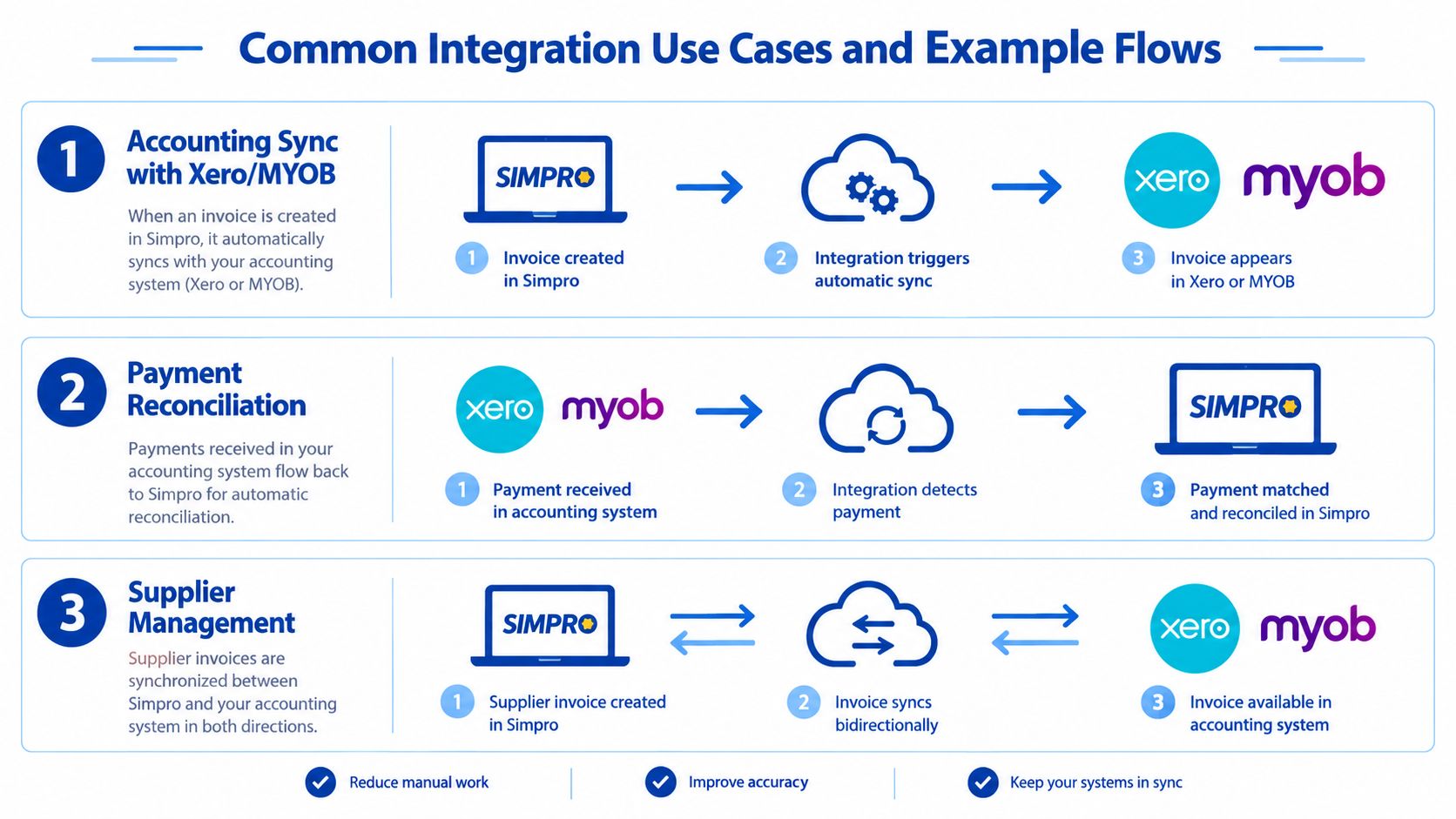
Finance is a common first workflow. Invoices, payments, supplier invoices, and timesheets must align between Simpro and the accounting system, including GST and tax-code treatment. If Simpro creates the invoice, the integration generally sends it downstream and returns payment status to Simpro. The office can then see whether an account is settled without relying on manual updates.
Tax-code mismatches and duplicate customers create the most avoidable trouble. A customer entered separately in both systems may have different names, addresses, or account identifiers. A failed invoice can then require manual correction before month-end reporting is reliable. Define which system owns each record, enforce a matching key, and produce a reconciliation report rather than treating the connection as an unrestricted data pass-through.
CRM integration for follow-up and sales continuity
A Sydney locksmith example linked Simpro with a CRM so job and project information could be synchronised, quote and job follow-up campaigns could run, and duplicate entry could be reduced (Tonic Technologies case study). The pattern is practical when the CRM owns sales activity while Simpro owns operational delivery. Only the fields needed by each team should cross the boundary.
Customer matching remains the difficult part. If a contact is created in both systems without a reliable match key, sales staff may call the wrong branch or see only part of the job history. Decide whether new customers originate in the CRM or Simpro, then send updates in one controlled direction unless there is a clear reason to support two-way changes.
Compliance automation into Simpro
Compliance information often belongs to a dedicated compliance platform, while Simpro needs the current status for dispatch and operations. A one-way flow can send approved contractor details, expiry states, or missing-document indicators into Simpro. Operations can then filter work by compliance status without asking staff to compare records manually.
This workflow should stay write-controlled. If staff edit the same status in Simpro, the integration needs a defined rule for whether that change is rejected, overwritten, or returned for review. Keeping the compliance platform as the owner avoids conflicting updates and makes exceptions easier to investigate.
For payment capture or billing coordination beyond standard accounting sync, Continuum Solutions' Stripe integration capability provides a relevant pattern for controlled payment workflows.
Technical Requirements for a Reliable Simpro Integration
A trade business can have a connector that authenticates successfully and still produce unreliable financial data. The design decisions that matter are which system owns each field, which direction records sync, how tax codes are translated, and how failures are reconciled.
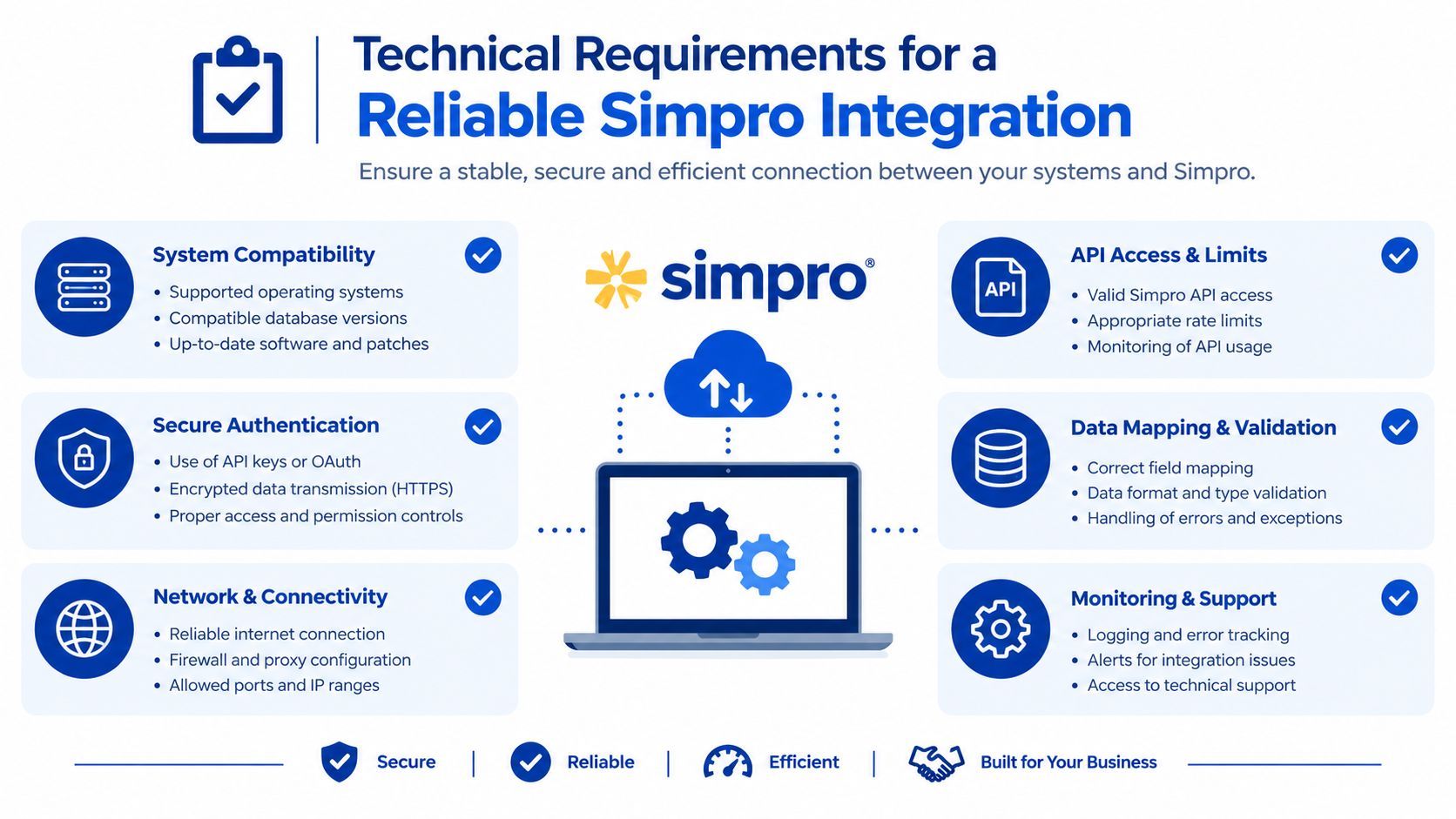
Simpro API access depends on the account plan and tenant configuration, so confirm availability before selecting an integration approach. Authentication uses OAuth 2.0 against the tenant domain. A long-running connection therefore needs secure refresh-token handling, credential rotation, and a clear process for revoked access (Simpro API integration guide).
Rate limits and migration planning
The API rate limit is 200 requests per minute per API user, according to the available AU-focused guidance (API rate limit guidance). Bulk imports, historical invoice migrations, and frequent updates across several entities must use queues, throttling, and controlled batch sizes. A pilot may not expose the problem, while production volumes can make it visible quickly.
Build retries, idempotency, and structured logging before the first live sync. If a tax code is rejected, the integration should retain the source record, attempted mapping, error response, and retry state. Someone should be able to correct the mapping and replay the transaction without creating a duplicate invoice.
Accounting compatibility needs to be checked early
Confirm the accounting edition before choosing a connector or commissioning a custom build. Simpro Premium supports Reckon Accounts Premier and Enterprise and Intuit QuickBooks Desktop Premier and Enterprise, while Reckon One, Reckon Accounts Hosted, Reckon Accounts Accounting, and Reckon Accounts Plus are not supported according to Simpro's supported accounting software list.
An unsupported accounting edition can force a different integration design after work has already begun.
Define ownership for customers, invoices, payments, and tax codes before mapping fields. If Simpro owns job status but accounting owns posted invoices, the integration should enforce that boundary rather than allowing two-way edits. Reconciliation must compare totals, statuses, and identifiers, not merely confirm that an API request succeeded.
Monitoring should show failed jobs, token expiry, rejected tax mappings, and payment mismatches. Structured logs and exception dashboards provide the operational record needed after go-live. Continuum Solutions' application monitoring and debugging capability illustrates the type of monitoring layer that keeps integrations supportable.
Implementation Checklist and Realistic Timelines
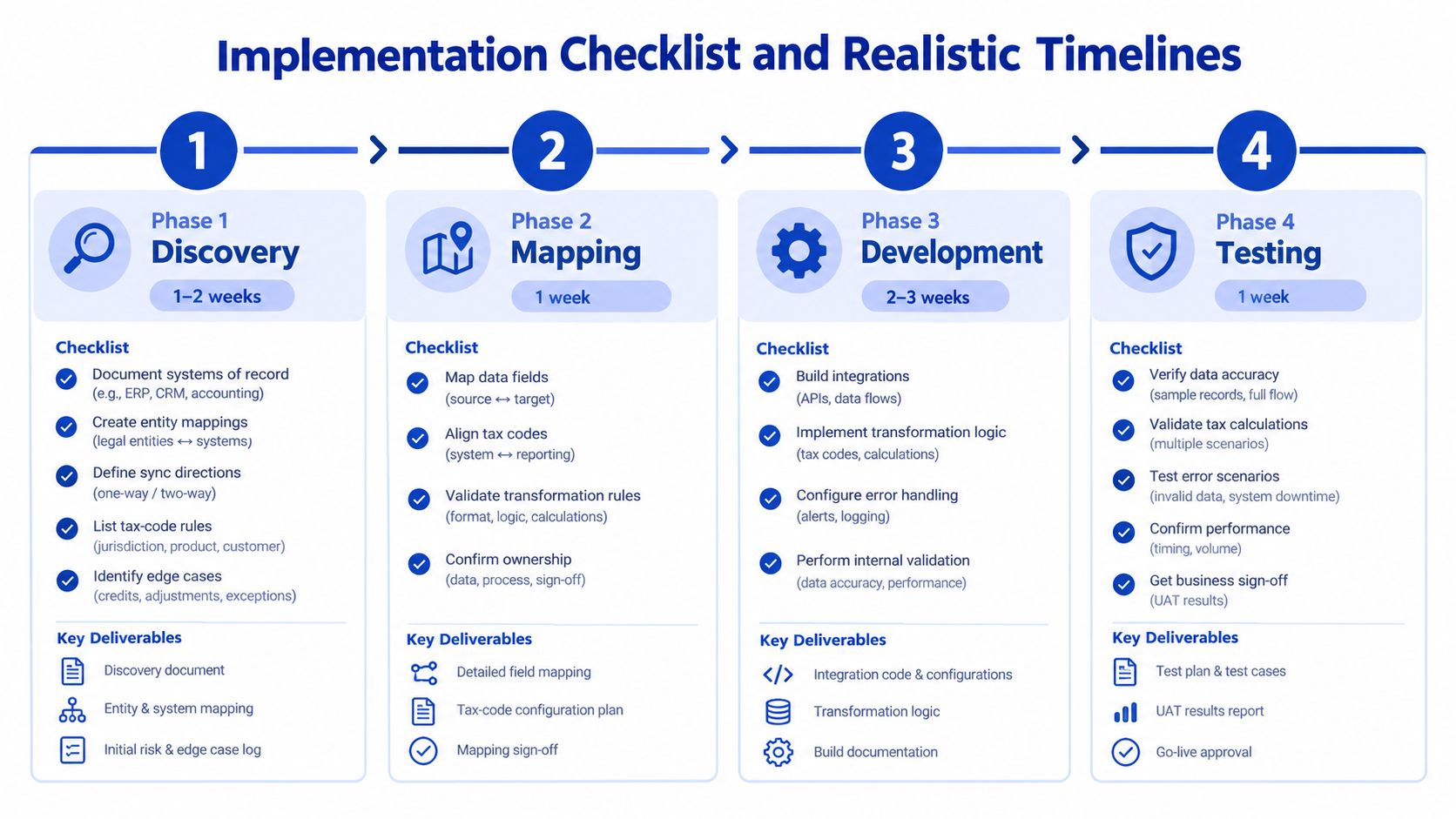
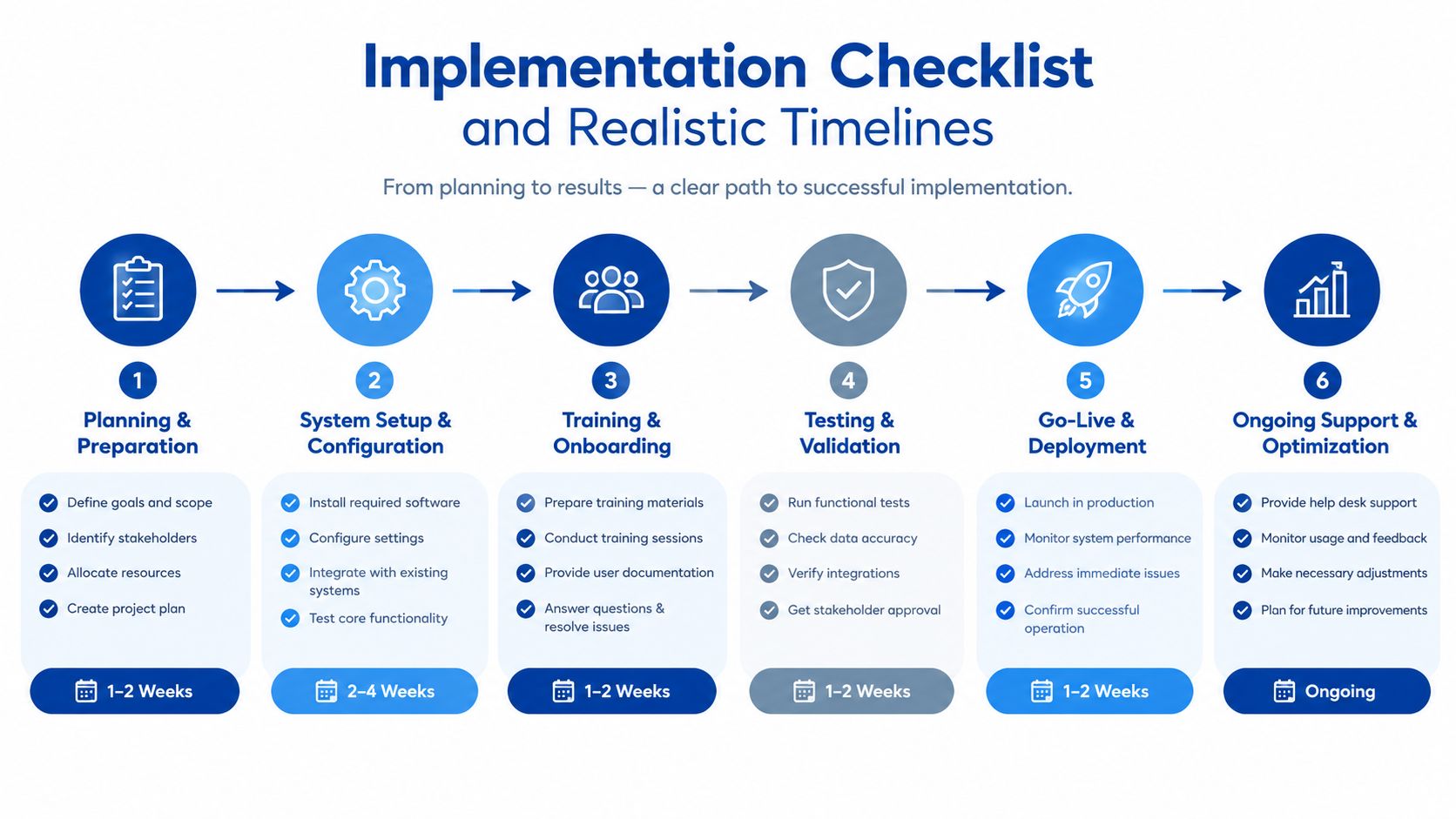
A good Simpro project does not start with code. It starts with a clean answer to four questions, who owns each system, which entity moves where, what happens on conflict, and how the business will know when the sync is wrong. Once those are clear, the delivery plan becomes much more predictable.
Discovery and mapping
Discovery should document systems of record, entity mappings, sync directions, tax-code rules, and edge cases like credits and part-payments. That decision shapes whether the project gets easier or harder later. If two systems both claim ownership of the same customer or invoice fields, that conflict needs to be resolved now, not during testing.
A simple pre-build checklist helps:
- Systems of record: confirm which platform owns customers, invoices, payments, timesheets, and supplier data.
- Sync direction: define what moves from Simpro to accounting, and what moves back.
- Tax handling: agree how GST and tax codes should be mapped.
- Exceptions: document credits, part-payments, partial invoices, and record edits.
- Matching keys: decide how records will be identified across systems.
Build, pilot, and cutover
Build should focus on authentication, sync logic, error handling, and logging. Pilot should use a controlled subset of jobs or invoices, then reconcile those records against known-good figures before scope widens. Cutover should happen only after the team has a runbook, a monitoring path, and a named person watching exceptions.
The projects that stretch most often are the ones with unclear ownership, messy historical data, or long approval loops. That's another reason phased releases beat big-bang launches. A small, controlled rollout surfaces data issues while the blast radius is still manageable.
For a practical go-live check, the business should be able to answer these questions before release:
- Can the team trace every synced record back to its source?
- Are failed jobs visible to the right owner?
- Have invoice totals, tax codes, and payments been reconciled in the pilot?
- Does the runbook explain who fixes what when the sync fails?
A measured rollout is easier to support, easier to audit, and easier to change later.
Costs Risks and When to Engage a Specialist
The cost of simpro integration is usually driven by two things, the connector path you choose and the amount of cleanup the business needs before anything can sync cleanly. A packaged connector can keep the upfront cost lower, but it can also leave you with weak ownership rules, limited error recovery, and little visibility when something drifts.
The main risks are easy to name and expensive to ignore. Reconciliation drift happens when two systems both think they own the same record. Silent sync failures happen when nobody is monitoring the exceptions. Tax-code mismatches create GST headaches. Unsupported accounting editions can derail a project after planning has already started.
A packaged connector is often enough for a small team with simple accounting sync and limited governance needs. Once the business needs auditability, reliability, multi-system coordination, or clear control over data ownership, a specialist-built integration usually holds up better over time. That's especially true when the workflow touches finance, compliance, and operational records at the same time.
The most practical next step is straightforward. Audit your systems of record, draft your entity map, and get a scoped integration plan before you commit to a connector or a custom build. If you want a team that designs and delivers cloud and systems integrations with that level of discipline, visit Continuum Solutions and start a conversation about your Simpro workflow, your accounting stack, and the data ownership model that fits your business.