
Your crew’s jobs are in Tradify, invoices are in Xero, and the office has just changed a customer’s billing details. Someone’s checking whether that change reached the other system while your bookkeeper queries a payment that still looks outstanding. You don’t need another dashboard. You need to know which record is right, what synchronises, and who fixes it when something doesn’t.
That’s the practical starting point for a Tradify integration project in 2026. I’d separate supported accounting connectivity from everything else before approving a build, then put Australian tax treatment and reconciliation ahead of convenience.
Table of Contents
- The Tradify Integration Problem Most Guides Miss
- What Tradify Can and Cannot Integrate With
- Pre-Integration Planning for Australian Trade Businesses
- Setting Up the Xero and Tradify Integration
- Alternative Integration Paths When the API Is Not Available
- Testing, Monitoring and Reconciliation Procedures
- Recommended Architecture and Next Steps for Tradify Integration
The Tradify Integration Problem Most Guides Miss
Consider an electrical contractor handling service calls alongside larger installation jobs. The office prepares invoices in Tradify, the bookkeeper manages the ledger in Xero, and the operations manager wants job updates flowing into a customer portal. This is an illustrative scenario, not a documented client result.
The accounting connection and the customer portal are different projects. Connecting Xero doesn’t establish that an external application can detect a changed job, retrieve its details, or update a customer-facing status.

Accounting connectivity isn’t an automation platform
Tradify’s Australian Xero integration guidance confirms availability in Australia and two-way synchronisation of customer information, invoices, bills, payments, suppliers and account settings. It describes customer edits flowing to Xero, transferred invoices receiving a successful-transfer status, and payments recorded in Xero flowing back to Tradify.
That’s useful commercial connectivity. But it doesn’t establish access to every operational record or guarantee that another application can respond immediately to changes.
For the contractor, the unanswered questions sit outside accounting:
- Customer portal updates: Can an approved job-status change reach the portal without someone exporting a report?
- Sales handover: Can a quote update an existing CRM opportunity without creating another customer?
- Operational reporting: Can managers distinguish completed work from invoiced work using dependable identifiers?
I’d reject a proposal that answers these questions with nothing more than “Tradify connects to Xero”. Each workflow needs its own access check, data mapping and failure process.
Define the outcome before choosing a connector
A useful integration brief describes the business event and its consequence. For example, an approved invoice should reach the ledger, retain its identity, and show a recoverable exception if transfer fails. A customer-address change should have a nominated origin and an explicit rule for resolving conflicting edits.
Practical rule: Buy a supported business outcome, not a promise that two applications can “talk to each other”.
The built-in sync has an advantage: it addresses a defined accounting workflow. Its disadvantage is scope. I’d use it for that purpose, then evaluate wider automation separately rather than stretching it into an architecture it hasn’t been shown to support.
What Tradify Can and Cannot Integrate With
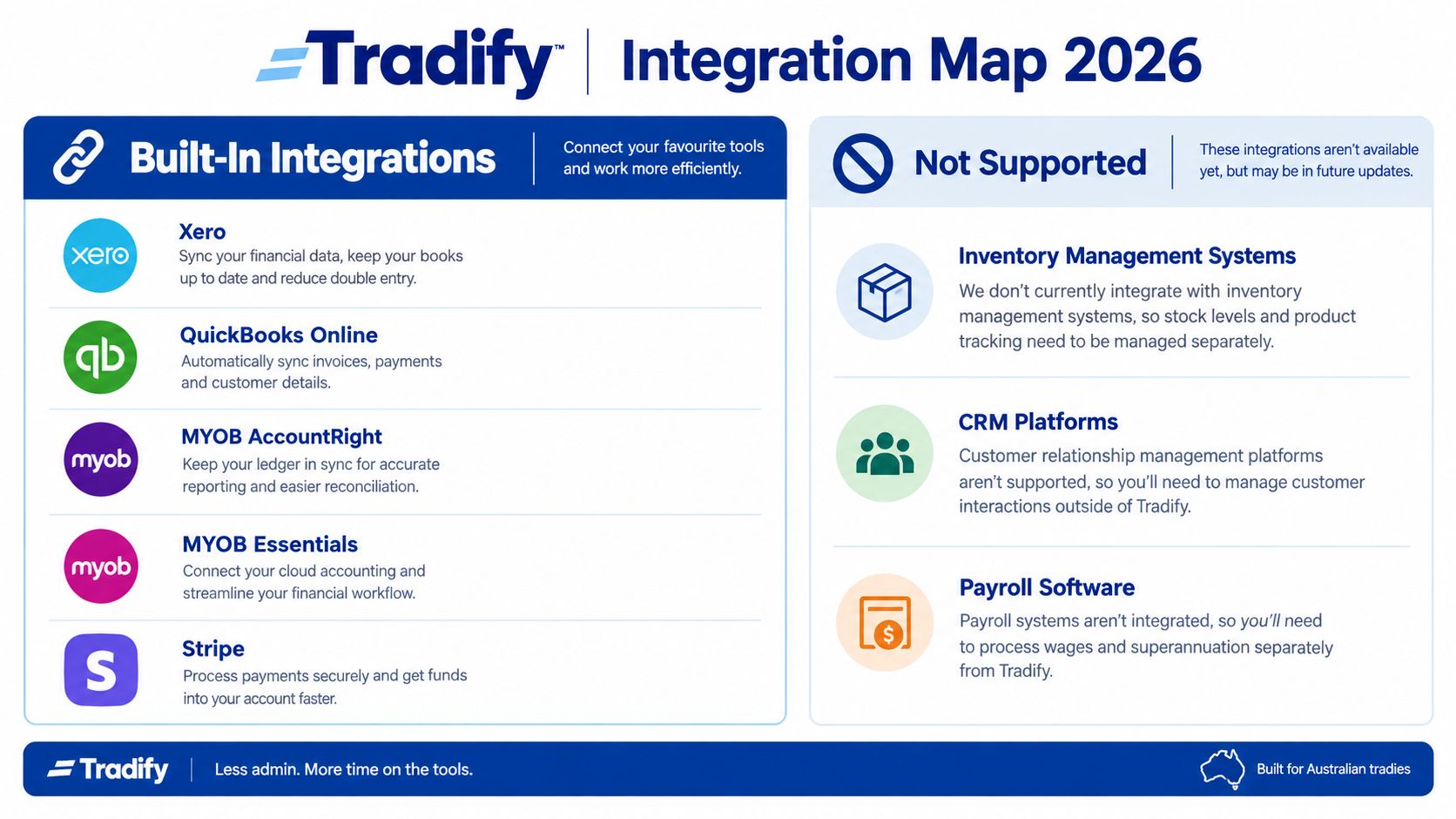
A Tradify connection can move accounting records without giving another system access to every job, quote or timesheet. Keep those capabilities separate when defining scope. The Tradify software assessment identifies built-in accounting connections for Xero, QuickBooks Online, MYOB AccountRight and MYOB Essentials, while distinguishing them from an open automation platform. Confirm which connection your account supports before committing to a design.
Accounting sync is not full-system access
Independent Australian guidance on Tradify automation reports that a generally available public API or developer portal is not available, and deeper access depends on case-by-case approval. It also notes there are no self-service API keys or published webhook facilities. Treat custom, event-driven synchronisation as unconfirmed until Tradify approves the access and demonstrates the required operations.
Assess each record by what the connection can do:
- Financial records: Check whether the selected accounting connector transfers customers, suppliers, invoices, bills and payments, and confirm how it handles account codes and GST tax rates. A successful sync still needs reconciliation against the ledger.
- Operational records: Verify whether jobs, quotes, timesheets and materials can be read or updated through an approved interface. A usable report may support manual handling, but it is not an automated event feed.
- Destination-specific data: Identify what Salesforce, HubSpot, payroll, warehouse, membership or BI systems require. Do not assume an accounting connection supplies those records.
The map’s unsupported categories indicate gaps in dependable native connectivity. They do not prove that every transfer is impossible. They do mean a report-based workaround should be scoped as a separate process, with an owner for exceptions and a check against source records.
Treat payments as their own workflow
Stripe payment processing does not, by itself, provide warehouse automation or payroll integration. For a proposed Stripe integration, specify how each payment matches an invoice, which reference is authoritative, and who investigates an unmatched amount. Preserve the invoice balance and reconcile fees and deposits using the accounting treatment approved for the business.
A payment connector also does not establish custom access to job records, and an accounting sync does not prove timesheet-to-payroll support. Require the supplier to demonstrate whether your approved setup can read, create or update each required object. If they cannot show the operation against your account, exclude it from the committed scope.
Pre-Integration Planning for Australian Trade Businesses
Before anyone configures production access, I’d get operations and finance to agree on record ownership. My recommendation is to keep Tradify responsible for field operations and the accounting platform responsible for the general ledger, BAS and payroll processes.
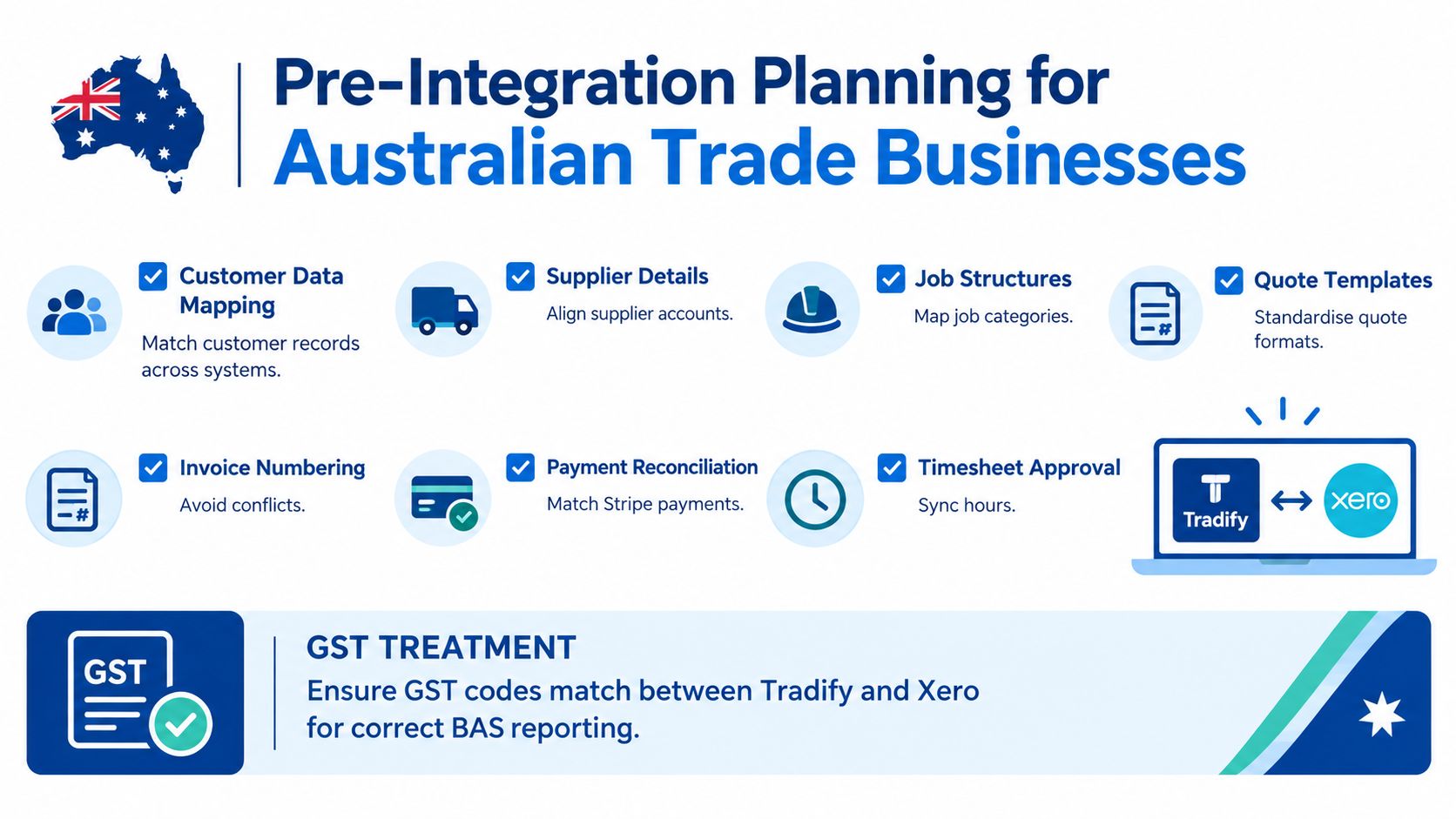
Australian guidance on Tradify access and accounting boundaries highlights the procedural gaps around GST, partial payments, deposits, progress claims and historical records. Treat those as design decisions requiring accountant approval, not details to tidy up after launch.
Prepare a field-mapping matrix
The matrix should record the originating system, destination field, matching key, permitted edits and exception owner. Include customers, suppliers, jobs, quotes, invoices, payments, timesheets and materials, even when the conclusion is that an object won’t be transferred.
| Record | Decision to settle before implementation |
|---|---|
| Customers and suppliers | Matching identifiers, duplicate handling and billing details |
| Jobs and quotes | Job references, categories, approval state and required destination fields |
| Invoices and payments | Numbering, allocation, amendments and cancellation handling |
| Timesheets and materials | Approval rules, units, costing fields and available extraction method |
For a builder issuing progress claims, I’d test the relationship between the job, each claim and its payment allocation. For a maintenance contractor, I’d focus on repeat customers with different site and billing addresses. These are different mapping problems, even if both businesses use the same software.
Get Australian finance rules signed off
Have your accountant approve inclusive versus exclusive GST, tax-code mapping, rounding, deposits, credit notes and backdated changes. Decide how an amended invoice is handled after it has reached the ledger, rather than allowing staff to edit both copies independently.
Historical migration needs an explicit boundary too. Decide whether completed jobs stay in Tradify, enter a reporting archive, or move into another operational system; don’t recreate financial history merely to populate a dashboard.
A synchronised invoice isn’t an approved accounting treatment. Finance still needs to sign off how the transaction is classified.
For security and delivery planning, specify:
- Authentication: Use the supported authorisation method and identify who can grant or revoke access.
- Secret storage: Keep approved credentials in a managed secrets store, not spreadsheets or application logs.
- Service expectations: Define acceptable data age, support ownership and escalation arrangements.
- Cutover controls: Preserve a baseline extract and document how you’ll suspend processing without losing the pending work.
This is the substantive work behind a business IT consulting assessment. It should produce decisions the implementer can build against, not just a diagram of connected applications.
Setting Up the Xero and Tradify Integration
A Tradify invoice can reach Xero and still be posted to the wrong account. Set up the supported connection first, then verify the organisation, account codes and resulting transactions before using it for live work. The built-in sync moves supported records; it does not decide your accounting treatment or replace reconciliation.
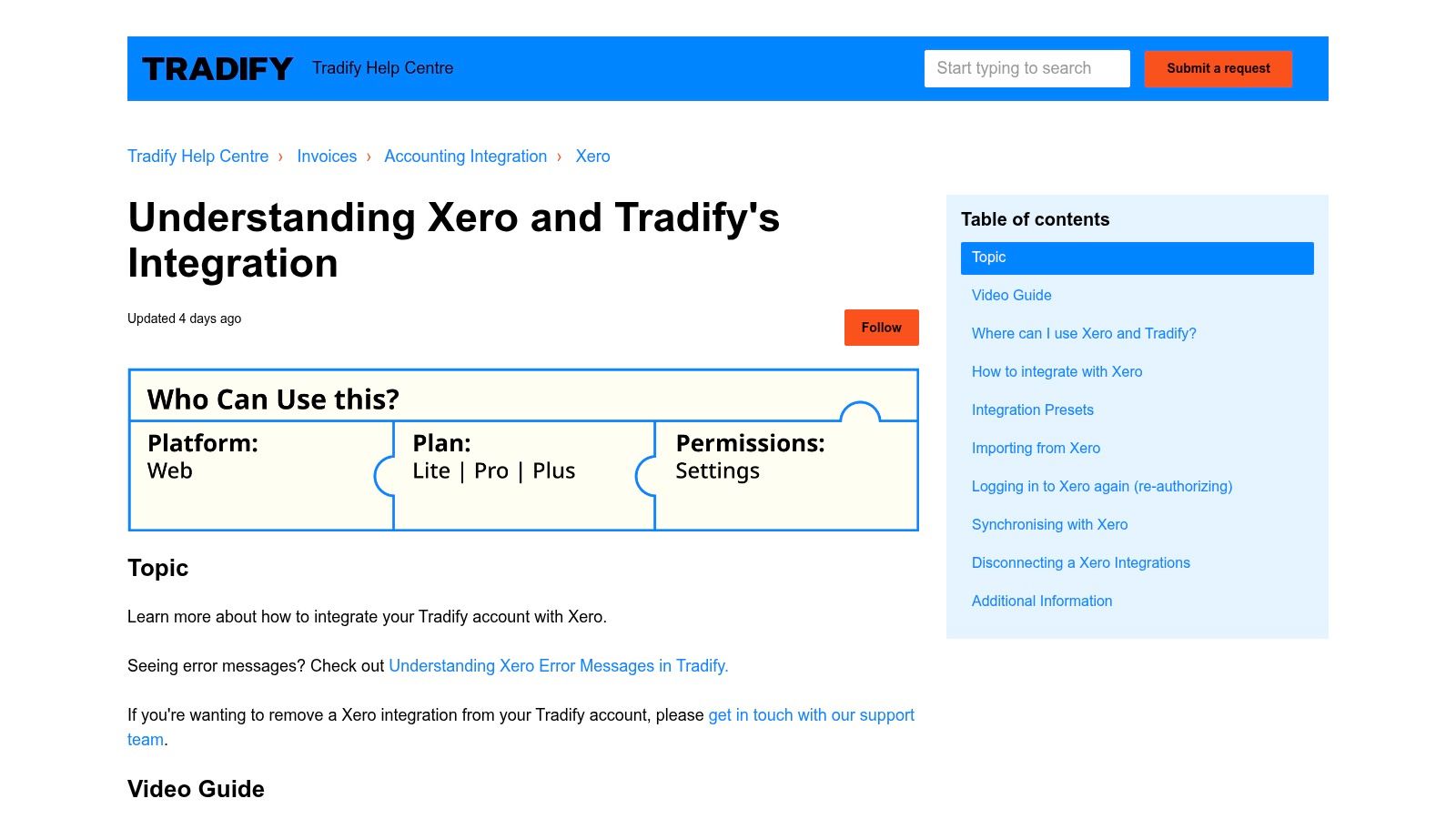
Tradify’s official Xero setup documentation lists support in Australia, New Zealand, the United Kingdom, the United States, Canada, Ireland and South Africa. It says use outside these territories is not guaranteed. Confirm the country configuration for your business before connecting.
Connect the correct Xero organisation
In Tradify, open Settings > Integrations > Xero. Sign in with the appropriate Xero credentials, check the organisation name, then select Allow Access. Complete the account mappings before sending production transactions.
Have the finance owner confirm the organisation and record the approved setup. An administrator’s open browser session is not proof that the right ledger is connected.
Check account codes and GST treatment
The documented mappings cover sales of labour, sales of materials, the bank account and purchases. Ask finance to confirm the Xero account code and GST treatment for each transaction type. For Australian businesses, check that the selected tax rate matches the approved GST treatment; a successful sync does not confirm that GST has been classified correctly.
| Mapping | Finance check |
|---|---|
| Sales of labour | Confirm the labour revenue account and approved GST treatment. |
| Sales of materials | Confirm the materials revenue account, keeping it separate where your accounting policy requires. |
| Bank account | Confirm the account used by the connected payment workflow. |
| Purchases | Confirm the purchasing or expense account and its tax treatment. |
Choose accounts by accounting purpose, not by a similar-looking name. Tradify can send mapped transactions, but it cannot determine whether your account codes or GST choices suit your business.
Run a controlled pilot
Use a Xero demo organisation only if the connection supports it. Otherwise, agree on a controlled pilot with finance. Send representative labour and materials invoices, a customer-detail change, a supplier bill and a payment. Then inspect the records in Xero, including account codes and GST, rather than relying on a success message.
Keep test records separate from ordinary invoicing until finance approves the results. Assign someone to identify and correct errors, and make sure staff know which transactions are tests. Treat the connection as a transaction feed, not a substitute for checking that Tradify and Xero agree.
Alternative Integration Paths When the API Is Not Available
A report-based integration can be a sound commercial choice. I’d prefer an explicit delay with traceable processing over a supposedly live connector that relies on unsupported access.
GetApp’s Australian Tradify directory lists four integrations: MYOB Business, QuickBooks Online, Stripe and Xero. That directory supports a narrow picture of native connectivity; it doesn’t establish a general-purpose connection to your CRM, warehouse or internal application.
Comparing Tradify Integration Paths for Australian Businesses
The risk levels below are my architectural assessment, not vendor ratings. Supported objects and latency must be verified during discovery.
| Path | Supported Objects | Latency | Risk Level |
|---|---|---|---|
| Native accounting connector | Connector-supported financial records | Verify actual behaviour | Lower within documented scope |
| Zapier-style workaround | Whatever the verified underlying access exposes | Depends on polling or file arrival | High if access is undocumented |
| Low-code middleware | Approved interface or exported fields | Depends on source availability | Moderate with supported inputs |
| Scheduled report or CSV pipeline | Fields included in available reports | Scheduled batches | Moderate with reconciliation controls |
| Account-specific API access | Only vendor-approved objects and operations | Subject to approved capabilities | High delivery uncertainty until confirmed |
Choose by business consequence, not connector convenience
For a CRM dashboard showing recent invoicing activity, a scheduled export may be adequate. For a customer portal promising immediate job updates, it may not be. I’d ask the owner what happens when information is late before choosing the mechanism.
Zapier-style workarounds need evidence of the actual trigger or data source. If a demonstration merely watches an exported file, describe it as file-triggered automation, not a live Tradify event.
Low-code middleware can organise validation and destination updates, but it doesn’t remove the source-access limitation. Require separate proof of extraction, transformation and loading, with retained execution logs and an explicit retry process.
For scheduled files, I’d recommend a canonical schema, meaning one agreed format for incoming records, plus stable reconciliation keys. An idempotent load should recognise a previously processed record so that reprocessing the file doesn’t create another invoice or customer.
Define the default direction as export from Tradify to the destination. Don’t promise write-back unless a supported import or approved interface has been demonstrated.
Commercial judgement: A controlled batch process is preferable to an undocumented connector when the business can tolerate delayed data.
Budget for operation as well as construction
Compare discovery, data cleanup, connector subscriptions, cloud execution, storage, monitoring and support. Native connectivity can reduce custom development, while a file pipeline requires ownership of extraction and schema changes; neither removes the need for finance controls.
Data volume affects the amount of validation and exception handling required. Start with a representative extract and measure the processing workload before agreeing to the production design.
A custom integration assessment should also establish when to request account-specific API access. If live two-way operation is mandatory, obtain written confirmation of capabilities before committing to a fixed implementation scope.
Testing, Monitoring and Reconciliation Procedures
A green transfer status does not prove that an integration is safe to release. Check that the right records arrived, financial values match, and a failed record can be recovered without creating a duplicate. Use the Tradify API integration guidance to define retry and partial-failure behaviour before the pilot begins.
For the pilot, require 100% record-count reconciliation and zero duplicate invoice IDs. These are acceptance criteria, not a promise of future performance. Verify values as well as counts: two systems can contain the same number of records while disagreeing on GST, payments or account coding.
Test the exceptions that affect the ledger
Run tests in a sandbox where available. Otherwise, use a limited pilot with finance oversight. Include incomplete and conflicting records, not just a clean invoice.
- Customer matching: Test a missing customer and a conflicting match. Hold either case for review rather than allowing the integration to guess.
- GST and account codes: Test inclusive and exclusive GST, altered totals, partial payments and unmapped tax codes. Confirm that each transaction reaches the intended account code and tax treatment. Finance should approve the mapping before release.
- Repeat processing: Submit an existing record again and verify that it is recognised, not recreated.
- Interrupted batches: Stop a transfer partway through. Confirm that completed records can be distinguished from pending ones before processing resumes.
Record the affected item, reason, owner and resolution. Operations should correct missing job details; finance should decide how to resolve tax, account-code and payment differences. Tradify cannot make those accounting decisions for your business.
Watch the exceptions, then prove recovery
Track failed transfers, stale extracts, unexpected changes in record counts and unresolved exceptions. Alerts should name the affected records and required action. A generic failure notice leaves staff guessing.
Combine execution logs with business-level checks through application monitoring and debugging. A transfer can complete technically while leaving the destination records incomplete or financially wrong.
Release gate: Before go-live, someone other than the developer must be able to find a failed record and follow the recovery steps.
The rollback procedure should explain how to stop scheduled transfers or disable the connection through supported controls. Keep source files and logs, isolate unsynchronised records, and pause automatic retries until the cause is understood. Preserve the audit trail.
Never delete valid ledger entries just to make the systems appear aligned. Finance must approve a reversal or correction, and the person making the change must record what was done.
At month-end, reconcile by customer, invoice, payment and reporting period. Have the bookkeeper review open exceptions before the period closes, then retain the sign-off. This is the control that catches differences a transfer notification cannot.
Recommended Architecture and Next Steps for Tradify Integration
My default recommendation is native accounting connectivity plus a separately governed operational-data pipeline. Don’t rebuild the ledger connection merely to place all automation inside the same middleware tool.
For additional reporting or internal-system requirements, use the export pattern established earlier unless approved access supports a better option. Keep extraction, validation and destination loading separate so that you can stop a faulty stage without discarding the entire processing history.
Build only the infrastructure the workflow needs
For an AWS deployment, I’d consider private object storage for extracts, a scheduled processing component, a reconciliation store and an exception view. Choose the execution service after testing file sizes and processing duration; serverless isn’t automatically the cheapest or simplest answer.
A cloud computing consulting review should evaluate access restrictions, retention, recovery and ongoing operating costs. Infrastructure should support the agreed controls, not introduce another platform for staff to manage unnecessarily.
Before approving delivery:
- Confirm access: Obtain evidence for every required object and operation. Escalate to Tradify support where the workflow depends on custom API capabilities.
- Approve the design: Have operations and finance sign off the mapping matrix and authority boundaries.
- Define the scope: Separate feasibility assessment, pilot implementation and production operation.
- Assign ongoing responsibility: Name the people who handle schema changes, exceptions and accounting discrepancies.
The right Tradify integration isn’t necessarily the most immediate or elaborate one. It’s the one your team can reconcile, recover and maintain without putting the ledger at risk.
Continuum Solutions offers integration discovery, cloud architecture, custom development and monitored delivery for Australian businesses using Tradify alongside accounting and operational systems. Visit Continuum Solutions to discuss your required workflows, available access and finance controls, and scope a pilot before committing to a production build.