
If you’re asking what is included in an AWS migration project, you’re probably already past the early “should we move to cloud?” conversation. The harder question is scope. Your team may have a few ageing servers, a business-critical database, a web application nobody wants touched during trading hours, and a finance lead asking when savings show up. At that point, migration stops being an infrastructure task and becomes an operating model decision.
That’s where many projects drift off course. Leaders approve “the migration” expecting a technical move, then discover the actual work sits around governance, sequencing, compliance, rollback planning, cost control, ownership, and post-cutover support. The businesses that handle this well treat migration as a structured programme with commercial guardrails, not a one-off engineering sprint.
A proper AWS migration project includes discovery, business case validation, environment design, security controls, migration tooling, test execution, cutover planning, user impact management, and operational handover. It also needs decisions about what shouldn’t move, what should be replaced, and what should be modernised later. If you’re evaluating external support, this is the difference between a tactical move and a durable cloud migration services engagement.
Table of Contents
- What an AWS Migration Project Really Entails
- The Three-Phase Framework for AWS Migrations
- Phase 1 Deep Dive Assessment and Mobilisation
- Phase 2 Deep Dive Migration Strategies and Execution
- Assembling Your Migration Team and Toolkit
- Managing Risk with Testing, Cutover, and Rollback Plans
- Life After Migration Optimisation Governance and Handover
- Your Next Steps Towards a Successful AWS Migration
What an AWS Migration Project Really Entails
An AWS migration project usually starts with a misleading phrase: “we’re moving our servers to AWS”. That sounds tidy. In practice, very few organisations are only moving servers.
A typical portfolio includes applications with undocumented dependencies, databases with unclear ownership, shared file storage used by several teams, manual integration jobs, vendor systems that can’t tolerate downtime, and security controls that were built around an on-premises network perimeter. If you treat that as a simple relocation exercise, you inherit the same operational mess in a more expensive environment.
It’s a business change project first
A migration changes who owns infrastructure decisions, how incidents get resolved, how access is controlled, how costs are tracked, and how quickly teams can release changes. That’s why decision-makers need more than a technical run sheet.
You need answers to questions like these:
- What’s driving the move: cost pressure, resilience, application performance, compliance, end-of-life hardware, or a broader modernisation programme?
- What can’t go wrong: customer-facing portals, payroll systems, manufacturing systems, finance platforms, or integrations that feed downstream reporting?
- Who approves trade-offs: the people who sign off on downtime windows, risk acceptance, rollout timing, and budget shifts?
- What stays behind: workloads that should be retired, replaced, or deferred instead of migrated?
What gets missed in weaker projects
The weakest migrations usually have technical activity but poor programme controls. Teams build target environments before agreeing ownership. They migrate databases before validating application dependencies. They push for lift-and-shift because it’s faster, then discover the new AWS bill reflects the old architecture’s inefficiency.
A migration succeeds when the organisation can operate confidently after cutover, not when workloads merely appear in a new hosting environment.
That’s why “what is included in an AWS migration project?” should be answered in business terms as much as technical ones. It includes governance, decision rights, delivery sequencing, commercial accountability, and operational readiness.
The Three-Phase Framework for AWS Migrations
A migration usually starts with a board-level target and ends with an operating model the business has to live with. Between those two points, the work is easier to govern if it follows three clear phases: Assess, Mobilise, and Migrate & Modernise.
That structure matters because each phase answers a different commercial question. Assess asks whether the move is justified and which workloads belong in scope. Mobilise asks whether the organisation is ready to execute without losing control of cost, security, or decision-making. Migrate and Modernise asks how each workload should move, in what order, and what the business gets in return beyond a change of hosting platform.
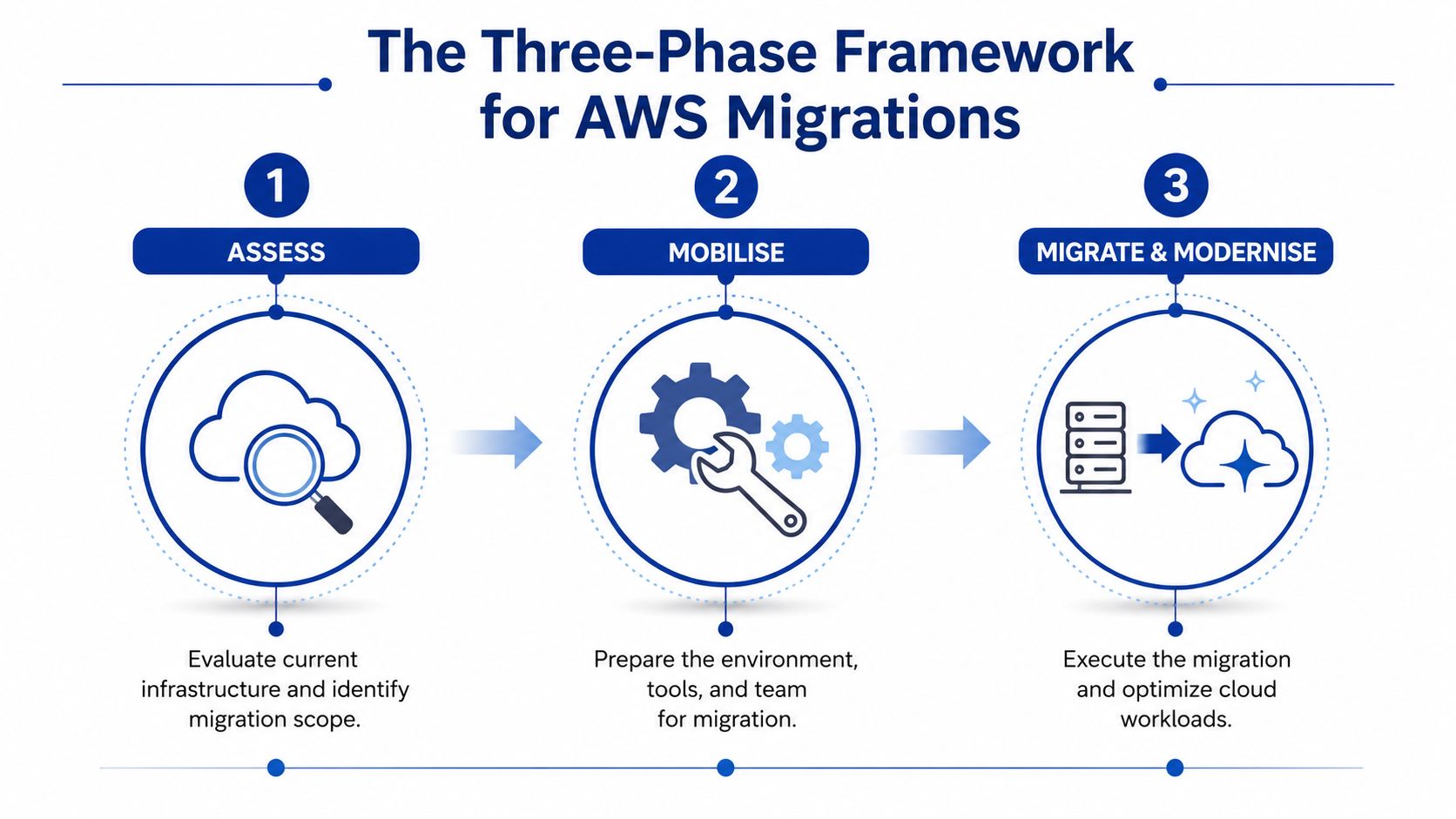
Assess
This phase determines whether the programme deserves funding, executive attention, and operational risk.
The job is not to produce a long asset list and call it strategy. The job is to establish business drivers, workload criticality, regulatory constraints, support requirements, likely migration patterns, and the financial case for acting now versus delaying. Good assessment work also exposes workloads that should be retired, replaced, or left alone.
In practice, uncomfortable trade-offs manifest. A low-value legacy system may be easy to move but not worth carrying into a new environment. A revenue-critical platform may justify deeper remediation because the cost of failure after cutover is far higher than the cost of preparation.
Mobilise
Mobilisation turns a justified idea into a controlled programme. Teams set up landing zones, security baselines, access models, delivery governance, migration tooling, wave planning, and reporting rhythms. More importantly, they define who can approve exceptions, who owns post-migration operations, and how budget changes are handled if effort expands.
This is often where leadership discovers whether the organisation is ready for cloud operating discipline, not just cloud infrastructure. Projects slow down here when executive sponsors approve the destination but leave ownership unclear across architecture, security, finance, and operations. If you need a realistic view of sequencing, approvals, and programme duration, this guide on how long an AWS migration takes gives useful planning context.
Migrate and Modernise
Execution starts after the first two phases have reduced uncertainty to an acceptable level.
Each workload should move with an approach that fits its business value, dependency profile, downtime tolerance, compliance obligations, and future role in the application estate. Some systems are rehosted because speed matters most. Others are refactored or rebuilt because the existing architecture would carry too much cost or operational friction into AWS. Some are better replaced with SaaS than migrated at all.
The strategic mistake is treating every application as a technical transfer. The stronger approach is to use migration waves to improve the estate as you go, while keeping governance tight enough that modernisation does not sprawl into an open-ended transformation programme.
Practical rule: If the plan focuses heavily on cutover weekend but gives little attention to governance, financial control, service ownership, and post-migration operations, the scope has been framed too narrowly.
Phase 1 Deep Dive Assessment and Mobilisation
A CTO approves the migration budget. The infrastructure team is ready to start building in AWS. Then the project stalls because nobody can answer three basic questions with confidence: what must move, who owns each service, and what business risk sits behind each cutover decision.
That is what Phase 1 is for. It sets the commercial and operational terms for the rest of the programme. If this work is rushed, the migration usually looks fine on a plan and becomes expensive in execution.
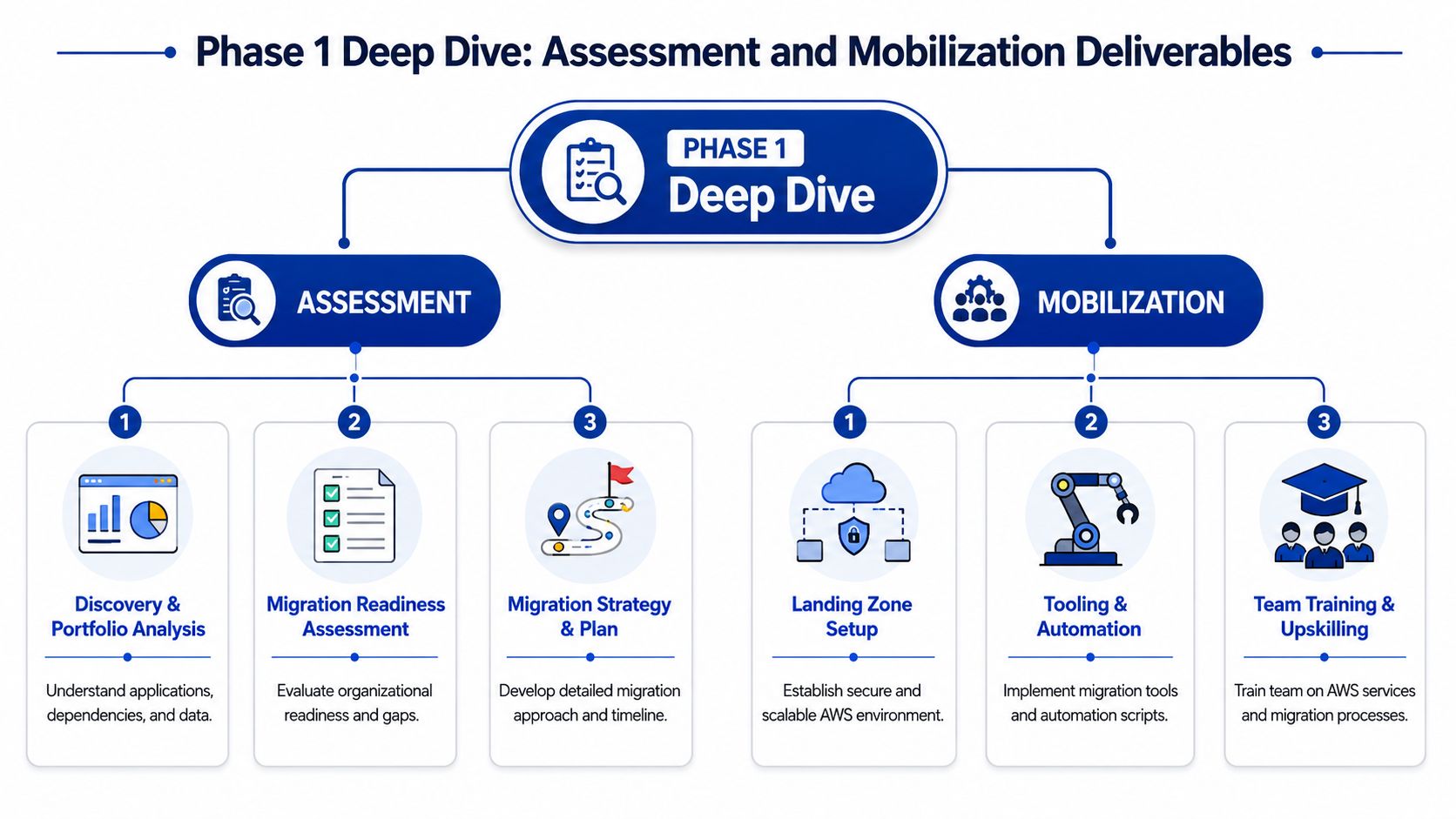
The assessment deliverables that matter
A useful assessment produces more than a discovery spreadsheet. It should leave the organisation with a current inventory of applications, infrastructure, integrations, service owners, business criticality, support arrangements, and data sensitivity. It should also define who can approve exceptions, who carries outage risk during cutover, how temporary double-running costs will be managed, and what evidence the business expects before a workload is signed off as safe to move.
That inventory needs active ownership. Static documents age quickly, especially once remediation work starts and application teams disclose dependencies that never appeared in CMDB records.
A practical assessment should answer questions such as:
| Deliverable | Why it matters |
|---|---|
| Application and infrastructure register | Prevents hidden systems from appearing halfway through migration waves |
| Dependency mapping | Reduces the chance of breaking upstream or downstream services during change |
| Ownership model | Clarifies approvals, escalation paths, and support accountability |
| Business criticality ranking | Helps sequence workloads by operational risk and business value |
| Data sensitivity classification | Informs security controls, residency choices, and access design |
The governance layer matters as much as the technical findings. I have seen technically capable programmes drift because no one agreed on who could accept extra run costs, who could delay a migration wave, or who owned rollback authority when a cutover affected revenue or customer service. Those decisions should be written into the mobilisation plan early, not negotiated during an incident call.
Finance should be involved from the start. The point is not to force a perfect forecast. The point is to test the business case against likely AWS run costs, licensing changes, support overhead, migration tooling, and the period where on premises and cloud environments may both need to operate.
Landing zone design sets the rules of the programme
Before production workloads move, the AWS environment needs a defined operating model. That includes account structure, identity and access controls, logging, guardrails, tagging standards, backup expectations, and the policy baseline for security and audit.
For Australian organisations, residency and privacy obligations often shape these decisions early. The design should reflect how the business will handle regulated data, evidence compliance, and separate duties across engineering, security, and operations. If the target environment will host smaller line-of-business systems as well as larger production applications, it also helps to decide early where simpler deployment models fit and where they create limits. This guide on choosing between AWS Lightsail and EC2 for a business application is useful when that question comes up during mobilisation.
Teams that skip this groundwork usually create avoidable rework. Accounts proliferate without a pattern. Permissions are granted too broadly because deadlines are tight. Logging and cost allocation become inconsistent, which creates problems later for audit, support, and chargeback.
A pilot should test operations, not just migration tooling
A pilot migration belongs in Phase 1 because it validates the programme design under controlled conditions. The best pilot is not solely the easiest workload. It is a low-risk service that still exposes the team to real approval paths, support handoffs, monitoring expectations, and recovery procedures.
Use the pilot to test the parts of the programme that often fail unnoticed:
- Change approval and business sign-off
- IAM role design and access review
- Backup, restore, and retention procedures
- Monitoring, alerting, and support handover
- Cutover timing assumptions and rollback decision points
A good pilot changes the plan. It may show that support teams need different runbooks, that tagging standards are too loose for finance reporting, or that an application owner assumed a downtime tolerance the business never approved. Finding those gaps here is far cheaper than finding them during a major migration wave.
Phase 2 Deep Dive Migration Strategies and Execution
A migration programme starts to get expensive in Phase 2 if leaders treat every application the same. One team wants a fast infrastructure exit. Another wants to use the move to retire technical debt. Finance wants a date they can plan around. Security wants proof that controls will still hold after cutover. Execution only works when each workload has a clear migration decision, an owner, and a business case the organisation will still agree with six months later.
The technical move matters, but this phase is also where governance becomes visible. Every workload needs an agreed path, approval criteria, funding model, risk rating, and cutover expectation before engineers start moving data or rebuilding servers. Without that discipline, teams drift into expensive half-decisions, such as rehosting an application that really should be replaced, or starting a refactor without product budget or executive backing.
A structured AWS migration usually assesses each workload against the 6 Rs model: Rehost, Replatform, Refactor, Repurchase, Retire, Retain. AWS tools such as AWS Application Migration Service for server moves and AWS Database Migration Service (DMS) for database transitions often support the delivery, but the tool should follow the strategy. It should not define it.
Choosing the right strategy for each workload
The strongest migration plans apply different strategies across the estate because workloads create value in different ways.
- Rehost: Fits systems that need to leave current infrastructure quickly and can tolerate carrying technical debt for a period. It is often the commercial choice when a data centre exit or hardware refresh deadline matters more than immediate optimisation.
- Replatform: Suits applications that are functionally acceptable but too costly or fragile to operate in their current form. A common case is moving a self-managed database onto Amazon RDS to reduce operational overhead without changing the application itself.
- Refactor: Makes sense for applications that affect growth, customer experience, or release speed. It takes longer, costs more upfront, and needs active business sponsorship because the migration becomes part of a wider product change.
- Repurchase: Works when the business capability is standard and a SaaS product can replace bespoke software at lower long-term cost. The hard part is rarely the software. It is process change, contract review, data migration, and user adoption.
- Retire: Should be considered early and seriously. Migration creates a deadline that often exposes duplicate tools, abandoned services, and systems with no meaningful owner.
- Retain: Can be the right call for workloads tied to licensing constraints, specialist hardware, or a later transformation initiative. It needs a review date and a stated reason, otherwise it turns into passive delay.
The trade-off is straightforward. Fast paths reduce immediate delivery risk, but they often preserve support burden and weak architecture. More ambitious paths improve long-term economics, but only when the organisation is willing to fund change beyond infrastructure.
What usually works, and where teams get caught out
| Strategy | Usually works when | Usually creates trouble when |
|---|---|---|
| Rehost | You need speed, limited application change, and a predictable exit from current infrastructure | Stakeholders expect lower run costs, better resilience, or cloud-native performance without redesign |
| Replatform | The application is stable and operations are consuming too much time | Hidden integrations, licence constraints, or unsupported components make a “small” change much larger |
| Refactor | The workload has strategic importance and product leadership is engaged | The migration is funded like an infrastructure project, even though it is really an application transformation |
| Repurchase | The capability is standardised and the business can adapt processes | Teams underestimate data cleanup, user retraining, and contract or compliance implications |
| Retire | Usage is low, duplicate, or unsupported | Nobody confirms reporting feeds, downstream dependencies, or regulatory retention obligations |
| Retain | The decision is temporary and documented | The application stays out of scope indefinitely, while risk and support cost continue to rise |
Programme governance proves its worth. Each decision should be recorded in a migration backlog with business owner approval, expected benefits, target timing, major dependencies, and an explicit reason for the chosen pattern. CTOs usually focus on architecture. Operations managers often focus on cutover risk. Finance focuses on overlap cost while old and new platforms run together. All three are looking at the same decision from different angles, and Phase 2 has to reconcile them.
For teams comparing hosting models as part of a rehost or replatform decision, this guide to AWS Lightsail versus EC2 for business applications is a useful reference point.
Rehosting can be the right answer. It buys time and reduces immediate delivery pressure. It does not remove technical debt, settle ownership issues, or fix an application with no clear future. Those decisions still sit with the business, and Phase 2 is where they need to be made clearly.
Assembling Your Migration Team and Toolkit
A migration wave can look technically ready and still fail in the room where decisions get made. The server build is complete, the scripts run, and the target environment passes its checks. Then legal raises a data residency concern, the application owner is tied up during UAT, finance rejects an unplanned overlap cost, or security asks for evidence nobody prepared. Migration delivery depends as much on governance and operating discipline as it does on AWS skills.

The core roles
A sensible migration team is built around accountability, not headcount. Some organisations cover several roles with the same person. That can work for smaller estates, but the approval path still needs to be explicit.
- Project manager or delivery lead: Owns migration wave planning, risk tracking, change windows, stakeholder updates, and escalation paths.
- Cloud architect: Defines the landing zone, account model, network design, identity approach, security baseline, and target patterns for each workload.
- DevOps engineer: Builds infrastructure as code, deployment workflows, environment provisioning, and the automation needed to reduce manual drift.
- Security specialist: Reviews access design, logging, encryption, policy controls, exception handling, and audit evidence.
- Application owner: Confirms business criticality, test scope, dependency behaviour, user sign-off, and whether the migrated service is fit for use.
- Financial analyst or FinOps lead: Tracks business case assumptions, overlap cost, licensing implications, and post-migration run-cost variance.
The gap that causes trouble is usually decision ownership. Teams often assign technical work clearly and leave approvals vague. That creates delays at the exact points where commercial risk is highest.
The toolkit around AWS
AWS services support the migration, but the wider toolkit determines whether the programme is controllable. A CTO needs visibility into standards, exceptions, and cost exposure. An operations manager needs repeatable runbooks, communication channels, and clear evidence that each wave is ready.
| Category | Typical tools | Why they matter |
|---|---|---|
| Work tracking | Jira, Asana, Azure DevOps | Keeps migration waves, issues, dependencies, and approvals visible |
| Infrastructure as code | Terraform, AWS CloudFormation | Makes environments repeatable, reviewable, and easier to recover |
| Collaboration | Microsoft Teams, Slack, Confluence | Keeps technical teams, business owners, and approvers aligned during delivery |
| Observability | Amazon CloudWatch, New Relic, Sentry | Confirms whether workloads behave properly before and after cutover |
| Documentation | Confluence, Notion, structured runbooks | Preserves support knowledge, operating procedures, and handover records |
Tool choice matters less than control design. If approvals sit in email, runbooks live in personal files, and cost reporting arrives after the fact, the project will struggle even with good engineers. Many of the common AWS migration mistakes SMEs make start with missing process discipline rather than missing cloud features.
For organisations without a deep internal cloud bench, an external delivery partner can provide architecture, migration execution, and structured handover while internal owners retain accountability for business decisions and risk acceptance. Continuum Solutions is one example of a Melbourne-based consultancy working across cloud architecture, application development, and systems integration.
What strong team design looks like
Strong migration teams define who recommends, who approves, who executes, and who carries operational ownership after go-live. A simple RACI model is often enough if it is kept current and used during wave planning, change approval, and incident review.
The engineer runs the migration tasks. The application owner signs off test outcomes. The delivery lead decides whether the wave proceeds within the agreed governance rules. Finance reviews exceptions that affect the business case. Security approves a control gap, asks for remediation, or blocks release.
That structure protects delivery speed because it removes ambiguity before the pressure rises. It also gives executives what they need during migration: a clear line from technical action to business accountability.
Managing Risk with Testing, Cutover, and Rollback Plans
Most migration anxiety comes down to one concern: “What happens if we switch over and something breaks?” That concern is justified. A migration project without a well-defined cutover and rollback model is relying on hope.
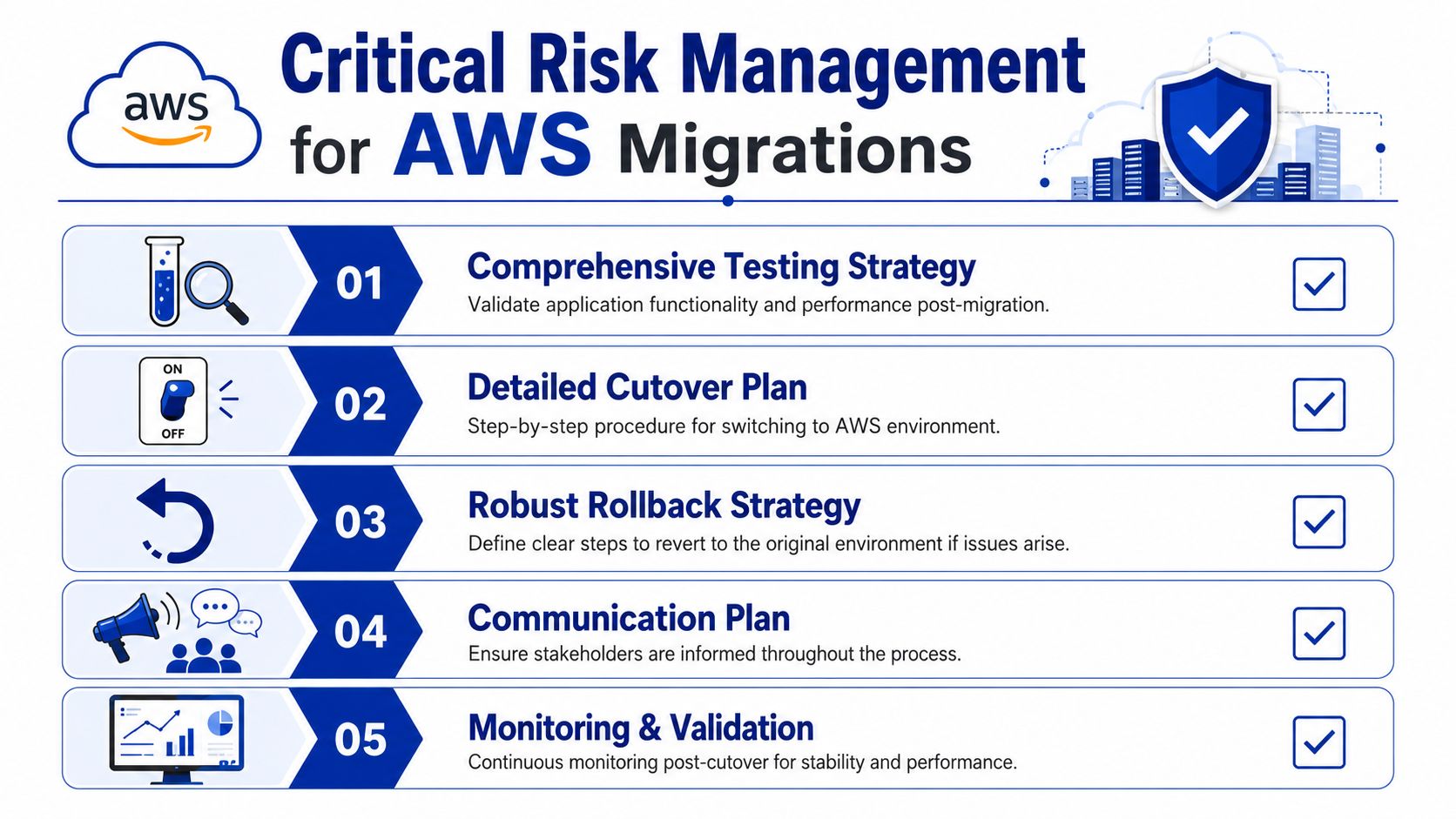
Rehearsal matters more than confidence
Critical migration projects should run a full cutover rehearsal that measures duration, manual steps, and failure points, then define objective rollback triggers based on evidence. A 30-day operational review should follow to validate restore times, access failure rates, incident volume, and cost variance, as summarised in Interscale’s AWS cloud migration guidance.
That requirement changes the tone of the whole programme. Instead of saying “we think cutover will be fine”, the team has to prove it under controlled conditions.
What belongs in a proper cutover plan
A useful cutover plan isn’t a vague checklist. It should identify exact responsibilities, sequence, timing assumptions, decision checkpoints, communication steps, and fallback actions.
Include at least these elements:
- Pre-cutover checks: Confirm backups, replication status, access readiness, support coverage, and stakeholder approvals.
- Sequenced tasks: Spell out each technical and operational action in order, including who performs it.
- Validation points: Define what must be verified before proceeding to the next stage.
- Business sign-off: Nominate the person who accepts service behaviour after technical validation.
- Communications: Prepare updates for users, internal teams, leadership, and support staff.
Rollback needs evidence, not emotion
The rollback plan should be objective. If the team breaches a defined duration threshold, misses a validation checkpoint, or hits a known failure condition, rollback happens. That avoids the worst kind of decision-making, where a tired team improvises under pressure because nobody wants to admit the cutover isn’t working.
A weak rollback plan says, “we’ll revert if needed.” A strong one says exactly who decides, based on what evidence, and by when.
This is also where many organisations repeat avoidable errors around permissions, logging, overprovisioning, and monitoring gaps. That’s why a review of common AWS mistakes SMEs make is often useful before final cutover planning.
Life After Migration Optimisation Governance and Handover
A migration project isn’t complete when workloads are live in AWS. It’s complete when the client team can operate the environment predictably, understand its cost profile, support incidents, and govern future change without relying on tribal knowledge.
Optimisation starts after stability
The first priority after cutover is stability. Once service behaviour is understood, the next job is optimisation. That usually means right-sizing infrastructure, reviewing storage and backup choices, removing temporary migration artefacts, and checking whether the architecture matches the operating pattern of the workload.
Cloud cost issues often appear here, not because AWS is unpredictable in itself, but because teams carried old sizing assumptions into the new environment. FinOps disciplines matter. Someone needs to review spend trends, ownership tags, environment purpose, and whether each workload is using the right service model.
Governance becomes an operating discipline
Governance after migration should cover:
- Identity and access management: Review roles, least-privilege access, joiner-leaver processes, and privileged access handling.
- Security monitoring: Ensure alerts are tuned, logs are retained appropriately, and incident response paths are practical.
- Compliance checks: Validate that the controls designed during mobilisation are still working in day-to-day operations.
- Change management: Make sure future application and infrastructure changes follow a documented path rather than bypassing controls.
Handover is a formal deliverable
A proper handover includes architecture documentation, runbooks, operational contacts, deployment procedures, backup and recovery guidance, and clear support boundaries. Internal teams also need practical training. Not broad cloud theory. The exact steps required to support their own workloads.
For teams building a stronger support posture after migration, this guide to enterprise application monitoring and debugging is relevant because observability often determines whether cloud operations feel controlled or reactive.
The handover should leave the client with documented systems, named owners, and support procedures that work at 2 am, not just during a project meeting.
Your Next Steps Towards a Successful AWS Migration
If you’ve been asking what is included in an AWS migration project, the short answer is this: far more than infrastructure movement. A serious migration includes portfolio assessment, commercial modelling, governance setup, compliant AWS foundations, workload-by-workload strategy selection, tooling, team design, cutover rehearsal, rollback criteria, and post-migration operating controls.
The organisations that get value from AWS don’t treat migration as a forklift exercise. They treat it as a structured change programme with clear decision rights and measurable outcomes. That’s what reduces risk and gives the business room to modernise sensibly.
A practical next step is an internal migration readiness review. Identify your current application estate, business owners, major dependencies, compliance requirements, and the workloads that can serve as pilot candidates. If that work already feels messy, that’s useful information. It means the project needs structure before it needs speed.
If you’re planning an AWS migration and want a clearer view of scope, sequencing, governance, or handover requirements, Continuum Solutions can help you map the project properly before expensive assumptions get locked in.