
Your donation page worked on Friday. On Monday it doesn't, payments aren't reaching your CRM, and nobody knows which plugin changed over the weekend. That's the moment most owners realise launching a WordPress site and operating one are different jobs. A good WordPress support agency doesn't sell you reassurance. It gives every risky task a named owner, a written response threshold, and evidence the work happened. I would judge any retainer on those three things before price.
Table of Contents
- Why Your WordPress Site Needs Ongoing Support
- What a WordPress Support Agency Actually Covers
- How to Run a Safe WordPress Update Cycle
- Security and Data Protection Beyond Patching
- Keeping Accessibility Intact Through Every Release
- Choosing a Support Model and What It Costs
- Book a Support Gap Audit Before You Sign
Why Your WordPress Site Needs Ongoing Support
Say a membership organisation runs a weekend plugin update. On Monday, the donation page loads but the submit button fails, and the staff member who managed the site has left. No one holds a working admin login, no one knows when the last backup was restored, and enquiries have stopped reaching the inbox.
WordPress itself is stable. Your site isn't just WordPress, though. It's core code, a theme, plugins, hosting, PHP, forms, payments, and connected tools, each changing on its own schedule. One layer changes, another breaks, and the failure rarely announces itself clearly.
A web designer builds the site. A support partner keeps that stack safe while it keeps changing. That covers updates, backups, security, troubleshooting, performance, integrations, accessibility, and the kind of enterprise application monitoring and debugging that catches errors before customers report them.
Signs Support Is Already Overdue
- No clear admin owner: Logins are shared, former staff still have access, or no one can reset them.
- Updates postponed for months: The dashboard shows pending core, theme, and plugin releases.
- Forms fail: Test submissions don't arrive, and no alert fires when they stop.
- No restore evidence: Backups exist in theory, but nobody has rebuilt the site from one.
If your site takes payments, memberships, bookings, or leads, those gaps are revenue risks, not housekeeping. You'll leave with a scope list, a safe update routine, and specific questions to test any agency against.
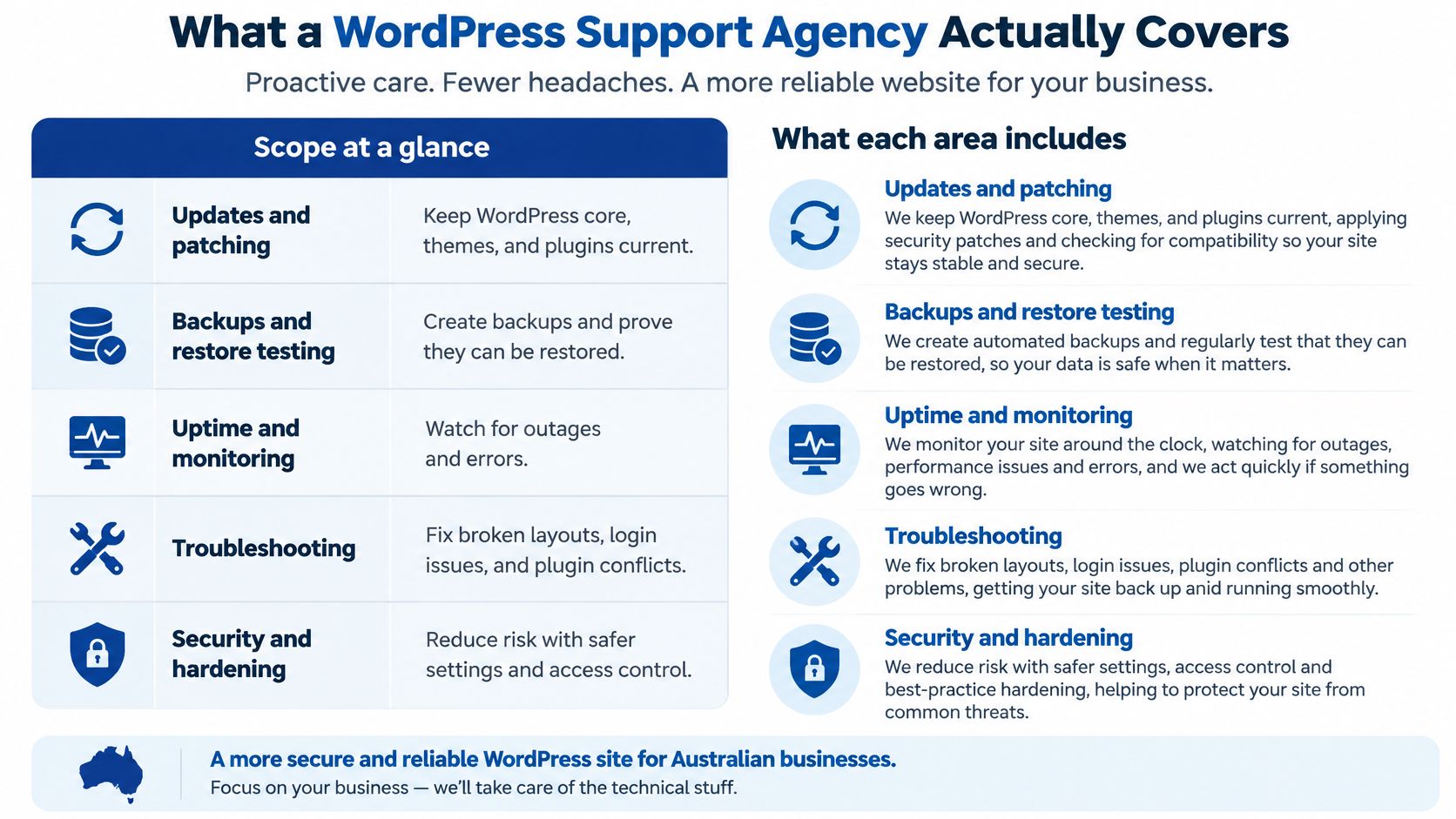
What a WordPress Support Agency Actually Covers
Start with scope in writing, because providers bundle these tasks differently. Some include small content edits, others leave them with you. Neither is wrong, but guessing is.
| Service | What It Covers | Typical Rhythm | Risk If Skipped |
|---|---|---|---|
| Updates and patching | Core, themes and plugins tested on staging, then applied | Critical advisories within 48 hours, routine work monthly | Known flaws stay live on a public site |
| Backups and restore testing | Off-site copies and a documented restore procedure | Daily backups, restore test quarterly | A backup nobody has restored may not work on the day it is needed |
| Uptime and monitoring | Checks on availability, errors and form submissions | Continuous | Outages and broken forms go unnoticed |
| Troubleshooting | Diagnosing conflicts, errors and failed updates | Within the agreed response time | Downtime lasts while staff guess at causes |
| Performance | Caching, image handling, database clean-up and page speed | Monthly review | Slow checkout costs sales and enquiries |
| Security hardening | MFA, least-privilege roles, firewall rules and malware scans | Ongoing | One stolen admin login can expose the whole site |
| Integrations | Forms, payments, CRM and email connections checked after changes | After every change to a connected tool | Leads or orders stop syncing without warning |
| Accessibility | Keyboard, focus, contrast and label checks per release | Each release | Forms become unusable for some visitors |
Where Each Row Earns Its Keep
Updates and backups work as a pair. A plugin update can take checkout offline, and an untested backup can fail during the restore you need most. Test on staging first, back up off-site, and prove restores quarterly.
Monitoring and troubleshooting shorten the gap between failure and fix. Continuous checks should cover uptime, HTTP errors, login anomalies, and form submissions, not just whether the homepage returns a 200. If you're comparing tools, a roundup of monitoring software for business budgets is a useful starting point for features and pricing. We offer application monitoring using Sentry and New Relic, which helps separate a code error from a hosting problem quickly.
Performance is mostly discipline: caching configured properly, oversized images compressed, transients and autoloaded data cleaned from the database. Review it monthly, because plugins add weight gradually.
Security hardening and integrations are where vague retainers fall down. MFA on every admin login, least-privilege roles, firewall rules, and malware scans reduce exposure, but someone still has to check that Stripe, your CRM, and email delivery still work after each change. A broken CRM connection doesn't error on screen. Leads just vanish.
Maintenance Versus Support
Maintenance is scheduled work: updates, backups, reviews. Support responds when something breaks. A sound retainer covers both, with response times stated for each severity.
We offer technical support and maintenance alongside website design, AWS consulting and managed services, SEO, digital marketing, and technology consulting, plus custom web development when a fix becomes a rebuild. I would host on managed WordPress hosting or AWS with a staging copy that mirrors production, enforce MFA on every admin login, and keep backups in a second location away from the host.
Practical rule: Any row in the table without a named owner is your first gap to fix.
How to Run a Safe WordPress Update Cycle
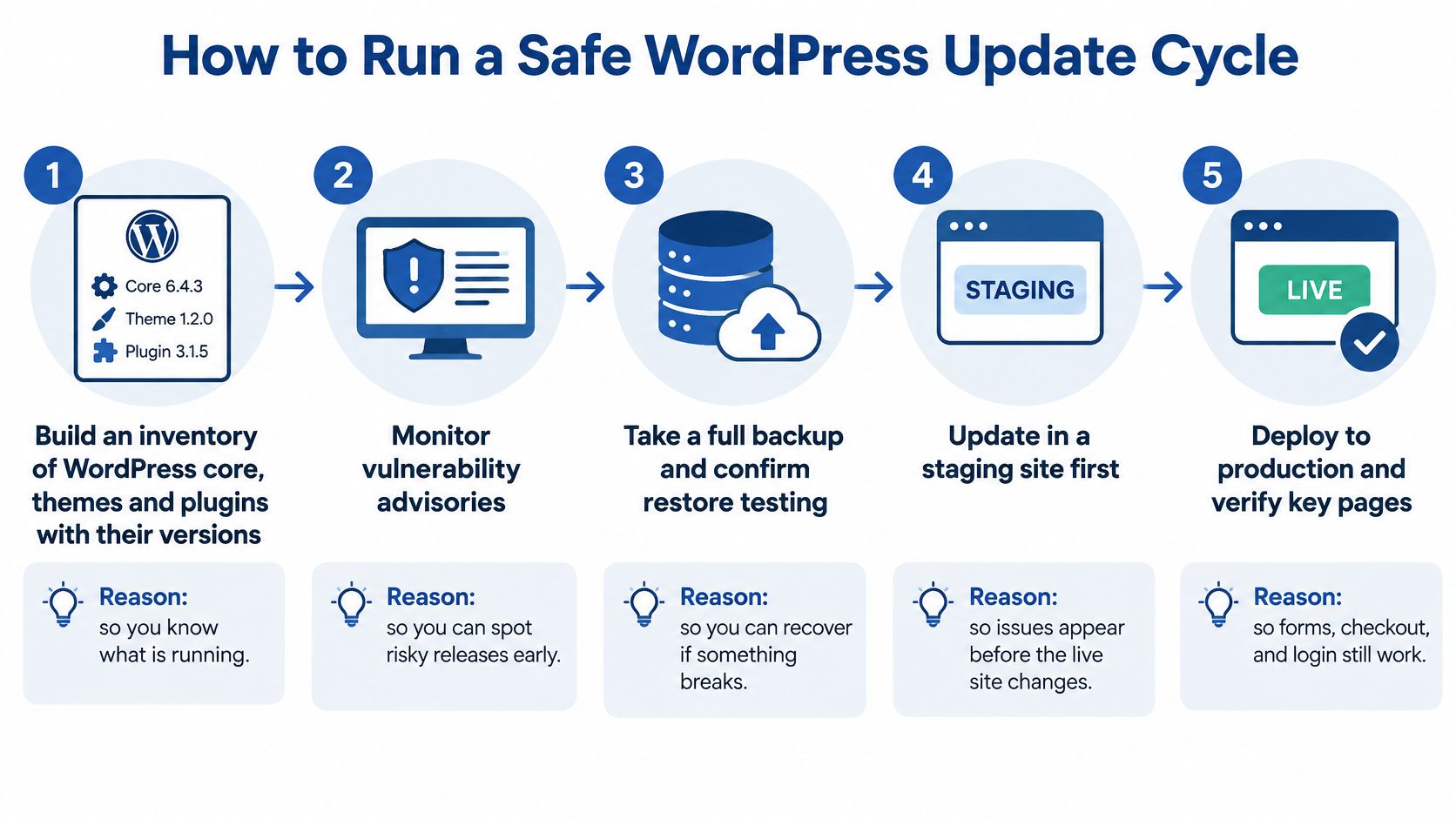
Updates shouldn't depend on whoever's available that week. Run them as a fixed procedure, with the reason attached to each step.
- Build an inventory: List WordPress core, every theme and plugin, current versions, licence status, and purpose, so you know what's running and what can be removed.
- Monitor advisories daily: Subscribe to vulnerability alerts for your exact plugin set, because a flaw in a popular plugin gets exploited quickly once it's public.
- Rank by risk: Apply security-critical fixes first and batch routine updates into the scheduled maintenance window, so urgency drives order, not convenience.
- Update staging first: Apply changes to a copy that mirrors production, then test checkout, forms, logins, search, and CRM sync before anything touches the live site.
- Back up immediately before release: Take a fresh off-site backup and confirm it completed, so rollback is minutes rather than guesswork.
- Deploy in a quiet window: Push early morning local time and watch error logs for thirty minutes, checking key pages yourself rather than trusting a green tick.
- Record everything: Log versions before and after, test results, and rollback status, so the next incident starts with facts.
- Roll back first, diagnose second: Restore service, then investigate on staging, because customers shouldn't fund your debugging session.
For a deeper worked example of this discipline, the WebinOne guide to staged plugin updates and rollback sets out the staging logic clearly.
Why 48 Hours Belongs in the Contract
The threshold isn't arbitrary. The Essential Eight assessment process guide states that patches, updates, or vendor mitigations for online-service vulnerabilities must be applied within 48 hours when a vendor rates the vulnerability as critical or when a working exploit exists. The same guidance identifies daily scanning for missing patches or updates in online services at the relevant maturity level. Put that window in your support contract and require evidence: what was affected, what was applied or mitigated, and when.
That rhythm gets easier with proper delivery plumbing. For ClubScout, we set up automated GitHub Actions deployment pipelines and a dedicated staging environment for testing and stakeholder review, and the project included infrastructure monitoring, backups, and disaster recovery planning. The trade-off is upfront setup cost against calmer, repeatable releases later.
Before you sign with anyone, ask one question: can you show me the update records for your last three releases? A provider with a real process answers in minutes.
Security and Data Protection Beyond Patching
Say a donation form plugin sends names, email addresses, and payment references to a CRM using an API key stored in plain text in site settings. Three volunteers share one admin login. WordPress core is fully patched, and the site is still exposed.
Patching closes known holes. It doesn't decide who can log in, where personal information flows, or who acts after a breach. That gap is why production discipline matters, a point that also applies to hastily built apps, as covered in why a vibe-coded app is not production ready.
| Control | What It Protects | Usual Owner |
|---|---|---|
| Multi-factor authentication on admin logins | Stops account takeover from a stolen password | Agency configures, client approves users |
| Least-privilege administrator roles | Limits damage from one compromised login | Agency sets roles, client decides who receives them |
| Plugin and dependency inventory | Shows what needs patching and what is abandoned | Agency maintains, client holds a copy |
| Form and integration data map | Shows where personal information is stored and sent | Shared, client confirms |
| Off-site backups and restore drills | Enables recovery after ransomware or a bad change | Agency runs, client verifies results |
| Breach escalation runbook | Sets who acts, who logs and who notifies | Client privacy lead owns, agency supplies logs |

Who Carries the Legal Decision
The Australian Cyber Security Centre guidance on protecting business and customer data explains that an eligible data breach involves personal information being accessed or disclosed without authorisation, or lost, where the incident is likely to result in serious harm and remedial action hasn't prevented that likely harm. Businesses covered by the Privacy Act must report eligible breaches to the Office of the Australian Information Commissioner and notify affected individuals.
That duty sits with your business, not your agency. The practical split works like this: your agency contains the incident, preserves logs, restores service, and documents what data was touched. Your privacy lead assesses serious harm and makes the notification call. Write that split, plus timeframes and contact names, into the contract before you need it.
Two mistakes recur. First, storing API credentials where any admin can read them, instead of in a secrets manager or restricted configuration. Second, collecting form fields you don't need, which increases exposure without improving the enquiry. I would insist on a contract that names the escalation contact, log retention period, backup protection method, and handover process in plain terms.
Keeping Accessibility Intact Through Every Release
A site can pass an accessibility audit at launch and fail three months later. A theme update shifts focus order. A page-builder block drops a heading level, a cookie banner traps keyboard users, or an embedded video ships without captions. The site stays technically online and operationally inaccessible.
The Australian Government Architecture standard for WCAG applies WCAG to all digital services, with WCAG 2.2 at minimum Level AA as the conformance target. I would set that as your benchmark even if you run an NGO site or a private service open to the public, because it is the reference point Australian assessors, procurement teams and complaint processes work from.
A Regression Checklist for Every Release
- Keyboard navigation: Tab through menus, modals, and forms without getting stuck or losing your place.
- Focus visibility: Confirm every interactive element shows a clear focus state.
- Structure and labels: Check semantic headings, labelled form fields, and alt text on new images.
- Contrast and zoom: Verify colour contrast and zoom to 400% without losing content or function.
- Screen reader pass: Run NVDA or VoiceOver over checkout, registration, and contact journeys.
A checklist without an owner is a wish. Assign each line to a named person, write down how soon after each release the check runs, and define which failures block the next deployment. A keyboard trap in your checkout should halt releases. A missing alt attribute on a decorative image can wait for the next cycle, provided someone logs it.
Automated scans catch missing alt text and contrast errors fast, so keep them as regression evidence. They miss broken focus order, unclear link text, and error messages that never get announced. Say an NGO's event registration form loses its inline error messages after a plugin update. Sighted users see red fields. Volunteers using assistive technology can't tell why submissions fail. No scanner flags that reliably, which is why the screen reader pass above needs a human on it.
Build the remedy into the retainer: accessibility triage after major releases, a log of documented exceptions with owners and dates, authoring guidance for content editors, and a pre-deployment checklist signed off before release. Prioritise fixes by user impact first, then legal and organisational risk. A checkout nobody can complete by keyboard outranks a contrast issue on an archived news page.
Choosing a Support Model and What It Costs
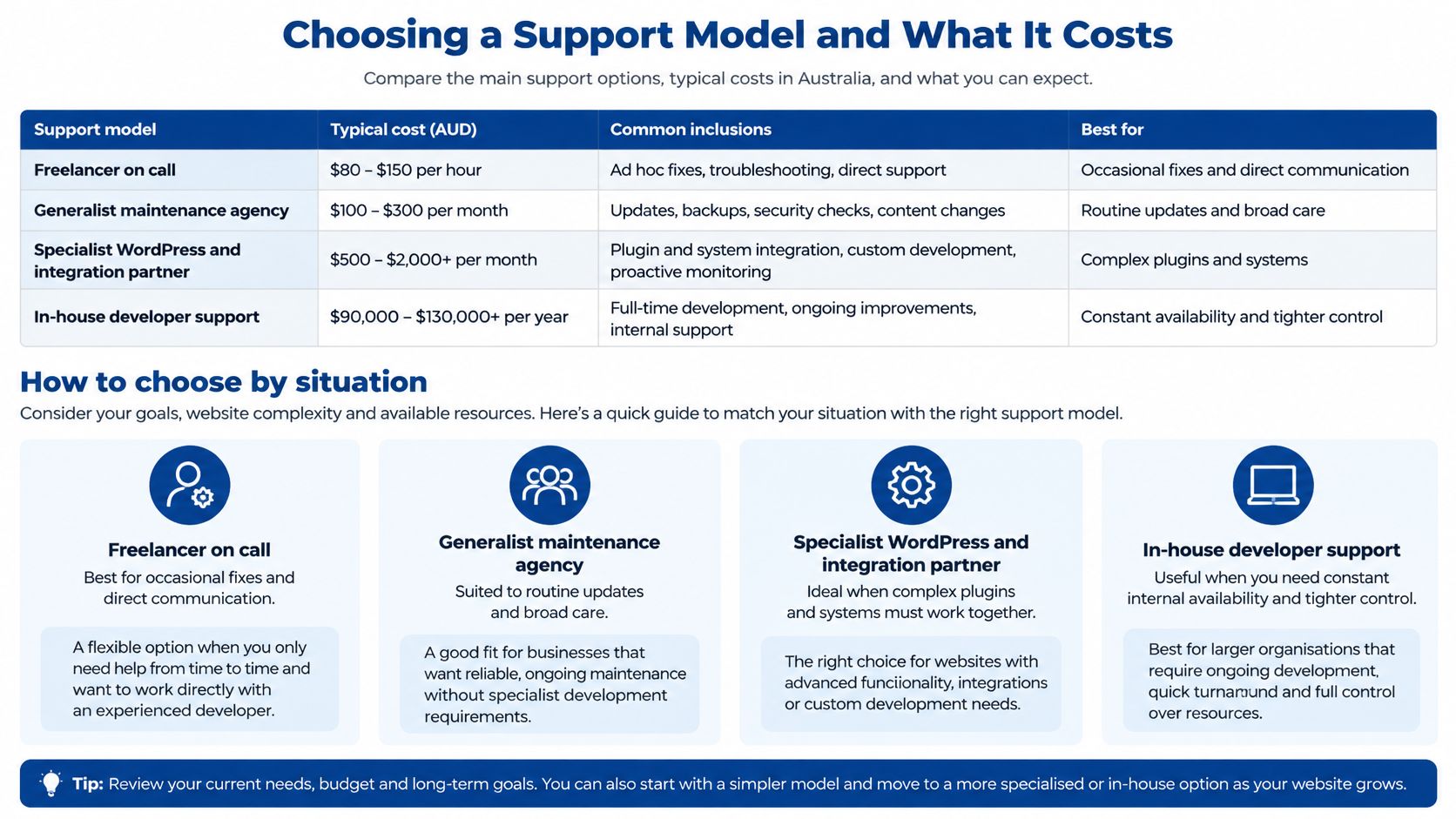
There's no honest fixed price for support, because scope drives cost. There are recognisable models, though, and each suits a different site.
| Model | Best Fit | Pricing Pattern | Watch-Out |
|---|---|---|---|
| Freelancer on call | Brochure site with few plugins and no integrations | Hourly or ad hoc | No out-of-hours cover and a single point of failure |
| Generalist maintenance agency | Marketing sites with frequent content changes | Monthly retainer with included hours | Included hours run out before security work is finished |
| Specialist WordPress and integration partner | Membership, ecommerce or CRM-connected sites | Scoped retainer plus project work | Scope needs careful writing around each integration |
| Enterprise managed service | Multi-site or regulated organisations | Custom contract with agreed service levels | Governance overhead falls on your own team |
What Actually Drives the Price
Counterintuitively, page count matters least. Cost follows the number of plugins and integrations, traffic and uptime expectations, how often content changes, whether security monitoring runs out of hours, and whether the site connects to a CRM, payment gateway, or membership system. Each connection is a thing that must be tested after every change.
Say you run a membership site with 30 plugins, a payment gateway, and a CRM sync. You need a specialist retainer with staging, integration checks, and out-of-hours escalation. A five-page brochure site with a contact form needs a monthly maintenance plan and little else. Paying specialist rates for the brochure site wastes money. Buying brochure-level cover for the membership site wastes far more when it fails.
Judge the retainer against downside, not against zero. The Australian Government 2025 to 26 cyber threat reporting summary puts the average self-reported cost of cybercrime for small businesses at $55,400. A retainer that prevents or shortens one serious incident, or one lost weekend of checkout, can pay for itself. That's the commercial frame I would use, not hours purchased.
Credentials help you verify capability, not choose it. We are a Shopify Plus Partner, AWS Partner, Azure Partner, and WP Engine Partner, with Australian staff, and on the ClubScout project we provided documentation and knowledge transfer to support long-term platform ownership. Those facts matter only if they map to your stack. Broader technology decisions, including when WordPress support should sit inside wider business IT consulting services, deserve the same scope discipline.
Four Cost Questions Before You Sign
- Integration pricing: How is a new CRM or payment connection scoped and charged?
- Out-of-hours cost: What does an unplanned Saturday callout cost?
- Exhausted hours: What happens when included hours run out mid-incident?
- Exit terms: What handover, data export, and credential transfer do you get if the contract ends?
If a provider can't answer the exit question clearly, you're not buying support. You're renting access to your own site.
Book a Support Gap Audit Before You Sign
Before you get quotes, spend under an hour gathering facts. Providers price uncertainty, so reducing it lowers your cost and improves the scope you get back.
- List every admin login: Remove people who have left, and note which remaining accounts use MFA and which are shared.
- Map personal information: Write down which forms, payment tools, and integrations touch personal information and where each one sends it.
- Check two dates: Record the last backup restore test and the last update to core, themes, and plugins.
A support gap audit turns those notes into a list of unowned tasks, a risk ranking for each, and a draft scope you can give to two or three providers. Comparable scopes produce comparable prices. Vague briefs produce quotes you can't evaluate.
Test each response against specifics: a written critical-patch window, a restore test log, a named out-of-hours contact, and clarity on who's on call. Our cloud services include on-call support, and we respond to contact form enquiries within one business day with an honest assessment of whether and how we can help. Hold every provider, including us, to that standard of directness.
The decision test is simple. If you can't name the person who restores your site on a Saturday, you don't have support yet. You have hope, and hope isn't a control.
If your gap audit turns up unowned updates, untested backups, or integrations nobody's checking, we can scope a WordPress support retainer around your actual stack, with staging, monitoring, and written response thresholds rather than vague cover. Send us your plugin list and your two dates, the last restore test and the last update, and we'll give you an honest assessment within one business day. Start that conversation at Continuum Solutions.