
A finance lead closes the month and sees a Stripe deposit in Xero that appears to reconcile cleanly. The bank feed match is accepted, the invoice is marked paid, and the ledger looks tidy. Later, someone checks the revenue and fee accounts and finds the issue: the net Stripe payout was treated as though it were the customer's invoice amount.
That failure is common because connecting Xero and Stripe is quick, while designing an accounting process that survives refunds, disputes, currency conversion and payout timing requires considerably more thought. This guide is for Australian finance, operations and IT decision makers who are implementing or repairing a Xero integration with Stripe. By the end, you'll have a practical framework for choosing the connection path, mapping accounts, automating reconciliation and defining controls that can be tested.
Table of Contents
- Why the Connection Is the Easy Part
- Choosing Your Connection Path in Xero
- Connecting Stripe and Enabling Invoice Payments
- Mapping Payouts Fees and Refunds to Xero Accounts
- Automating Reconciliation for Subscriptions and Multi-Currency
- Testing the Integration Before You Trust It
- Enterprise Practices and Practical Next Steps
Why the Connection Is the Easy Part
The native connection solves an important problem. Xero can add a payment option to invoices, Stripe can process the customer's payment, and transaction data can flow back into Xero for matching. Xero describes payments and processing fees as matchable through the Stripe connection, including one-click reconciliation through the relevant payment account. Xero's Australian payment documentation explains the customer-facing workflow.
The difficulty begins when money moves through different stages. A customer pays the gross invoice amount. Stripe deducts its processing fee. A refund or dispute may alter the balance. The remaining amount reaches the bank later as a payout. If the bookkeeping process records only the bank deposit, revenue and expenses can be understated even though the bank-feed match appears successful.
Practical rule: Treat the Stripe balance as a controlled clearing account, not as a shortcut around accounting entries.
A defensible design records the gross receipt against the invoice, posts the Stripe fee separately, and uses the clearing account to explain the difference between those entries and the net payout. It also keeps invoice status separate from payout settlement. An invoice can be paid before the cash reaches the operating bank account, while a payout can contain several invoices, fees, refunds and other adjustments.
The same distinction matters for IT teams. A browser redirect can tell a customer that checkout completed, but it isn't a reliable accounting event. Payment confirmation may be delayed, duplicated, reversed or interrupted by 3-D Secure authentication. The accounting system needs a server-side event trail and a reconciliation process that finance can inspect without relying on application logs alone.
This is the difference between a payment button and an integration. The button helps a customer pay. The integration must preserve the relationship between invoice, gross payment, fee, refund, dispute, clearing balance and bank payout.
Choosing Your Connection Path in Xero
Australian businesses generally have three practical connection paths. The right choice depends on where invoices originate, how much control the finance team needs, whether subscriptions are involved and how many exceptions the operation can absorb.
Xero payment services are the simplest route when customers pay Xero invoices. The Pay Now experience, Stripe processing and invoice matching are closely aligned. This path suits a business with conventional receivables and modest integration requirements. Its limitation is that payments from a website, application or external subscription workflow may need additional treatment.
A direct Stripe configuration through the Xero App Store gives the finance team a clearer view of Stripe transactions and the balance that sits between collection and payout. It's useful when Stripe is also handling payments outside Xero invoices. The team must still decide how to code gross receipts, fees, refunds and non-invoice sales.
Third-party middleware or a custom API integration becomes relevant when the organisation has multiple entities, complex customer identity rules, multiple settlement currencies or a subscription platform that owns the billing lifecycle. That route provides more control, but it introduces licensing, monitoring, credentials, change management and support obligations.
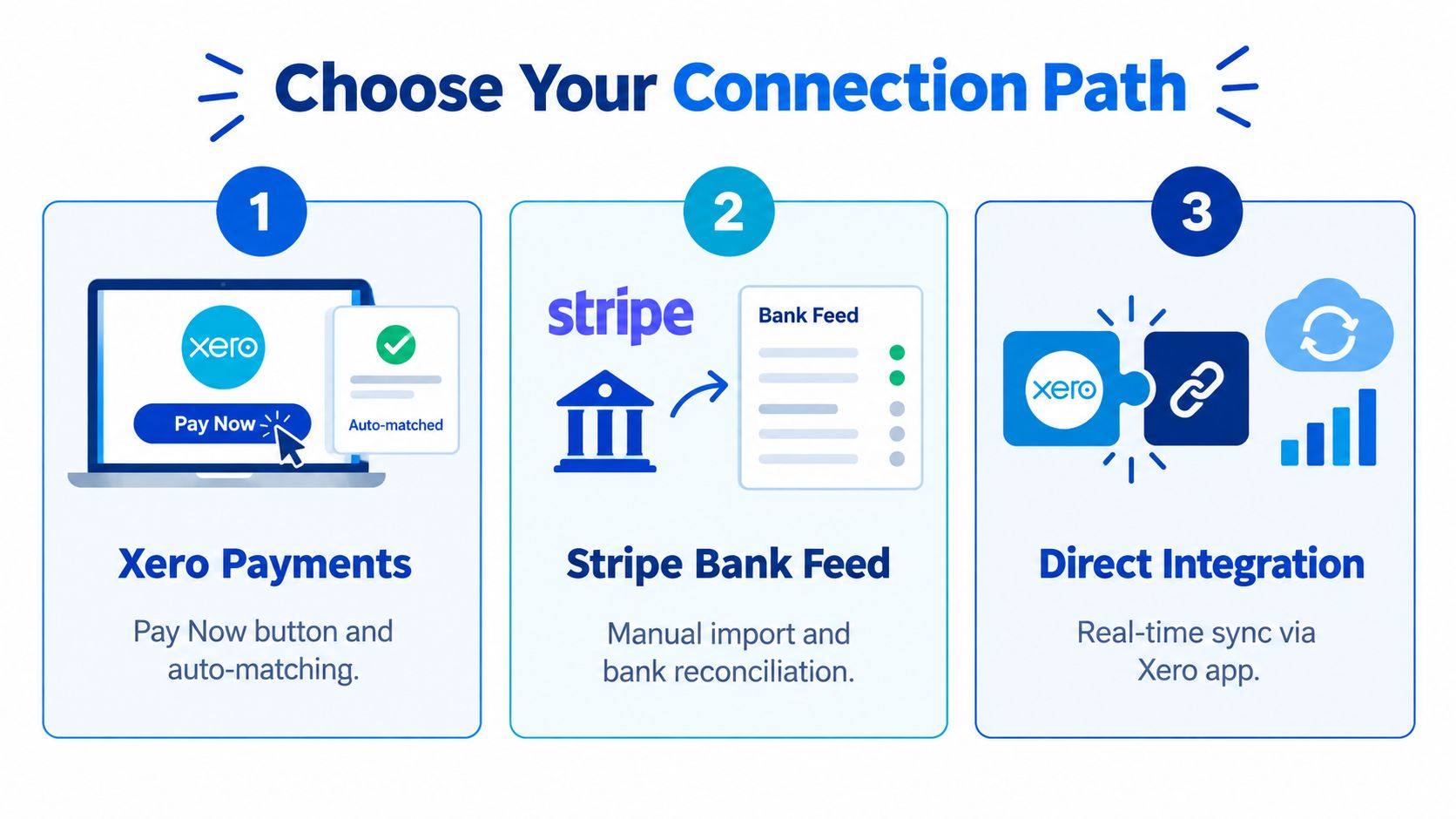
| Connection path | Best for | Cost drivers | Control level |
|---|---|---|---|
| Xero payment services | Xero invoices and standard online payments | Stripe transaction charges and implementation effort | Moderate |
| Stripe bank feed | Businesses needing transaction-level visibility | Stripe charges, reconciliation labour and exception handling | Moderate to high |
| Direct integration | Complex billing, entities, currencies or custom applications | Development, hosting, monitoring and maintenance | High |
The contractual boundary is important. Xero's Australian Stripe terms state that payment processing is provided by Stripe under the Stripe Connected Account Agreement applicable to the business's location. Xero isn't a party to that agreement and doesn't assume responsibility for processing the payment. Fees may vary by region and may be inclusive or exclusive of transactional taxes such as GST, depending on how the applicable pricing is presented.
That means a connected Xero organisation doesn't remove the need to assess Stripe's Australian terms, pricing, disputes, tax treatment and account requirements. The connection joins systems, but it doesn't merge contractual responsibilities.
For a conventional service business, I'd start with the native payment service and a properly designed clearing account. For a business selling through an application, marketplace or subscription platform, I'd define the system of record first, then decide whether middleware is sufficient or whether a documented API integration is safer. A custom integration implementation is justified when the cost of manual exceptions and incorrect reporting is greater than the cost of maintaining explicit integration logic.
Connecting Stripe and Enabling Invoice Payments
Before connecting anything, confirm that the Australian Stripe account is active, the business has an appropriate bank account and the Xero user has the required role and permissions. Decide which Xero account will represent the Stripe balance or receive payouts. Don't select an account casually, because changing the accounting structure after transactions have begun creates avoidable cleanup.
In Xero, add Stripe through the payment-services or online-payments area, select the relevant Stripe connection and authorise the account. Once connected, attach Stripe to the invoice branding theme used by the organisation. The purpose is practical: customers need to see the payment option on the invoices they receive, and the payment must remain tied to the Xero invoice that created the receivable.
Xero's Australian documentation states that businesses can add a Pay Now button supporting credit card, debit card, Apple Pay, Google Pay and other supported methods. It lists Australian domestic-card pricing at 1.75% plus AUD 0.30 per transaction, and international cards at 3.5% plus AUD 0.30. The Xero App Store records the Stripe integration date as 4 February 2015, a substantial historical milestone for its availability in the Xero ecosystem.
Those charges belong in the implementation budget, but they shouldn't be confused with the accounting treatment. The customer pays the invoice amount. Stripe deducts its charge. Xero must preserve both values.
Australia-specific payment choice has also expanded beyond cards. Xero's PayTo information describes a Stripe-integrated real-time bank-payment method where a customer authorises a one-off payment through a mobile banking application using PayID or a BSB and account number. The payment is confirmed instantly in Stripe, while Stripe typically settles funds within two business days. Xero's Australian payment guidance should be checked alongside the current eligibility terms before enabling it.
PayTo requires a connected Stripe account and an Australian Business Number recorded in Stripe. Xero identifies the feature as beta and currently limited to one-time payments through Xero. This makes it useful for selected receivables workflows, but not automatically suitable for recurring billing.
After authorisation, run a controlled test invoice. Confirm that the customer sees the intended payment method, the invoice status changes correctly after payment, the fee is visible in the expected account and the transaction appears in the intended Stripe clearing or payment account. A Stripe integration implementation should document those checks rather than treating the successful connection screen as the end of the work.
Mapping Payouts Fees and Refunds to Xero Accounts
The most reliable accounting structure separates four things:
- Customer receivable or revenue, recorded at the gross invoice amount.
- Stripe fee expense, posted separately rather than netted against revenue.
- Stripe clearing account, holding collected funds before payout.
- Operating bank account, receiving the net Stripe payout.
The key mistake is posting the bank deposit directly to revenue. Xero's guidance on online payment gateways explains the practical issue: a bank-feed match can look successful while revenue and fees remain misstated if the payout is treated as the invoice amount. The same guidance supports recording gross receipts, posting fees separately, using a clearing account and matching the net payout to the bank feed.

The journal structure
Assume a customer pays an invoice for AUD 1,000. The exact fee depends on the payment method and Stripe's applicable Australian pricing. The entries should still follow the same logic.
| Event | Debit | Credit |
|---|---|---|
| Customer payment | Stripe clearing account, AUD 1,000 | Accounts receivable, AUD 1,000 |
| Stripe fee | Stripe fee expense, applicable fee | Stripe clearing account, applicable fee |
| Net payout | Operating bank, net amount | Stripe clearing account, net amount |
The invoice is settled for its gross amount. The fee is an expense. The payout is a movement from the Stripe clearing account to the operating bank, not a second sale.
This structure gives finance a useful diagnostic. If the clearing account doesn't explain the Stripe balance, the team can look for a missing payment, fee, refund, dispute or payout. If the bank deposit is posted directly to sales, that diagnostic disappears and the ledger can remain wrong while the bank feed appears reconciled.
Refunds need their own treatment
Refunds reverse the customer transaction, but they don't necessarily reverse the original processing cost. Stripe states that original processing fees and applicable currency-conversion fees are not refundable. The refund entry should therefore reduce or reverse the sale while leaving the non-refundable fee expense correctly represented.
For example, if an invoice payment is refunded, the accounting workflow should:
- Reverse the sale or receivable settlement: Link the refund to the original customer transaction.
- Reduce the Stripe clearing balance: Record the cash leaving Stripe.
- Retain the non-refundable processing cost: Don't reverse the fee expense unless Stripe returns it.
- Review tax treatment: Ensure the reversal follows the organisation's Australian tax and BAS treatment.
A dispute follows the same principle, with an additional requirement to identify the dispute event and any associated charge. Don't rely on a single net payout figure to explain the result. The Stripe payout detail and the Xero event record should agree at the transaction level.
Accounting test: If a reviewer asks why the bank received less than the invoice amount, the ledger should answer with separate gross receipt, fee, refund and payout entries.
The clearing account also handles timing. Funds can be collected by Stripe before the payout reaches the bank, so month-end balances may be legitimate. The objective isn't to force the clearing account to zero at every reporting date. The objective is to explain its balance and reconcile it to Stripe's records.
Automating Reconciliation for Subscriptions and Multi-Currency
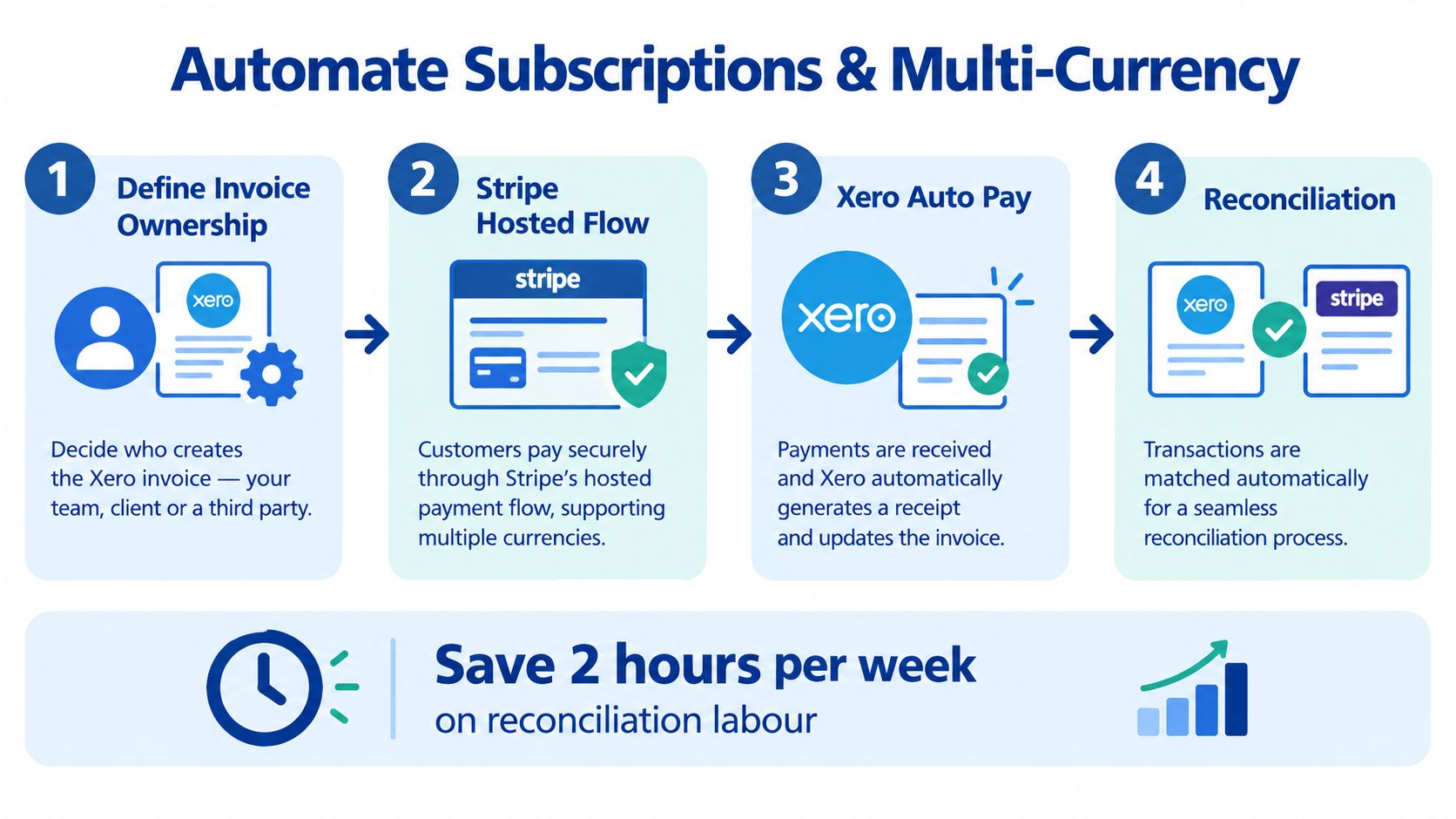
Recurring billing fails when ownership is ambiguous. Before enabling Xero Auto Pay or a Stripe-hosted payment flow, decide which system creates the invoice, which system owns the customer identity and which event is authoritative for payment status.
For a controlled subscription design, create a stable cross-system customer key. Generate or associate the Xero invoice before charging the customer. Store the Stripe payment intent and charge identifiers against the invoice or integration record. Then process success, failure, refund and dispute events on the server.
Payment status must come from durable events
The dangerous shortcut is marking an invoice paid from a browser redirect or synchronous API response. Stripe's Xero partnership documentation identifies the risk of delayed, duplicated or reversed confirmation, including payment flows affected by 3-D Secure authentication.
Use server-side webhook processing instead. Each handler should be idempotent, meaning replaying the same event doesn't create a second ledger posting. Retain an immutable event log containing the event identifier, received time, processing result, linked customer key, invoice identifier and Stripe payment identifiers.
The integration should also reconcile the Stripe payout independently of invoice status. An invoice can be marked paid because Stripe confirmed the payment, while the corresponding funds remain in the Stripe balance. The payout process then verifies that the collected balance, fees, refunds and payout movements agree with the bank.
Multi-currency needs explicit ownership
Currency conversion introduces another reconciliation boundary. The integration must record the transaction currency, settlement currency, Stripe exchange result and the accounting treatment for any difference. Don't allow a generic bank-feed rule to collapse these values into a single unexplained amount.
For recurring billing, define the following before production:
- Invoice ownership: Xero creates the invoice, or the application creates an accounting summary.
- Customer identity: One stable key links the application, Stripe and Xero records.
- Retry behaviour: Failed charges have a documented retry and notification path.
- Event ordering: Out-of-order events can't overwrite a later confirmed state.
- Payout reconciliation: Stripe settlement is checked independently from invoice status.
- Auditability: Every financial event remains traceable after retries or reversals.
A membership platform hosted on AWS infrastructure for subscription applications can implement these controls as part of its application architecture. The important point isn't the hosting provider. It's the separation between customer-facing payment flow, accounting events and settlement controls.
Testing the Integration Before You Trust It
A production test plan should exercise the ledger, not just the checkout screen. A successful card payment proves that Stripe can collect money. It doesn't prove that Xero can distinguish gross receipts, fees, refunds, delayed payouts and replayed events.
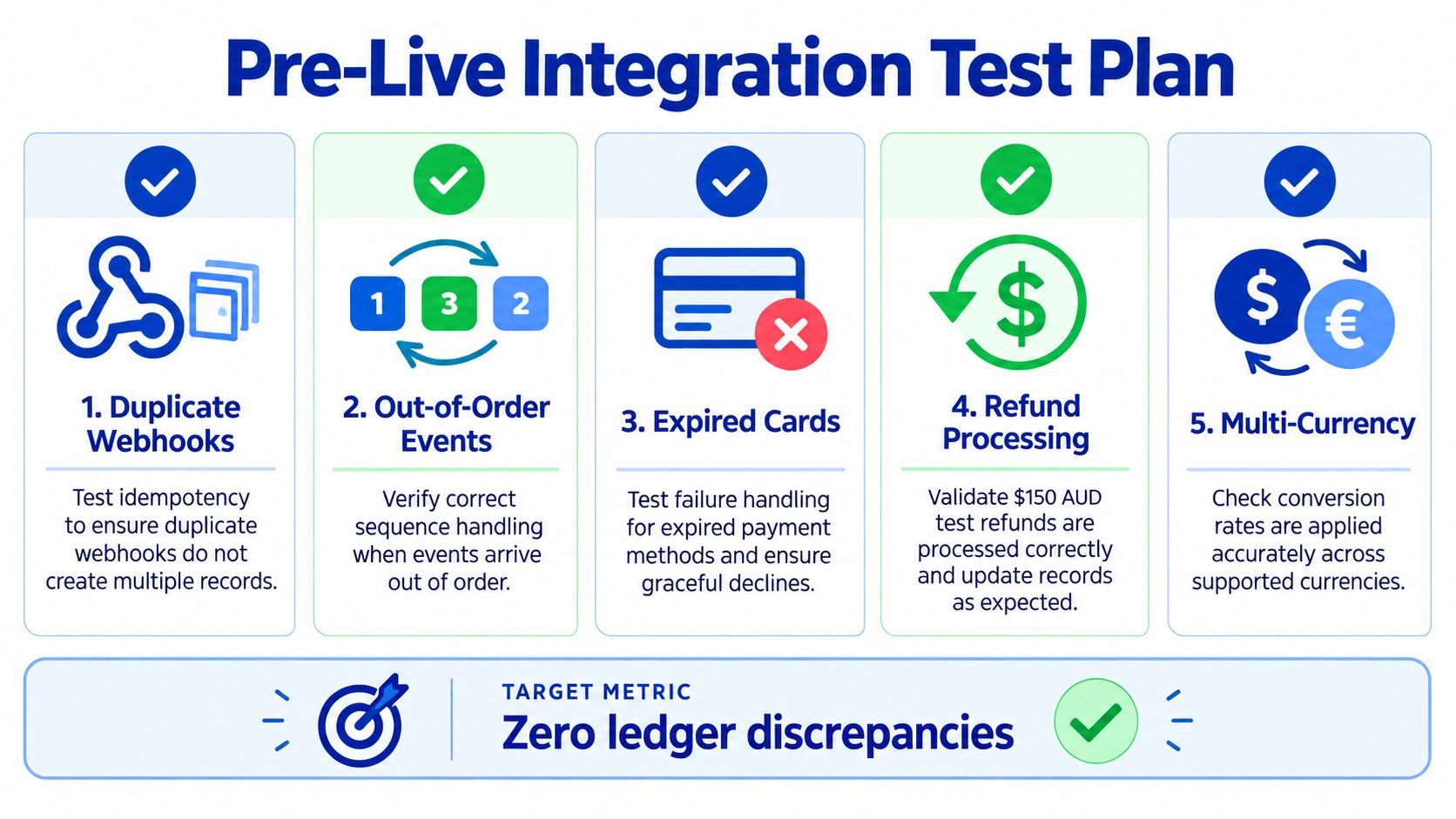
Run each test with a known invoice, a known customer and a recorded expected accounting outcome.
| Test | Finance symptom | Likely cause | Passing result |
|---|---|---|---|
| Duplicate webhook delivery | The invoice or fee posts twice | Handler lacks idempotency | One event, one ledger effect |
| Out-of-order events | A failed status overwrites a later success | Events processed by arrival order | State follows the valid event sequence |
| Expired card | Invoice remains open without an exception | Failure event isn't linked to the invoice | Clear failure status and retry outcome |
| Bank holiday or payout delay | Clearing balance appears unexplained | Settlement timing differs from expectation | Timing difference is documented |
| Cancellation before capture | Payment exists without an intended active subscription | Cancellation isn't checked before capture | Charge and invoice state remain controlled |
| Refund | Revenue reverses but fee treatment is wrong | Refund logic reverses all entries | Sale reverses and non-refundable fee remains accurate |
Test duplicate delivery by replaying the same webhook. Test out-of-order processing by sending a failure, success and refund sequence in a controlled environment. Test expired cards and 3-D Secure paths so the team sees how a failed or pending payment appears in Xero.
Then test a customer cancellation between invoice creation and charge capture. This catches an ownership problem that ordinary checkout testing misses. The application must decide whether the invoice is voided, left open, or charged under a defined cancellation policy.
The passing state should be measurable:
- Payment linkage: 100% of captured payments link to a Xero invoice or a documented exception, as defined in the integration control design.
- Fee mapping: 100% of Stripe fees map to the intended expense account.
- Webhook safety: Zero duplicate ledger postings occur when events are replayed.
- Payout integrity: Zero unexplained differences remain between Stripe payout totals and Xero clearing-account movements.
Stripe's published Xero case study reports that Xero customers were paid 14 days faster on average after adopting Stripe. Stripe also reports payment collection added to Xero invoicing helped customers get paid up to 15 days faster. Stripe's Xero case study identifies these as vendor-reported outcomes, not independent Australian benchmarks, so they shouldn't replace your own reconciliation and cash-flow measurements.
For production monitoring, application monitoring and debugging services can surface failed webhook handlers, authentication errors and processing exceptions. Monitoring can't correct a faulty journal design, but it can shorten the time between an integration failure and finance discovering it.
Enterprise Practices and Practical Next Steps
A business-grade integration protects credentials, restricts webhook endpoints, records immutable events and alerts the right people when a payment cannot be linked or a payout doesn't reconcile. Finance should review the clearing account on a defined cycle that aligns with BAS preparation and internal month-end controls.
Keep a straightforward Xero payment setup in-house when the invoice flow is conventional and the exceptions are easy to inspect. Bring in a systems integration team when the business has subscriptions, multiple entities, application-generated payments, multi-currency settlement or a growing backlog of reconciliation exceptions. The cost decision should compare implementation and maintenance effort with the risk of misstated revenue, duplicated postings and delayed operational reporting.
A practical sequence is:
- Confirm Stripe's Australian contractual, pricing and tax position.
- Define the Xero chart of accounts and clearing-account journals.
- Connect the payment service and relevant Stripe feed.
- Run the failure and payout test plan before live processing.
- Add subscriptions or custom API automation only after the one-off flow reconciles reliably.
For organisations that need broader architecture, governance and integration support, business IT consulting services can help turn this sequence into a documented delivery scope with ownership, monitoring and handover controls.
Continuum Solutions designs and maintains Stripe and Xero integrations with clearing-account logic, webhook controls, reconciliation workflows and documented handover for Australian businesses. If your current bank matches hide fee, refund or payout discrepancies, visit Continuum Solutions to discuss a controlled implementation or remediation plan.