
A technician finishes a late-afternoon job, the customer approves the work, and the invoice is ready in ServiceM8. The office administrator then opens Xero and re-enters the customer, labour, materials, tax treatment and payment details. By month end, the business has two records of the same work, a growing reconciliation queue and no easy way to tell whether a mismatch started in the field or in accounting.
That's the problem the ServiceM8 Xero integration is designed to address. Used properly, it connects job administration with financial record-keeping. Used casually, it can move incorrect tax settings, duplicate contacts or unapproved timesheets into critical accounting and payroll workflows. The difference is implementation discipline, not merely whether the connection says “active”.
Table of Contents
- Why the ServiceM8 and Xero Connection Matters for Australian Businesses
- How to Set Up the ServiceM8 Xero Integration Correctly
- Understanding Field Mapping and Synchronisation Direction
- Payroll Timesheet Export and Award Compliance Risks
- Alternative Integration Approaches and Architecture Options
- Cost Considerations and Maintenance Implications
- When to Engage a Specialist for Integration Support
Why the ServiceM8 and Xero Connection Matters for Australian Businesses
A plumbing, electrical, HVAC or maintenance company usually starts with an operational record. A customer enquiry becomes a booking, the technician receives a job, someone records the work and the office prepares an invoice. Xero then needs the financial version of that activity, including the customer, invoice lines, payment and account treatment.
Without a connection, staff duplicate information between systems. That duplication creates more than administrative inconvenience. It gives two people an opportunity to enter different customer details, omit a line item or apply the wrong tax treatment. The finance team then spends time investigating a discrepancy that began as a small handover failure.
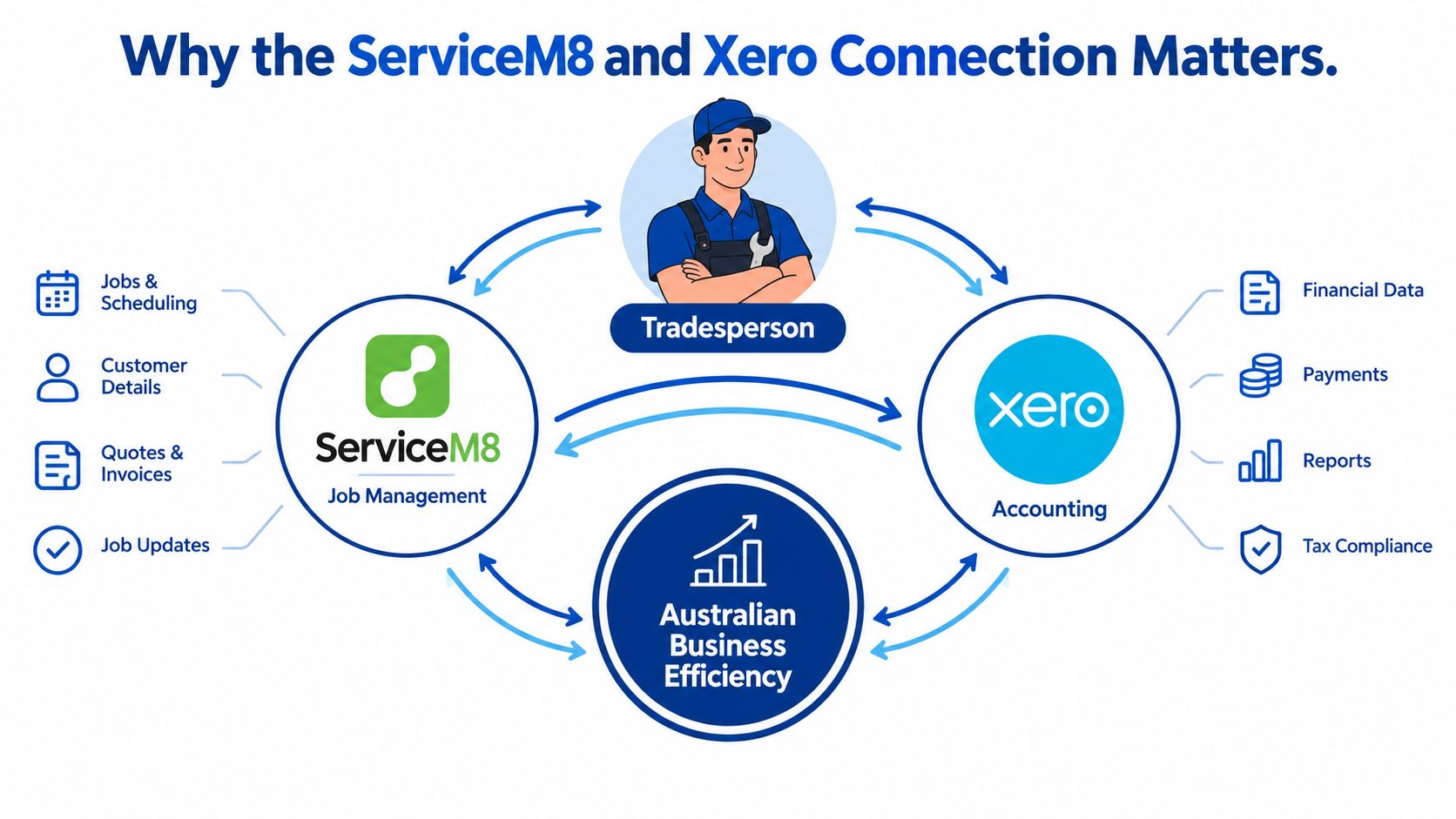
The connection has been established in Australia since 31 July 2015, giving it a useful historical baseline for businesses reviewing an older configuration or planning a migration, as recorded in the Australian Xero App Store listing for ServiceM8. It isn't just a link that sends invoice totals to an accounting file. ServiceM8 manages the customer enquiry, scheduling, quoting, job documentation, invoicing and payment workflow, while Xero receives and manages the associated financial records.
What the integration connects
The documented synchronisation scope includes invoices, contacts, items, payments, accounts, bank transactions, tax rates, tracking categories and bank transfers, according to the same ServiceM8 integration listing. Approved invoices created in ServiceM8 can be raised in Xero for reconciliation, while contacts and inventory items can synchronise in both directions.
That makes the integration operational infrastructure. A company reviewing its systems should treat the original connection date, existing mappings and historical data as evidence of how the business has worked, not as background trivia. Before changing anything, document the current account codes, tax settings, contact ownership and invoice approval process. A broader cloud computing consulting assessment can help when the integration sits inside a larger application or infrastructure review.
Practical rule: Treat ServiceM8 as the operational source for job completion and billing approval, and treat Xero as the accounting destination unless your documented design says otherwise.
How to Set Up the ServiceM8 Xero Integration Correctly
A connection can be technically successful while the accounting outcome is wrong. I use a controlled four-stage rollout because it separates access, configuration, validation and production testing.
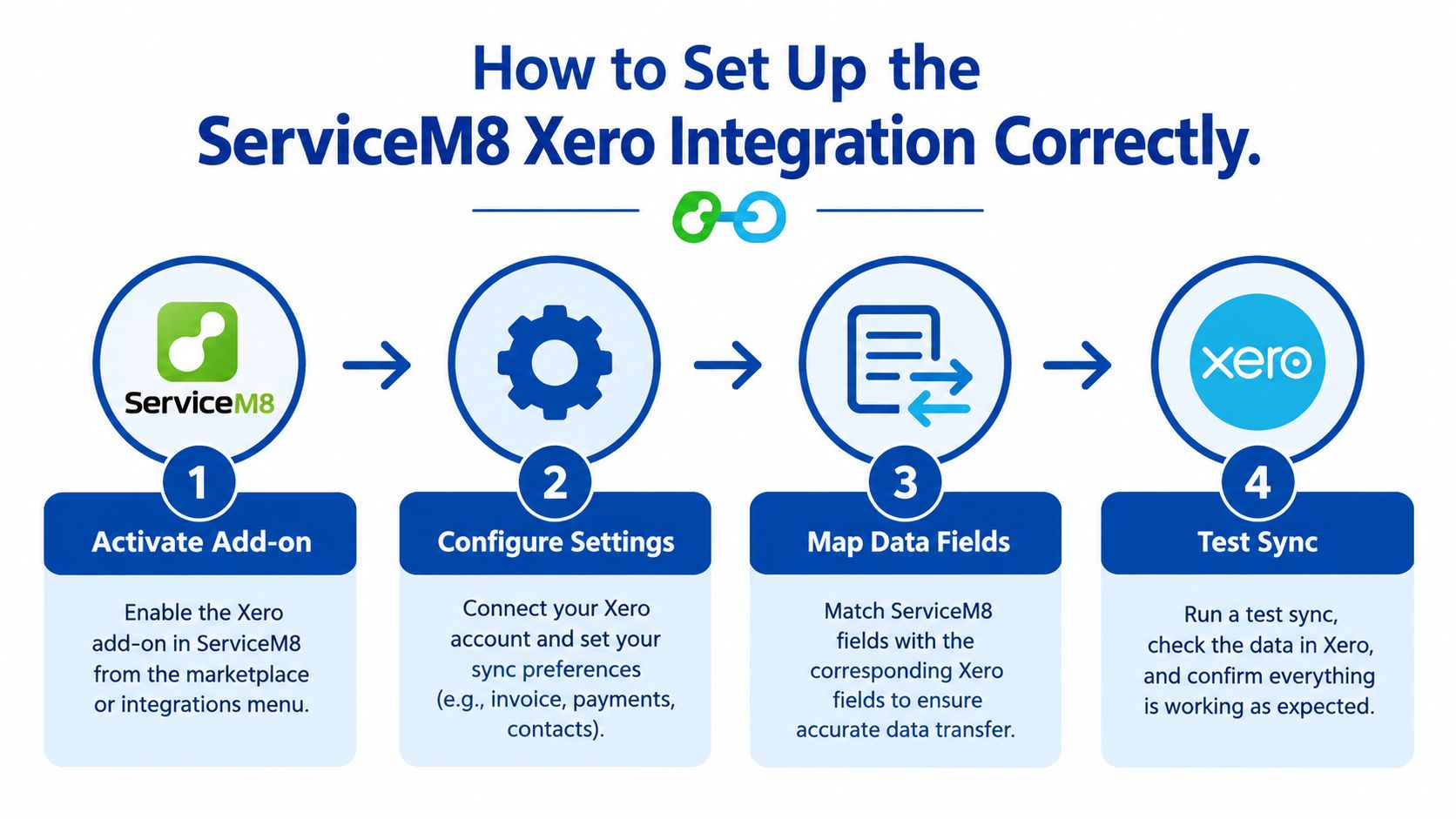
Stage one starts with the Xero organisation
Activate the ServiceM8 Xero add-on under Settings, then select the Xero organisation and authorise access. This selection deserves more attention than it usually receives. A director, bookkeeper or implementation consultant may have access to multiple Xero organisations, and choosing the wrong file can send operational invoices into the wrong accounting environment.
Record the organisation name before authorisation and have the finance owner confirm it. Don't rely on a familiar logo or browser tab. If the wrong organisation is selected, the remedy may involve disconnecting, reconnecting to the correct organisation and retrying synchronisation.
Stage two confirms initial population
After authorisation, existing Xero customers and inventory items populate ServiceM8 within the following minutes. The ServiceM8 Xero integration guidance also states that tax rates and income-account codes are imported automatically from Xero.
Before allowing staff to use those records, export a baseline containing:
- Customers: Record the number and identify likely duplicates.
- Inventory items: Check naming, descriptions and account associations.
- Tax rates: Confirm the Australian GST treatment expected by the finance team.
- Open invoices: Preserve a reference list for post-sync comparison.
Stage three validates mappings, not just access
Review tax settings, income-account mappings, contacts and inventory items. GST treatment deserves a specific sign-off because an incorrect configuration can flow into generated invoices and create reconciliation exceptions across otherwise valid jobs.
The finance owner should inspect representative labour, materials, call-out and mixed-service items. The operations owner should confirm that technicians can find the intended customers and items in ServiceM8. A green connection indicator doesn't prove that the resulting ledger entries are correct.
Stage four uses one low-risk test job
Create or select a low-risk job, complete it using the intended production workflow and approve the invoice. Then reconcile the invoice, payment, tax amount and ledger account in Xero. Only after that comparison passes should the business enable the workflow for all staff.
Implementation checkpoint: Keep the test job, its source data and its Xero result together as a reference record. It becomes the benchmark for troubleshooting after future changes.
Understanding Field Mapping and Synchronisation Direction
The most important design question isn't “does ServiceM8 connect to Xero?” It's “which system is allowed to create, update and approve each record?”
Invoices follow an approval-based export model. A draft invoice doesn't automatically become an accounting invoice because a technician completed the job. ServiceM8 sends it to Xero when a user marks it Approved from the online invoicing page or mobile app. If the total changes later in ServiceM8, the line items can re-synchronise and update the corresponding Xero invoice, as documented in the ServiceM8 explanation of Xero synchronisation.
Invoices created directly in Xero don't travel back into ServiceM8. That one-way rule has a practical consequence: teams shouldn't create job invoices independently in both systems and expect the records to converge. ServiceM8 should normally own job billing, approval and invoice creation, while Xero handles the financial record and reconciliation.
Synchronisation direction and update rules
| Entity type | Sync direction | Update condition |
|---|---|---|
| Invoices | ServiceM8 to Xero | Export occurs when the ServiceM8 invoice is marked Approved |
| Invoice line items | ServiceM8 to Xero | Changes affecting the total can update the corresponding Xero invoice |
| Customers | Bidirectional | Changes in either connected account can update the other |
| Inventory items | Bidirectional | Changes in either connected account can update the other |
| Invoices created in Xero | No return to ServiceM8 | They remain outside the ServiceM8 invoice workflow |
The connection wizard also asks the user to choose the Xero organisation and authorise access. That makes organisation selection an architectural control, not an administrative detail. If a user selects the wrong file, the business may need to re-integrate with the correct organisation before retrying synchronisation.
Design decision: Assign one owner to invoice approval and document whether Xero users may edit exported invoices. Uncontrolled editing makes later investigation harder because the operational and accounting records no longer share a clear source.
For businesses adding custom workflows around the native connection, custom web development services may be relevant where an internal application must manage approvals, exceptions or data preparation before an invoice crosses systems.
Payroll Timesheet Export and Award Compliance Risks
The most serious risk isn't always a bad invoice. In Australia, ServiceM8 can send staff shift times to Xero as employee timesheets. That takes operational data from a job-management system into payroll, where an incorrect employee match, break calculation or pay-category mapping can affect what a worker is paid and how the business meets its obligations.
The available general integration documentation confirms the timesheet capability but doesn't provide a complete governance model for approval controls, breaks, overtime, leave, pay categories, employee matching or corrections after export, as noted in the ServiceM8 connection guidance for Xero and other accounting platforms. Treating exported timesheets as reliable without verification is therefore unsafe.
A controlled payroll handover
A practical workflow for a multi-technician business should include these checkpoints:
- Lock the job: Confirm that the work record is complete before payroll data is considered final.
- Verify the technician: Check the employee identity against the person who performed the shift.
- Review shift times: Validate start, finish, breaks and any manually adjusted entries.
- Approve exceptions: Require a supervisor to resolve missing breaks, unusual hours, leave or disputed entries.
- Export to Xero: Send the approved timesheet data only after the operational review.
- Reconcile the pay run: Compare exported hours and employee allocations with the payroll result.
- Retain an audit trail: Keep the original job record, approval history and correction notes.
The controls need to reflect the workforce. A small owner-operated business may use a single review point, while a larger contractor with employees, subcontractors, variable rates or complex award conditions needs role separation and a documented exception process.
Where automation creates exposure
Automation removes re-keying, but it also makes errors repeatable. A wrong employee match can affect more than one shift. A pay category selected without review can turn a correct field record into an incorrect payroll input.
I recommend measuring the workflow by exception visibility, not by how few clicks it requires. Supervisors should be able to see unapproved shifts, changed times and failed exports before payroll is finalised. If the native integration can't provide that visibility, add a controlled review queue or consider middleware that records each handover event.
Payroll rule: A timesheet export is a proposed payroll input until a responsible person verifies it. The export itself is not evidence that the pay treatment is correct.
Alternative Integration Approaches and Architecture Options
The native connection is usually the right starting point for standard job invoicing, contacts, items and payments. It becomes less suitable when the business needs conditional routing, custom field transformations, additional approvals or coordination with systems outside ServiceM8 and Xero.
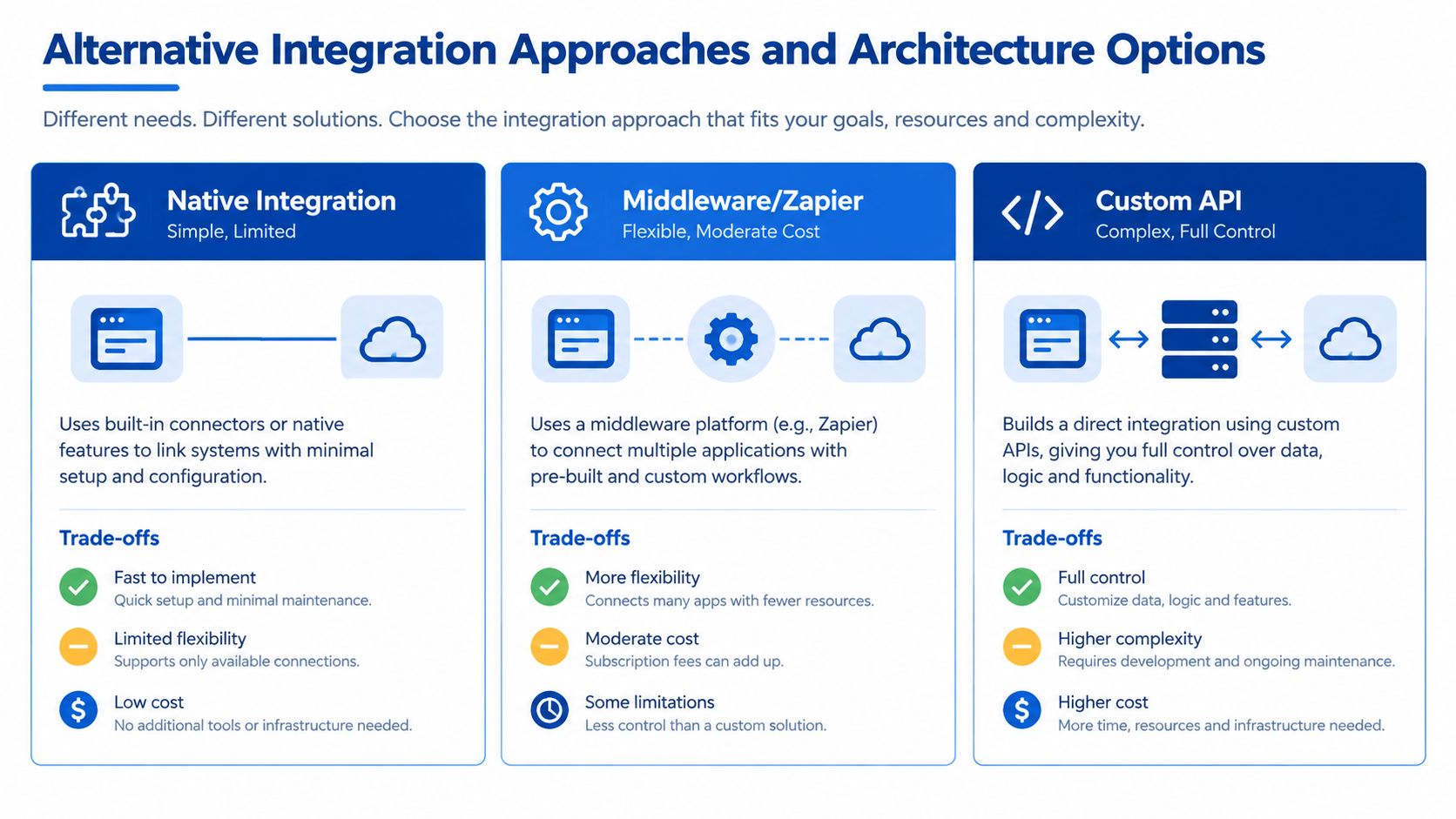
Native integration
Use the built-in ServiceM8 connection when the desired workflow closely matches its documented sync rules. It has the lowest architectural overhead and avoids maintaining a separate connector. The trade-off is limited control over transformations, exception routing and audit behaviour.
A native setup works well when ServiceM8 owns job billing and Xero receives approved invoices. It works less well when finance wants invoices originating in Xero to create or update operational jobs, because that direction isn't supported for invoices.
Middleware
A middleware platform such as Zapier or Make can add triggers and conditional steps. For example, a business might route a job for review when a particular service category is used, notify an administrator when an export fails or write an exception record to a separate operational register.
Middleware is useful for moderate complexity, but it introduces another platform, authentication credentials, task execution rules and failure states. Someone must own retries, duplicate prevention and changes to the ServiceM8 or Xero interfaces.
Custom API development
A custom connector is appropriate when the business needs full control over transformations, sequencing, audit trails or integration observability. A REST-based service can validate records before submission, retain correlation identifiers and send failed transactions to a review queue instead of leaving staff to discover them later.
The cost is ongoing engineering responsibility. The business must test changes, monitor failures, manage credentials and update the connector when either platform changes. Custom integration development is most defensible when the process is commercially important and native or middleware options can't enforce the required controls.
| Requirement | Native connection | Middleware | Custom API |
|---|---|---|---|
| Standard invoice export | Strong fit | Usually unnecessary | Excessive for simple workflows |
| Conditional routing | Limited | Suitable | Highly flexible |
| Complex transformations | Limited | Moderate | Strong |
| Observability and audit design | Basic | Depends on platform | Designed to requirements |
| Maintenance responsibility | Lower | Moderate | Highest |
Choose the simplest architecture that can enforce the business controls. Complexity is justified by a real workflow requirement, not by the appeal of building a more elaborate system.
Cost Considerations and Maintenance Implications
The native ServiceM8 Xero integration usually has the lowest implementation cost because the business is configuring an existing connection rather than commissioning a new application. That doesn't make it free in operational terms. Staff still need time for data clean-up, tax validation, test jobs, training and post-launch reconciliation.
Middleware adds subscription and configuration costs. The commercial impact depends on the number of workflows, execution volume and exception paths, none of which should be estimated from the connection screen alone. A workflow that handles only approved invoices is materially simpler than one that coordinates payroll review, customer updates, notifications and failure retries.
Custom development carries the largest initial investment and the broadest maintenance obligation. The build may include API access, field mapping, validation, logging, monitoring, retry logic, security controls and a handover package. Ongoing work can include platform-change testing, incident response and updates to business rules.
A practical total-cost comparison
| Approach | Initial effort | Ongoing burden | Suitable use |
|---|---|---|---|
| Native integration | Configuration, clean-up and testing | User governance and reconciliation | Standard invoicing and master-data workflows |
| Middleware | Workflow design and platform configuration | Subscription, monitoring and retry management | Conditional notifications and moderate transformations |
| Custom API | Discovery, development and quality assurance | Engineering, monitoring and change management | Critical, complex or highly controlled data flows |
Xero's Australian small-business information describes an ecosystem of more than 5 million customers worldwide and more than 1,000 integrations, and says 4.6 million subscribers globally trust Xero with Australian compliance features. It also reports that 93% of Australian customers surveyed agreed Xero helps them stay compliant, based on a May 2024 survey of 1,505 Australian small businesses, as stated on Xero's Australian small-business information page.
Those figures provide context for choosing Xero as a connected accounting platform, but they don't prove that every integration architecture will suit a particular business. The investment case should come from the workflow: fewer duplicate entries, faster reconciliation, clearer payroll controls and less manual investigation.
For a business comparing integration investment with a broader software build, custom application cost considerations provide a useful way to think about development, testing and maintenance as separate cost categories.
When to Engage a Specialist for Integration Support
DIY configuration is reasonable when one Xero organisation is involved, the tax structure is straightforward, the team has a clear invoice approver and the business can reconcile a test job before launch. Specialist support becomes sensible when the consequences of a configuration error exceed the time available to investigate it.
Seek help when the business operates across multiple Xero organisations, uses complex award conditions, relies on subcontractors, needs custom data transformations or has already found reconciliation discrepancies. A previous failed setup is particularly valuable evidence. It shows where assumptions, ownership or mapping rules broke down.
Warning signs that deserve investigation
- Wrong organisation: Invoices appear in an accounting file that wasn't intended for the ServiceM8 connection.
- Tax mismatch: ServiceM8 invoice treatment doesn't agree with the approved Xero tax configuration.
- Duplicate contacts: The same customer appears under multiple names or records.
- Stalled approvals: Completed jobs remain unapproved and don't reach Xero.
- Timesheet variance: Operational shift records differ from the hours prepared for payroll.
- Unclear ownership: Staff can change billing or payroll data without a documented approval step.
A specialist should begin with an audit, not an immediate rebuild. The review should examine the selected organisation, authorisation, account mappings, tax rates, master data, invoice direction, payment handling and timesheet governance. It should then test representative records and produce a documented handover that names owners, exception procedures and rollback decisions.

What a reliable engagement should deliver
Expect configuration findings, synchronisation evidence and practical operating procedures. The deliverables should explain which system owns each record, who approves invoices and timesheets, how failed exports are identified, how corrections are made and what gets reconciled before payroll or month end.
The right technical partner should also distinguish a native configuration issue from an architecture problem. Sometimes the answer is a cleaner ServiceM8 and Xero setup. Sometimes the business needs middleware, an internal review queue or a custom connector. Business IT consulting services can support that wider assessment when integration reliability depends on application design, data governance and cloud operations.
Final implementation test: Ask the consultant to demonstrate one complete path from job completion to approved invoice, Xero reconciliation and exception handling. A diagram alone isn't enough.
Continuum Solutions helps Australian businesses audit, configure and extend ServiceM8 and Xero workflows, including data mapping, custom integrations, exception handling and documented handover. Visit Continuum Solutions to discuss a controlled integration review before a tax, invoicing or payroll error becomes a larger operational problem.