
The popular advice is to buy the cheapest plan that promises updates and backups. I'd challenge that. Updates that are never tested, backups that have never been restored, and forms that no one checks after a release aren't operational controls. They're line items. Good WordPress support packages should be judged on measurable outcomes, including patch timing, restore evidence, accessibility checks and clear incident ownership.
That matters in Australia because the Australian Small Business and Family Enterprise Ombudsman submission reports that 4 in 5 surveyed small businesses had experienced a cyber incident and puts the average cybercrime cost at $56,600 per affected small business in 2024 to 2025. A support package won't remove that risk. It should reduce exposure, shorten recovery and give you evidence that the controls you paid for are working.
Table of Contents
- What a WordPress Support Package Includes by Tier
- What Australian Monthly Prices Actually Cover
- Backups That Restore Under Test
- How to Run a Monthly Update and Patch Cycle
- Accessibility Checks After Every Site Change
- Matching a Package to Your Site Risk
- Incident Response Terms and Your Next Step
What a WordPress Support Package Includes by Tier
A WordPress support package is a recurring service that keeps WordPress core, the theme, plugins, PHP and hosting components current, monitored and recoverable. It's not a bundle of content edits. If the definition stops at "we update plugins", you're buying labour, not a control framework.
Tier names vary, so compare scope, not labels.
| Tier | Core coverage | Monitoring and reporting | Security and incident scope |
|---|---|---|---|
| Basic care | Core, theme and plugin updates; scheduled backups | Uptime checks; no formal report | Patching only; incident work quoted separately |
| Professional | Staging tests before release; performance and compatibility checks | Monthly report with update compliance and uptime | Vulnerability triage, administrator-account review, MFA checks |
| Enterprise or NGO | Staging; accessibility regression tests; integration checks | Monthly governance report and accessibility defect log | Documented incident response, named escalation contacts, priority restoration |
The gap appears when a basic provider updates plugins directly on production. A plugin can pass in isolation, then break a donation form, checkout or membership renewal through a conflict with the theme or payment extension. You may not know until a user complains or revenue drops. For a membership organisation, the hosting model matters too, so read our guidance on AWS hosting for membership platforms before separating support from infrastructure decisions.
Plugin quantity isn't the only concern. Plugin quality, duplication and abandonment affect workload and risk. A useful starting point is the roundup of top agency plugins for WordPress, but the question is whether your provider will inventory, justify and remove unnecessary plugins rather than patch everything forever.
Judge a tier by its evidence, not its name. Ask what gets tested, what gets recorded and who acts when a release fails.
Before comparing quotes, answer three questions:
- Complexity: How many plugins, integrations and custom functions does the site run?
- Sensitivity: Does it collect personal details, donations, memberships or payments?
- Escalation: Who must be contacted within a few hours if the site fails?
Those answers determine whether basic care is proportionate or dangerously thin.
What Australian Monthly Prices Actually Cover
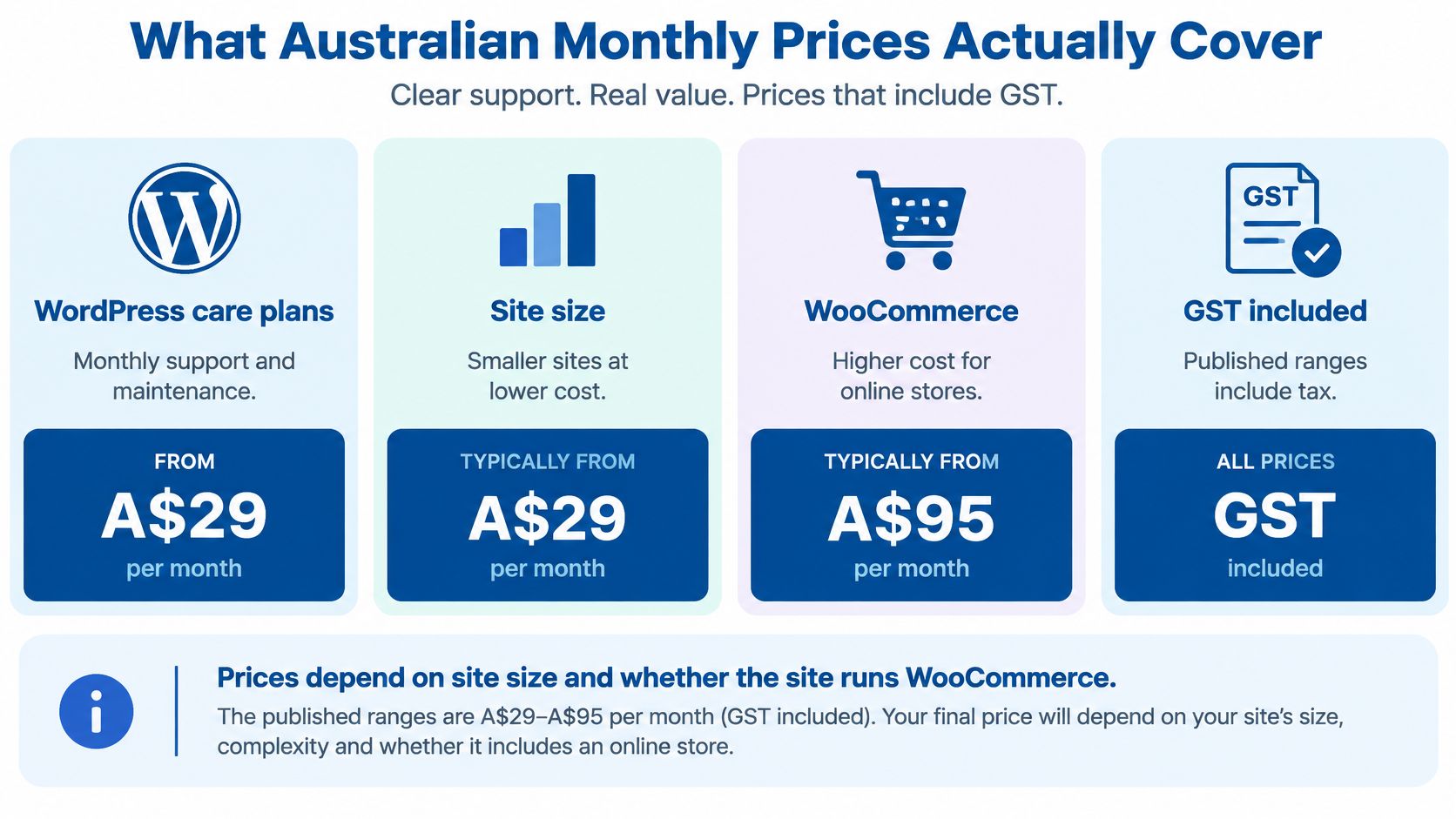
Published Australian prices cover a wide spread because providers aren't selling the same service. One fee may include only automated updates and a backup. Another may include staging, manual journey testing, reporting, vulnerability triage and restoration. Comparing the monthly number without separating those items produces a false bargain.
| Source and year | Stated range (AUD per month) | What the range reflects |
|---|---|---|
| Code In WordPress (2026) | A$29 to A$95, including GST | WordPress care plans; varies with site size and WooCommerce |
| Nirmal (2026) | About A$50 to A$300 for basic care; A$500 or more for full service | Basic WordPress care versus full-service support |
| Dev Story (2025) | A$100 to A$500 | WordPress maintenance retainers; varies with site size and features |
| Wolf IQ (2025) | A$100 to A$2,000 | Professional website maintenance; varies with complexity and support level |
| Studio Slate (2026) | A$90 to A$980 or more | Website maintenance retainers from ten agencies' published pricing |
How to Read the Spread
Say you're running a small WooCommerce store with a moderate plugin stack, payment testing and monthly reporting. That work belongs on a professional tier and will sit well above the price of a simple brochure site receiving scheduled updates and uptime checks. The difference isn't necessarily margin. It's staging time, test coverage, reporting discipline and the cost of having someone accountable when something breaks.
Separate hosting from support as well. Cloud infrastructure, licences, monitoring tools and support labour are different cost lines, even when they're bundled into one invoice. Our cloud computing consulting work starts by making those responsibilities visible, because bundled pricing often hides who owns the server, who patches PHP and who pays for emergency recovery.
Before accepting any quote, ask:
- Inclusions: Which exact tasks does the monthly fee cover?
- Exclusions: Is emergency work billed hourly, and at what approval threshold?
- Recovery: Is restoration after compromise included, capped or quoted separately?
I'd also ask for the report format. A useful report names completed updates, failed updates, backup status, restore-test results, uptime, security actions and outstanding risks. If a provider can't show a sample, the cheaper fee may buy silence until an incident forces a conversation.
Backups That Restore Under Test
Say a membership site receives a plugin update on Tuesday afternoon and the member table becomes corrupted. The support team restores the database to staging, tests logins and renewals, checks recent transactions, then promotes a clean restore to production. That sequence only works if the restore path has been rehearsed. A backup file sitting in hosting storage proves very little.
The Australian Cyber Security Centre mitigation guidance recommends regular backups of important data, software and configuration settings, stored disconnected from production and retained for at least three months. It also says restoration should be tested when the backup system is first implemented, annually, and whenever IT infrastructure changes.
Your package should name the backup scope precisely:
- Database: Posts, users, orders, memberships, settings and form entries.
- Files: Uploaded media, theme files and plugin configuration.
- Deployment settings: Server configuration, redirects, scheduled tasks and integration credentials handled through an approved secrets process.
Storage location matters. Backups that remain continuously accessible from production can be encrypted, corrupted or deleted during the same incident that damages the live site. A hosting snapshot may be one layer, but it isn't a recovery strategy without separation, retention rules and a timed restore test.
You can build a routine for data backups around frequency and retention, but WordPress adds another requirement. The restored site must be tested as an application, not merely opened on the home page. Check search, forms, login, checkout, email delivery and connected services. Monitoring should then confirm the restored environment stays healthy, which is why recovery planning belongs with enterprise application monitoring and debugging, not in a hosting footnote.
Ask every provider three direct questions. Where are copies stored? Who can delete them? When was the last restore test, and how long did it take?
Record the achieved restore time against your target. An untimed restore tells management nothing about outage duration, lost transactions or the point at which you'll need to reconcile data manually.
How to Run a Monthly Update and Patch Cycle
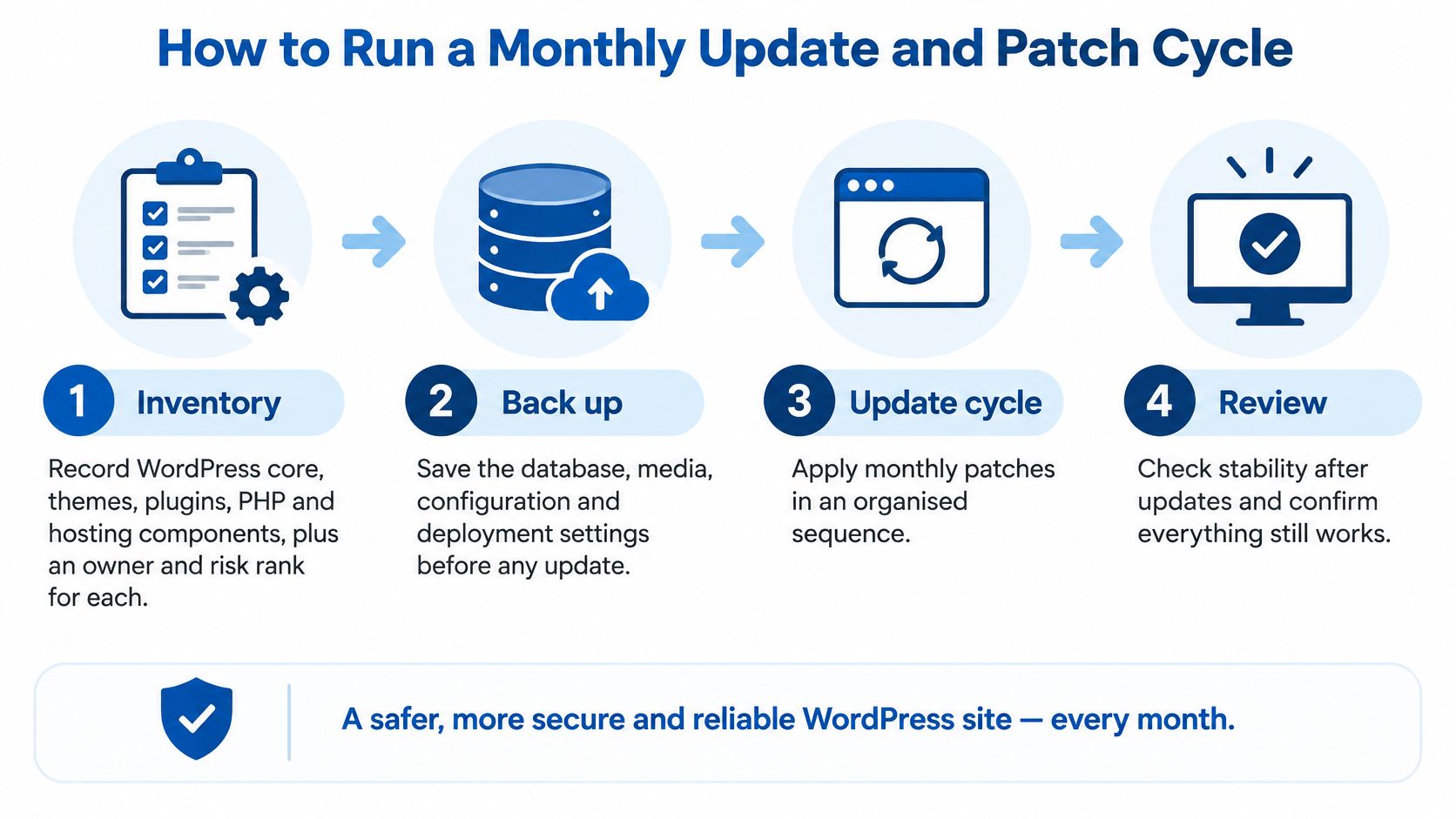
A patch cycle is a controlled release process, not a reminder to click update once a month. The Australian Cyber Security Centre patching guidance recommends applying patches to online services within two weeks, or within 48 hours when a vendor classifies the vulnerability as critical or working exploits exist.
The Seven-Step Cycle I Recommend
Inventory every component. Record WordPress core, themes, plugins, PHP, web server software, database and key integrations. Assign an owner and risk rank to each item so internet-facing and payment-related components get priority.
Back up before changing anything. Capture the database, media, configuration and deployment settings. This gives you a defined rollback point if an update changes data structures or breaks an integration.
Update staging first. Apply the same versions you'll deploy to production. Staging exposes conflicts that don't appear when you test a plugin by itself.
Run smoke tests on critical journeys. Test login, search, forms, donations, checkout, account pages and confirmation emails. A home page loading successfully isn't acceptance testing.
Deploy in a low-traffic window. Promote the tested release, then repeat the same smoke tests on production. Never assume staging and production behave identically, especially where caching, payment settings or webhooks differ.
Monitor for the next day. Watch uptime, application errors, failed transactions and unusual authentication activity. If a test fails, roll back from the pre-release backup instead of debugging indefinitely on the live site.
Record the result. Log versions, timing, test outcomes, faults and any component still outside its patch window. Your monthly report should show exceptions clearly, not bury them under a generic "all updates complete" statement.
The same discipline applies when WordPress sits on cloud infrastructure. Our overview of common AWS mistakes SMEs make covers the wider operational pattern, including unclear ownership and changes made without a recovery path.
Where Cycles Commonly Fail
Teams skip staging for "plugin-only" updates, even though plugins are often the components most likely to alter forms, checkout behaviour or database tables. They keep abandoned plugins because removing them requires replacement work. They also schedule releases during a campaign launch, donation appeal or sale, when the business has the least tolerance for defects.
Practical rule: If an update can affect money, identity or personal data, it goes through staging, journey testing and a documented rollback path.
A healthy month ends with every component inside its patch window, critical issues handled inside their shorter deadline and no failed update left unreported. If a component can't be patched safely, record the compensating control, owner and decision date.
Accessibility Checks After Every Site Change
A release can improve security while degrading keyboard access, form error handling or screen-reader behaviour. That is the uncomfortable gap in many WordPress support packages: updates get scheduled and logged, yet accessibility regression testing rarely appears in the deliverables. I'd treat it as a measured control, not an optional extra.
The Australian Human Rights Commission digital accessibility guidance identifies WCAG 2.2 as the latest WCAG version and recommends at least Level AA. It also explains that conformance applies to all pages in scope and requires reliance on accessibility-supported technologies. Those obligations do not pause between audits. Every site change is a chance to break them.
Automated scanners are helpful, but they cover only part of the problem. A scanner can flag missing alternative text or low contrast. It cannot reliably judge whether a person can complete a donation using only a keyboard, understand an error after a failed payment, or use assistive technology to renew a membership. Large-scale audits of public websites routinely find detectable WCAG failures on a large share of audited home pages, and those counts only reflect what a tool can catch.
Checks Your Provider Should Run
After core, theme, plugin and significant content changes, test:
- Navigation: Keyboard order, visible focus and skip links.
- Forms: Labels, instructions, error identification and error recovery.
- Structure: Headings, landmarks, link purpose and page titles.
- Visual presentation: Colour contrast, text resizing and responsive behaviour.
- Media and documents: Alternative text, captions where required and accessible PDFs.
- Critical journeys: Donation, checkout, membership login, event registration and contact forms.
A form plugin update that changes an error message from text to colour alone shows why the manual pass matters. Sighted mouse users may still complete the form. Some screen-reader users receive no useful explanation, and a scanner may never flag the practical failure.
Record each defect against the relevant WCAG success criterion, with remediation priority, owner, approval, fix status and retest result. Define which templates and journeys are covered after every release and which receive a deeper periodic audit. Before signing, ask the provider to show that record from a real engagement: if the only evidence is a green "scan passed" badge, the control does not exist. For NGOs, public-facing services and enterprises, that record doubles as governance evidence.
Matching a Package to Your Site Risk
Choose a tier according to what the site does, not how many pages it has. A small site that collects donations or member data carries more operational risk than a larger brochure site with static content and no authenticated users.
| Site situation | Controls to prioritise | Starting tier | Risk if skipped |
|---|---|---|---|
| Brochure site, no forms or logins | Core updates, tested backups, uptime checks | Basic care | Missed patches on a forgotten plugin |
| Donation, membership or event registration | Staging, admin MFA, restore tests, accessibility checks on forms | Professional | Lost donations or registrations during downtime |
| WooCommerce or subscription store | Payment-flow tests, staging, fast incident response | Professional or Enterprise | Failed checkouts and orders that cannot be recovered |
| Site connected to CRM, ERP or customer data | Integration monitoring, access governance, documented incident response | Enterprise or NGO | A compromise spreading into connected systems |
A brochure site can sit on basic care if updates are controlled, unused plugins are removed and at least one restore has been proven. I wouldn't accept a basic plan that treats backup success as a green icon in a plugin dashboard. You still need to know who receives an uptime alert and who authorises emergency work.
Donation, membership and registration sites need more because failure directly interrupts income, participation or service access. Form testing must include validation messages, confirmation emails, payment receipts and the transfer of records into any connected CRM. A page can appear healthy while sign-ups aren't reaching the database.
WooCommerce and subscription sites add transaction risk. Test coupons, tax, shipping, payment capture, refunds where practical, renewal emails and webhook delivery. A failed checkout isn't just downtime. It can create duplicate payments, incomplete orders and hours of manual reconciliation.
Integration raises the ceiling again. If WordPress exchanges data with Salesforce, HubSpot, an ERP or a customer database, support must cover API credentials, webhook failures, queue errors and least-privilege access. This is also where hastily built custom code becomes expensive to support, as our article on why a vibe coded app is not production ready explains.
The common mistake is buying the cheapest plan for a site that takes money or personal data. The saving looks neat in a budget. It disappears during the first outage, when restoration, forensic work and integration checks are all quoted as extras.
Incident Response Terms and Your Next Step
"Updates included" isn't resilience. An update can fail, a plugin can expose an integration, and a backup can turn out to be incomplete. Your agreement needs to say who responds, how quickly, what they can do without waiting for approval and which work costs extra.
The Australian Cyber Security Centre denial-of-service guidance says organisations should maintain an incident-response plan with defined roles, responsibilities, notification processes and recovery steps, test it regularly, and exercise denial-of-service planning at least annually. It also supports isolating infected systems and restoring from a known-good backup or rebuilding where that's the reliable way to remove malicious code.
Put Severity and Authority in Writing
Define severity in business terms:
- Low: One non-critical page is broken, with core journeys unaffected.
- Medium: A form, login, donation path or checkout is degraded.
- High: The site is unavailable, transactions are failing or compromise is suspected.
Attach a response target to each level. Then name the escalation contacts on both sides and record who can approve containment actions, including taking the site offline, disabling a plugin, revoking credentials, blocking traffic or restoring a prior version. Good agreement drafting borrows the same discipline you'd expect from a RedirHub service level agreement, where service commitments are explicit rather than implied by friendly sales language.
Continuum Solutions includes on-call support within its cloud services, offers technical support and maintenance as part of its service range, and is a Shopify Plus Partner, AWS Partner, Azure Partner and WP Engine Partner. Those facts matter less than the operating terms behind them. Any provider, including us, should be able to show the escalation path before you sign.
Confirm these points in the contract:
- After-hours cover: Who answers, through which channel, and within what target?
- Containment: Can the provider isolate the site and revoke compromised access immediately?
- Restoration: Is recovery included, capped or charged separately?
- Forensics: Who preserves logs and evidence, and who investigates cause?
- Integrations: How are CRM, payment, email, DNS and hosting services checked after recovery?
- Reporting: Will you receive a post-incident report with timeline, impact, root cause and preventive actions?
- Restore evidence: When was the last restore test, and how long did recovery take?
Don't accept "priority support" as a response commitment. Priority means nothing until severity, acknowledgement time, escalation and restoration authority are written down.
Audit Before You Buy
Run a short self-audit first. Count active plugins and themes. Record the last successful update, the last restore test and the date it was timed. List administrator accounts and confirm which ones use MFA. Check when critical forms were last tested for accessibility. Identify every integration that receives personal, membership or payment data.
Those answers let you select a tier based on exposure rather than habit. They also reveal whether you need remediation before recurring support begins. A provider shouldn't inherit abandoned plugins, shared administrator accounts or untested backups and then describe the resulting risk as included support.
I'd start with a scoped review of the site, hosting, integrations and recovery evidence, then price the package against that risk. You'll spend less time debating tier names and more time fixing the controls that determine whether the site stays available, accessible and recoverable.
Continuum Solutions provides WordPress technical support and maintenance alongside AWS consulting, managed cloud services and on-call support, so your package can cover the application, hosting and integrations as one operating responsibility. Visit Continuum Solutions to request a scoped review of your current WordPress risk, restore evidence and support requirements before you renew or sign a new package.