
A CTO staring at a half-full data centre and a rising support bill usually isn't asking whether the business should “do cloud”. The question is whether AWS cloud migration will remove operational drag without creating a bigger mess in six months, because that's where many programmes go wrong. The best outcomes come from treating migration as a business and operating model change, not just a server move, and that means deciding early what should move, what should stay, and what needs to be rebuilt.
For Australian organisations, that decision is rarely simple. Legacy platforms still carry customer traffic, compliance obligations, and integrations that nobody wants to touch until they break. A sensible migration plan makes those trade-offs visible, gives finance a way to track cost, and gives operations a way to control risk.
If you're evaluating whether AWS is the right landing zone, the practical question is not “can we migrate everything?” It's whether the parts you move will be more reliable, easier to scale, and simpler to govern than what you run today. For many teams, that answer depends on region choice, data residency, hybrid constraints, and the discipline to phase the work properly. Cloud computing consulting for Australian teams is often the fastest way to separate those decisions from the noise.
Table of Contents
- Introduction to AWS Cloud Migration for Decision Makers
- Why Australian Businesses Are Migrating to AWS Now
- Understanding Migration Patterns and When to Use Each
- Your Phased AWS Migration Roadmap From Assess to Optimise
- Tooling Architecture and AWS Services That Reduce Risk
- Cost Governance Security and Common Mistakes to Avoid
- Migration Checklist Timeline and How to Measure Success
Introduction to AWS Cloud Migration for Decision Makers
A migration programme usually starts with a familiar conversation. The platform still works, but the hardware is ageing, the vendor support window is getting tighter, and every change feels riskier than it should. Operations wants stability, finance wants predictability, and the CTO is stuck between a system that can't stay as it is forever and a board that doesn't want a speculative rewrite.
AWS cloud migration means more than shifting servers into someone else's data centre. In practice, it involves deciding which applications move, how much they change on the way, how data is handled, and what the target operating model looks like once the cutover is done. For many Australian businesses, that includes dealing with hybrid architectures, regulated workloads, and systems that must keep running while the migration happens.
The strongest programmes I've seen are clear about the end state. They don't just move workloads, they improve reliability, reduce the friction of scaling, and make spend easier to explain. That matters because a move to AWS should create more control, not less, especially when the business depends on CRM, analytics, mobile apps, or customer portals that can't afford flaky performance.
A useful way to judge fit is to ask three questions. What are we trying to improve, what can't move yet, and how will we know the migration was worth it? If those answers aren't explicit, the project tends to drift into a technical exercise with no commercial finish line.
Practical rule: if you can't describe the target operating model in one paragraph, the migration design isn't finished yet.
Why Australian Businesses Are Migrating to AWS Now
Australian buyers are moving because the old model is getting harder to defend. Infrastructure refreshes are expensive, aging platforms are harder to secure, and fragmented systems make it difficult to understand what's running where. At the same time, cloud adoption is no longer a fringe choice in government. The Digital Transformation Agency said more than 140 Commonwealth, state, and territory agencies were already using AWS in January 2025, and the Australian Government also announced a strategic AWS partnership in July 2024 worth at least AU$2 billion over 10 years to build a Top Secret cloud capability for government use. DTA AWS arrangement announcement
That public-sector direction matters because it signals where governance expectations are heading. In Australia, migration isn't just about speed. It's about compliance, repeatability, and proving that a workload belongs in cloud before it gets there. The Australian Government's AWS arrangement also gives agencies access to more than 165 AWS services, which reinforces the point that cloud adoption is now tied to managed services, observability, and controlled change rather than one big cutover. Australian government and AWS arrangement overview
What usually triggers the move
The most common trigger is not innovation, it's pressure. Teams are facing end-of-life infrastructure, brittle integrations, or patching overhead that keeps consuming time. Others migrate because they need better resilience for customer-facing systems, or because they've outgrown a platform that was fine when the business was smaller.
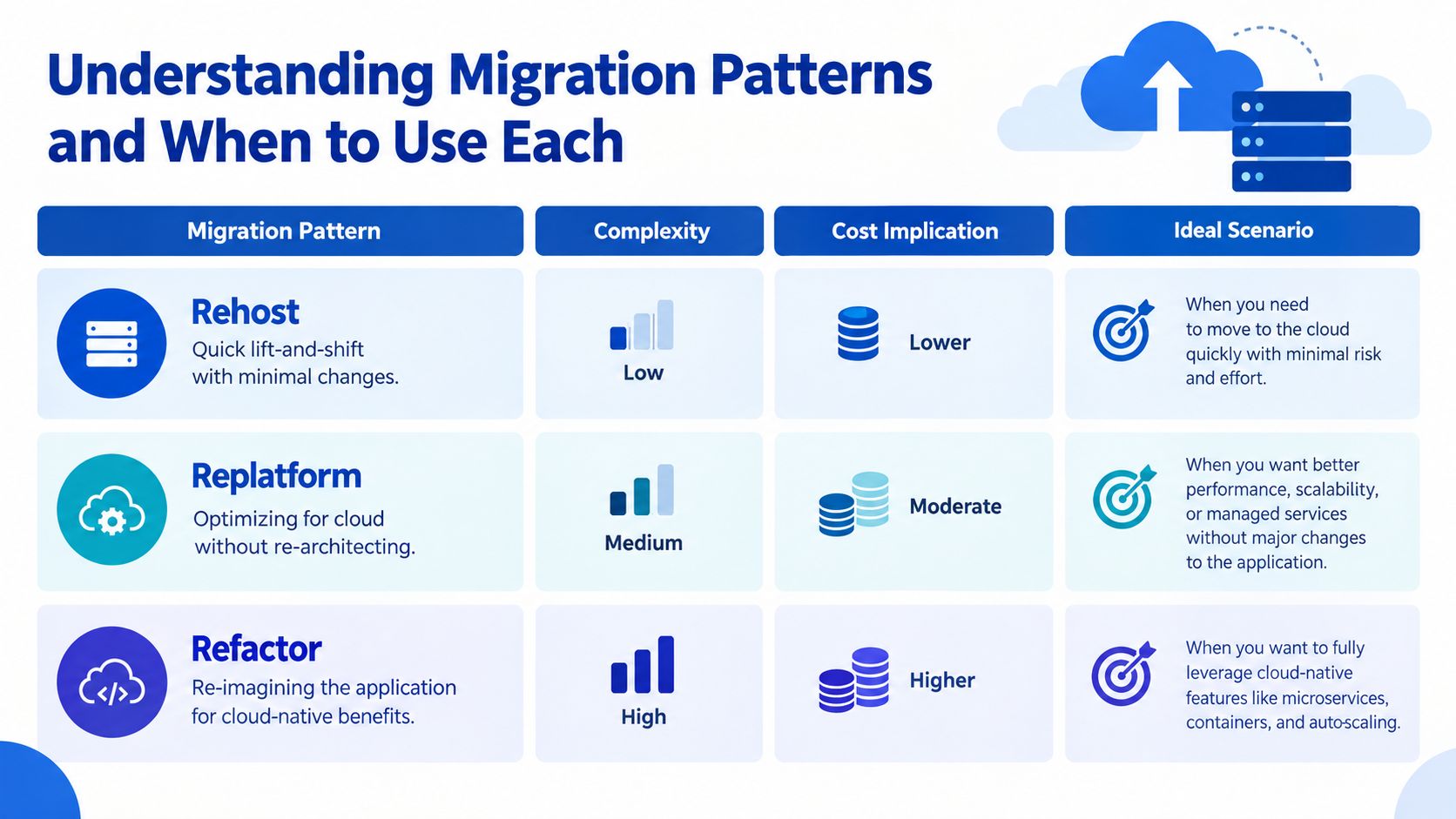
A lot of leaders assume migration always means “lift and shift”. It doesn't. Rehosting is the quickest option, replatforming introduces cloud-native benefits without a full rebuild, and refactoring is the bigger change reserved for applications that justify it. If you're running a membership platform, for example, the right answer may be to modernise only the parts that create bottlenecks, not everything at once. AWS hosting for membership platforms
Understanding Migration Patterns and When to Use Each
The fastest way to derail an AWS programme is to force every workload through the same migration pattern. Mature portfolios usually need a mix of rehost, replatform, and refactor, with some systems retained or replaced outside AWS. That mix is normal in Australia, where data residency, procurement rules, and legacy dependencies often narrow the options.
Rehost for speed, not for perfection
Rehost suits workloads that need to leave infrastructure quickly and already behave predictably. It fits older but stable systems, and it is often the right first move when the risk of staying put is higher than the risk of change. The trade-off is clear. If you stop at rehost, you can carry old inefficiencies into cloud.
Replatform when the platform is the problem
Replatform sits in the middle. The application shape stays broadly intact, but managed services replace parts of the stack where they reduce operational load. That makes sense when the current platform is sound, yet too expensive or too fragile to keep running directly. I would use this pattern when maintenance overhead is the issue, not business logic.
Refactor when the application itself is holding growth back
Refactor is the most demanding option and the one with the highest governance burden. It suits workloads that need cloud-native architecture to scale, integrate, or recover properly. If the application sits close to revenue or operational efficiency, the extra effort can be justified. If it does not, refactoring can become a long and expensive detour.
| Pattern | Best For | Effort and Cost | Risk and Trade-off |
|---|---|---|---|
| Rehost | Fast relocation of stable workloads | Lower effort, lower upfront change | Keeps legacy design and may delay savings |
| Replatform | Operational simplification without a rewrite | Moderate effort and cost | Requires careful service selection and testing |
| Refactor | Strategic applications that need modern architecture | Highest effort and cost | Longer timelines, more change, greater dependency on skills |
Australian decisions also need a hybrid view. Some workloads can stay on-premises for sovereignty or commercial reasons, while others move to AWS in stages. Recent ANZ research says 93% of Australian enterprises describe their cloud strategy as hybrid, while 88% already use cloud-native technologies outside public cloud. Hybrid cloud in ANZ research summary
For smaller estates, the starting point may be simpler. If you are migrating from shared hosting to AWS, rehost or replatform is usually the cleaner first step because the business can move without taking on avoidable rebuild work.
Keep the migration pattern tied to business value, not team preference. Choosing the wrong pattern early usually costs more than starting slower with the right one.
Your Phased AWS Migration Roadmap From Assess to Optimise
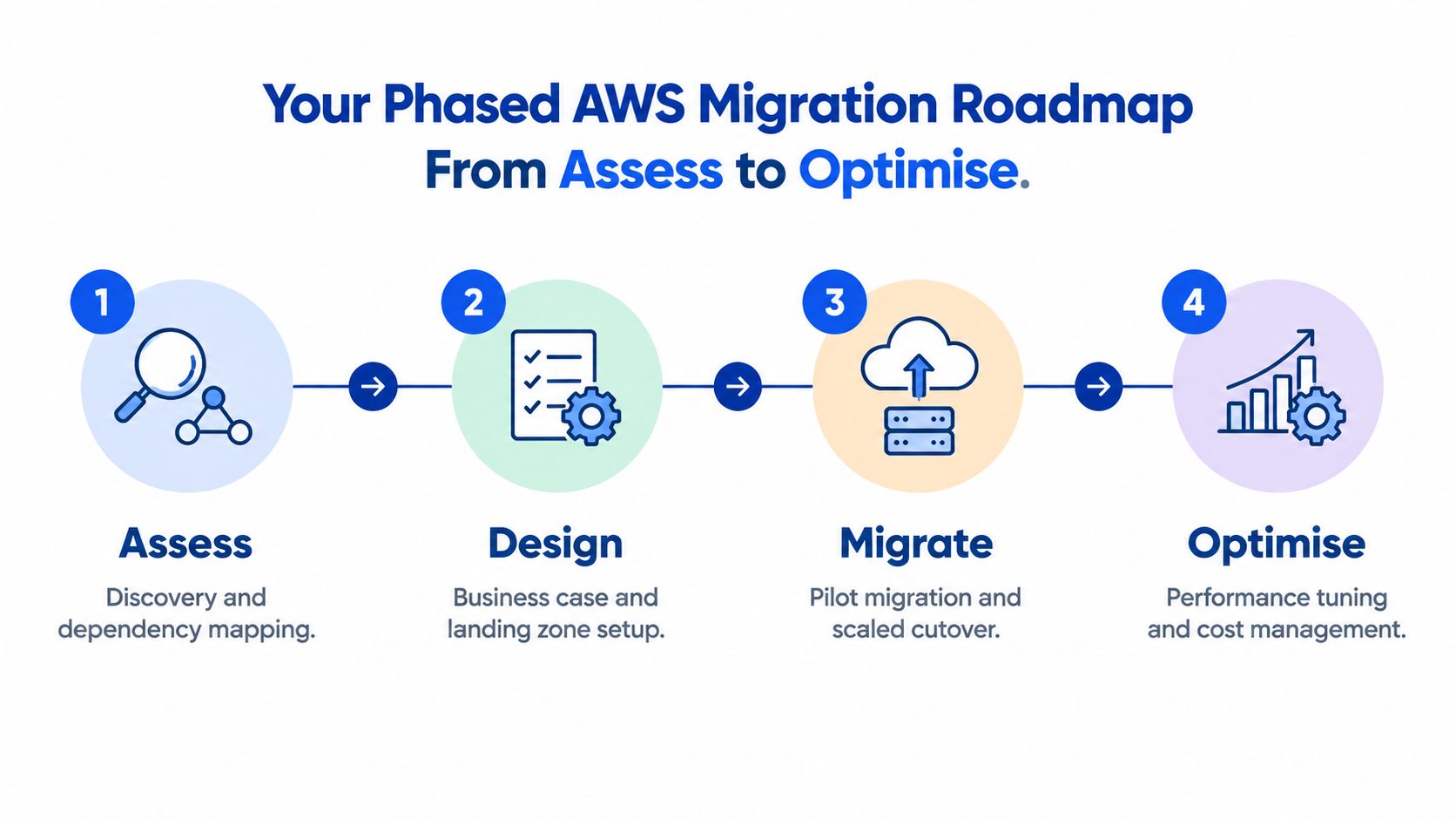
A workable migration roadmap looks boring on paper, and that's a good sign. The work should be sequenced so the business learns before it commits, validates before it scales, and optimises after it stabilises. That approach is especially important in Australia, where compliance and operational continuity matter as much as technical progress.
Assess and design first
Start with discovery, dependency mapping, and a business case that ties each workload to an outcome. That means knowing which systems talk to each other, which databases are shared, and which controls must stay in place. The design phase then sets up the landing zone, identity model, and logging structure so the migration doesn't create a governance gap on day one.
Migrate in waves, not all at once
Pilot a low-risk workload before touching the more sensitive ones. Then move the estate in waves so each release improves your understanding of cutover timing, testing, and rollback. Many teams discover this process reveals whether their documentation is accurate or just optimistic.
Optimise after cutover
The first week after go-live is not the finish line. It's where you validate performance, tune cost settings, review alerting, and confirm that the new environment can be operated by the team that owns it. Cloud migration services for phased delivery often make the difference between a one-off move and a stable operating model.
The roadmap also affects budget. Australian guidance commonly distinguishes between a small move and a full enterprise programme. One local published guide places a basic lift-and-shift at AUD 30,000 to 70,000 over 6 to 12 weeks, while an enterprise programme can start at AUD 450,000+ and run beyond 12 months. Australian cloud migration cost guide A separate pricing guide frames smaller migrations at AUD 70,000 to 200,000, mid-market programmes at AUD 200,000 to 350,000, and large regulated programmes at AUD 350,000 to 500,000+ depending on scope and compliance effort. Australian pricing guide
Tooling Architecture and AWS Services That Reduce Risk
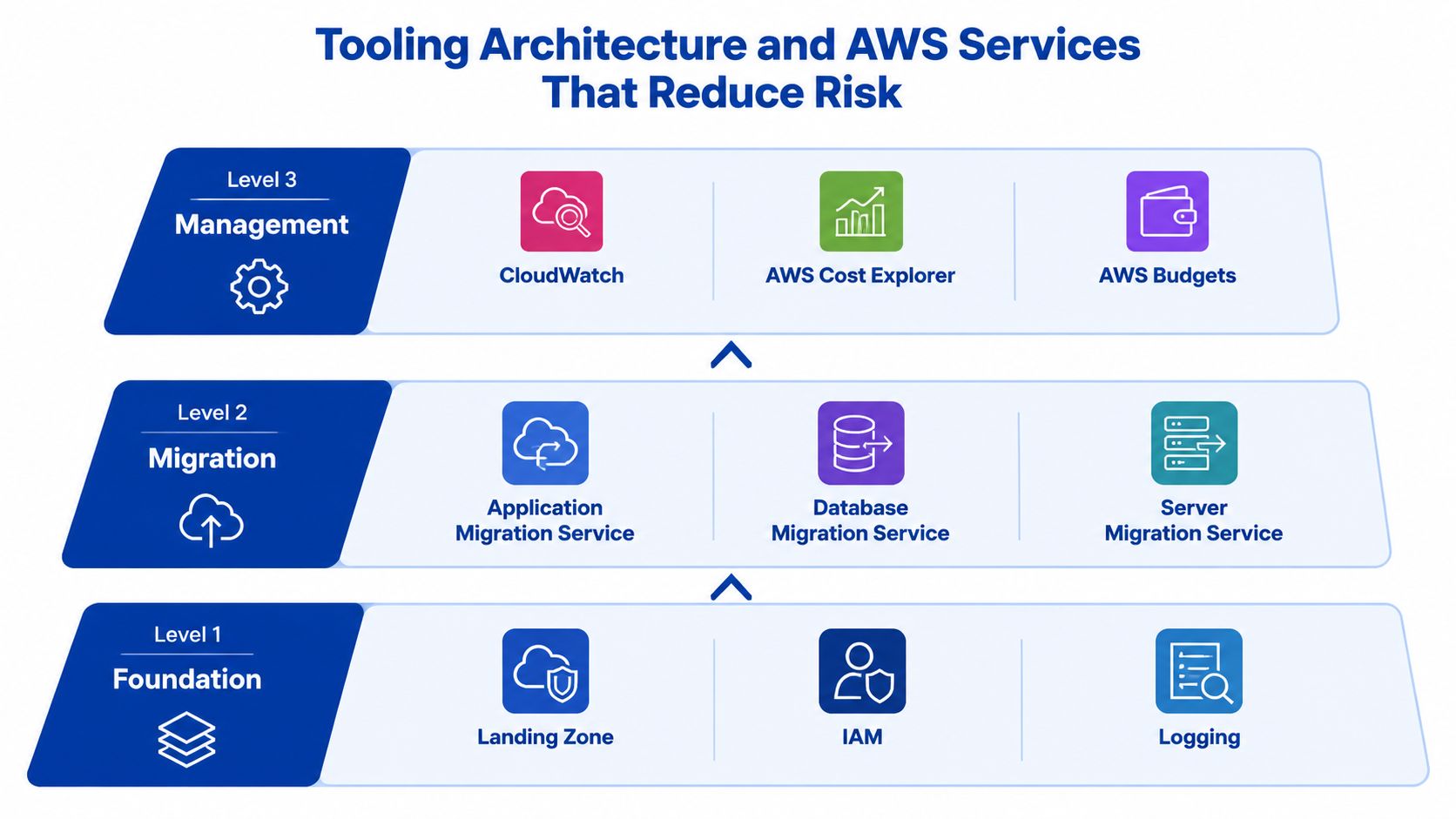
A safe AWS migration starts with the landing zone, not the workload. Identity separation, logging, and account structure give you a controlled base to migrate into, and they make it easier to show who changed what and when. That matters in regulated environments because governance problems usually start with weak foundations, not with the migration tools themselves.
Foundation services do the heavy lifting
A good foundation usually includes a landing zone, IAM, and centralised logging. Those controls do not speed migration on their own, but they reduce the risk of messy access, lost audit trails, and uncontrolled sprawl. They also make later cost reviews more credible because workload ownership is clearer.
Migration tooling should match the workload
For application relocation, tools such as Application Migration Service and Database Migration Service are practical starting points. They help teams move servers and data with less manual effort, but they still need a well-scoped target design and tested cutover steps. For some workloads, EC2 is the right landing zone. For others, choosing the right hosting platform for your application means ECS, Lambda, or managed database services, because they remove more operating work.
The tool is not the strategy. The strategy is the set of decisions that tells you why that tool fits this workload and not the next one.
Region choice affects performance and sovereignty
For Australian user-facing systems, Sydney, ap-southeast-2 is usually the right starting point because local latency is materially better than sending traffic overseas. Benchmark data shows Sydney-hosted endpoints sit in the low-millisecond range locally, while Australia-to-overseas paths commonly jump into the tens or hundreds of milliseconds, and same-region transfers are significantly faster than cross-region transfers because traffic stays on the regional backbone. ThousandEyes cloud performance benchmark
That also links directly to data sovereignty. AWS states it stores and processes customer content only in the AWS Region(s) the customer selects, and the customer stays in control of where content is stored or moved unless they choose to replicate it elsewhere. Australian cloud sovereignty note
Observability and integrations should be designed in
If the workload depends on Salesforce, HubSpot, or internal APIs, build those integrations into the target design before you migrate. Add monitoring from day one as well, whether that is Sentry, New Relic, or native AWS telemetry, because a migration that cannot be measured is a migration you cannot safely optimise. I have seen more cost waste come from missing observability than from the initial architecture choice.
Cost Governance Security and Common Mistakes to Avoid
Most migration failures do not happen at cutover. They show up after go-live, when the business learns the new environment is running larger than expected, more open than intended, or harder to support than the old one. In Australia, that pressure is sharper because teams are often constrained, and cloud spend has to be managed as a real operating discipline, not a rough estimate.
AWS's Australian public-sector guidance calls out workforce constraints, on-call readiness, and cloud-finance practices after migration, which matches what I see in commercial projects. AWS public-sector operations guidance The practical lesson is simple, migration success depends on how well the business can run the platform afterwards, not just on whether the workload moved.
What usually drives bill shock
Consumption pricing can work well, but only if the workload is sized correctly and watched continuously. Oversized instances, forgotten test environments, and unmanaged data transfer are the usual culprits. Tagging, budget thresholds, and regular cost reviews need named owners, not just dashboards that no one checks.
Security needs the same discipline. Australian public-sector workloads still need to line up with local security expectations such as ISM and Essential 8, and identity separation plus centralised logging are needed in regulated environments. If those controls are patched in after the migration, the business carries the risk longer than it should.
The mistakes I see most often
- Skipping dependency mapping: Teams move an application without knowing what it talks to, then spend the next month chasing failures. Map the dependencies first, including databases, scheduled jobs, and third-party integrations.
- Treating change management as optional: Staff need time to absorb new support processes, alerting, and ownership lines. If they are not trained, the cloud environment becomes everyone's problem and no one's responsibility.
- Ignoring on-call readiness: A platform that goes live without clear incident ownership will expose gaps quickly. Test handover, escalation, and runbooks before the main cutover.
- Assuming security will be identical after migration: It will not be. Controls need to be reviewed in the target environment, not copied across blindly.
- Overlooking cost ownership: If no one owns the monthly review, spend drifts. Put a named owner against each workload and review it regularly.
Large migrations tend to work when migration, operations, and cost control are treated as linked responsibilities. Commonwealth Bank completed a major AWS migration in 2025 after starting in July 2024, shifting more than 61,000 data pipelines and moving 100% of its data to the cloud. Commonwealth Bank AWS migration That scale only holds up when governance stays in place after the move, especially where compliance, support ownership, and spend control all sit on the same table.
Migration Checklist Timeline and How to Measure Success
A migration is successful when the business can operate the new environment with confidence and explain its cost. That sounds obvious, but it forces discipline around what to check before, during, and after the move. It also keeps the programme grounded in outcomes instead of motion.
Practical checklist for the next move
- Readiness review. Confirm workload ownership, dependencies, security requirements, and which systems must remain outside cloud for now.
- Baseline capture. Record current latency, uptime, incident frequency, and monthly operating cost so the target can be measured accurately.
- Landing zone setup. Put in place identity separation, logging, network boundaries, and tag standards before the first workload lands.
- Pilot migration. Move one contained workload first and validate cutover, rollback, and support processes.
- Wave migration. Group similar applications together so testing and operational handover stay manageable.
- Validation and handover. Confirm data integrity, user access, alerting, and support ownership before declaring success.
- Optimisation review. Tune rightsizing, alerts, backups, and cost controls after go-live, not months later.
What success should look like
Success isn't just “it's in AWS now”. It's clearer cost per workload, a stable latency baseline, fewer production surprises, and faster decision-making about scaling or fixing issues. For user-facing systems in Australia, Sydney should usually be the first performance benchmark, with a secondary region used for resilience rather than primary traffic. As covered earlier, that reduces avoidable network delay and keeps the user experience more consistent.
A short example makes the point. A membership platform that moved from shared hosting to AWS can keep the same front-end shape, but the key win comes when the team can see which release caused the spike, which integration failed, and which environment is costing too much. That visibility is what lets a CTO defend the migration in a budget meeting.
If your programme needs structure, sequencing, and post-migration governance, a partner earns its keep. Continuum Solutions delivers phased AWS migration planning, delivery, and day-two support for teams that need the migration done without losing control of the platform.
If you're planning an AWS move and want a practical assessment of what should migrate, what should stay, and how to control cost after cutover, talk to Continuum Solutions. Their team can help with phased migration planning, cloud architecture, integrations, and managed support, and you can start by visiting Continuum Solutions.