
Your website hasn’t failed yet. It’s just started showing the warning signs.
Pages take longer to load when traffic picks up. Admin tasks feel sluggish. Plugins time out during updates. A campaign goes live and the site becomes unreliable at the exact moment the business needs it most. On a shared hosting plan, that usually means you’ve hit the practical ceiling of a platform built for low-risk, low-complexity sites.
That’s when AWS enters the conversation. It promises better control, stronger isolation, more room to grow, and architecture options that shared hosting cannot offer. It also introduces a problem many decision-makers run into immediately. The monthly cost is no longer obvious.
A shared host gives you one fixed line item. AWS gives you a bill made up of infrastructure, storage, data transfer, monitoring, backups, and the management effort required to keep it all working properly. If you’re trying to answer how much it costs to move from shared hosting to AWS, you need more than instance pricing. You need a total cost of ownership view that includes the migration project, the target architecture, and the operational model after go-live.
If your organisation is planning a more demanding platform such as gated content, recurring subscriptions, or authenticated user traffic, the architecture choices become even more important. This is particularly true for AWS hosting for membership platforms, where traffic patterns and application behaviour are rarely a good fit for basic shared environments.
Table of Contents
- Your Business Has Outgrown Shared Hosting. What Now?
- Why Direct Price Comparisons Are Misleading
- Breaking Down the One-Off Migration Costs
- Estimating Monthly AWS Infrastructure Costs
- Uncovering Hidden and Ongoing Operational Costs
- Sample Scenarios and Your Migration Checklist
Your Business Has Outgrown Shared Hosting. What Now?
A common pattern looks like this. A business starts with a simple website on shared hosting because it’s fast to launch and easy to budget. Over time, the site becomes more important. It gains integrations, transactional workflows, a larger content library, more admin users, or a customer portal. The hosting plan hasn’t changed much, but the workload has.
At that point, the problem isn’t just performance. It’s commercial risk. The marketing team can’t rely on the site during campaigns. Operations staff work around platform limitations. Developers avoid improvements because the environment is fragile. Even basic troubleshooting becomes harder because you don’t control much of the stack.
The move to AWS usually happens for one of three reasons:
- The application needs isolation: Shared infrastructure makes it harder to predict performance and diagnose faults.
- The business needs flexibility: You want control over compute, storage, backups, environments, and deployment workflows.
- The platform has become business-critical: Downtime or instability now affects sales, service delivery, or internal operations.
Practical rule: If the site now supports revenue, membership access, internal workflows, or third-party integrations, treat hosting as infrastructure, not as a commodity utility.
That said, many businesses hesitate for good reason. AWS pricing feels opaque when you’ve spent years paying a flat monthly fee. There’s also a real difference between “hosting a site on AWS” and “operating a production environment responsibly on AWS”. The first sounds simple. The second is what you need to budget for.
The right question isn’t whether AWS is cheaper than shared hosting. It usually isn’t in a straight monthly comparison. The actual question is whether the move gives you enough operational headroom, reliability, and control to justify the increase in total cost.
Why Direct Price Comparisons Are Misleading
The biggest budgeting mistake is comparing your current hosting invoice with a single AWS line item and assuming that’s the answer.
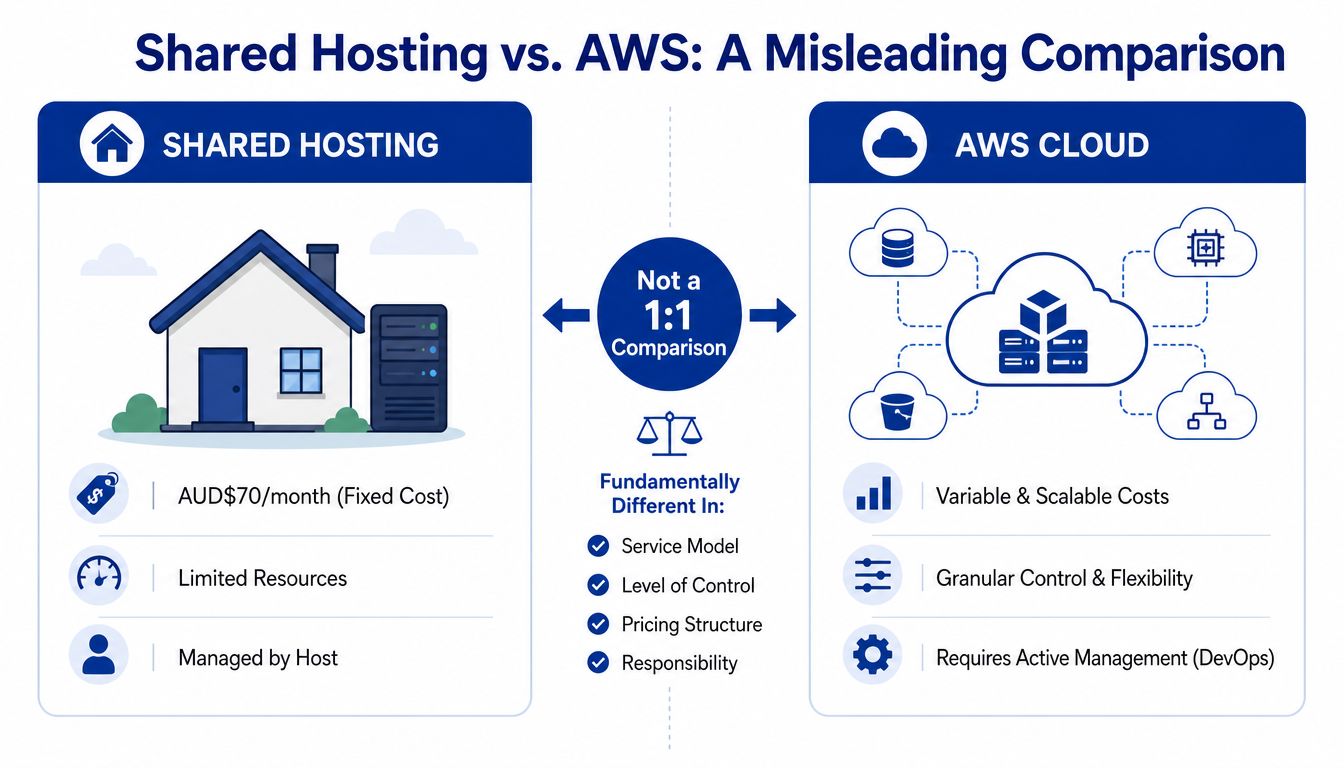
A shared hosting plan is a bundled service. AWS is an infrastructure platform. Those are not the same commercial model.
Fixed hosting versus consumption pricing
In Australia, shared hosting plans typically cost between AUD$50 and AUD$70 per month, while one small web design company moving client sites to AWS reported their current shared server cost was AUD$848 per month, which shows how quickly costs rise once workloads outgrow entry-level hosting limits, as outlined in this Australian website hosting cost guide.
That number matters because it shows two things at once. First, very cheap shared hosting exists. Second, businesses often aren’t really comparing AWS against the cheapest tier. They’re comparing AWS against an overloaded or stretched hosting arrangement that’s already compensating for growth in a limited environment.
Here’s the simplest analogy. Shared hosting is like paying for a fixed buffet. You accept the menu, the service level, and the limits in exchange for a predictable price. AWS is more like ordering à la carte. You choose each component separately, which gives you control, but each choice affects the final bill.
If you’re evaluating the jump properly, it helps to frame it less as hosting replacement and more as an infrastructure decision. That’s also why many organisations bring in cloud consulting services before committing to an architecture. The wrong comparison leads to the wrong budget, and then to the wrong migration scope.
What you’re actually buying on AWS
On shared hosting, many costs are hidden inside one package. Server management, baseline monitoring, email, a control panel, and some level of bandwidth are usually bundled. On AWS, these elements become separate design and cost decisions.
You’re typically paying for a mix of:
| Component | Shared hosting model | AWS model |
|---|---|---|
| Compute | Included in plan | Billed according to chosen services and runtime |
| Storage | Bundled | Charged by storage type and volume |
| Bandwidth | Often flattened into the plan | Metered, especially for outbound traffic |
| Backups | Usually included at a basic level | Designed and billed separately |
| Management | Host handles most basics | Your team or provider must manage it |
Don’t compare a managed bundle with raw infrastructure and expect a fair answer. Compare the business outcome each option supports.
That shift is why some AWS migrations feel expensive even when the infrastructure itself is reasonable. The cost model becomes broader. You’re no longer buying “space on a server”. You’re funding a platform with more responsibility, more flexibility, and more moving parts.
Breaking Down the One-Off Migration Costs
The migration project itself is a separate budget line from the future AWS bill. That sounds obvious, but many businesses still combine the two and then struggle to understand why the project cost feels high.
In practice, you’re paying for analysis, engineering, testing, risk reduction, and business continuity. The smaller and simpler the site, the lighter that effort can be. The more custom the application, the more discovery and redesign work it usually needs.
Discovery and architecture planning
Before anyone moves files or provisions AWS services, someone needs to understand what’s running today.
That usually includes:
- Application review: CMS type, plugins, custom code, dependencies, scheduled jobs, file structure, and current pain points.
- Traffic and behaviour assessment: Not for abstract forecasting, but to understand what the application does under normal and peak conditions.
- Target architecture selection: Deciding whether the site belongs on AWS Lightsail, Amazon EC2, container services, or a more modern application pattern.
- Risk identification: Legacy plugins, unsupported PHP versions, hidden cron dependencies, hardcoded paths, and fragile integrations often surface here.
For a straightforward brochure site, this phase is short. For a multi-site WordPress estate, ecommerce platform, or integrated membership application, it takes more effort because the cost of missing a hidden dependency is much higher.
Execution choices drive effort
Not all migrations are equal. The labour required depends less on “how big the website is” and more on how much has to change.
A simple move might look like a controlled lift-and-shift:
- Build the target AWS environment.
- Move files and database.
- Recreate scheduled tasks, SSL, backups, and environment settings.
- Test and cut over.
A more involved move often includes re-architecture decisions such as:
- separating the web server from the database
- shifting static assets into Amazon S3
- replacing local backups with managed backup workflows
- introducing a load balancer
- redesigning deployment and rollback practices
- removing reliance on control-panel features from the old host
Those choices improve resilience and maintainability, but they also increase migration effort because engineers aren’t just moving a site. They’re redesigning how it runs.
A cheap migration that preserves bad architecture usually creates a more expensive operating model later.
There’s also a practical distinction between website migration and application migration. A website mostly needs hosting continuity. An application often needs environment parity, integration validation, and stronger deployment discipline.
Testing cutover and business risk control
Cutover is where many under-scoped projects fail.
A professional migration budget needs room for:
- Functional testing: Forms, login, checkout, membership rules, admin workflows, webhooks, and batch jobs.
- Environment validation: Permissions, caching behaviour, SSL, scheduled tasks, image handling, and backup recovery.
- Performance review: Not lab benchmarks, but enough validation to confirm the new environment behaves properly under expected use.
- Rollback planning: If the go-live window exposes a blocker, there needs to be a controlled way back.
A short table helps frame how project effort usually expands:
| Migration type | Typical effort driver | Commercial implication |
|---|---|---|
| Basic website move | Minimal custom logic | Lower project overhead, faster cutover |
| CMS with plugins and forms | Compatibility and environment settings | More testing and remediation |
| Ecommerce or membership platform | Stateful workflows and third-party integrations | Higher validation effort and tighter go-live planning |
| Custom application | Architecture redesign and operational maturity | Migration becomes part of a broader modernisation project |
This is why two businesses can ask the same question, “How much does it cost to move from shared hosting to AWS?”, and get very different answers. The bill isn’t shaped only by AWS. It’s shaped by what must be discovered, fixed, redesigned, and protected during the move.
Estimating Monthly AWS Infrastructure Costs
Once the migration is complete, the recurring AWS bill starts to matter. Many businesses often focus too narrowly on the server itself and ignore the surrounding services that make the platform workable.
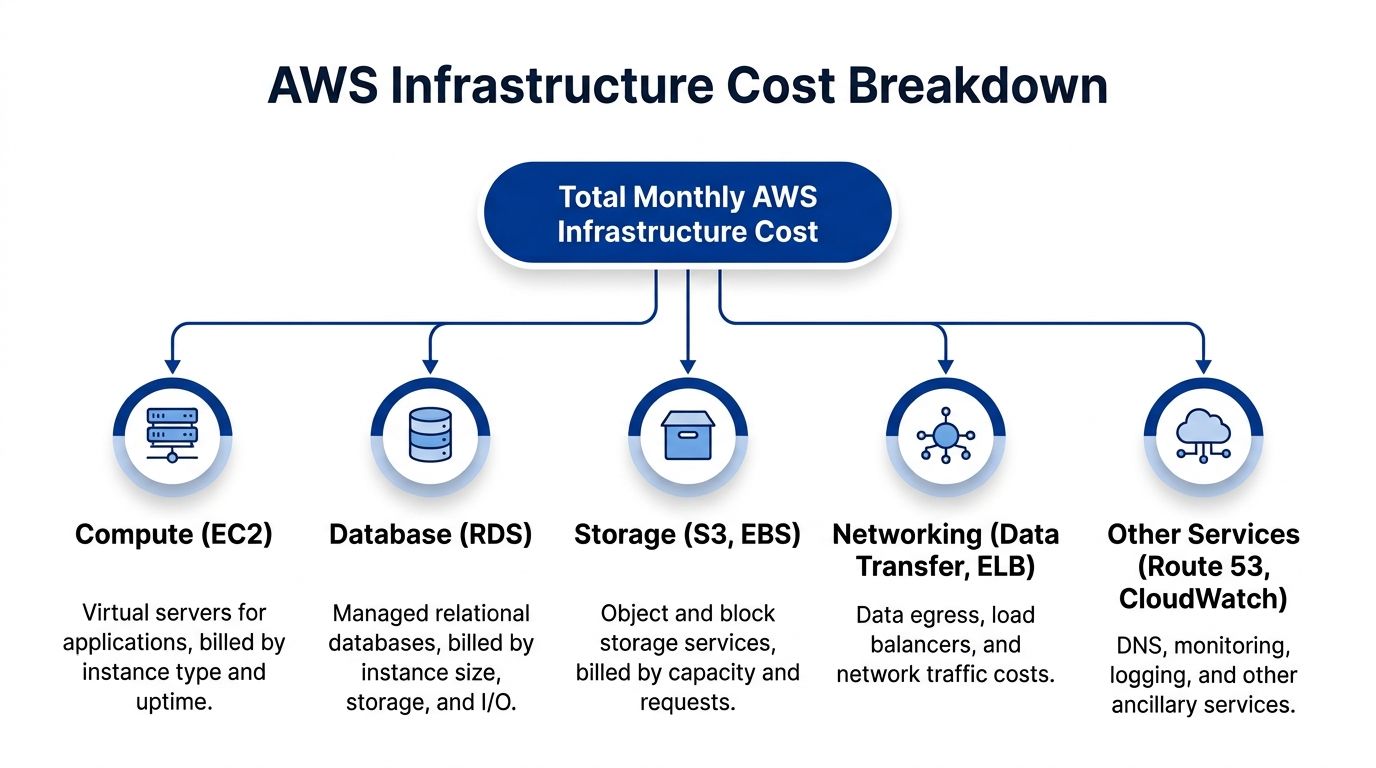
The monthly spend is usually a combination of compute, storage, database, networking, and a small set of supporting services.
For teams still deciding on the right hosting pattern, the trade-off between AWS Lightsail and EC2 for business applications often becomes the first practical architecture decision. Lightsail can simplify entry-level workloads. EC2 gives broader flexibility once the application becomes more demanding.
Compute
Compute is the runtime layer for your application.
On AWS, that might be a single virtual server, multiple instances behind a load balancer, or a container-based setup. The right choice depends on how critical the application is, how much control you need, and how variable the traffic pattern looks.
For organisations leaving shared hosting, the mistake isn’t usually under-powering the first environment. It’s choosing a compute model that doesn’t match the operating model. A single instance can work well for a small site if backups, security patching, and recovery procedures are disciplined. It becomes risky when the business assumes “AWS” automatically means high availability without designing for it.
Storage
Storage costs tend to split into two broad categories.
The first is block storage attached to servers, which supports the operating system, application files, and local data. The second is object storage, often used for media libraries, backups, exports, logs, or archived assets.
A business moving from shared hosting often discovers that its old host blurred these layers together. AWS doesn’t. If you keep all uploads, logs, and backups on attached server storage, you may create a costly and operationally awkward setup. If you separate them well, storage becomes easier to scale and manage.
Managed databases
Shared hosting usually hides the database inside the plan. On AWS, you need to decide whether the database stays on the same server as the application or moves into a managed service such as Amazon RDS.
That decision affects more than price. It changes backup workflows, patching, isolation, failover options, and recovery expectations.
For low-complexity sites, keeping the database on the application host can be acceptable if you understand the trade-offs. For transactional platforms, client portals, membership sites, or anything that’s important to operations, a managed database often becomes easier to justify because it reduces manual administration and separates application issues from database issues.
Networking and data transfer
This is one of the most misunderstood parts of AWS pricing.
AWS charges $0.00 per GB for inbound data transfer globally, but outbound transfer to the internet is charged based on Region, and traffic crossing Availability Zone or Regional boundaries usually adds further cost, as AWS explains in its overview of data transfer costs for common architectures.
That matters because shared hosting often bundles bandwidth into a flat fee. AWS doesn’t. A site with modest compute requirements can still produce an unexpectedly high bill if it serves large files, handles substantial public traffic, or sends data inefficiently between services.
Cost warning: Data transfer is often the item executives miss when they approve the migration budget and then question the invoice later.
A few design decisions regularly influence this part of the bill:
- Asset strategy: Large media files, downloads, and public assets need careful placement and caching strategy.
- Availability Zone layout: Multi-AZ design improves resilience, but unnecessary cross-zone traffic can add avoidable spend.
- Region selection: Australian workloads often sit in Asia Pacific (Sydney), but architecture decisions still need to account for data movement patterns.
Supporting services
Even small AWS environments usually accumulate a handful of supporting services. DNS, monitoring, logging, snapshots, certificates, load balancing, and alerting don’t always dominate the invoice, but they matter for a realistic budget.
They also determine whether the platform is supportable. A cheap environment with poor logging and no meaningful monitoring doesn’t stay cheap for long once outages begin consuming staff time.
The monthly AWS bill is only the visible infrastructure layer. The full cost picture gets clearer once you add the operational items around it.
Uncovering Hidden and Ongoing Operational Costs
The AWS invoice is not the total cost of ownership. It’s one part of it.
The hidden costs usually appear after the migration, when the organisation realises that shared hosting used to bundle a number of conveniences that now need separate tools, licenses, or operational processes.

Many of the billing surprises that hit SMEs after go-live are the same patterns discussed in common AWS mistakes SMEs make. They’re rarely caused by one bad decision. They usually come from several small assumptions carried over from shared hosting.
Licensing and platform add-ons
A lot of businesses moving off shared hosting are used to cPanel, Plesk, Softaculous-style installers, bundled backups, and host-managed convenience features. In AWS, those may need to be replaced, licensed separately, or dropped altogether.
That has two commercial effects.
First, there may be direct third-party software costs. Second, your team may need a different operating model because the old control-panel workflow no longer fits the new environment. If the migration keeps old habits but changes the infrastructure underneath, complexity tends to rise instead of fall.
Email is no longer bundled
This catches people more often than it should.
Migration from shared hosting to AWS often requires decoupling email services, because AWS doesn’t provide the same bundled email setup as a traditional shared host. Businesses typically need separate services such as AWS SES, SendGrid, or Microsoft 365, which creates a new operational cost category that didn’t exist in the old hosting plan, as discussed in this AWS migration discussion about moving away from shared hosting.
That affects more than cost. It also affects ownership and reliability. Transactional email, mailbox hosting, DNS-related configuration, and sender reputation become part of the migration scope if the old shared host handled everything in one place.
Operations and cost governance
This is the largest hidden cost in many AWS migrations. Someone has to operate the environment.
That means tasks such as:
- Security and patching: Operating system updates, package maintenance, certificate renewal oversight, and access control hygiene.
- Monitoring and response: Log review, alert tuning, incident handling, and root-cause analysis when the application misbehaves.
- Backups and recovery: Verifying backups exist isn’t enough. Recovery workflows need testing and ownership.
- Cost management: Resource reviews, rightsizing, storage housekeeping, and checking for waste after changes or campaigns.
A low AWS bill can still be an expensive platform if your internal team spends too much time babysitting it.
Some organisations absorb this through internal DevOps capability. Others engage a managed services partner. Either approach is valid, but neither is free. The key budgeting mistake is pretending that AWS operates itself once the migration ends.
The businesses that do this well treat operations as part of the platform, not as an afterthought. That’s when AWS starts behaving like a useful business asset instead of a more complicated hosting account.
Sample Scenarios and Your Migration Checklist
Decision-makers don’t need a theoretical answer. They need a commercial range and a way to pressure-test whether the move makes sense.
The challenge is that the range is wide. In Australia, VPS hosting can run from AUD$10 to over AUD$300 per month, dedicated servers start at AUD$550 per month, and an Australian cPanel user reported an AWS invoice of approximately AUD$2,300 before licensing and backup costs, as noted in this migration cost mapping guide.
That’s why the right question isn’t “What does AWS cost?” It’s “What architecture and operating model does this application require, and what does that cost to run properly?”
Scenario one brochure or marketing site
A small business marketing site with modest traffic, limited integrations, and a standard CMS often doesn’t need an elaborate AWS design.
A practical approach might involve:
- a simple compute footprint
- externalised backups
- basic monitoring
- email moved to a separate service
- a conservative security and patching routine
In this case, the move to AWS is usually justified by control, isolation, deployment flexibility, or future growth, not by raw hosting savings. If the current site still fits comfortably on basic shared hosting, AWS may feel like a cost increase with limited commercial upside.
Scenario two ecommerce or membership platform
A growing ecommerce store, learning platform, or membership site is different. These workloads tend to have login-heavy traffic, scheduled jobs, plugins or integrations, and a direct link between site reliability and revenue or service delivery.
For those environments, AWS often makes more sense because the business needs:
| Requirement | Shared hosting response | AWS response |
|---|---|---|
| Predictable application isolation | Limited | Stronger control over environment design |
| Integrated deployment workflows | Often constrained | Can be designed properly |
| Separate database and storage layers | Rarely flexible | Standard architectural choice |
| Operational monitoring | Basic at best | Built into the platform if implemented properly |
The risk, of course, is overbuilding. A business that leaps from shared hosting straight into an elaborate cloud design without cost controls can end up with a monthly bill that reflects ambition rather than actual need.
If the architecture is unoptimised, AWS can become the most expensive way to run an otherwise ordinary website.
The commercially sound middle ground is usually a phased migration. Start with the simplest environment that meets the actual risk profile. Then optimise around observed usage, operational overhead, and business priorities.
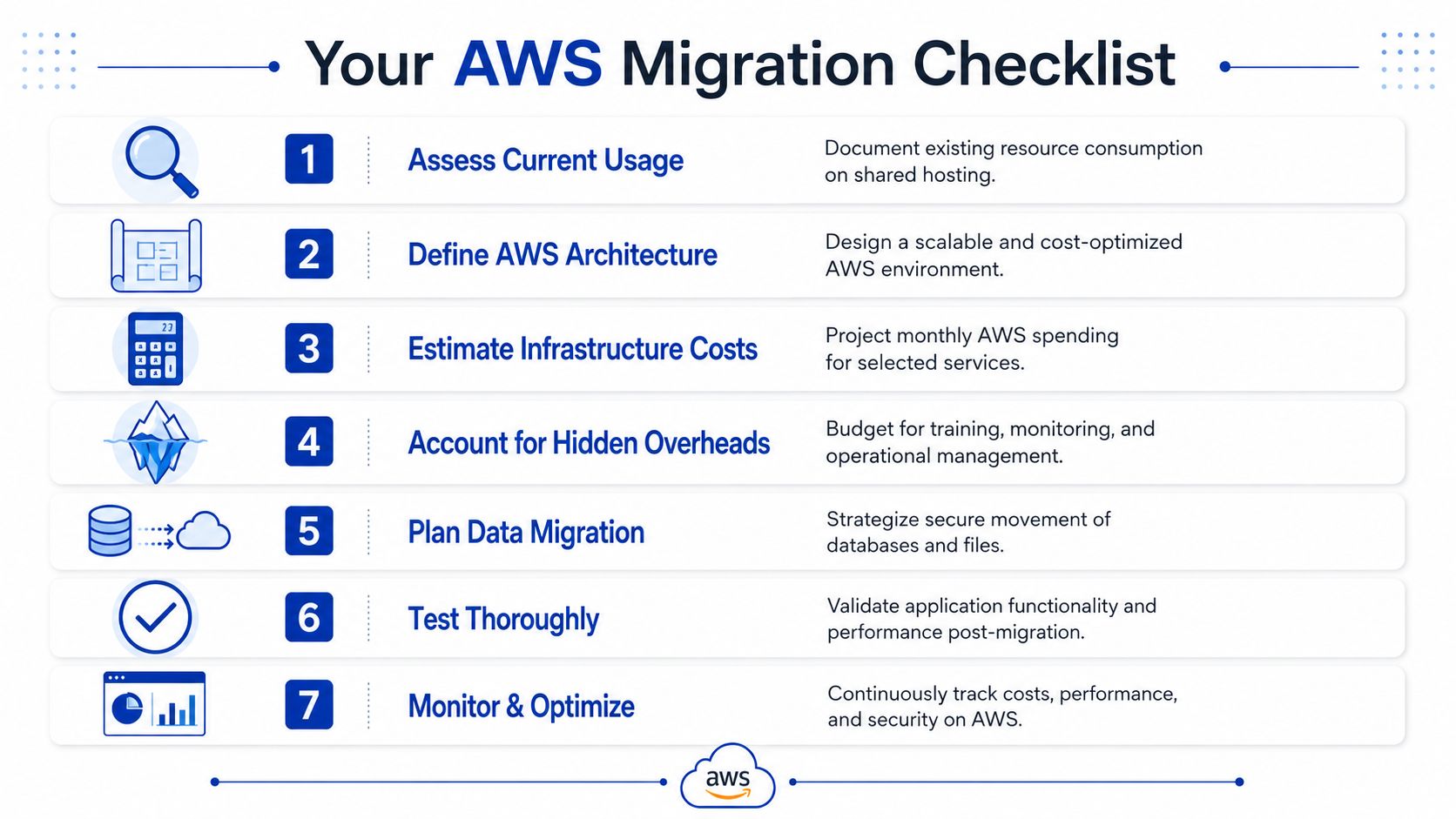
A practical migration checklist
This is the information worth gathering before approving the move:
-
Current workload profile
List what the site does. CMS, custom code, forms, ecommerce, memberships, scheduled jobs, third-party integrations, and admin workflows. -
Business criticality
Decide what failure costs the business. Lead loss, transaction interruption, support load, staff inefficiency, or reputational damage. -
Architecture expectations
Clarify whether you need a basic single-environment setup or a more mature platform with separate database, storage, monitoring, and recovery controls. -
Bundled services that will disappear
Identify email, control panel features, backup tooling, and convenience services currently hidden inside the hosting plan. -
Operational owner
Choose whether internal staff will manage AWS or whether an external partner will handle ongoing support and optimisation. -
Migration risk window
Determine whether the site can tolerate a simple cutover or requires staged validation and rollback planning. -
Post-migration optimisation plan
Build in a review cycle after launch so the environment can be tightened, simplified, and right-sized based on actual use.
A timeline matters too. The answer to budget, project scope, and resourcing often depends on how long an AWS migration takes once application complexity and business risk are taken seriously.
For most businesses, the honest answer is simple. Moving from shared hosting to AWS usually increases complexity and often increases spend. It can still be the right decision if the site has become important enough that reliability, control, scalability, and operational clarity matter more than preserving a low fixed hosting fee.
If you’re planning a move from shared hosting to AWS and want a realistic budget before you commit, Continuum Solutions can help assess the current environment, define the right target architecture, and map the one-off migration effort alongside the ongoing operational cost. That gives you a commercial decision, not just a rough guess based on server pricing.